












 Radiology & PACS: Imaging orders, modality worklist, DICOM viewer hand-off and radiology reporting
+$57.60/mo at 20 practitioners. Free instant access, no credit card required.
Works with
 HMS Core
What's inside
Everything in Radiology & PACS
41 items in 8 areas, every one shipping with the app today.
PACS Server Registry
- Multi-Vendor PACS Server RegistryRegister any number of PACS archives with unique code, AE title, host, DICOM port, country code, status and notes.
- Six Supported Server TypesChoose Orthanc, dcm4chee, Conquest, Dicoogle, Google Healthcare API or AWS HealthImaging per server.
- DICOMweb & WADO Endpoint ConfigStore separate base URL, DICOMweb URL and WADO-URI URL for each archive to route queries and image retrieval.
- Four Authentication ModesConfigure None, Basic Auth, OAuth 2.0 or API Token credentials per server, with password/
token fields masked in the form. - Live Connection Test ButtonOne-click 'Test Connection' pings Orthanc /system or DICOMweb /studies over REST and posts the HTTP result to the chatter.
- Server Status TrackingEach server carries an Active/
Disabled/ Error status badge that auto-flips to Error on failed pings or syncs.
Study / Series / Instance Hierarchy
- Three-Level DICOM HierarchyModel studies, their series and individual image instances as a linked Study to Series to Instance tree.
- DICOM Study RecordsCapture Study Instance UID, accession number, study date, description, anatomic region and body part examined per exam.
- Patient LinkageLink each study and worklist entry to the shared patient record for a unified patient imaging history.
- Study Lifecycle State MachineTrack studies through Ordered, Acquired, Reported, Finalized and Canceled states on a status bar.
- Secondary Study StatusAdditional Scheduled/
In Progress/ Completed/ Reported/ Finalized/ Canceled status captures the clinical workflow stage. - Priority TriageFlag studies STAT, Urgent, Routine or Research for radiology triage and a dedicated STAT filter.
Radiology Reporting
- Structured Radiology ReportAuthor reports with distinct clinical history, technique, findings, impression and recommendation sections.
- Report Lifecycle StatesMove reports through Draft, Preliminary, Final, Addended and Canceled statuses on a status bar.
- Sign & Finalize ButtonOne click stamps the signer, signed timestamp and flips the report to Final state.
- Critical Finding FlagMark reports as critical findings, trackable and filterable for urgent communication follow-up.
- RSNA Structured FindingsStore machine-readable structured findings as RSNA-style JSON alongside the narrative report.
- Addendum SupportAppend addendum text to signed reports and move them to an Addended state.
Modality Worklist (MWL)
- DICOM Modality WorklistSchedule imaging procedures the modality can query, with scheduled datetime, station AE title and procedure codes.
- Auto-Generated Accession NumbersNew worklist entries receive an ACC-prefixed sequence accession number when none is supplied.
- MWL Status WorkflowTrack entries through Scheduled, Arrived, In Progress, Completed, Discontinued and Canceled statuses.
- Pre-Exam Safety ChecklistCapture allergies, isolation-required, contrast-required, GFR-check-done and pregnancy-check-done flags before imaging.
- Requesting Physician & ReasonRecord the requesting physician and clinical reason for each scheduled procedure.
- Unique Accession ConstraintDatabase constraint keeps worklist accession numbers unique.
DICOMweb & Viewer Integration
- QIDO-RS Studies EndpointExposes /pacs/
dicomweb/ studies returning studies as DICOM+JSON, filterable by PatientID, AccessionNumber and modality. - Study Metadata EndpointExposes /pacs/
dicomweb/ studies/<uid>/metadata returning study and per-series metadata in DICOM+JSON. - OHIF Viewer Launcher/pacs/
study/<id>/viewer renders an OHIF viewer page embedding the study by UID against its server's DICOMweb URL. - Q/R Query Audit LogRecords every patient/
study/ series/ image query with level, criteria, result count, status, user and error message. - Q/R Audit AnalyticsKanban, pivot and graph views with Failed/
Completed filters and grouping by server and status for query auditing.
- QIDO-RS Studies EndpointExposes /pacs/
Modality Dictionary
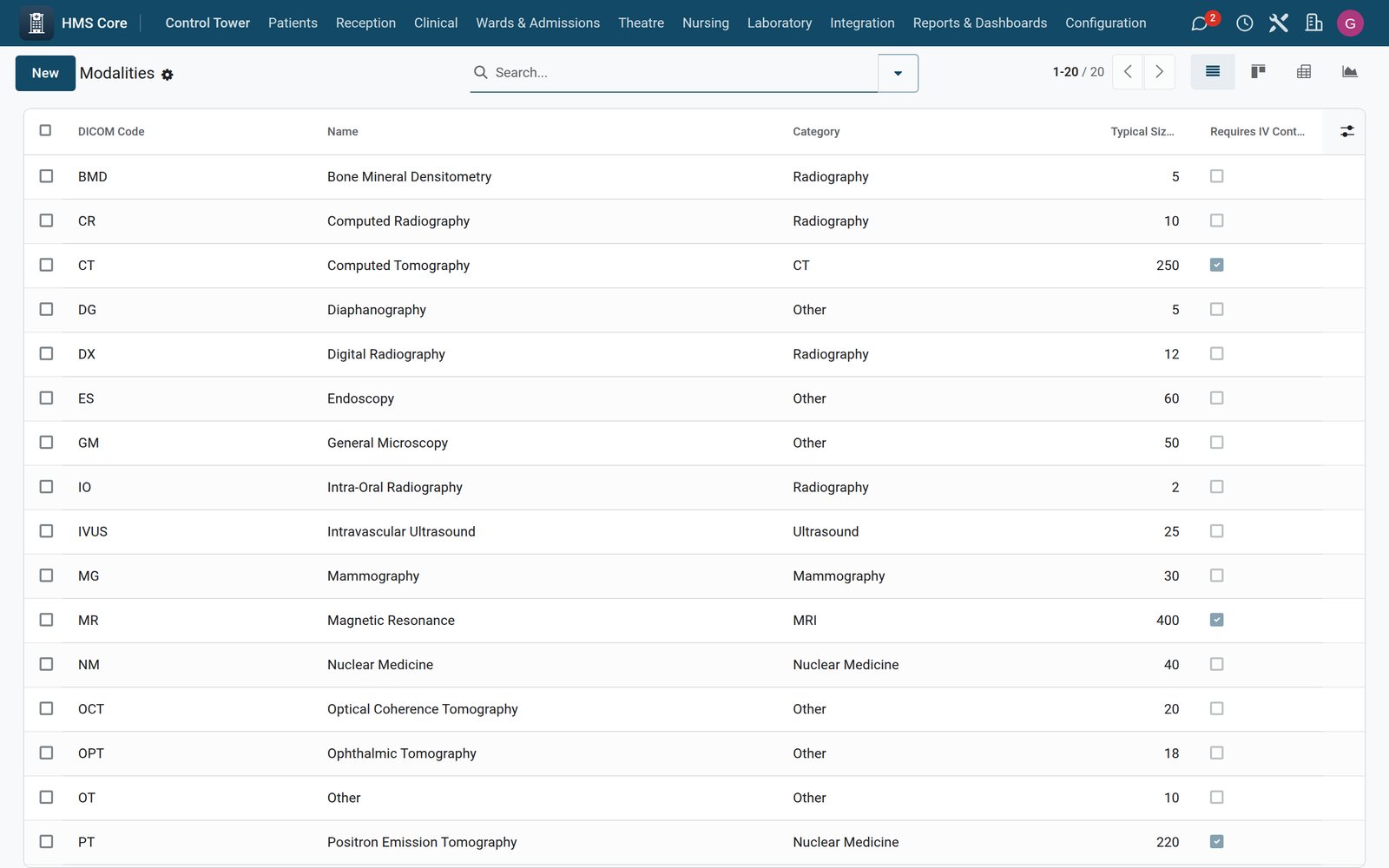
- 20 Seeded Imaging ModalitiesShips CT, MR, US, XR, CR, DX, MG, NM, PT, RF, XA, IO, IVUS, DG, OPT, OCT, GM, BMD, ES and OT out of the box.
- Modality MetadataEach modality carries DICOM code, full name, SOP Class UID, category, typical size in MB and an IV-contrast flag.
- Modality CategorizationGroup modalities into Radiography, CT, MRI, Ultrasound, Nuclear Medicine, Mammography, Fluoroscopy or Other.
- Unique Modality CodeDatabase constraint enforces unique DICOM modality codes.
Automation & Scheduled Jobs
- Daily Study-Count Sync CronDaily job pulls live study counts from each active Orthanc/
DICOMweb server, falling back to local counts on failure. - Hourly Stale-Study FlaggerHourly job posts a chatter warning on acquired studies older than 7 days that still have no report.
- Weekly MWL PurgeWeekly job deletes worklist entries canceled more than 90 days ago to keep the worklist clean.
- Accession Number SequenceProvides an ACC-prefixed, 8-digit padded sequence for automatic worklist accession numbering.
- Daily Study-Count Sync CronDaily job pulls live study counts from each active Orthanc/
Security & Access Control
- Three-Tier RBAC RolesShips PACS Technologist, PACS Radiologist and PACS Admin groups with implied-inheritance escalation.
- Model Access RulesAccess rules grant per-role create, read, write and delete rights across all PACS records.
- Auto-Grant Admin on InstallPost-init hook adds the superuser to all three PACS groups so the app is usable immediately after install.
- Mail Thread & ActivitiesServers, studies, reports and worklist entries carry chatter tracking and scheduled activities via mail mixins.
Works with
What Radiology & PACS works with
Radiology & PACS shares one database with the rest of the Bridge HMS Suite and BridgeERP: these are the apps it already talks to, with nothing to buy in between.
Builds on
Radiology & PACS needs these to run; they come with it in the same plan.
And the wider platform
Any BridgeERP app can join the same database.
 AccountingFull double-entry accounting, bank reconciliation, assets, budgets and statutory reports.
 ExpensesEmployee expense claims with receipt capture and reimbursement.
 InvoicingCustomer invoices, vendor bills, payments and tax handling.
 SignSend documents for legally binding electronic signature.
 SubscriptionsRecurring contracts, automatic renewals and MRR reporting.
 EmployeesEmployee records, contracts, attendance, skills, appraisals and referrals.
In the suite
More Bridge HMS Suite apps
- HMS Core
 Reception
 Appointments
 Consultation / OPD
 Electronic Health Record
 Laboratory
 Pathology
 Pharmacy
 Billing & Cashiering
 Insurance & Claims
 Wards & Inpatient
 Nursing
 Operating Theatre
 Intensive Care
 Emergency
 Blood Bank
 Dialysis
 Maternity
 Paediatrics
 Dental
 Ophthalmology
 Specialty Packs
 Telehealth
 Patient Portal
 Ambulance
 Mortuary
 Medical Stores
 Dietary
 CSSD
CSSD Infection Control
 Quality & Accreditation
 Health Analytics
 Bria Clinical AI
 Interoperability
 Public Health
 Country Compliance
 Biomedical Engineering
 Facility Helpdesk
 Housekeeping
Put Radiology & PACS to work
Add it to your Bridge HMS Suite plan, priced per practitioner, or start a free trial and see it running first.