

 Accounting: Every sale, bill, till session and payslip lands in one ledger, already posted
Bank reconciliation, VAT and e-invoicing for your country, fixed assets, deferrals, multi-currency and multi-company, with Sales, Purchase, Point of Sale and Payroll writing their own journal entries.
Free instant access. No credit card required.
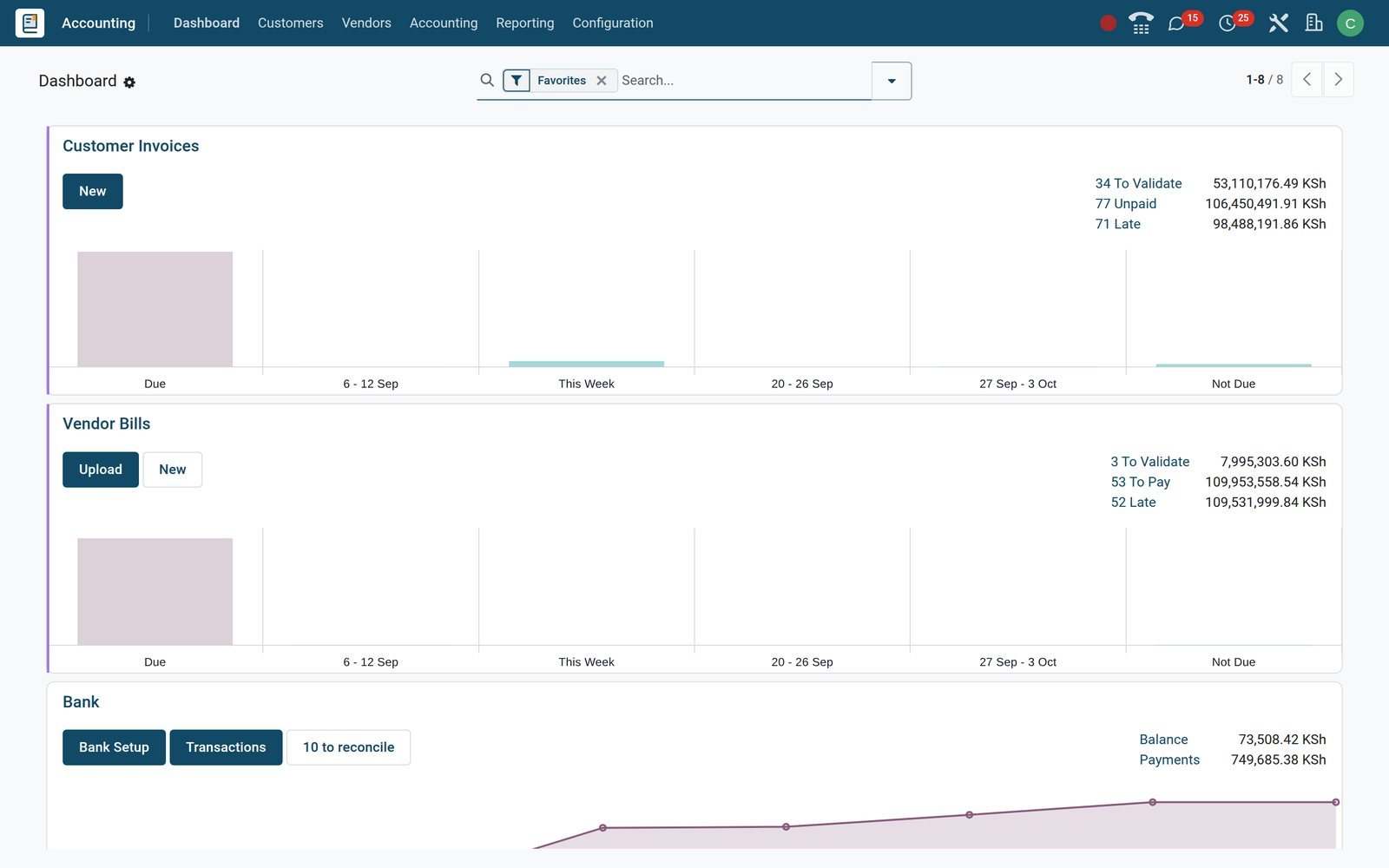
See income, receivables, payables and cash before you open a ledger
The Finance dashboards are live spreadsheets fed by posted entries. Open Dashboards, pick Accounting, and this year's figures are already on screen with last period beside them.
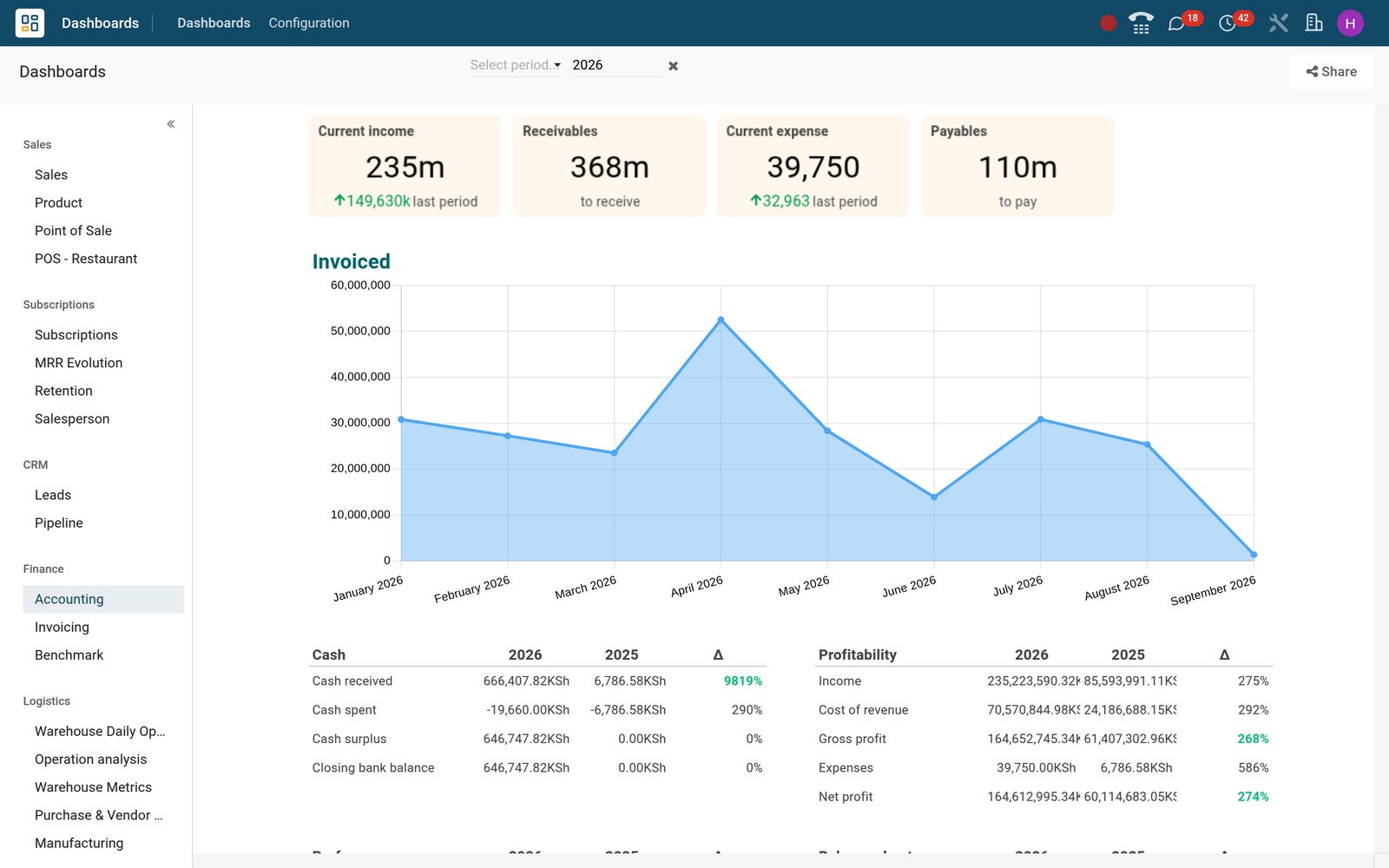 Accounting
Income, receivables, expense and payables above the invoiced chart
Current income, Receivables, Current expense and Payables scorecards sit above the monthly Invoiced chart, with Cash, Profitability, Liquidity and Solvency tables computed from the same ledger.
Explore Accounting →By the numbers
Installed, not promised
Counts of what ships in the app on the demo database, not targets.
- 20
- reports under Accounting › Reporting, from Balance Sheet and Cash Flow Statement to Depreciation Schedule and Aged Payable
- 12
- taxes on sales and purchases in the demo company's Kenyan package: 16% and 8% VAT, zero-rated, exempt, export, import and 2% withholding
- 3
- bank statement file formats imported, CSV or Excel, OFX and CAMT, alongside online bank synchronisation
- 11
- payment terms ready to use, from Immediate Payment to End of Following Month and an early-payment discount term
Inside the app
What is inside the Accounting app
The menus as they appear on the demo, grouped the way the app groups them.
Customers
Invoices, credit notes, customer payments, the product list and the customer file, with each customer's payment terms setting the due date and follow-up levels chasing overdue invoices.
Vendors
Bills, refunds, supplier payments and vendor products, plus country registers such as Kenya's Customs Imports for eTIMS; upload a PDF bill and digitisation fills the lines.
Bank and cash
Bank reconciliation from the dashboard, CSV, OFX and CAMT statement import, online synchronisation, cash journals and four reconciliation models, Internal Transfers among them.
Ledger
Journal Entries, Journal Items, manual Reconcile, scheduled Transfers, Lock Dates, and a per-journal Secure Posted Entries with Hash setting that seals what has been posted.
Assets and loans
Fixed assets with asset models, straight-line or declining depreciation and a Depreciation Schedule, plus a Loans register with its own Loans Analysis report.
Analytic and budgets
Three analytic plans (Project, Departments, Internal) with their analytic accounts, the Analytic Report, and Financial Budgets that add a budget column to the reports.
Taxes and fiscal
Taxes, fiscal positions, the Tax Return and country versions of the Balance Sheet, Profit and Loss and tax report, plus e-invoicing codes such as KRA eTIMS on the demo.
Reporting
Statement, Partner, Audit and Management report groups, Invoice Analysis, Audit Trail, deferred revenue and expense reports and Unrealized Currency Gains/Losses.
Step by step
From confirmed order to locked month
Each step happens in the app that owns it; the journal entry is the by-product, never a separate job.
- Step 1
Sell and invoice
Confirm the quotation in Sales; the customer invoice is created from the order and posted to the Customer Invoices journal with its payment term.
Sales - Step 2
Bill the supplier
Create the bill from the purchase order, or upload the supplier's PDF and let digitisation fill vendor, lines, taxes and total.
Purchase - Step 3
Collect and pay
Register receipts and supplier payments against their invoices however the money moved; follow-up levels at 15 and 30 days chase the late ones.
Accounting - Step 4
Reconcile the bank
Import the statement or fetch it online; bank reconciliation proposes the matching payment, invoice or bill for each line and posts charges through reconciliation models.
Accounting - Step 5
Close the month
Run the Tax Return, review Profit and Loss and the Balance Sheet, post depreciation and deferrals, then set the Lock Date so the period stays closed.
Accounting
Pay suppliers on time and clear every open item
Vendor bills carry their due date and payment state, and every open receivable and payable waits in one list until a payment settles it, at a desk or on a phone.
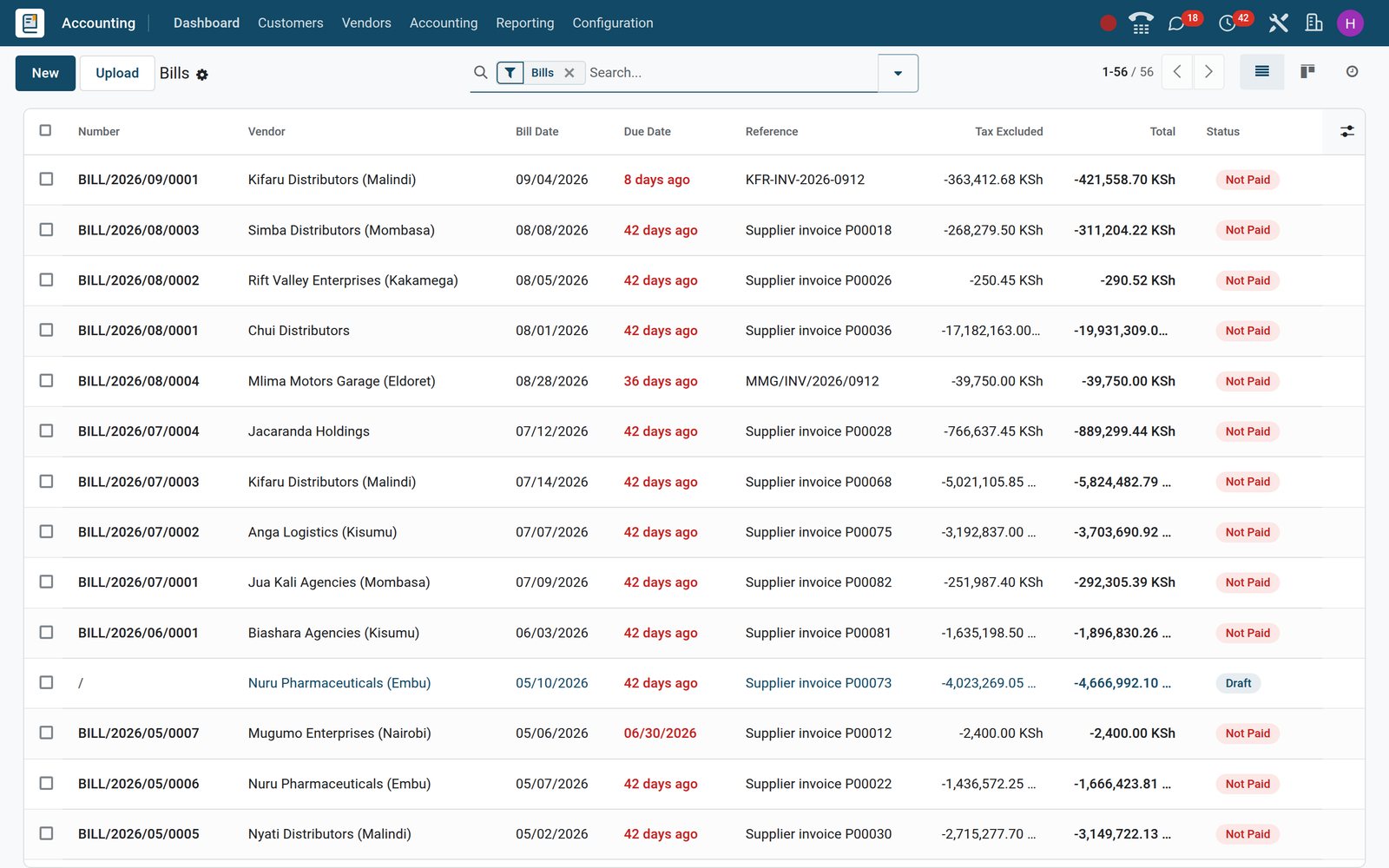 Accounting
Every supplier bill with its due date and what is still unpaid
Accounting › Vendors › Bills lists number, vendor, bill and due dates, the supplier's reference, total and a payment status badge, with filters for unpaid and overdue bills.
Explore Accounting →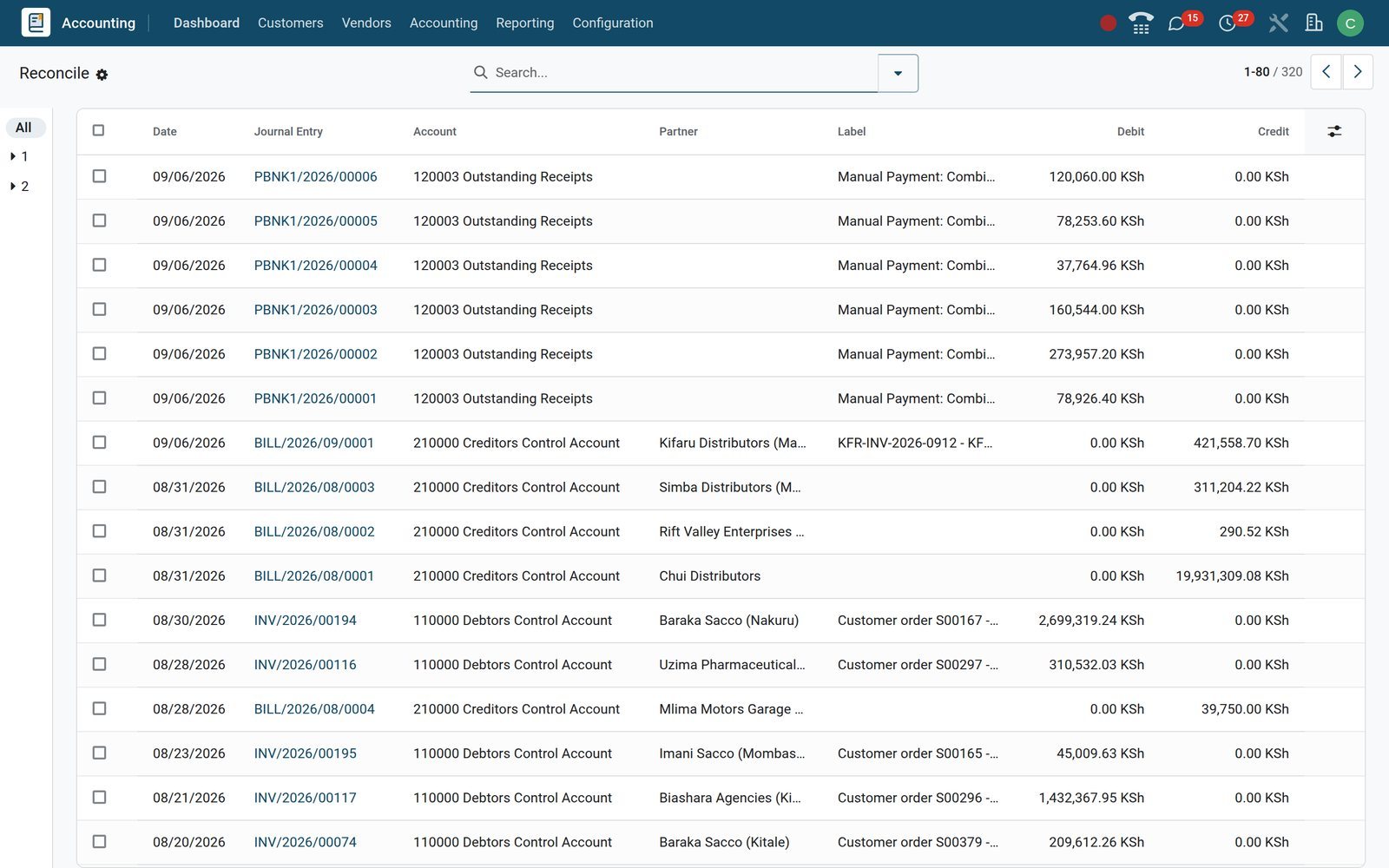 Accounting
Every open item in one list, ready to match
Accounting › Accounting › Reconcile gathers posted items still open on receivable, payable and outstanding-payment accounts; select a payment with its invoices and reconcile them together.
Explore Accounting →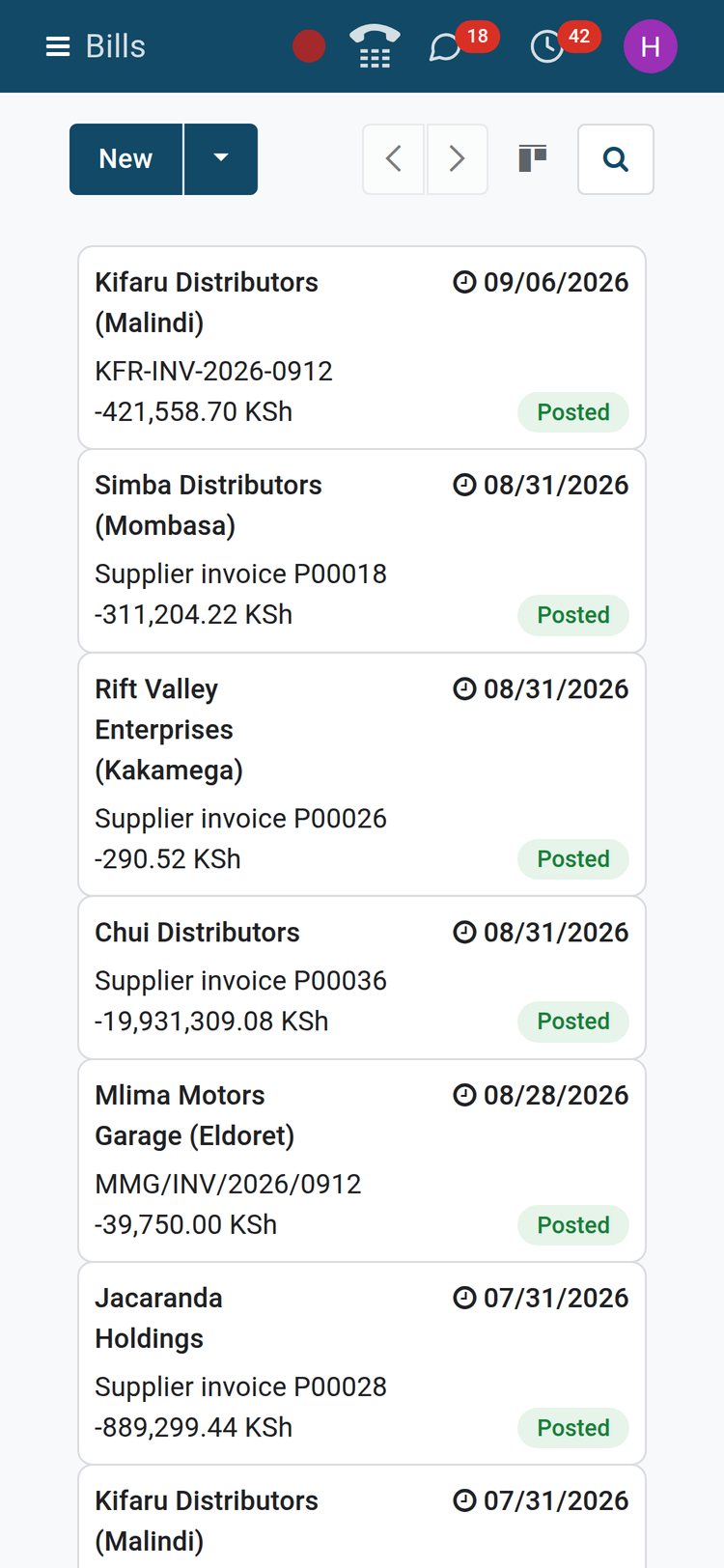 Accounting
Check or approve a bill from wherever you are
The same bills open in a phone browser: filter the unpaid ones, open a bill, confirm it or register the payment without waiting for a desk.
Explore Accounting →Statements and the VAT return, ready when the auditor or the tax office asks
Profit and Loss, Balance Sheet, Cash Flow, Executive Summary and Tax Return are built from the ledger as you post. Compare periods, unfold to journal items, export to PDF or XLSX.
- Accounting
Profit and Loss with this year beside last year
Pick the period, compare it with the previous period or a Financial Budget, unfold Income and Expenses to accounts and open the journal items behind any figure.
Explore Accounting →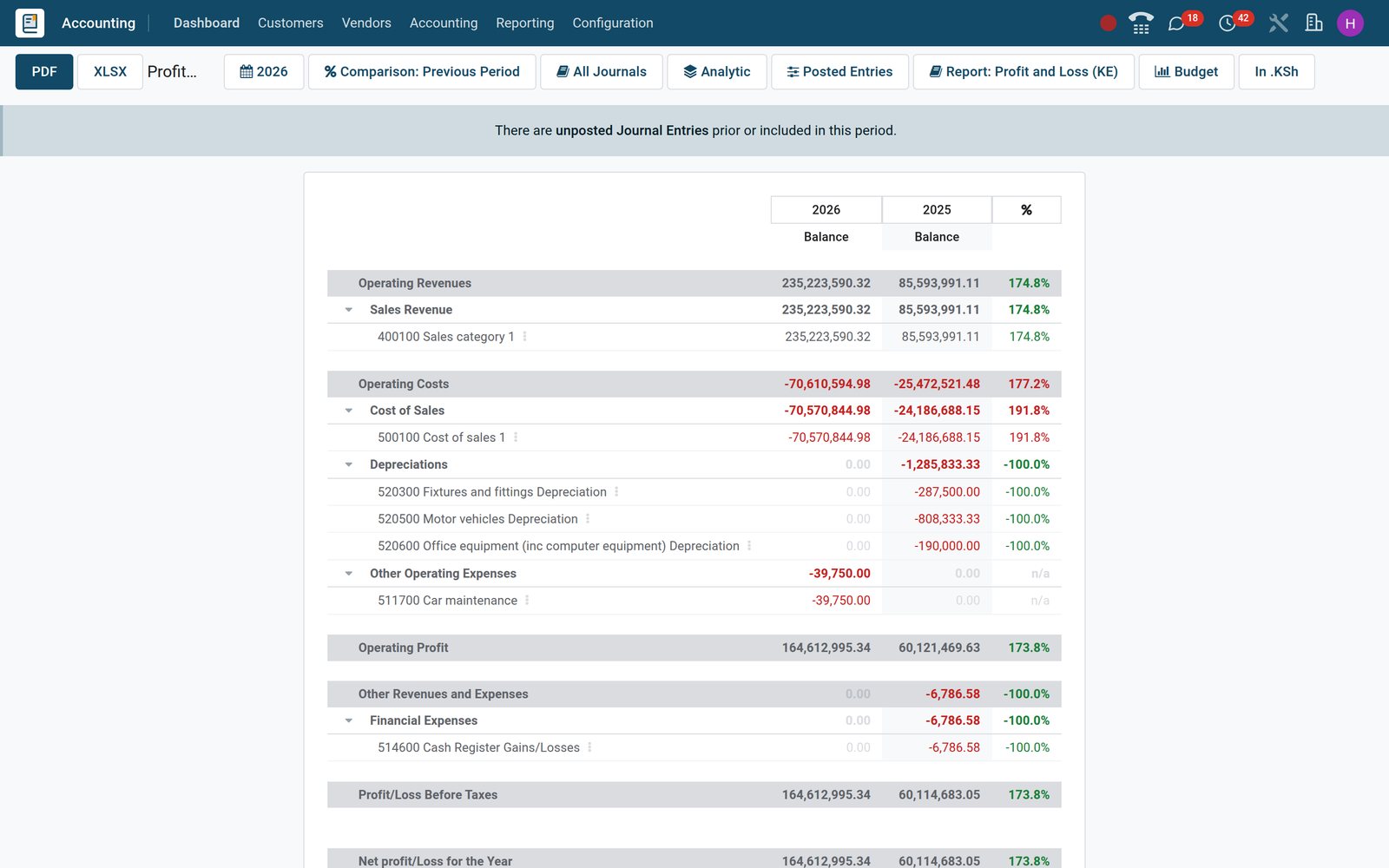
- Accounting
Tax Return grouped by rate, straight from posted invoices
The Tax Return totals net and tax per rate for the period, output VAT on sales against input VAT on purchases; every figure opens its invoices.
Explore Accounting →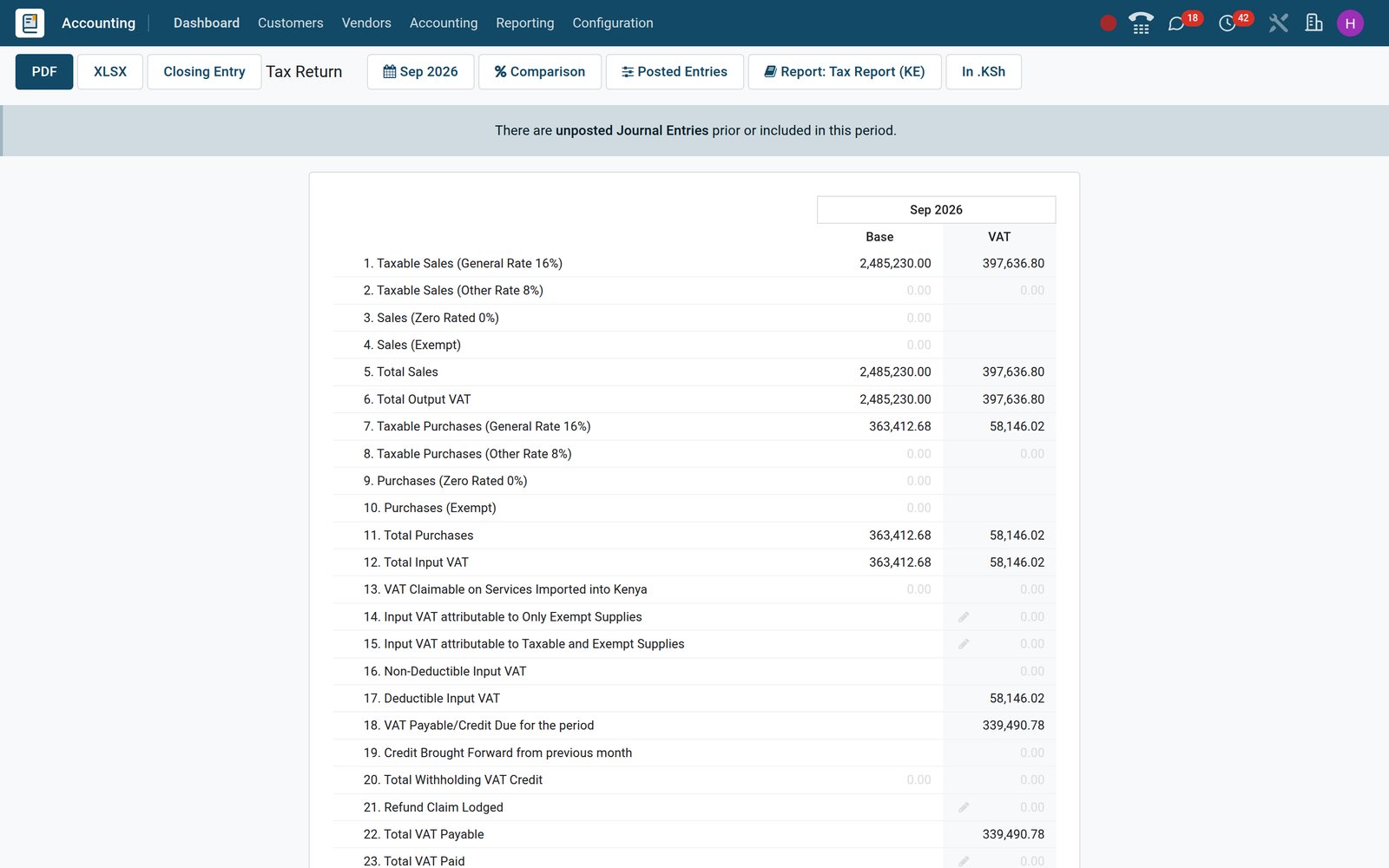
Every figure on a statement traces back to a journal entry
Audit reports read the same ledger the statements do. Unfold any balance to its journal items, filter by journal or date, and export what the auditor asks for.
- Accounting
General Ledger unfolded to the line
Each account shows its debit, credit and balance for the period; unfold it and the initial balance line and every journal item appear with date, partner and label.
Explore Accounting →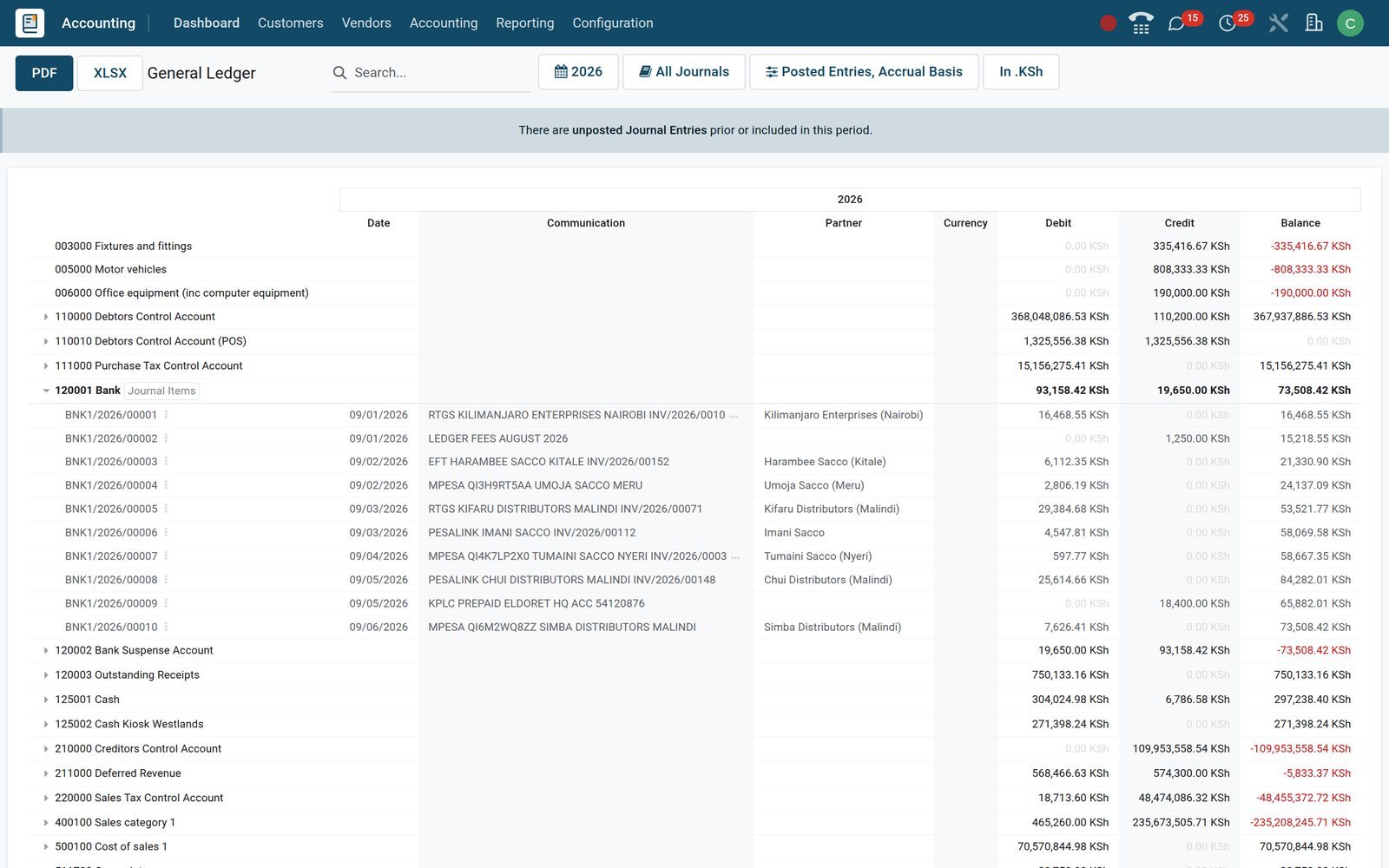
- Accounting
Trial Balance that balances before you export it
Initial balance, period debit and credit and end balance per account, filterable by journal and date, exportable to PDF or XLSX for the auditor's file.
Explore Accounting →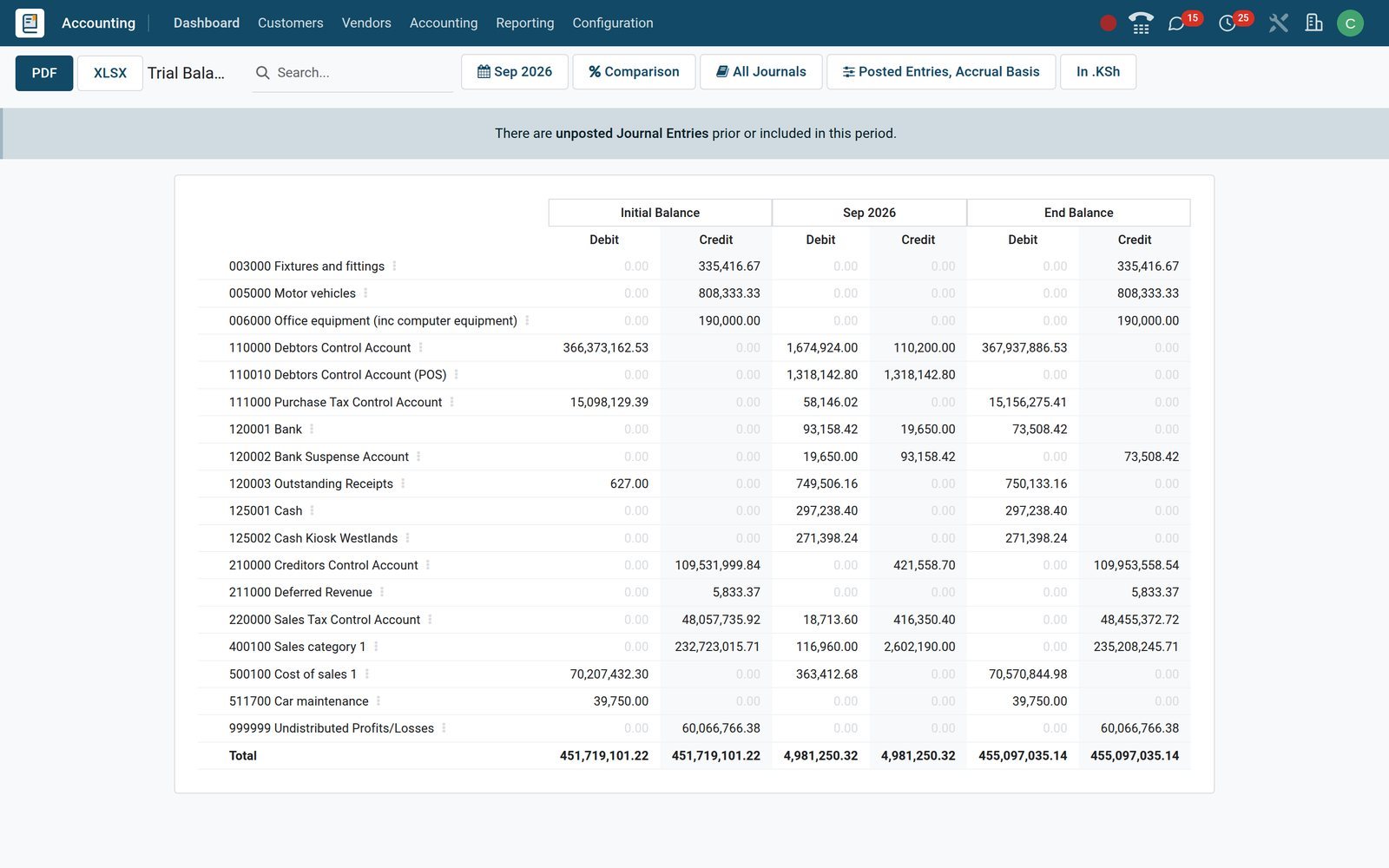
- Accounting
One register for invoice, bill and bank entries
Journal Entries lists every posted move with number, date, partner, reference, journal, total and status, filtered by journal type; lock dates freeze a closed period.
Explore Accounting →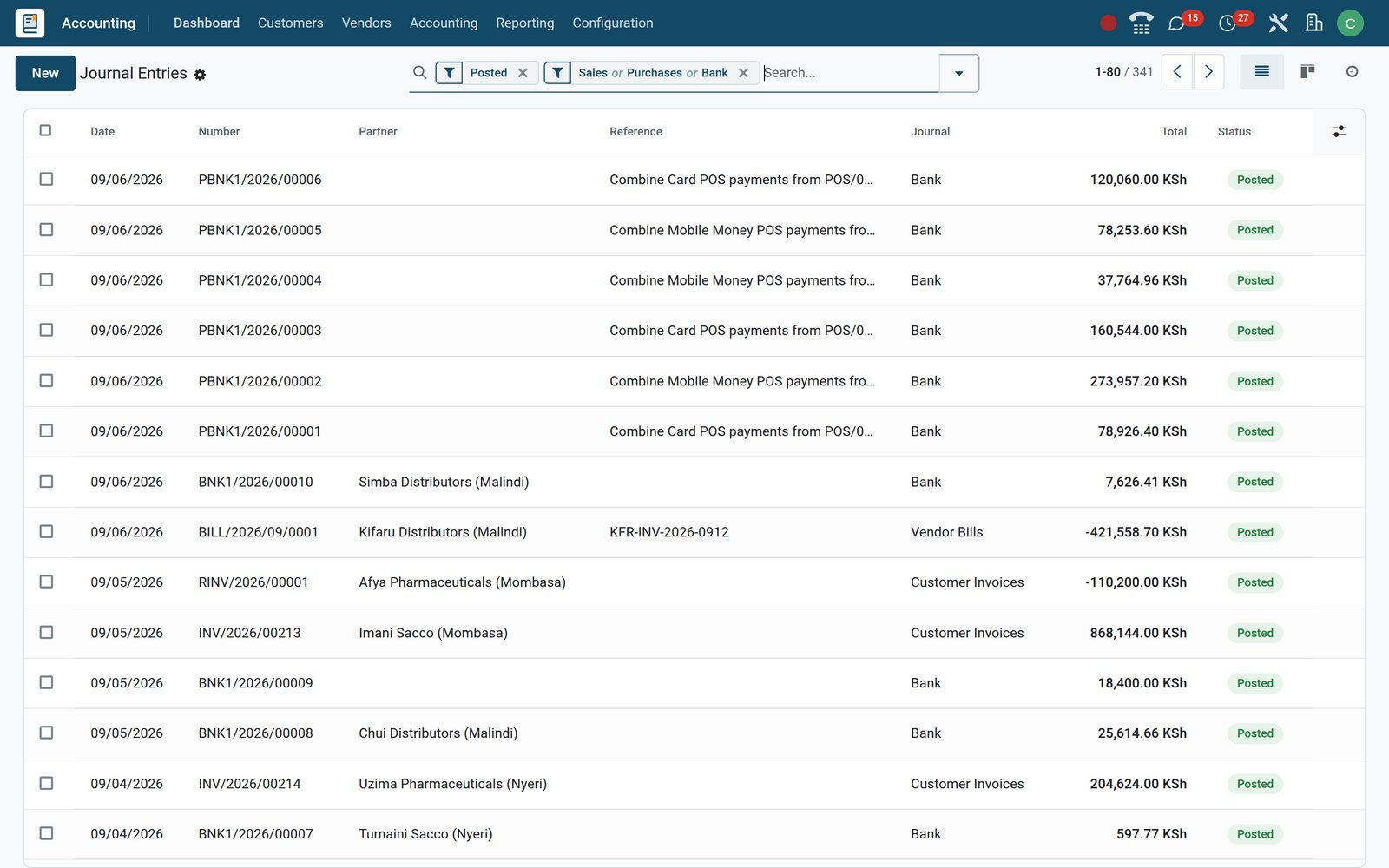
Depreciation that posts itself every period
Register a vehicle, computers or shop fittings once. BridgeERP computes the board, posts each period's entry on its date and carries the net book value to the Balance Sheet.
- Accounting
From purchase to depreciation board
The asset form holds original value, acquisition date, method and duration; the Depreciation Board tab lists every future entry with its amount and remaining value.
Explore Accounting →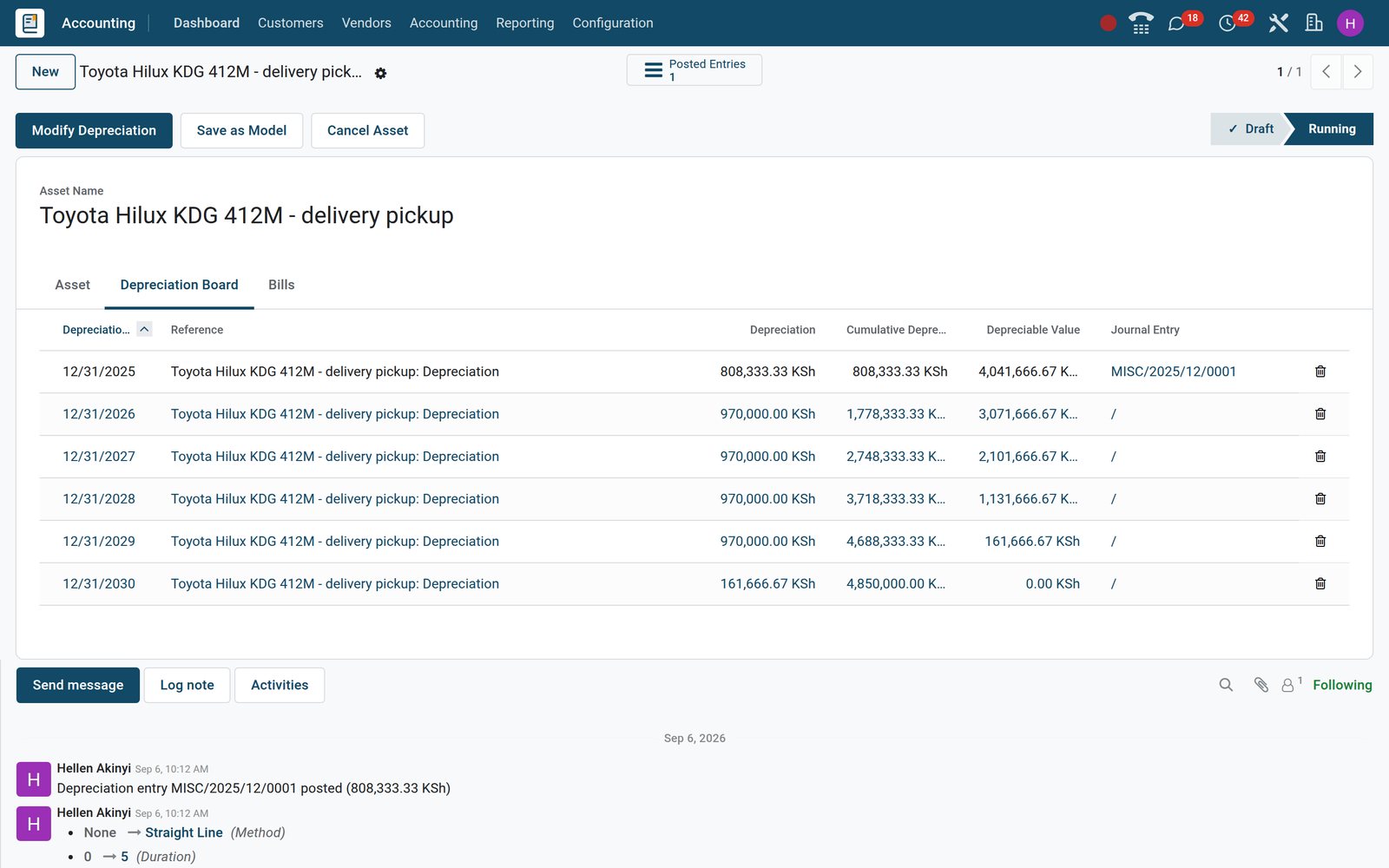
- Accounting
Depreciation Schedule for the whole register
The Depreciation Schedule lists every running asset with acquisition date, method, original value, depreciation to date and book value, grouped by fixed-asset account.
Explore Accounting →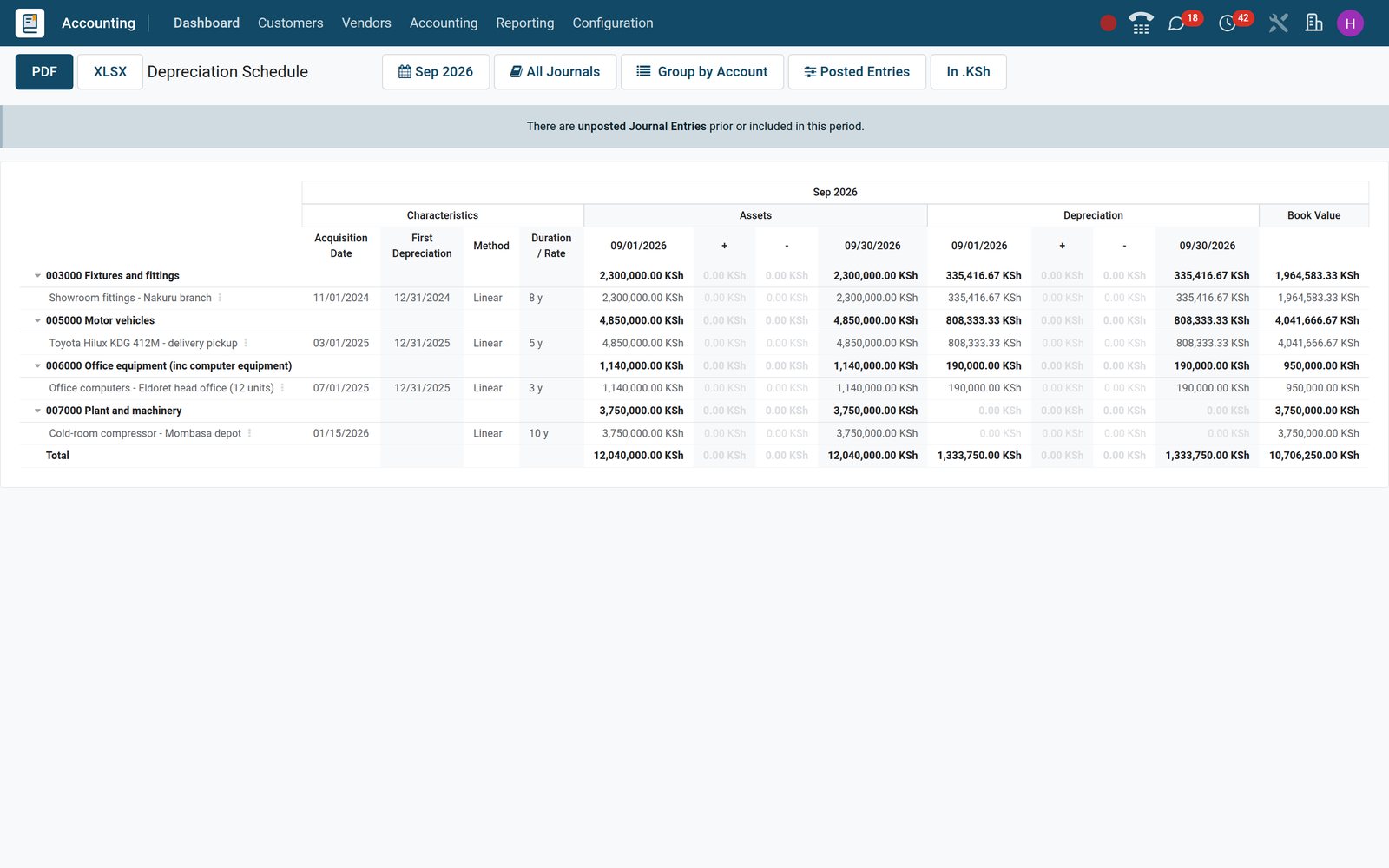
Who uses it
Who uses it, and what each person sees
Access is set per user with the four Accounting roles that ship with the app: Administrator, Bookkeeper, Invoicing and Read-only.
Owner or managing director
The Finance dashboards and the Executive Summary, on a phone if needed: income, receivables, payables and cash without opening a single ledger screen.
Finance manager
Accounting Administrator rights cover Configuration, the chart of accounts, journals, Lock Dates, the Tax Return, Financial Budgets, statement reports and the Audit Trail.
Bookkeeper or accounts clerk
The Bookkeeper role handles invoices, bills, payments, journal entries and bank reconciliation day to day, while Configuration and Lock Dates stay with the administrator.
Sales and operations staff
Invoicing-only access raises invoices from orders and registers payments while journals, the chart of accounts and settings stay out of reach.
External accountant or auditor
A Read-only accounting role opens the General Ledger, Trial Balance, Journal Audit and Audit Trail and exports them, without posting or editing anything.
Branch or subsidiary manager
Multi-company access limits each user to the companies ticked on their user form; the company switcher moves between them without a second login.
Works with
Apps that post straight into the ledger
No batch import between apps: each one writes its own journal entries as it works, into journals you can see on the Accounting dashboard.
 InvoicingInvoices, bills, payments and payment terms; Accounting adds the full ledger, bank reconciliation and the reports on top.
 SalesConfirmed orders become customer invoices; down payments and delivered quantities decide what is billed and when.
 PurchasePurchase orders turn into vendor bills with the same lines, taxes and analytic distribution already filled in.
 InventoryStock moves post to the Inventory Valuation journal when automated valuation is on, so stock on hand agrees with the Balance Sheet.
 Point of SaleClosing a session posts sales, taxes and payment methods into the Point of Sale journal as a single entry.
 PayrollPayslip batches post to the Salaries journal with gross pay, statutory deductions and employer costs on their own accounts.
 SubscriptionsRecurring contracts invoice themselves on schedule, and invoice lines with a service period feed the Deferred Revenue report.
 ProjectsProject analytic accounts collect revenue and cost lines for the Analytic Report and each project's profitability view.
 ManufacturingFinished goods and work-order costs reach the ledger through the same stock accounting entries as purchases and sales.
 FleetA vendor bill tagged to a vehicle carries its cost into Fleet and into the Disallowed Expenses report for the tax return.
 eCommerceWeb orders invoice like any other sale, and the Payment Providers under Online Payments settle the invoice link online once switched on.
 SignEngagement letters, statements and supplier contracts go out for electronic signature from the Sign app, on the same database and login.
In your country
Built for how money moves in your country
Country taxes and e-invoicing, mobile money at the till, several currencies and companies on one database, and bank statements in whatever form the bank hands them over.
Country tax packages out of the box
Accounting packages cover more than 100 countries; on the demo the Kenya package installs 16% and 8% VAT, zero-rated, exempt, export and import rates plus 2% withholding for the Tax Return.
E-invoicing with the tax authority
E-invoicing modules range from Mexico and India to Saudi Arabia and Kenya; on the demo, KRA eTIMS codes, notices and a Customs Imports register sit under Accounting.
Multi-currency with automatic rates
Invoice in any of 169 currencies while the ledger stays in the company currency; Automatic Currency Rates update on a schedule and Unrealized Currency Gains/Losses revalues open items at period end.
Several companies, one login
Companies in different countries run side by side on one database, each keeping its own chart, journals and taxes; the demo pairs a Kenyan and an Ethiopian company.
Bank statements however your bank delivers them
Import CSV, Excel, OFX or CAMT files, connect an online feed where the bank supports it, or key lines in by hand; reconciliation works the same way.
Mobile Money at the till, online payment on invoices
Point of Sale takes Mobile Money beside cash and card, and Payment Providers lists Flutterwave, Stripe and PayPal to switch on for paying emailed invoices online.
Reports and control
Reports and control, all under Reporting
Every report below is a menu on the demo, filterable by period, journal and company, exportable to PDF and XLSX, with the journal items one click away.
Statement reports
Balance Sheet, Profit and Loss, Cash Flow Statement, Executive Summary and Tax Return, each with period comparison, unfolding to accounts and PDF or XLSX export.
Partner reports
Aged Receivable, Aged Payable and Partner Ledger, plus Customer Statement and Follow-Up Report, every line drilling down to the invoice or payment behind it.
Audit reports
General Ledger, Trial Balance and Journal Audit, filterable by journal, account and date, with the journal items one click away for any balance.
Audit Trail
Changes to journal entries and their lines are logged with user, date, old and new value under Reporting › Management › Audit Trail.
Lock Dates and secured entries
Lock a period for everyone, or for sales, purchase and tax separately; Secure Posted Entries with Hash chains posted entries so a change would show.
Management reports
Analytic Report, Invoice Analysis, Deferred Revenue and Deferred Expense, Depreciation Schedule, Disallowed Expenses and Loans Analysis, all under Reporting › Management.
Multi-currency control
Unrealized Currency Gains/Losses revalues open foreign-currency receivables and payables at the period-end rate and can post the adjustment entry for you.
Finance dashboards
Three ready spreadsheet dashboards, Accounting, Invoicing and Benchmark, sit under Dashboards › Finance, each opening with its figures already filled from the ledger.
Getting started
Getting started without a consultant on site
Setup is menus and imports, not code: choose the country package, load the opening data, connect the bank and set the rules once.
Country package at setup
Choose the company's country at setup and its chart of accounts, VAT and withholding rates, fiscal positions and report layouts are installed with the company.
Import opening data
Load customers, suppliers, products, the chart of accounts, open invoices and opening journal entries from XLSX or CSV with the built-in import tool.
Connect the bank
Add a Bank Account creates the bank journal; import the first statement or connect a feed and start matching lines the same day.
Set the rules once
Payment terms, follow-up levels, reconciliation models and asset models are defined under Accounting › Configuration and then apply to every new record.
Accounts set on the product category
Set income, expense and stock valuation accounts on each product category, and every product in it posts to the right accounts without picking them per line.
Bring the history, then lock it
Post historical entries by month or a single opening entry, then set a Lock Date so nothing before go-live can be changed.
What sets it apart
What you stop doing by hand
Features, not slogans: each one is a menu or a setting on the demo.
One ledger for every app
Shop sessions, stock valuation and payslips post to their own journals (Point of Sale, Inventory Valuation, Salaries) in the same ledger, with no month-end import.
Assets straight from the bill
Give a fixed-asset account an asset model and any supplier bill posted to it creates the asset with its depreciation board, ready to validate.
Automatic transfers
Transfer models move balances between accounts on a schedule, for prepayments spread over months or costs recharged between departments, and post the entries themselves.
Deferrals without spreadsheets
Annual insurance, rent or subscriptions are spread over their months automatically; the Deferred Expense and Deferred Revenue reports show what remains.
Bills read by the machine
Upload or email a supplier's PDF and Invoice Digitisation fills vendor, dates, lines, taxes and total for review; bank statements can be digitised the same way.
Spreadsheets fed by the ledger
The Finance dashboards are spreadsheets whose account-balance formulas read the ledger, so the board pack updates as entries post; administrators edit them like any spreadsheet.
Questions
Questions about Accounting
Not covered here? Contact us.
Is this full double-entry accounting or just invoicing?
Full double-entry. Every invoice, bill, payment, till session, stock move and payslip becomes a journal entry you can open under Accounting › Accounting › Journal Entries, and the General Ledger, Trial Balance and Journal Audit read from that same ledger.
Does it handle our country's VAT and e-invoicing?
Yes, through the country's accounting package and, where one exists, its e-invoicing module. On the demo, the Kenya package installs 16% and 8% VAT, zero-rated, exempt, export and import rates plus 2% withholding into the Tax Return, and the KRA eTIMS menus cover invoice submission.
Can I connect my bank account?
Online synchronisation is available where the bank is supported. Any bank can be handled by importing CSV, Excel, OFX or CAMT statements, after which bank reconciliation proposes the matching invoice, bill or payment for each line.
Can we run several companies or currencies?
Yes. One database holds several companies, each with its own chart, journals and taxes, and any company can invoice in foreign currencies with automatic rates and an Unrealized Currency Gains/Losses report at period end.
Can my external accountant or auditor log in?
Give them the Read-only accounting role. They open the General Ledger, Trial Balance, Journal Audit and Audit Trail and export to PDF or XLSX, but cannot post, edit or change settings.
How do we move from another package or from spreadsheets?
Export customers, suppliers, products, the chart of accounts and open invoices to XLSX or CSV and load them with the import tool, post an opening entry for the balances, then set a Lock Date so history stays fixed.
Can we close a period so nobody changes it?
Yes. Lock Dates close a period for everyone or for sales, purchase and tax separately, and the Secure Posted Entries with Hash setting on a journal chains its posted entries so any alteration would show.
Does it work on a phone?
The same screens open in a phone browser: invoices, bills, payments, the Finance dashboards and the reports, so approvals and payment registration do not wait for a desk.
Tax compliance
Invoices your tax authority accepts
In Kenya, Uganda, Rwanda, Burundi and Zambia, each invoice, receipt and stock movement goes to the tax authority's own system when you post it. Ghana and Pakistan come next, and we connect 73 more countries on request.
- KenyaReady
eTIMS KRA
Invoices, credit notes, POS receipts and stock movements
- UgandaReady
EFRIS URA
Invoices, POS receipts and stock
- RwandaReady
EBM RRA
Invoices, POS receipts, stock and imports
- BurundiReady
EBMS OBR
Invoices, POS receipts, stock and manufacturing
- ZambiaReady
Smart Invoice ZRA
Invoices, POS receipts, stock and imports
Put Accounting to work
Add it to your plan and pay only for what you use, or see it running on your own demo first.