

 Subscriptions: Bill every subscriber on time and see churn coming
Recurring plans, automatic invoices, renewals, upsells and MRR reports in one Subscriptions app, connected to Sales, Accounting and your online shop.
Free instant access. No credit card required.
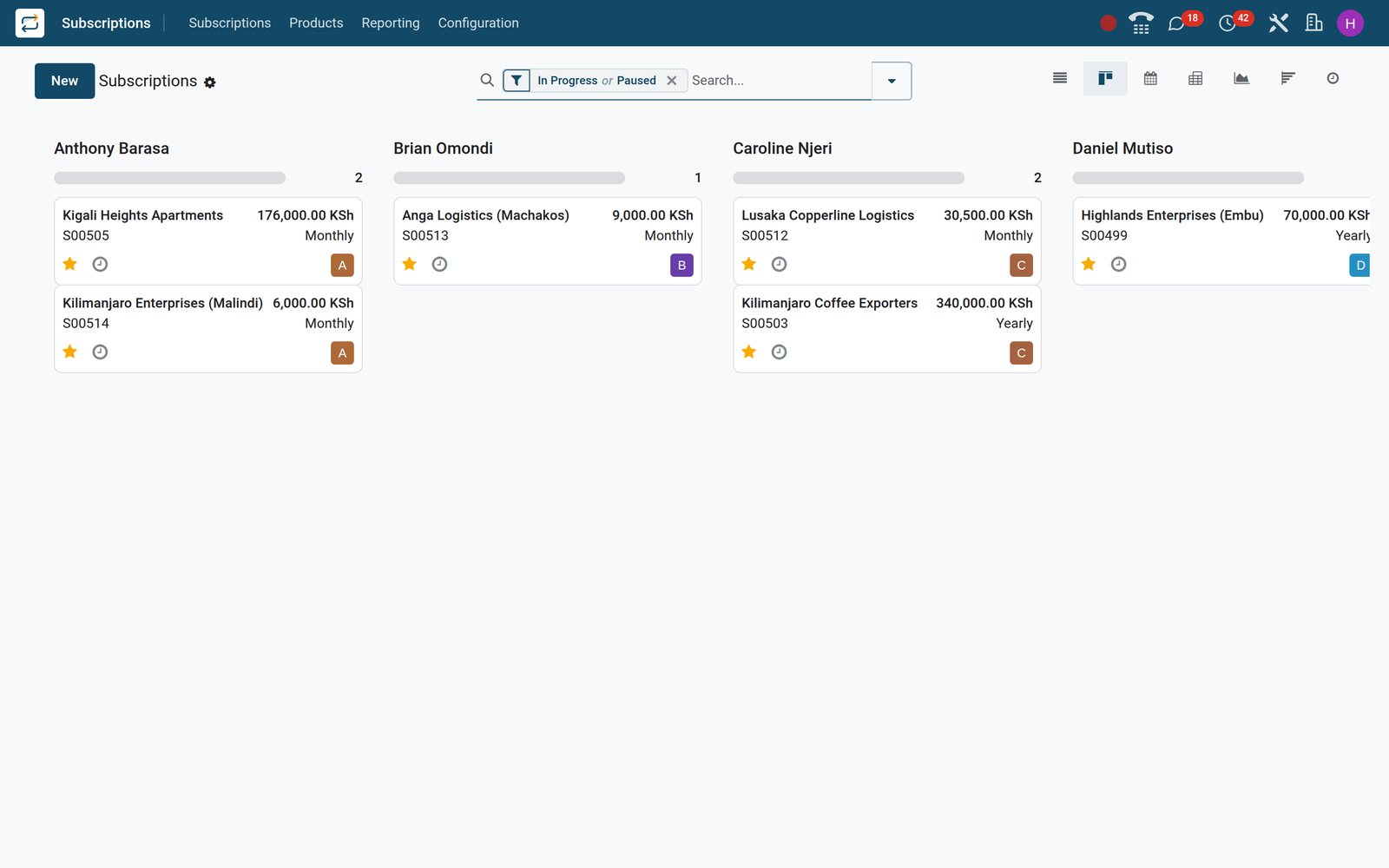
Every recurring customer, plan and next invoice on one screen
The Subscriptions list is where the day starts: who is billed next, what each contract is worth per month and which plan it runs on.
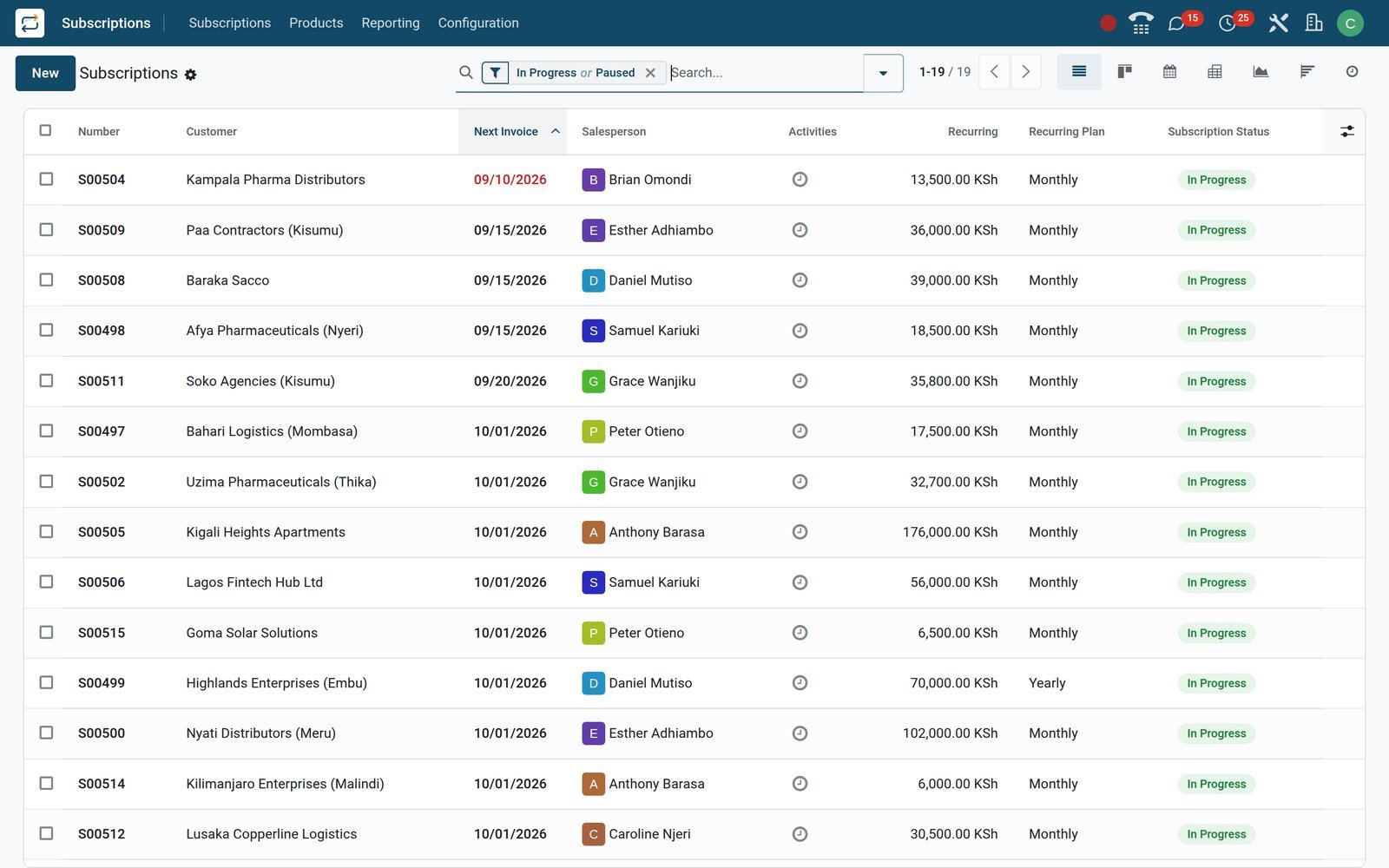 Subscriptions
One list for every running contract
Each row shows the customer, recurring plan, monthly recurring revenue and next invoice date; filter by status, salesperson or plan from the search bar.
Explore Subscriptions →By the numbers
Counted on the live demo, not estimated
Every figure below is a record count taken from the BridgeERP demo database behind this page.
- 19
- subscriptions in progress on the demo right now, each with its next invoice date already scheduled
- 42
- customer invoices raised from subscriptions in the demo company, every line linked back to its contract
- 4
- recurring revenue reports under Reporting: MRR Breakdown, MRR Timeline, Retention cohort and Subscriptions analysis
- 11
- close reasons configured on the demo, so each cancellation records why the customer decided to leave
Inside the app
Everything a recurring business runs on, in one app
The Subscriptions menus, grouped by the job each one does for you.
Subscriptions and quotations
Draft, running, paused and churned contracts live under Subscriptions, with Quotations for new deals and a Customers list for account history.
Renewals and upsells
To Renew flags contracts due for a renewal decision; Upsells holds quotations that add products or quantity to a subscription already running.
Recurring plans
Set the billing period, weekly, monthly or yearly, when unpaid contracts close automatically, and what customers may change themselves in the portal.
Products and pricelists
Mark a product as recurring and give it a price per plan and pricelist, so Monthly and Yearly quotes fill in the right amount.
Quotation templates
Save standard contracts with lines, optional products, recurring plan, duration and signature or payment rules, then reuse them for every new subscriber.
Automation rules
Schedule an activity, send an email or SMS, or set a health flag when MRR moves, satisfaction drops or a subscription changes state.
Close reasons and retention
Each cancellation stores a close reason; reasons shown in the portal can carry a retention message and a button linking to your offer.
Recurring revenue reports
MRR Timeline, MRR Breakdown, Retention and the Subscriptions analysis all read the same contract data, in graph, pivot, list and cohort views.
Step by step
From first quote to renewal without re-keying anything
One subscription record moves through every step, and each app below reads the same record.
- Step 1
Quote the plan
Start from a quotation template, choose the recurring plan and products; prices come straight from each product's plan pricing.
Subscriptions - Step 2
Sign and pay online
The customer opens the quotation link, signs and pays; the order confirms and becomes a running subscription on its own.
Sales - Step 3
Invoice on the date
On each next invoice date the subscription raises its invoice and emails it with the invoice template set on the plan.
Accounting - Step 4
Collect and reconcile
Receipts are matched in Accounting and the invoice turns Paid; contracts left unpaid past the plan's closing limit close automatically.
Accounting - Step 5
Renew or upsell
Renewal and upsell quotations start from the running contract, keeping its customer, pricing and history linked together.
Subscriptions - Step 6
Measure MRR and churn
Every start, expansion, contraction and churn is logged, feeding MRR Timeline, MRR Breakdown and the Retention cohort.
Subscriptions
Sell the same service monthly or yearly, at the right price
Recurring prices sit on the product itself, one per plan, so nobody hunts for a rate card while quoting.
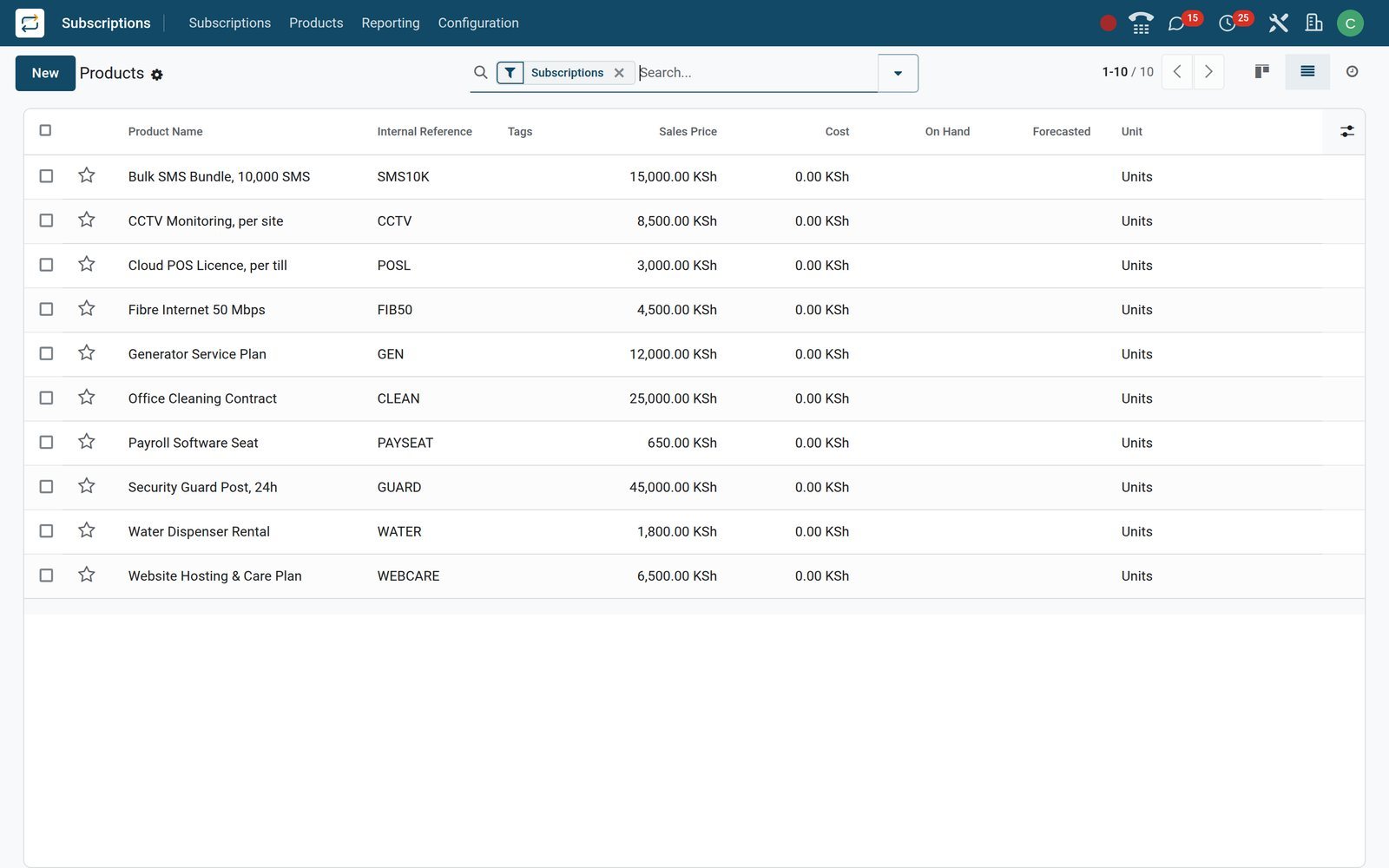 Subscriptions
A catalogue built for recurring sales
The Products menu opens on recurring products; each holds a price per recurring plan and pricelist that quotations pick up automatically.
Explore Subscriptions →Invoices go out on the right day, every period
No month-end spreadsheet of who to bill: the next invoice date on each contract drives the run.
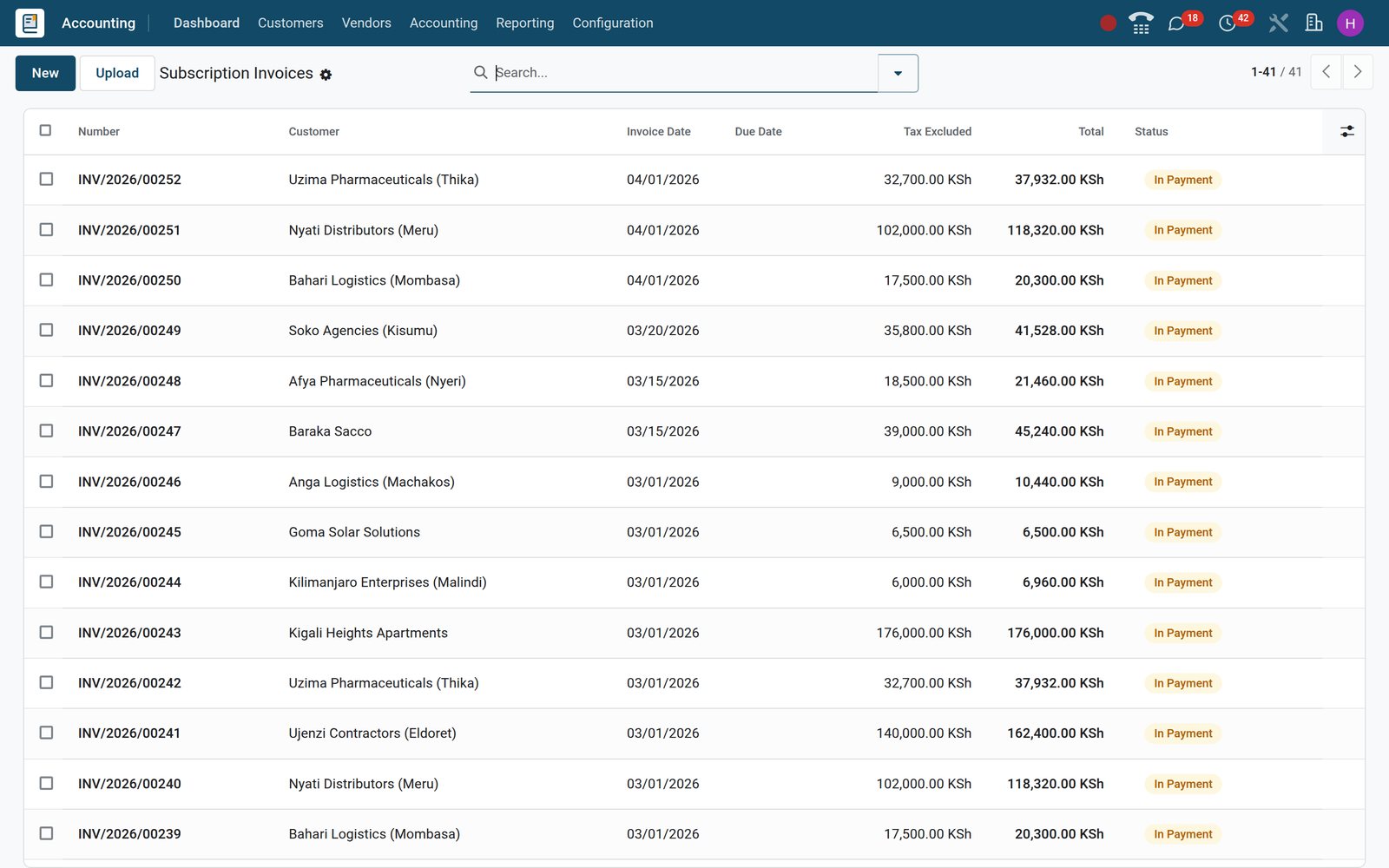
 Accounting
Every invoice traced to its contract
Each invoice line keeps a link to its subscription and its service period, so Accounting can spread prepaid yearly plans as deferred revenue.
Explore Accounting →See recurring revenue grow, and spot where it leaks
Every change to a subscription writes an MRR log line, so the reports explain the number instead of just showing it.
- Subscriptions
MRR Timeline
Plot monthly recurring revenue over time and group it by plan, salesperson, sales team or country to see which segment carries growth.
Explore Subscriptions →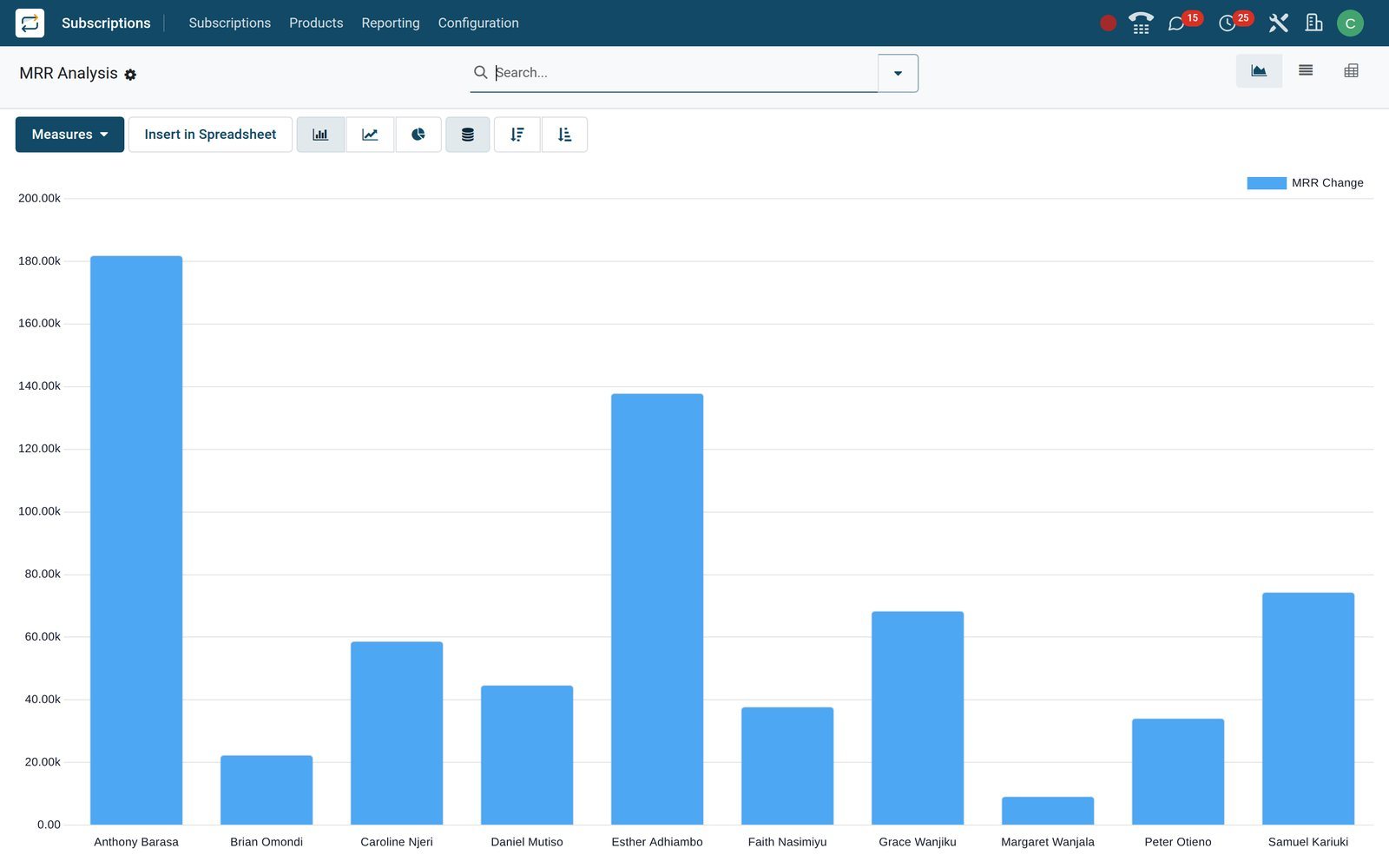
- Subscriptions
MRR Breakdown
Split each period's movement into new, expansion, contraction and churn, so a flat month shows whether upsells hid cancellations.
Explore Subscriptions →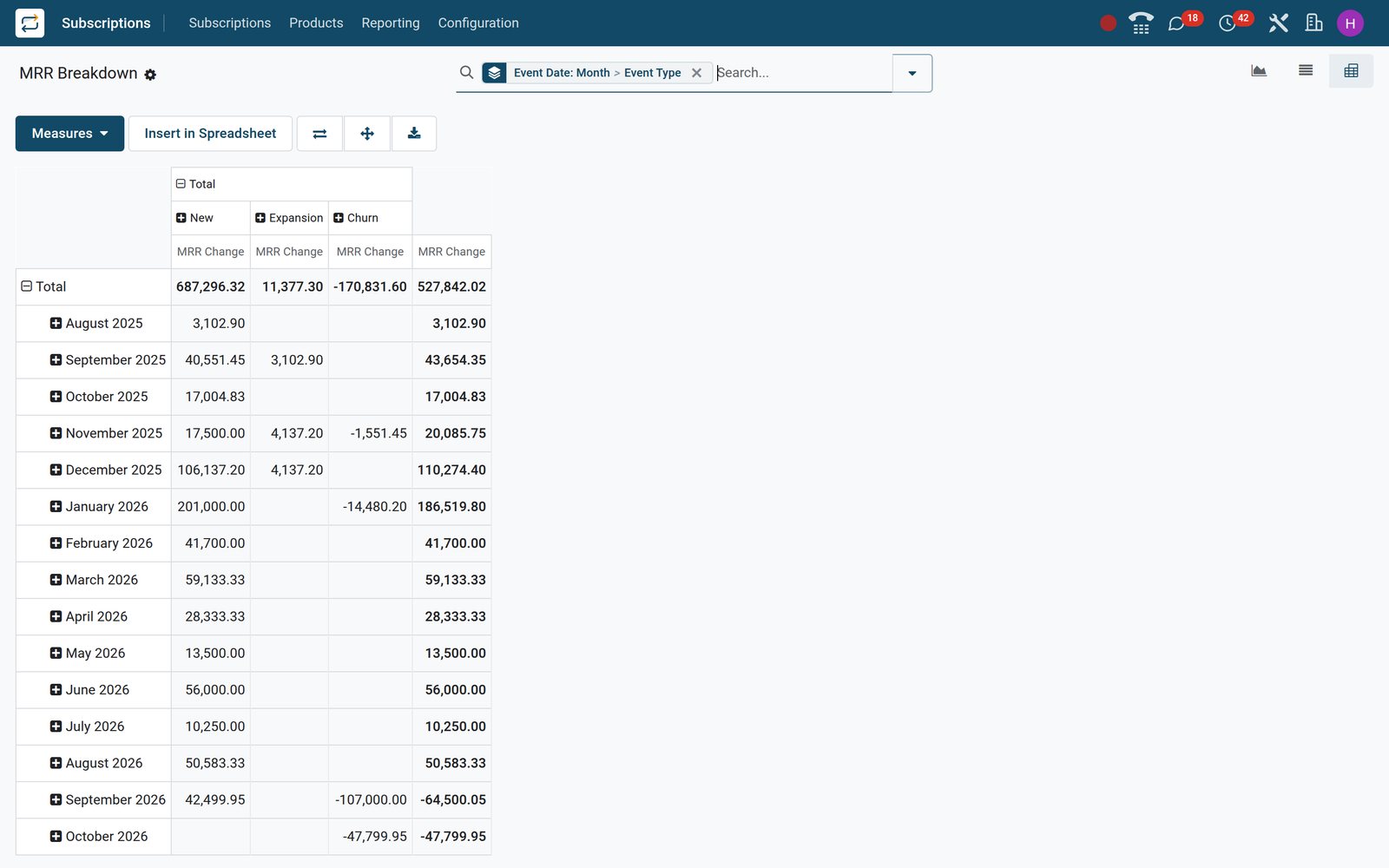
Catch churn early and learn why customers leave
The Retention cohort and your close reasons turn cancellations into something the team can act on.
- Subscriptions
Retention cohort
Group subscribers by the month they started and follow how many are still active in each month that follows, cohort by cohort.
Explore Subscriptions →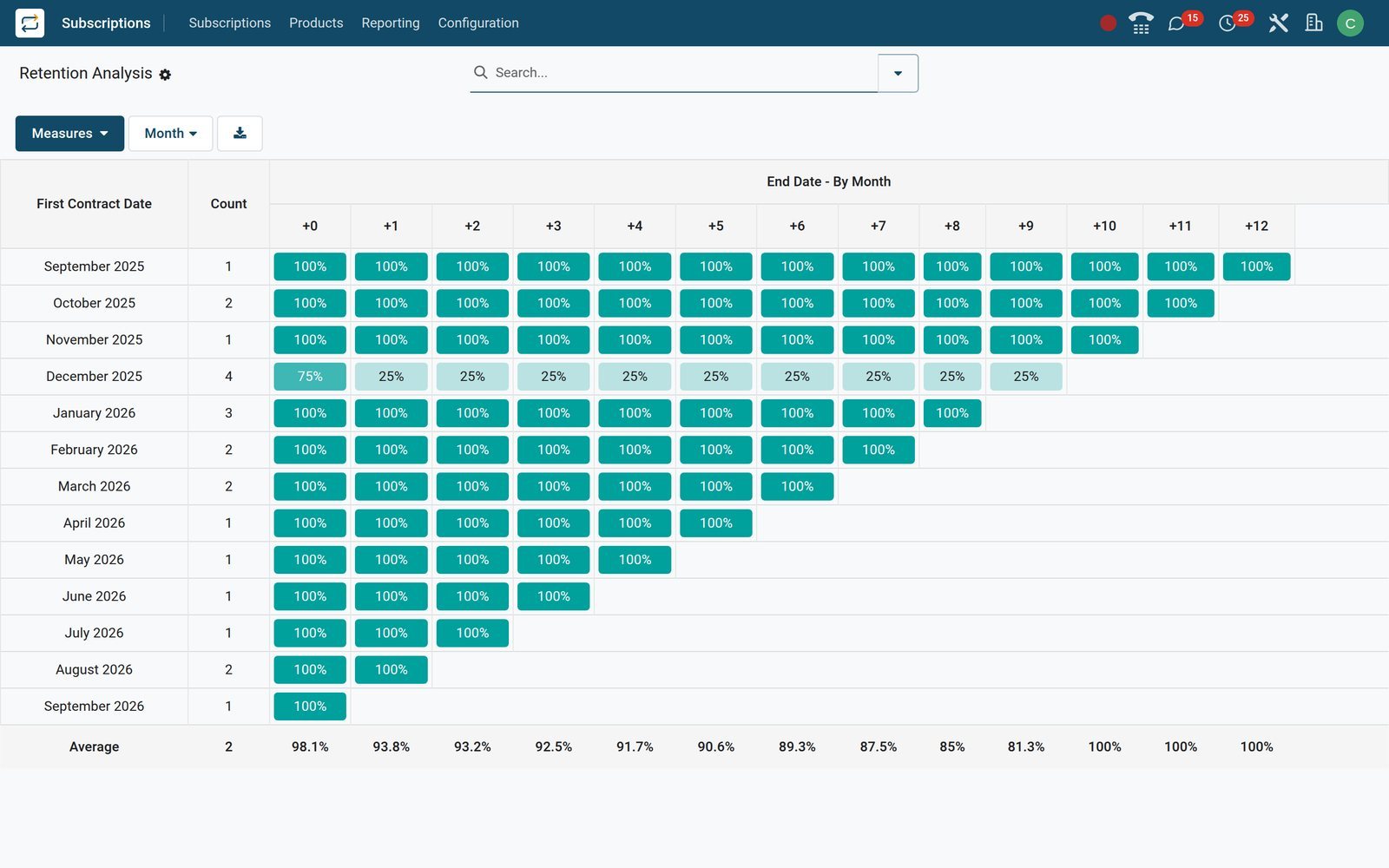
- Subscriptions
Close reasons
Choose the reasons customers can pick when they close, decide which appear in the portal and attach a retention message with an offer link.
Explore Subscriptions →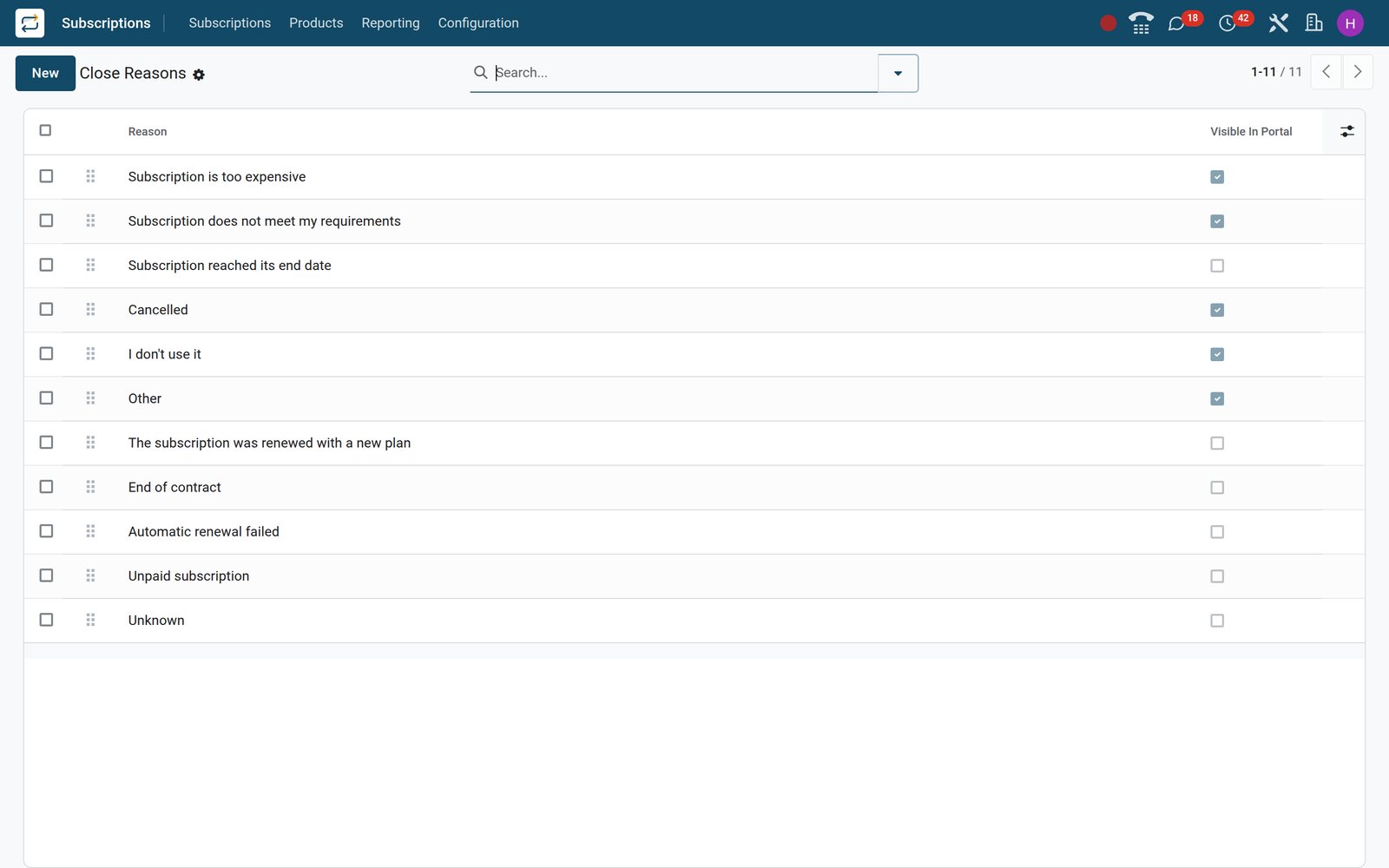
Who uses it
What each person sees
One subscription record, six different jobs done from it.
Owner or managing director
Opens MRR Timeline and Retention to watch recurring revenue, churn and which plans carry growth, without asking finance for a spreadsheet.
Account manager
Works the To Renew and Upsells lists, sends templated quotations and checks each customer's contracts and invoices from the Customers list.
Accountant
Receives invoices linked to contracts with service periods for deferred revenue, and can consolidate a customer's subscriptions due together onto one invoice.
Customer success
Sees the health flag set by automation rules and follows up with scheduled activities before a customer quietly stops paying.
Warehouse and operations
Gets a delivery each period for physical subscription products, from water refills to monthly supply boxes, straight into Inventory.
The subscriber
Uses the customer portal to see invoices, renew, change quantities or close, within the options each recurring plan allows.
Works with
Runs with the apps you already use
Subscriptions shares customers, products and invoices with these BridgeERP apps, so nothing is typed twice.
 CRMWon opportunities become subscription quotations
 SalesSame quotation, signature and payment flow
- AccountingRecurring invoices, payments and deferred revenue
 eCommerceSell subscription products in your online shop
 InventoryRecurring deliveries for physical subscriptions
 WebsiteCustomer portal to renew, change or close
In your country
Built for how businesses bill, in any currency
Currencies, tax and payment habits that the demo database already runs with.
Priced in more than one currency
The demo bills its subscriptions in Kenyan shillings, with KES and USD pricelists so one product can carry a price per currency.
E-invoicing on recurring invoices
Subscription invoices are ordinary customer invoices, so they follow the country's e-invoicing; on the demo, a Kenyan company sends them to KRA eTIMS through the OSCU connector.
Mobile money, bank or cash receipts
Register the customer's mobile money, bank or cash payment against the invoice; the payment status updates and the subscription keeps running.
Billing cycles that match cash flow
Weekly, monthly or yearly plans, with the option to align invoices to the first day of the period for calendar-style billing.
Deliveries every period
Physical products on a subscription, such as gas, water or animal feed, create a delivery each period for the warehouse to pick.
Several companies, one database
Each subscription belongs to a company with its own currency, journals and taxes, so a group bills every business from one login.
Reports and control
Reports and controls that keep recurring revenue honest
Each report below is a menu or field on the demo, filled with the demo company's contracts.
MRR Timeline
Monthly recurring revenue over time as a graph, pivot or list, filtered by plan, salesperson, sales team, industry or country.
MRR Breakdown
New, expansion, contraction, churn and transfer movements per period, with the close reason recorded behind every churned contract.
Retention cohort
A cohort table of subscribers by start month, showing how many stay active in each following period and where they drop.
Subscriptions analysis
Monthly and yearly recurring value by product, plan, customer or salesperson, in graph, pivot and list views for board packs.
Health flag and MRR trend
Each subscription carries a health flag plus its one-month and three-month MRR change, ready to filter the accounts at risk.
Customer satisfaction
Rating requests collect satisfaction on each subscription, and an automation rule can react when the score falls below your threshold.
Getting started
Start billing from the subscriber list you already have
Four steps take you from a spreadsheet of contracts to invoices that go out on their own.
Import what you have
Bring customers, products and running contracts from Excel or CSV: map the columns, press Test to check the file, then import.
Set your plans
Create recurring plans under Configuration with billing period, automatic closing and portal options, then attach plan prices to products.
Save quotation templates
Turn your standard contracts into templates with plan, duration, optional products and signature, so every rep quotes the same way.
Switch on alerts and settings
Add automation rules for health and follow-ups, choose invoice consolidation in Settings and adjust close reasons to your market.
Questions
Questions about Subscriptions
Not covered here? Contact us.
Can one product be sold monthly and yearly at different prices?
Yes. Each subscription product holds a price per recurring plan, and optionally per pricelist, so choosing Monthly or Yearly on the quotation fills in the matching price.
How are recurring invoices created?
Every subscription carries a next invoice date. When that date arrives the invoice is raised automatically, linked to the contract and emailed with the plan's invoice template, and the date moves on to the next period.
Can customers renew, change or cancel on their own?
Yes, through the customer portal and within what each recurring plan allows: closing, renewing, adding products or quantities, and switching to a related plan. Closing asks for a reason and can show a retention offer.
What happens when a customer does not pay?
The invoice stays open in Accounting, where payment follow-up applies. Each plan sets an automatic closing limit; once it passes, the subscription closes and the churn is logged in the MRR reports.
Which subscription metrics can I track?
Monthly recurring revenue over time, its breakdown into new, expansion, contraction and churn, retention by start-month cohort, and recurring value by product, plan or salesperson. Each subscription also shows a health flag and its MRR trend.
Can I sell subscriptions in my online shop?
Yes. The eCommerce subscription module is installed on the demo, so recurring products can be sold in the online shop and the confirmed order becomes a running subscription.
Can we bill in more than one currency?
Yes. A subscription follows the currency of its pricelist; the demo has KES and USD pricelists, and each company keeps its own journals and taxes.
How do we move existing subscribers across?
Import customers, products and running subscriptions from Excel or CSV. The importer maps your columns, lets you test the file first, and can update the same records later through their external ID.
Where Subscriptions fits
Nothing here is a silo: the apps around it read and write the same records, so the hand-offs happen on their own.
What feeds it, and what it feeds — these are real app connections, not a diagram.
- Customers & sales
- Finance
Sales
Quotations, sales orders, price lists and customer portal.
Sales →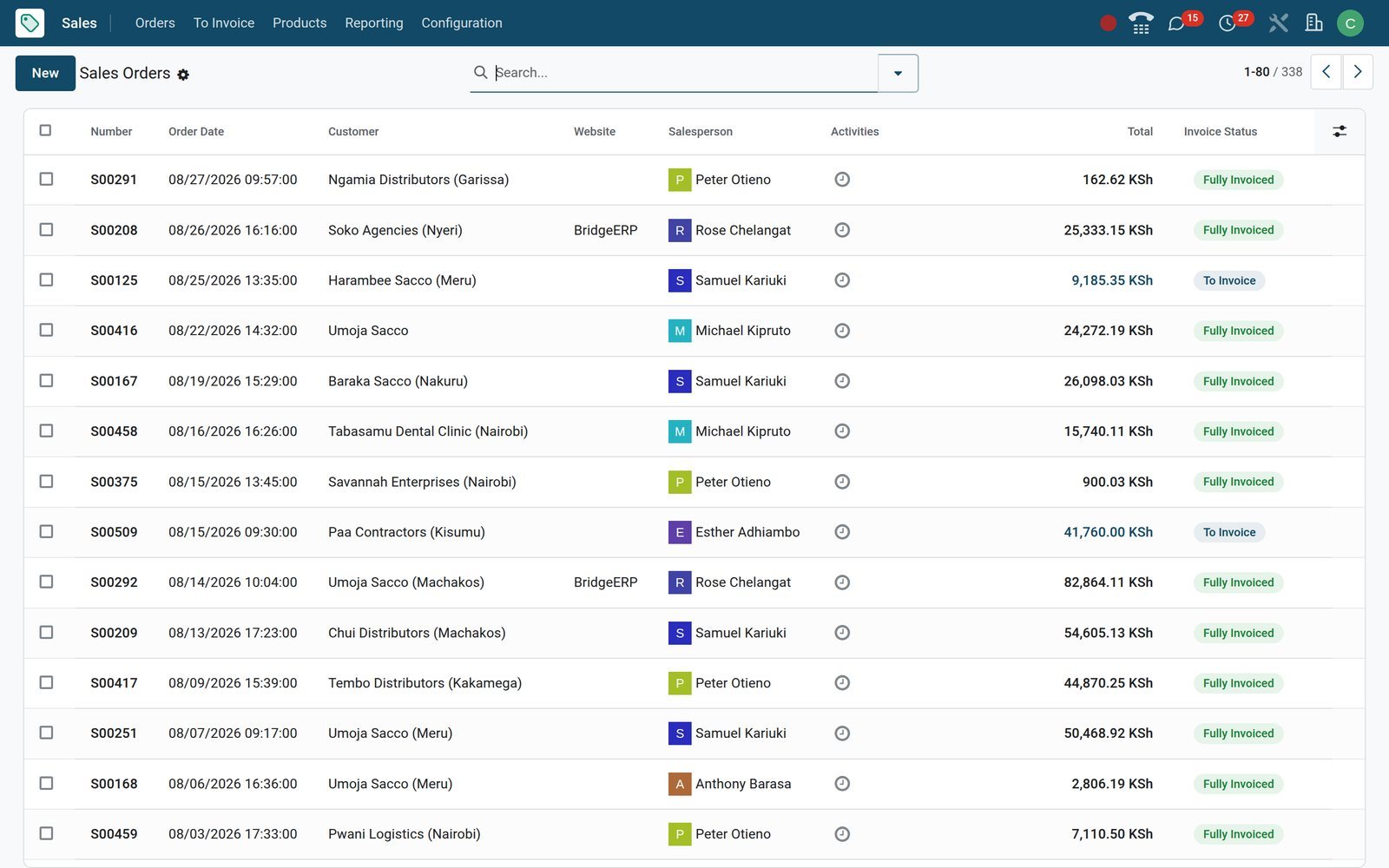
Put Subscriptions to work
Add it to your plan and pay only for what you use, or see it running on your own demo first.