

 Restaurant POS: Tables, kitchen tickets and bills for every restaurant
BridgeERP Restaurant POS seats guests on your floor plan, sends orders to the kitchen and bar screens, splits bills, takes tips and mobile money, and closes the day with the cash counted.
Free instant access. No credit card required.
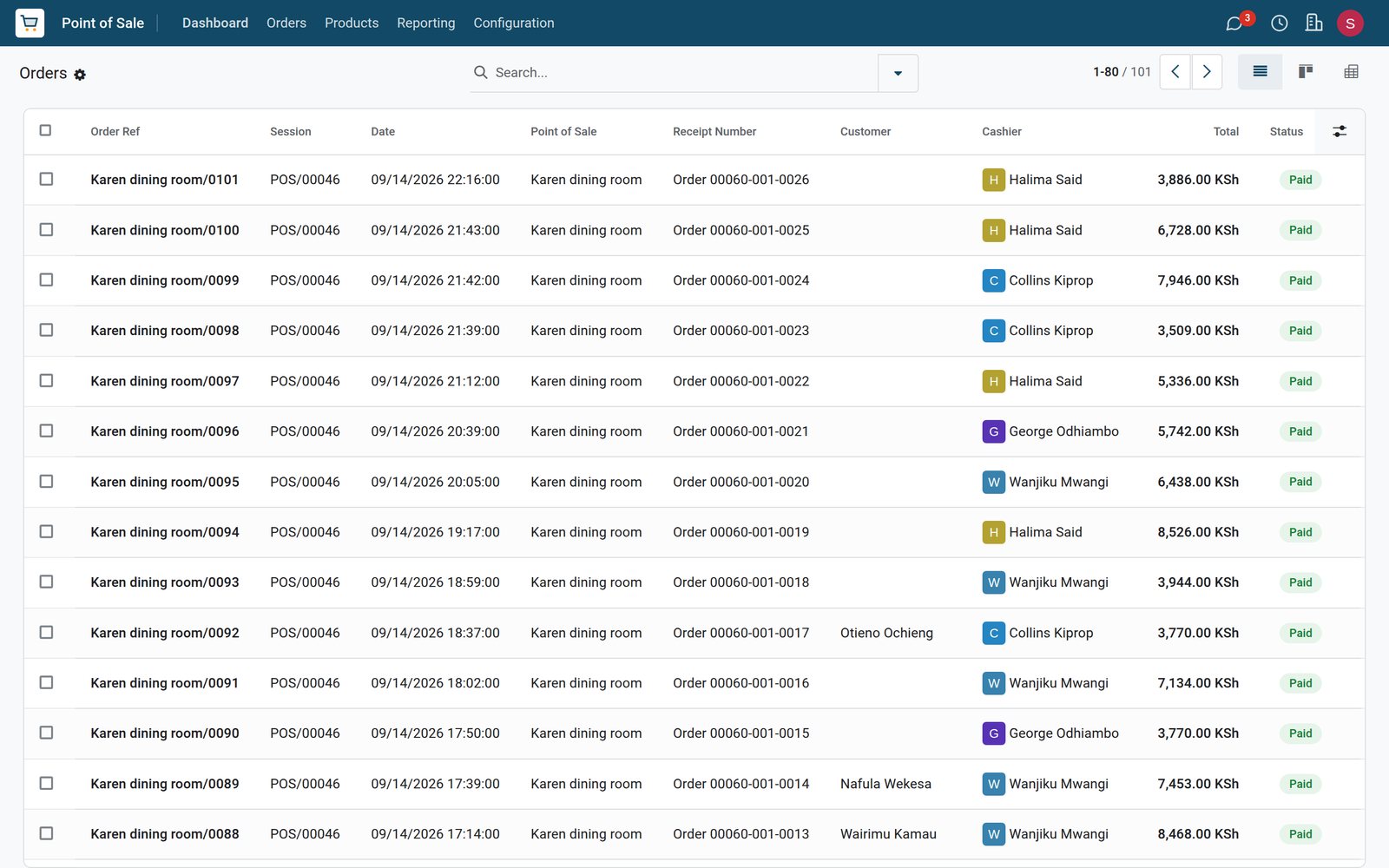
Every order knows its table and its guests
The order keeps the table, the number of guests, the waiter, each dish and the tip.
 Restaurant & Bar
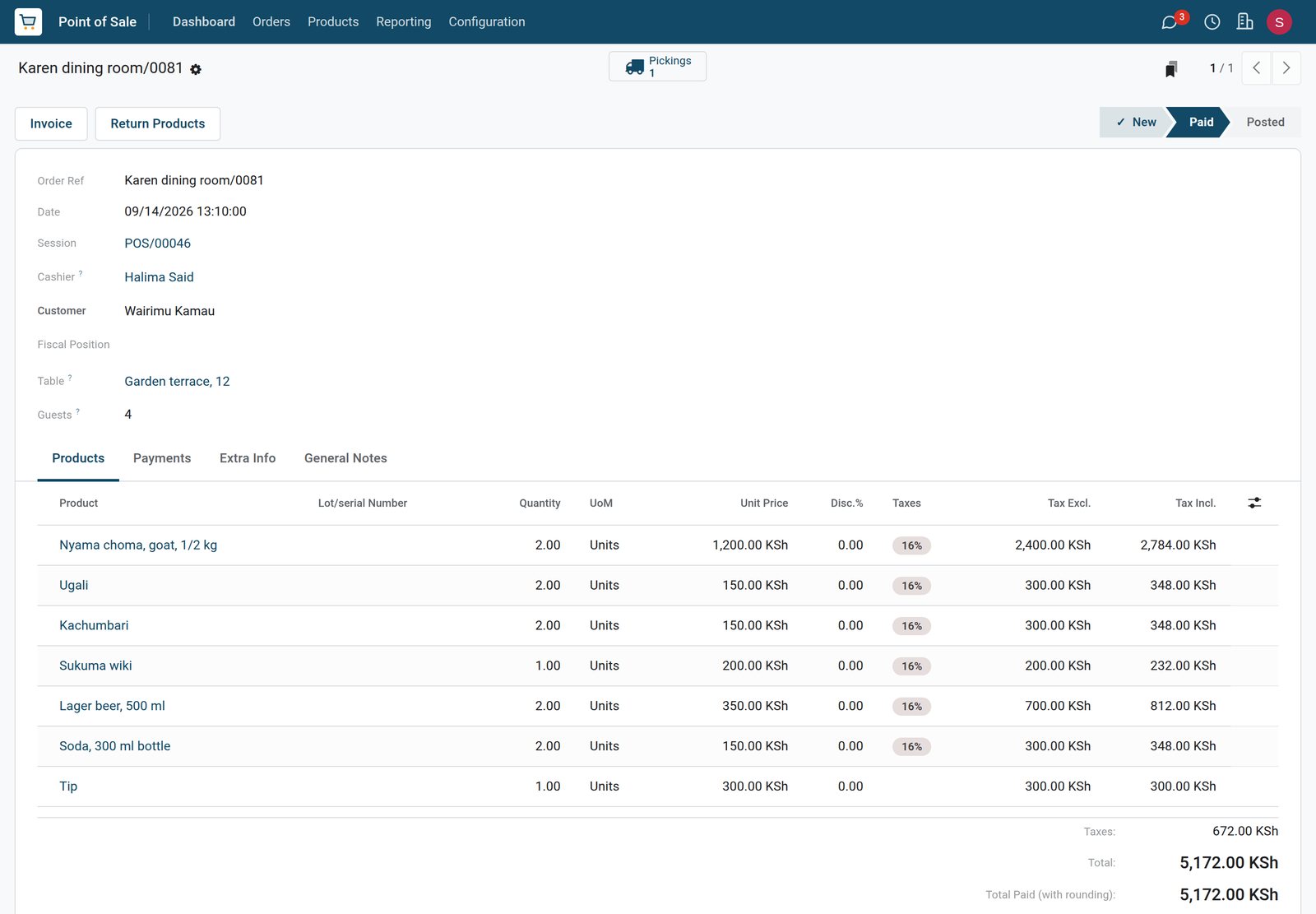
Lunch for four on the terrace
Table 12 on the garden terrace, four guests: two nyama choma with ugali, kachumbari, sukuma wiki and drinks, with a KSh 300 tip on the bill.
Explore Restaurant & Bar →By the numbers
What ships inside Restaurant POS
Counted in the product itself, on the demo database.
- 4
- self-ordering modes: disabled, QR menu, QR menu with ordering, and kiosk
- 2
- table shapes, square and round, placed on the floor plan where they stand
- 5
- order states, from New and Paid to Posted, Invoiced or Cancelled
Inside the app
What is inside
The parts of Restaurant POS, grouped by what they do during a service.
Floor plans
Each room or terrace is a floor with its tables, their seats and their shape.
Orders by table
An order is opened on a table with the number of guests and stays open until the bill is paid.
Kitchen and bar screens
Dishes go to the kitchen display and drinks to the bar display, each with its own stages.
Split bills
A table can split its bill so each guest pays their part by mobile money, card or cash.
Tips
A tip is added to the bill as its own line, so tips are kept apart from sales.
Waiters on the till
Waiters are employees allowed on the till, and every order records who served it.
Kitchen notes
Ready-made notes such as no onions or well done are picked for a dish when ordering.
Cash per service
Each session starts with a float, records the cash banked and closes with the count.
Step by step
From seating to closing
How a table travels through BridgeERP during a service.
- Step 1
Seat
The waiter opens the table on the floor plan and enters the number of guests.
Restaurant & Bar - Step 2
Order
Dishes and drinks are added with notes, and the order is sent to the kitchen and bar.
Restaurant & Bar - Step 3
Prepare
The kitchen and bar screens show each ticket until it is marked ready.
Restaurant & Bar - Step 4
Pay
The bill is printed or split, a tip is added and the guests pay by mobile money, card or cash.
Restaurant & Bar - Step 5
Close
At the end of service the cash is counted and the sales post to accounting.
Accounting

Your rooms, table by table
Floor plans hold the tables with their number, seats and shape.
 Restaurant & Bar
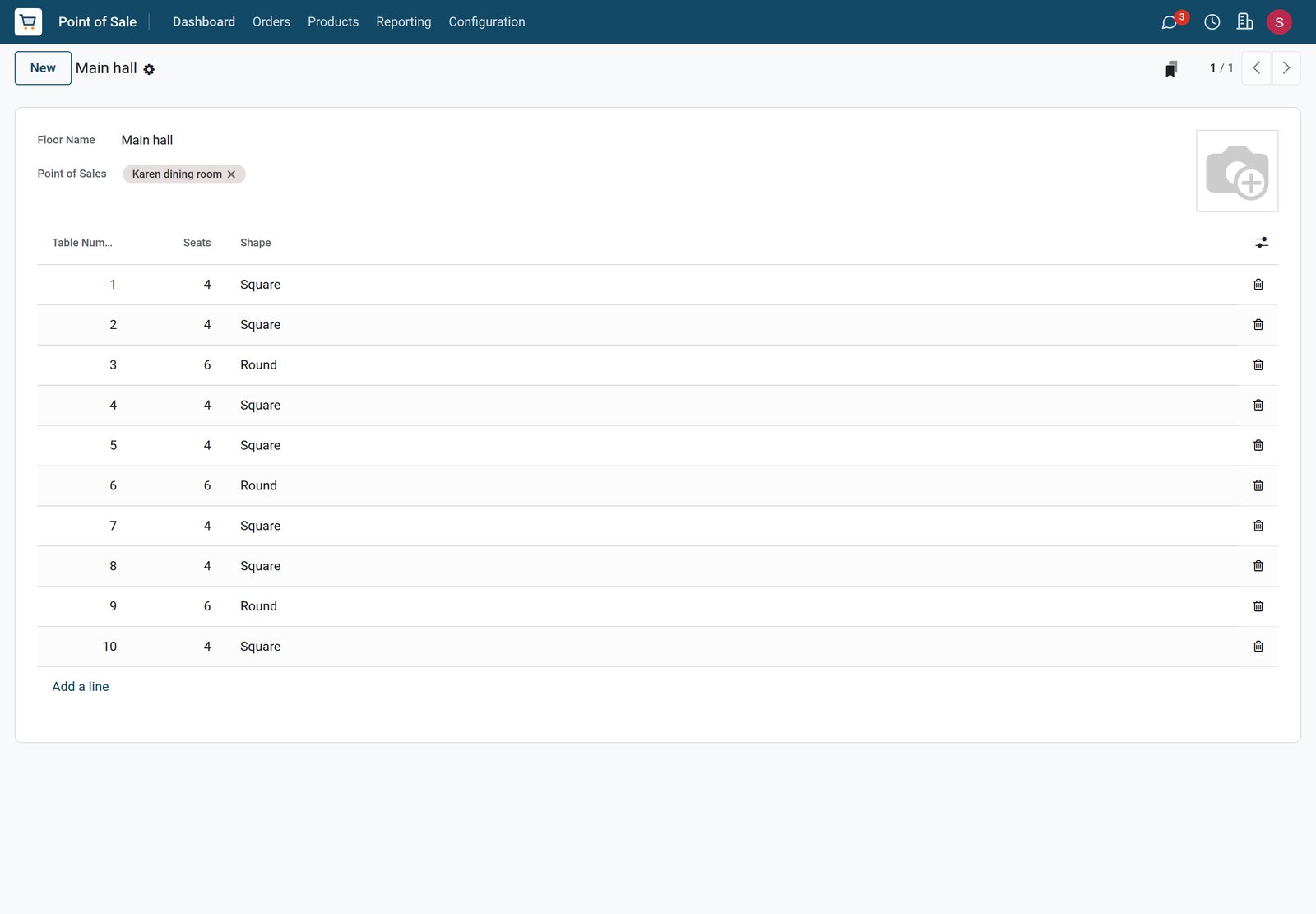
The main hall
The main hall has ten tables, square tables for four and round tables for six, served by the Karen dining room till.
Explore Restaurant & Bar →Tickets sent to the right screen
A preparation display shows the categories it prepares, in stages.
 Restaurant & Bar
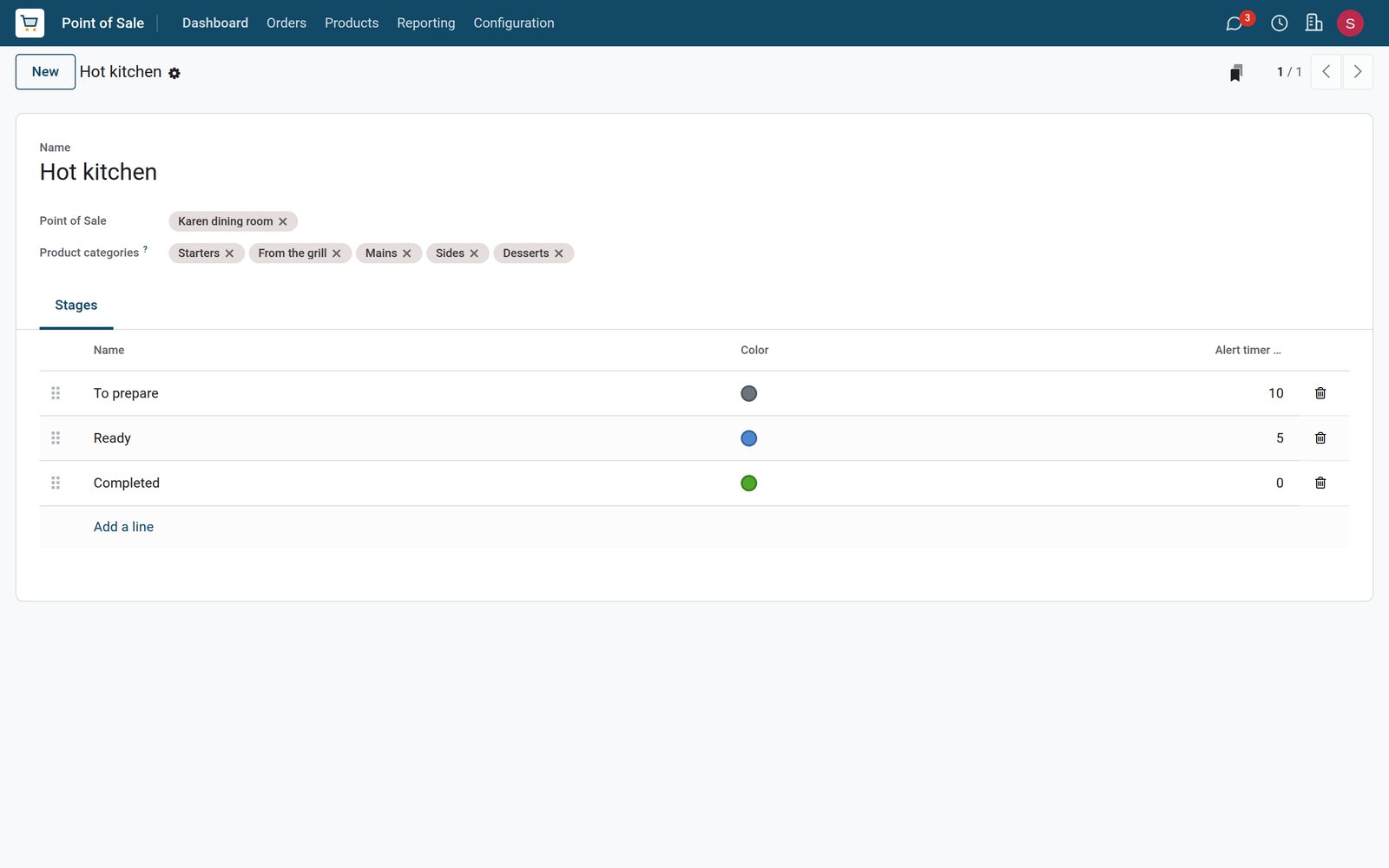
The hot kitchen display
The hot kitchen screen takes starters, grill, mains, sides and desserts from the dining room till, in To prepare, Ready and Completed stages.
Explore Restaurant & Bar →Who uses it
Who uses it, and what they see
One system for the floor, the kitchen, the bar and the manager.
Waiter
Opens tables, takes orders with notes, splits bills and takes payment at the table.
Kitchen
Works from the kitchen display and marks each ticket ready when the dishes are done.
Bar
Sees only the drinks on the bar display, ticket by ticket.
Manager
Counts the cash at closing and compares sales by waiter and by menu category.
Works with
Runs with the rest of BridgeERP
Apps that share the menu, the team and the money with Restaurant POS.


Sales by waiter
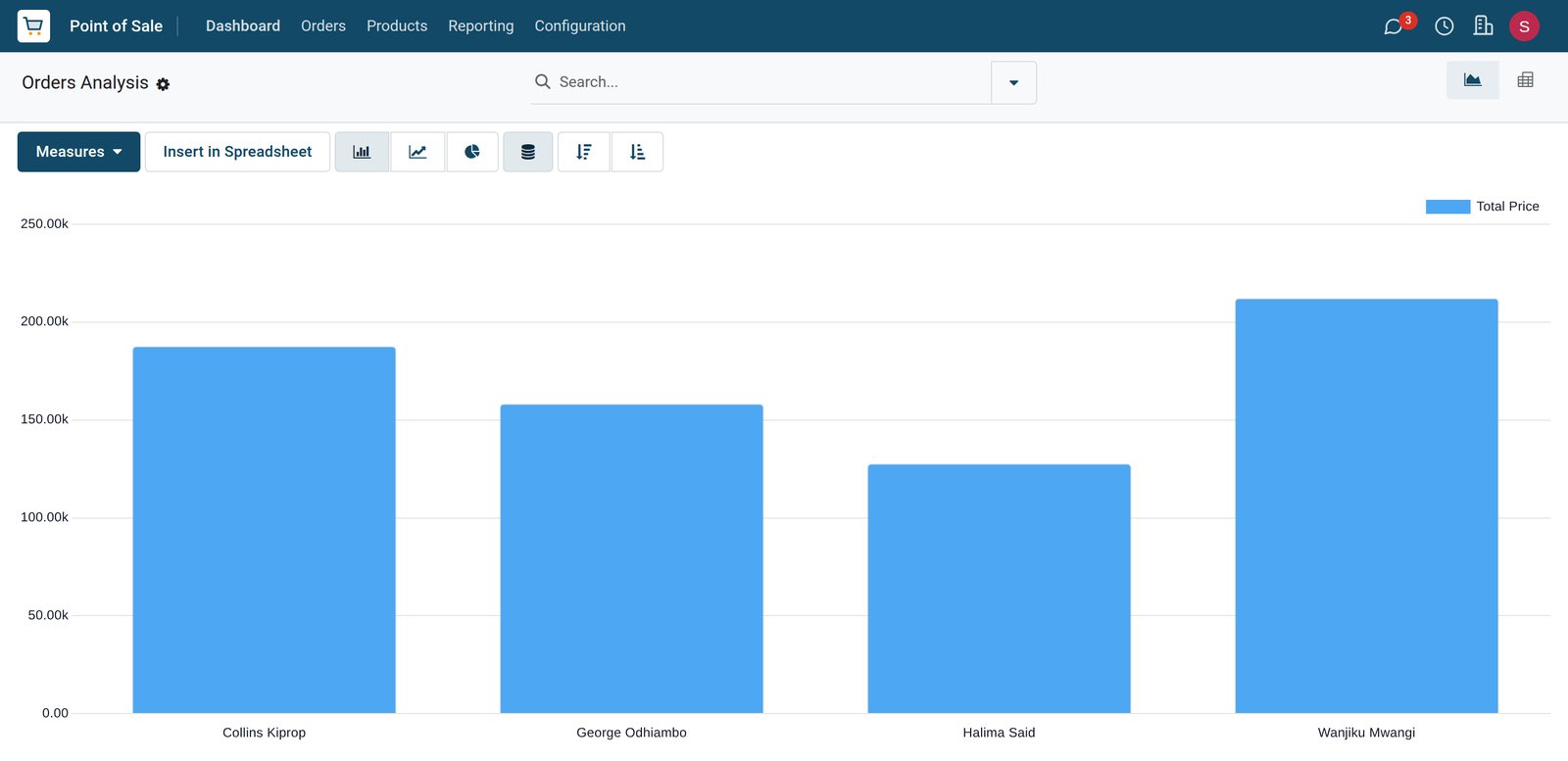
The orders analysis compares waiters, categories and days from the same data.
 Restaurant & Bar
Who sold the most
Sales of the dining room grouped by waiter show Wanjiku Mwangi ahead of Collins Kiprop, George Odhiambo and Halima Said.
Explore Restaurant & Bar →A service closed and posted
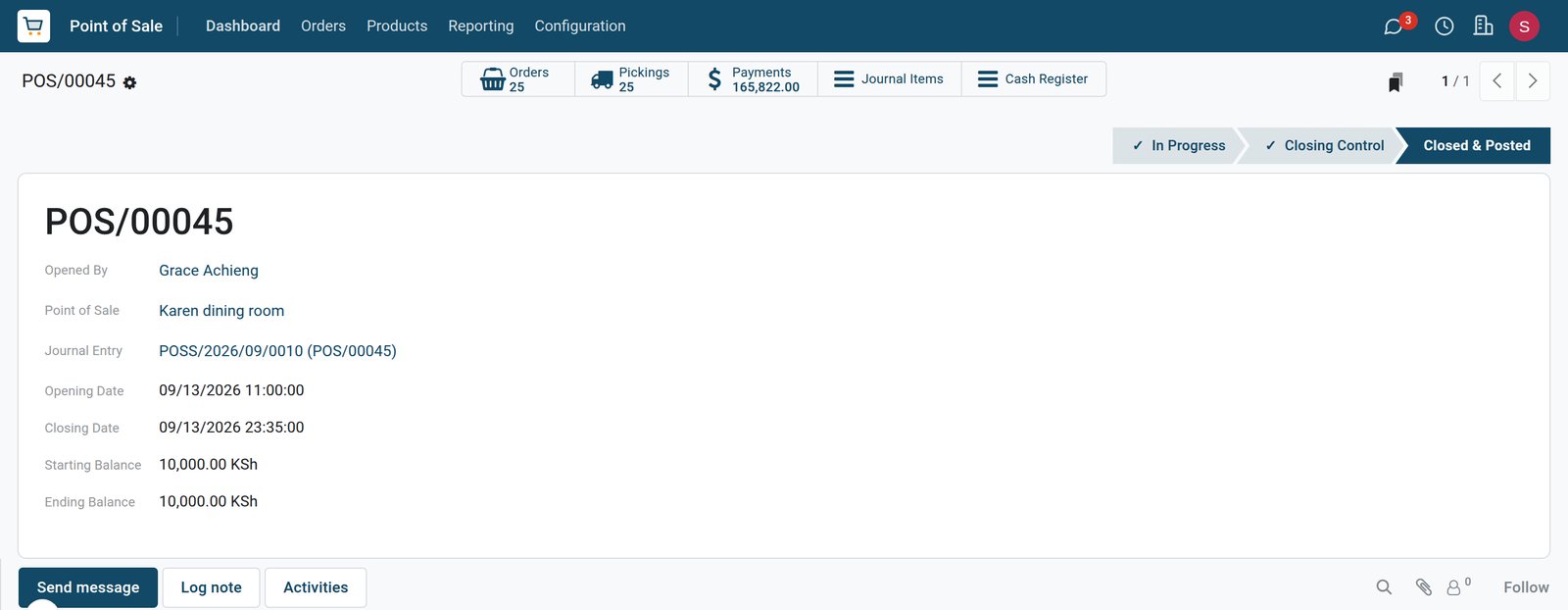
The session keeps the float, the cash banked and the journal entry.
 Restaurant & Bar
Sunday service in the dining room
The 13 September session opened at 11:00 with a KSh 10,000 float, took KSh 165,822 in payments and closed at 23:35 with the float left in the drawer.
Explore Restaurant & Bar →In your country
Built for restaurants in any country
What changes from country to country, shown on the demo's Kenyan restaurant.
Your currency and VAT
Menu prices, bills and daily sales are in the company currency, KES on the demo, with VAT at 16%.
Mobile money at the table
Mobile money, M-Pesa on the demo, is a payment method of the till next to card and cash, counted separately at closing.
E-invoicing connectors
Country e-invoicing modules report sales to the tax authority; the demo has Kenya's eTIMS connector installed, ready for the company to register.
Getting started
Getting started
How a restaurant moves its service onto BridgeERP.
Draw your floors
Create a floor per room or terrace and place the tables with their seats.
Load the menu
Create dishes and drinks in menu categories with prices and VAT.
Set up the screens
Create a kitchen display and a bar display, each with the categories it prepares.
Add the team
Enter waiters as employees allowed on the till, then open the first service.
Questions
Questions about Restaurant POS
Not covered here? Contact us.
Can guests at one table pay separately?
Yes. With split bills on, the waiter splits the order and each guest pays their part with any payment method.
Do the kitchen and the bar see different tickets?
Yes. Each preparation display is set to the menu categories it prepares, such as dishes for the kitchen and drinks for the bar.
How are tips recorded?
A tip is added to the order as a tip line, so tips are kept apart from food and drink sales.
Can we see sales by waiter?
Yes. The orders analysis groups sales by employee, menu category, product or day.
Can guests order from their phone?
Self-ordering can be set to a QR menu, a QR menu with ordering, or a kiosk on each till.
Does it handle cash at the end of the night?
Yes. Each session starts with a float, records cash taken out and closes with the counted cash.
Tax compliance
Invoices your tax authority accepts
In Kenya, Uganda, Rwanda, Burundi and Zambia, each invoice, receipt and stock movement goes to the tax authority's own system when you post it. Ghana and Pakistan come next, and we connect 73 more countries on request.
- KenyaReady
eTIMS KRA
Invoices, credit notes, POS receipts and stock movements
- UgandaReady
EFRIS URA
Invoices, POS receipts and stock
- RwandaReady
EBM RRA
Invoices, POS receipts, stock and imports
- BurundiReady
EBMS OBR
Invoices, POS receipts, stock and manufacturing
- ZambiaReady
Smart Invoice ZRA
Invoices, POS receipts, stock and imports
Put Restaurant POS to work
Add it to your plan and pay only for what you use, or see it running on your own demo first.