

 Invoicing: Send the invoice today, know who has paid tomorrow
BridgeERP Invoicing turns confirmed orders into numbered VAT invoices, sends them by email or the customer portal, records payments in any currency you activate, and chases overdue accounts with reminder levels you set once.
Free instant access. No credit card required.
Start the morning knowing what to validate, send and collect
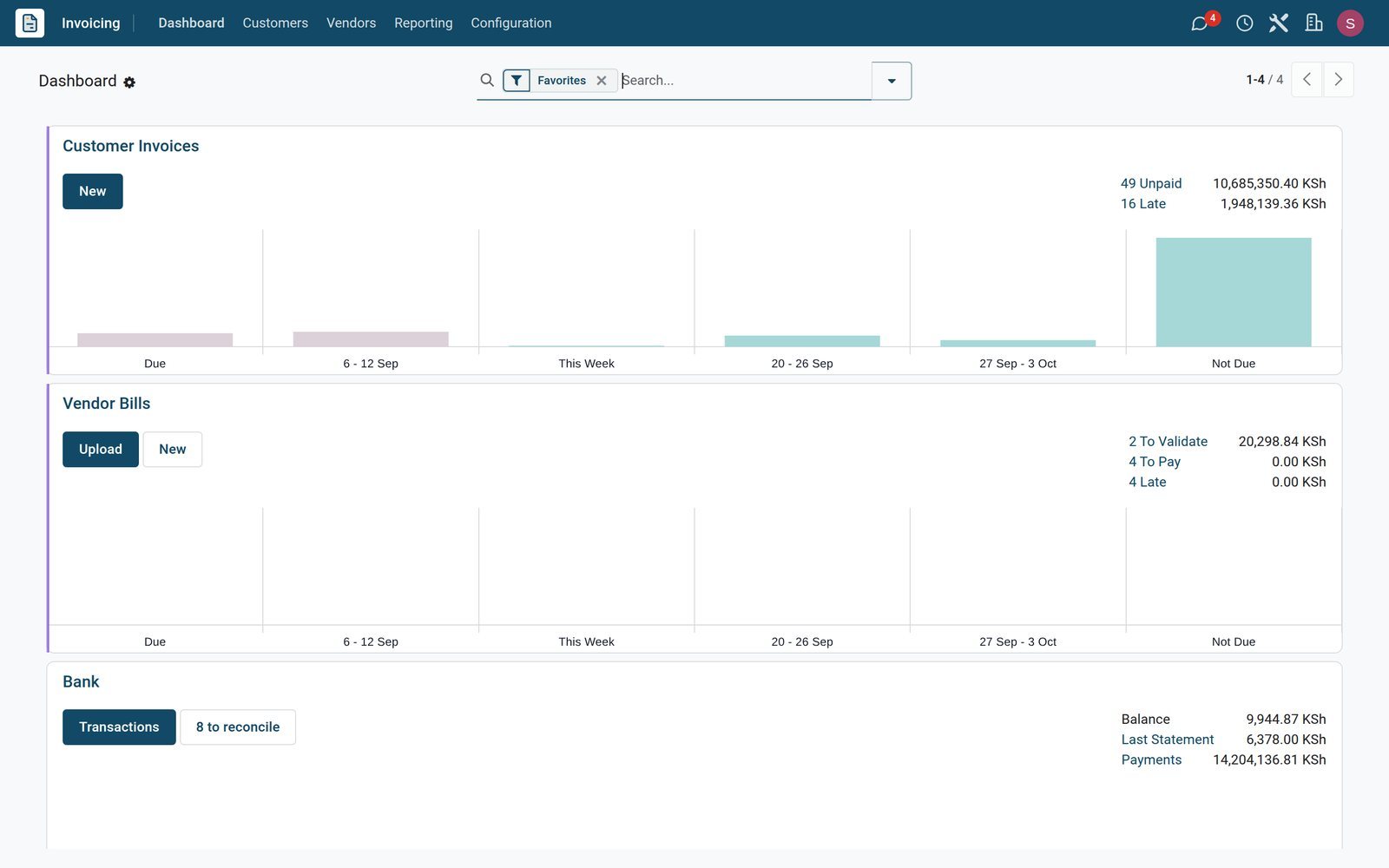
The Invoicing dashboard lays every journal out as a card: customer invoices, vendor bills and the bank, each with the work waiting and the money involved.
 Invoicing
Customer invoices, bills and the bank on one board
The Customer Invoices card shows KSh 10,685,350.40 unpaid, KSh 1,948,139.36 of it late, and charts what falls due week by week, above the Vendor Bills and Bank cards.
Explore Invoicing →By the numbers
Ready before you configure anything
Counts of what is in the product, not promises.
- 11
- payment terms preconfigured, from Immediate Payment and 30 Days to 30% Now, Balance 60 Days
- 292
- e-invoicing reference codes preloaded under Configuration on the demo, here Kenya's KRA eTIMS OSCU codes, ready for invoices sent to eTIMS
- 16
- online payment providers to choose from, Flutterwave, Stripe, PayPal and Wire Transfer among them
- 7
- document layouts for the invoice PDF, from Striped and Light to Boxed and Bold, carrying your logo and colours
Inside the app
What is inside Invoicing
The menus you will use every day, grouped the way the app groups them.
Customer invoices
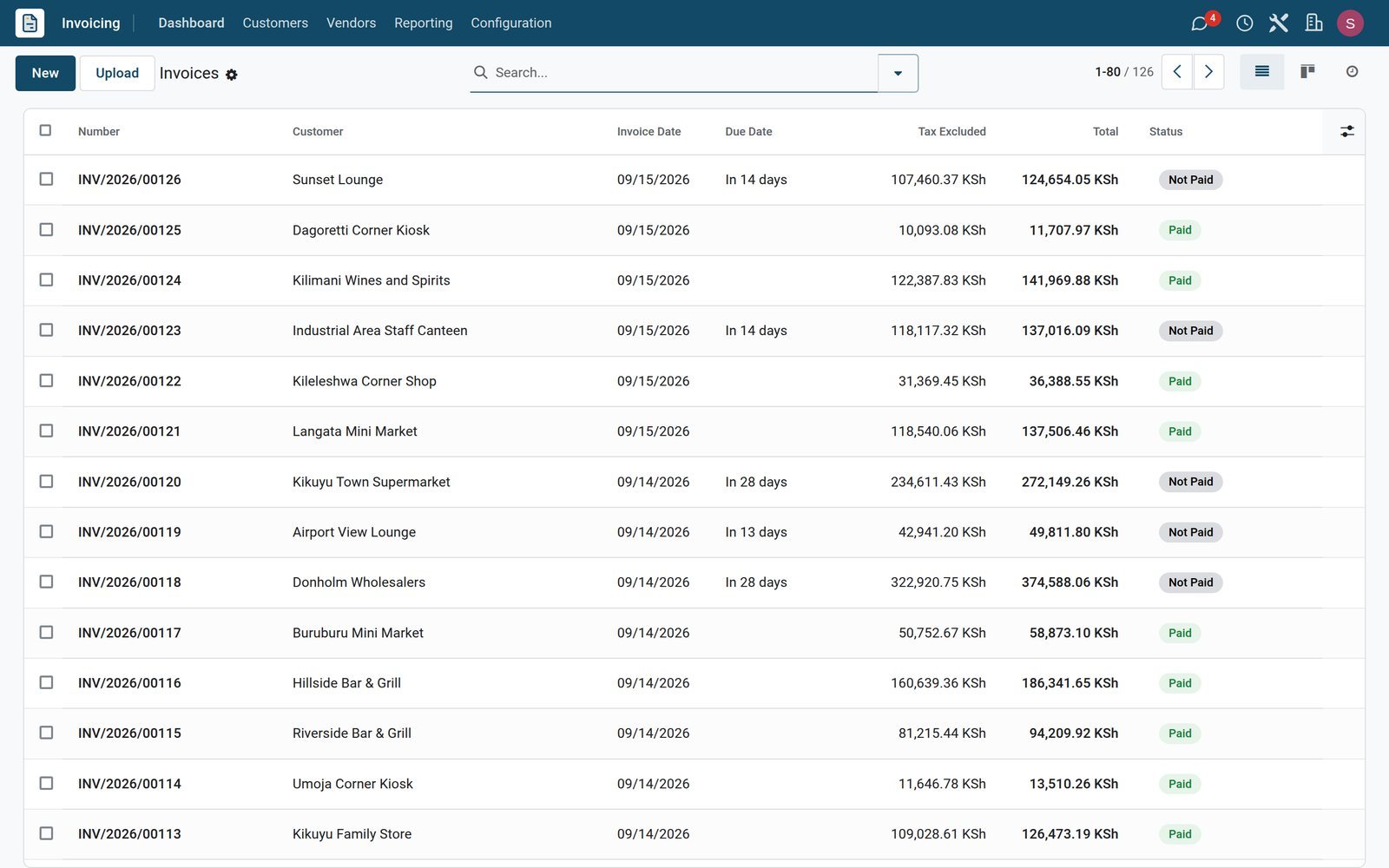
Customers › Invoices: INV-numbered invoices from Draft to Posted, each with a payment status of Not Paid, In Payment, Partially Paid or Paid, to filter and group.
Credit notes
Customers › Credit Notes: press Credit Note on a posted invoice, give the reason, and the RINV credit note is linked to the invoice it reverses.
Customer payments
Customers › Payments: Register Payment records bank, cash or online receipts against invoices, one by one or grouped, and prints a Payment Receipt.
Products and prices
Customers › Products: each item carries its sales price and default tax, 16% VAT on most, so an invoice line fills price, tax and account.
Customers
Customers › Customers: Total Due, Total Overdue, unpaid invoice count, days sales outstanding, payment terms, fiscal position and credit limit on every account.
Payment terms and follow-up levels
Configuration › Invoicing: instalment plans, a 2% discount for payment within 7 days, and reminder levels at 15 and 30 days overdue by email, SMS or letter.
Taxes and fiscal positions
Configuration › Accounting: 16%, 8%, 0%, exempt, export and 2% withholding taxes preconfigured, with National and International fiscal positions that swap taxes per customer.
Online payments and e-invoicing
Configuration › Online Payments lists Flutterwave, Stripe, PayPal and more; on the demo, the e-invoicing menu for Kenya's KRA eTIMS holds 292 OSCU codes and the notices list.
Step by step
From confirmed order to money in the bank
Six steps, each one a screen in BridgeERP, none of them re-typing.
- Step 1
Confirm the order
A quotation becomes a sales order; each product's invoicing policy decides whether you bill ordered or delivered quantities, in full or as a down payment.
Sales - Step 2
Create the invoice
Create Invoice copies customer, lines, taxes and payment terms from the order and keeps the order number in the invoice's Source Document field.
Invoicing - Step 3
Send it
The Send window emails the PDF with the Invoice: Sending template, offers download or post, and adds a UBL or Factur-X file for e-invoicing customers.
Invoicing - Step 4
Get paid
Customers pay from the portal once a provider is enabled, or you press Register Payment; the badge moves from Not Paid to In Payment or Paid.
Invoicing - Step 5
Match the bank
Import the statement or synchronise the bank; the Invoices/Bills Perfect Match model pairs each receipt with its invoice, which then turns Paid.
Accounting - Step 6
Chase what is late
Follow-up levels send the 15-day and 30-day reminders with the overdue invoices attached, or schedule a call as an activity for the credit controller.
Invoicing
One invoice, everything already filled in
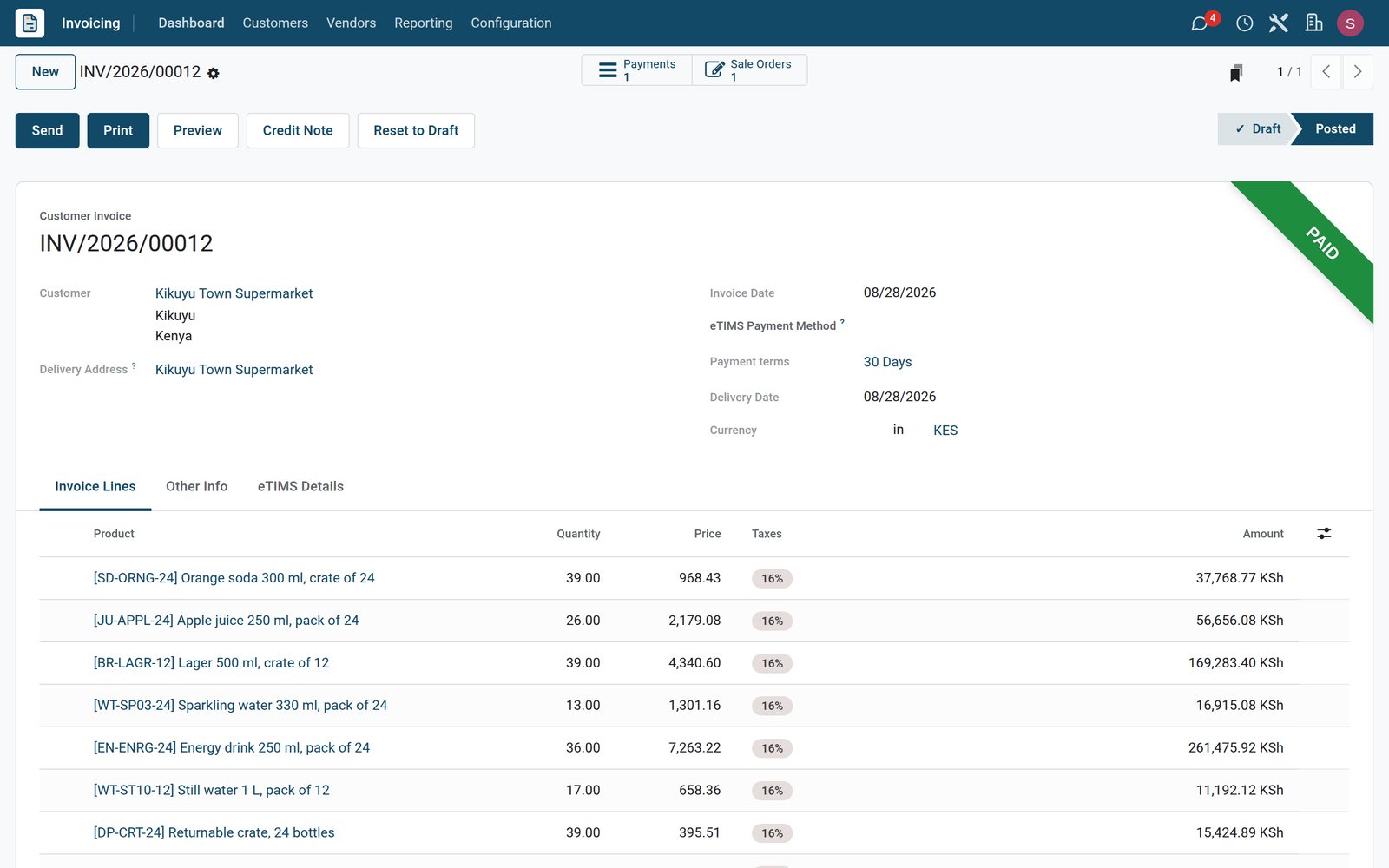
Pick the customer and the products; taxes, payment terms, the due date and the total in the company currency arrive on their own.
 Invoicing
Pre-filled from the customer and the product
INV/2026/00012 for Kikuyu Town Supermarket lists orange soda, apple juice, lager, water, energy drinks and returnable crates at 16% VAT on 30-day terms, with the Paid ribbon.
Explore Invoicing →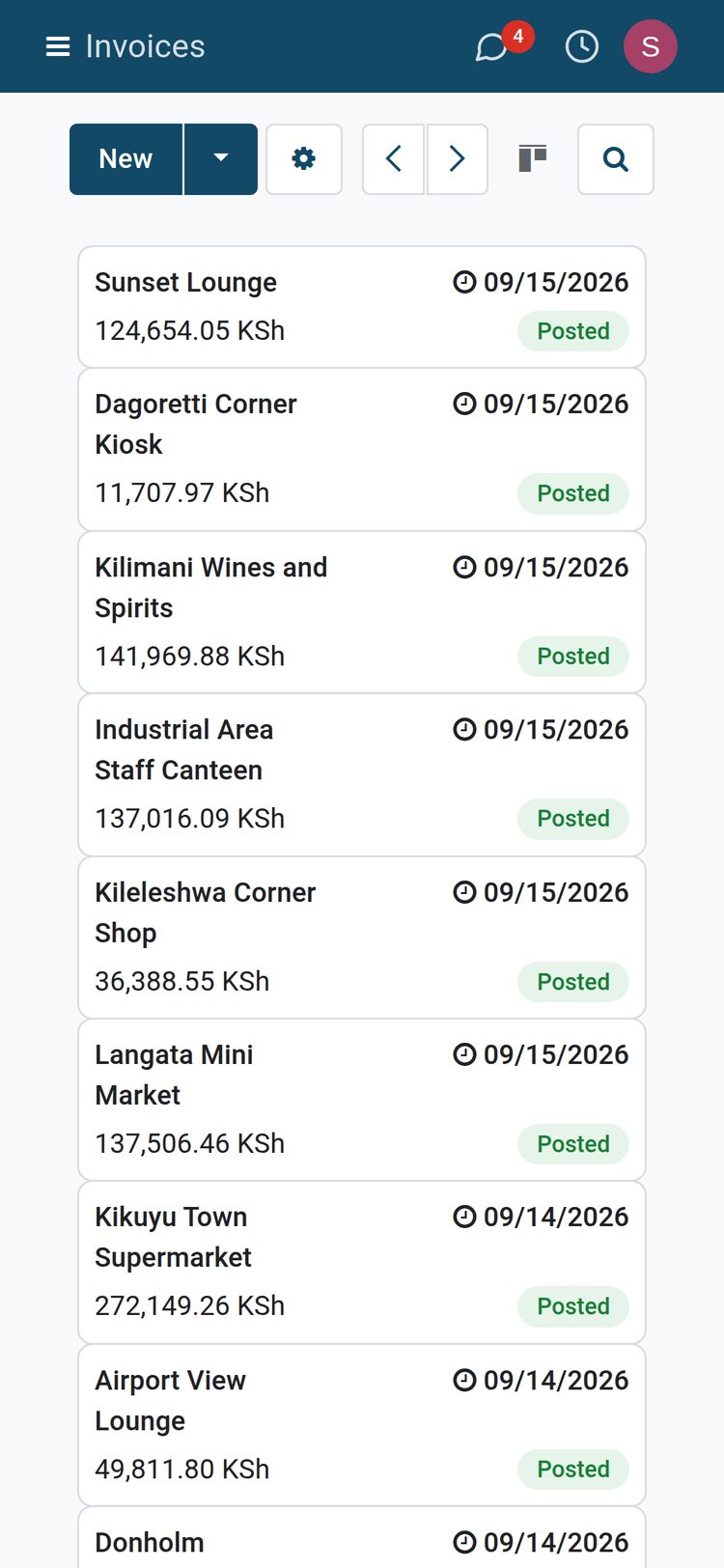 Invoicing
Invoices in your pocket
The same posted invoices on a phone: each card shows the customer, the invoice date, the total and the status, so an owner can check invoicing from the road.
Explore Invoicing →Know who owes you, and chase it without a spreadsheet
The overdue list and the payments register show who owes what and what has come in, without a receivables spreadsheet.
- Invoicing
The overdue list, ready to act on
Seven late invoices, the oldest first, each showing how many days ago it fell due in red, with the Not Paid badge and KSh 1,948,139.36 still owed summed at the foot.
Explore Invoicing →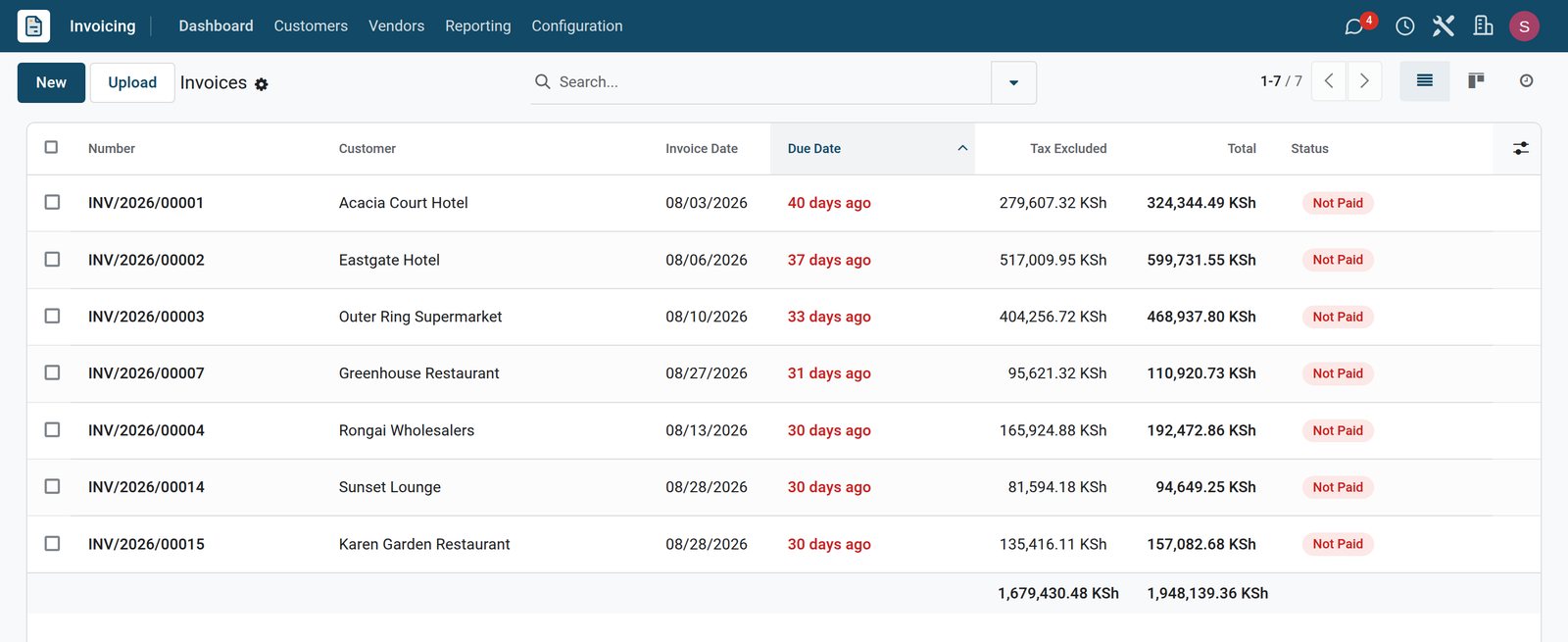
- Invoicing
Payments with their receipts
Customers › Payments lists every receipt with its date, number, bank journal, payment method, customer, KSh amount and status.
Explore Invoicing →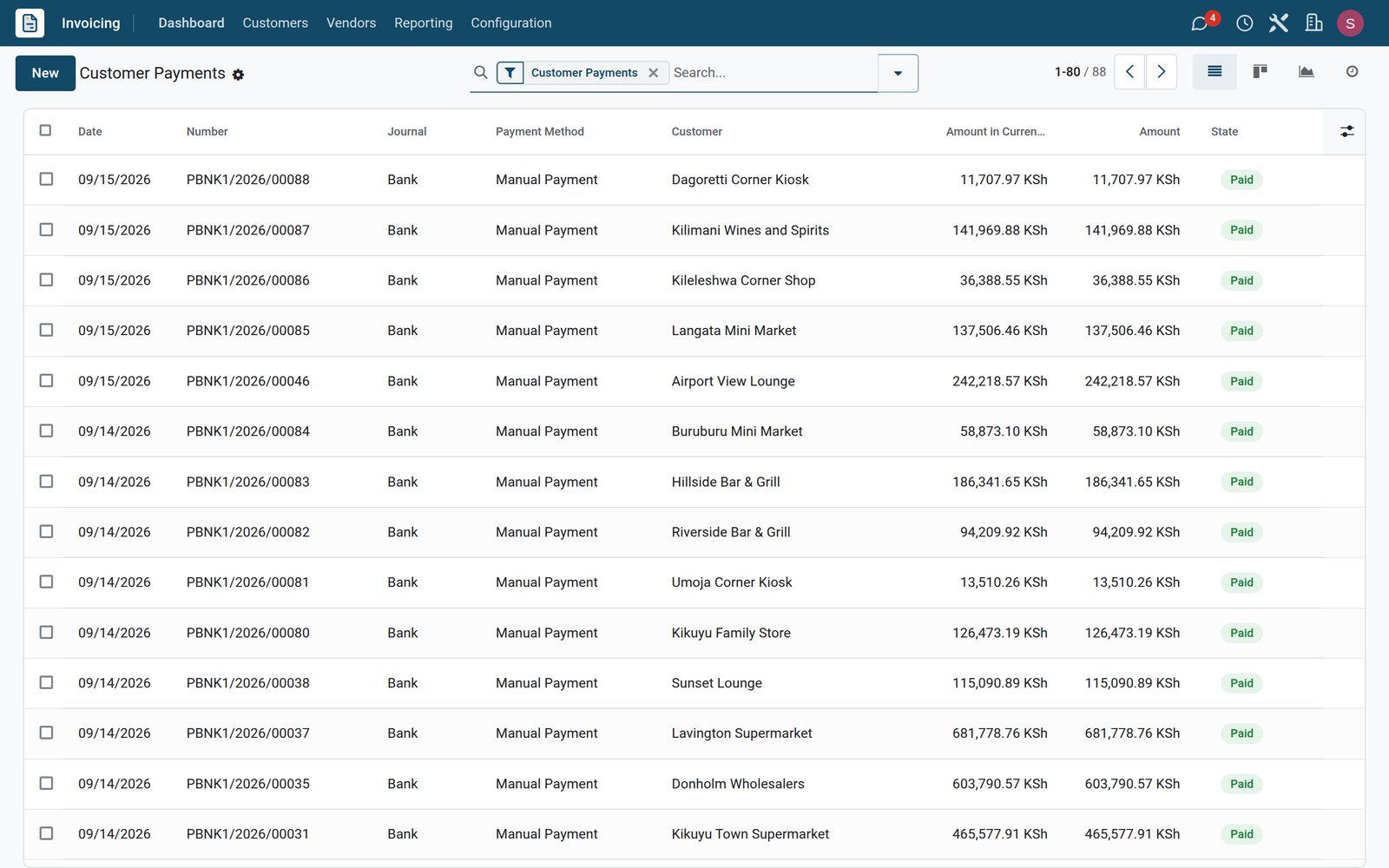
Rules you set once do the arithmetic on every invoice
Payment terms and taxes live in Configuration; the invoice applies them, prints them and reports on them.
- Invoicing
Instalment plans with the dates worked out
The 30% Now, Balance 60 Days term splits the amount due into two instalments, and its preview shows each amount with its due date before you save.
Explore Invoicing →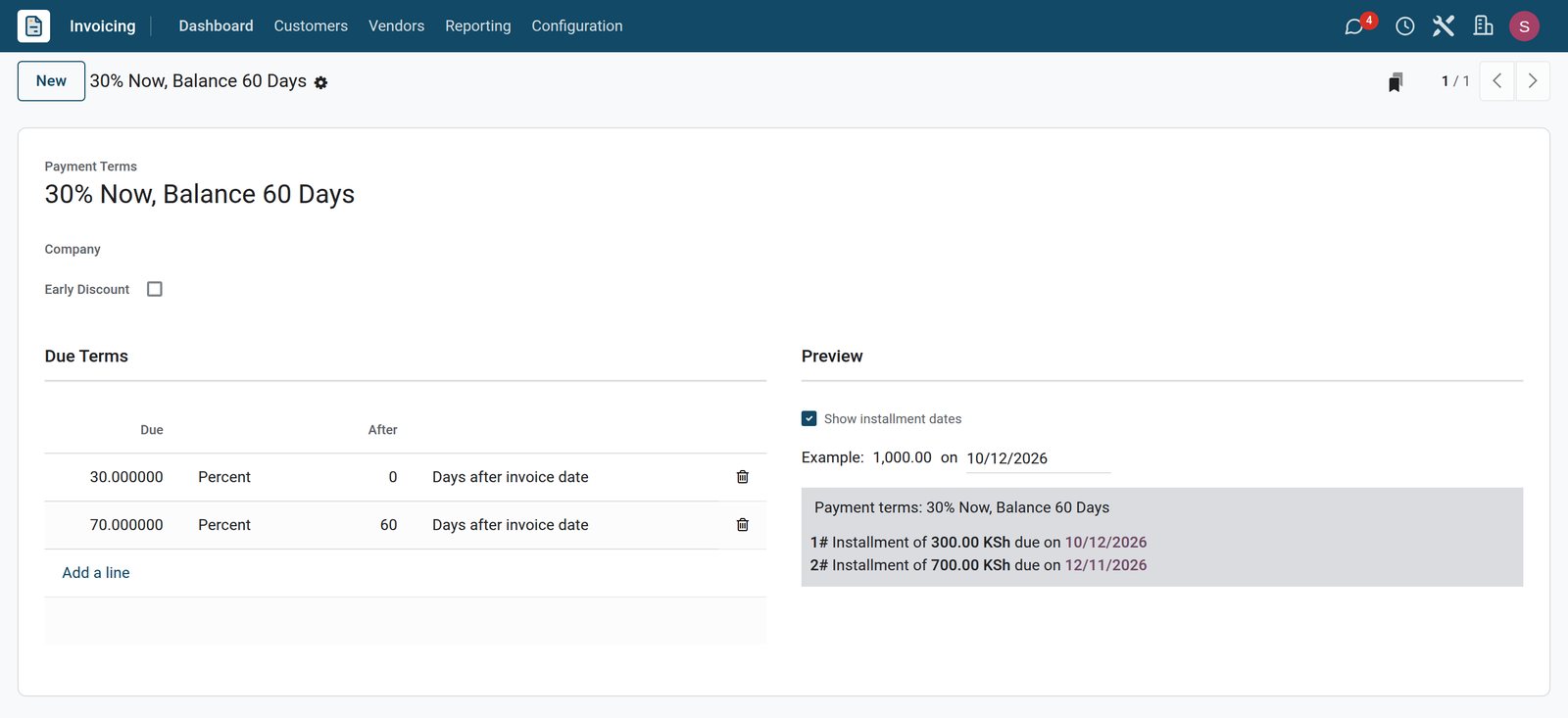
- Invoicing
The company's tax set, ready
The Taxes list holds the company's twelve active taxes for sales and purchases: 16% and 8% VAT, zero-rated, exempt, export and import VAT, and 2% withholding.
Explore Invoicing →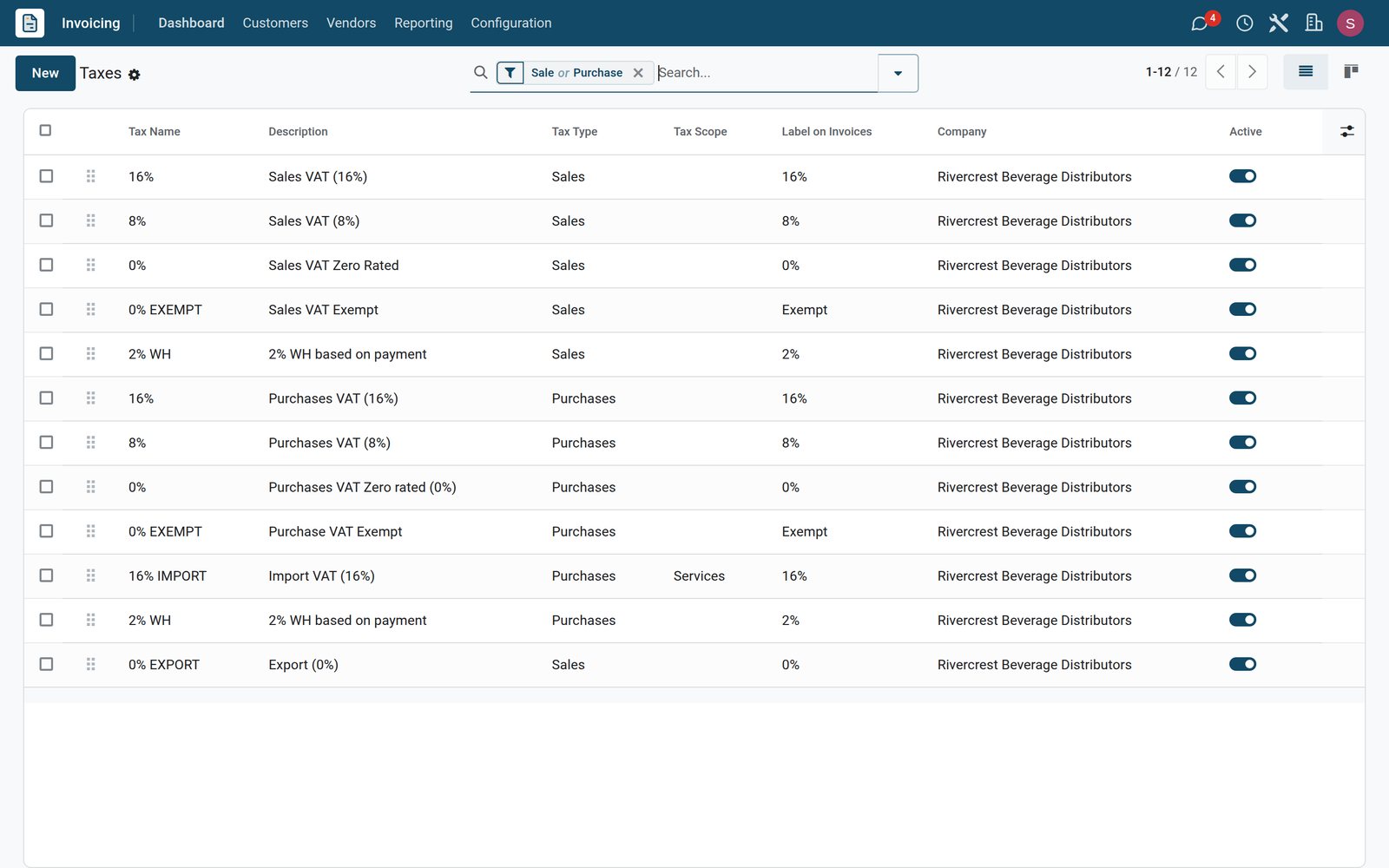
In your country
Made for how business is done in your country
Mobile money, e-invoicing, several currencies and several companies are settings, not projects.
Mobile money and cards online
M-Pesa, Mobile money and MoMo are among the payment methods online providers offer; install and enable a provider and the portal invoice shows a Pay button.
E-invoicing with the tax authority
Country e-invoicing modules add the authority's fields to invoices: a Kenyan company's invoice, for example, carries an eTIMS Details tab with receipt number and signature, plus a Send to eTIMS button.
Withholding tax handled
The 2% WH tax is computed on the invoice like any other rate, the WH Report totals it, and certificate number and date fields record the certificate.
Any currency on the invoice
Invoice in any of 169 currencies while the ledger keeps the company currency; rates update by hand or through Automatic Currency Rates, and Unrealized Currency Gains/Losses shows the exposure.
Several companies, one login
Switch company from the top bar; each company's books keep their own journals, taxes, fiscal country and invoice numbering, all under one login.
Email, SMS and post
Email with the Invoice: Sending template, add SMS to any follow-up level, or send by post and the letter is printed and mailed for you.
Who uses it
Who uses it, and what each person sees
The Invoicing, Bookkeeper, Administrator and Read-only access levels decide who can create, post, configure or only look.
Owner or managing director
Reads the dashboard cards and the Invoicing board under Dashboards › Finance, and checks invoices from a phone; Read-only access lets them look without changing a figure.
Accounts clerk
With the Invoicing level: creates invoices from orders, sends them, registers payments and prints receipts, with no access to the chart of accounts or lock dates.
Salesperson
Sees which confirmed orders still need invoicing, presses Create Invoice on the order, and follows its Invoices smart button to check whether it has been paid.
Credit controller
Works the Overdue filter, the Aged Receivable report and the follow-up levels, schedules calls as activities, and prints or emails the Follow-Up Report.
Accountant
As Bookkeeper or Administrator: reconciles the bank, prepares the Tax Return and WH Report, sets Lock Dates and reads the Audit Trail of changes.
Your customer
Opens the portal link to view and download invoices with your payment terms and conditions, and pays online once a payment provider is enabled.
Works with
Invoicing runs with the rest of BridgeERP
Every app that sells something creates the same customer invoice, so one list and one set of reports cover them all.
 SalesConfirmed orders wait to be invoiced; bill ordered or delivered quantities, take a down payment, or invoice several orders at once.
 CRMA won opportunity becomes the quotation, the order and then the invoice, with the salesperson and sales team carried onto every document.
 SubscriptionsMonthly, 6 Months and Yearly plans invoice themselves on the next invoice date, and the MRR Evolution and Retention dashboards read the result.
 Point of SaleTill sessions post to the Point of Sale journal; a customer can ask for an invoice at the counter or settle an old balance at the till.
 eCommerceWeb orders arrive as sales orders ready to invoice, and an online payment is recorded against the order it paid for.
 PurchaseVendor bills sit beside customer invoices with the same terms, taxes and payment screens; upload a PDF and Digitize document reads it.
 InventoryDelivered quantities feed the invoice when the policy is delivered quantities; the Inventory Valuation journal posts the cost of goods sold.
 AccountingEvery invoice is a journal entry: bank reconciliation, Tax Return, Balance Sheet and Profit and Loss come from the same records.
 ProjectsAnalytic accounts on invoice lines report revenue per project, department or internal plan, and the Analytic Report sums it up.
 AppointmentsAsk for a prepayment when a booking is made online, so the money is in before the appointment takes place.
 EventsTicket sales become orders and invoices; the Events dashboard reads attendance and revenue from the same records.
 StudioAdd a field, a column or an automation to the invoice with drag-and-drop, without waiting for a developer.
Reports and control
Reports that answer the money questions
All under Accounting › Reporting or Dashboards, all live from posted invoices.
Aged Receivable
Who owes what and for how long, customer by customer, in four ageing periods plus Older, with a partner filter and Unfold All down to the invoice.
Partner Ledger and Customer Statement
Every invoice, credit note and payment on one account; the Customer Statement variant is the one to email when a client asks for a reconciliation.
Follow-Up Report
The Partner Ledger's Follow-Up Report variant lists each customer's due and overdue invoices; Print Follow-up Letter produces the paper version for the post.
Invoice Analysis
Reporting › Management › Invoice Analysis: invoiced amounts by month, product category, salesperson, sales team or customer, as a graph or a pivot table.
Tax Return and WH Report
The Tax Return of the company's country totals output and input VAT for the period from the tax grids on each invoice; on the demo, a WH Report totals withholding tax.
Invoicing dashboard
Dashboards › Finance › Invoicing: a spreadsheet dashboard fed by invoice data, with the Accounting and Benchmark dashboards a click away.
Audit Trail and lock dates
Reporting › Management › Audit Trail lists changes to journal entries with who made them and when; Lock Dates stop back-dated invoices once a return is filed.
Documents that print
The invoice PDF, the PDF without Payment, the Payment Receipt and the Print Follow-up Letter, each in the document layout you chose.
See who buys the most, at a glance
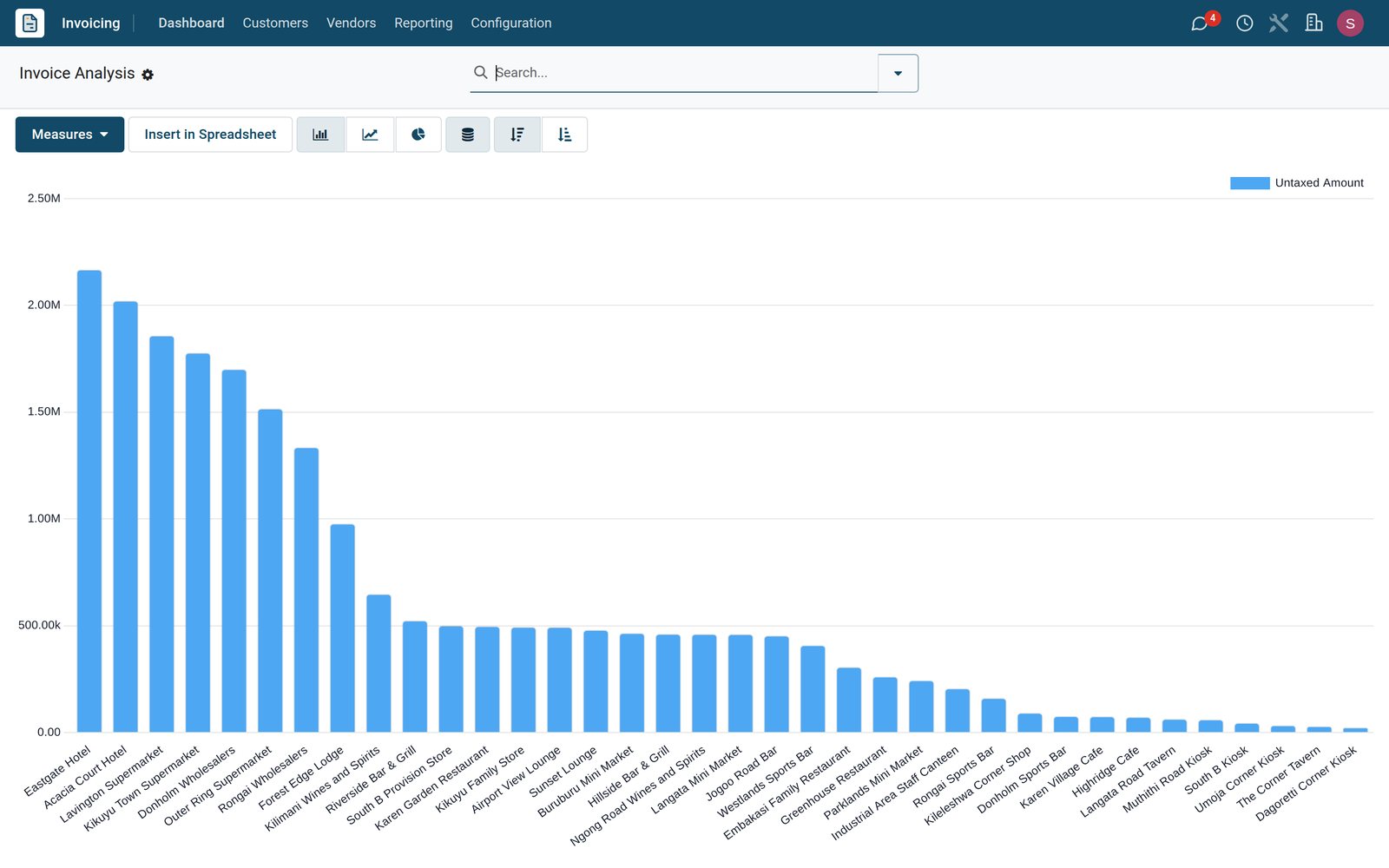
Invoice Analysis is a graph and a pivot on the same data; switch measure, grouping and period without leaving the screen.
 Invoicing
Invoiced amounts by customer, largest first
Invoice Analysis charts the untaxed amount invoiced to each customer, largest first, from the hotels and supermarkets down to the corner kiosks, and Insert in Spreadsheet takes the figures further.
Explore Invoicing →What sets it apart
What sets it apart
Not a stand-alone invoicing tool: the same document is the sales record, the tax record and the ledger entry.
Invoices from every source
Sales orders, subscriptions, web shops, events and invoiced till orders all create the same customer invoice, so one list and one report cover the lot.
E-invoice files built into Send
Set a customer to a UBL or Factur-X e-invoice format and the Send window attaches the XML file alongside the PDF, with no plug-in to buy.
Recurring without a second app
Set Auto-post to Monthly, Quarterly or Yearly with an end date and the invoice re-issues itself; Subscriptions adds plans when you need them.
Credit control at the source
Sales Credit Limit warns when an invoice or order would take a customer past the limit; Warnings in Invoices shows the note you left on the account.
Payments that know their invoice
Register Payment offers early-payment discounts, instalment amounts and difference handling, and leaves the balance open when a customer short-pays.
Bank statements that match themselves
CSV, OFX and CAMT statement imports or online synchronisation feed the bank; four reconciliation models ship ready, Invoices/Bills Perfect Match among them.
Getting started
Up and running in days, not months
Everything below is a standard menu or setting; nothing needs a developer.
Import what you already have
Customers, products and open invoices load from XLSX or CSV through Import records on each list, matching your columns to the right fields.
Localisation in one choice
Choose the company's fiscal localisation, with packages for more than 100 countries, and its chart of accounts, VAT and withholding taxes and Tax Return arrive with it.
Connect the bank
Configuration › Banks › Add a Bank Account creates the bank journal; then import statements, or turn on online synchronisation where your bank is covered.
Your logo, your terms
Pick one of seven document layouts, add your logo and colours, and set Default Terms & Conditions as text or a web page on every invoice.
Numbering and references
The journal code drives INV/2026/ numbering, credit notes run on their own RINV sequence, and the invoice list flags any gap in the sequence.
Extend without code
Studio adds fields and automations to the invoice; the Accounting settings switch on cash rounding, discounts, units of measure and customer addresses.
Questions
Questions about Invoicing
Not covered here? Contact us.
Can I create an invoice without a sales order?
Yes. Customers › Invoices › New opens a blank invoice; choose the customer and add product or free-text lines. Taxes, payment terms and the due date fill from the customer and product records.
How do my customers pay online?
Install and enable a provider under Configuration › Online Payments › Payment Providers, such as Flutterwave, Stripe or PayPal. The emailed invoice then carries a portal link with a Pay button, and the payment is recorded against the invoice.
Does it handle our country's VAT and e-invoicing?
Yes. The country's localisation installs its taxes and tax return, and e-invoicing modules add the tax authority's fields where one exists. On the demo, the Kenya localisation adds 16%, 8%, 0%, exempt, export and withholding taxes, and the eTIMS module adds a Send to eTIMS button.
What about recurring invoices?
Two ways. Set Auto-post on an invoice to Monthly, Quarterly or Yearly with an end date, or use the Subscriptions app with its Monthly, 6 Months or Yearly plans, which invoice on the next invoice date.
Can I invoice in US dollars or another currency?
Yes. Activate the currencies you need under Configuration › Currencies, keep rates up to date by hand or with Automatic Currency Rates, and pick the currency on the invoice; the value in the company currency posts to the ledger.
How do payment reminders work?
Follow-up Levels define the days overdue, the email or SMS template and whether invoices are attached. Set a level to Automatic and it sends itself; otherwise the Follow-Up Report lets you send or print reminders customer by customer.
How do I issue a credit note?
Open the posted invoice, press Credit Note, give the reason and date, adjust the lines and post it. The RINV credit note is linked to the original invoice and reduces the customer's balance.
Can a posted invoice be changed later?
A posted invoice can be reset to draft and corrected unless a lock date covers its period. The Audit Trail records who changed what, and Lock Dates stop back-dated edits once the return is filed.
Tax compliance
Invoices your tax authority accepts
In Kenya, Uganda, Rwanda, Burundi and Zambia, each invoice, receipt and stock movement goes to the tax authority's own system when you post it. Ghana and Pakistan come next, and we connect 73 more countries on request.
- KenyaReady
eTIMS KRA
Invoices, credit notes, POS receipts and stock movements
- UgandaReady
EFRIS URA
Invoices, POS receipts and stock
- RwandaReady
EBM RRA
Invoices, POS receipts, stock and imports
- BurundiReady
EBMS OBR
Invoices, POS receipts, stock and manufacturing
- ZambiaReady
Smart Invoice ZRA
Invoices, POS receipts, stock and imports
Where Invoicing fits
Nothing here is a silo: the apps around it read and write the same records, so the hand-offs happen on their own.
What feeds it, and what it feeds — these are real app connections, not a diagram.
- Customers & sales
- Finance
Sales
Quotations, sales orders, price lists and customer portal.
Sales →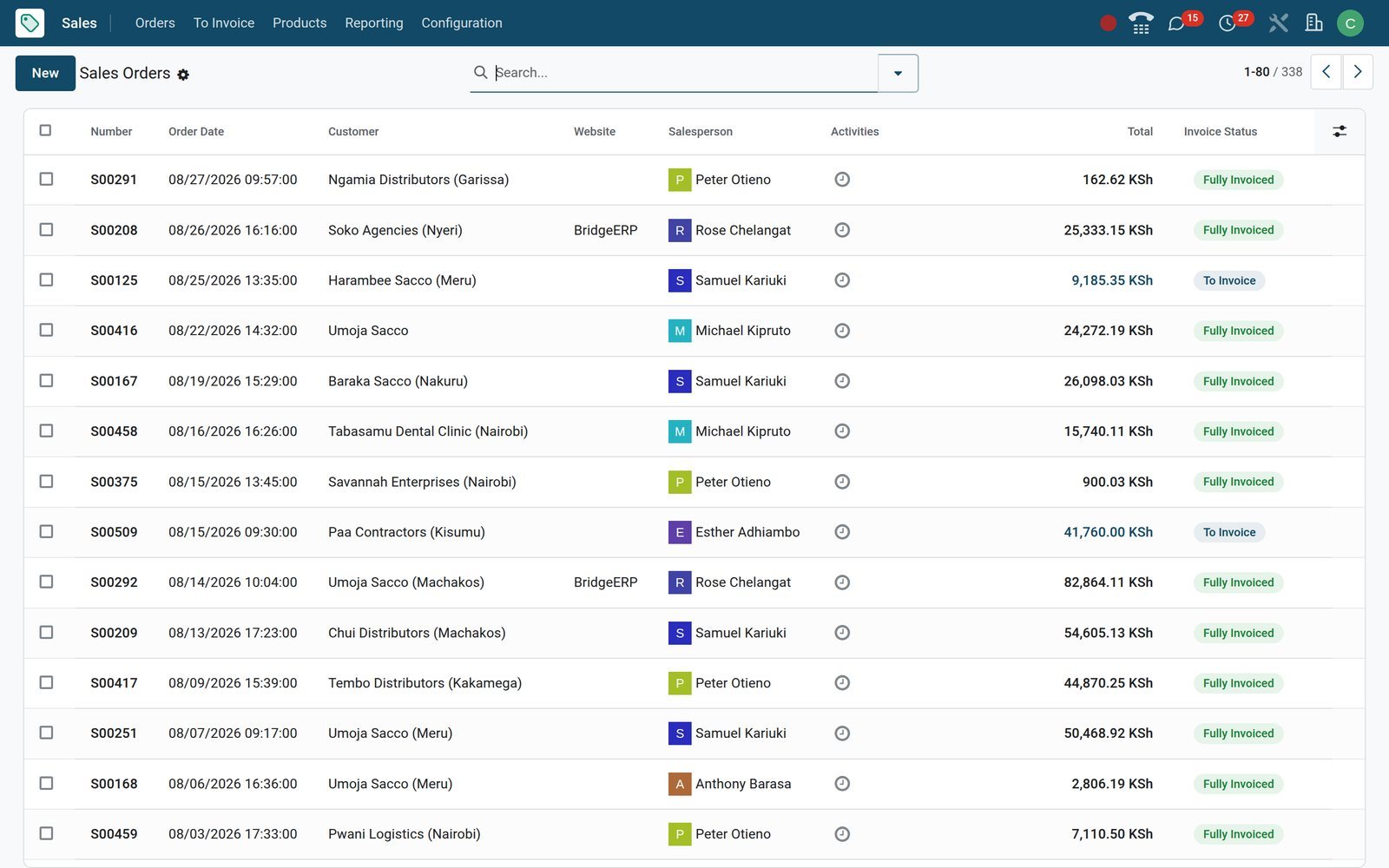
Put Invoicing to work
Add it to your plan and pay only for what you use, or see it running on your own demo first.