

Clothing Store: Sizes, colours, exchanges and loyalty for clothing stores
BridgeERP sells every size and colour with its own barcode and stock, takes exchanges and returns at the till, keeps loyalty points and orders the next season ahead.
Free instant access. No credit card required.
 Invoicing
 Point of Sale
 Inventory
 Purchase
 eCommerce
 Website Builder
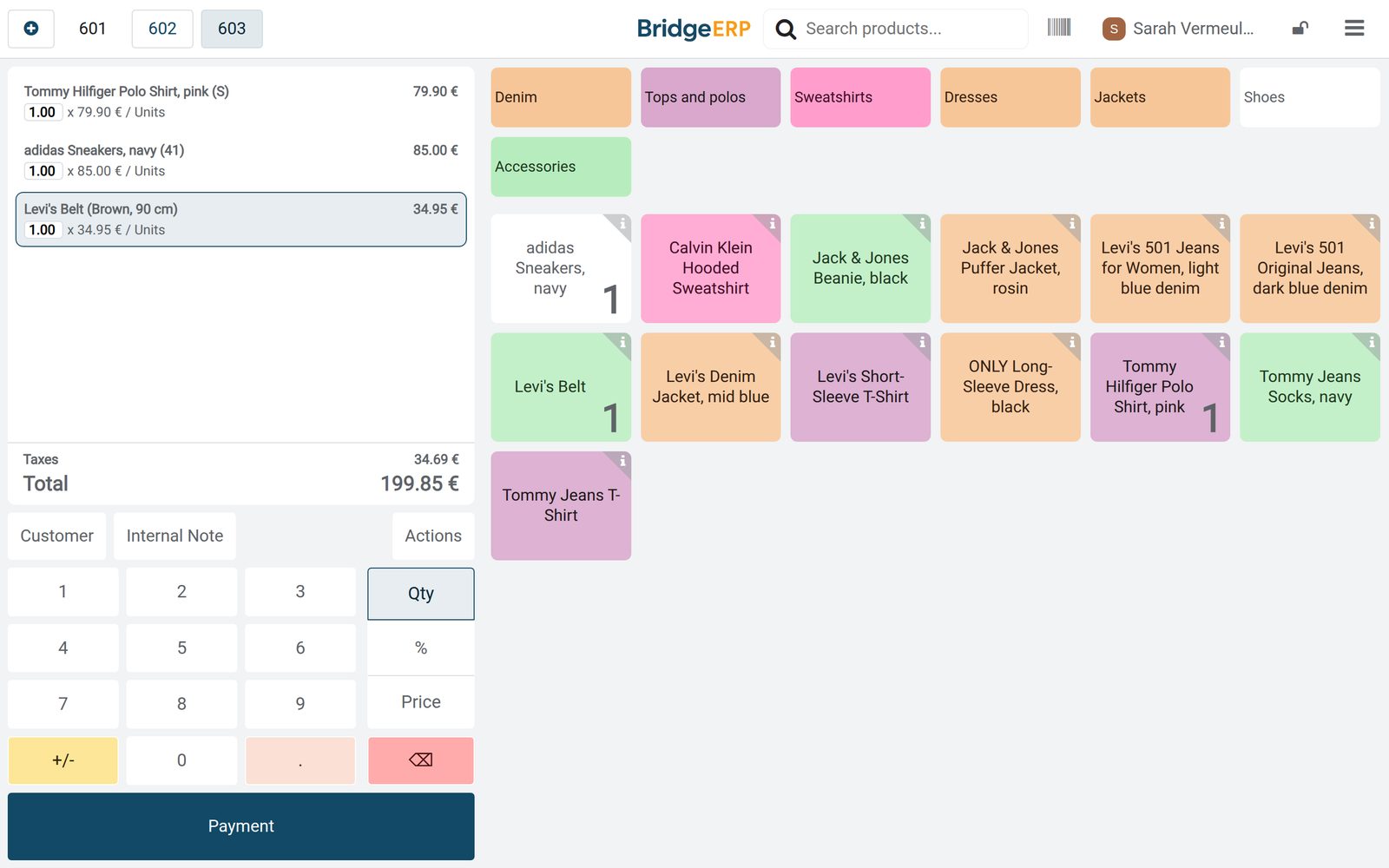
At the till, size by size
Each size and colour is its own item with its own barcode, and the VAT is already in the shelf price.
 Point of Sale
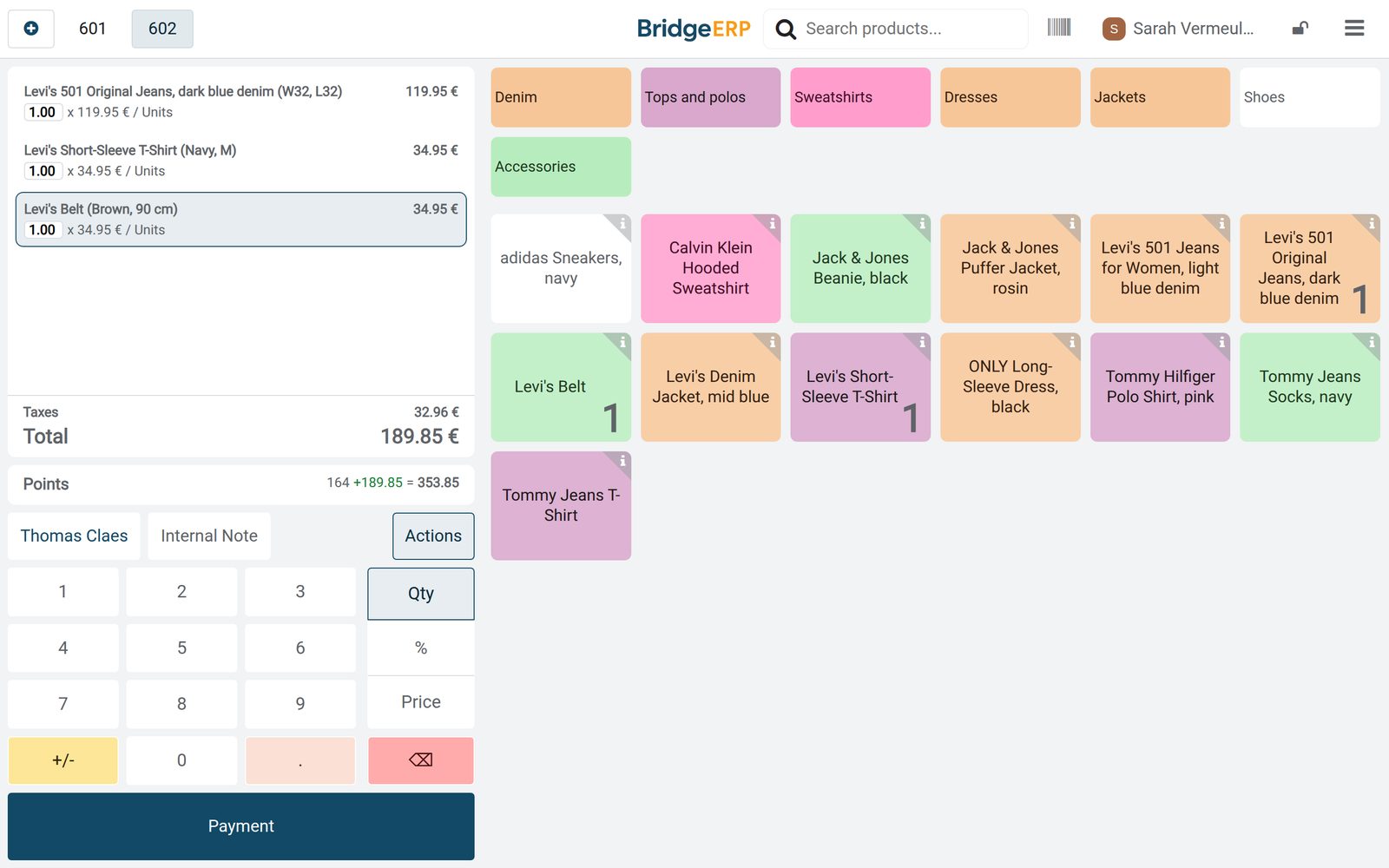
Jeans, a T-shirt and a belt
Thomas Claes bought Levi's 501 jeans in W32 L32, a navy T-shirt in M and a brown belt in 90 cm: €189.85, VAT of €32.96 included.
Explore Point of Sale →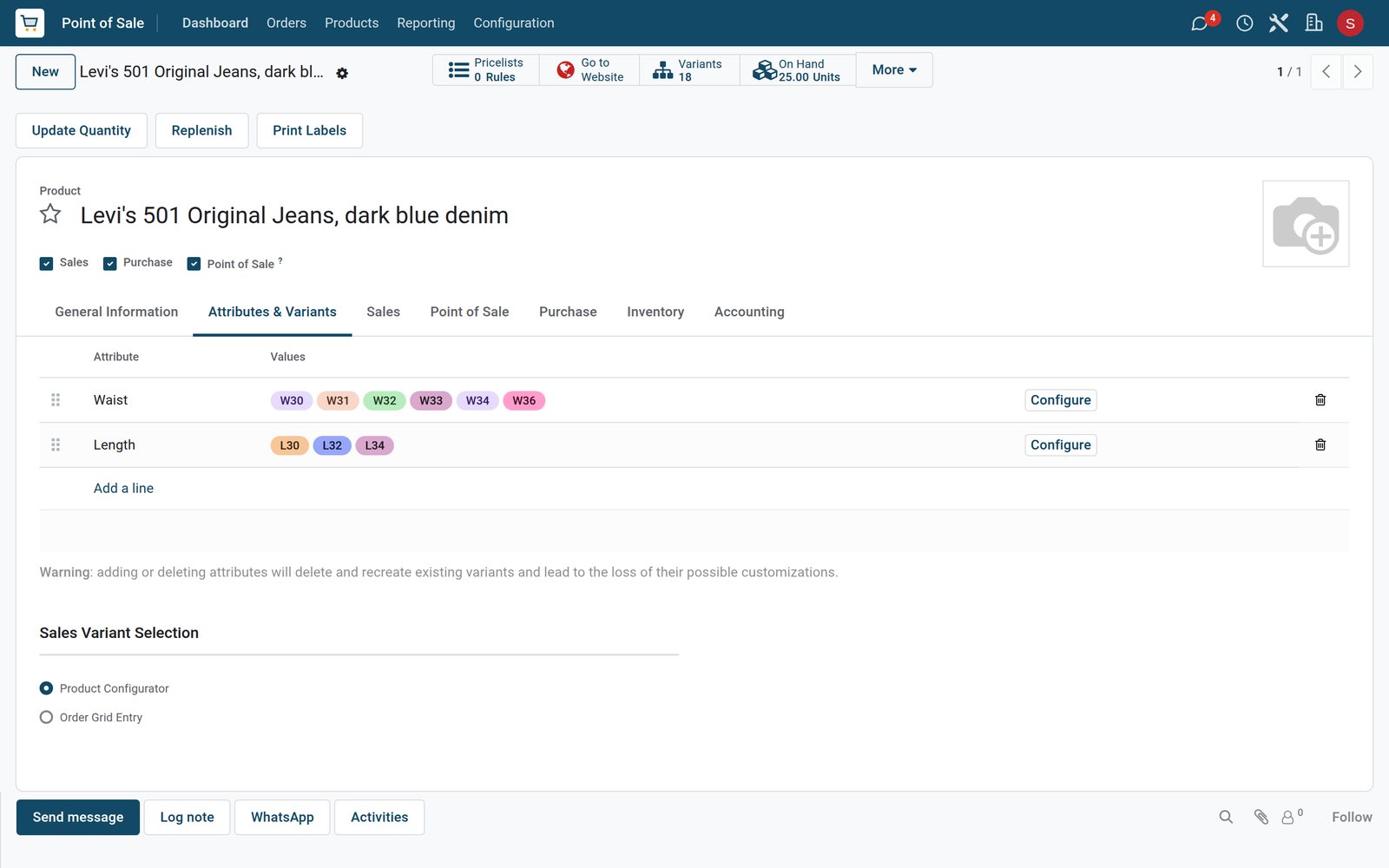 Point of Sale
One jean, eighteen sizes
Levi's 501 Original jeans come in six waist sizes and three leg lengths, so the one product has 18 variants.
Explore Point of Sale →By the numbers
What ships inside
Counted in the product.
- 5
- ways to show a size or colour choice: radio buttons, pills, a drop-down list, colour swatches or checkboxes
- 3
- ways variants are made: all at once, when a combination is first sold, or never, for options that are not stocked
- 8
- kinds of programme for customers, from loyalty cards and promotions to gift cards, eWallets and discount codes
- 2
- ways the till shows prices: with VAT included, or before tax with the tax added at checkout
Inside the app
What is inside
The apps a clothing store runs on, and what each does for the day.
Sizes and colours
Each size and colour of a product is a variant with its own barcode, price and stock count.
Stock by size
On-hand and forecast quantities are kept per size and colour, so a missing size shows before a customer asks for it.
Exchanges at the till
A sold item is taken back from its original order and the new size goes on the same ticket.
Returns and refunds
Returned items go back into stock and the money goes back by card or cash, linked to the original sale.
Loyalty cards
Customers earn points on what they spend and trade them for a discount at the till.
Buying by size
Purchase orders list each size and colour with its quantity, and the delivery is received size by size.
Seasonal orders
Next season's jackets and knitwear are ordered months ahead, with the date each delivery is due.
Sales by department
The sales analysis shows what each department sold, from denim and tops to accessories.
Step by step
From the collection to the customer
How stock moves through a clothing store in BridgeERP, and which app does each step.
- Step 1
Buy
The collection is ordered from brands and distributors size by size, with the date each delivery is due.
Purchase - Step 2
Receive
Deliveries are checked against the order and each size goes onto the rails and shelves.
Inventory - Step 3
Sell
The till scans the size and colour, takes card or cash and adds points to the customer's card.
Point of Sale - Step 4
Exchange
A wrong size comes back from its original ticket and the right size leaves on the same order.
Point of Sale - Step 5
Reorder
Basics that fall below their minimum come back on the replenishment list, size by size.
Inventory
Stock you can see size by size
Every size and colour is counted on its own, from the delivery to the last pair on the shelf.
 Inventory
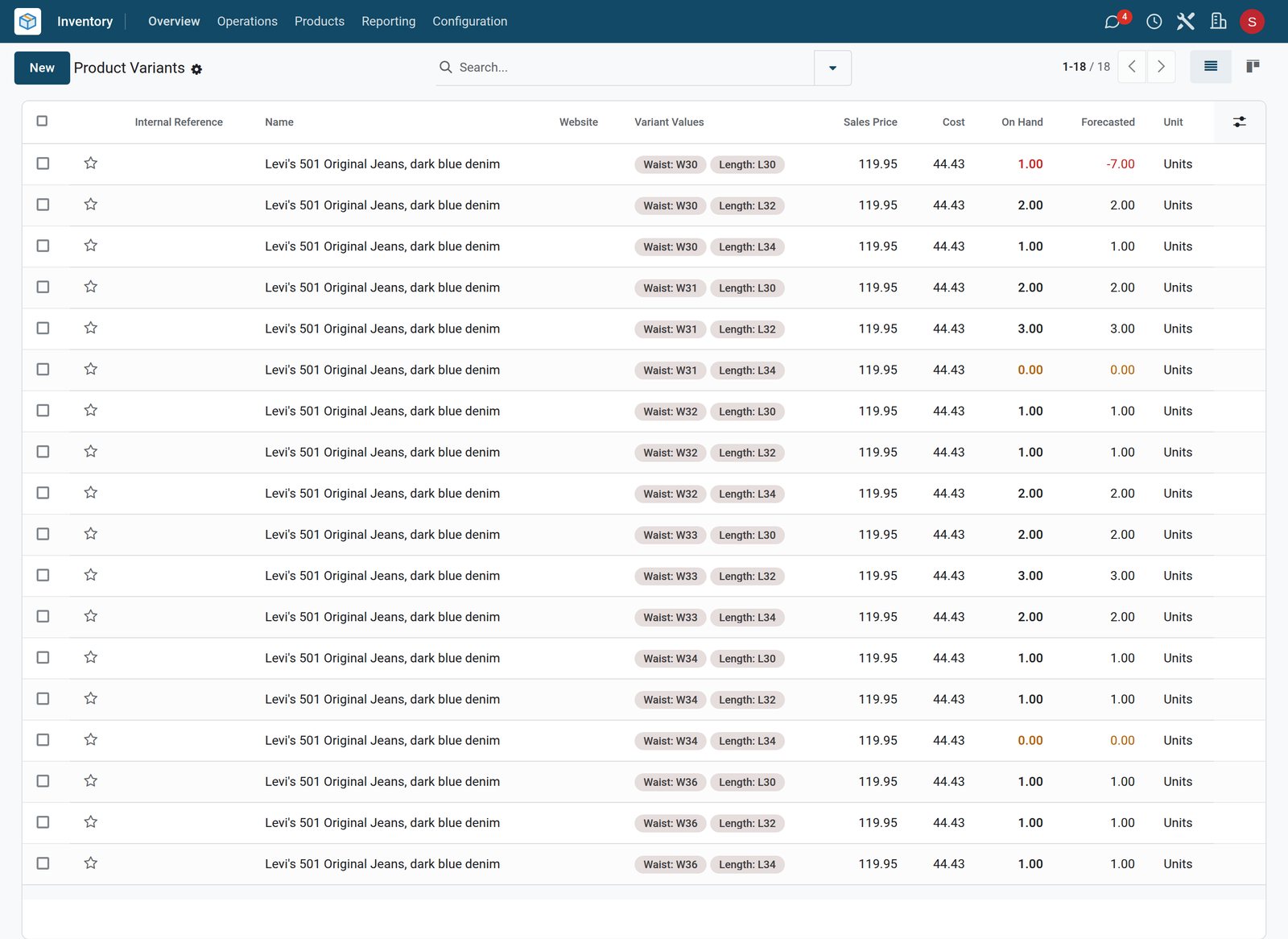
Which sizes are left
The Levi's 501 is sold out in W31 L34 and W34 L34, and each of the other 16 sizes has one to three pairs left.
Explore Inventory →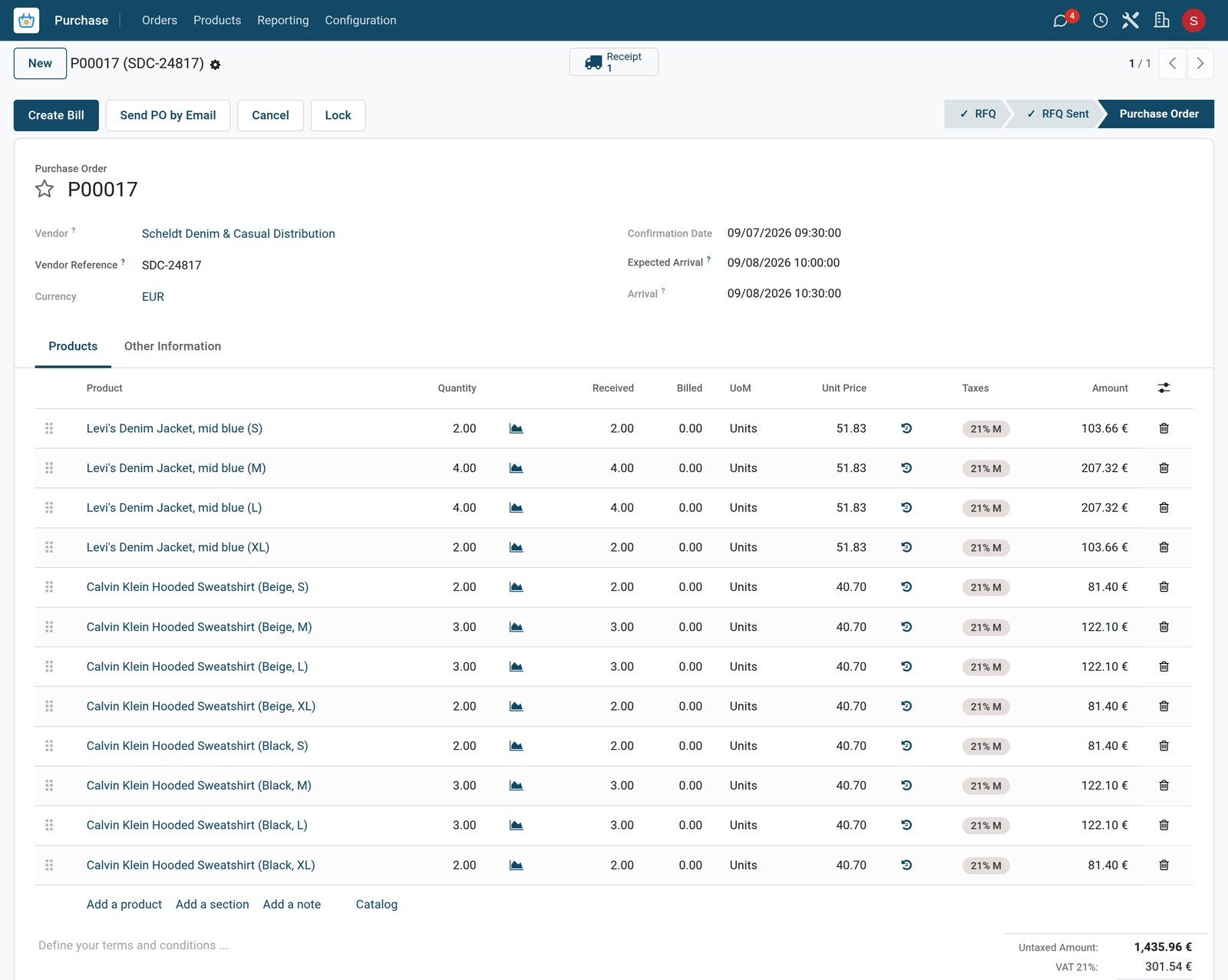 Purchase
An autumn delivery by size
Scheldt Denim & Casual Distribution delivered denim jackets and Calvin Klein hoodies size by size: 2, 4, 4 and 2 jackets from S to XL.
Explore Purchase →Exchanges and returns at the till
A size swap or a return is taken back from the original ticket, so the stock and the takings stay right.
 Point of Sale
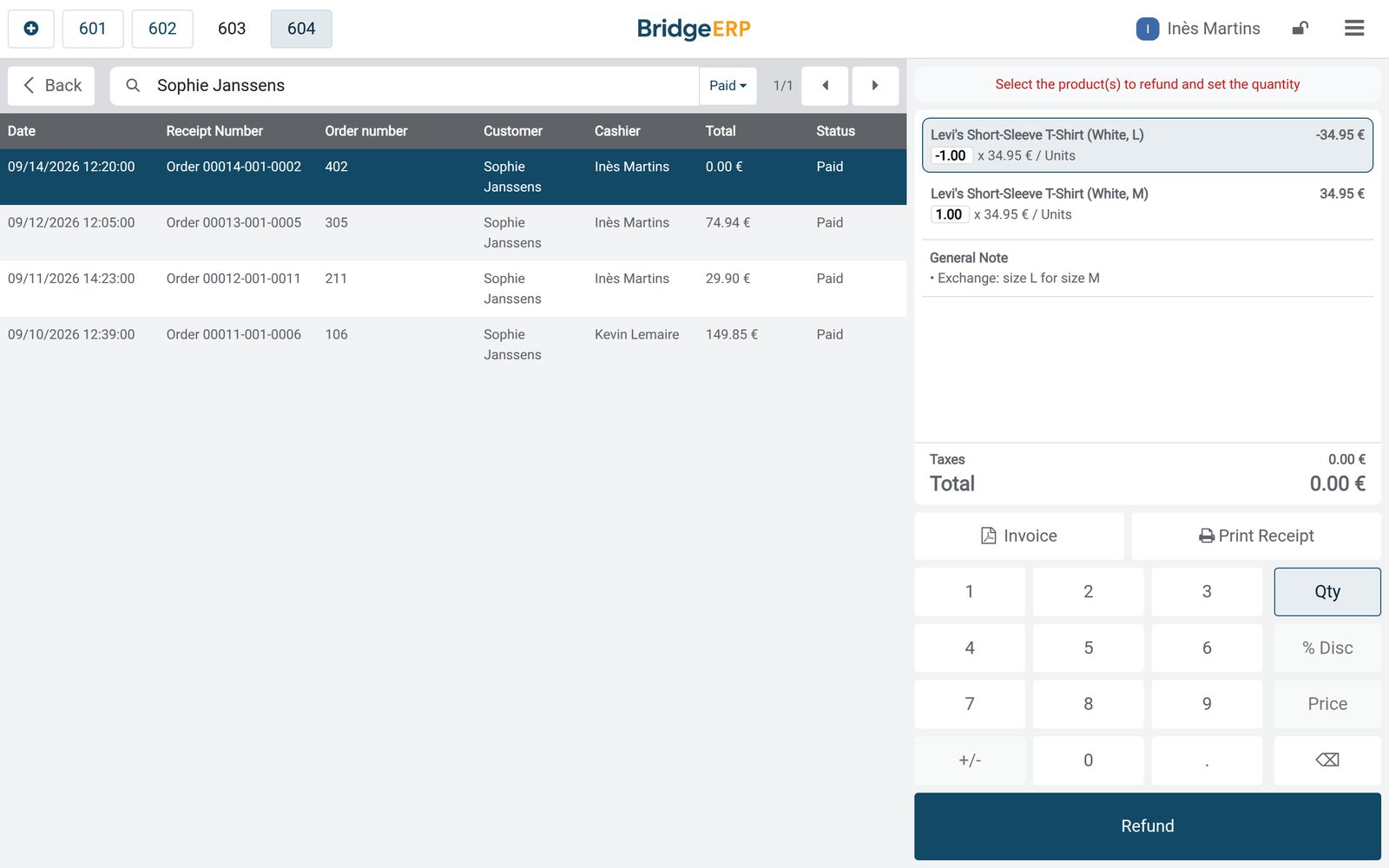
Another size, the same T-shirt
Sophie Janssens swapped a white Levi's T-shirt in L for an M: the L comes back from order Boutique till/0042, the M goes out, €0.00 to pay.
Explore Point of Sale →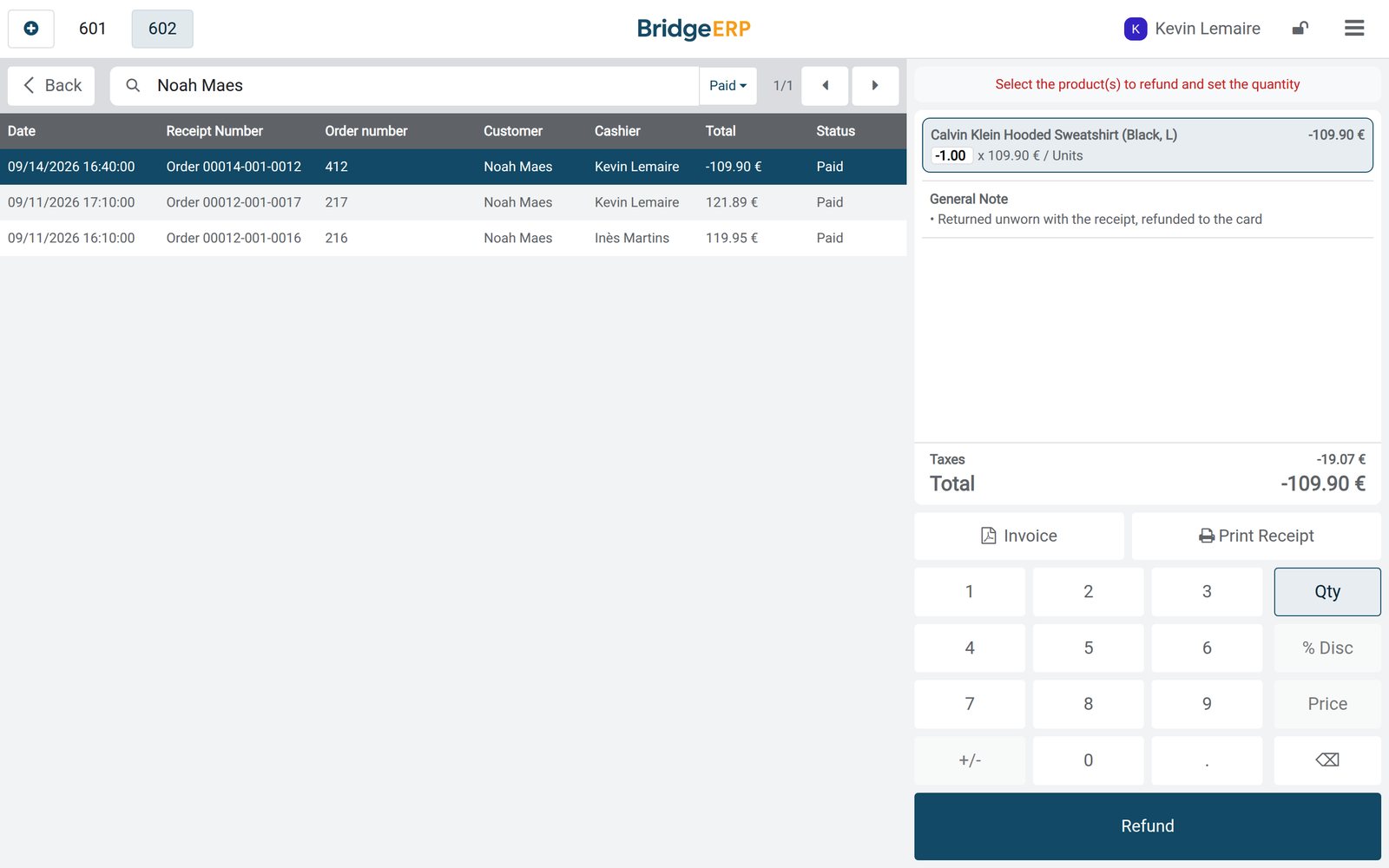 Point of Sale
A return, refunded to the card
Noah Maes returned an item bought in order Boutique till/0033, and €109.90 was refunded to the card.
Explore Point of Sale →Points for regular customers
The Style Club runs on the till, and each customer's card keeps the balance.
 Point of Sale
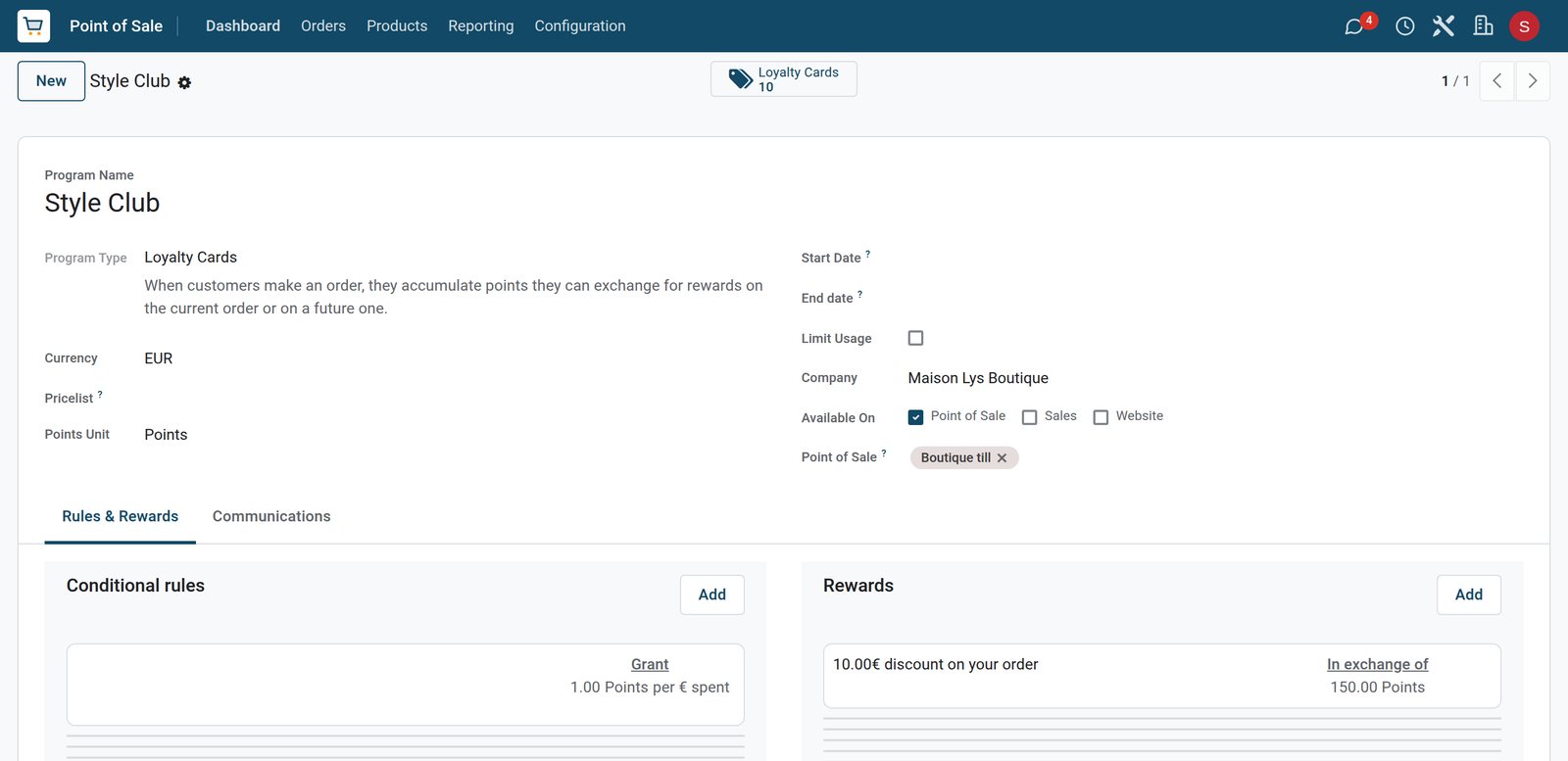
A point for every euro
The Style Club gives a point for every euro spent at the Boutique till, and 150 points take €10 off an order.
Explore Point of Sale →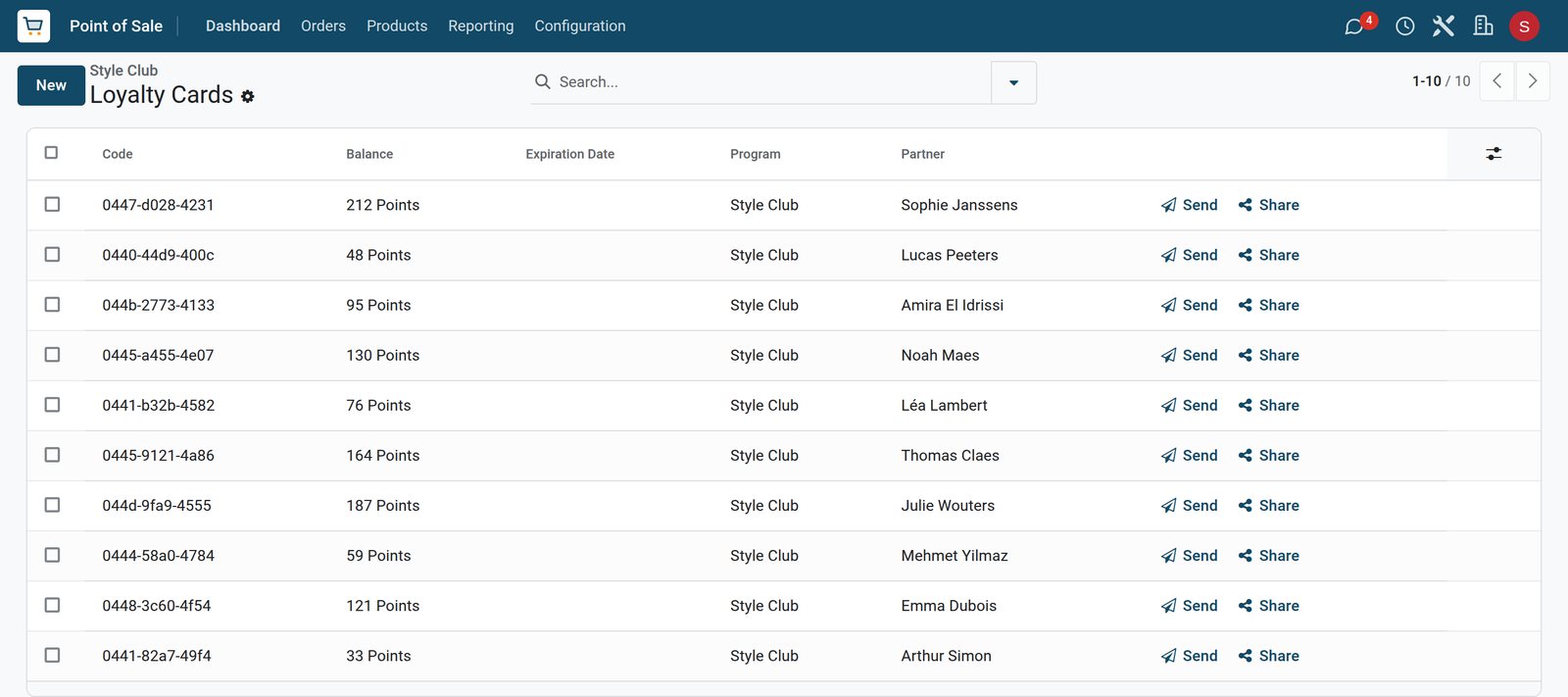 Point of Sale
Every customer's balance
Sophie Janssens has the most points, 212, ahead of Julie Wouters with 187 and Thomas Claes with 164, each on their own card.
Explore Point of Sale →Winter stock, ordered in September
Seasonal orders go to the distributors early, with the day each delivery is due.
 Purchase
Due on 6 October
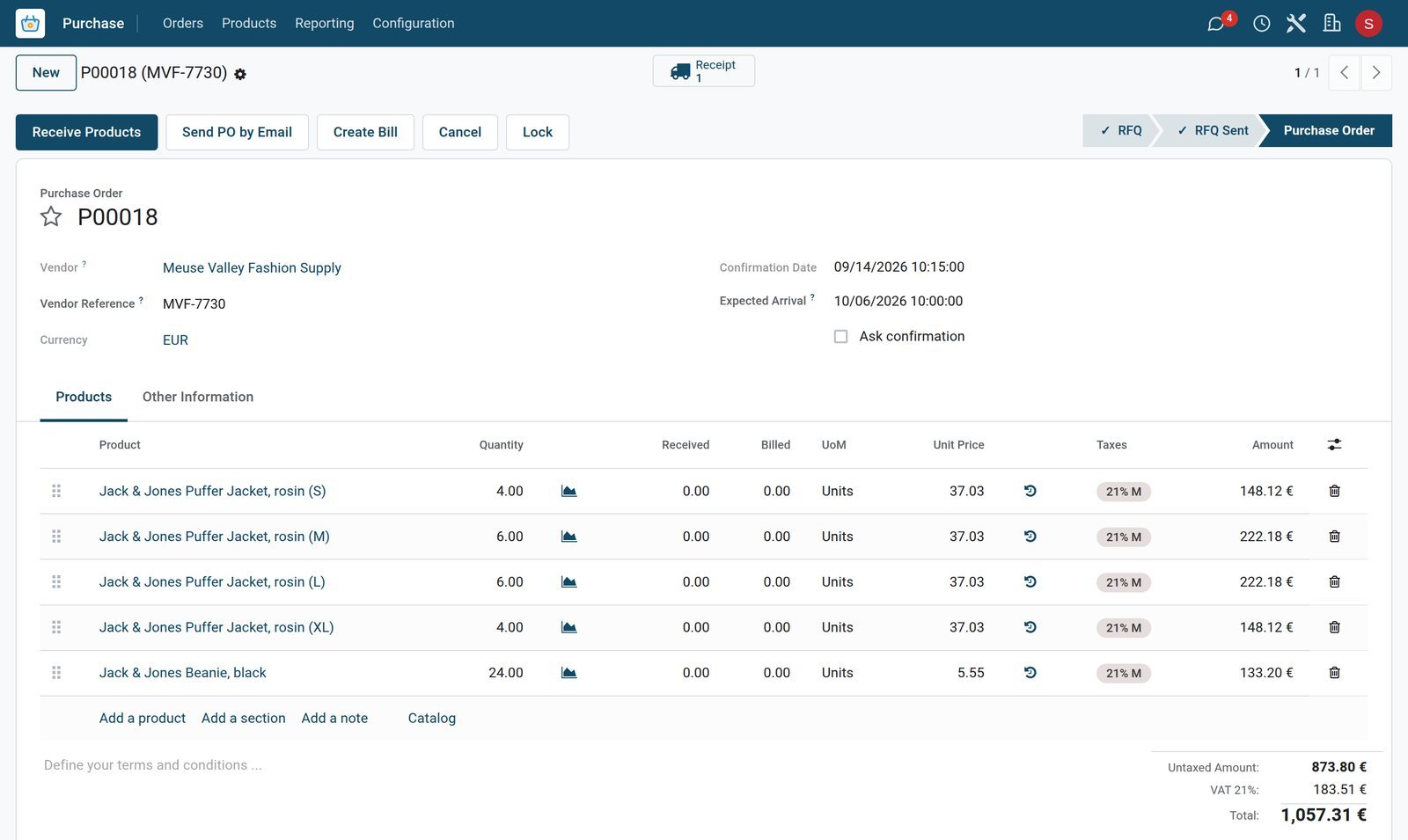
Puffer jackets in four sizes and 24 beanies were ordered from Meuse Valley Fashion Supply on 14 September, €1,057.31 due on 6 October.
Explore Purchase →A Saturday at the till, closed and counted
The session keeps the float, the orders and the payments, and the analysis shows what each department sold.
 Point of Sale
Saturday at the till
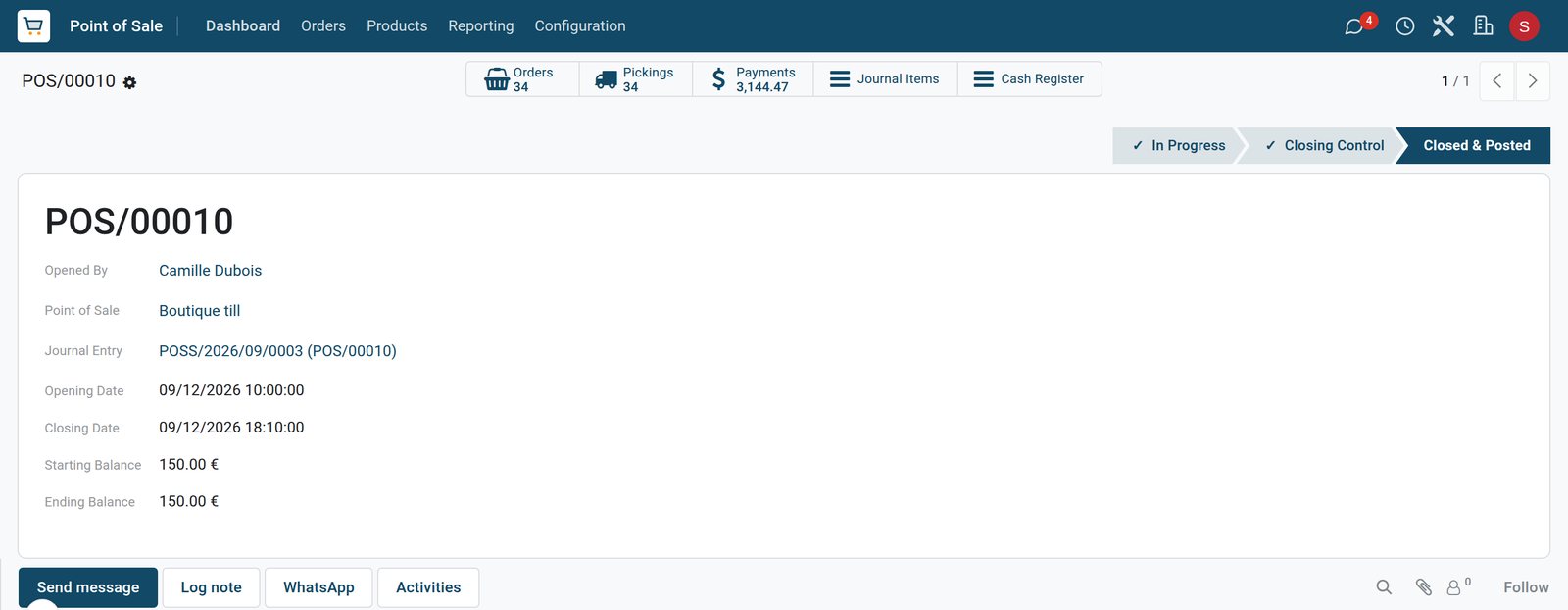
Saturday's session opened at 10:00 with a €150 float and closed at 18:10 after 34 orders and €3,144.47 in payments.
Explore Point of Sale →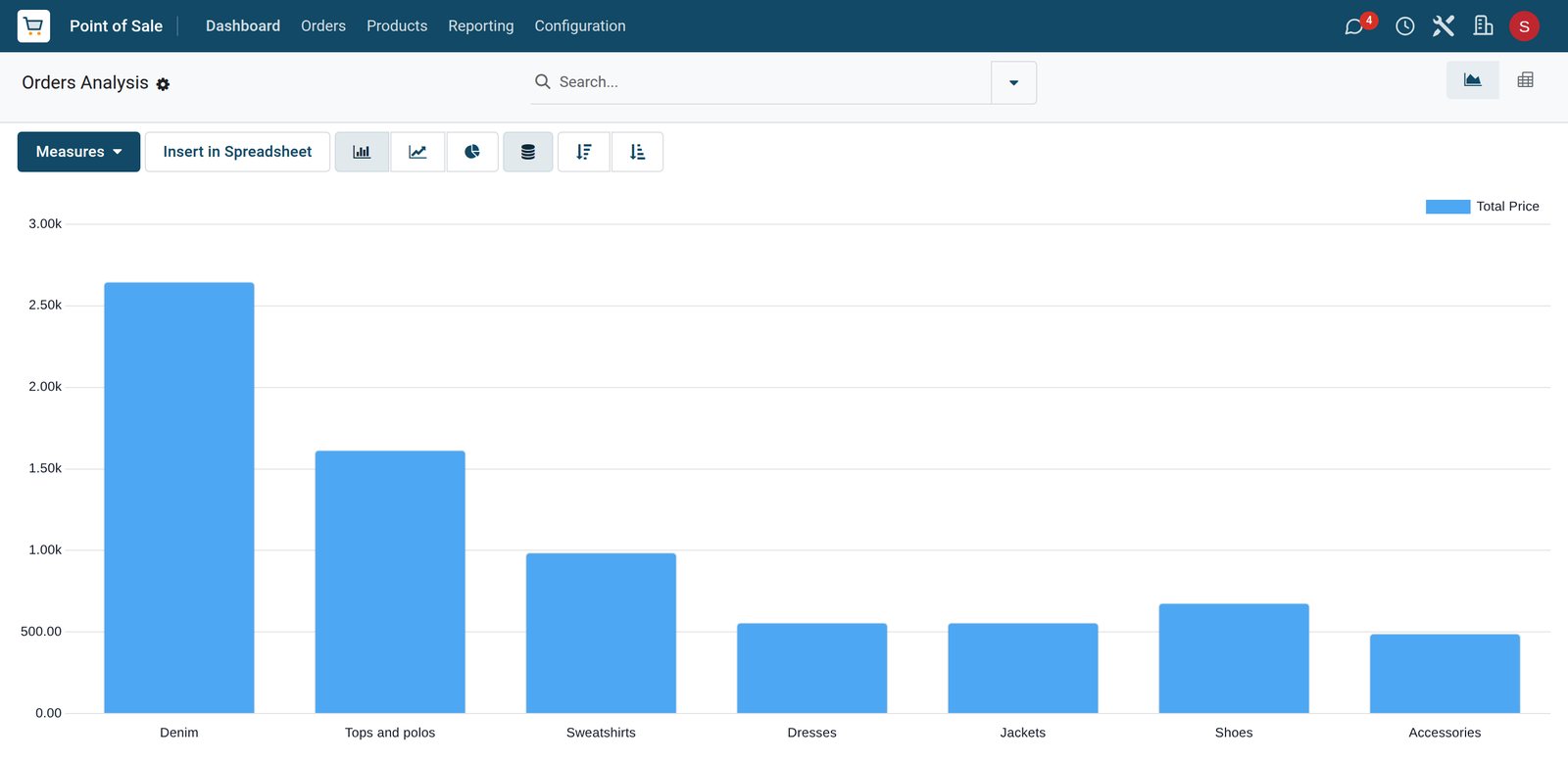 Point of Sale
Four days by department
Denim sold the most over the four days, ahead of tops and polos, then sweatshirts and shoes, with dresses, jackets and accessories behind.
Explore Point of Sale →Who uses it
Who uses it, and what they see
One system for the manager, the shop floor, the stockroom and the books.
Store manager
Sets up sizes and colours, buys the collection by size and places the seasonal orders ahead.
Sales associates
Scan the size and colour, swap sizes and take returns, and add points to the customer's card.
Stockroom
Receives brand deliveries size by size against the purchase order and puts them out on the floor.
Bookkeeper
Sees each day's takings, refunds included, posted to accounting with the VAT.
Works with
Runs with the rest of BridgeERP
Apps a clothing store draws on.


In your country
Your currency, payments and taxes
Set to the country the store trades in.
Company currency
Shelf prices, brand costs and daily takings are kept in the currency of the company; the demo store trades in EUR.
VAT included or added
VAT can sit inside the shelf price, as the 21% rate does on the demo, or sales tax can be added at checkout.
Accounting by country
Accounting packages for more than 100 countries set up the chart of accounts and the taxes for the store.
Getting started
Getting started
How a clothing store moves onto BridgeERP.
Set up sizes and colours
Create the size, colour and fit attributes once and use them on every product.
Load the collection
Import products with their variants, barcodes, shelf prices, costs and brands.
Open the till
Create the till with card and cash, and give each sales associate access to it.
Start the loyalty club
Set how many points a purchase earns and what the points are worth at the till.
Questions
Questions about Clothing Store
Not covered here? Contact us.
Can each size and colour have its own barcode?
Yes. Every size and colour of a product is a variant with its own barcode, so the till rings up the exact item that was scanned.
Can a customer exchange an item for another size?
Yes. The item is taken back from its original order and the new size goes on the same ticket; when the prices match there is nothing to pay.
Can a return be refunded to the card?
Yes. The returned item goes back into stock, the refund is paid by card or cash, and it stays linked to the original sale.
Can we see stock for each size?
Yes. On-hand and forecast quantities are kept for every size and colour, so sold-out sizes are visible straight away.
Can customers collect loyalty points?
Yes. A loyalty programme gives points on what customers spend, each customer has a card with the balance, and points turn into a discount at the till.
Can shelf prices include VAT?
Yes. VAT can be included in the shelf price, as on the demo, or sales tax can be added at checkout, depending on the country.
Tax compliance
Invoices your tax authority accepts
In Kenya, Uganda, Rwanda, Burundi and Zambia, each invoice, receipt and stock movement goes to the tax authority's own system when you post it. Ghana and Pakistan come next, and we connect 73 more countries on request.
- KenyaReady
eTIMS KRA
Invoices, credit notes, POS receipts and stock movements
- UgandaReady
EFRIS URA
Invoices, POS receipts and stock
- RwandaReady
EBM RRA
Invoices, POS receipts, stock and imports
- BurundiReady
EBMS OBR
Invoices, POS receipts, stock and manufacturing
- ZambiaReady
Smart Invoice ZRA
Invoices, POS receipts, stock and imports
Clothing Store, app by app
One connected flow instead of separate systems — the work moves from one team to the next without re-typing anything.
Every stop is a real app in your plan, and the hand-offs between them are the product.
- Customers & sales
- Operations
- Finance
Point of Sale
Touch till, offline mode, sessions, cash control and receipts.
Point of Sale →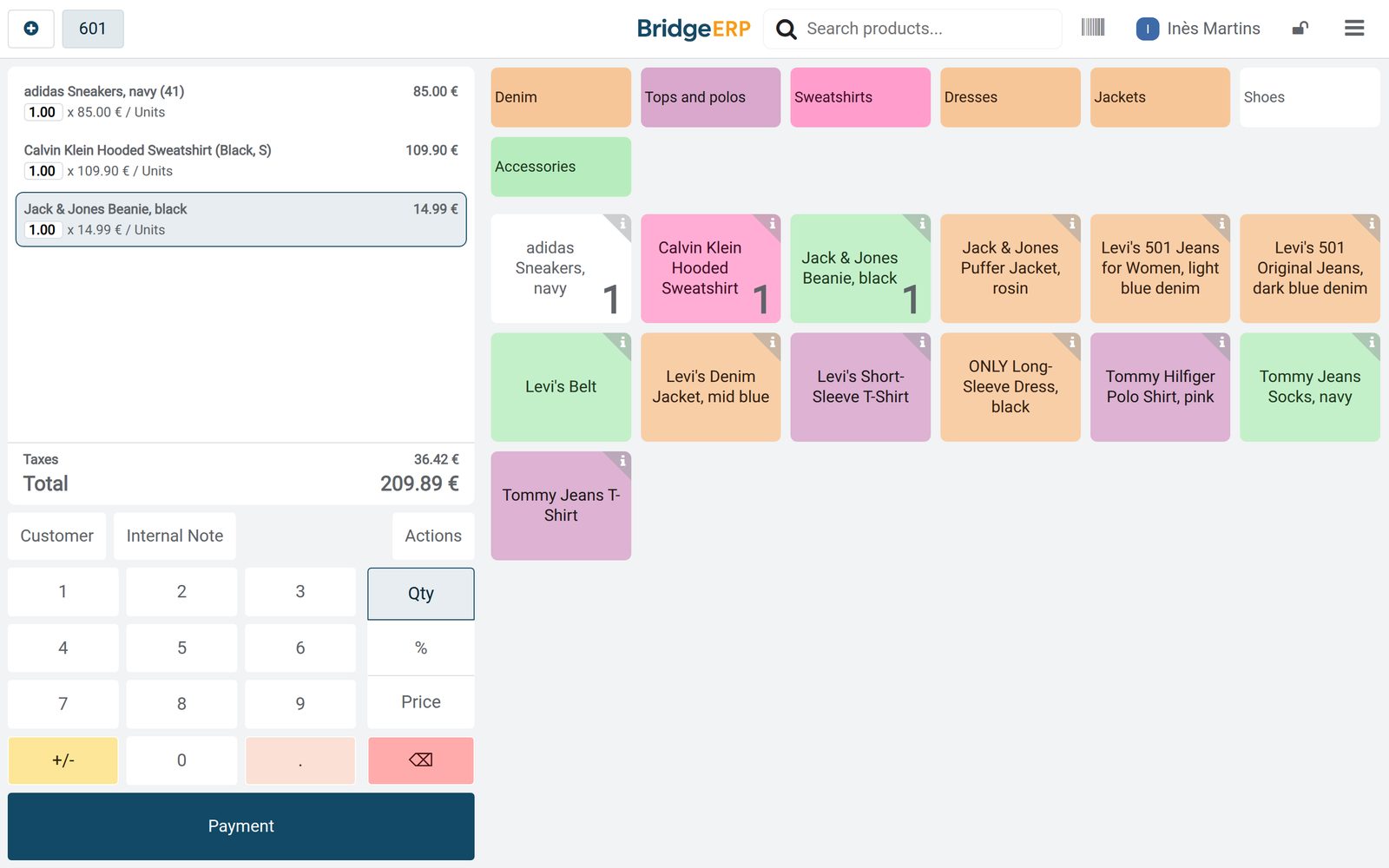
Ready when you are
Open the plan builder with the right apps for this industry already selected, or see it running first.