

Supermarket: Checkouts, weighed produce and shelf stock for supermarkets
BridgeERP runs every checkout, prices weighed fruit and meat, rewards regular shoppers, counts the shelves and tells you what to reorder from each supplier.
Free instant access. No credit card required.
 Invoicing
 Accounting
 Point of Sale
 Inventory
- Advanced Warehouse
 Purchase
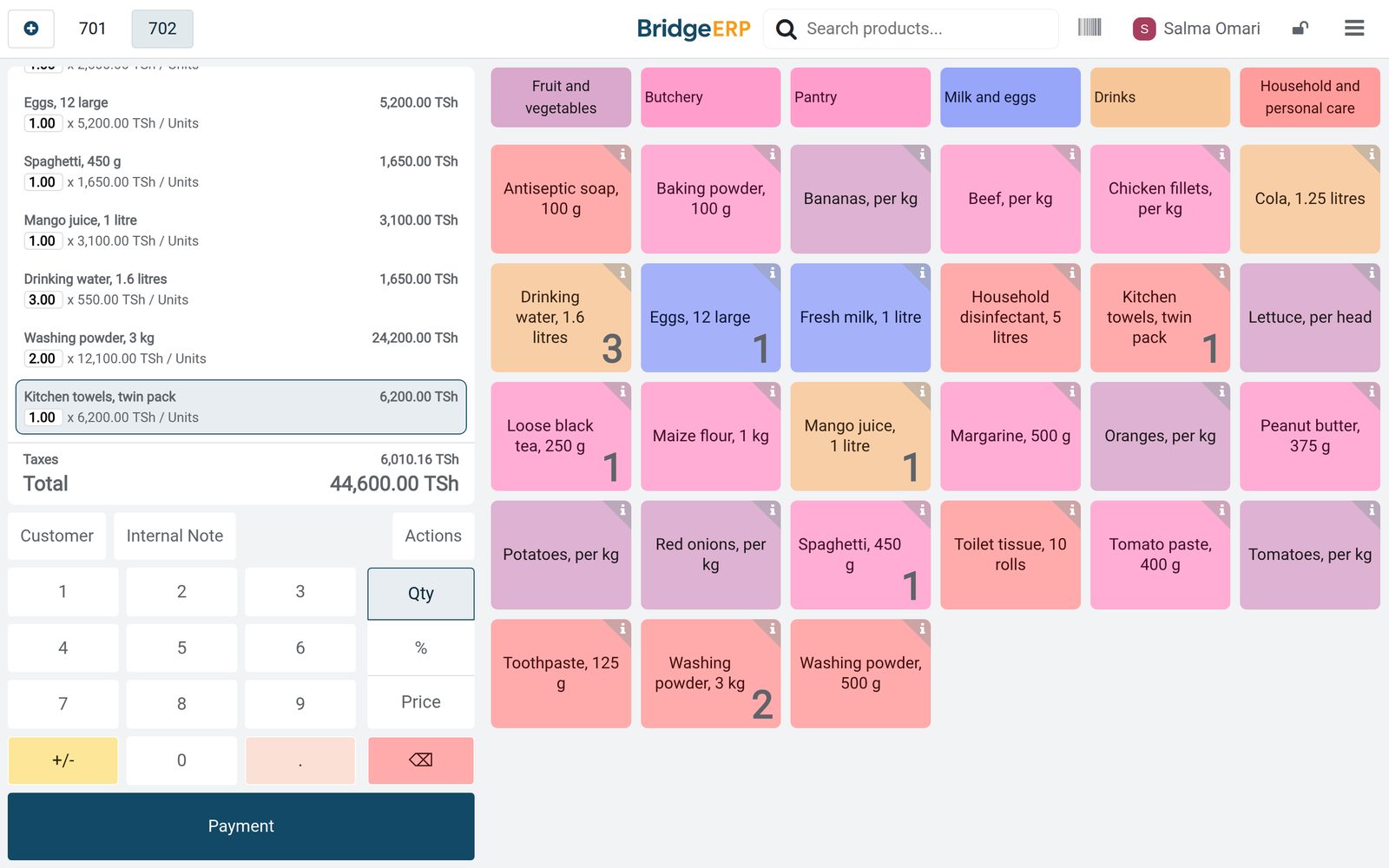
A full basket through one checkout
Weighed produce, packaged goods and exempt staples go through the same checkout, each with its own price and tax.
 Point of Sale
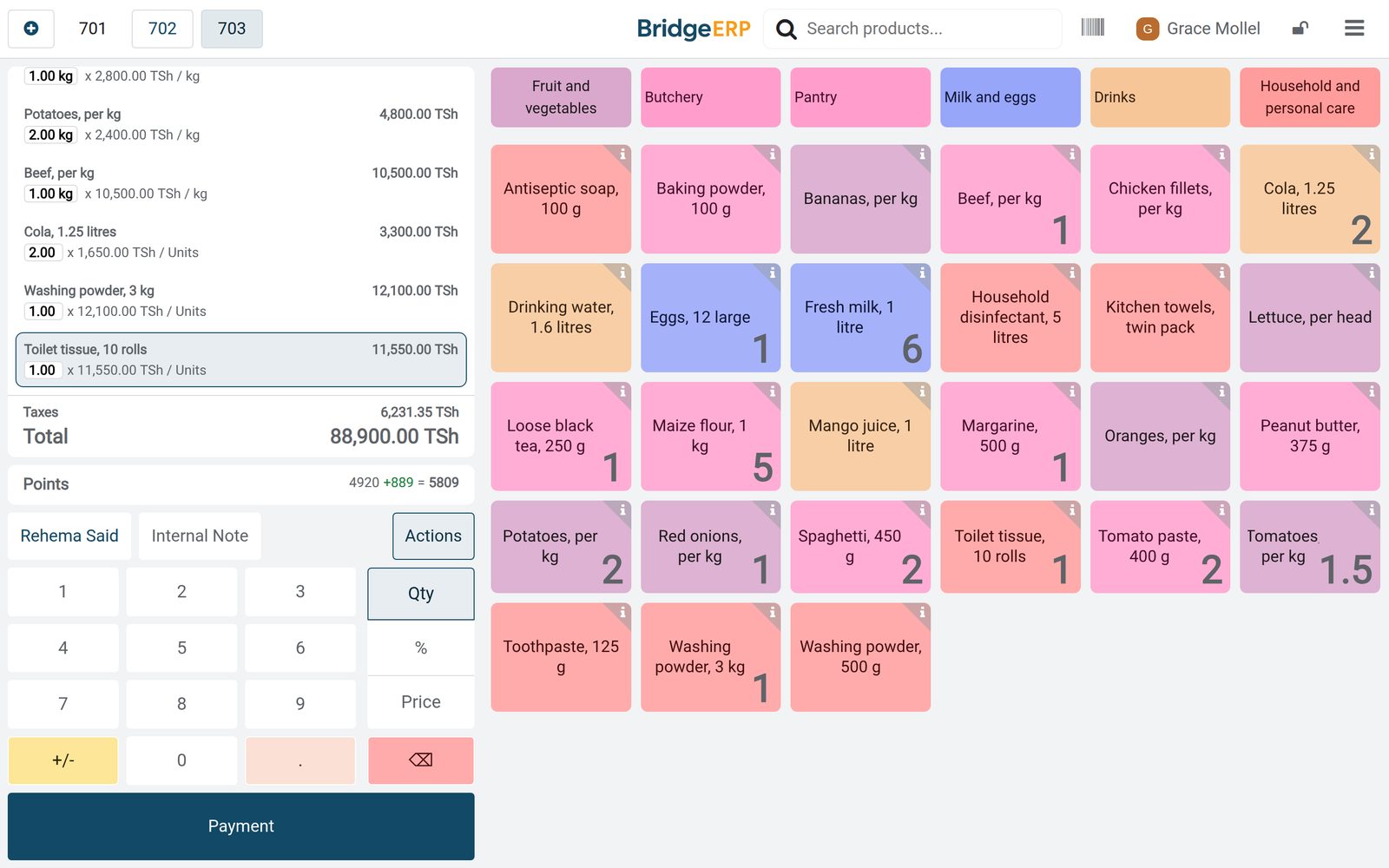
The Saturday shop
On Saturday at 11:20, Grace Mollel rang up fourteen lines for Rehema Said, from 1.5 kg of tomatoes to washing powder, with each line showing its tax.
Explore Point of Sale →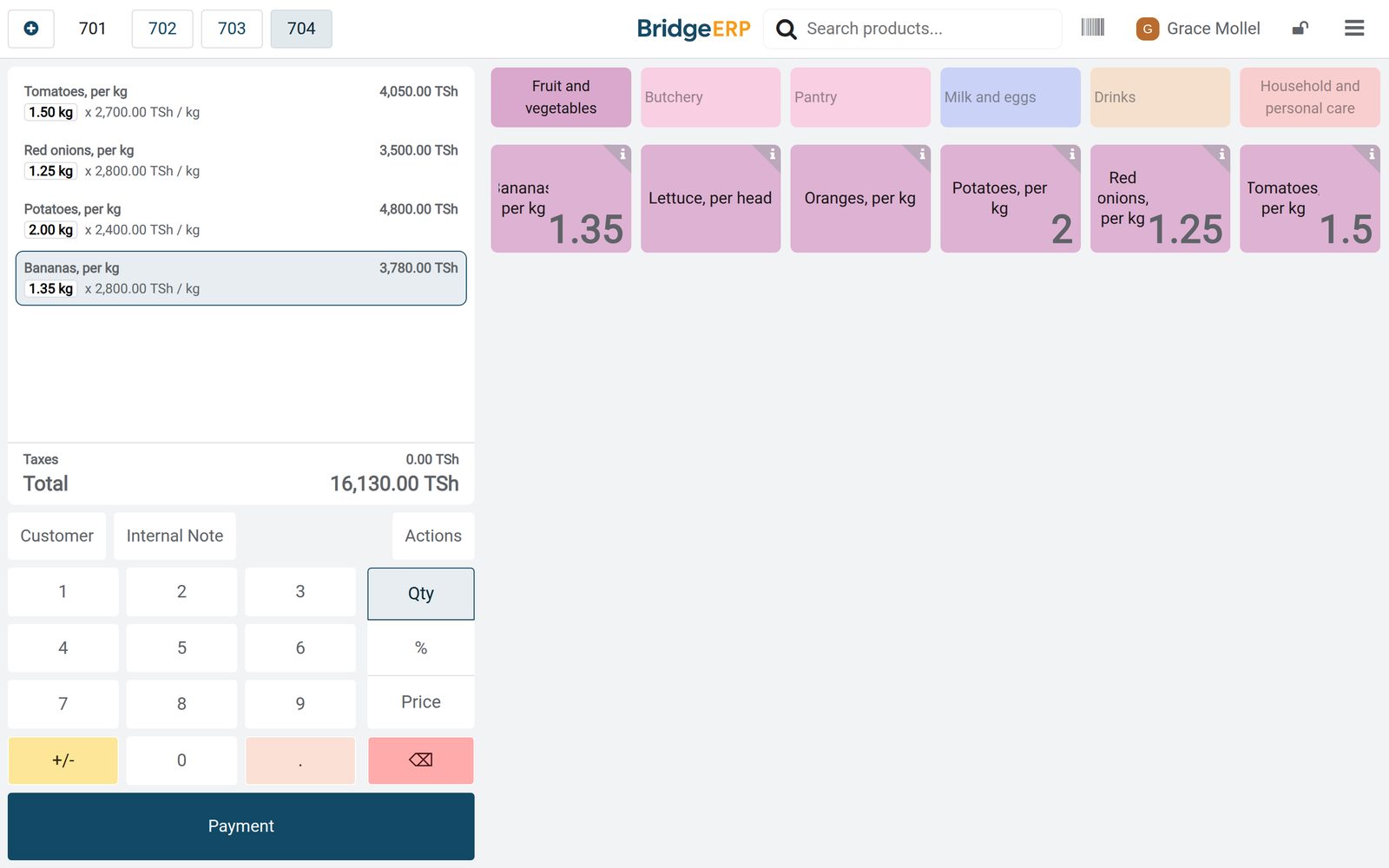 Point of Sale
Sold by the kilo
Tomatoes are set to be weighed with the scale, sold per kilogram in the Fruit and vegetables category of the checkouts.
Explore Point of Sale →By the numbers
What ships inside
Counted in the product.
- 17
- barcode rule types, including weighed, priced and discounted products
- 3
- kinds of reward for loyal shoppers: a discount, a free product or free shipping
- 2
- ways to show prices at the checkout, with tax included or excluded
Inside the app
What is inside
The apps a supermarket runs on, and what each does for the day.
Checkouts
Each checkout has its own till, cash drawer and cashiers, and all of them sell from the same shelves.
Weighed produce
Fruit, vegetables and meat are sold by the kilogram, and a quantity like 1.5 kg prices itself.
Barcodes
Every product carries a barcode for the scanner, and scale labels can carry the weight inside the code.
VAT on each line
Prices include VAT where it applies, and exempt staples show 0% on their own order lines.
Shopper rewards
Regular shoppers collect points at every checkout and turn them into money off their basket.
Shelf stock
Each sale takes the items out of stock, and deliveries from suppliers put them back.
Reordering
Minimum and maximum levels show which products to reorder and how many.
Supplier orders
Orders to the wholesaler, dairy, farm and distributors are received line by line.
Step by step
From opening the doors to the reorder
How a supermarket day runs in BridgeERP, and which app does each step.
- Step 1
Plan
Cashiers, the floor supervisor, the stock controller and the butcher are put on their shifts.
Shift Planning - Step 2
Open
Each checkout opens in the morning with its cash float counted in.
Point of Sale - Step 3
Sell
Baskets are scanned and weighed, and paid by mobile money, cash or card.
Point of Sale - Step 4
Close
At closing the cash is counted, the rest is banked and the day posts to accounting.
Accounting - Step 5
Reorder
Products below their minimum are ordered from the suppliers and received.
Purchase
Three checkouts, one set of books
Each checkout closes on its own, and every payment is kept with its method.
- Point of Sale
The checkouts after Monday
Checkout 1, Checkout 2 and the Express checkout each show their last closing date and the cash left in the drawer.
Explore Point of Sale →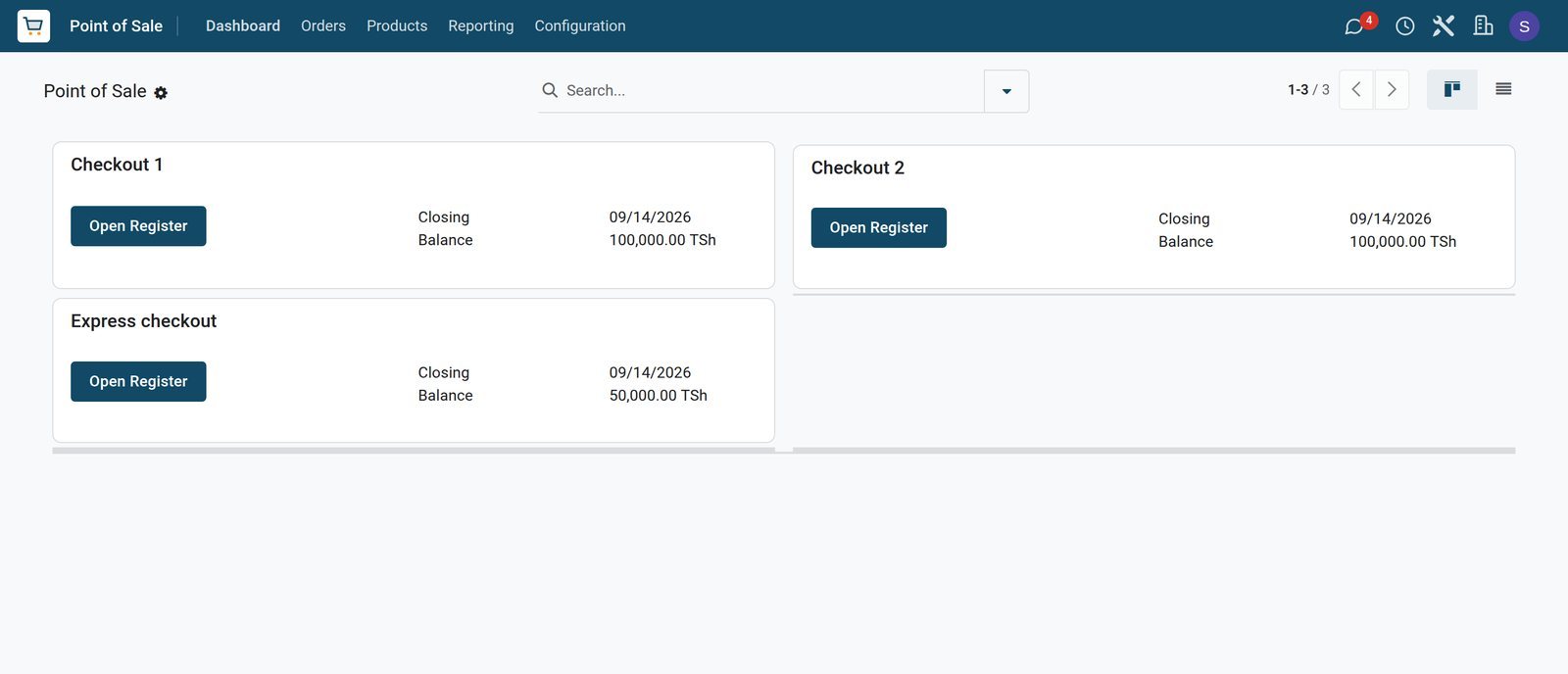
- Point of Sale
Saturday at Checkout 1
Checkout 1 opened at 07:00 on Saturday with a TSh 100,000 float and closed at 22:10 after 44 orders.
Explore Point of Sale →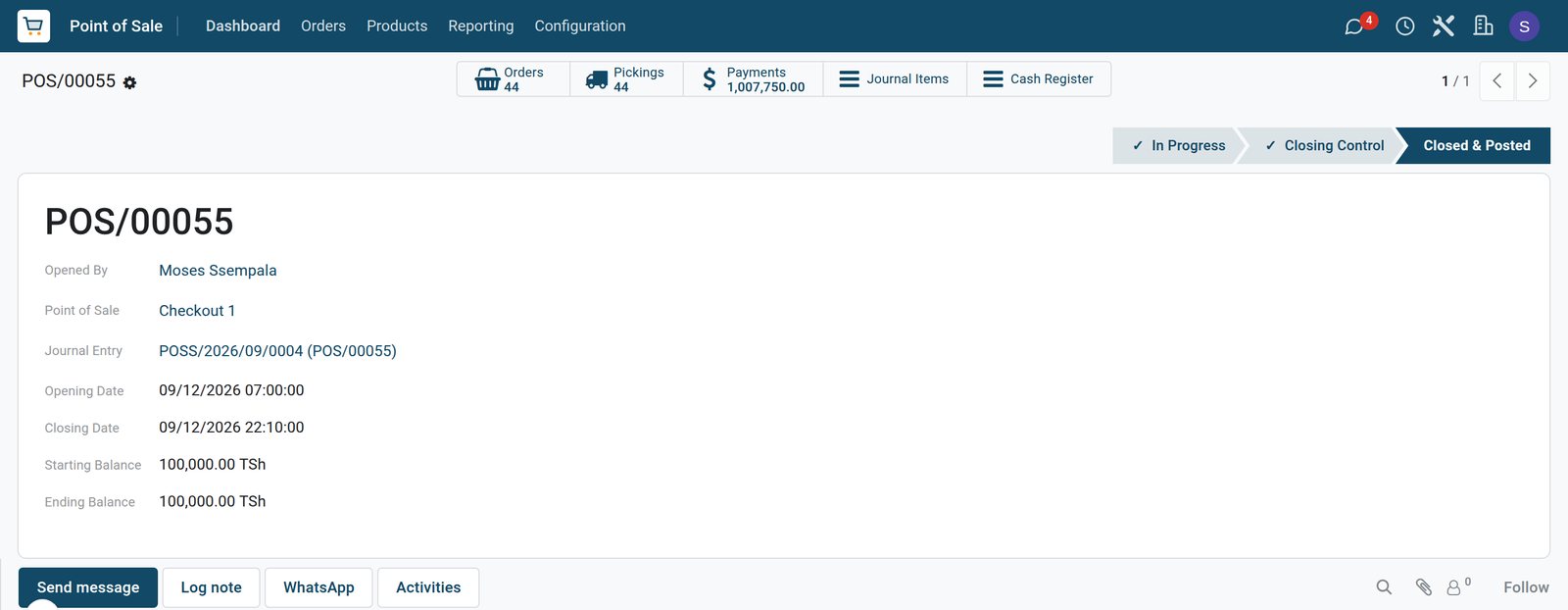
- Point of Sale
How shoppers paid
Over four days M-Pesa brought in TSh 3,157,700, and each checkout's cash drawer has its own cash line next to Airtel Money and card.
Explore Point of Sale →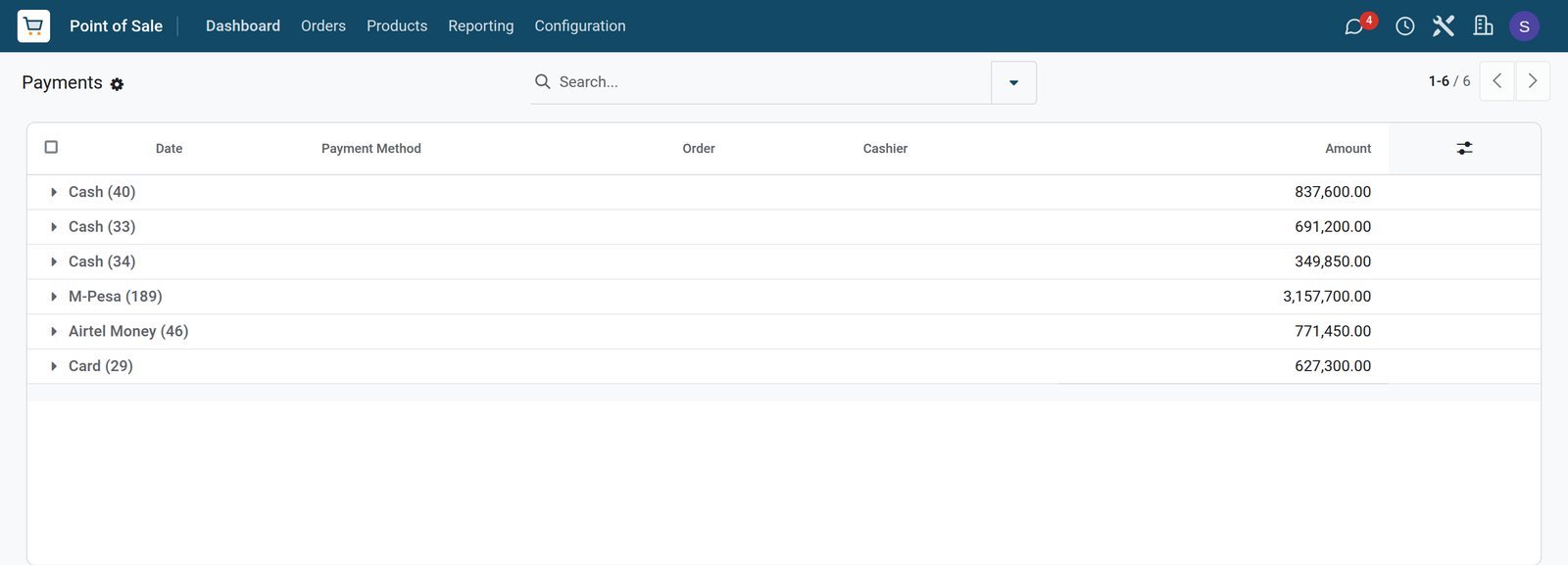
Points for regular shoppers
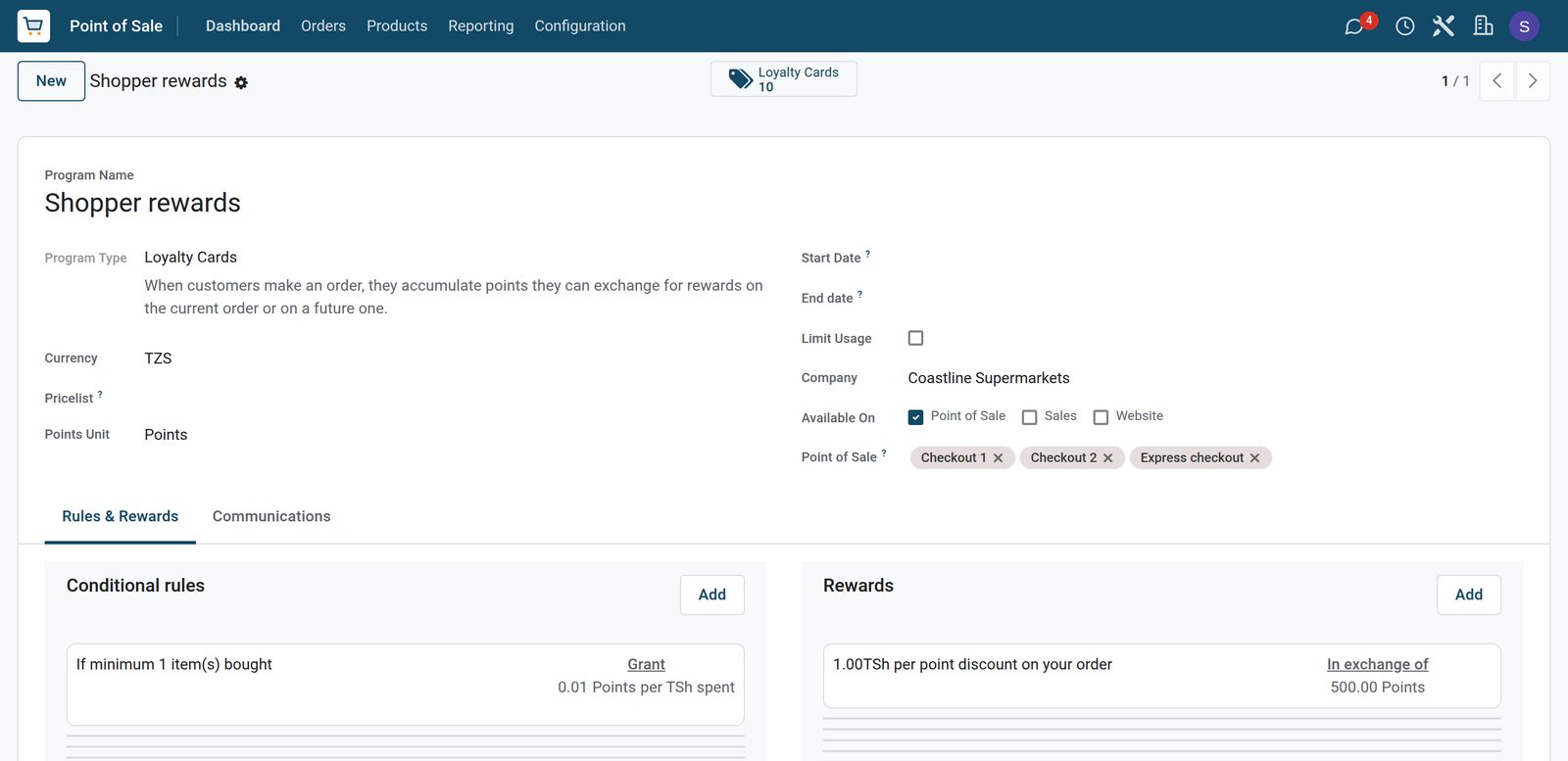
The loyalty programme runs on all three checkouts, and each shopper's card keeps the balance.
 Point of Sale
One point per TSh 100
Shopper rewards gives 0.01 point per shilling spent on all three checkouts, and 500 points or more take TSh 1 off per point.
Explore Point of Sale →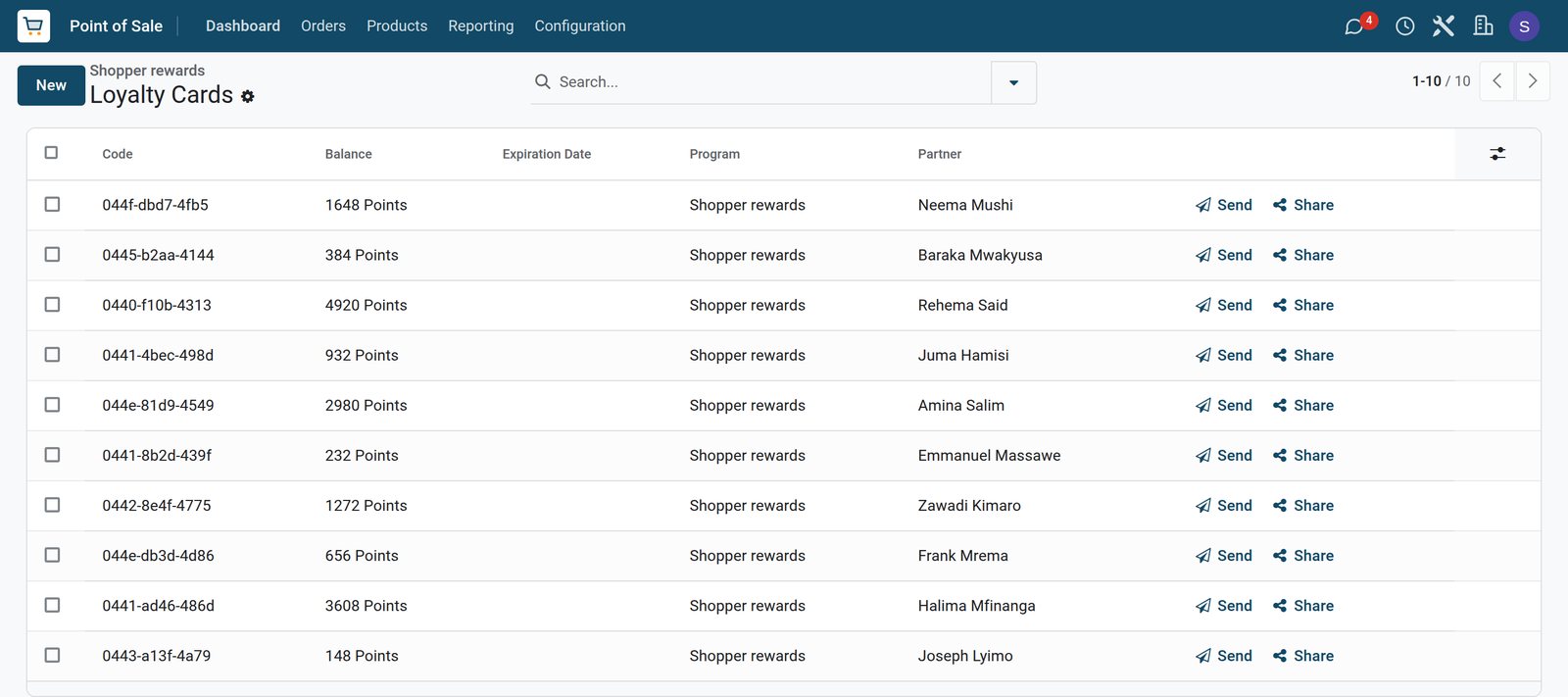 Point of Sale
Every shopper's balance
Rehema Said leads with 4,920 points, ahead of Halima Mfinanga and Amina Salim, and each card shows its own code.
Explore Point of Sale →Shelves counted, suppliers reordered
Stock drops with every basket, and the reorder list shows what to buy before the shelves run empty.
 Inventory
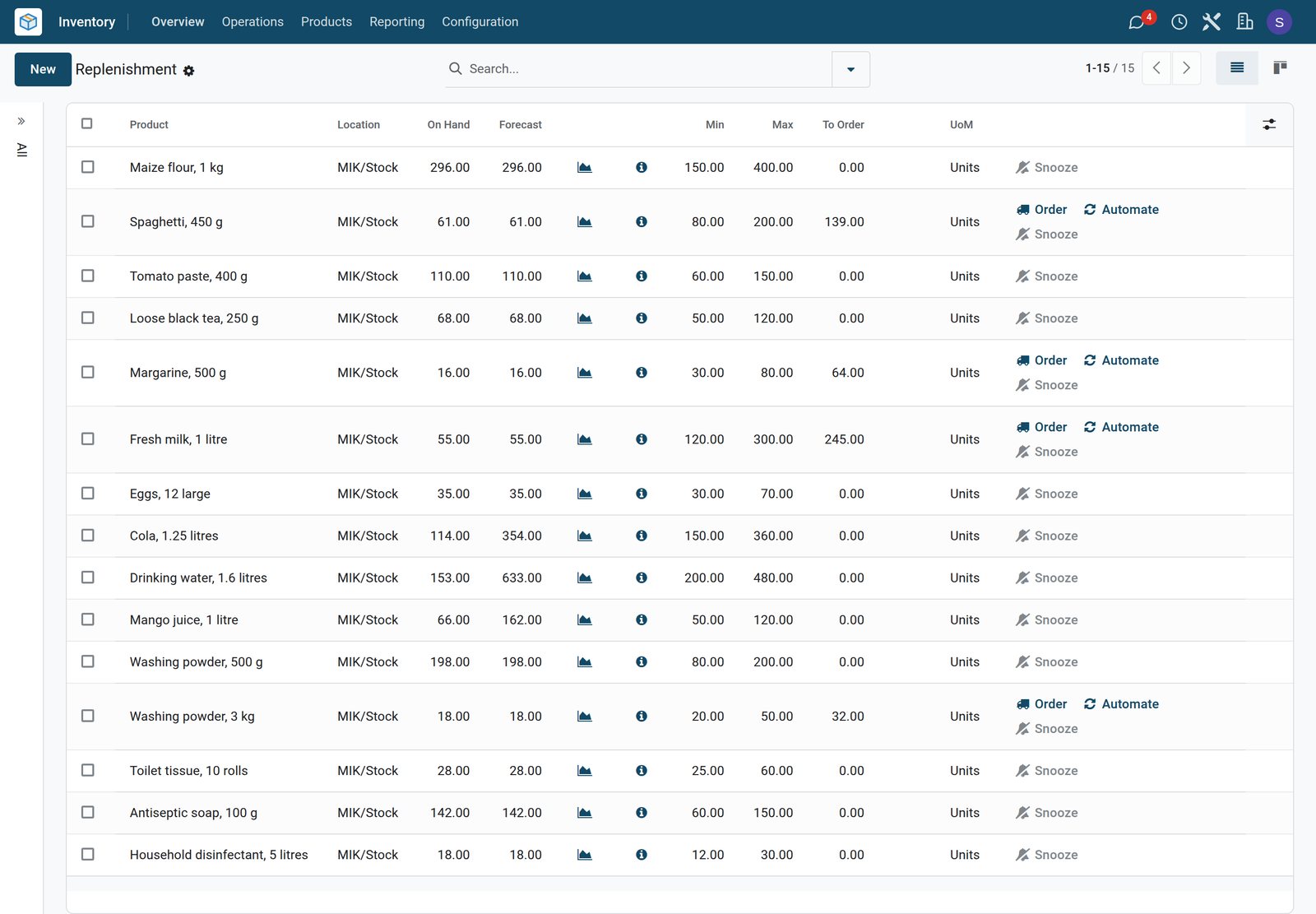
What to order on Tuesday
Spaghetti, margarine, fresh milk and 3 kg washing powder are below their minimum; cola, water and juice are covered by the drinks order on its way.
Explore Inventory →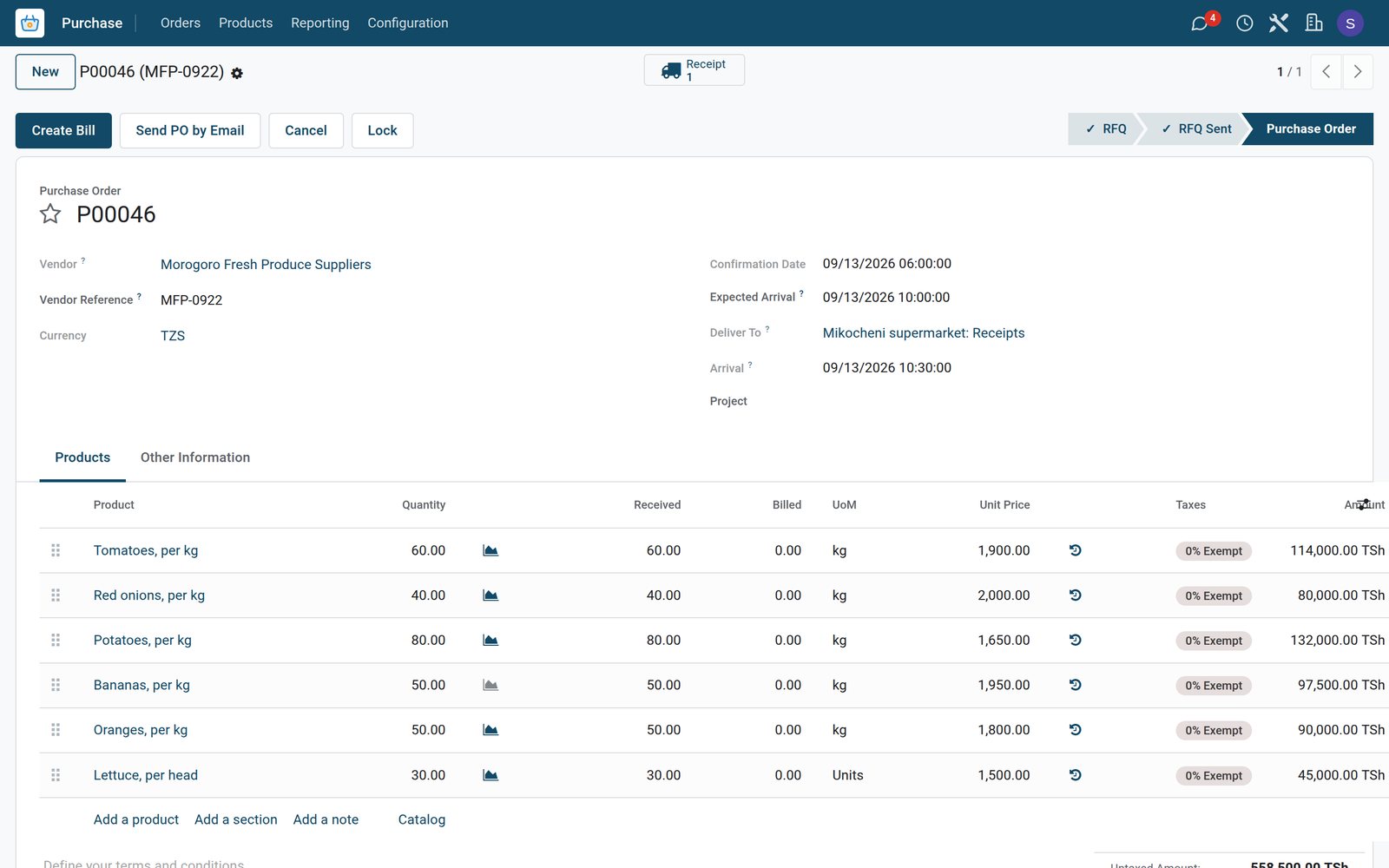 Purchase
Sunday's fresh produce
Tomatoes, onions, potatoes, bananas, oranges and lettuce confirmed at 06:00 on Sunday arrived at 10:30 the same morning, all received.
Explore Purchase →What sells, aisle by aisle
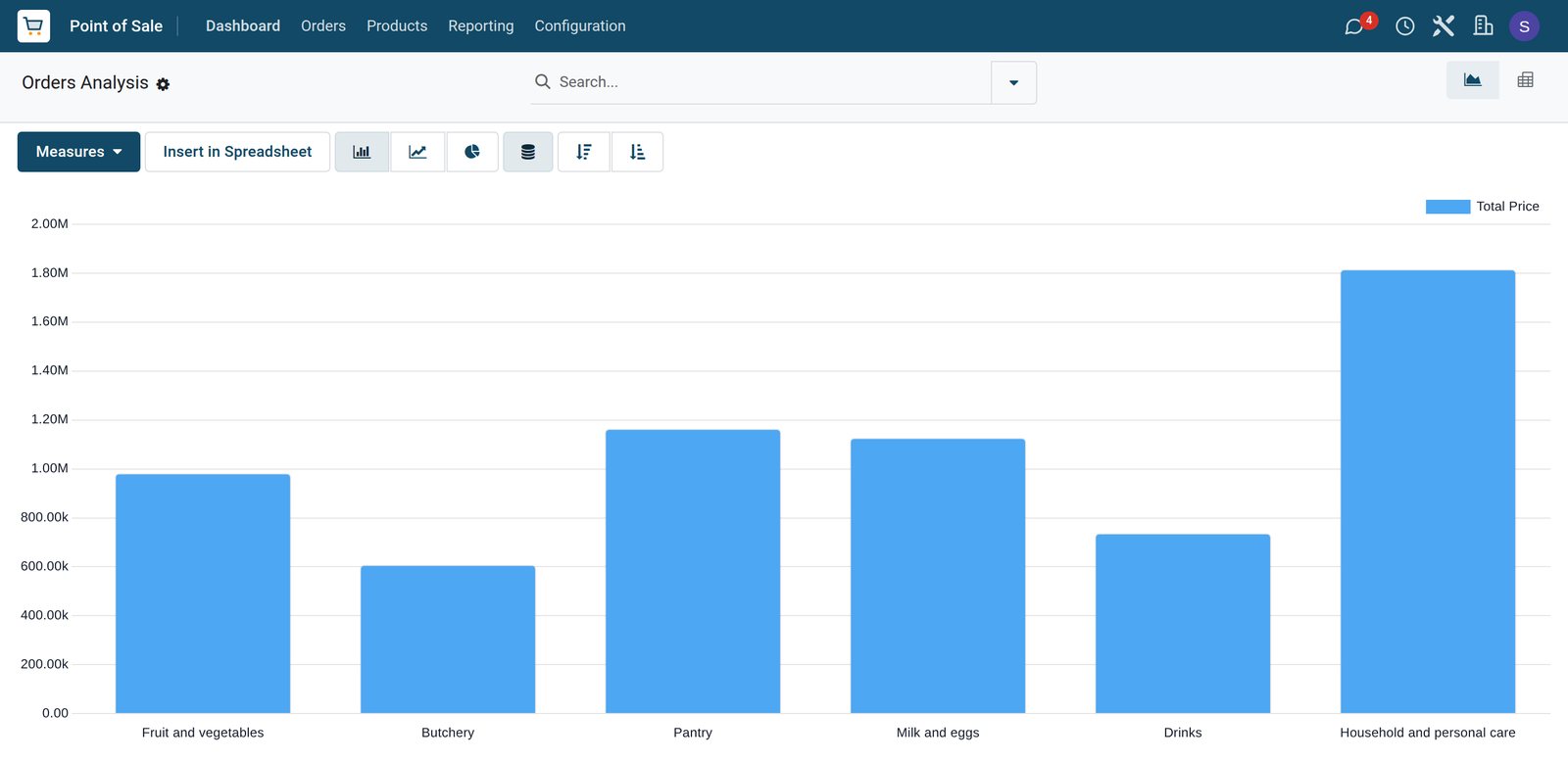
Sales analysis groups every checkout line by its aisle.
 Point of Sale
Four days by aisle
Household and personal care brought in the most over the four days, then pantry goods, milk and eggs, fruit and vegetables, drinks and the butchery.
Explore Point of Sale →Early and late shifts at every checkout
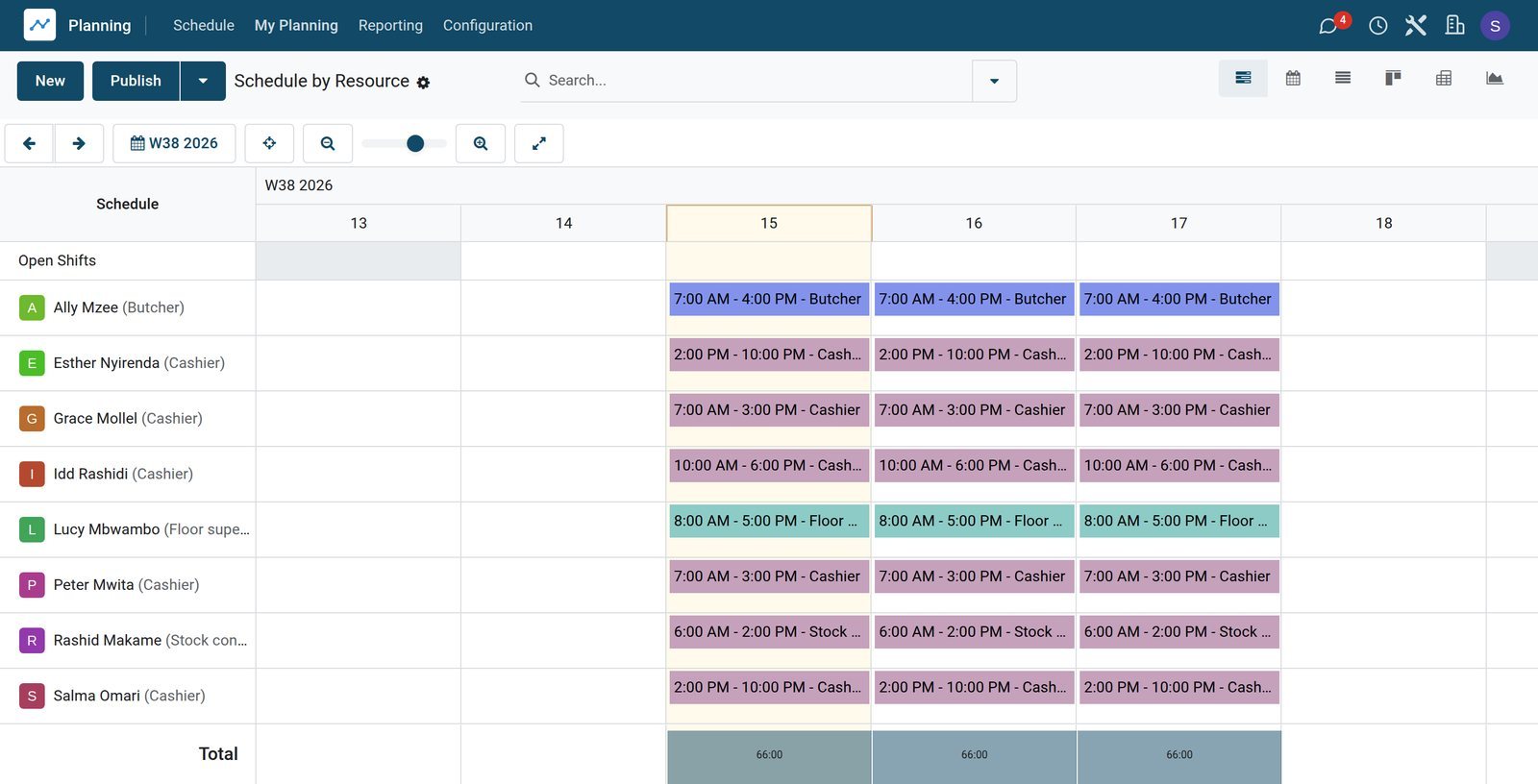
The planning shows cashiers, the supervisor, the stock controller and the butcher for each day.
 Shift Planning
The store team this week
Rashid Makame, the stock controller, starts at 6 a.m., the butcher and morning cashiers at 7 a.m., and the late cashiers work 2 p.m. to 10 p.m.
Explore Shift Planning →Who uses it
Who uses it, and what they see
One system for the manager, the checkouts and the stock room.
Store manager
Follows sales by aisle and by checkout, and approves orders to suppliers.
Floor supervisor
Opens and closes the checkouts, counts the cash and banks what is over the float.
Cashier
Logs in on a checkout, scans and weighs the basket, adds loyalty points and takes the payment.
Stock controller
Receives deliveries, checks shelf stock and turns the reorder list into supplier orders.
Works with
Runs with the rest of BridgeERP
Apps a supermarket draws on.

In your country
Built for supermarkets in any country
What changes from country to country, shown on the demo's Dar es Salaam supermarket.
Your currency
Shelf prices, supplier costs and daily takings are in the company currency, TZS on the demo.
Mobile money wallets
M-Pesa and Airtel Money sit next to cash and card on the demo's checkouts, and one basket can be split between them.
Exempt and taxed items
Packaged goods carry 18% VAT inside the shelf price, while fresh produce, raw meat, fresh milk and maize flour show 0% Exempt.
Getting started
Getting started
How a supermarket moves onto BridgeERP.
Load the products
Import products with their barcodes, prices, taxes and aisle, and mark the ones sold by weight.
Set up the checkouts
Create each checkout with its cash drawer, mobile money and card methods and its cashiers.
Count the shelves
Enter opening stock for every product with its minimum and maximum levels.
Start the rewards
Create the loyalty programme, choose the points and the reward, and add it to the checkouts.
Questions
Questions about Supermarket
Not covered here? Contact us.
Can we run several checkouts at once?
Yes. Each checkout is its own till with its own cash drawer and cashiers, and all of them sell from the same stock.
How are weighed items priced?
Products marked to be weighed are sold by the kilogram. The checkout charges the price per kilogram for the weight entered or read from a connected scale.
Can shelf prices include VAT?
Yes. A tax can be set as included in the price, so the shelf price is what the shopper pays, and exempt items show 0%.
Can a basket be paid with mobile money and cash?
Yes. A basket can be paid with several payment methods, such as part by mobile money and the rest in cash.
How do loyalty points work?
The programme sets how many points each amount spent earns and what the points are worth, and every checkout adds and redeems them.
How do we know what to reorder?
The replenishment list shows the products below their minimum and how many bring them back to the maximum.
Tax compliance
Invoices your tax authority accepts
In Kenya, Uganda, Rwanda, Burundi and Zambia, each invoice, receipt and stock movement goes to the tax authority's own system when you post it. Ghana and Pakistan come next, and we connect 73 more countries on request.
- KenyaReady
eTIMS KRA
Invoices, credit notes, POS receipts and stock movements
- UgandaReady
EFRIS URA
Invoices, POS receipts and stock
- RwandaReady
EBM RRA
Invoices, POS receipts, stock and imports
- BurundiReady
EBMS OBR
Invoices, POS receipts, stock and manufacturing
- ZambiaReady
Smart Invoice ZRA
Invoices, POS receipts, stock and imports
Supermarket, app by app
One connected flow instead of separate systems — the work moves from one team to the next without re-typing anything.
Every stop is a real app in your plan, and the hand-offs between them are the product.
- Customers & sales
- Operations
- Finance
Point of Sale
Touch till, offline mode, sessions, cash control and receipts.
Point of Sale →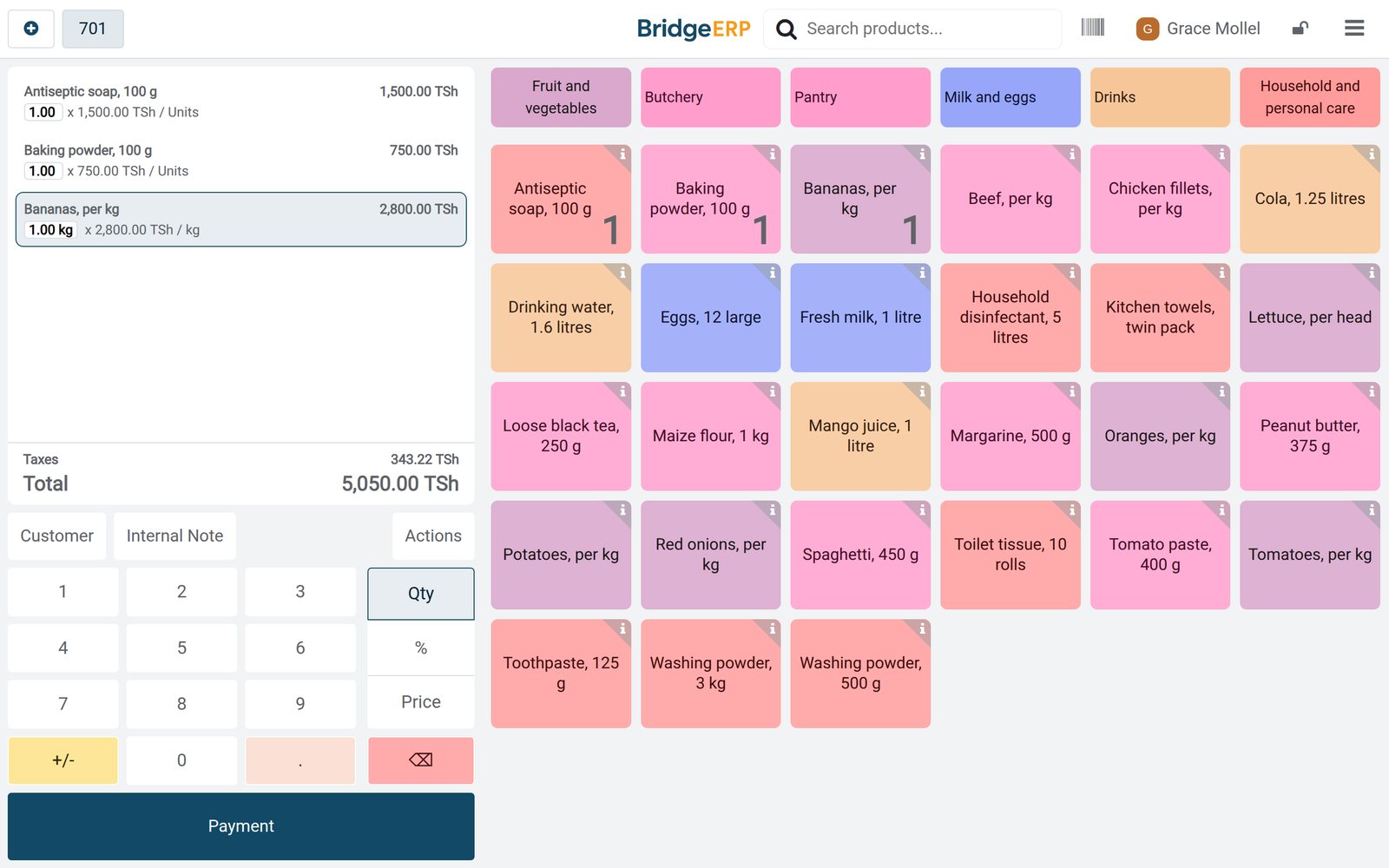
Ready when you are
Open the plan builder with the right apps for this industry already selected, or see it running first.