

Electronics Store: Serial numbers, repairs and returns for electronics stores
BridgeERP sells phones, laptops and TVs by their IMEI or serial number, runs repairs from quotation to invoice and takes returned devices back into stock.
Free instant access. No credit card required.
 Invoicing
 Point of Sale
 Inventory
 Purchase
 Repairs
 CRM
CRM
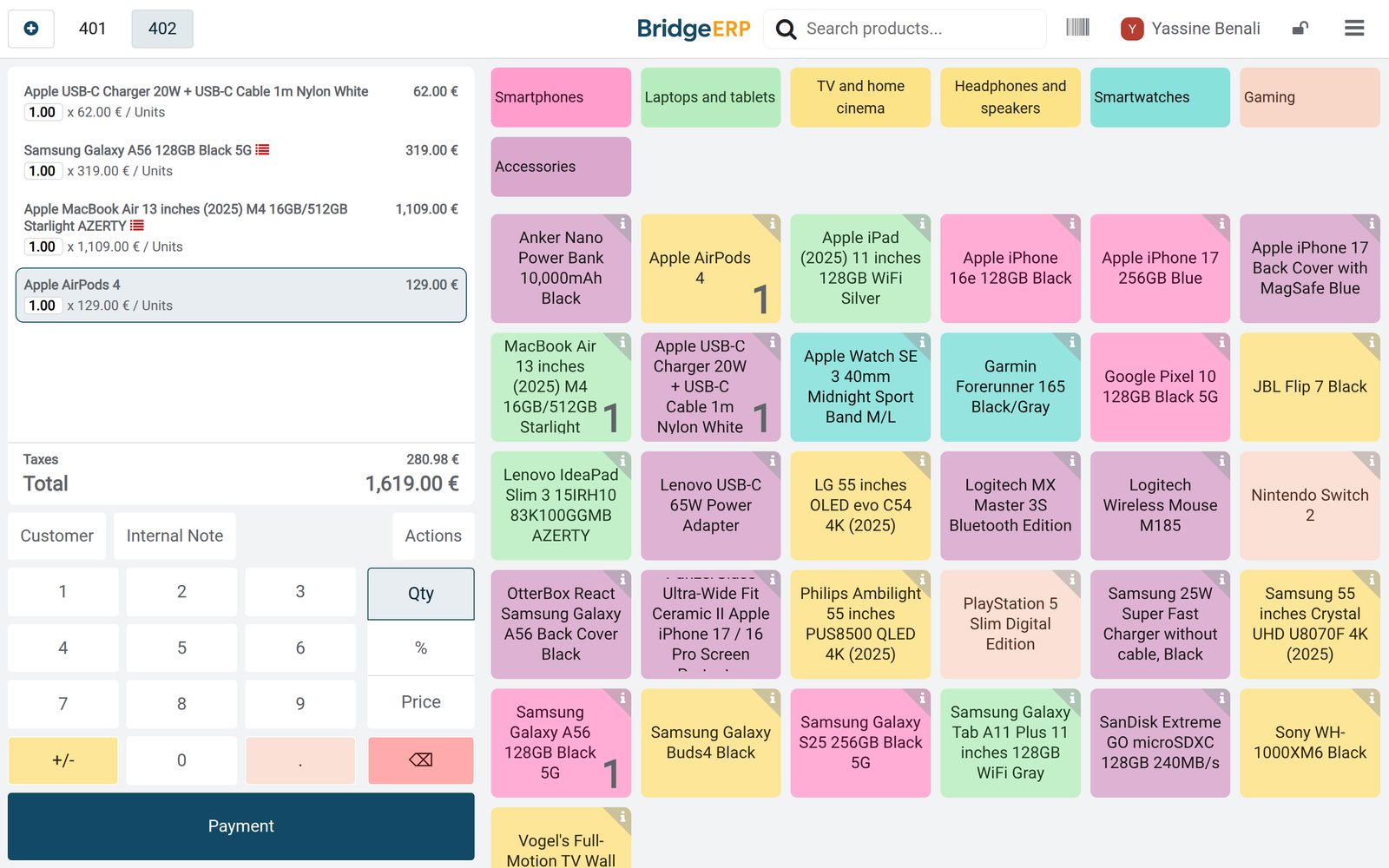
Sold with its IMEI or serial number
The till records the serial number of each device it sells, on the same order as the case, charger or mouse that goes with it.
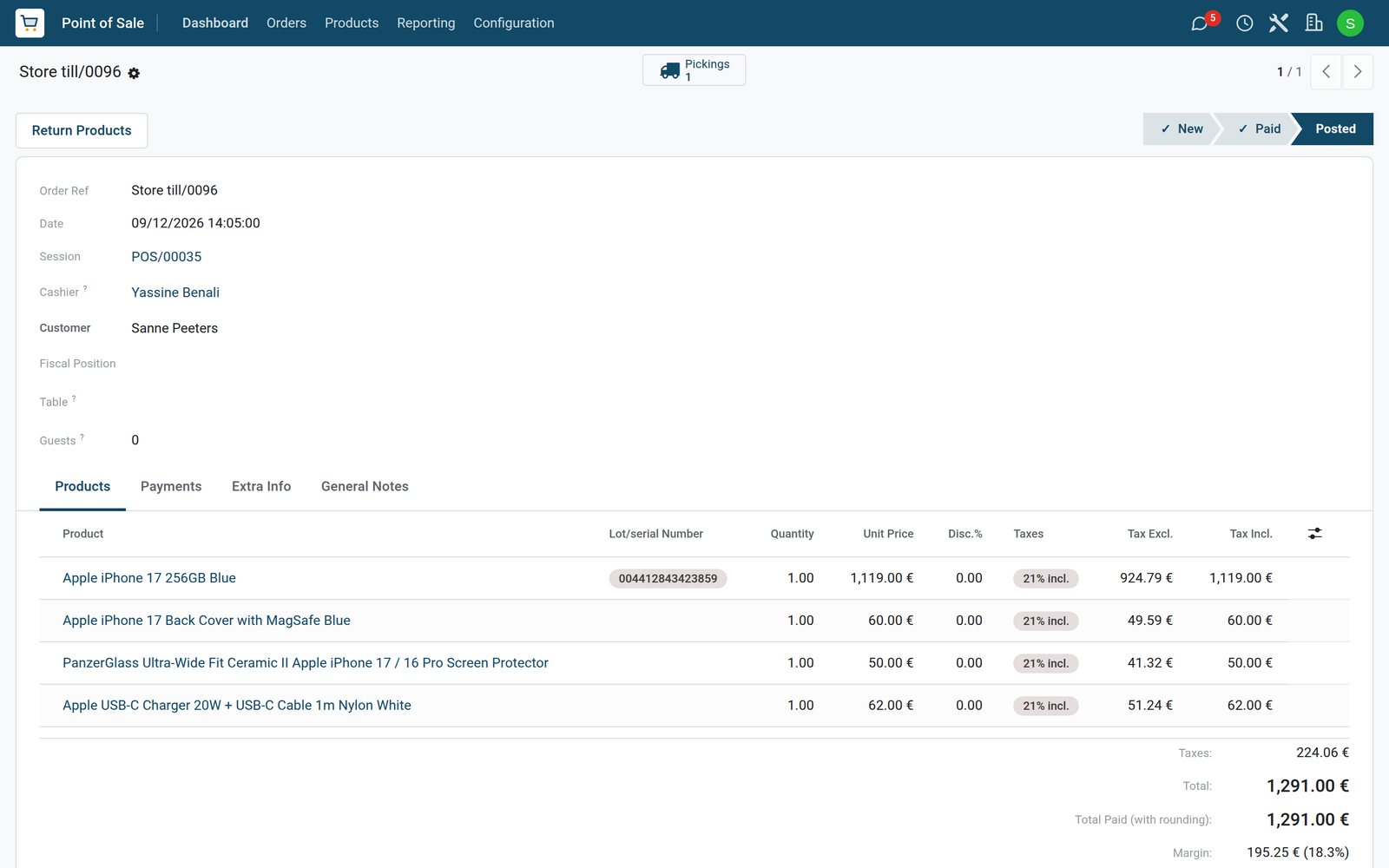 Point of Sale
An iPhone 17 with case, glass and charger
Sanne Peeters bought an iPhone 17, recorded by its IMEI, with a MagSafe case, a screen protector and a 20W charger: €1,291.00 with VAT included.
Explore Point of Sale →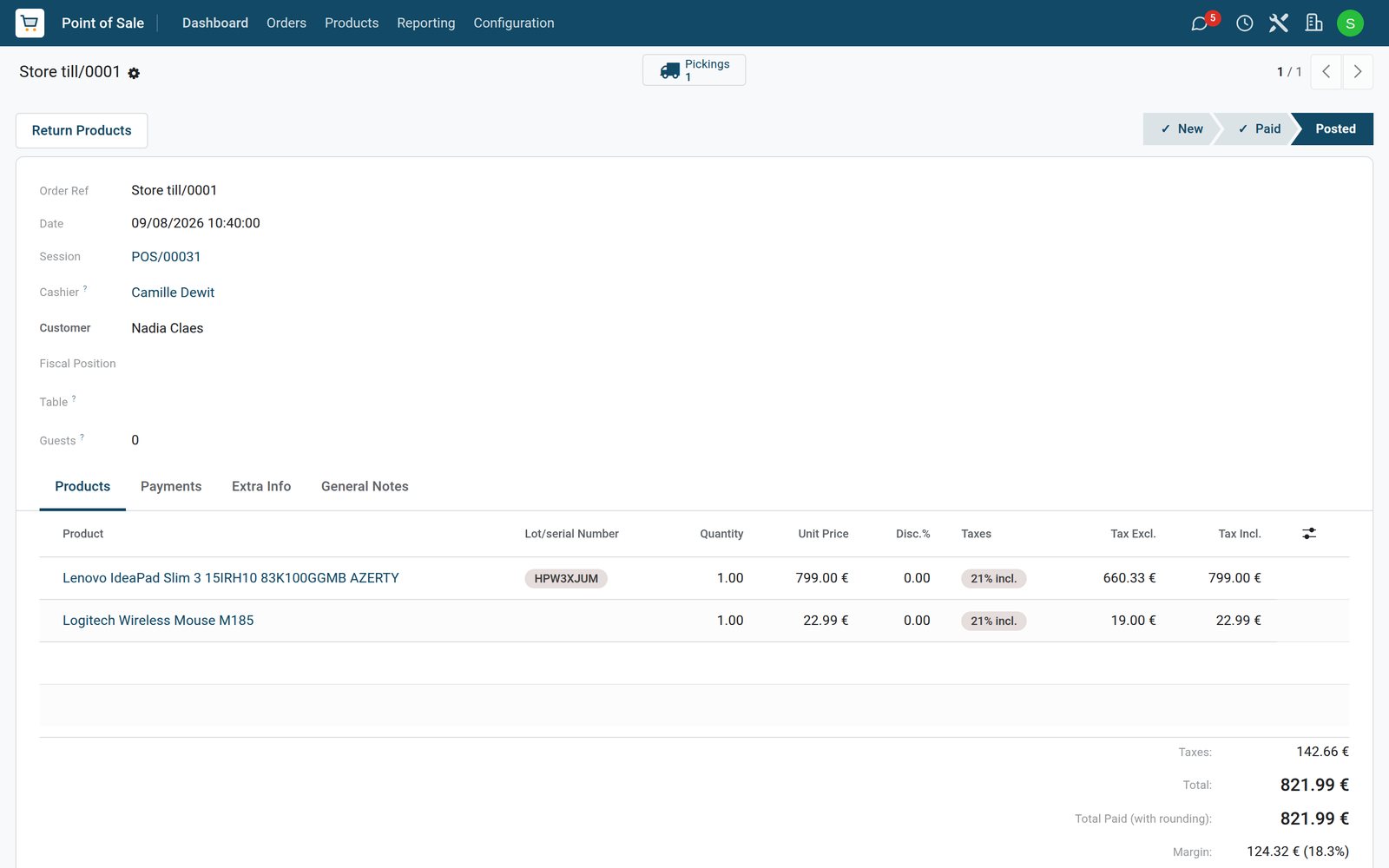 Point of Sale
A laptop with a wireless mouse
Nadia Claes bought a Lenovo IdeaPad Slim 3, recorded by its serial number HPW3XJUM, and a Logitech wireless mouse: €821.99 on Tuesday 8 September.
Explore Point of Sale →By the numbers
What ships inside
Counted in the product.
- 3
- ways to track a product: by unique serial number, by lots or by quantity only
- 5
- stages of a repair order: new, confirmed, under repair, repaired and cancelled
- 3
- kinds of part line on a repair: a part added, a part removed or a part recycled
- 2
- ways the till shows prices: with the tax included or without it
Inside the app
What is inside
The apps an electronics store runs on, and what each does for the day.
Serial and IMEI tracking
Phones, laptops, TVs and consoles are tracked by serial number from the distributor's delivery to the sale.
Accessories on the same order
Cases, chargers, screen protectors and mice go on the same order as the device they are bought with.
Repair orders
Each repair records the customer, the device and its serial number, the parts used and the stage it has reached.
Repair quotations
A repair service confirmed on a quotation opens the repair order, and the quotation is invoiced when the device is collected.
Warranty repairs
A repair under warranty puts its parts on the quotation at no charge, while the parts still leave stock.
Returns by serial number
A refund takes a device back by the serial number it was sold with and returns the unit to stock.
Parts on order
A repair shows whether its parts are in stock or the date they are expected from the supplier.
Sales by department
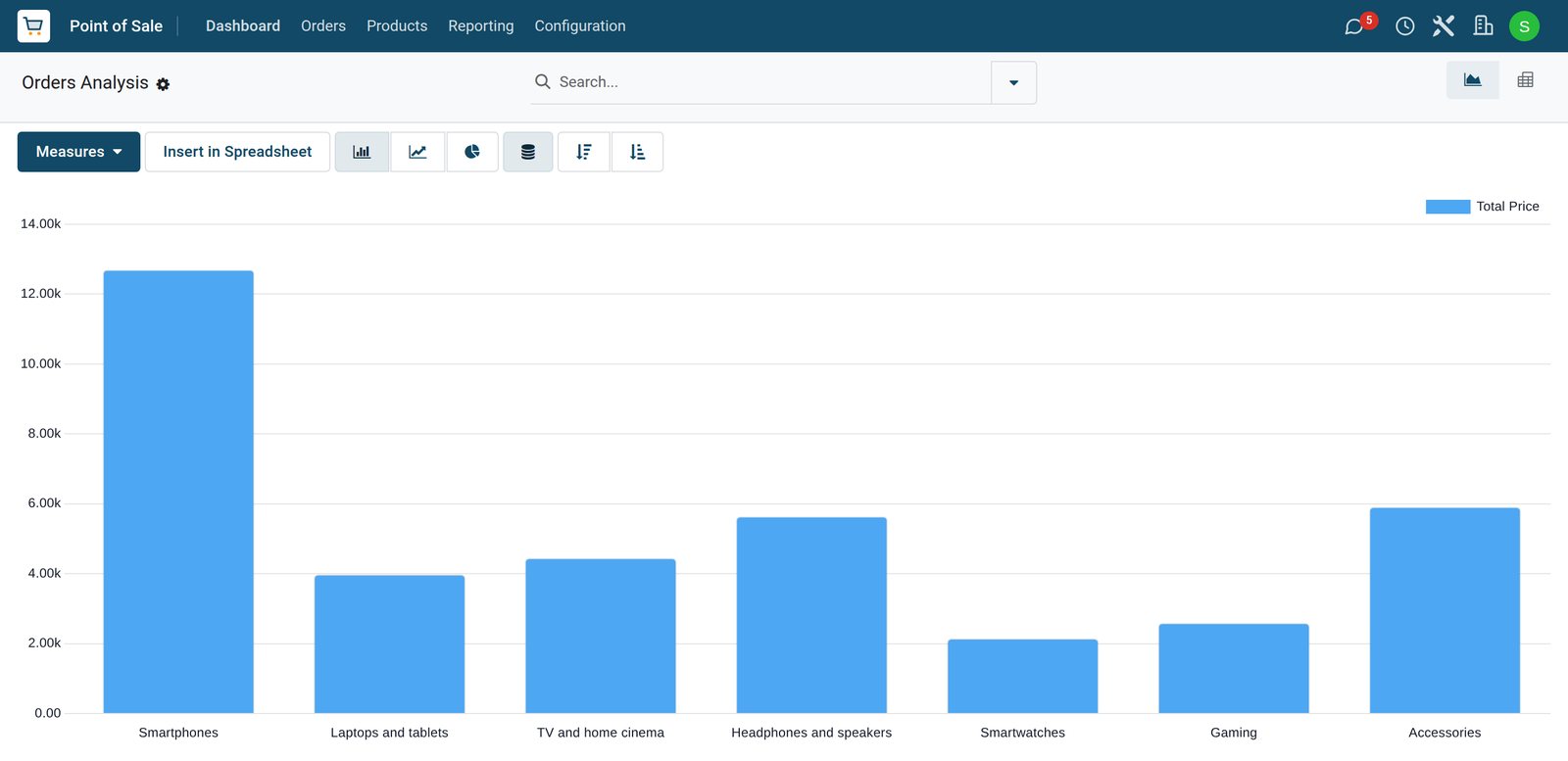
The sales analysis shows what each department sold, from smartphones and accessories to TVs and gaming.
Step by step
From the distributor to the repair desk
How devices move through an electronics store in BridgeERP, and which app does each step.
- Step 1
Buy
Devices, accessories and repair parts are ordered from distributors with the vendor reference and the delivery date.
Purchase - Step 2
Receive
Deliveries are received with the IMEI or serial number of every device, before the store opens.
Inventory - Step 3
Sell
The till sells each device by its serial number, with its accessories on the same order.
Point of Sale - Step 4
Repair
A confirmed repair quotation opens a repair order for the device, its serial number and its parts.
Repairs - Step 5
Return
A refund takes the device back by its serial number and puts the unit back in stock.
Point of Sale - Step 6
Close
At closing each day posts to accounting, with the card and cash takings and the VAT on sales.
Accounting
Every unit by its serial number
Each serial number shows where the unit is and who bought it, and its history runs from the delivery to the sale and back.
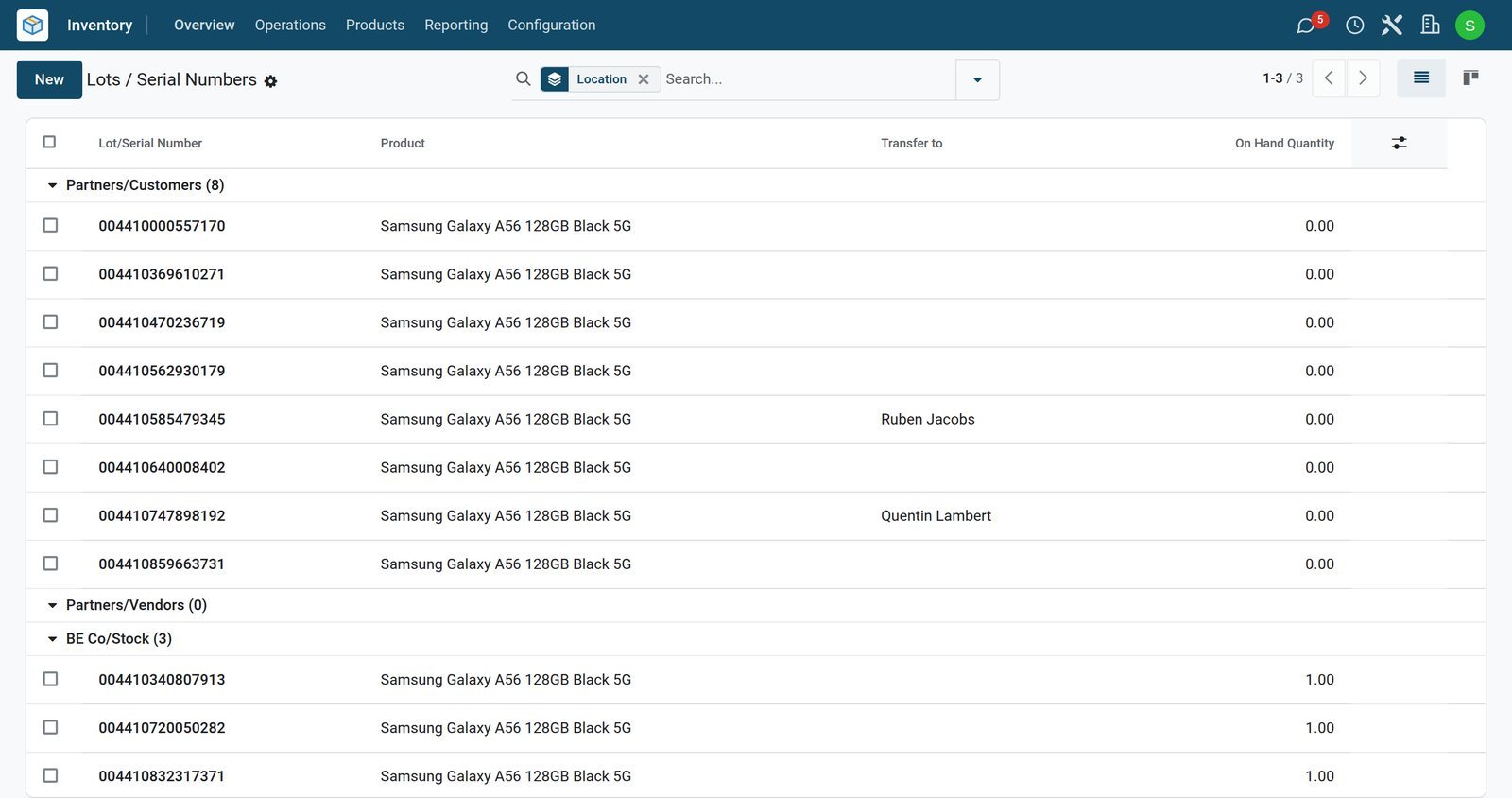 Inventory
Galaxy A56 phones in stock and sold
The Galaxy A56 serial numbers by location: three phones in stock and eight sold, with the customer where the sale named one.
Explore Inventory →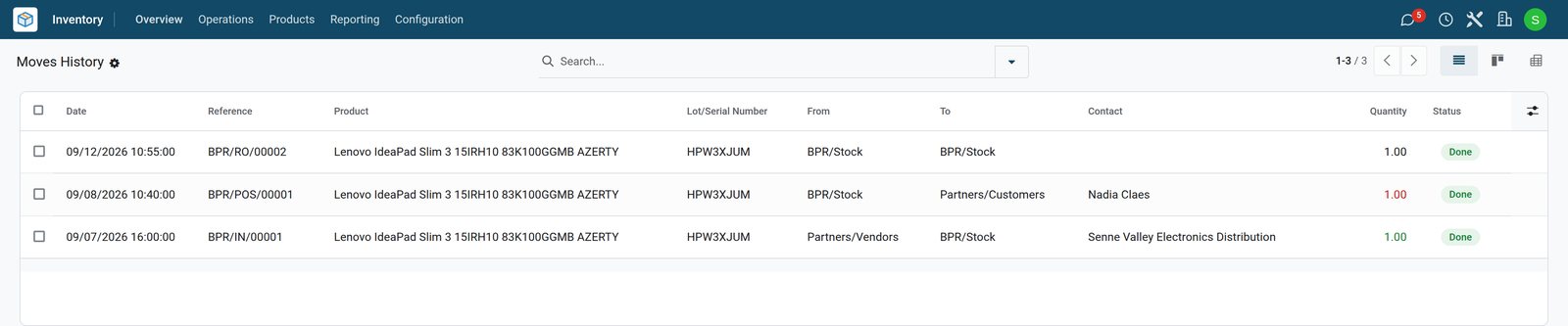 Inventory
One laptop from delivery to warranty repair
Serial number HPW3XJUM was received from Senne Valley Electronics Distribution on 7 September, sold to Nadia Claes on 8 September and repaired on 12 September.
Explore Inventory →Repairs with quotations and parts
A confirmed repair quotation opens the repair order; the technician adds the parts and moves the repair through its stages.
- Repairs
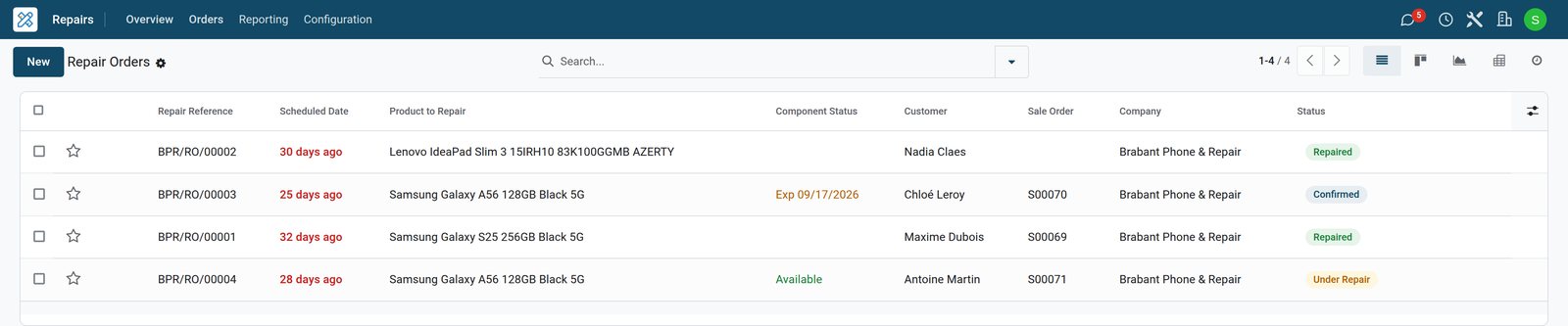
Four repairs at four stages
The repair desk's orders: a Galaxy S25 screen repaired, a laptop repaired under warranty, a Galaxy A56 screen waiting for its display and a battery under repair.
- Repairs
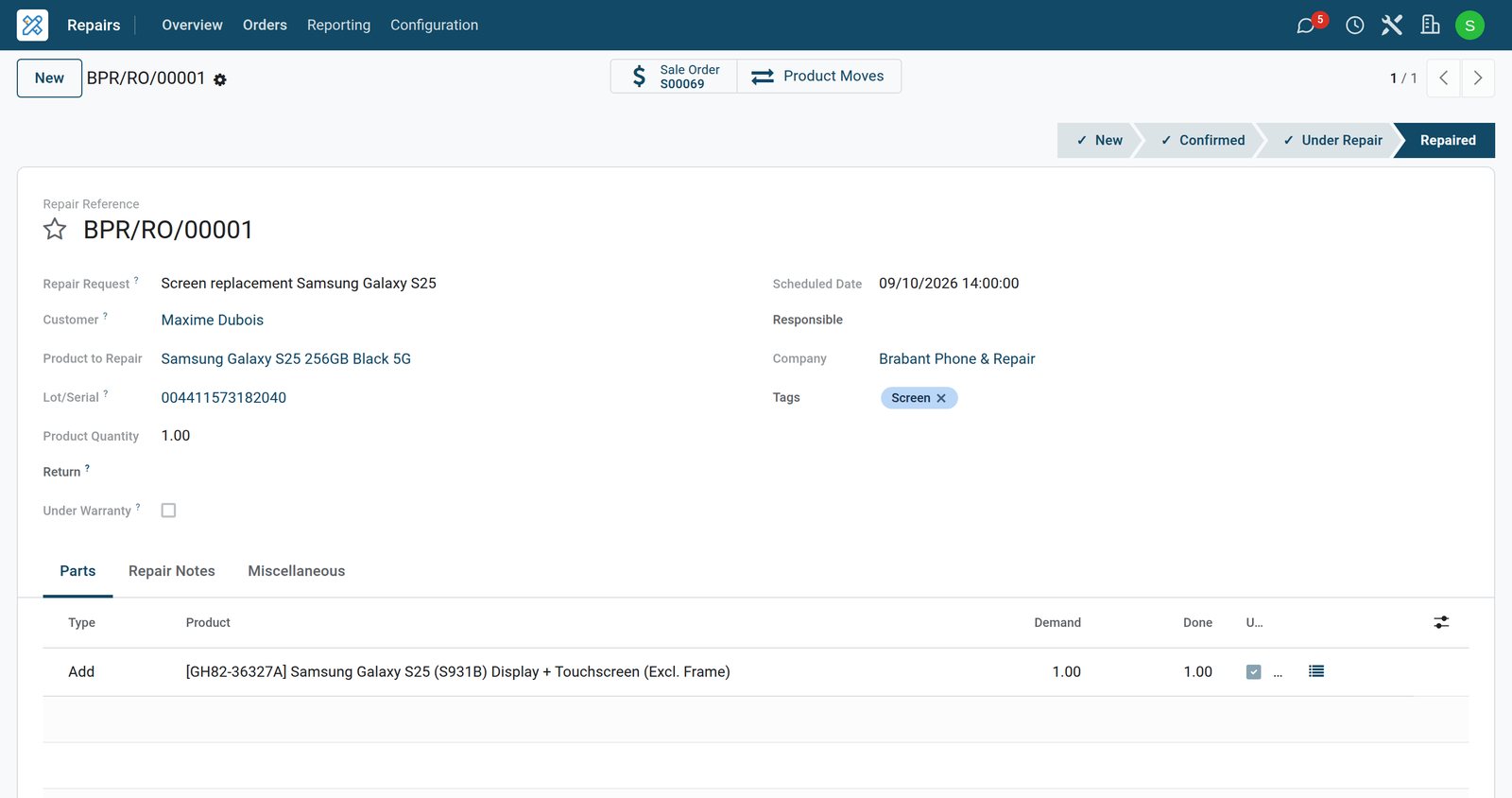
A Galaxy S25 screen, repaired
Maxime Dubois's Galaxy S25 was recorded by its IMEI, its screen was replaced with a Samsung display from stock, and the repair is linked to its quotation.
 Sales
SalesThe quotation behind the repair
The screen replacement costs €229.00 with VAT and labour included; the display used appears on the same order at no extra charge, and the order is invoiced.
Explore Sales →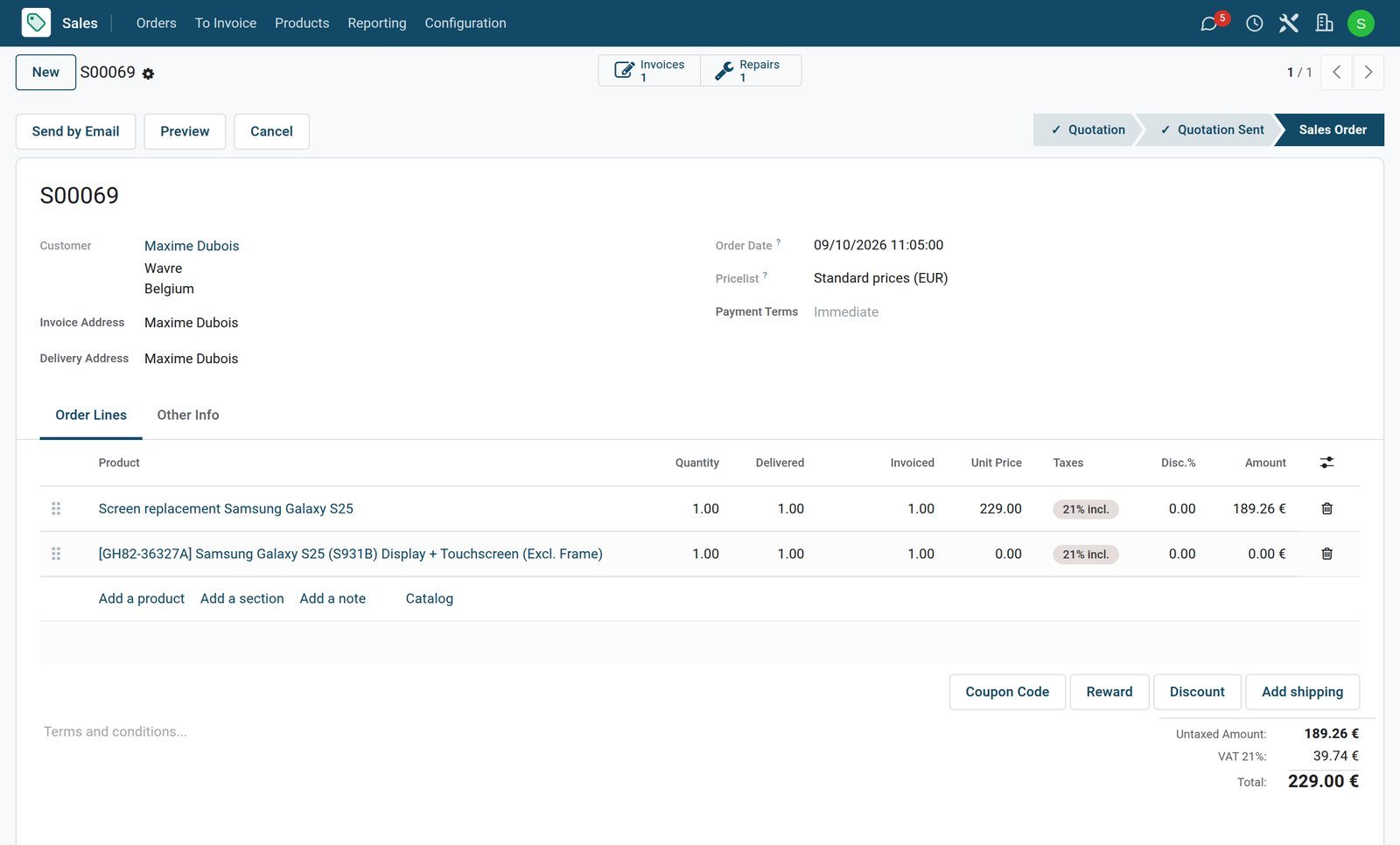
Warranty repairs and parts on order
A warranty repair charges nothing for its parts, and a repair waiting for a part shows the day the part is due.
- Repairs
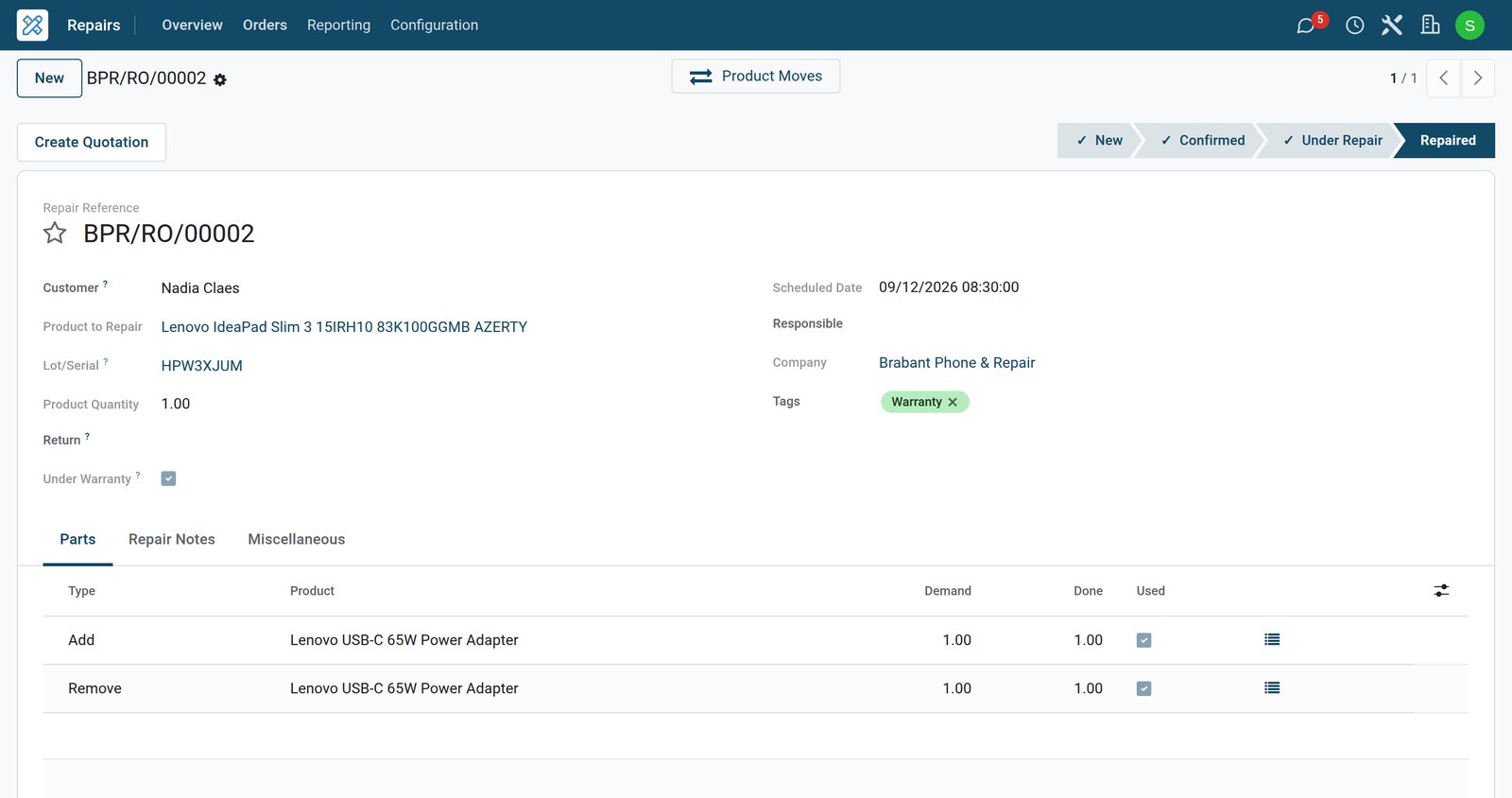
A charger replaced under warranty
Nadia Claes's laptop came back on Saturday with a charger that does not charge: the repair under warranty adds a new adapter from stock and removes the faulty one.
- Repairs
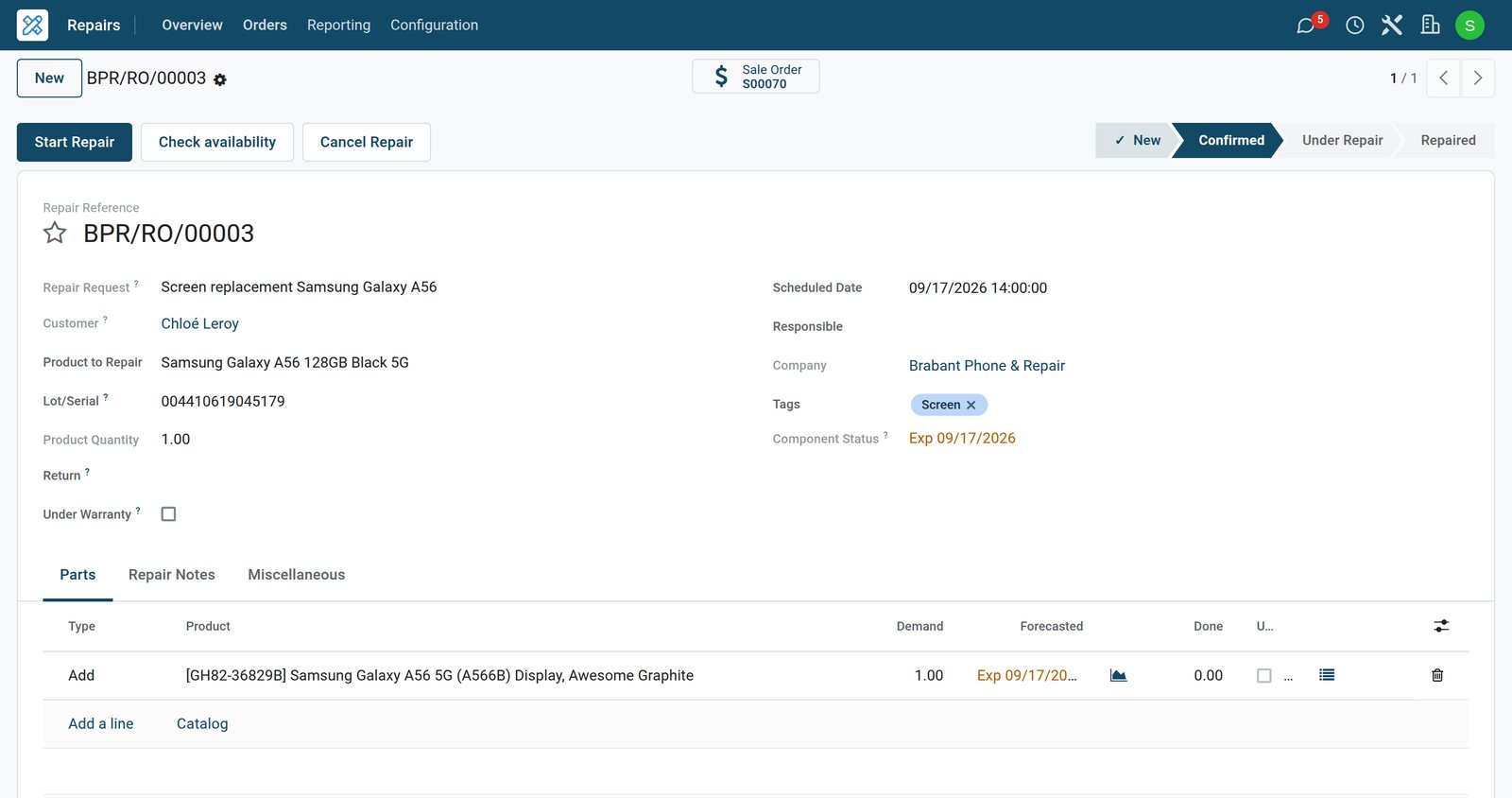
A Galaxy A56 screen waiting for its display
Chloé Leroy's repair is confirmed, but the display is not in stock: the component status shows it expected on 17 September, when the repair is planned.
- Purchase
Two displays ordered for Thursday
Two Galaxy A56 displays were ordered from Hesbaye Mobile Parts on Monday at €79.83 each, expected on Thursday 17 September at 09:30.
Explore Purchase →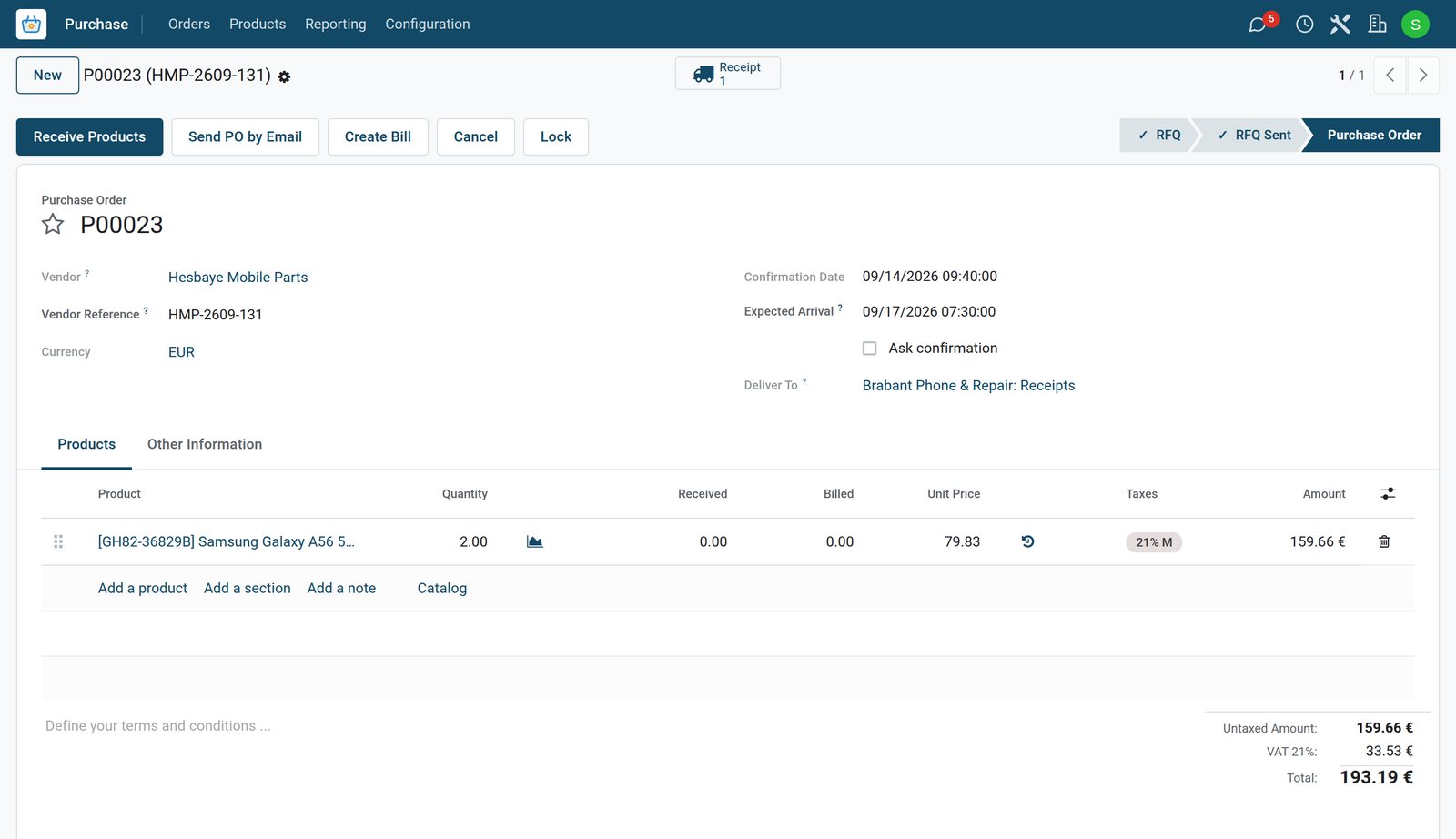
Returns that go back on the shelf
A refund takes the device back by the serial number it was sold with, and the unit is in stock again.
 Point of Sale
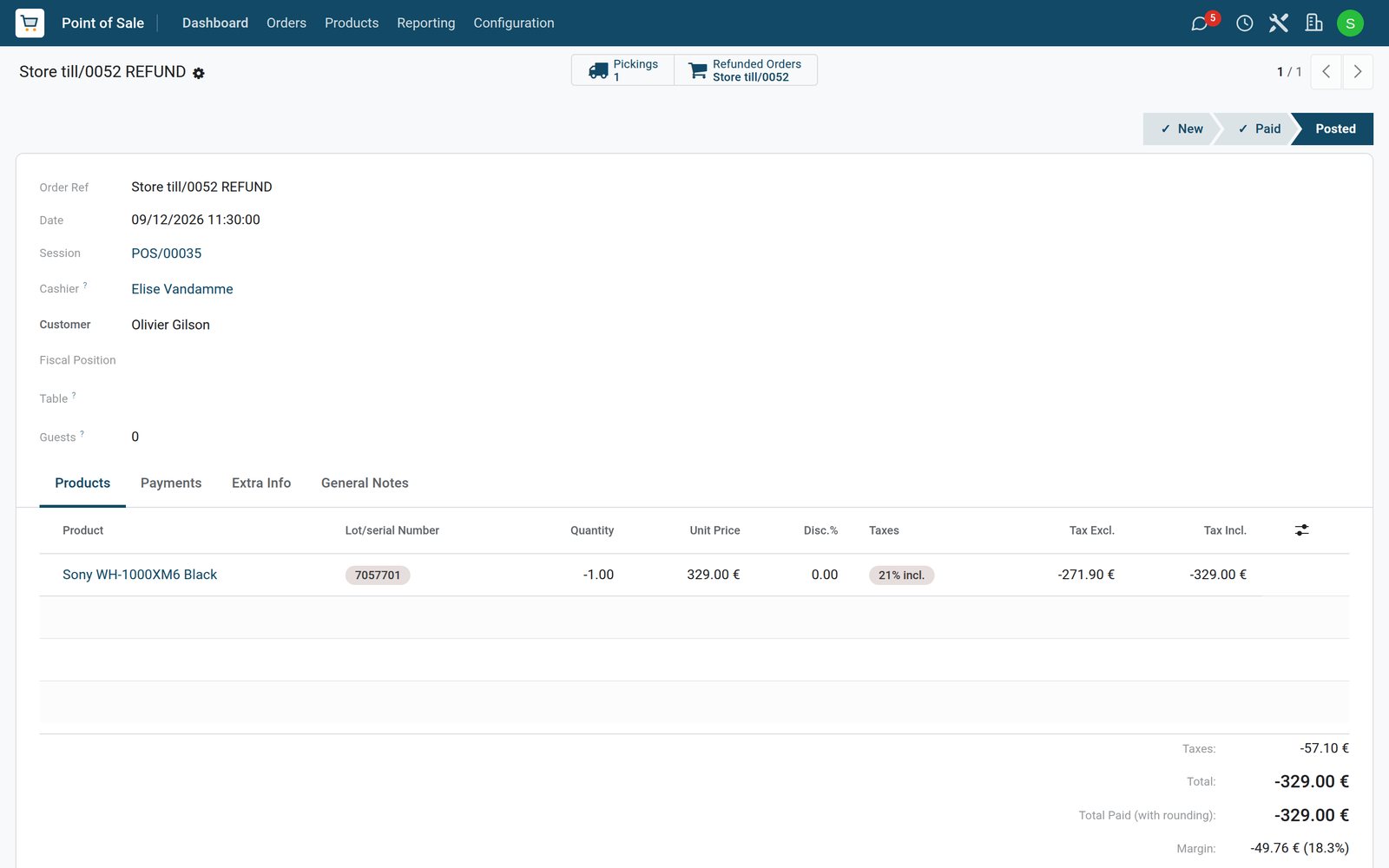
Headphones returned with the receipt
Olivier Gilson brought back the Sony WH-1000XM6 headphones bought on Thursday; on Saturday the refund took back serial number 7057701 and paid back €329.00.
Explore Point of Sale →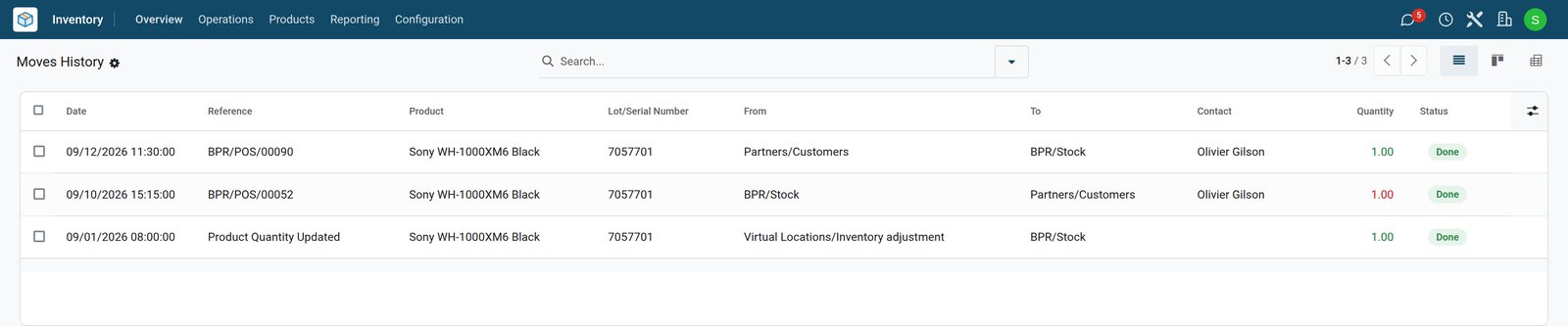 Inventory
Sold, returned and in stock again
The headphones' serial number shows the stock count, the sale on Thursday and the return on Saturday, which brought the unit back into stock.
Explore Inventory →Phones received with their IMEI numbers
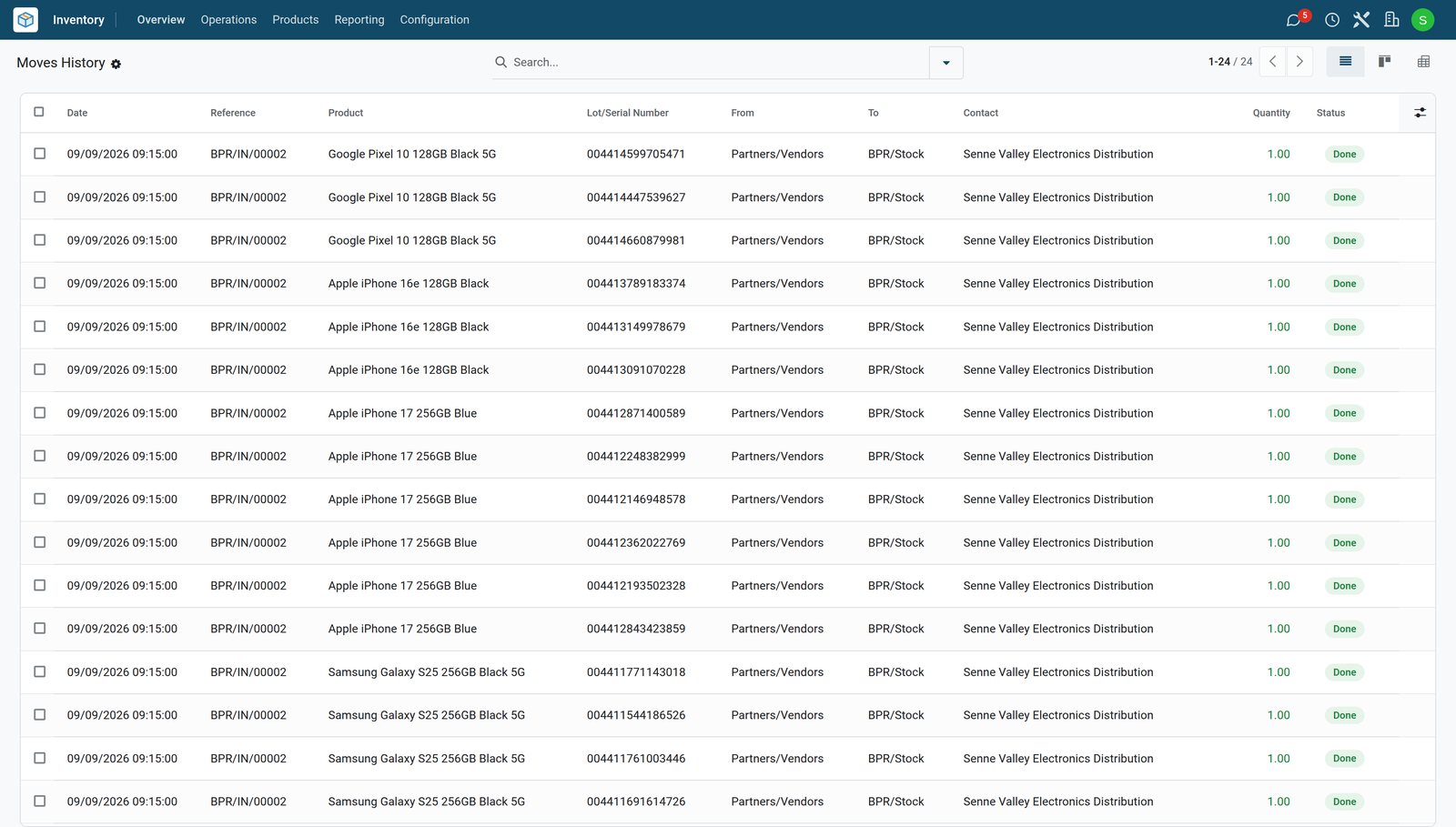
Distributor deliveries are received with the IMEI or serial number of each device before the store opens.
 Inventory
Phones in, one IMEI per unit
Senne Valley Electronics Distribution's delivery of Wednesday 9 September brought 24 phones, each received into stock with its own IMEI.
Explore Inventory →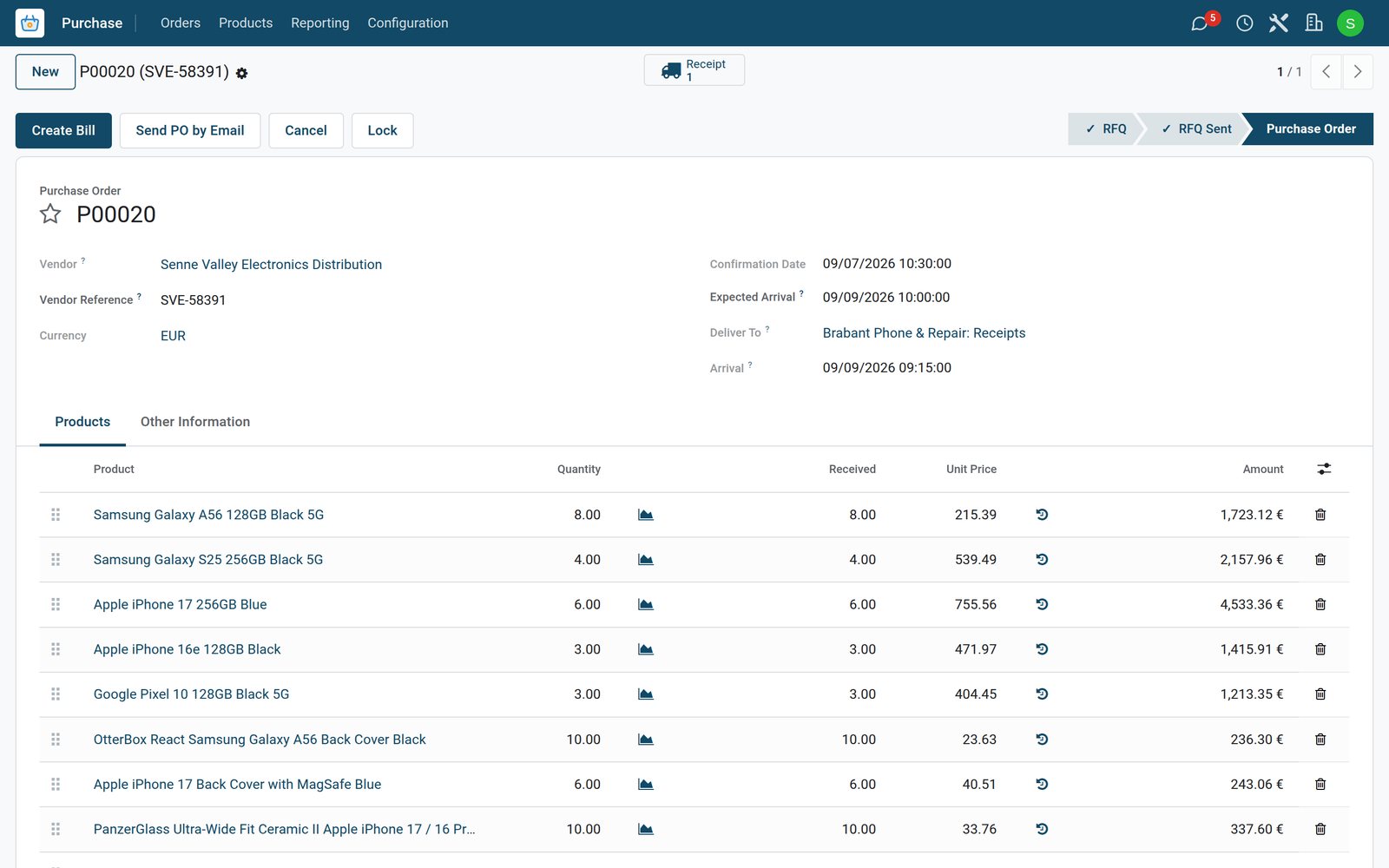 Purchase
The phone order to the distributor
Phones and cases ordered from Senne Valley Electronics Distribution on Monday 7 September arrived on Wednesday 9 September; each line shows the quantity received.
Explore Purchase →Sales by department, VAT by grid
The sales analysis shows what each department sold, and each day's closing posts the takings and the VAT to their tax grids.
 Point of Sale
Six days by department
From 8 to 14 September smartphones sold the most, ahead of accessories, headphones and speakers, TVs, laptops and tablets, gaming and smartwatches.
Explore Point of Sale →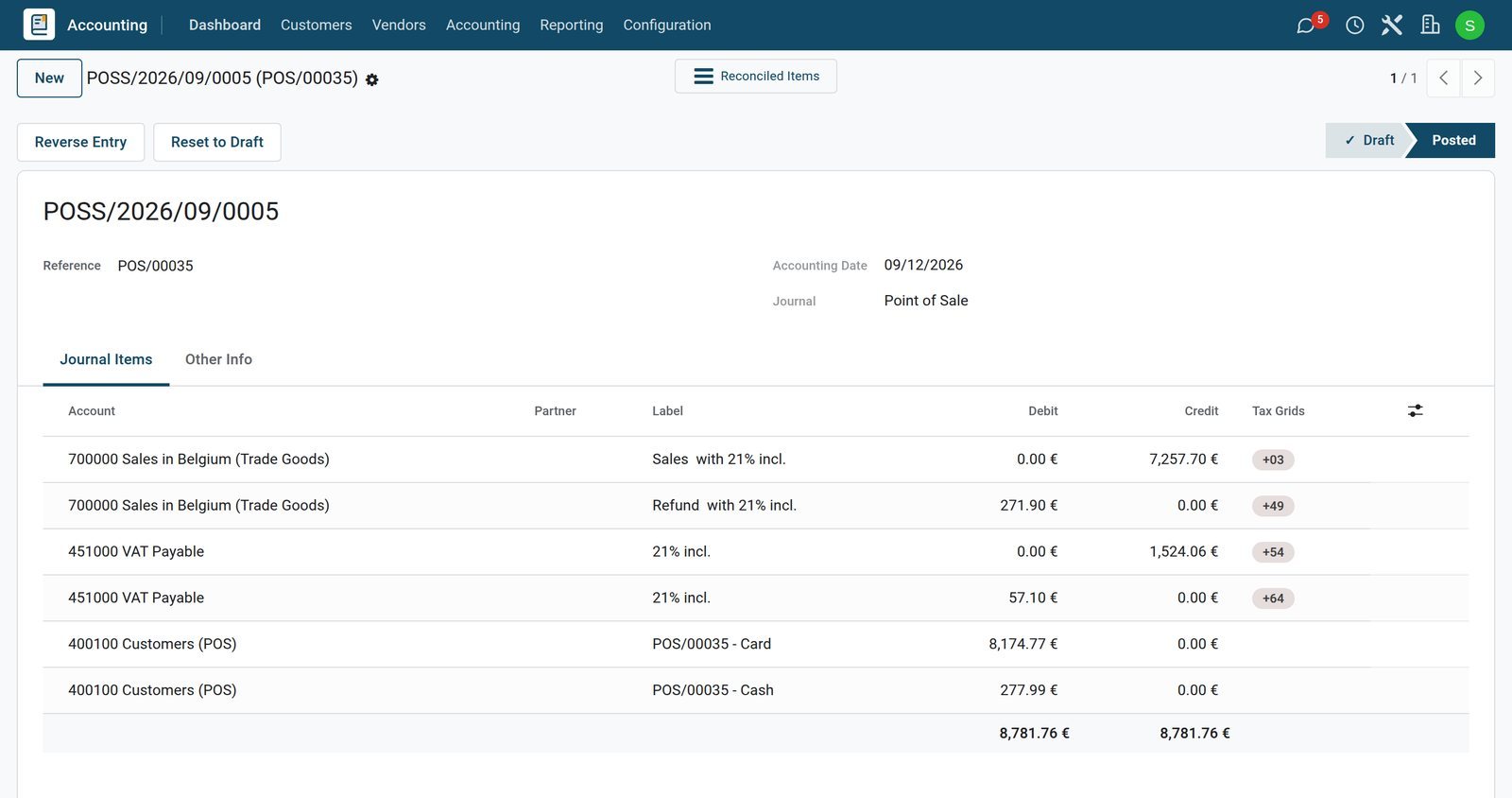
 Accounting
Saturday's takings in the books
Saturday's closing entry posts €7,257.70 of sales and €1,524.06 of VAT to their tax grids, with the headphone refund in grids 49 and 64.
Explore Accounting →Who uses it
Who uses it, and what they see
One system for the shop floor, the repair desk, the stock room and the books.
Store manager
Orders devices and parts from distributors, sets prices and follows sales by department.
Sales adviser
Sells each device by its serial number, adds the accessories and takes returns with the receipt.
Repair technician
Records the device and its IMEI, adds the parts used and moves the repair from confirmed to repaired.
Bookkeeper
Invoices collected repairs, matches the payments and reports VAT from the tax return.
Works with
Runs with the rest of BridgeERP
Apps an electronics store draws on.
In your country
Your currency, payments and taxes
Set to the country the store trades in.
Company currency
Shelf prices, distributor costs and daily takings are kept in the currency of the company; the demo store trades in EUR.
Prices with tax included
A tax can be included in the price, so the till charges the shelf price and the VAT is worked out of it; the demo follows a Belgian example.
Card and cash
Each till has its own payment methods; the demo till takes card and cash.
Accounting by country
Accounting packages for more than 100 countries set up the chart of accounts, the taxes and the tax report.
Getting started
Getting started
How an electronics store moves onto BridgeERP.
Load the catalogue
Import devices and accessories with prices, costs and VAT, and set phones, laptops and TVs to be tracked by serial number.
Receive with serial numbers
Receipts take a new serial number for each unit, typed or scanned, so every device enters stock by its number.
Open the till
Create the till with card and cash, the staff who sell and the price list it uses.
Set up repair services
Create the repair services with their prices and set them to open a repair order when a quotation is confirmed.
Questions
Questions about Electronics Store
Not covered here? Contact us.
Can we record the IMEI of every phone we sell?
Yes. Phones can be tracked by unique serial number: the IMEI is recorded when the phone is received and again when it is sold, and each number keeps its history.
Can we take repairs with a quotation?
Yes. A repair service on a quotation opens a repair order when the customer confirms, and the technician records the device, its serial number and the parts used.
Are parts free on a warranty repair?
Yes. A repair marked under warranty sets the price of its parts to zero on the quotation, while the parts still leave stock.
What happens to a returned device?
The refund takes the device back by the serial number it was sold with, the unit returns to stock, and the amount is paid back by the payment method chosen.
Can a repair wait for a part?
Yes. The repair shows whether its parts are available or the date they are expected, and the parts can be ordered from a supplier on a purchase order.
Can shelf prices include VAT?
Yes. A tax can be set as included in the price, so the till charges the shelf price, and the tax return reports the VAT on sales.
Tax compliance
Invoices your tax authority accepts
In Kenya, Uganda, Rwanda, Burundi and Zambia, each invoice, receipt and stock movement goes to the tax authority's own system when you post it. Ghana and Pakistan come next, and we connect 73 more countries on request.
- KenyaReady
eTIMS KRA
Invoices, credit notes, POS receipts and stock movements
- UgandaReady
EFRIS URA
Invoices, POS receipts and stock
- RwandaReady
EBM RRA
Invoices, POS receipts, stock and imports
- BurundiReady
EBMS OBR
Invoices, POS receipts, stock and manufacturing
- ZambiaReady
Smart Invoice ZRA
Invoices, POS receipts, stock and imports
Electronics Store, app by app
One connected flow instead of separate systems — the work moves from one team to the next without re-typing anything.
Every stop is a real app in your plan, and the hand-offs between them are the product.
- Customers & sales
- Operations
- Finance
Point of Sale
Touch till, offline mode, sessions, cash control and receipts.
Point of Sale →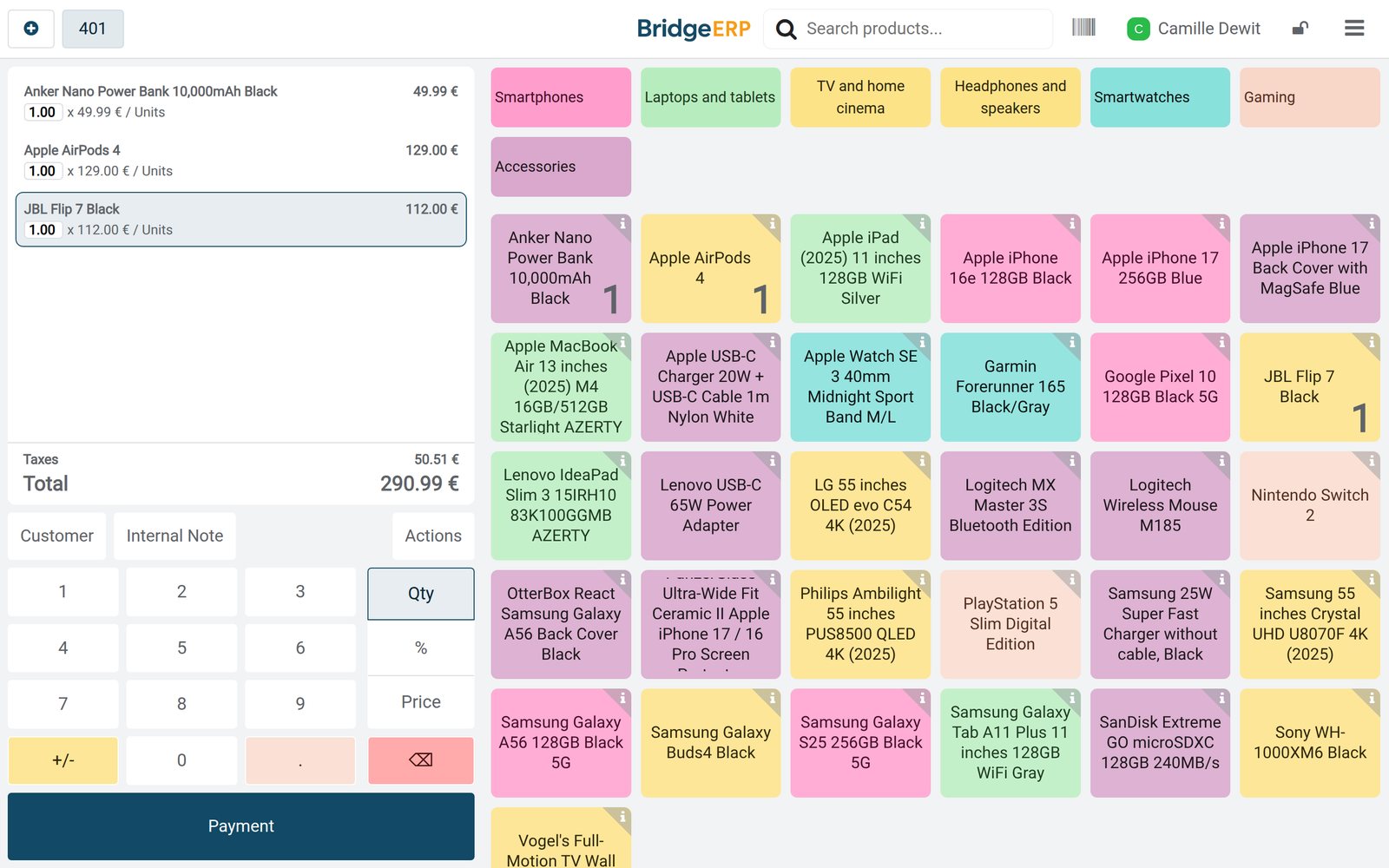
Ready when you are
Open the plan builder with the right apps for this industry already selected, or see it running first.