

 Point of Sale: Run every till from one screen, take cash, card and mobile money, and close the day with the cash counted
Three tills on the demo share one catalogue of 38 products, one customer list and payment methods from Cash and Card to Mobile Money and Customer Account, and every closed session posts straight into Accounting.
Free instant access. No credit card required.
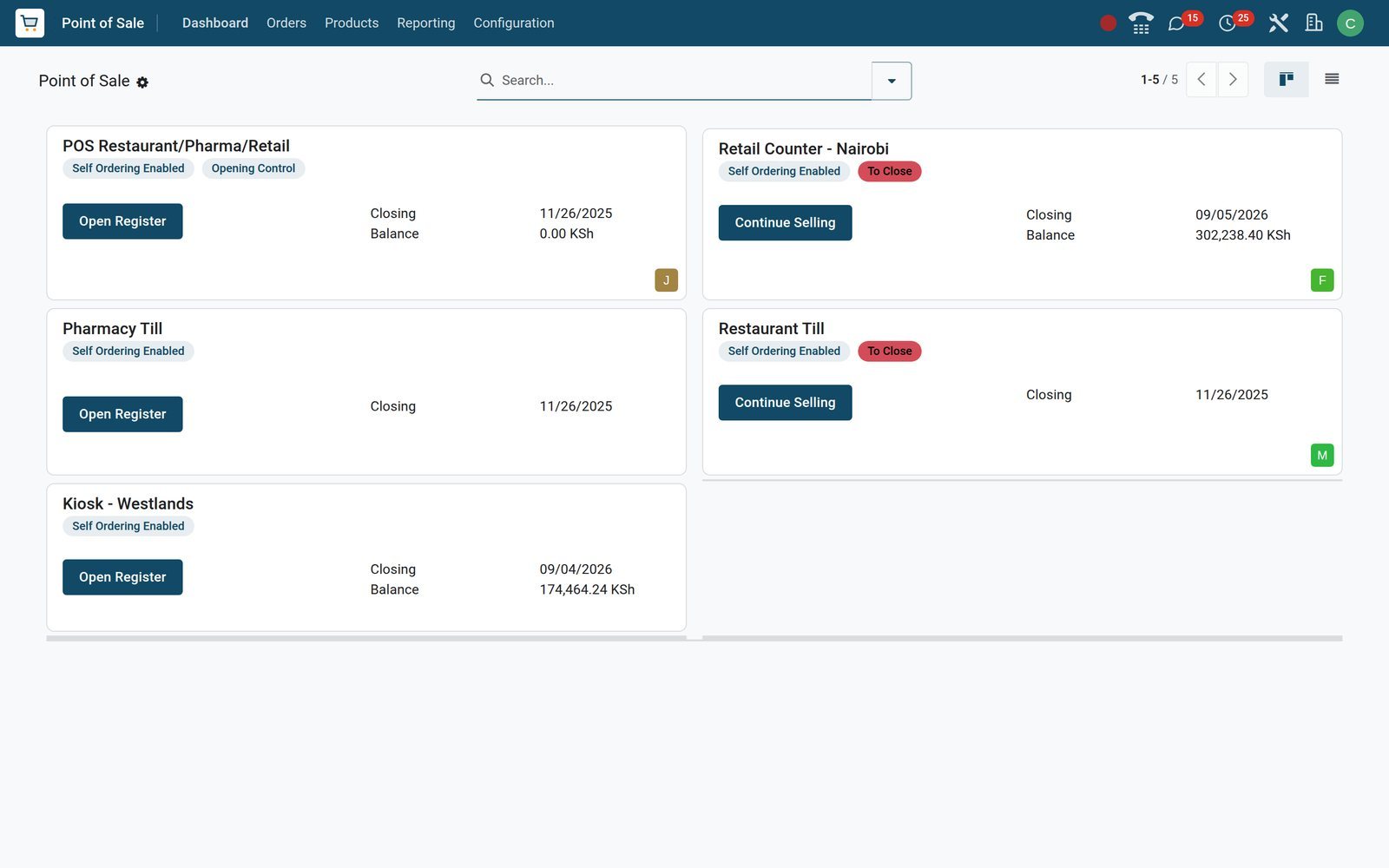
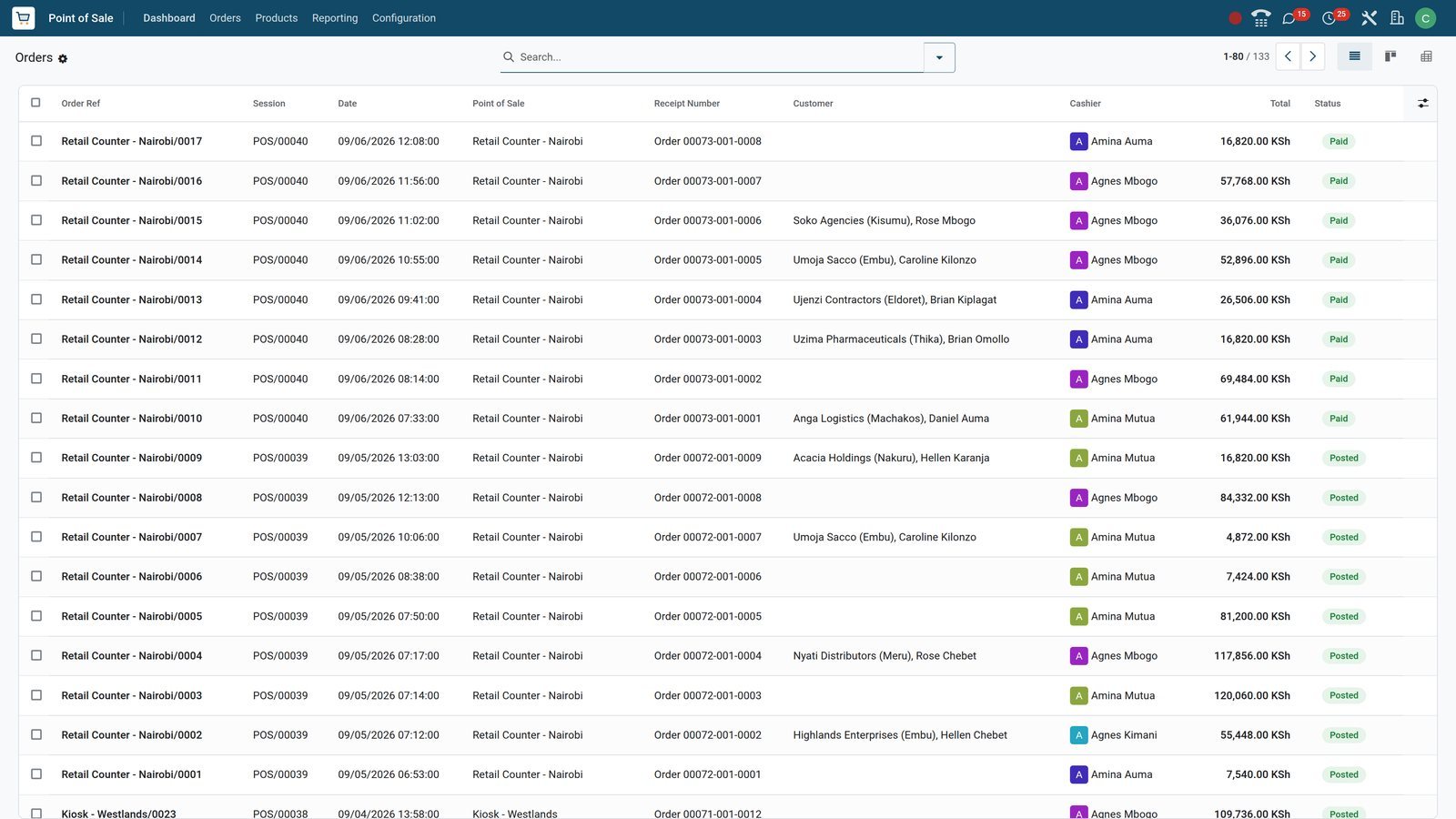
Every sale on every till lands in one list you can search
The Orders menu is the shop's record: each order names its till, session, receipt number, customer, cashier and total, with Paid, Posted or Invoiced as its status. Filters for Invoiced, Posted and Cancelled and groupings by session, cashier and customer sit in the search bar.
 Point of Sale
Session, receipt number, customer, cashier, total and status on one row
Orders shows Retail Counter - Nairobi/0015 for Soko Agencies (Kisumu) at KSh 36,076 with its session POS/00040, cashier Agnes Mbogo, receipt Order 00073-001-0006 and a Paid badge.
Explore Point of Sale →By the numbers
What ships inside Point of Sale
Counts of things found under the Point of Sale menus and settings on the demo, not estimates.
- 8
- promotion programme types across Discount & Loyalty and Gift cards & eWallet, from discount codes and coupons to loyalty cards and eWallets
- 4
- payment method types: Cash, Bank for card and Mobile Money, Customer Account for pay-later sales, and Online through a payment provider
- 7
- payment terminal connectors ready to switch on in Settings: Adyen, Stripe, Six, Viva Wallet, PayTM, Razorpay and Mercado Pago
- 3
- self-ordering modes per till: a QR-code menu to browse, a QR-code menu with ordering, and a self-service kiosk
Inside the app
What is inside
The Point of Sale menus on the demo, grouped by what they let a shop do.
Dashboard and sessions
The Dashboard shows one card per till with who opened it and the last closing cash; Sessions keeps every opening float, closing count and cash difference.
Orders, payments and customers
Orders, Payments and Customers share one menu; an order keeps its lines, taxes, payments, cashier, receipt number and the invoice it produced.
Products, variants and combos
Products, Product Variants, Combo Choices and Attributes are the same records as in Sales and Inventory; a product is flagged Available in POS and given a POS category.
Pricelists, discounts and loyalty
Pricelists per till, line discounts, Discount & Loyalty and Gift cards & eWallet live under Products; each programme is switched on for Point of Sale, Website or Sales.
Payment methods and cash
Payment Methods map each way of paying to a journal, Coins/Bills defines the denominations counted at closing, and Advanced Cash Control is a switch on each till.
Preparation printers and display
Preparation Printers and the Preparation Display route order lines by category to a printer or screen, so a large order is picked while the customer pays.
Reporting
Session Report and Sales Details print the takings of a session or a date range; Orders Analysis pivots sales by category, till, employee and payment method.
Settings per till
Every till has its own Settings page: cash control, IoT devices, customer display, receipt header and footer, tax display, pricelists, categories and employee access.
Step by step
From opening float to posted takings in six steps
Each step names the app that does the work; nothing is retyped between the till and the books.
- Step 1
Open the register
The cashier opens a session with the opening float, KSh 5,000 on the Nairobi counter, and the till loads its products, customers and pricelists.
Point of Sale - Step 2
Ring up the basket
Scan or tap products, pick the customer, apply a line discount or a loyalty reward and add a note; prices show tax-included as the till is set.
Point of Sale - Step 3
Take the payment
Cash, Card, Mobile Money or Customer Account, split across several methods when one does not cover the basket; every payment records the cashier who took it.
Point of Sale - Step 4
Receipt or invoice
Print or email the receipt, or press Invoice to raise a customer invoice with the shop's VAT in the Customer Invoices journal.
Invoicing - Step 5
Close and post
Closing counts the cash, records any difference and posts one closing entry per session in the Point of Sale journal; the stock moves leave Inventory.
Accounting - Step 6
Analyse the day
Session Report prints the takings by product, payment method and tax; Orders Analysis compares tills, categories and cashiers by month.
Point of Sale
A till record that keeps everything the cashier did
An order on BridgeERP is not a line on a Z-report. It holds the product lines with their VAT, the payments by method, the cashier, the receipt and tracking numbers, the customer, and the invoice or return that followed, on one form with Products, Payments and Extra Info tabs.
- Point of Sale
Lines, VAT, payment, cashier and receipt number on one order
Retail Counter - Nairobi/0015 holds a UPS 1500VA and an External SSD 1TB, 16% VAT of KSh 4,976, and one Mobile Money payment of KSh 36,076.
Explore Point of Sale →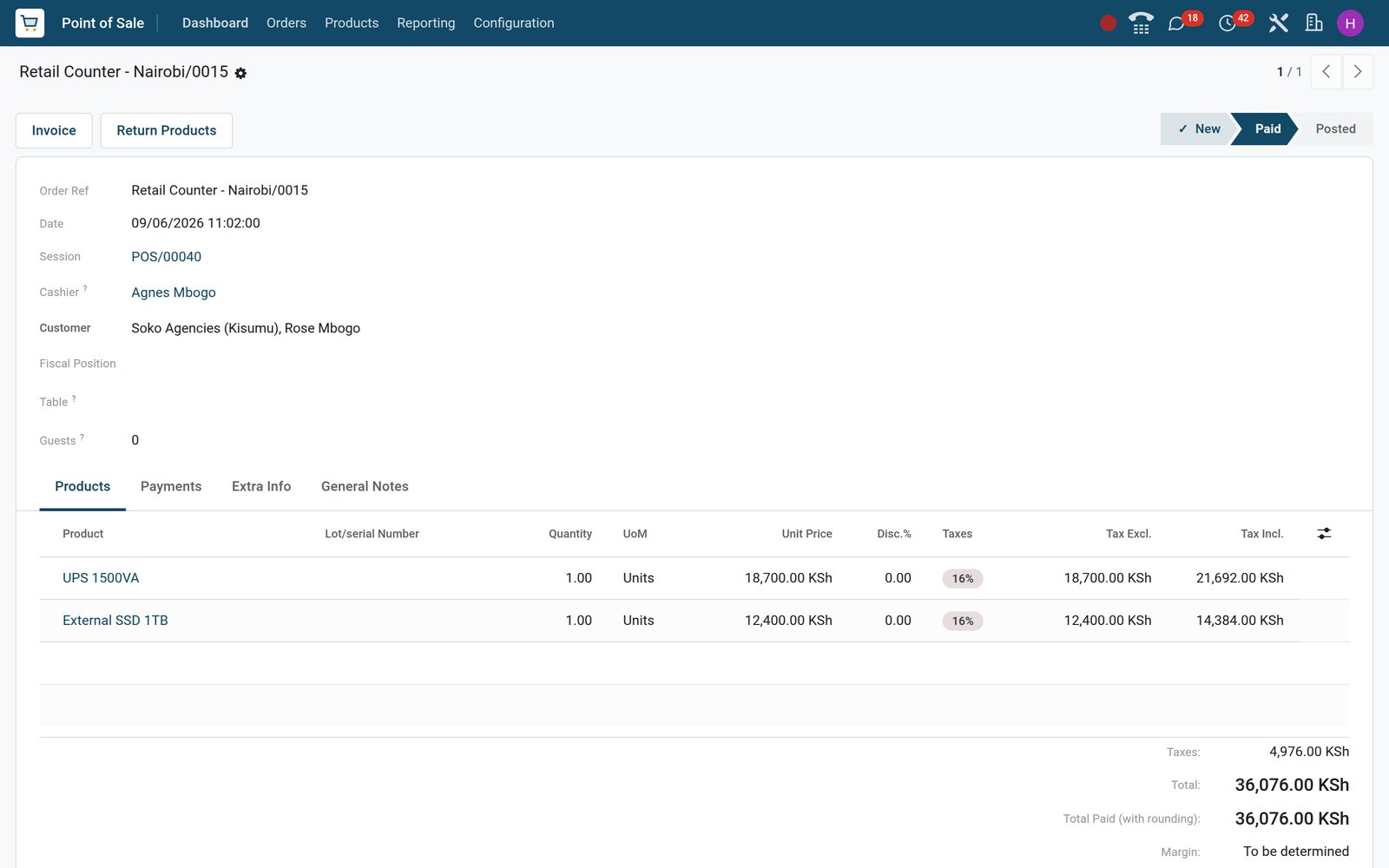
- Point of Sale
One catalogue of 38 products, each in a POS category
Products flagged Available in POS list sales price and cost in shillings, from A4 copier paper at KSh 650 to a business laptop at KSh 89,000.
Explore Point of Sale →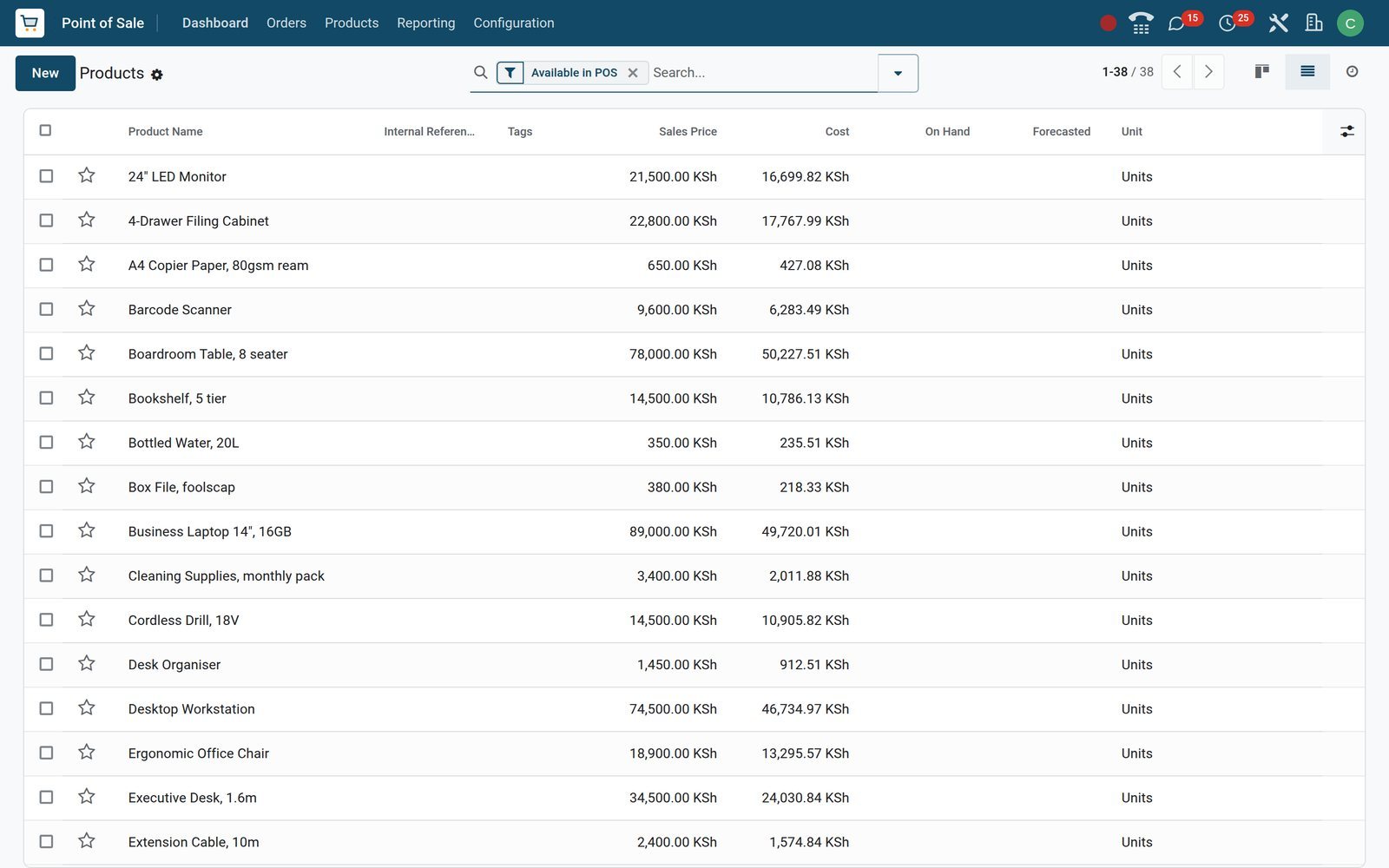
Close the day knowing the drawer, the takings and the books agree
A session starts with an opening float and ends with a cash count against the denominations in Coins/Bills. The difference is recorded, a maximum difference can block the close, and Close Session & Post Entries writes one journal entry for the whole session.
- Point of Sale
Opening float, closing count and posted entry on one session
POS/00039 on Retail Counter - Nairobi: opened by Mercy Chebet with a KSh 5,000 float, 9 orders, KSh 302,238.40 counted at closing and entry POSS/2026/09/0003 posted.
Explore Point of Sale →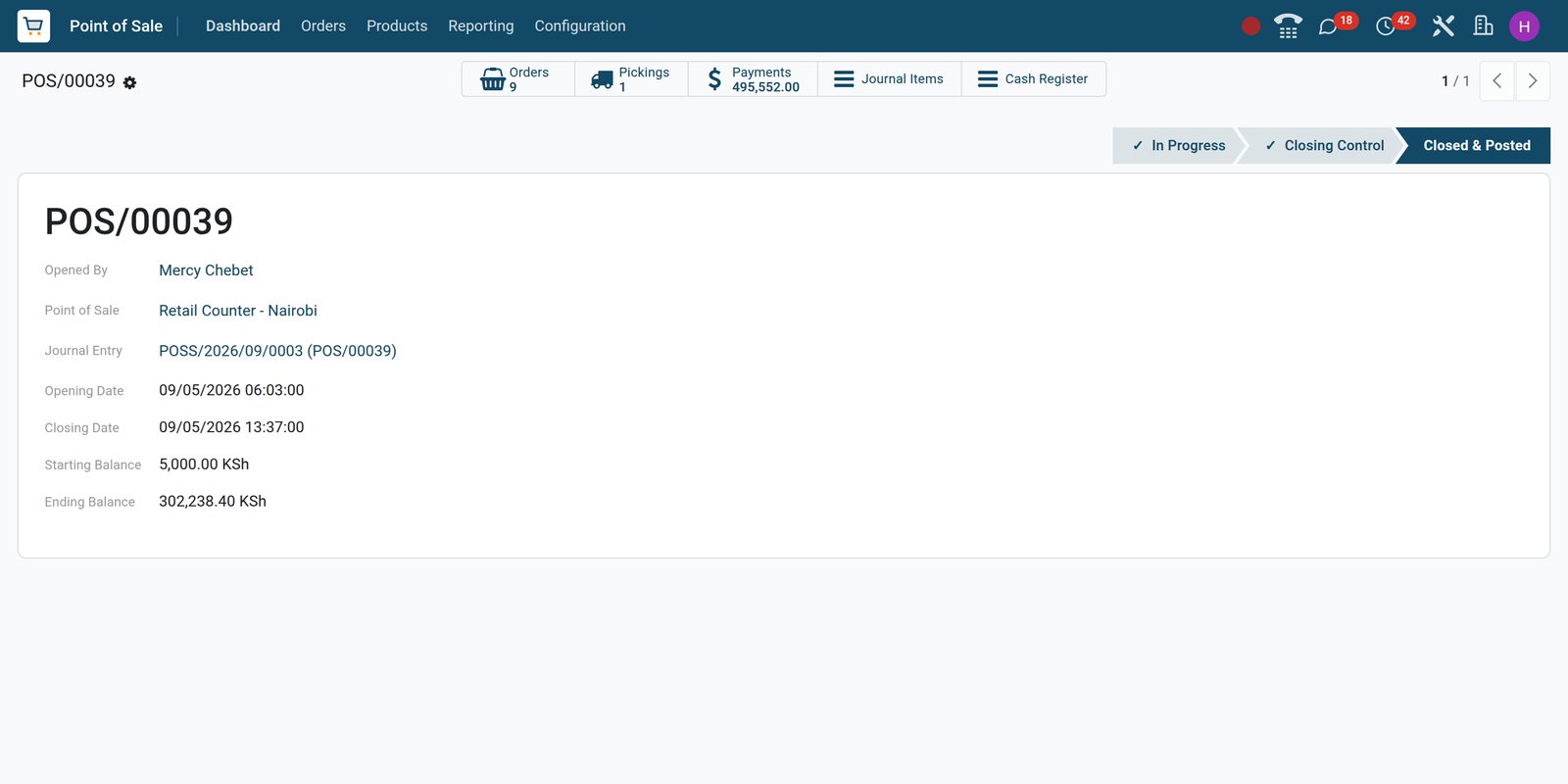
- Point of Sale
Every payment by method, order and date
Payments lists every Cash, Card and Mobile Money payment against its order and date; the four September sessions hold 21 cash, 13 Mobile Money and 9 card payments.
Explore Point of Sale →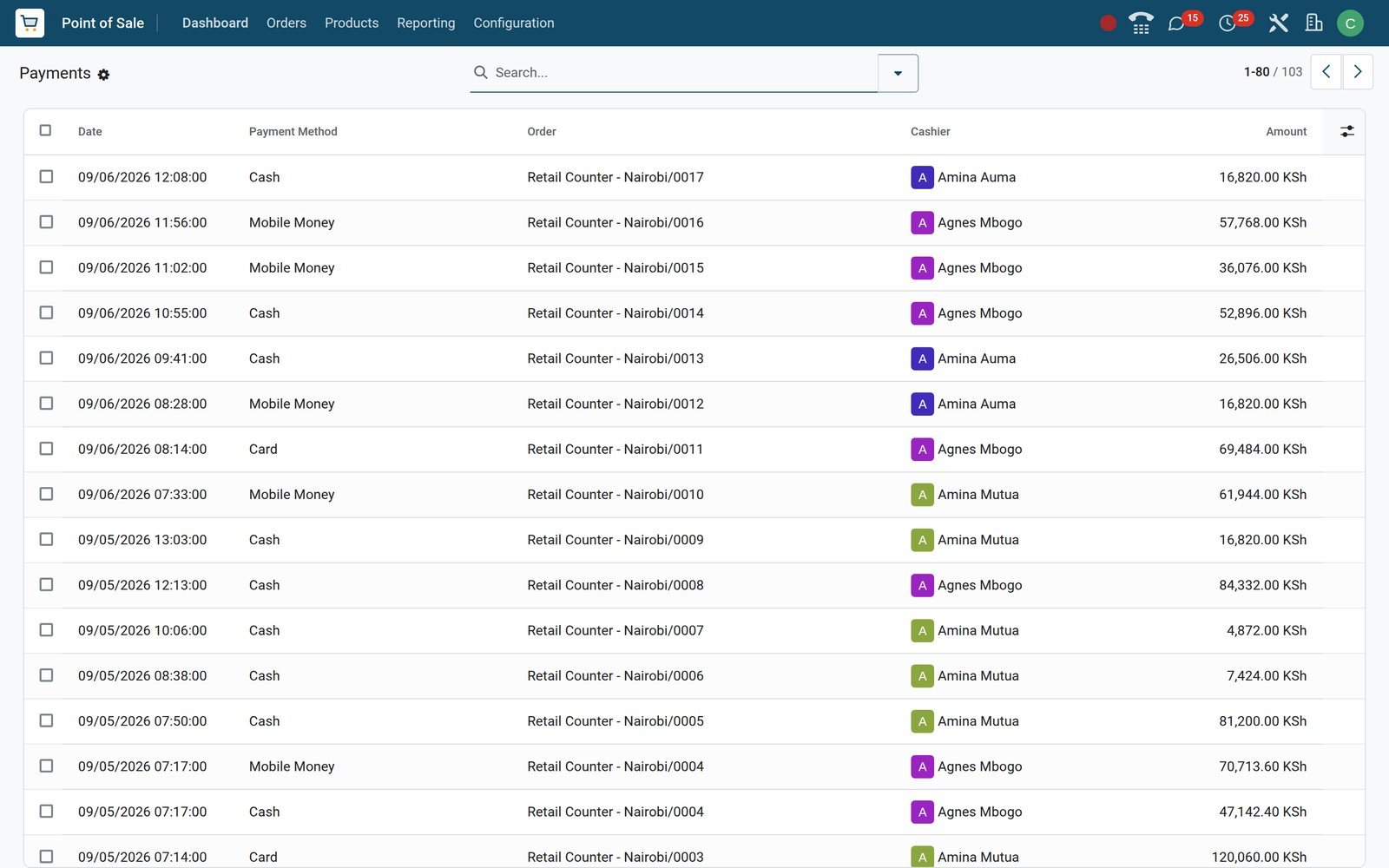
Points, coupons and gift cards that work at the till and on the website
Discount & Loyalty holds promo codes, coupons, buy X get Y, promotions, loyalty cards and next-order coupons; Gift cards & eWallet holds prepaid balances. Each programme is ticked for Point of Sale, Sales or Website, so the same customer card earns at the counter and spends online.
 Point of Sale
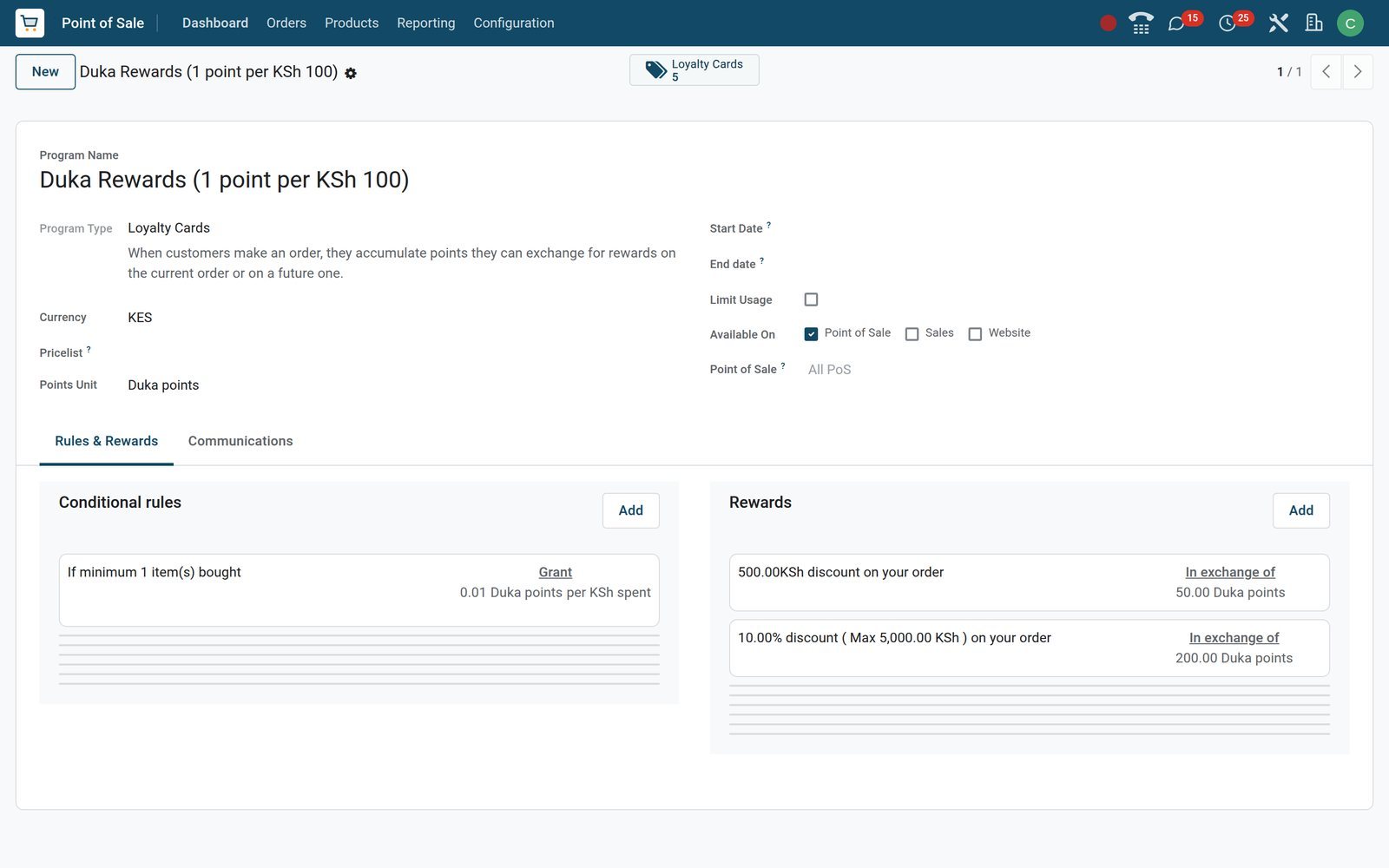
A loyalty programme with rules and rewards on one form
Duka Rewards gives 1 point per KSh 100 spent; 50 points take KSh 500 off an order, 200 points take 10% off up to KSh 5,000.
Explore Point of Sale →See which category, till and cashier earned the money
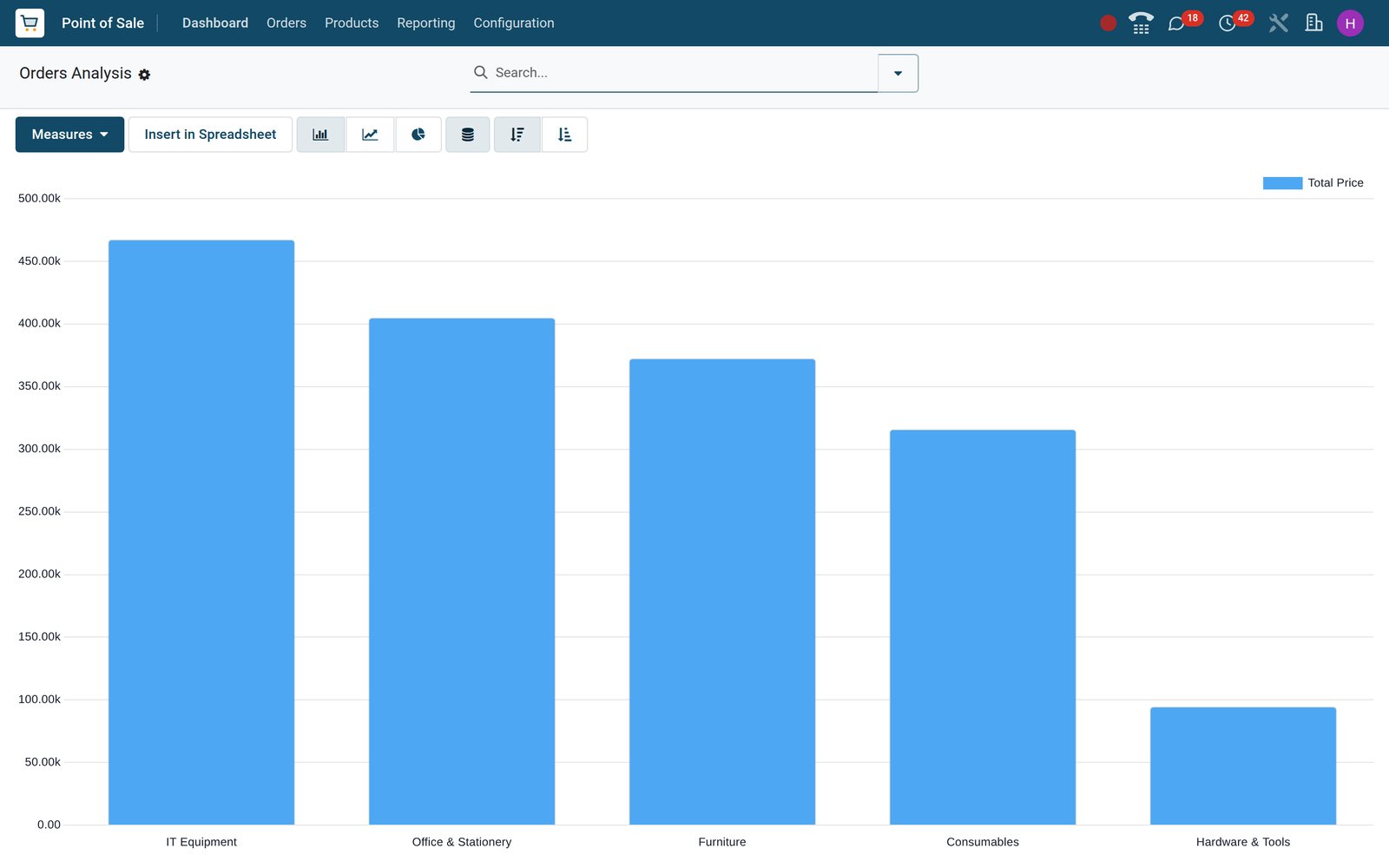
Orders Analysis reads every order line. Measures are Total Price, Subtotal w/o Tax, Total Discount, Average Price, Product Quantity, Sale Line Count and Margin; groupings are User, Employee, Point of Sale, Product, Product Category, Payment Method, POS Category and Order Date, in graph or pivot.
 Point of Sale
Orders Analysis by product category
Total Price by product category sets IT Equipment, Office & Stationery, Furniture, Consumables and Hardware & Tools side by side; switch to Margin or group by Employee.
Explore Point of Sale →Who uses it
Who uses it, and what each person sees
The same database, four different screens.
Owner
The Dashboard shows which tills are open and by whom; Orders Analysis compares Retail Counter - Nairobi with Kiosk - Westlands by month, category and margin.
Shop manager
Sets pricelists, restricts price changes to managers, defines employee access per till, prints the Session Report and checks the cash difference on every closing.
Cashier
Logs in with a badge or PIN, sells from the touch screen by product category, takes split payments and prints or emails the receipt.
Accountant
Finds one closing entry per session in the Point of Sale journal, the customer invoices raised from the till, and the cash and bank journals to reconcile.
Set up each till for its counter: devices, controls, receipts
Settings are per till. On the demo, Retail Counter - Nairobi runs Advanced Cash Control with an IoT box driving its receipt printer, scanner, scale and customer-facing screen; Pharmacy Till runs without cash control. The same page holds tax display, receipt footer, pricelists, category restrictions and who may change a price.
 Point of Sale
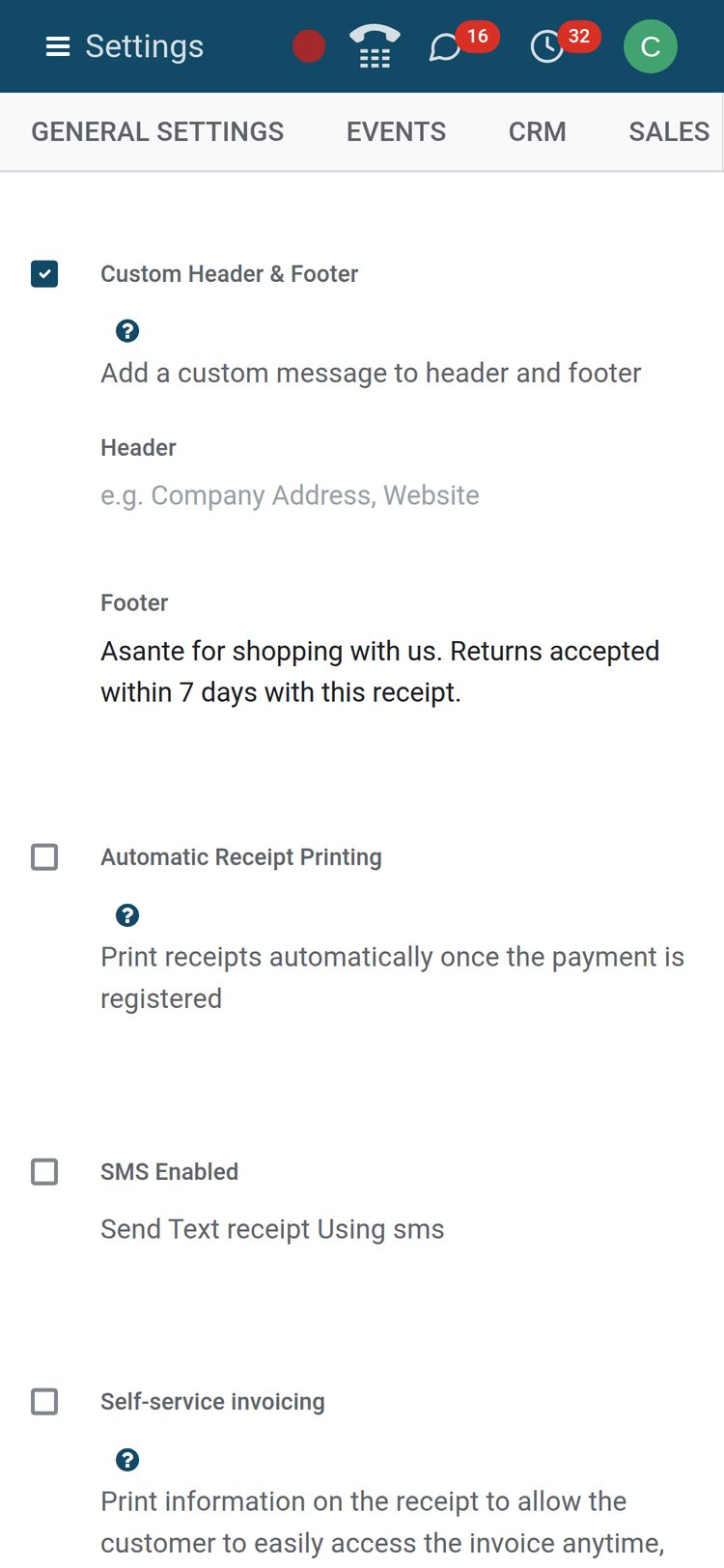
The receipt footer, set per till
Custom Header & Footer prints the shop's own line on every receipt, here the returns policy; automatic receipt printing, SMS receipts and self-service invoicing are one switch each.
Explore Point of Sale →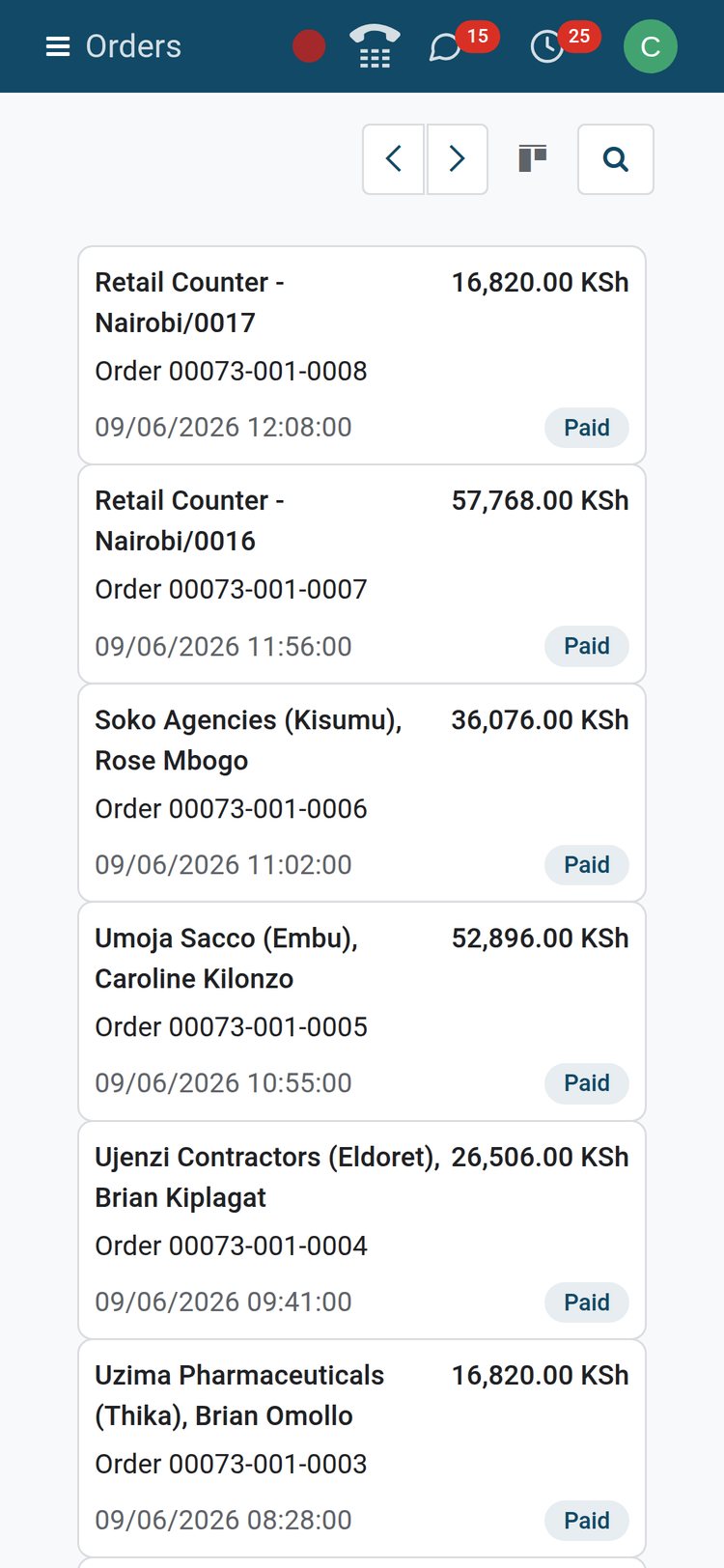 Point of Sale
Orders and sessions from a phone
The back office is responsive: the Orders kanban on a phone shows each till order with customer, amount, date and status, wherever the manager is.
Explore Point of Sale →Works with
Apps that pick up where the till leaves off
All of these are installed on the demo and share the till's products, customers, orders and journals.
 InventoryEach closed session sends its products out of the till's warehouse, Nairobi Distribution Centre on the demo, through the PoS Orders operation; Ship Later books a delivery instead.
 InvoicingPress Invoice on an order and a customer invoice with the shop's VAT is created in the Customer Invoices journal.
 AccountingOne closing entry per session in the Point of Sale journal, cash and bank journals for every payment method, and the e-invoicing fields, eTIMS on the demo, on invoiced sales.
 SalesA quotation or sales order can be loaded and settled at the till; the sales team and the shop share products, pricelists and customers.
 eCommerceProducts, customers, pricelists and loyalty programmes are the same records online, so a coupon or gift card earned on the web works at the counter.
 Restaurant & BarSwitch a till to Is a Bar/Restaurant for floor plans, table orders, bill splitting and the kitchen display, as the two restaurant tills on the demo do.
 EmployeesCashiers are employee records with a badge and PIN; each till lists who has basic access and who has manager access.
 Internet of ThingsOn the demo, the IoT box on the Nairobi counter drives the receipt printer, barcode scanner, electronic scale and the customer display.
 EventsTickets with PoS is a settings switch that sells event tickets at the till and registers the attendee.
 PurchaseReordering rules on stocked products sold at the till raise purchase orders to the vendor before the shelf runs empty.
 DiscussEvery order and session carries a chatter for notes, follow-ups and attachments between the shop and the office.
 StudioAdd your own fields, list columns and automated actions to orders and sessions without writing code.
In your country
Built for the counter in any country
Mobile money, credit customers, country VAT, e-invoicing, several companies and offline selling are settings on the demo, not projects.
Mobile Money at the counter
A Mobile Money method booked to a bank journal sits beside Cash and Card on the demo's retail counter; the shop's September sessions took 13 payments through it.
Credit customers who pay later
Customer Account is a pay-later method that insists on a named customer and books the amount to that customer's receivable; Settle Due collects it at the till.
Country VAT on every line
Tills show tax-included prices and each product carries its country's VAT; on the demo, the Kenya localisation's 16%, 8%, zero-rated, exempt and export rates apply, with fiscal positions per till.
E-invoicing through invoicing
An order invoiced at the till becomes a customer invoice for the country's e-invoicing module; on the demo, Kenya's eTIMS (OSCU) module reports it and keeps the receipt number and signature.
Offline and on any device
The till runs in a web browser on a desktop, tablet or phone, and keeps working while the connection is temporarily down.
Several companies, several currencies
Five companies share the database with KES, ETB and USD active; each till belongs to one company and its journals, so a group runs shops in several countries.
Reports and control
Reports and control
Everything under Point of Sale > Reporting on the demo, plus the printed reports on a session.
Session Report
A PDF for a session: sales by product and category, payments by method, taxes, discounts and the opening, closing and difference of the cash register.
Sales Details
The same figures for any date range and any set of tills, so a week at the kiosk and the counter is one document.
Orders Analysis
Graph or pivot over every order line: Total Price, Subtotal w/o Tax, Margin, Quantity, Discount and Average Price by category, till, employee, payment method or month.
Orders and Payments lists
Filter Orders by Invoiced, Posted or Cancelled and group by session, cashier or customer; group Payments by method or session for a takings check.
Sales per employee
The Session Report can add a report per employee, so commissions and shift handovers rest on who actually rang the sale.
Margins and costs
Switch on Margins & Costs and every order shows its margin and margin percentage; Orders Analysis carries Margin as a measure.
Getting started
Getting started
What a shop does in its first week on BridgeERP.
Import the catalogue
Import products, POS categories, customers and pricelist rules from Excel or CSV, map each column to a field and press Test before the real load.
Create a till from one form
Add a Point of Sale under Configuration, choose its payment methods, journals, warehouse operation type, receipt footer and cash control, then press Open Register.
Add products at the counter
New Product creates an item already flagged Available in POS with its price, POS category and barcode, and it is on the till from the next session.
Train once, run every till
Every till uses the same touch screen, so a cashier trained on the counter can work the kiosk; only the Settings page differs between tills.
Questions
Questions about Point of Sale
Not covered here? Contact us.
Does the till keep working when the internet drops?
Yes. The register runs in a web browser on a desktop, tablet or phone and keeps working while the connection is temporarily down; the orders taken meanwhile reach the server when the connection returns and appear in Orders and in the session like any other sale.
Can customers pay by mobile money such as M-Pesa, Airtel Money or MTN MoMo?
Yes, as a payment method at the counter. Mobile Money is set up beside Cash and Card, booked to a bank journal, and the cashier records each M-Pesa, Airtel Money or MoMo payment against it, so the session and the Payments list show mobile takings apart from cash.
How does cash control work at closing?
With Advanced Cash Control on, each session opens with a counted float and closes with a count entered against the denominations in Coins/Bills. The session records the opening balance, the expected and counted closing balances and the difference; Set Maximum Difference blocks a close beyond a limit, and Close Session & Post Entries writes one journal entry.
Can I invoice a sale at the till, and does it reach the tax authority's e-invoicing?
Yes. Invoice on the order creates a customer invoice in the Customer Invoices journal with the same lines and VAT. It is an ordinary invoice in Accounting, so the country's e-invoicing module reports it where one is installed; on the demo, Kenya's eTIMS (OSCU) module sends it to KRA and keeps the returned receipt number and signature on the invoice.
Can several cashiers share one till?
Yes. Each till lists employees with basic access and employees with manager access; cashiers switch with a badge or PIN from their employee record, and every order and payment records the employee who took it. The Session Report can add a report per employee.
Does stock go down when I sell?
Yes, for stocked products. Goods sold at the till leave the till's warehouse through the PoS Orders operation type, Nairobi Distribution Centre on the demo, with a picking created for the session's orders. Ship Later instead creates a delivery for goods the customer collects or receives later.
What hardware do I need?
Any device with a web browser. For peripherals, an IoT box connects a receipt printer, barcode scanner, electronic scale, cash drawer and customer-facing screen, as the demo's retail counter shows; an Epson network printer can print without a box, and Settings lists seven payment terminal connectors.
Can a customer buy on account and pay later?
Yes. The Customer Account payment method is a pay-later type that insists on a named customer; the amount becomes a receivable on that customer, and the till can settle the due amount later, or the accountant collects it through Invoicing.
Tax compliance
Invoices your tax authority accepts
In Kenya, Uganda, Rwanda, Burundi and Zambia, each invoice, receipt and stock movement goes to the tax authority's own system when you post it. Ghana and Pakistan come next, and we connect 73 more countries on request.
- KenyaReady
eTIMS KRA
Invoices, credit notes, POS receipts and stock movements
- UgandaReady
EFRIS URA
Invoices, POS receipts and stock
- RwandaReady
EBM RRA
Invoices, POS receipts, stock and imports
- BurundiReady
EBMS OBR
Invoices, POS receipts, stock and manufacturing
- ZambiaReady
Smart Invoice ZRA
Invoices, POS receipts, stock and imports
Where Point of Sale fits
Nothing here is a silo: the apps around it read and write the same records, so the hand-offs happen on their own.
What feeds it, and what it feeds — these are real app connections, not a diagram.
- Customers & sales
- Finance
Point of Sale
Touch till, offline mode, sessions, cash control and receipts.
Point of Sale →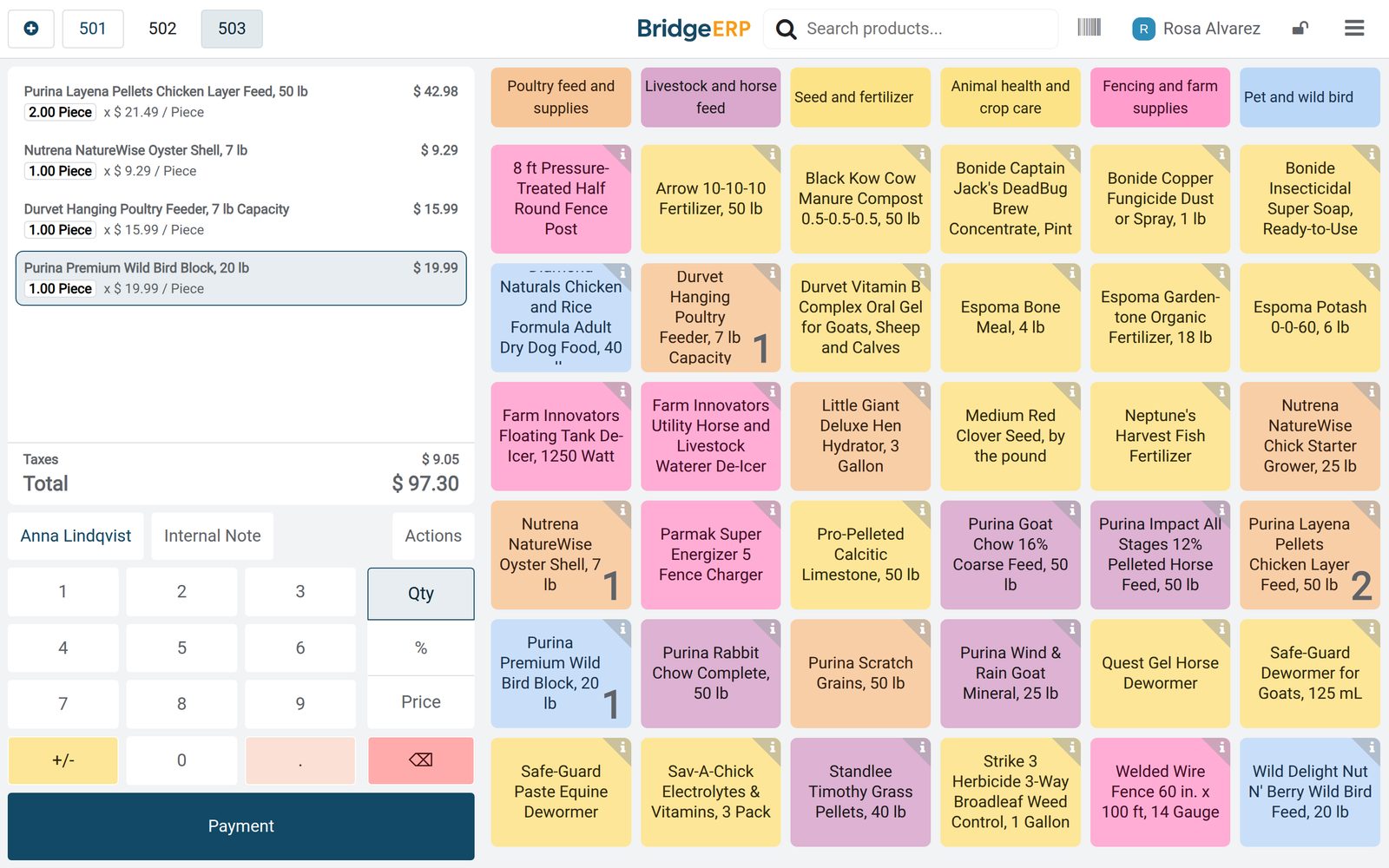
Put Point of Sale to work
Add it to your plan and pay only for what you use, or see it running on your own demo first.