

 Discuss: Every branch, deal and month-end in one conversation, with the record one click away
BridgeERP Discuss gives your team channels, private groups, direct chats, threads, calls and an inbox of mentions, all tied to the orders, receipts and invoices they are talking about.
Free instant access. No credit card required.
Start the day with the three things that need you, not three hundred
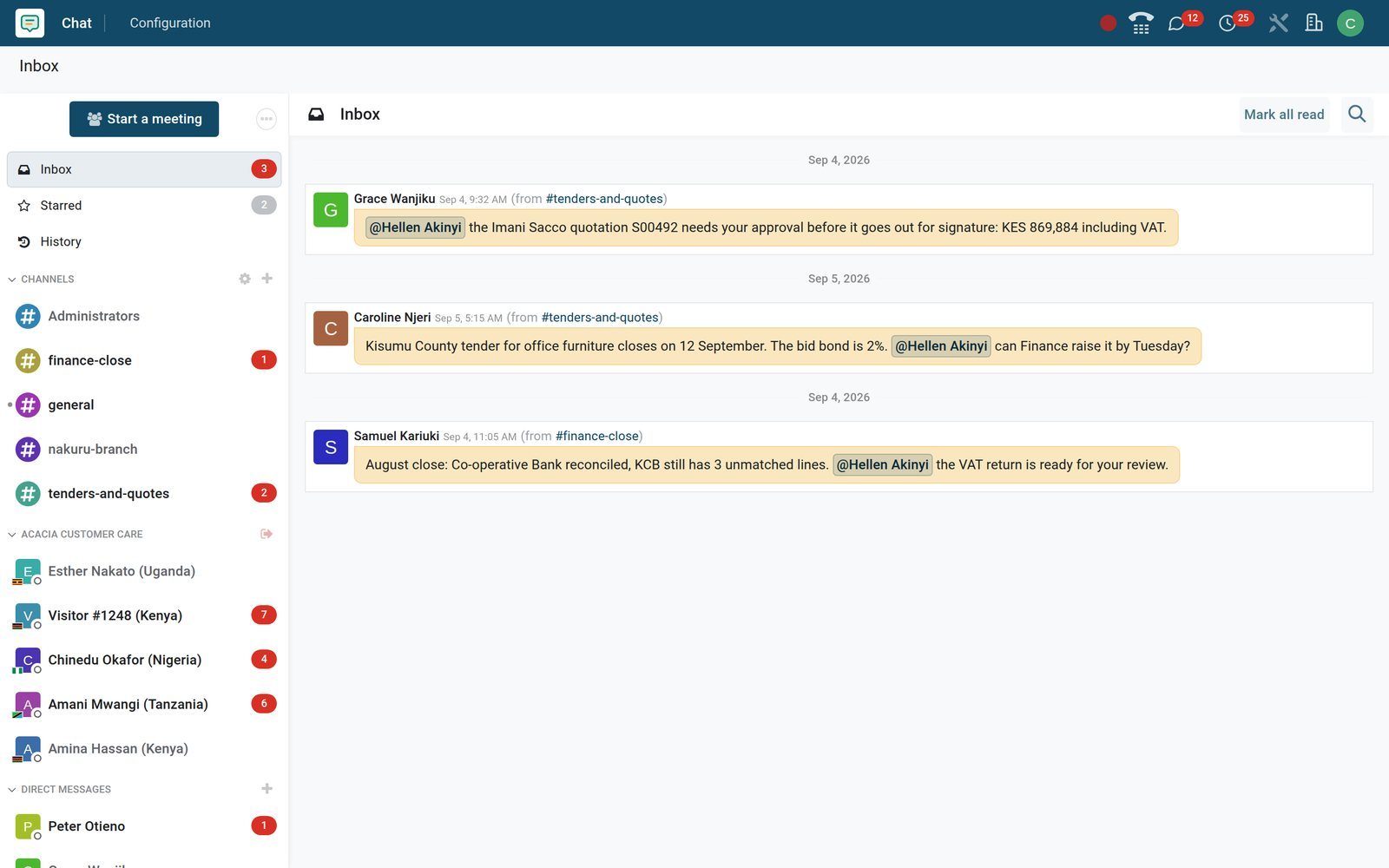
The Inbox collects every mention, direct reply and update from a record you follow in one list; Starred keeps the messages you must not lose.
 Discuss
Mentions land in the Inbox with their channel attached
Grace's @mention about quotation S00492, Caroline's tender update and Samuel's month-end note wait in Hellen's Inbox, each with its channel; Mark as Read clears them.
Explore Discuss →By the numbers
What ships in Discuss
Counted on the BridgeERP demo database, not estimated.
- 4
- kinds of conversation in one sidebar: team channels, private groups, direct chats and website live-chat sessions
- 24
- activity types used across the apps, from Call and Meeting to Request Signature and Grant Approval
- 52
- email templates for quotations, invoices, payment reminders and more, each sent from the record it concerns
- 9
- SMS templates for texting a customer from a lead, order, receipt, task or event, logged on the record
Inside the app
What is inside
The panels and menus of the Discuss app, which appears as Chat in the app menu, and what each one does for a team.
Inbox and Starred
Inbox lists mentions, replies and updates from records you follow; Starred keeps the messages you flag. Both sit at the top of the sidebar with unread counts.
Channels
Open to everyone or restricted to an authorised group, with a description, an avatar, auto-subscribed groups and an invitation link for guests without a login.
Direct chats and groups
One-to-one chats and named private groups such as Nakuru launch week, with a presence dot on every avatar showing who is online right now.
Threads
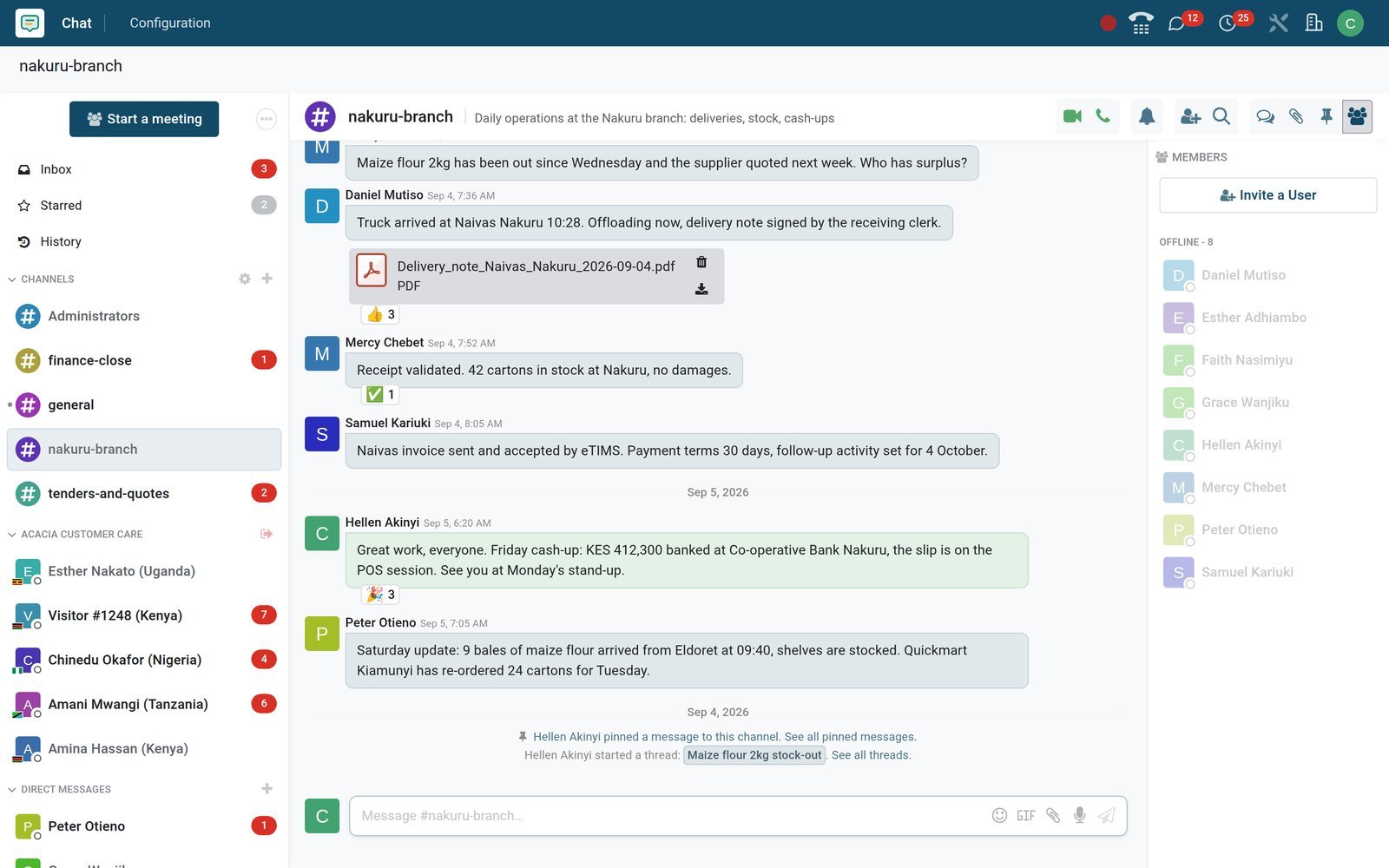
Start a thread from any message and it becomes a sub-channel with its own members, like the maize-flour stock-out thread under #nakuru-branch.
Calls
Voice and video calls from any channel or chat, with screen sharing, a full-screen video layout, push-to-talk and a volume setting per person.
Chatter on every record
Orders, invoices, leads, employees and tasks carry the same message box: send a message, log an internal note, attach files, follow the record.
Activities
Schedule a Call, Meeting, To-Do or Upload Document on a record with a deadline and an owner; the activity menu shows what is late, due today and planned.
Configuration
Notifications, Voice & Video and Canned Responses sit under Chat > Configuration; each person sets a mute period, a push-to-talk key and a voice-detection delay.
Step by step
From a message in a channel to a paid invoice, without re-typing anything
A day at one of the demo's branches, step by step, and the app that does each part.
- Step 1
A message arrives
The Nakuru team posts in #nakuru-branch: Peter's update from the delivery truck, Faith's stock count spreadsheet and Mercy asking who has surplus maize flour.
Discuss - Step 2
Answer in a thread
A stock-out thread branches off the channel; Daniel and Esther offer bales from Eldoret and Kisumu, and Mercy arranges the transfer for Saturday.
Discuss - Step 3
Turn it into an activity
The approval moves onto quotation S00492 itself as a To-Do, Approve S00492 (deposit received), with an owner and a deadline.
Sales - Step 4
Work the record
The stock receipt is validated in Inventory; its chatter logs the status change with the user who made it and the time.
Inventory - Step 5
Invoice and chase
The invoice goes out from its own chatter with the Invoice: Sending template, Samuel posts the eTIMS acceptance in the branch channel, and a payment reminder follows.
Invoicing - Step 6
Close the loop
The day's cash-up is posted in the channel, the stand-up rule is pinned for everyone to find, and the morning call starts from the channel's call button.
Discuss
Keep one problem in one thread, and one decision in one chat
Threads branch off a message and keep their own members and notifications; direct chats stay between two people, with a call one click away.
- Discuss
A stock-out gets its own thread under the branch channel
The maize-flour stock-out thread holds five members and five messages: offers from Eldoret and Kisumu, the transfer arranged, a purchase order requested. The channel stays readable.
Explore Discuss →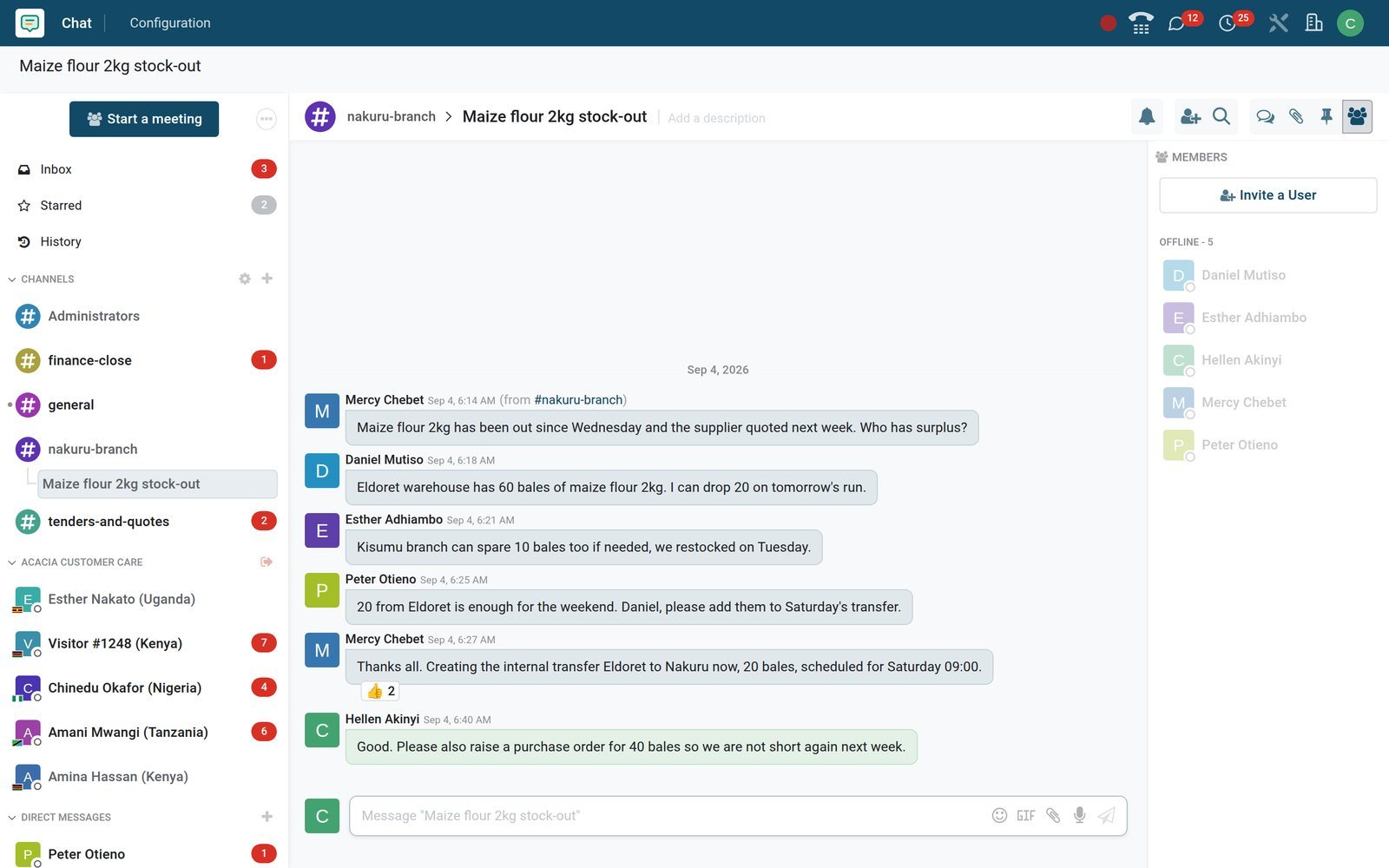
- Discuss
Direct chats for the decisions that do not need an audience
Grace tells Hellen the Imani Sacco deposit is in and the order is confirmed; a planning call is agreed, all in five messages between two people.
Explore Discuss →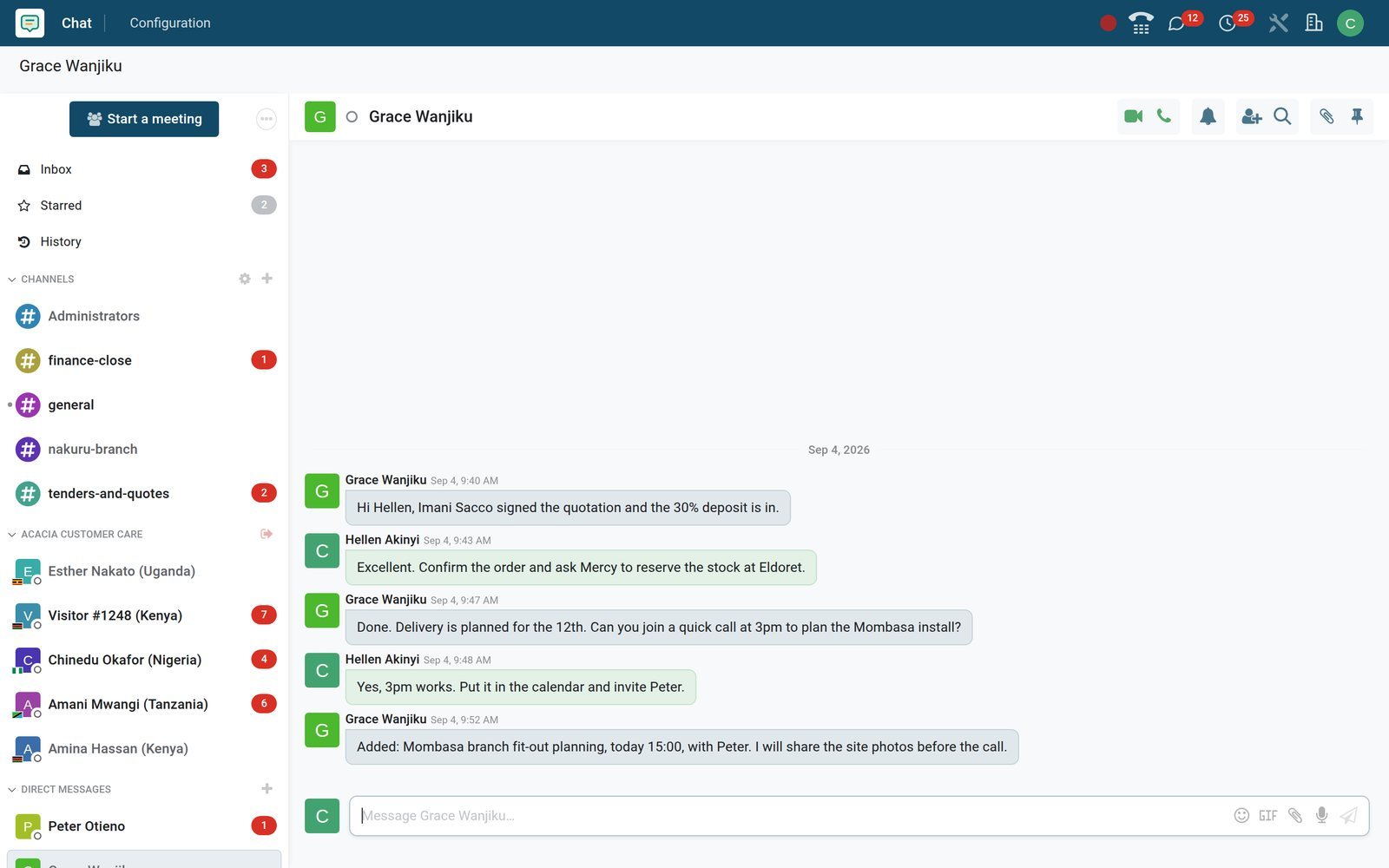
The conversation lives on the record it is about
Every BridgeERP document has a chatter: messages to the customer, internal notes, tracked changes, files and scheduled activities, beside the form itself.
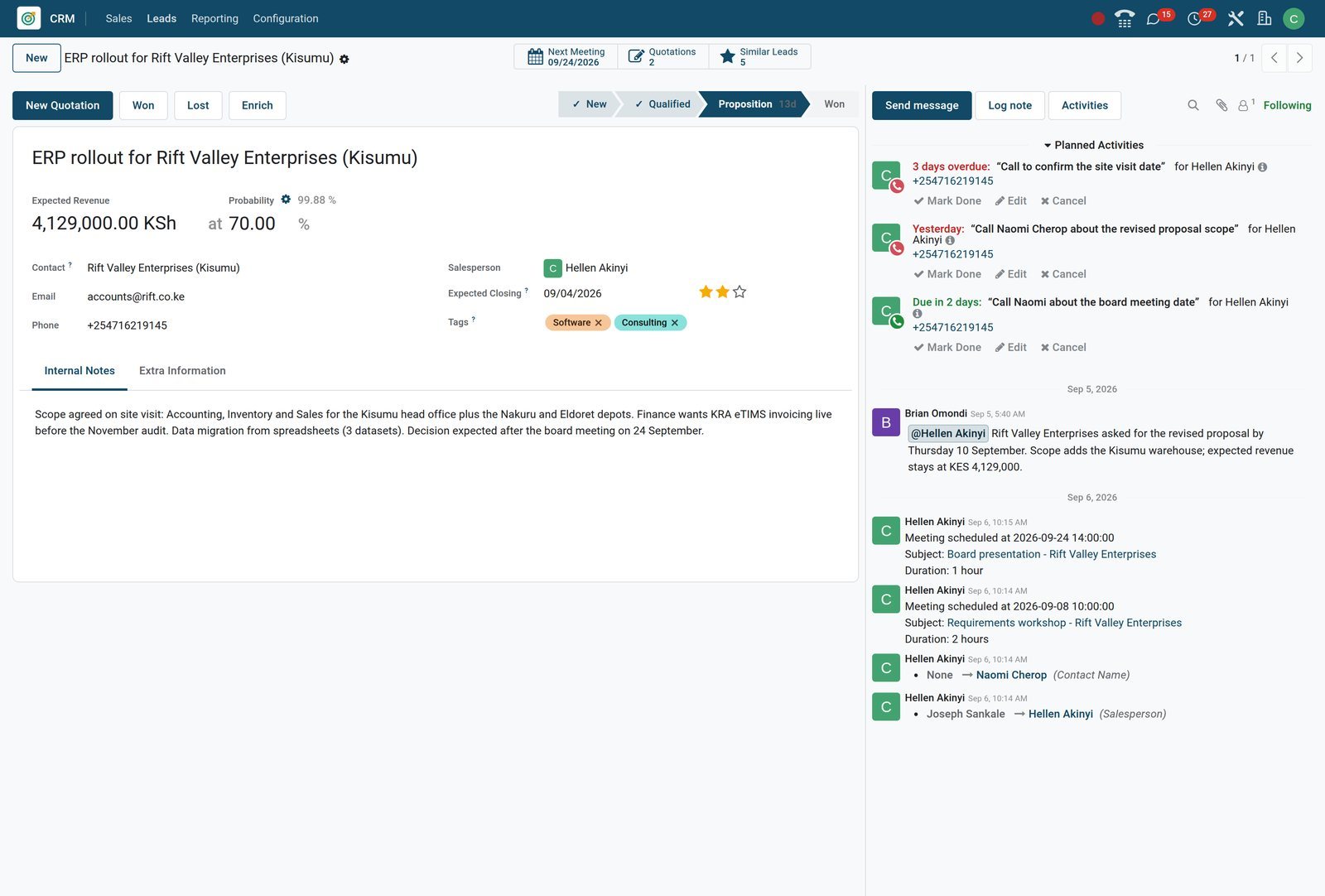
 CRM
CRMOne opportunity, its notes, its meetings and its next three calls
The Rift Valley Enterprises deal holds Brian's internal note mentioning Hellen, two meeting notices, two tracked field changes and three Call activities with owners and deadlines.
Explore CRM →Reply in two keystrokes, from the office or from the road
Canned responses expand a short code into a full answer; the same channels open in a phone browser with their files and pins.
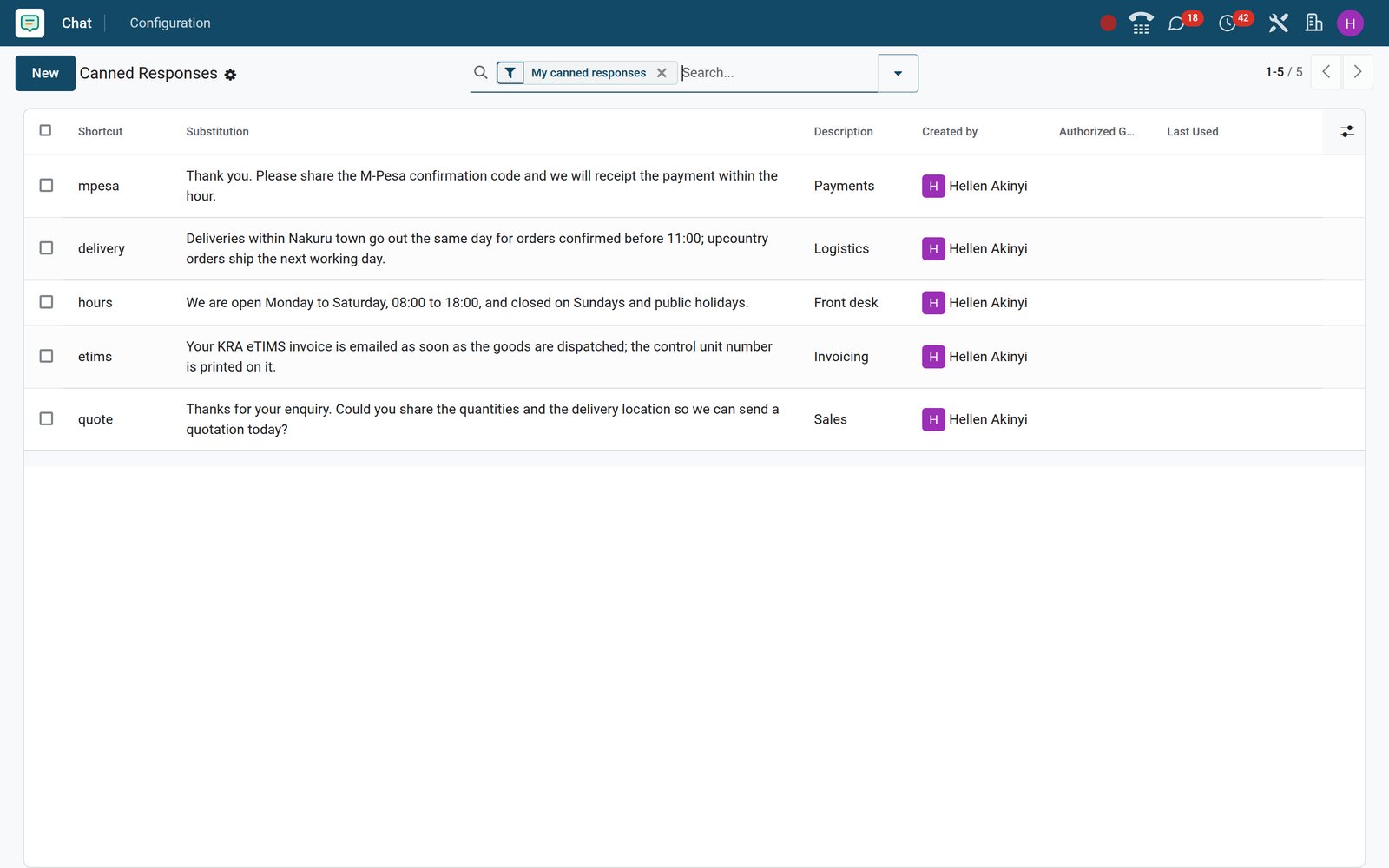 Discuss
Type ::mpesa and the whole answer appears
Hellen's five shortcuts cover quotations, delivery times, opening hours, the M-Pesa confirmation-code request and the eTIMS invoice note, each a row under Chat > Configuration > Canned Responses.
Explore Discuss →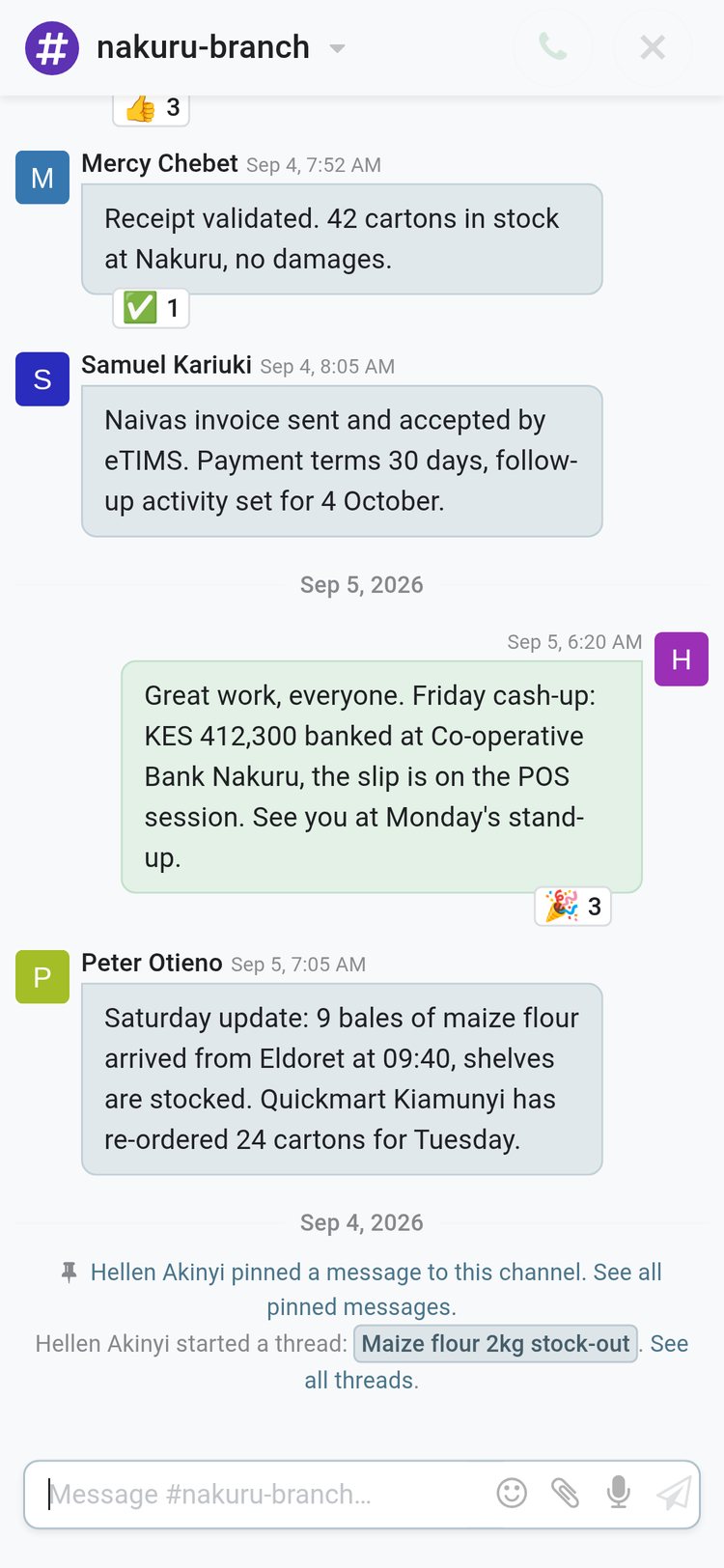 Discuss
The branch channel on a phone, with the same files and pins
On a phone the sidebar becomes a conversation list; open #nakuru-branch and the stock count spreadsheet, the delivery note PDF and the pinned stand-up rule are there.
Explore Discuss →Who uses it
Who it is for
What each person opens first, and what Discuss shows them.
Managing director
The Inbox of mentions, Starred for the rules that matter, the activity menu for today's approvals, and a call button in every channel for the stand-up.
Branch manager
A channel per branch with a description, a thread for each incident, pinned messages for standing orders, and receipts validated in Inventory with their chatter beside them.
Salesperson
#tenders-and-quotes for tenders and quotations, a direct chat to close a decision, activities on every lead, and canned responses for the standard answers.
Accountant
#finance-close holds the PAYE, NSSF and SHIF reminders; journal entries keep their tracked changes, and Tax Report and Pay Tax activity types mark the filing calendar.
Storekeeper and driver
Post the delivery note from a phone; the stock count spreadsheet goes into the branch channel where the manager and the buyer both read it.
Customer care agent
Website visitors' live-chat sessions open in the same sidebar as team channels; each agent sets a live-chat name and languages, and visitors can rate the chat.
Works with
Apps it runs with
Every one of these is installed on the demo and carries the same chatter, followers, activities and @mentions.
- CRMEvery lead has chatter, activities, followers and @mentions; email aliases turn inbound mail into new leads.
 SalesQuotations go out from the chatter with the PDF attached; the customer's reply lands on the order.
 InvoicingInvoice: Sending and Payment Reminder templates send from the invoice; replies land in its chatter.
 InventoryReceipts and transfers track their status changes in the chatter; delivery notes attach as files.
 PurchasePurchase orders carry To-Do, Email and Call activities with owners and deadlines.
 ProjectTasks carry chatter and followers; an SMS template on a stage texts the customer when the task moves.
 EmployeesOnboarding and Offboarding activity plans create the checklist for each new hire and leaver.
 Time OffTime Off Approval and Second Approve activities land in the approver's activity list.
 RecruitmentEach application carries its chatter, activities and SMS to the candidate.
 Live ChatWebsite visitor sessions appear beside the team channels, each kept with its transcript afterwards.
 VoIPCall a contact from the phone widget; Call activities dial from the record.
 SignA Request Signature activity on a record sends the document for signing.
In your country
Built for how business is done, wherever you are
The parts of Discuss that fit a branch network, mobile money and local tax filing.
Payment codes and tax numbers in the conversation
Canned responses carry the local answers; on the demo, ::mpesa asks for the M-Pesa confirmation code and ::etims explains the eTIMS invoice, and branch channels log deposits as they happen.
SMS from the record
Nine SMS templates ship with the installed apps; text a customer from a lead, order, receipt, task or event and the SMS is logged in the chatter.
Email or in-app, per person
Each user chooses to be notified by email or inside BridgeERP; managers on the road take email, desk staff work from the Inbox.
Local time on every message
Message times show in each user's own time zone, set on the user, so a team at head office and colleagues abroad each read their own clock.
Translate a message in place
Add the Message Translation API key in Settings and a Translate action appears on messages written in another language.
Phone browser and push notifications
The web app fits a phone screen, push notifications reach registered devices, and each user's VoIP setting decides how calls are placed from a phone.
Reports and control
Reports and control
The lists and settings an administrator uses to see what was said, sent and changed.
Audit Trail
With the audit trail switched on, Accounting's Audit Trail report lists every logged change on journal entries, with old and new values side by side.
Messages and Emails lists
The technical Messages and Emails lists hold every message and every outgoing email with its state, so a failed email is found and sent again.
Aliases and alias domains
51 email aliases route inbound mail to the right record type, such as a new lead; alias domains set the catch-all and bounce addresses.
User Settings
One list of every user's chat settings: push-to-talk key, mute period, channel notification level, VoIP username, live-chat name and languages.
Live chat sessions and dashboard
Every visitor session is kept with its transcript and rating, and the Live chat dashboard under Dashboards summarises the sessions.
Activity Overview
All activities across the company in one list with type, owner, deadline and state; Activity Types set the default delay and what comes next.
Digest emails
Switch on periodic digest emails in Settings so managers receive the key figures by email without opening the app.
Channel access
Restrict a channel to an authorised group, auto-subscribe groups or departments, and decide whether public visitors may upload files to it.
What sets it apart
What sets it apart
Features, not adjectives.
Chat and record are the same thing
Discussion about an order happens in the order's own chatter, its followers are notified, and an @mention there lands in the colleague's Inbox; nothing is copied between tools.
Threads with their own members
A thread is a real sub-channel of its parent: it keeps its own history, its own members and its own notification setting, so the main channel stays readable.
Pin, star, react, reply
Pin standing orders to the channel, star what you must return to, react with an emoji, or reply to one message so the context travels with the answer.
Voice messages, GIFs and files
Record a voice note in the composer, pick a GIF once a Tenor key is set in Settings, or attach spreadsheets and PDFs that stay on the channel.
Calls that scale
Calls run peer-to-peer out of the box; point Settings at an SFU server and Twilio ICE servers for larger calls across networks.
Activities that chain
An activity type can suggest or automatically trigger the next one when it is marked done, after a set delay, so follow-ups never depend on memory.
Getting started
Getting started
Setting up Discuss on a new BridgeERP database, in the order it is usually done.
Invite your people
Create users in Settings, choose email or in-app notification for each, and they join #general automatically; the onboarding bot greets each new user in a chat.
Connect your email
Set the alias domain, add an outgoing mail server or Gmail sign-in, and replies to messages sent from records come back into their chatter.
Create the channels you run by
One per branch, one per team, each with a description; restrict it to an authorised group and auto-subscribe the groups or departments that must be in.
Switch on the extras
VoIP, SMS, Website Live Chat and the mail plugins are checkboxes in Settings; ticking one installs its module.
Set calls up once
Add the SFU server and Twilio ICE servers if calls cross networks; each user sets push-to-talk and voice detection under Voice & Video.
Bring your contacts
Import contacts and companies from a spreadsheet into Contacts; every record starts its chatter from its first message or note.
Questions
Questions about Discuss
Not covered here? Contact us.
Do we still need a separate chat app?
Discuss gives you channels, private groups, direct chats, threads, voice and video calls, file sharing, reactions and pinned messages inside the same login as Sales, Inventory and Accounting, and every message can link to the record it concerns.
Can staff who live in email keep working in email?
Yes. Each user picks Handle by Emails or Handle in BridgeERP. Email users receive mentions and record updates as email and can reply to them; the reply is logged on the record.
Can a customer or supplier join a channel without a BridgeERP login?
Yes. Each channel has an invitation link. People who open it without an account join as guests and can read and write in that channel only.
How do calls work?
Calls start from the phone or camera icon in any channel or chat and run peer-to-peer by default, with screen sharing, a full-screen video layout and push-to-talk. For larger calls an administrator connects an SFU server in Settings.
Can we control who sees a channel?
Yes. A channel can be open to everyone, restricted to an authorised group, or a private group of named members. Groups and departments can be auto-subscribed and public file uploads can be switched off.
Does Discuss work on phones?
Yes. The web app adapts to a phone browser with the conversation list and composer, and push notifications reach registered devices. Each user's VoIP setting chooses how calls are placed from a phone.
Can we find an old message?
Yes. Every channel and every record's chatter has a search panel for messages, and Starred and pinned messages keep the important ones one click away.
What happens to files shared in chat?
Attachments stay on the channel or record they were posted to and download from the message itself, so the stock count or the delivery note stays next to the conversation about it.
Put Discuss to work
Add it to your plan and pay only for what you use, or see it running on your own demo first.