

 IoT: Plug in the printer, the scale or the camera; it appears in BridgeERP, ready for the till, the line and the dispatch bay
Three IoT Boxes and fourteen devices on the demo: receipt and label printers, a customer display, scales, barcode scanners, a payment terminal, a camera and a three-pedal foot switch, with the till, the assembly steps and the dispatch paperwork already pointing at them.
Free instant access. No credit card required.
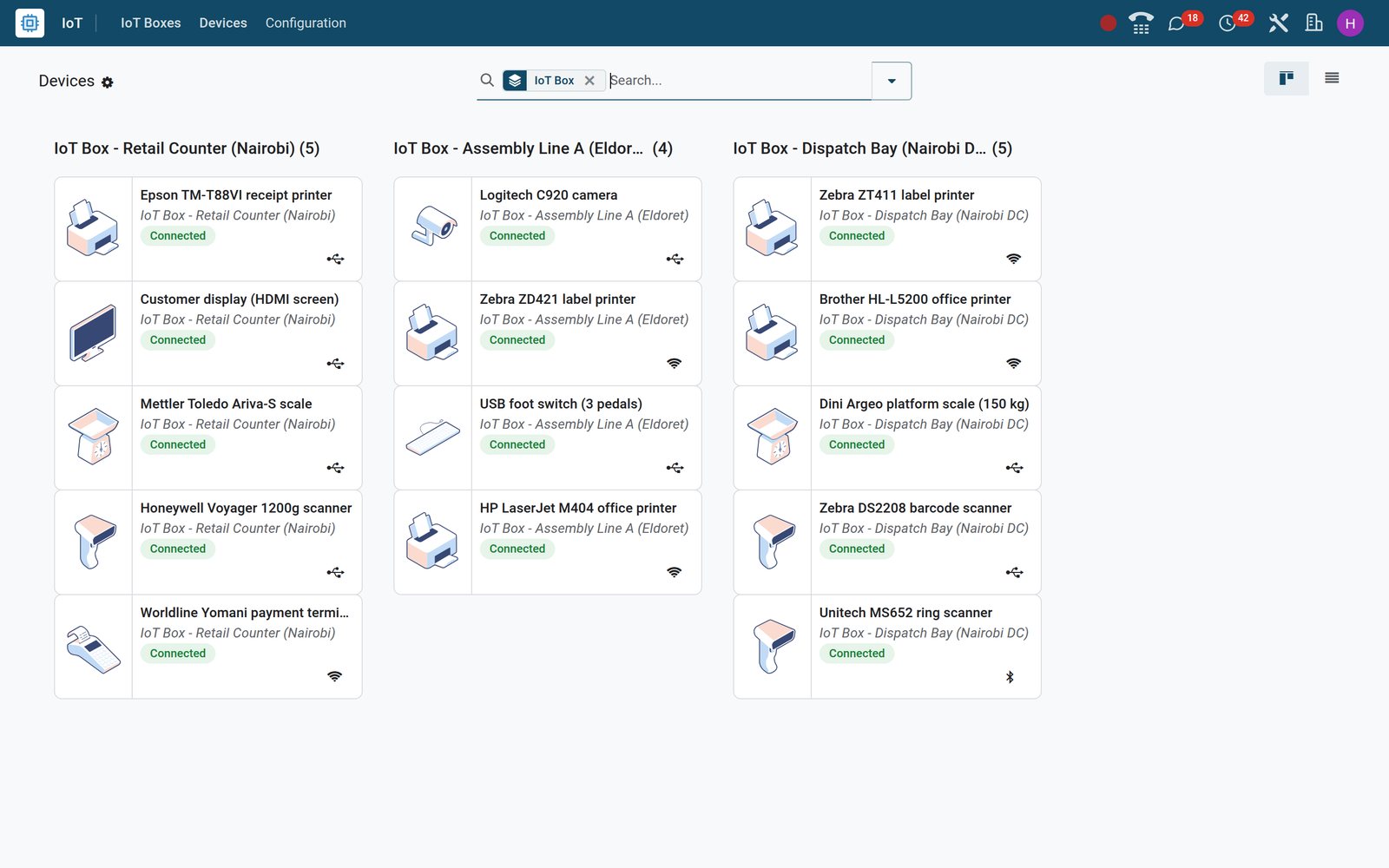
See every box and every device it carries before anyone walks to the back room
The IoT app has two working menus, IoT Boxes and Devices, and both are lists you can trust: a device is either Connected or it is not.
- Internet of Things
Fourteen devices, and the box each one hangs off
Devices in list view names every printer, scale, scanner, camera and terminal with its IoT Box: Retail Counter (Nairobi), Assembly Line A (Eldoret) or Dispatch Bay (Nairobi DC).
Explore Internet of Things →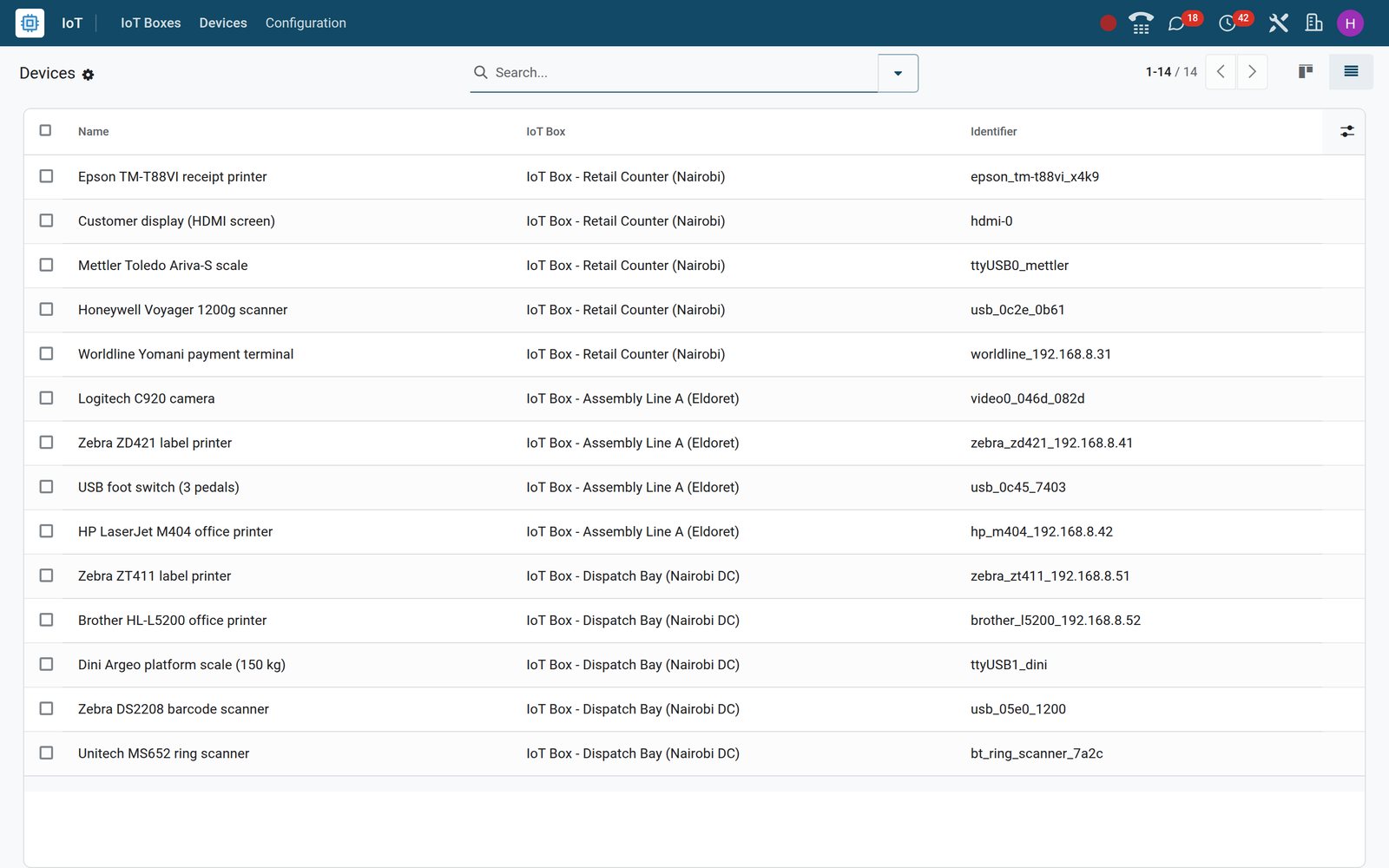
- Internet of Things
Open a box and read its device list like a packing slip
The Retail Counter box lists its Epson TM-T88VI receipt printer, HDMI customer display, Mettler Toledo scale, Honeywell scanner and Worldline terminal with identifier, type and connection.
Explore Internet of Things →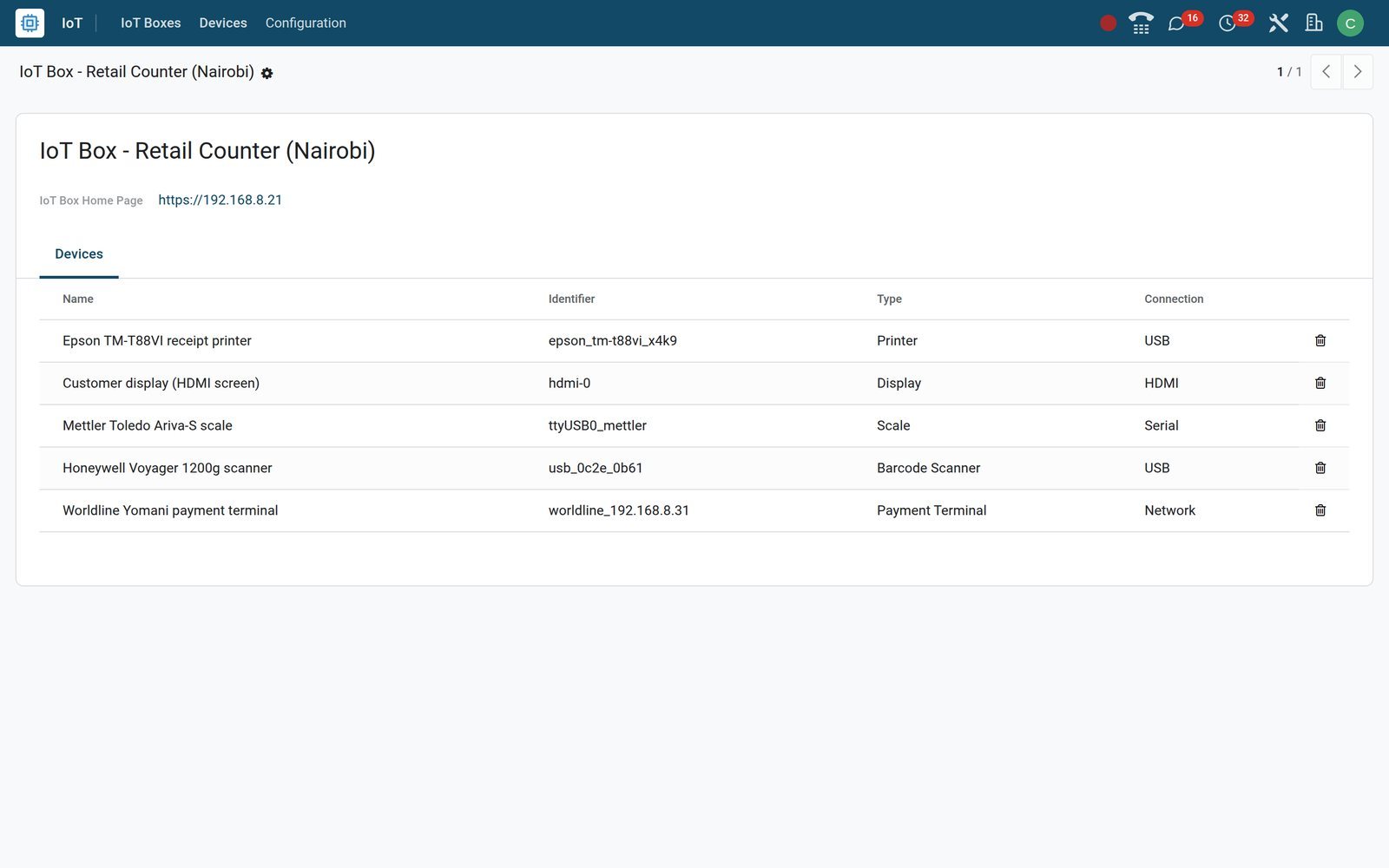
By the numbers
What the IoT app is running on the demo
Record counts from the demo database: devices, routed reports, work centre triggers and work order steps.
- 14
- devices on three IoT Boxes, and every one of them shows Connected on the Devices screen
- 10
- reports that already know their printer, from Delivery Slip and Shipping Labels to Production Order and Finished Product Label (ZPL)
- 5
- IoT triggers on work centre Assembly 1, three of them the pedals of one foot switch: Validate, Next and Pause
- 4
- work order steps with a device: two Take a Picture steps on the camera and two Print label steps on the Zebra ZD421
Inside the app
What is inside
The IoT menus, and the tabs and settings the app adds to Point of Sale, Manufacturing and Inventory on the demo.
IoT Boxes
One card per box with name, home page address and device count; Connect pairs a new box, and each record keeps its MAC identifier and image version.
Devices
Kanban cards with a type icon, the owning box, a Connected or Disconnected badge and a connection icon; the form adds manufacturer, subtype and keyboard layout.
Printer Reports tab
A printer's form lists the reports it prints: on the demo the Zebra ZD421 holds Product Label, Lot/Serial Number and Finished Product Label in ZPL.
Quality Control Points tab
A camera or label printer lists the work order steps that use it: Picture of the SN and Print Labels on the Assembly operation.
IoT Triggers
A foot switch or keyboard maps each key to a work centre action; Assembly 1 has Pedal 1 Validate, Pedal 2 Next and Pedal 3 Pause.
Linked Operation Types
A scale is tied to Receipts and Delivery Orders, so a Put in Pack on the dispatch bay takes its weight from the Dini Argeo platform scale.
Point of Sale settings
Each till chooses its Receipt Printer, Cashdrawer, Customer Display, Barcode Scanners and Electronic Scale from the box; a payment method can use a Worldline terminal.
Reset Linked Printers
Configuration > Reports > Reset Linked Printers lists the reports this browser has tied to a printer, and Unlink stops them printing there automatically.
Step by step
From a box in a carton to a printer that fires by itself, in six steps
Each step is a screen on the demo; no driver disc, no script, nothing installed on the cashier's computer.
- Step 1
Pair the box
Press Connect on IoT Boxes, enter the pairing code the box shows or paste the token on its home page; the box then appears with its MAC identifier.
Internet of Things - Step 2
Read the devices
Devices lists what is plugged into each box: printers by subtype, scanners, scales and a camera, each with Type, Connection and a Connected badge.
Internet of Things - Step 3
Wire the till
On Retail Counter - Nairobi tick IoT Box and pick the Epson receipt printer, HDMI display, Honeywell scanner and Mettler scale; tick Cashdrawer.
Point of Sale - Step 4
Wire the line
On work centre Assembly 1 map the three pedals to Validate, Next and Pause; put the camera and the Zebra printer on the Assembly steps.
Manufacturing - Step 5
Route the paperwork
Send Shipping Labels to the Zebra ZT411 and the Delivery Slip to the Brother; connect the platform scale to Receipts and Delivery Orders.
Inventory - Step 6
Run the day
Staff work in Point of Sale, Shop Floor and Inventory as usual; the administrator watches the Connected badges on Devices and resets linked printers when needed.
Internet of Things
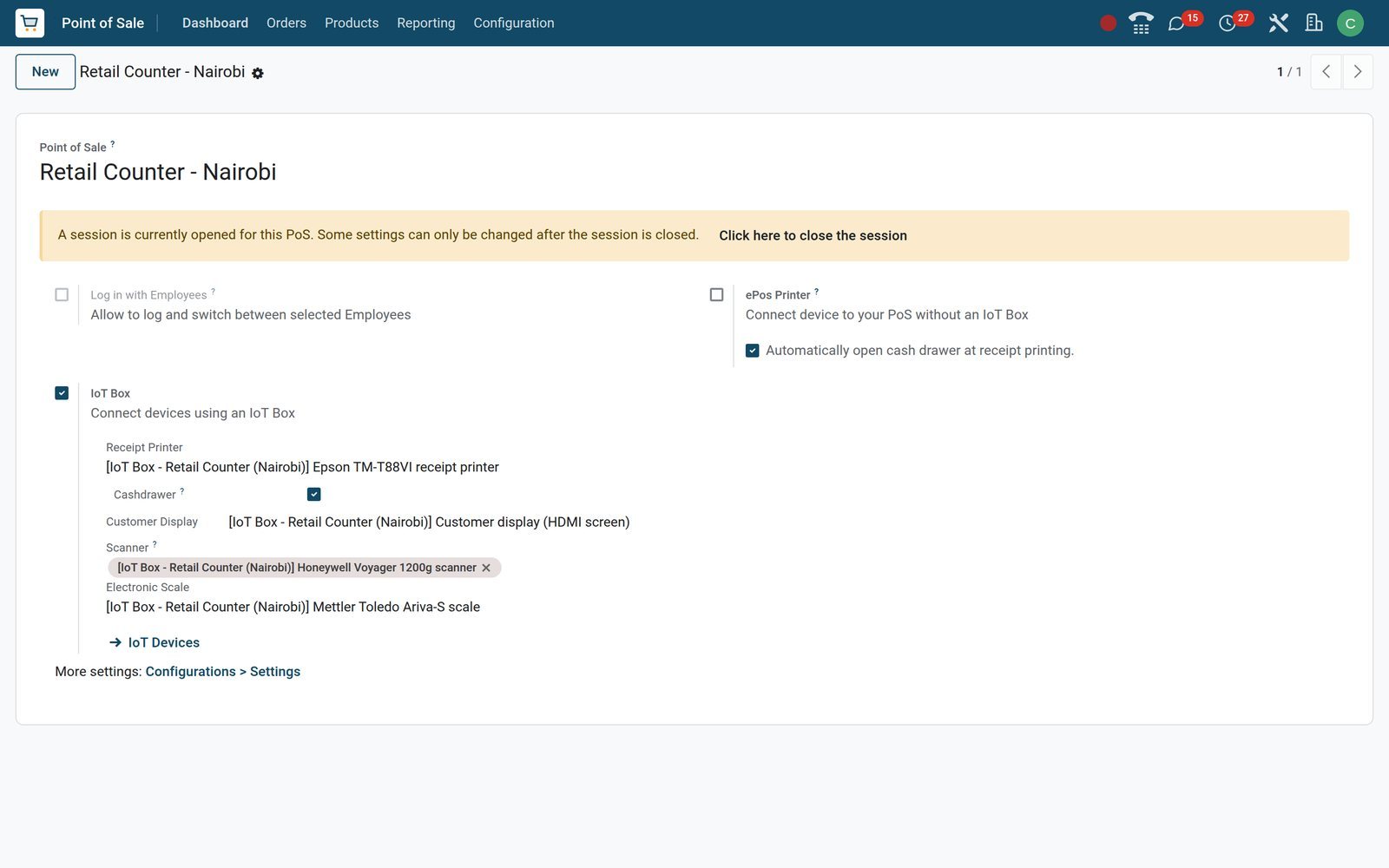
One till, five devices, one settings block
Point of Sale > Configuration > Point of Sales holds the hardware choices per till; the cashier only ever sees the receipt come out and the drawer open.
 Point of Sale
Retail Counter - Nairobi, wired end to end
The IoT Box block lists the Epson TM-T88VI as Receipt Printer with Cashdrawer ticked, the HDMI customer display, the Honeywell scanner and the Mettler Toledo scale.
Explore Point of Sale →On the assembly line the pedal validates, the camera records and the printer labels
On the demo, Assembly 1 in Eldoret has a three-pedal foot switch, a Logitech camera and a Zebra label printer on one box; each is tied to a step or a key, so the operator's hands stay on the work.
 Manufacturing
The camera knows which steps it serves
The Logitech C920 form shows USB, Connected and its Quality Control Points: Picture of the SN and Picture, both on the Assembly operation of the Manufacturing type.
Explore Manufacturing →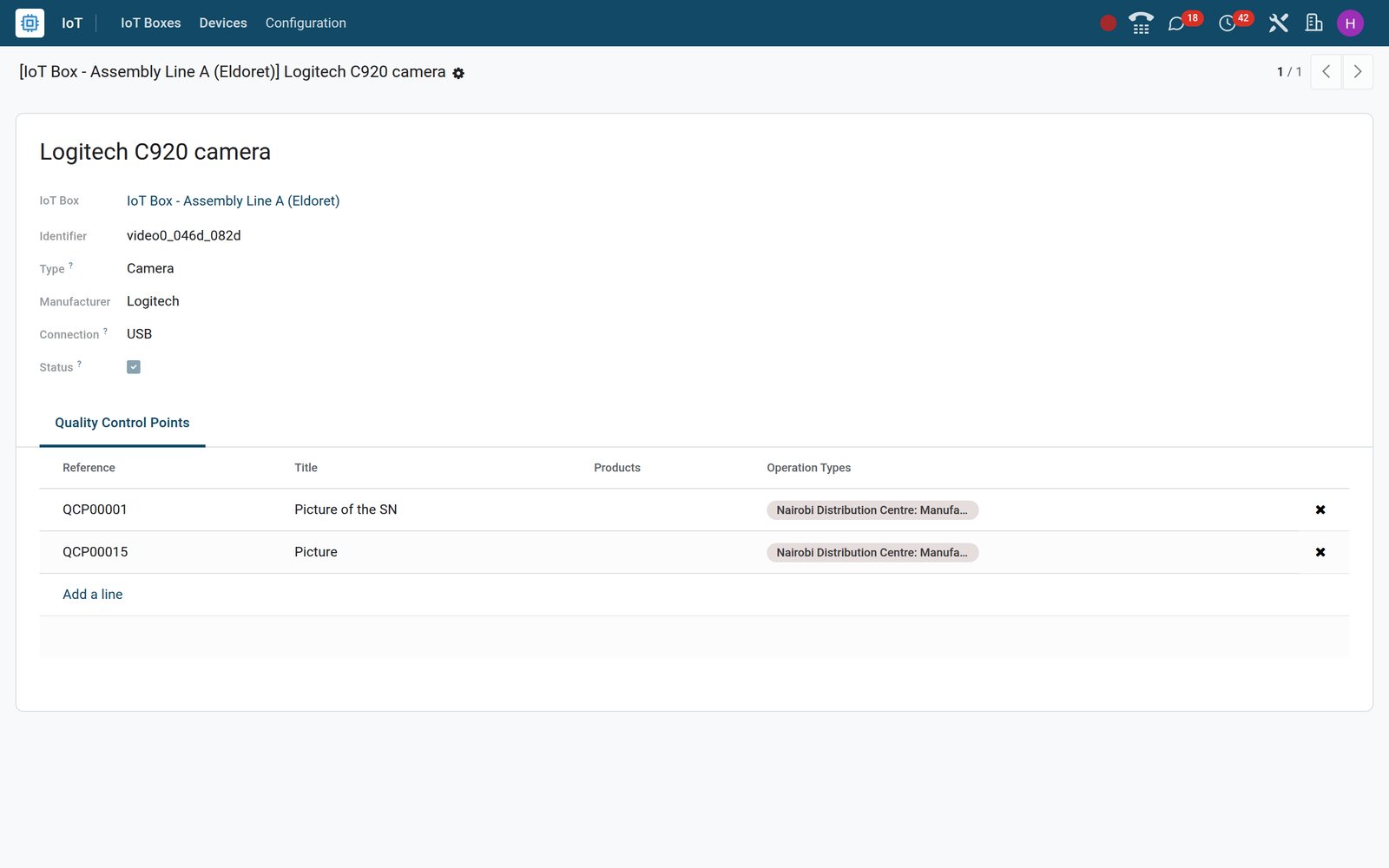
- Manufacturing
A Take a Picture step names its device
Step QCP00001 on the Assembly operation reads Type Take a Picture, Device Logitech C920 camera, and the instruction to photograph the table head serial number.
Explore Manufacturing →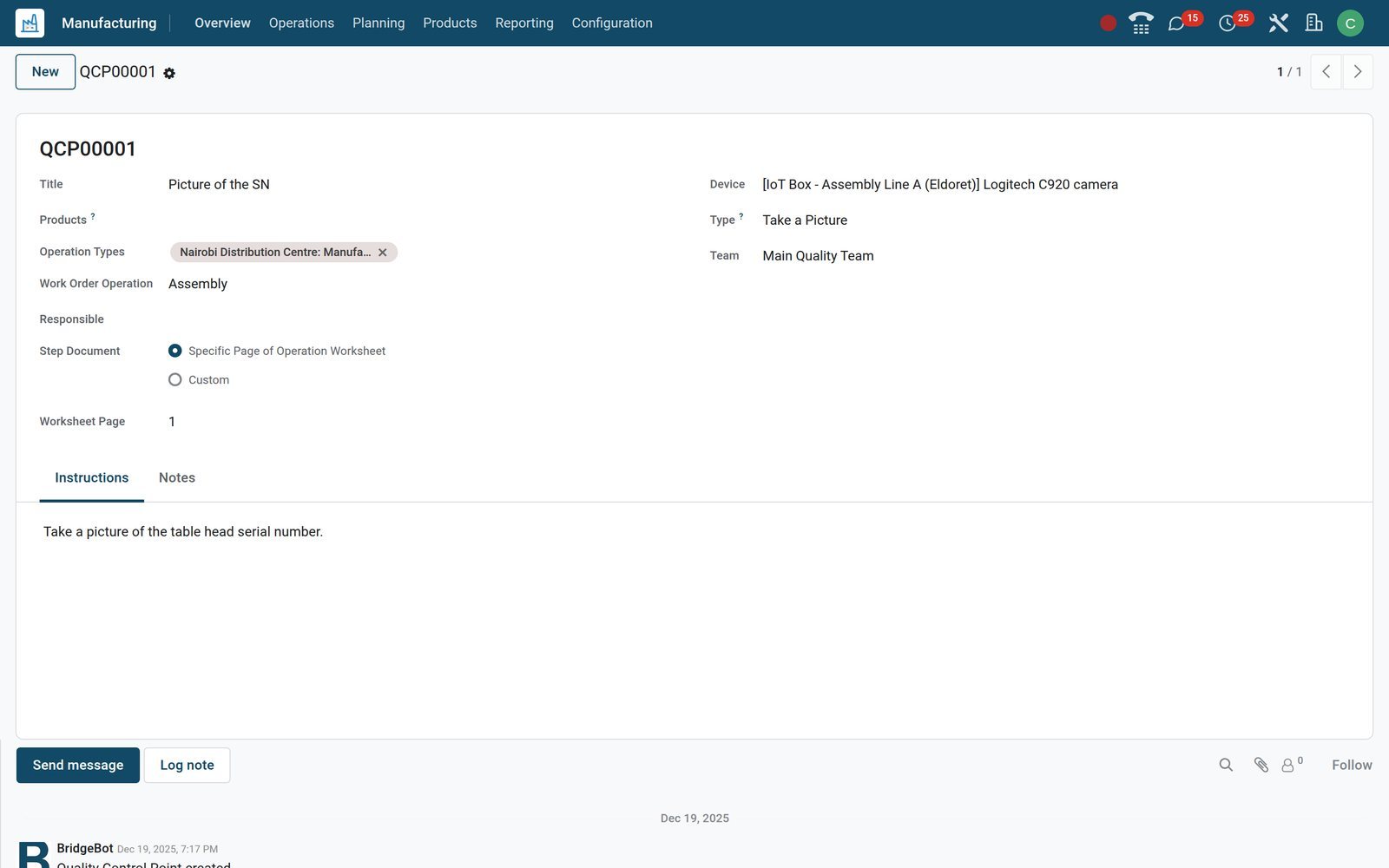
- Manufacturing
The label printer carries its own print steps
The Zebra ZD421 form reads Label Printer, Network and Connected, with its Print Labels and Print Label steps on the Assembly operation listed beneath.
Explore Manufacturing →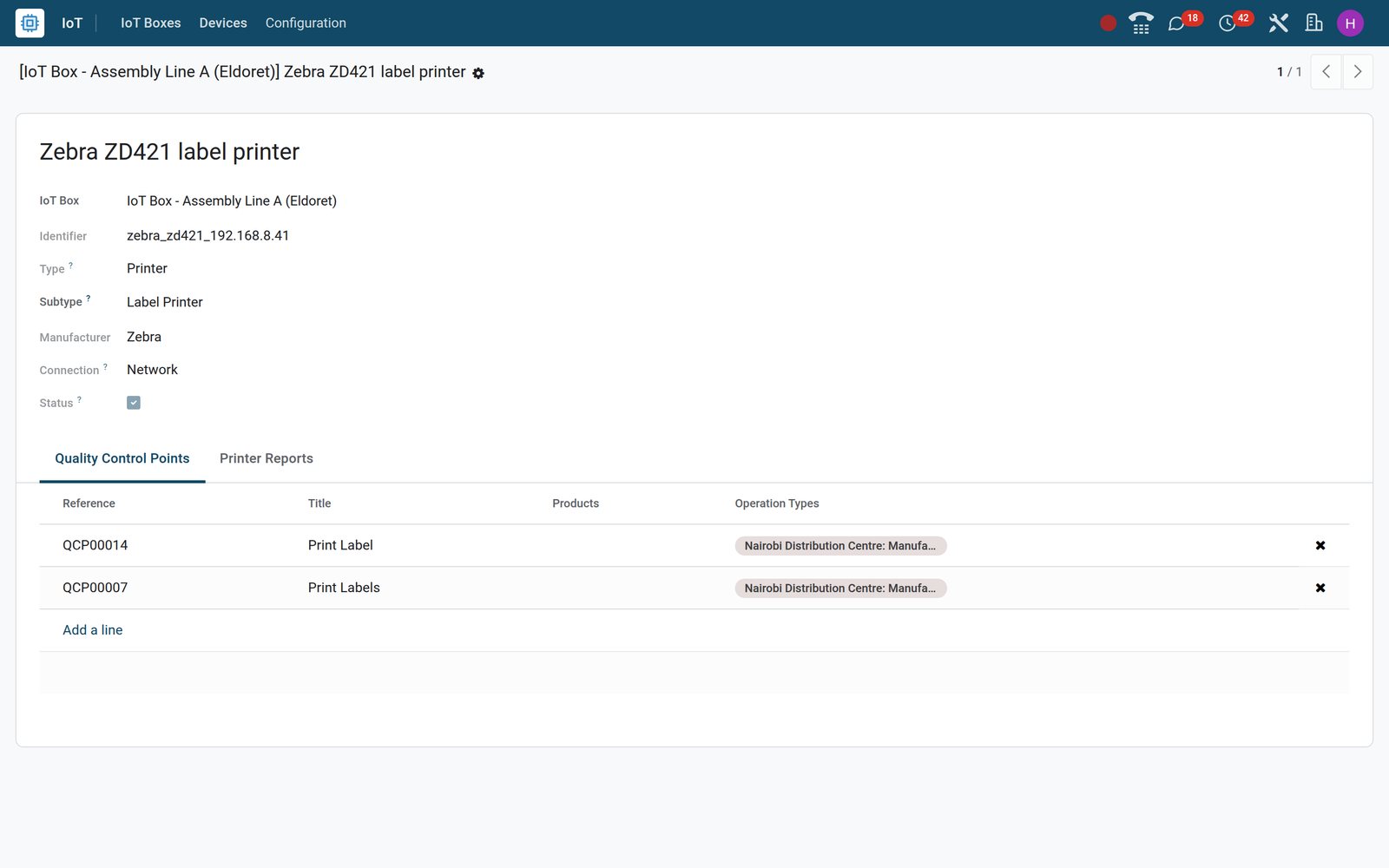
Any document in the system can be told which printer it belongs to
A report record carries an IoT Devices field; set it once, confirm the printer the first time you print, and the Print button on a delivery, a lot or a production order sends the job straight to that printer.
 Internet of Things
Shipping Labels go to the Zebra in the dispatch bay
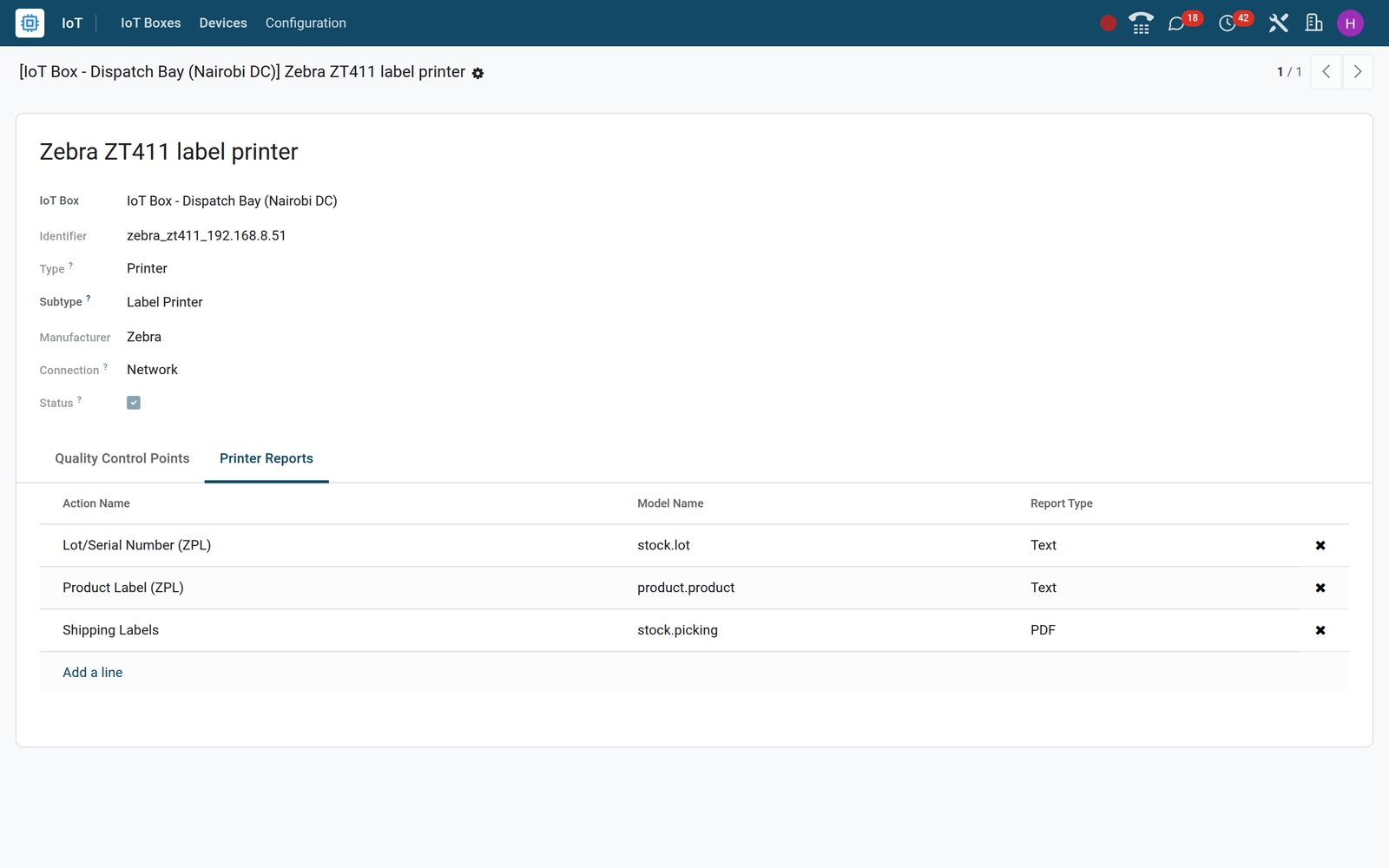
The Zebra ZT411 label printer on the Dispatch Bay IoT Box lists its Printer Reports: Shipping Labels for transfers, plus Product and Lot/Serial Number labels in ZPL.
Explore Internet of Things →Who uses it
Who touches it, and what each person sees
One administrator sets it up; everyone else only meets the printer, the scale or the pedal.
Shop owner
Sales Details and the Session Report per till; the receipt printer, cash drawer and customer display are settings on the till, not a support ticket.
Cashier
Scans with the Honeywell, weighs on the Mettler Toledo, sees the order mirrored on the HDMI customer display and hears the drawer open when the receipt prints.
Line supervisor
Sets the pedals to Validate, Next and Pause on Assembly 1, and chooses which operation steps take a picture or print a label, on which device.
Machine operator
Works the Shop Floor screen hands-free: a pedal moves to the next step, the camera captures the serial number, the Zebra prints the label.
Dispatch clerk
Put in Pack takes the weight from the platform scale; Print sends Shipping Labels to the Zebra ZT411 and the Delivery Slip to the Brother.
IT administrator
IoT Boxes, Devices, the Printer Reports tab and Reset Linked Printers; a Company field on each box and device for groups with several companies.
Works with
Apps that hand work to a device
The IoT app is the plumbing; these are the apps where a box shows up as a setting, a tab or a field on the demo.
- Point of SaleReceipt Printer, Cashdrawer, Customer Display, Barcode Scanners, Electronic Scale and a payment terminal per till; a box that can be a kiosk carries the self-order screen.
- ManufacturingWork centre IoT Triggers, Take a Picture and Print label steps with a Device, and the Production Order and Work Order printouts routed to an office printer.
 QualityA Take a Picture step stores the camera's image on the quality check with the device name, and a Print label step sends its label to the Zebra.
 InventoryConnect Scale on Receipts and Delivery Orders; Delivery Slip, Picking Operations, Shipping Labels, Shipping Documents and the package, lot and product labels routed to printers.
 SalesA quotation or order printout is a report like any other: give it an office printer under IoT Devices and Print puts paper in the tray.
 AccountingInvoices and credit notes print to the printer set on their report; receipts at the till go through the Point of Sale receipt printer.
In your country
Built for a shop counter and a factory line
The details that matter when the box sits on a shop LAN behind a 4G router, not in a data centre.
Lives on the local network
Each box joins the shop's own network by Wi-Fi or Ethernet and shows its Domain Address; devices reach it over USB, serial, Bluetooth, HDMI or the LAN.
Card terminals and mobile money at the same till
A payment method can Use a Payment Terminal through the box, with a Worldline device on the demo; Mobile Money on the Retail Counter till needs no device.
Receipts without a box
The ePos Printer setting takes an Epson receipt printer's IP address, so a till with no IoT Box at all can still print its receipts.
Fiscal devices where the law wants them
The device Type list includes Fiscal Data Module for countries that require one; Kenya's KRA eTIMS link on the demo is the software OSCU module instead.
Several companies, one database
Boxes and devices carry a Company field with a record rule behind it, so the five companies on the demo can keep their printers apart.
Kiosk screens and Zebra labels
A box that can be a kiosk gets a Screen Orientation; printers are typed Receipt, Label or Office, and ZPL labels reach Zebra printers as raw text.
Reports and control
Reports, labels and control
What comes off the printers on the demo, and how you know a device is alive.
Delivery Slip, Picking Operations, Shipping Documents
Transfer reports routed to the Brother HL-L5200 office printer on the demo; once the browser has confirmed the printer, Print on a delivery sends them straight out.
Shipping Labels
Shipping Labels prints the carrier label from a delivery; on the demo it points at the Zebra ZT411 label printer on the Dispatch Bay (Nairobi DC) box.
Product, lot and finished-product labels in ZPL
Product Label (ZPL), Lot/Serial Number (ZPL) and Finished Product Label (ZPL) are text reports, sent as raw ZPL to the Zebra ZD421 and ZT411.
Production Order and Work Order
Both manufacturing printouts go to the HP LaserJet M404 office printer on the Assembly Line A box, the same box that runs the line's camera and pedals.
Pictures stored on the quality check
A Take a Picture step with a camera as its Device stores the captured image on the quality check, with the device name recorded beside it.
Connected or Disconnected
The Status field on each device and the badge on its card show at a glance whether a printer, scale or scanner is still reachable through its box.
Work Orders, OEE and Production Analysis
Manufacturing > Reporting keeps the duration of each pedal-driven work order, the overall equipment effectiveness per work centre and the production analysis.
Sales Details and Session Report
Point of Sale > Reporting shows what the IoT-equipped till sold and cashed up, per session and per payment method, Mobile Money included.
What sets it apart
What a box changes on the floor
The differences a buyer notices in the first week, taken from fields and menus on the demo.
No driver on the cashier's PC
Drivers live on the box and refresh each time it restarts unless Automatic drivers update is switched off; nothing is installed on the cashier's computer.
One box, many roles
Retail Counter runs printer, display, scale, scanner and terminal from a single box; a box can also be Linked To Point of Sale directly.
Hands-free steps
An IoT trigger maps a key or pedal to a work order action such as Validate, Next, Previous, Pause, Record Production, Print Labels, Pack or Scrap.
Paperwork that prints itself
Choose the printer once per browser and every later Print on a linked report goes straight to it; Reset Linked Printers clears that choice.
Getting started
Getting started
A single afternoon for one till or one line; nothing to install on the cashier's computer.
Pair the box
IoT Boxes > Connect takes the box's pairing code or hands you a token; the box lands with its MAC identifier, image version and Automatic drivers update on.
Name and type the devices
Give each device the name your staff use, set Receipt, Label or Office Printer on printers and pick a Keyboard Layout for scanners and keyboards.
Wire the till
Point of Sale > Configuration > Point of Sales: tick IoT Box and pick Receipt Printer, Cashdrawer, Customer Display, Barcode Scanners and Electronic Scale.
Wire the line
Configuration > Work Centers > IoT Triggers for the pedals; on each Take a Picture or Print label step of an operation, set the Device.
Route the reports
On each printer's Printer Reports tab, or on the report itself under IoT Devices, choose which documents and labels print there.
Weigh at the dock and check the badges
Add Connect Scale on Receipts and Delivery Orders; then open Devices and confirm every card reads Connected before the first shift.
Questions
Questions about IoT
Not covered here? Contact us.
Which devices can we connect?
The device Type field covers Printer (receipt, label or office), Camera, Keyboard (including foot switches), Barcode Scanner, Device, Payment Terminal, Scale, Display and Fiscal Data Module. Each connects by Network, USB, Bluetooth, Serial or HDMI, and the device record shows the manufacturer, identifier and whether it is Connected.
Do we need one box per till or per line?
No. One box carries several devices: the Retail Counter box on the demo runs a receipt printer, customer display, scale, scanner and payment terminal; the Dispatch Bay box runs two printers, a platform scale and two scanners. A box can also be Linked To Point of Sale directly, and each box and device carries a Company field.
Can a till print receipts without an IoT Box?
Yes. The ePos Printer setting on the till takes the IP address of an Epson receipt printer, so a till with no IoT Box can still print its receipts.
What does the box do on a factory line?
Three things on the demo. A foot switch maps its pedals to work centre actions (Pedal 1 Validate, Pedal 2 Next, Pedal 3 Pause on Assembly 1) so the operator's hands stay on the work. A camera is the Device on a Take a Picture step, and the quality check stores the image. A label printer is the Device on a Print label step and also holds the ZPL label reports it prints.
Can the scale weigh parcels at receipt and dispatch?
Yes. A scale device has a Linked Operation Types tab; on the demo the Dini Argeo platform scale is connected to Receipts and Delivery Orders, so a Put in Pack sets the package weight from the scale. At the till, an Electronic Scale on the Point of Sale weighs loose goods for the order line.
Which documents can print straight to a printer?
Any report record has an IoT Devices field. On the demo Delivery Slip, Picking Operations, Shipping Documents and Package Barcode (PDF) go to the Brother office printer, Shipping Labels to the Zebra ZT411, Product Label (ZPL), Lot/Serial Number (ZPL) and Finished Product Label (ZPL) to the Zebra label printers, and Production Order and Work Order to the HP LaserJet. The first time a browser prints a linked report it asks you to confirm the printer.
How do we know a device has gone down?
Each device has a Status field and its card on the Devices kanban shows a Connected or Disconnected badge, with the connection type beside it. The IoT Box record also links to the box's own home page on the local network. Reset Linked Printers under Configuration > Reports lets a browser unlink the printer it remembered for a report, for example when a laptop moves to another counter.
Do card terminals and mobile money work with it?
A payment method on the till can Use a Payment Terminal through the box, with a Payment Terminal Device field on the method; the demo's Retail Counter box carries a Worldline terminal. Mobile Money on the demo till is an ordinary payment method on a bank journal and needs no device at all.
Put IoT to work
Add it to your plan and pay only for what you use, or see it running on your own demo first.