

 Quality: Catch the defect at the machine, not at the customer
BridgeERP Quality puts control points on the steps of production and on receipts, records every check, and follows each problem to its fix.
Free instant access. No credit card required.
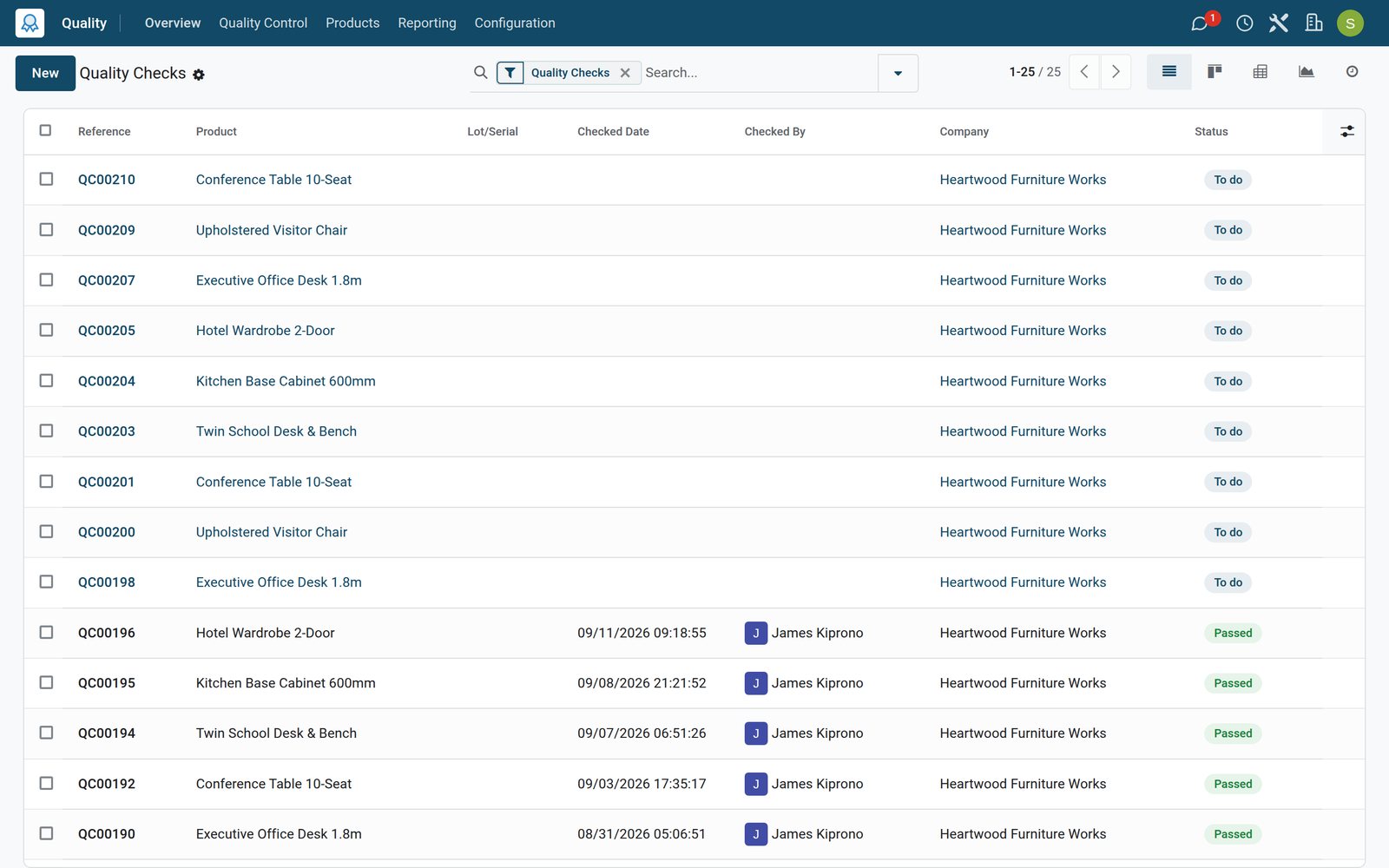
Decide once what to check, and where
A control point says what to check, on which product, at which step, and how often.
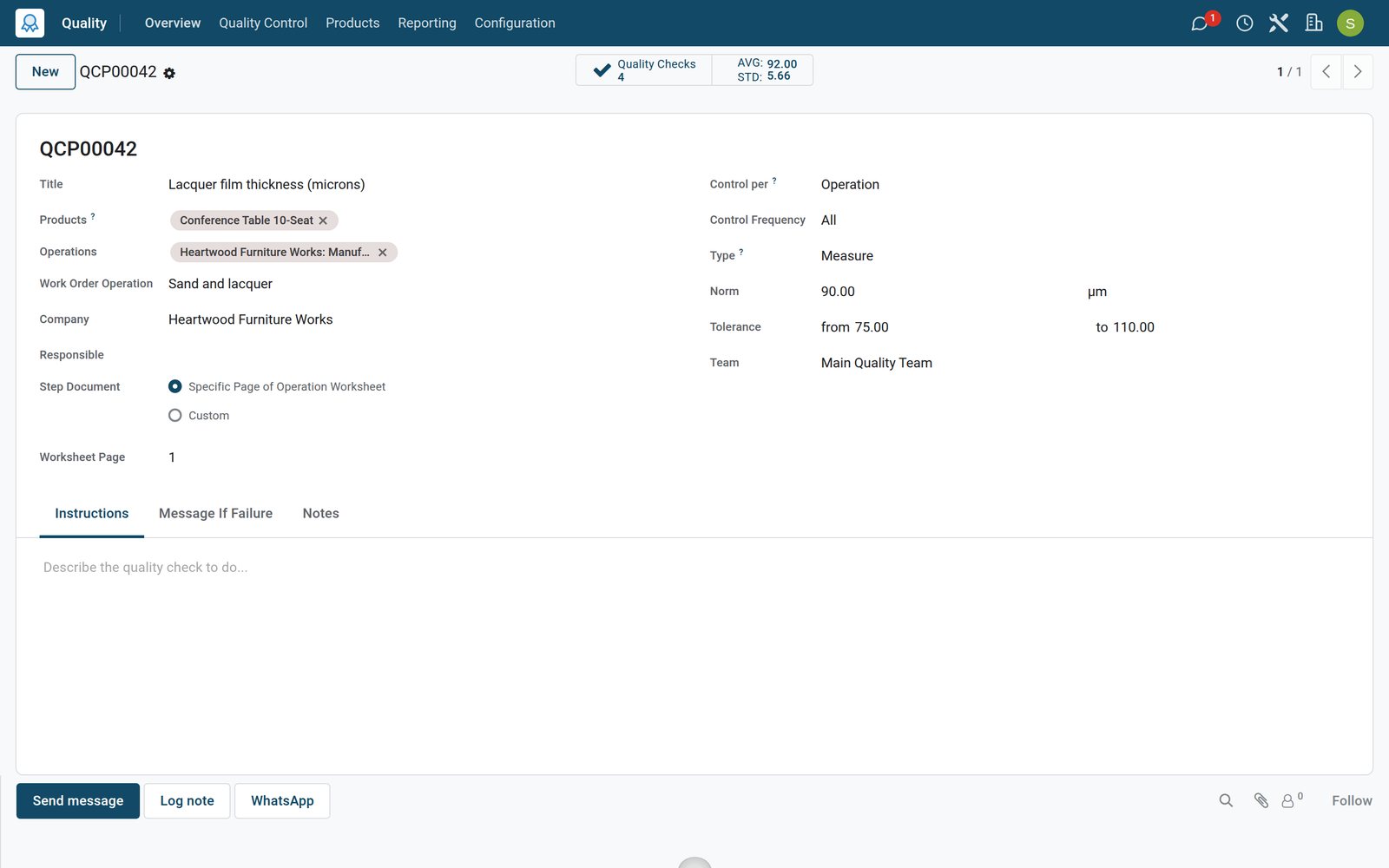 Quality
A measurement with its tolerance
The lacquer control point asks for the film on every conference table: 90 microns, accepted between 75 and 110, with the average of past measures.
Explore Quality →By the numbers
What ships inside the Quality app
Counted in the product itself, on the demo database.
- 8
- kinds of step a control point can ask for, from pass or fail and measures to pictures and spreadsheets
- 4
- control frequencies: every time, randomly, periodically or on demand
- 4
- alert stages out of the box, New, Confirmed, Action Proposed and Solved
- 4
- root causes ready to use: work centre failure, parts quality, work operation and others
Inside the app
What is inside
The menus of the Quality app, grouped by what they do for the plant.
Control points
What to check, on which products, operation types or production steps, and how often.
Quality checks
Each check records its result, who did it, when, and the order, lot or transfer it belongs to.
Measures and tolerances
A measure is compared with the norm and its minimum and maximum, so pass or fail is not a matter of opinion.
Pictures and instructions
Steps can show instructions to the operator or ask for a photo of the part.
Quality alerts
Problems with the product, work centre, root cause and the corrective and preventive actions taken.
Spreadsheet checks
Complex inspections filled in a spreadsheet template attached to the control point.
Lots and serial numbers
Checks carry the lot or serial number, and a lot can be tested on a share of its quantity.
Quality teams
Each team sees its checks to do and its open alerts on the overview.
Step by step
From control point to lasting fix
How quality travels through BridgeERP, and which app does each step.
- Step 1
Define
The quality manager puts a control point on a production step or on the receipts of a product.
Quality - Step 2
Check
The step appears in the operator's work order on the Shop Floor, at the moment it is due.
Manufacturing - Step 3
Decide
The measure is compared with the tolerance, or the operator passes or fails the step.
Quality - Step 4
Alert
A problem becomes a quality alert with the product, work centre, root cause and priority.
Quality - Step 5
Fix
Corrective and preventive actions are recorded, and the alert moves to Solved.
Quality

Every check on record, with the number behind it
A check keeps the value measured, the tolerance it was held to and the order it belongs to.
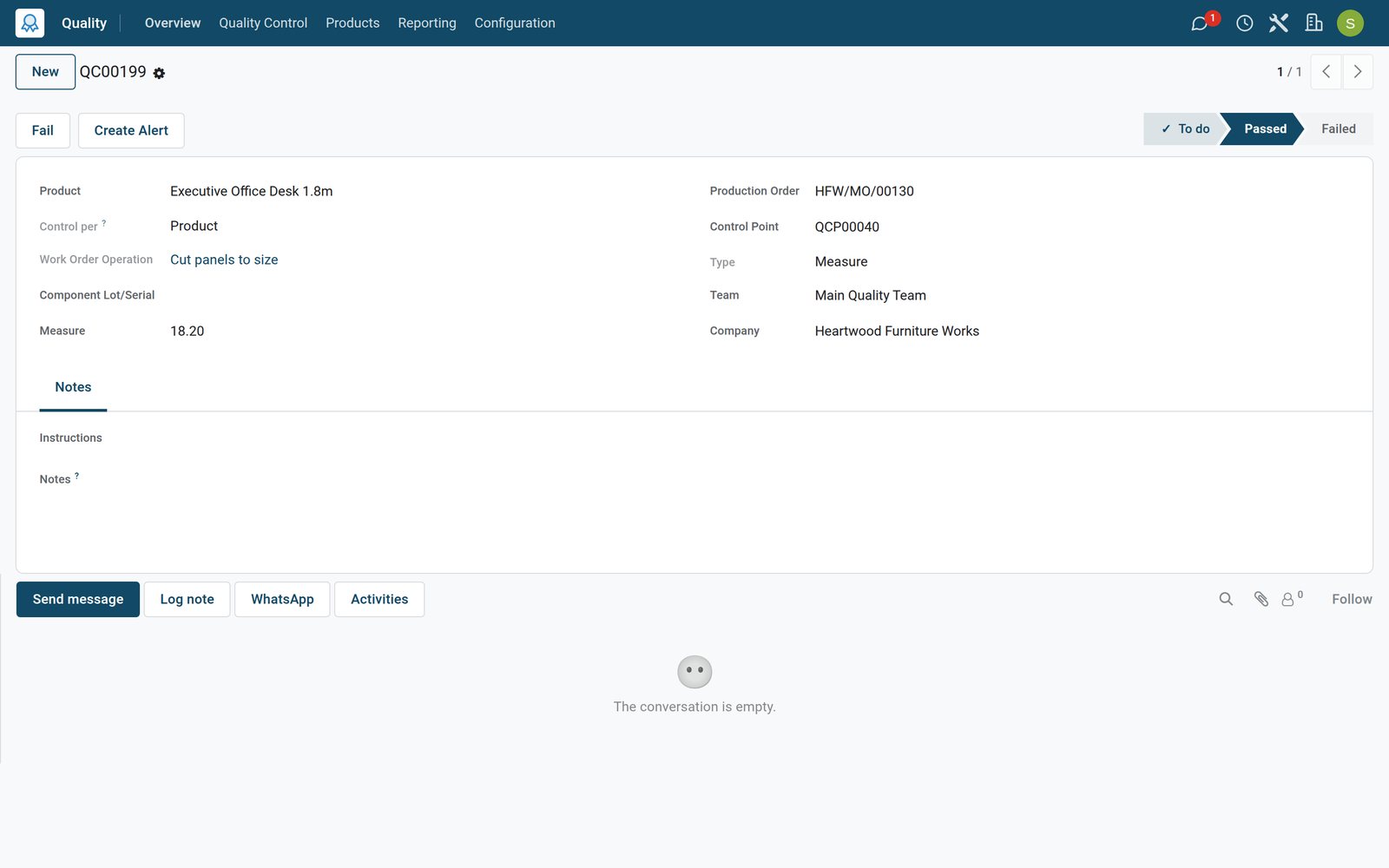 Quality
A measurement that passed
The panel thickness check on a desk order recorded 18.2 mm against 18 mm plus or minus 0.3, and passed.
Explore Quality →Follow every problem to its fix
A quality alert names the problem, where it came from and why, and keeps the actions until it is solved.
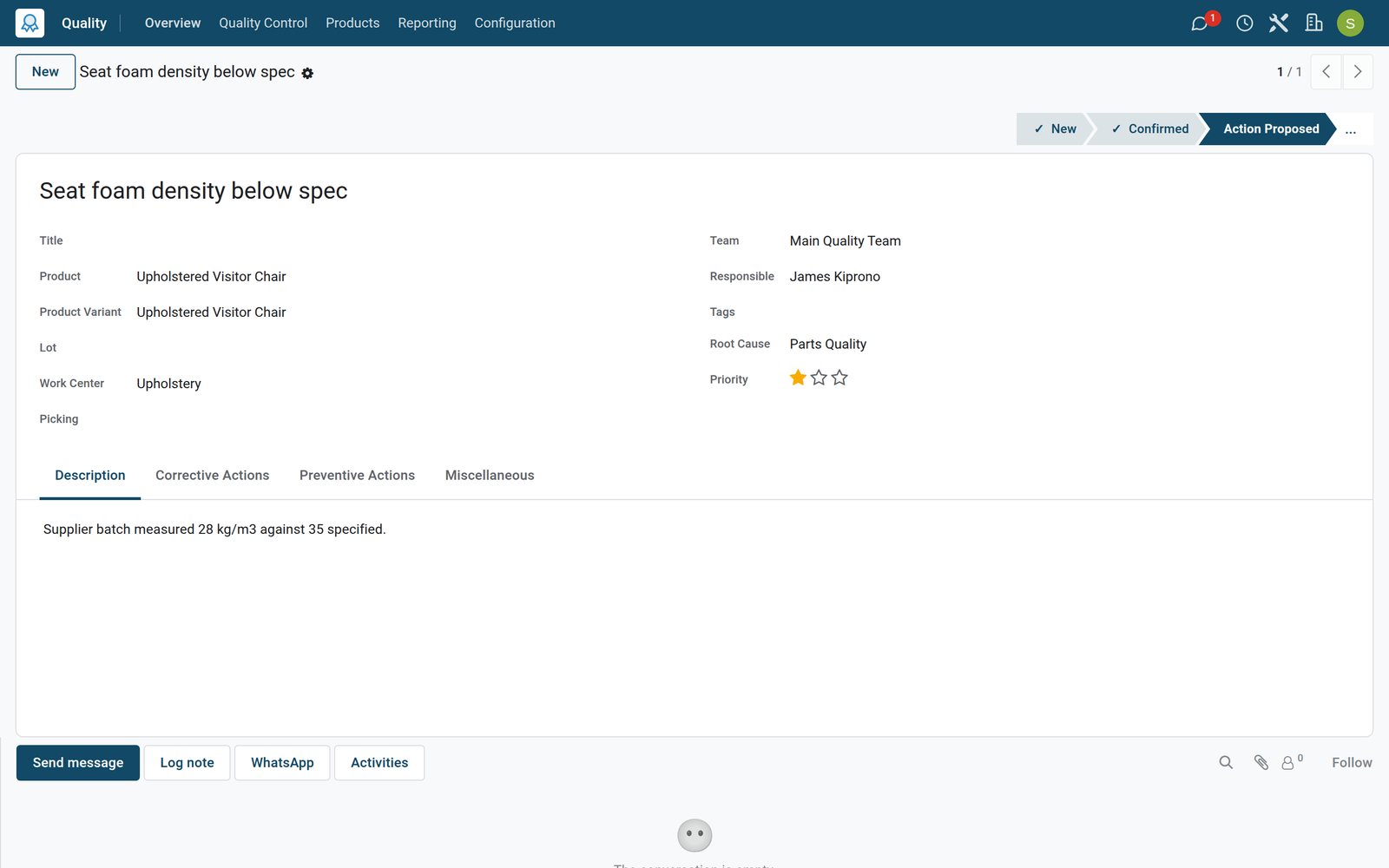 Quality
A problem with its cause and actions
The seat foam alert points to the upholstery work centre, gives parts quality as the root cause and records what was done and what will prevent it.
Explore Quality →Who uses it
Who uses it, and what they see
Quality touches the people who make, receive and sign off products.
Quality manager
Sets control points and tolerances, follows alerts and reads the check reports.
Operator
Records measures, photos and pass or fail results inside the work order on the Shop Floor.
Receiving clerk
Checks goods from suppliers on the receipt before they go into stock.
Production manager
Sees the alerts raised on each work centre and product, and the actions still open.
Works with
Runs with the rest of BridgeERP
Apps that share products, orders and people with Quality.


See where quality slips
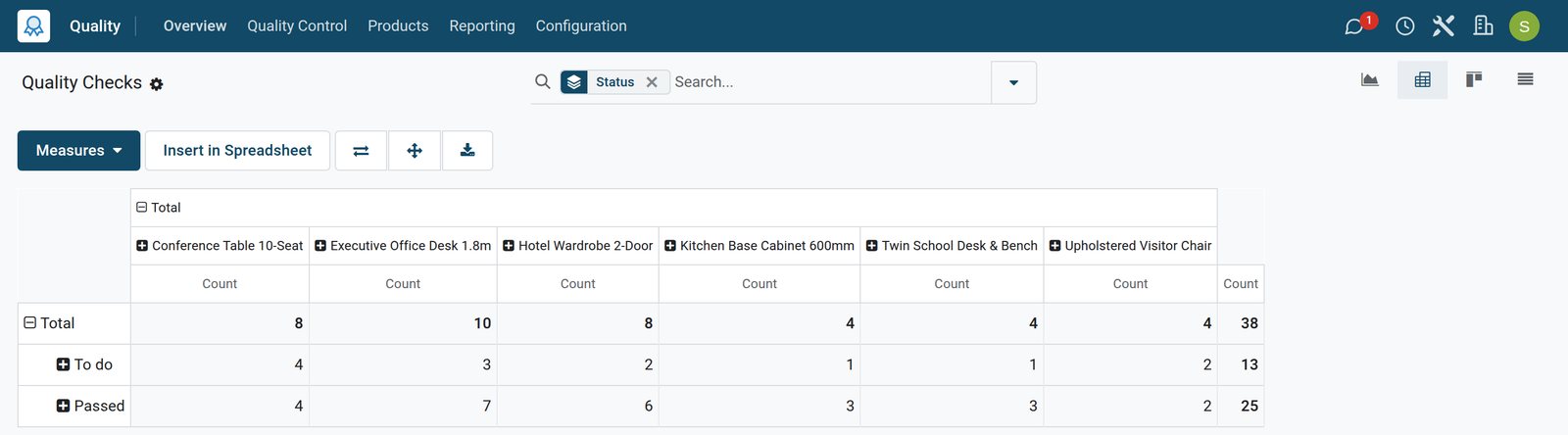
The checks report counts results by product, point or team, so recurring problems stand out.
 Quality
Checks by product and result
The quality checks analysis breaks down the checks of each product by result, ready to regroup by control point, team or month.
Explore Quality →In your country
Built for plants in any country
What the demo runs for a workshop group with companies in six countries.
One database, many companies
Each company in a group keeps its own control points, checks and alerts; the demo runs companies in six countries side by side.
Imported parts checked
A control point on receipts checks parts from overseas suppliers the day they arrive, before anyone uses them.
Your languages
The quality screens run in English, French or Arabic on the demo, chosen per user.
Getting started
Getting started
How a plant moves its quality control onto BridgeERP.
Set up teams
Create the quality teams that own checks and alerts, and add the people who will do the checks.
Start with the final inspection
One pass or fail point on finished products gives a record of every order in the first week.
Add measures at critical steps
Put measures with tolerances on the steps where defects start, such as cutting or finishing.
Try it on the demo
The demo workshop has control points, dozens of checks and alerts at every stage to click through.
Questions
Questions about Quality
Not covered here? Contact us.
Can I check parts when they arrive from a supplier?
Yes. A control point can apply to receipts through their operation type, so the check opens when the goods are received.
Can operators record measurements on the shop floor?
Yes. Quality steps appear in the work order on the Shop Floor, and a measure is compared with the tolerance straight away.
Do I have to check every unit?
No. A control point runs every time, randomly on a percentage, periodically by days, weeks or months, or on demand.
Can a check ask for a photo?
Yes. The Take a Picture step stores the photo on the check, next to the order it belongs to.
How do I follow a problem to its fix?
Raise a quality alert with the product, work centre and root cause, then record corrective and preventive actions until it is solved.
Can I test only part of a lot?
Yes. A control point can test a lot fractionally, on the percentage of its quantity you set.
Put Quality to work
Add it to your plan and pay only for what you use, or see it running on your own demo first.