

 PLM: Change a product without breaking production
BridgeERP PLM runs every engineering change as an order with its own revision of the bill of materials, the approvals it needs and the date it takes effect.
Free instant access. No credit card required.
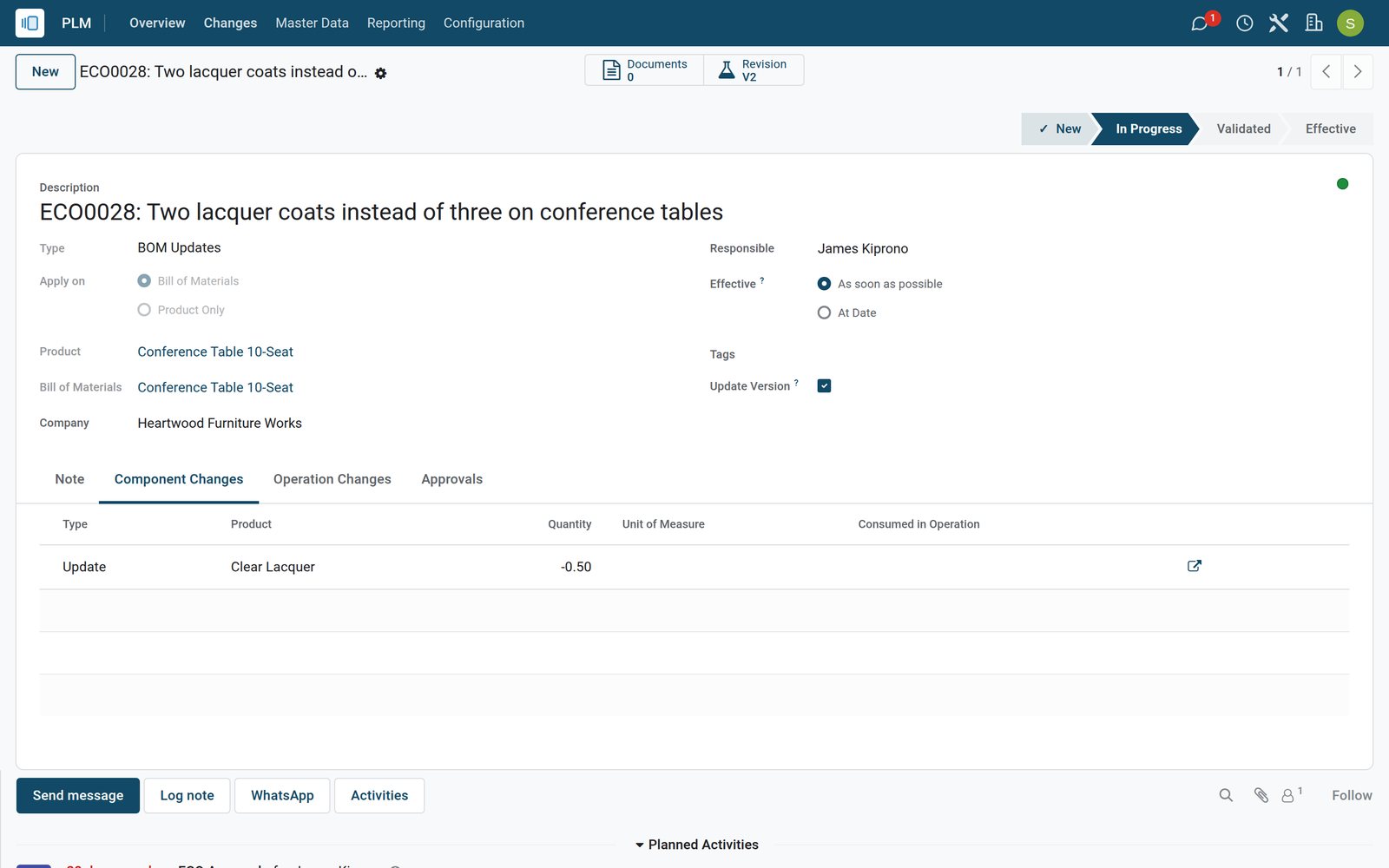
Every engineering change in one pipeline
Change orders move through stages from New to Effective, so nobody builds from a drawing that is being revised.
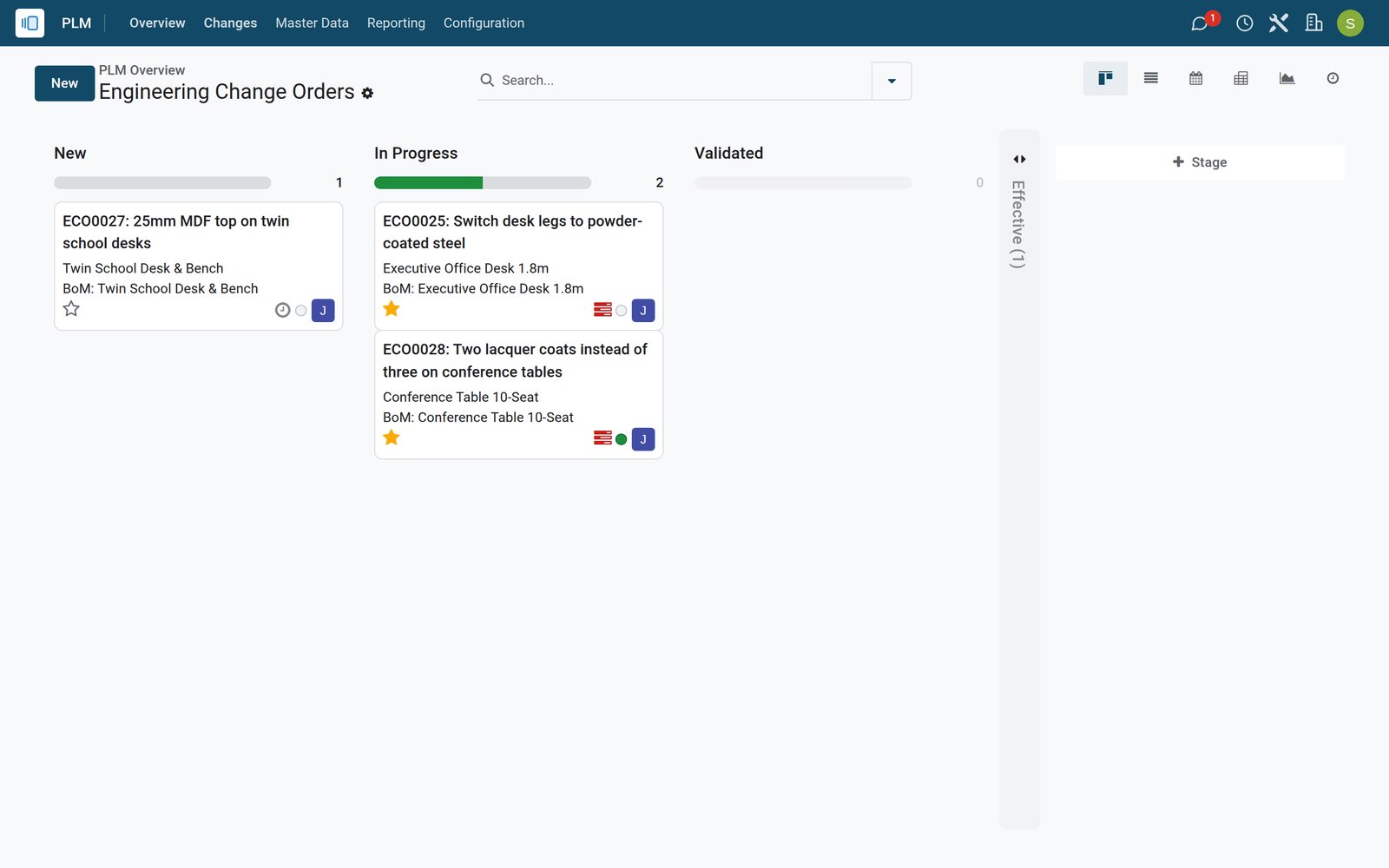 Product Lifecycle
See which changes wait, which run and which are live
The change board groups engineering change orders by stage, each card with its product, type, responsible and priority.
Explore Product Lifecycle →By the numbers
What ships inside the PLM app
Counted in the product itself, on the demo database.
- 2
- kinds of change order, a revision of a bill of materials or a change to the product itself
- 3
- approval types per stage role: required to approve, optional approval or comments only
- 5
- change order states, from To Do and In Progress through Rebase and Conflict to Done
- 2
- effectivity options: apply a change as soon as it is validated or at a chosen date
Inside the app
What is inside
The menus of the PLM app, grouped by what they do for engineering.
Change orders
Each change names the product, its bill of materials, the reason, the responsible and when it takes effect.
BoM revisions
Starting a revision copies the bill of materials as a new version, so engineering edits it while production keeps the current one.
Change comparison
Added, removed and updated components and operations are listed line by line against the current bill of materials.
Approvals by stage
Roles on a stage approve, reject or comment, and required approvals keep the change from moving on without them.
Change types
Separate pipelines for bill of materials updates and new product introductions, each with its own stages.
Master data
Products, bills of materials and work centres open from PLM, with their change history one click away.
Documents on changes
Drawings and specifications attached to the product travel with the change and come back as the new version when it is applied.
Overview and reporting
An overview per change type and a report of change orders by stage, type or product.
Step by step
From idea to the shop floor
How a change travels through BridgeERP, and which app does each step.
- Step 1
Request
An engineer opens a change order for the product and says why, such as fewer lacquer coats on a table.
Product Lifecycle - Step 2
Revise
Start Revision creates the new version of the bill of materials to edit components and operations.
Product Lifecycle - Step 3
Compare
The change order lists what the revision adds, removes or updates against the bill of materials in use.
Product Lifecycle - Step 4
Approve
The roles set on the stage approve the change, and the order moves on once required approvals are given.
Product Lifecycle - Step 5
Apply
Apply Changes makes the new version the active bill of materials and closes the order as Effective.
Product Lifecycle - Step 6
Build
The next manufacturing orders use the new version, with its components and operations.
Manufacturing

See exactly what a revision changes
Before anyone approves, the change order shows the difference between the current and the revised bill of materials.
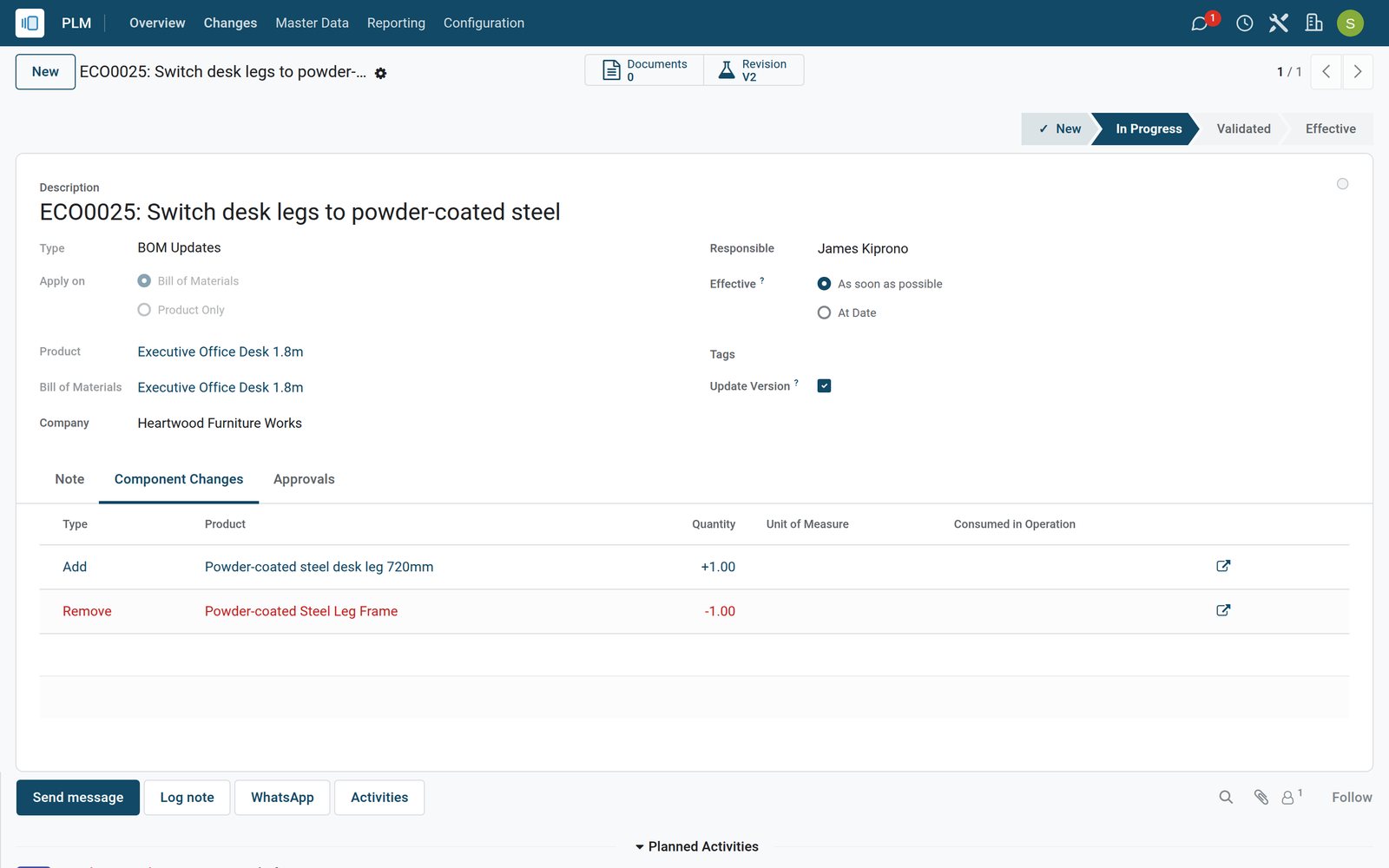 Product Lifecycle
A change waiting for engineering review
The desk legs change lists the old leg frame removed and the new powder-coated leg added, for engineering to review before it moves on.
Explore Product Lifecycle →Apply a change once, on the date you choose
When the approvals are in, the new version replaces the old one and the change order records when it became effective.
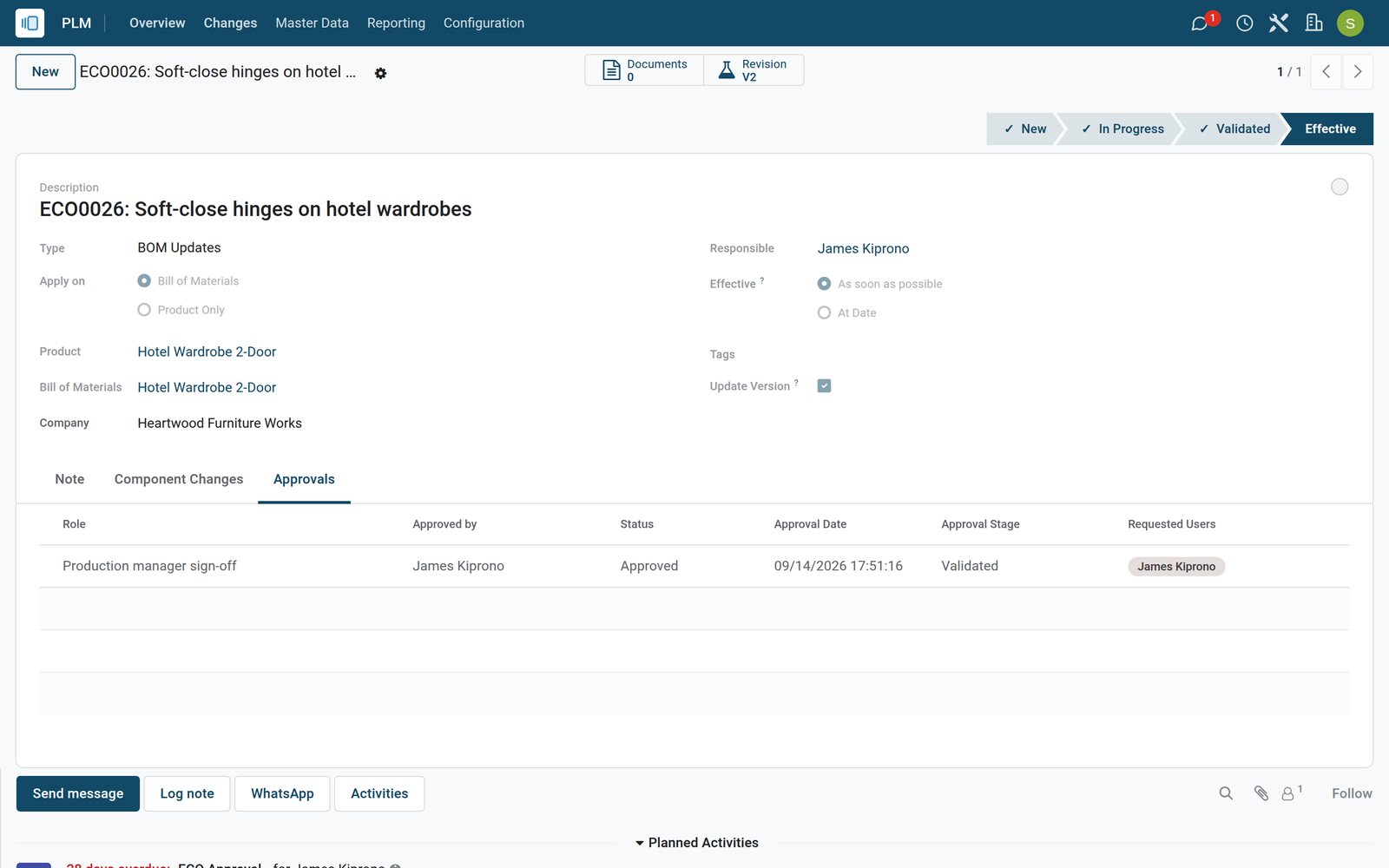 Product Lifecycle
A change that is live in production
The wardrobe hinge change shows its sign-off approved, the stage Effective and the bill of materials revision it made the active version.
Explore Product Lifecycle →Know where engineering stands
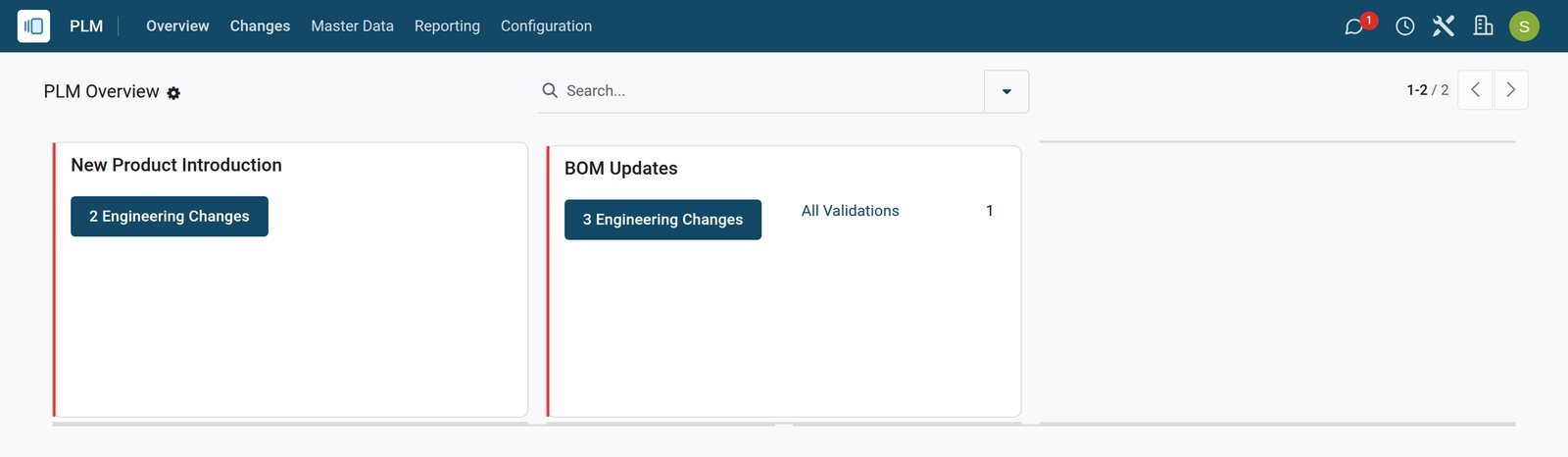
The overview counts change orders per type, so a manager sees the backlog before the planning meeting.
 Product Lifecycle
Change types at a glance
Each change type card counts its open change orders and those waiting for approval, with a link to the orders behind the number.
Explore Product Lifecycle →Who uses it
Who uses it, and what they see
Engineering changes touch several desks; each sees its part.
Design engineer
Opens change orders, starts revisions and edits components and operations on the new version.
Engineering manager
Approves or rejects changes set on the stage and follows the backlog on the overview.
Production manager
Signs off before a change becomes effective and plans orders on the version that applies.
Quality team
Reviews operation changes that also move quality control points on the shop floor.
Works with
Runs with the rest of BridgeERP
Apps that share the products and bills of materials PLM changes.


In your country
Built for manufacturers in any country
What the demo runs for a workshop group with sister companies in several countries.
Several companies
Change orders belong to a company, so each factory in the group runs its own changes on its own products.
Costs in local currency
Component costs on revised bills of materials are kept in the company currency, Kenya shillings for the Nairobi workshop.
Your languages
Engineering, production and quality read the same change orders in English, French or Arabic on the demo.
Discussed on the record
Approvals and comments are posted on the change order, so decisions are kept with the change instead of in email.
Reports and control
Reports and control
What PLM shows about the changes the workshop makes.
ECO report
Change orders counted by stage, type, product or responsible, in graph, pivot or list.
Approval status
Every change order lists its approvals with who approved or rejected and when.
Version history
Each bill of materials keeps its version number and the previous version it replaced.
Blocking stages
Stages with required approvals stop a change from skipping ahead, which the stage settings make visible.
Getting started
Getting started
How engineering moves onto BridgeERP PLM.
Start from your BoMs
Import products and bills of materials first; every change order starts from one of them.
Define change types
Keep BoM updates and new products apart, each with the stages your process uses.
Set approval roles
Add the people who must approve on each stage, and whether their approval is required.
Try it on the demo
The demo workshop has change orders in every stage, one with a pending review and one already effective.
Questions
Questions about PLM
Not covered here? Contact us.
Does production stop while a bill of materials is being revised?
No. The revision is a new version that stays inactive; manufacturing keeps using the current version until the change is applied.
Can a change take effect on a later date?
Yes. A change order is applied as soon as possible or at a date you set on the order.
Who can approve an engineering change?
The users named on the approval roles of the stage. A role can be required, optional or comment only.
Can I see what changed between two versions?
Yes. The change order lists every component and operation added, removed or updated against the version in use, and the bill of materials keeps its version number.
Does PLM work for new products as well as changes?
Yes. New product introductions run as their own change type with separate stages.
Do I need the Manufacturing app?
Yes. PLM revises the bills of materials and operations that Manufacturing builds from.
Put PLM to work
Add it to your plan and pay only for what you use, or see it running on your own demo first.