

 Maintenance: Keep every machine running, and know when it will need you
BridgeERP Maintenance tracks equipment, turns breakdowns and routine service into requests for your team, and measures the time between failures on each machine.
Free instant access. No credit card required.
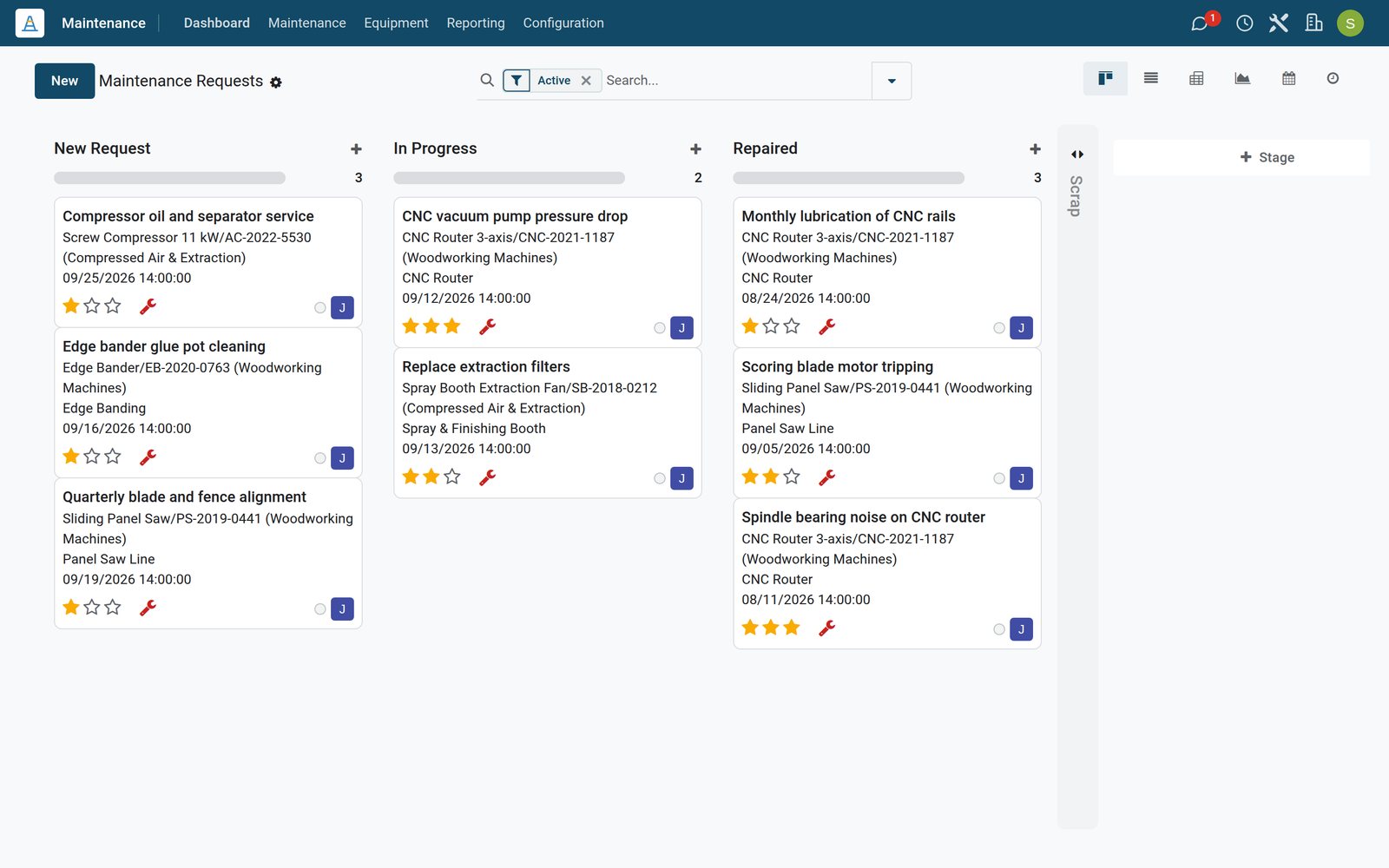
Plan service around production, not during it
Preventive and corrective requests sit on one calendar, so the planner sees which machine is down on which day.
 Maintenance
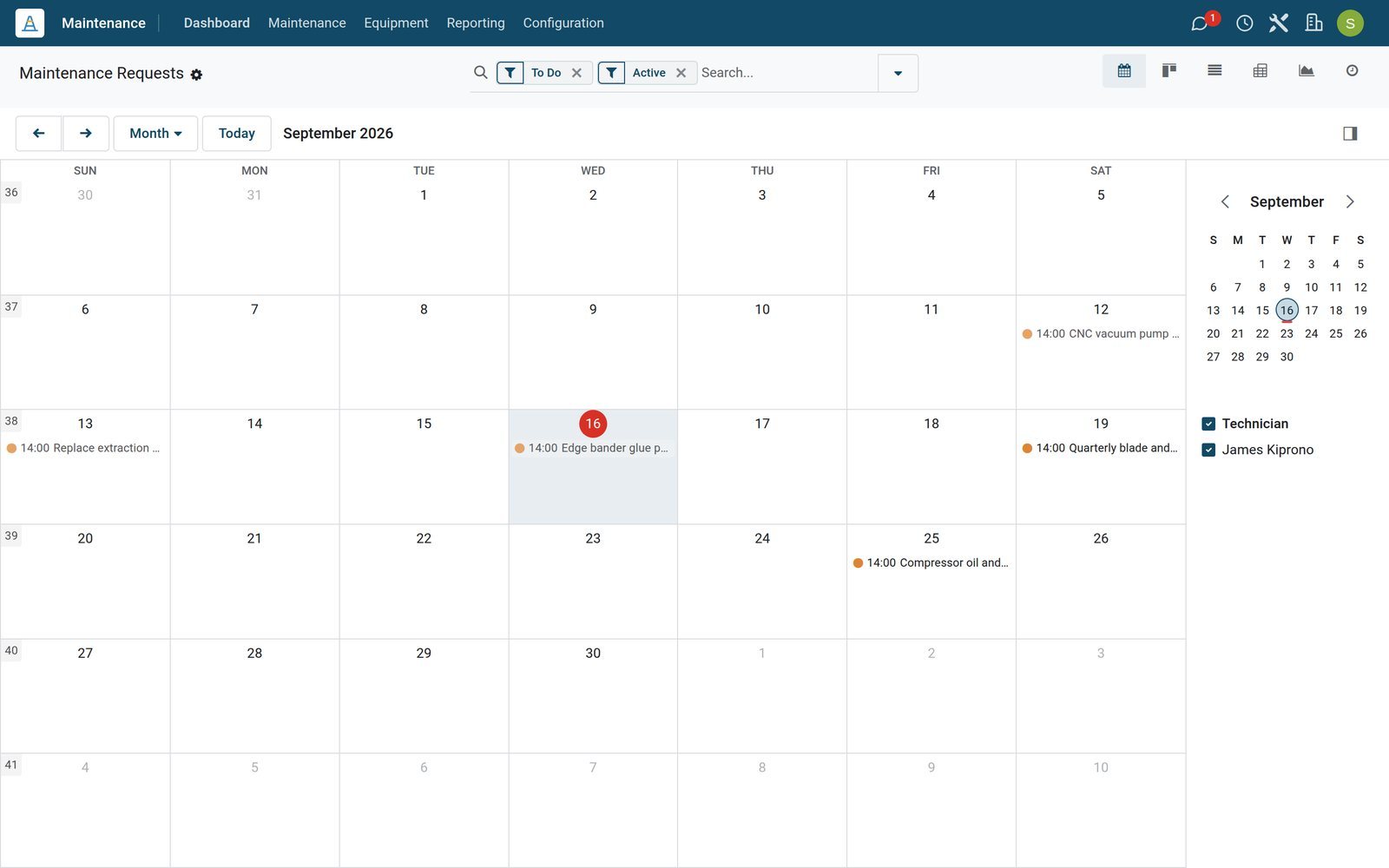
The month of maintenance on one screen
The maintenance calendar shows each open request on its scheduled day, from a glue pot cleaning to a pump repair, filtered by technician.
Explore Maintenance →By the numbers
What ships inside the Maintenance app
Counted in the product itself, on the demo database.
- 2
- kinds of request, corrective for a breakdown and preventive for planned service
- 4
- request stages out of the box, New Request, In Progress, Repaired and Scrap
- 3
- reliability figures per machine: mean time between failures, mean time to repair and the expected next failure
- 3
- ways to attach instructions to a request: a PDF, a Google Slides link or plain text
Inside the app
What is inside
The menus of the Maintenance app, grouped by what they do for the plant.
Maintenance requests
Every breakdown or service job is a request with its equipment, team, technician, priority, scheduled date and duration.
Preventive plans
A preventive request can repeat every so many days, weeks, months or years until a date you choose.
Equipment register
Machines and tools with category, serial number, model, vendor, cost, warranty date, location and technician.
Work centres
Equipment is linked to the work centre it serves, and a request raised on a work centre can block it during the repair.
Maintenance calendar
All scheduled requests by day, week or month, to plan service around production.
Teams and dashboard
Each team sees its requests to do, the urgent and blocked ones and those not yet scheduled.
Office equipment too
Laptops, phones and tools can be assigned to an employee or a department and maintained the same way.
Categories
Equipment categories group machines, such as woodworking machines or compressed air and extraction on the demo.
Step by step
From breakdown to back in production
How a request moves through BridgeERP, and which app does each step.
- Step 1
Report
An operator raises a maintenance request from the Shop Floor or from the manufacturing order that stopped.
Manufacturing - Step 2
Assign
The request lands with the maintenance team, which sets the technician, priority and scheduled date.
Maintenance - Step 3
Plan
The job appears on the maintenance calendar, and a repair on a work centre can block it for its duration.
Maintenance - Step 4
Repair
The technician follows the instructions, records the time taken and moves the request to Repaired.
Maintenance - Step 5
Learn
Closed requests update the machine's mean time between failures, time to repair and expected next failure.
Maintenance

Every machine with its history and reliability
The equipment record keeps serial number, work centre, technician and the requests raised on it, and works out how reliable it is.
- Maintenance
All machines and tools in one register
The equipment list shows each machine with its serial number, technician, category and company, ready to filter by team or category.
Explore Maintenance →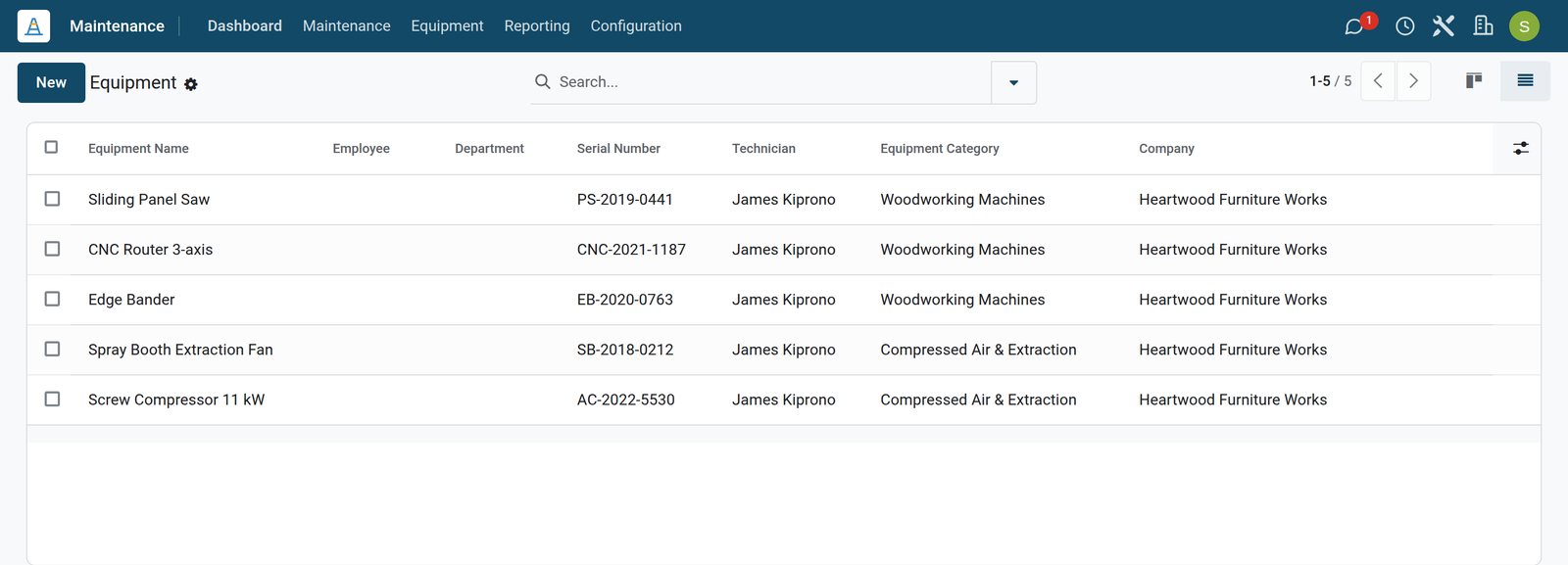
- Maintenance
Reliability worked out for you
The CNC router's record shows its maintenance count, mean time between failures, mean time to repair and the date of its expected next failure.
Explore Maintenance →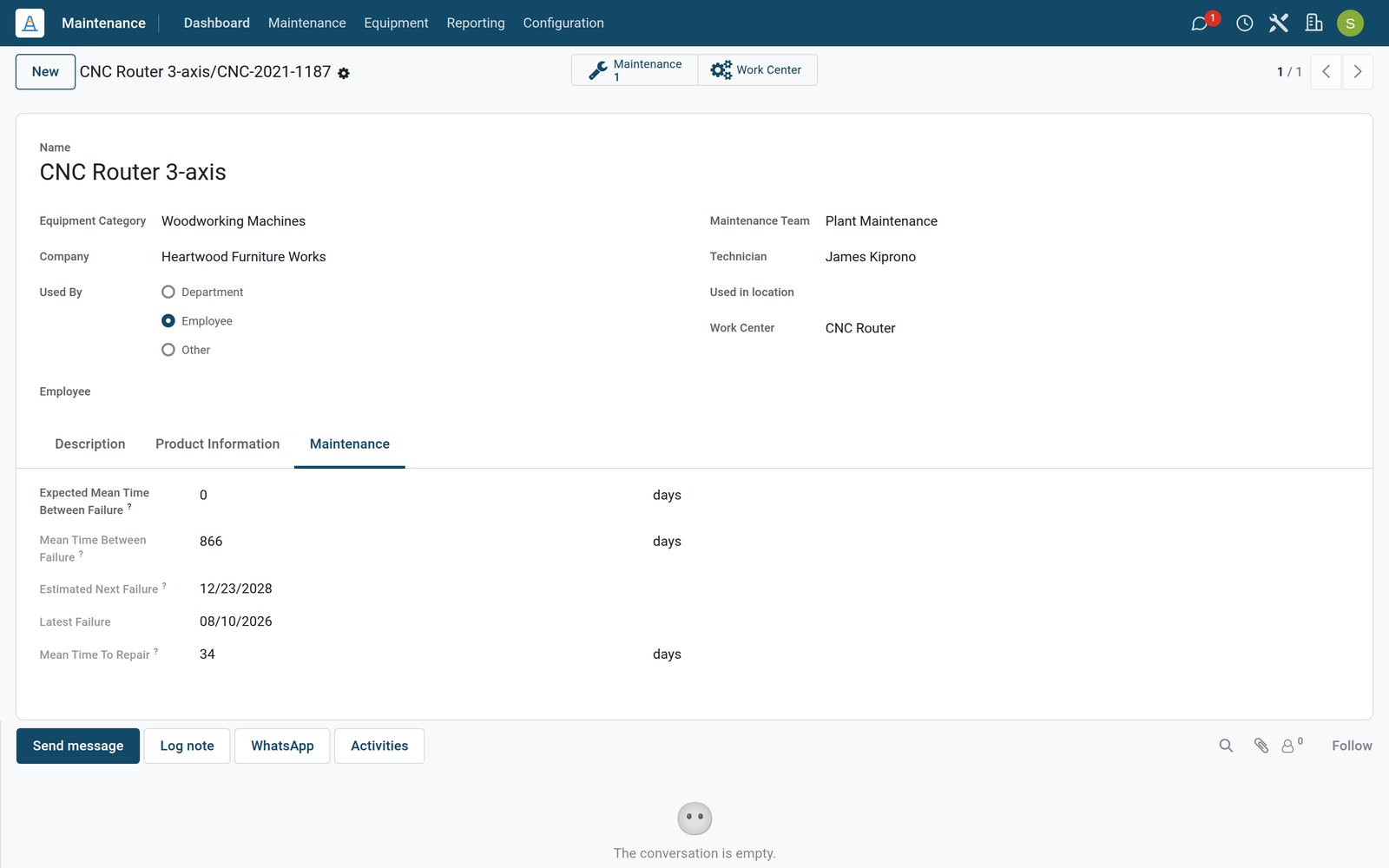
Give technicians everything they need on the request
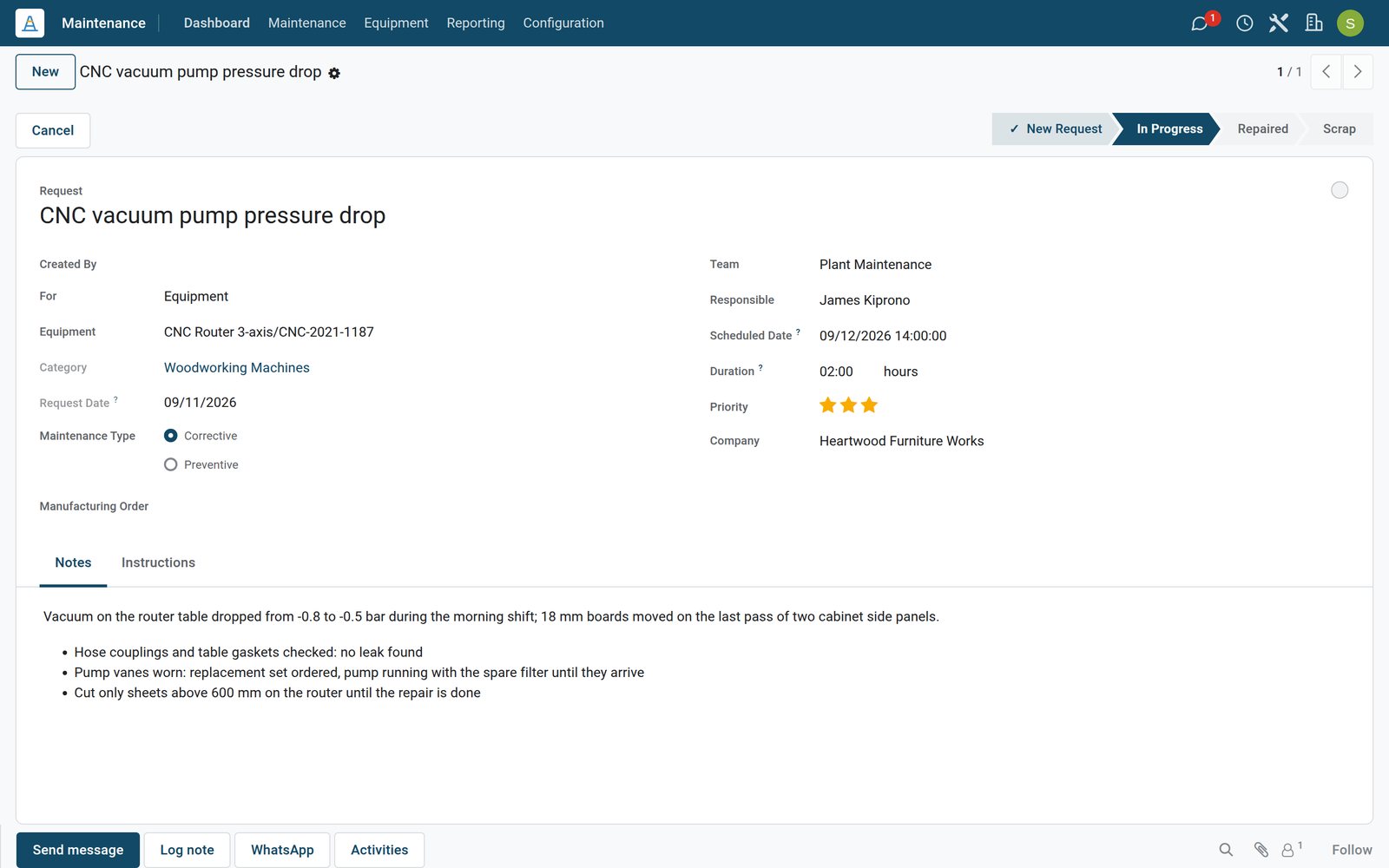
A request carries the machine, the team, the schedule and the instructions, so the repair starts without a phone call.
 Maintenance
A breakdown being fixed
The pump repair request shows the CNC router it concerns, the team, the schedule, its priority and the technician's findings so far.
Explore Maintenance →Who uses it
Who uses it, and what they see
Maintenance involves the people who break, fix and pay for machines.
Maintenance manager
Follows the team dashboard, sets preventive plans and reads MTBF and MTTR per machine.
Technician
Works through assigned requests, follows the attached instructions and records the time spent.
Operator
Requests maintenance from the Shop Floor screen of the work order that stopped.
Production planner
Plans orders around the maintenance calendar and the work centres blocked for repair.
Works with
Runs with the rest of BridgeERP
Apps that share machines, people and costs with Maintenance.


In your country
Built for plants in any country
What the demo runs for a workshop group with companies in six countries.
One database, many companies
Each company in a group keeps its own equipment, teams and requests; the demo runs companies in six countries side by side.
Power and extraction
Compressors, extraction fans and generators are equipment like any machine, with their own preventive plans.
Your languages
The maintenance screens run in English, French or Arabic on the demo, chosen per user.
Reports and control
Reports and control
What Maintenance tells you about your machines and your team.
Maintenance requests report
Requests by equipment, team, type or stage in graph, pivot or list, to find the machines that fail most.
MTBF and MTTR
Mean time between failures and mean time to repair on every equipment record.
Team workload
Requests to do, high priority, blocked and unscheduled per team on the dashboard.
Downtime on production
Work centre time lost to equipment failure shows in the Overall Equipment Effectiveness report.
Getting started
Getting started
How a plant moves its maintenance onto BridgeERP.
Import your equipment
Bring machines, serial numbers and categories in from a spreadsheet with the import on the equipment list.
Set up teams
Create maintenance teams with their members and link each machine to its team and technician.
Add preventive plans
Start with the service manuals: one recurring request per routine, from lubrication to filter changes.
Try it on the demo
The demo workshop has five machines, preventive plans and repairs in every stage to click through.
Questions
Questions about Maintenance
Not covered here? Contact us.
Can I schedule preventive maintenance that repeats?
Yes. A preventive request repeats every chosen number of days, weeks, months or years, optionally until an end date.
Does it calculate MTBF and MTTR?
Yes. Each equipment record works out its mean time between failures, mean time to repair and expected next failure from its closed requests.
Can a breakdown stop production planning?
A request raised on a work centre can block it, so no work orders or other maintenance are planned there during that time.
Can operators report a problem from the shop floor?
Yes. Operators request maintenance from the Shop Floor or the manufacturing order, and the request keeps the link to that order.
Can I track office equipment as well as machines?
Yes. Equipment can be assigned to an employee or a department, which suits laptops, phones and tools.
Can technicians see instructions on the request?
Yes. A request can carry instructions as a PDF, a Google Slides link or text.
Put Maintenance to work
Add it to your plan and pay only for what you use, or see it running on your own demo first.