

 Fleet: Know what every vehicle costs, who drives it and when its cover runs out
BridgeERP Fleet holds the vehicle register, driver assignments, insurance and lease contracts, service, fuel and odometer logs, and turns them into cost analysis per vehicle, in the same database as Employees and Accounting.
Free instant access. No credit card required.
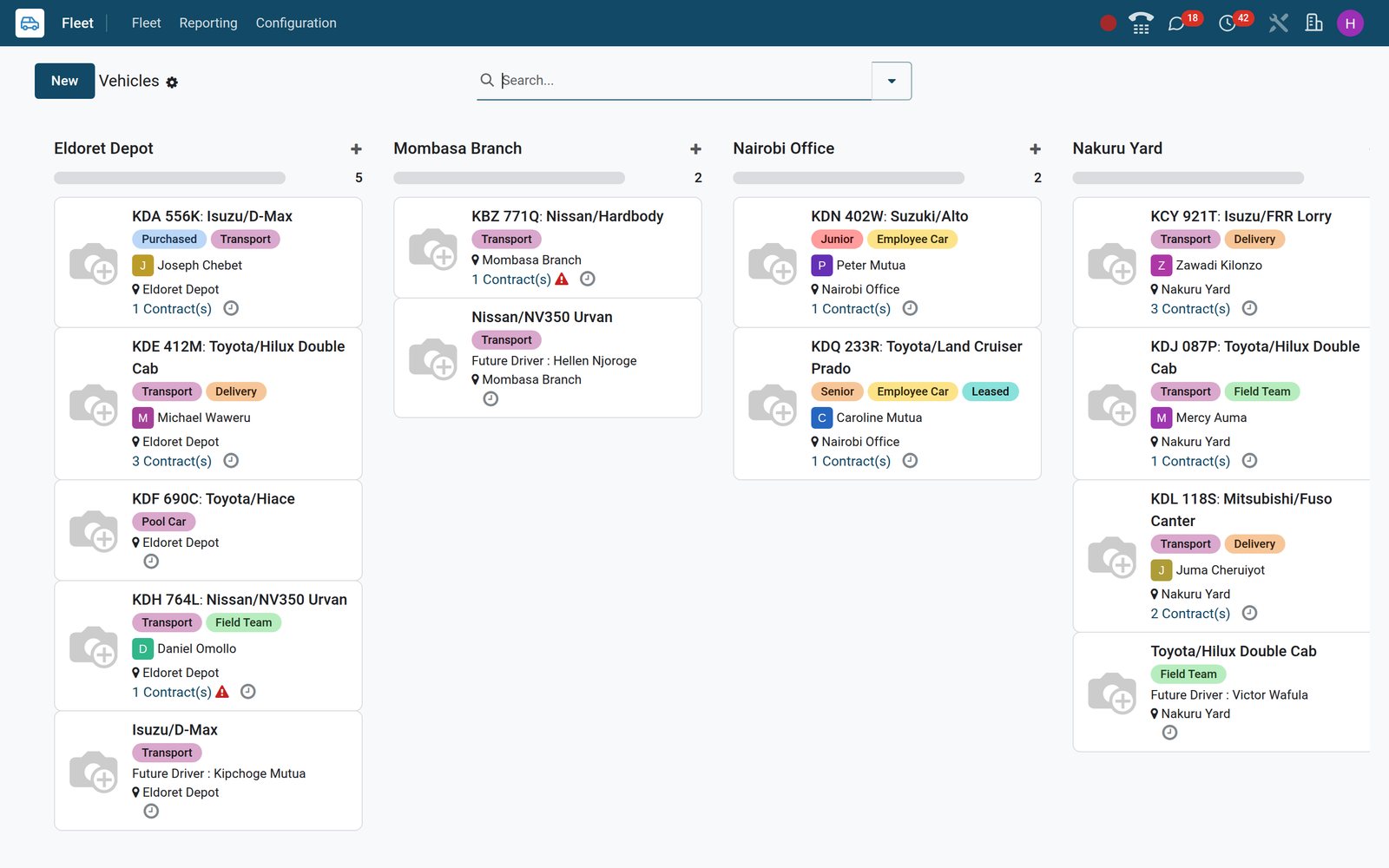
See the whole fleet, plate by plate, before anyone has to ask
Fleet > Fleet lists every vehicle with plate, model, category, driver, future driver, registration date and tags, whether it is on the road, in reserve or still on order.
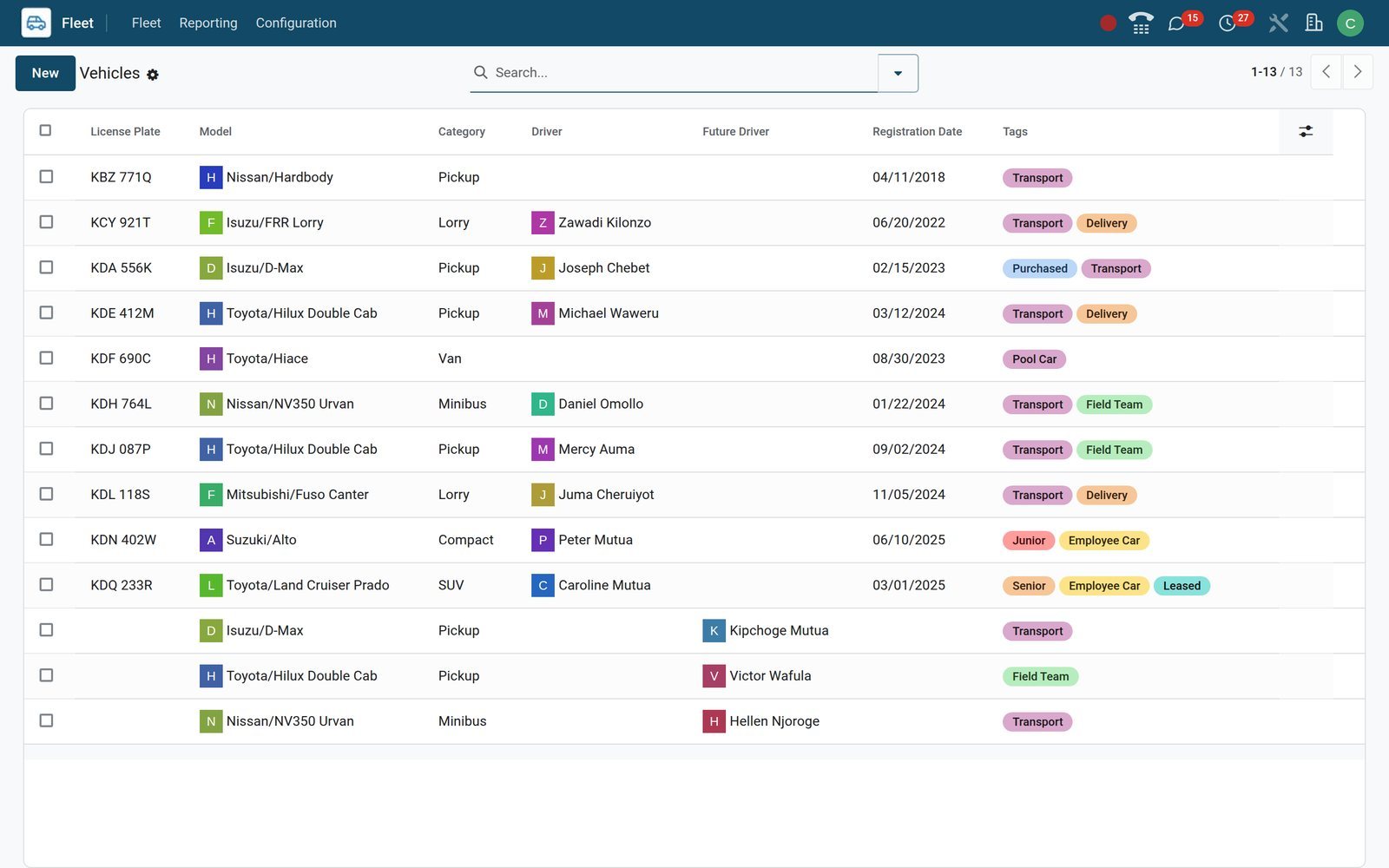 Fleet
FleetThe vehicle register
Group the list by status, model, brand or fuel type, tick several rows to retag or reassign them in one edit, and filter on Need Action for renewals.
Explore Fleet →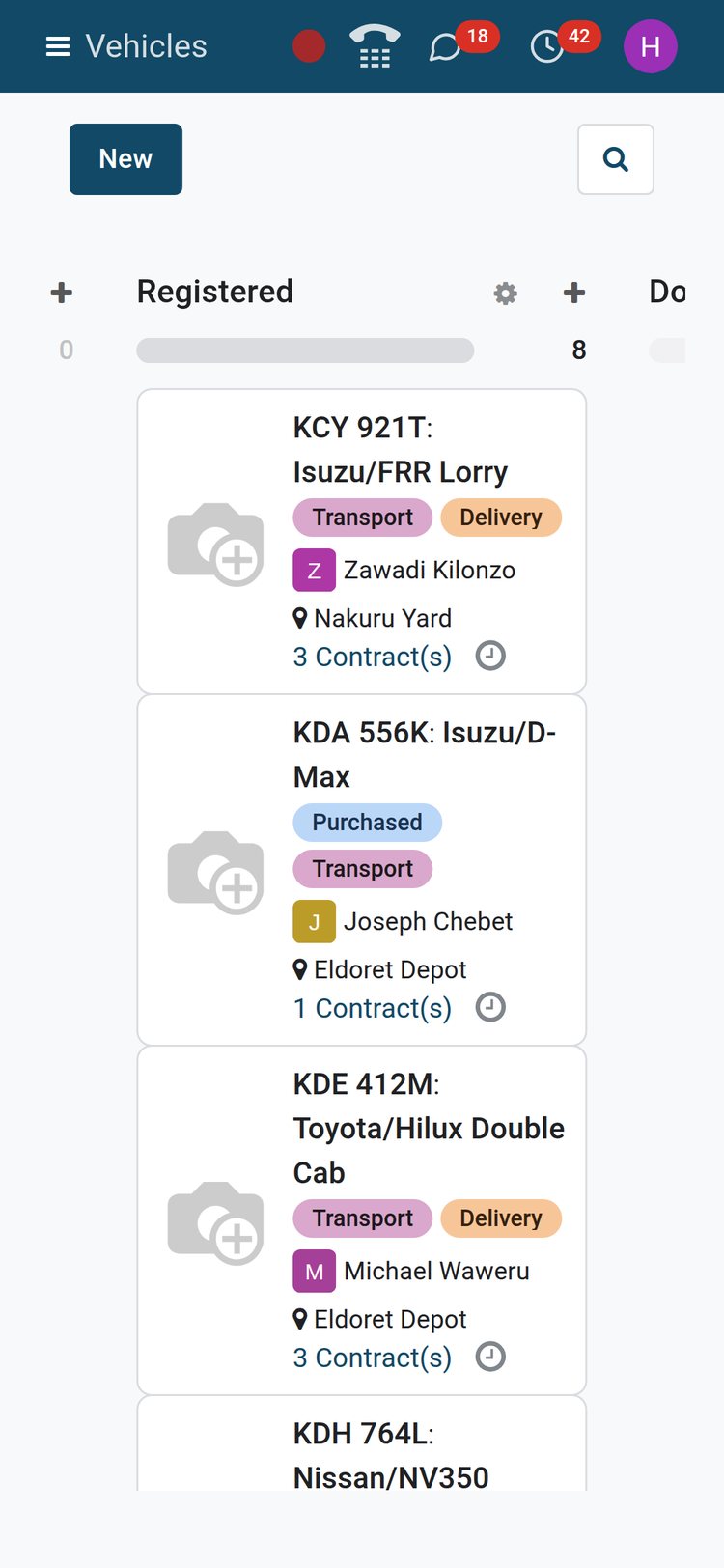 Fleet
FleetThe same board on a phone
On a phone at the depot, filter the Fleet board on Registered and the plates, tags, driver avatars and locations read just as they do at the office.
Explore Fleet →By the numbers
What the app ships with
Counted on the BridgeERP demo from the lists the Fleet app brings with it, not from anything typed in afterwards.
- 66
- manufacturers preloaded, Toyota, Isuzu, Nissan and Mitsubishi among them, with your own models added under Configuration
- 74
- standard service types, from oil change and brake pads to tyre replacement, refuelling, car wash and vendor bills
- 9
- fuel types on the vehicle form, diesel and petrol through full and plug-in hybrids to CNG, LPG, hydrogen and electric
- 7
- vehicle statuses on the board, New Request, To Order, Ordered, Registered, Downgraded, Reserve and Waiting List
Inside the app
What is inside
The menus of the Fleet app, and what each one does for the people who run the vehicles.
Fleet board
Vehicles as cards in status columns, with plate, model, tags, driver, location and a contract counter that turns amber or red when a renewal is due or overdue.
Vehicle record
Driver and future driver with assignment date, chassis number, registration date, last odometer, catalogue, purchase and residual value, plus smart buttons to everything logged against the vehicle.
Contracts
Insurance, lease, service plan or tracking subscription with vendor, reference, start and expiry dates, activation cost and recurring cost; the list sorts by expiry and counts days left.
Services
Repairs, servicing, tyres, fuel and inspections logged against the vehicle with type, vendor, driver, cost and odometer, moving through New, Running, Done or Cancelled stages.
Odometers
Every reading with date, vehicle, driver, value and unit in a list you edit in place; a reading typed on a service lands here as well.
Costs analysis
Reporting > Costs charts contract and service spend by month in a graph or per vehicle in a pivot, filtered by cost type and date, grouped by driver.
Models and manufacturers
Configuration holds manufacturers, models with seats, doors, fuel type and transmission, and categories such as Pickup, Lorry, Van and Minibus that carry weight and volume capacity.
Settings and roles
Fleet > Configuration > Settings sets how many days before a contract ends the alert fires; the Officer and Administrator roles are granted from Users.
Step by step
From purchase request to the cost of the year
Six steps, each in the app that does the job, and nothing typed twice.
- Step 1
Request
A vehicle you plan to buy sits as a card in New Request with its model, catalogue value and future driver, then moves through To Order and Ordered.
Fleet - Step 2
Register
On delivery, enter the plate, chassis number, registration date and purchase value, move the card to Registered and log the first odometer reading.
Fleet - Step 3
Assign
Set the driver, an employee from the Employees app; each change is written to the Drivers History and the employee file shows the plate and a Cars button.
Employees - Step 4
Cover
Record insurance, lease, service plan and tracking contracts with expiry date and recurring cost; renewal activities are scheduled inside the alert window from Settings.
Fleet - Step 5
Maintain
Log fuel, services and repairs as they happen with vendor, cost and odometer; a garage bill posted in Accounting with the vehicle on its line creates the entry.
Accounting - Step 6
Analyse
Read the year's contract and service spend per vehicle in Costs analysis, then decide which vehicle to keep, sell or replace.
Fleet
One record tells the vehicle's whole story
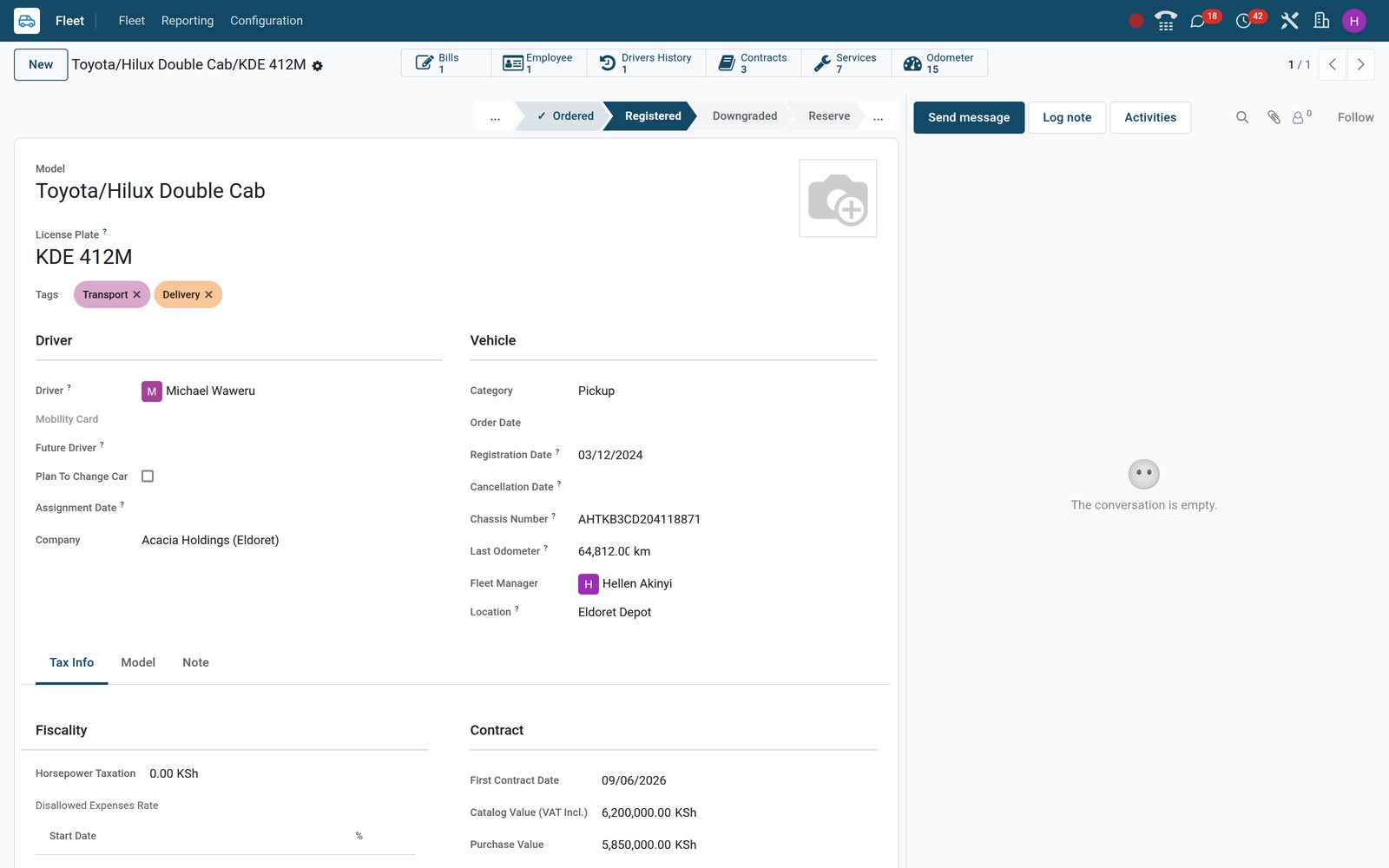
The vehicle form carries driver, status, chassis number, location and last odometer on top, and its smart buttons open the contracts, services, odometer log, vendor bills and driver history behind it.
 Fleet
FleetToyota Hilux KDE 412M, Eldoret Depot
Driver Michael Waweru, the status bar at Registered, chassis number and last odometer on top, and smart buttons for Contracts 3, Services 7, Odometer 15 and Bills 1.
Explore Fleet →Never let an insurance cover or a lease lapse unnoticed
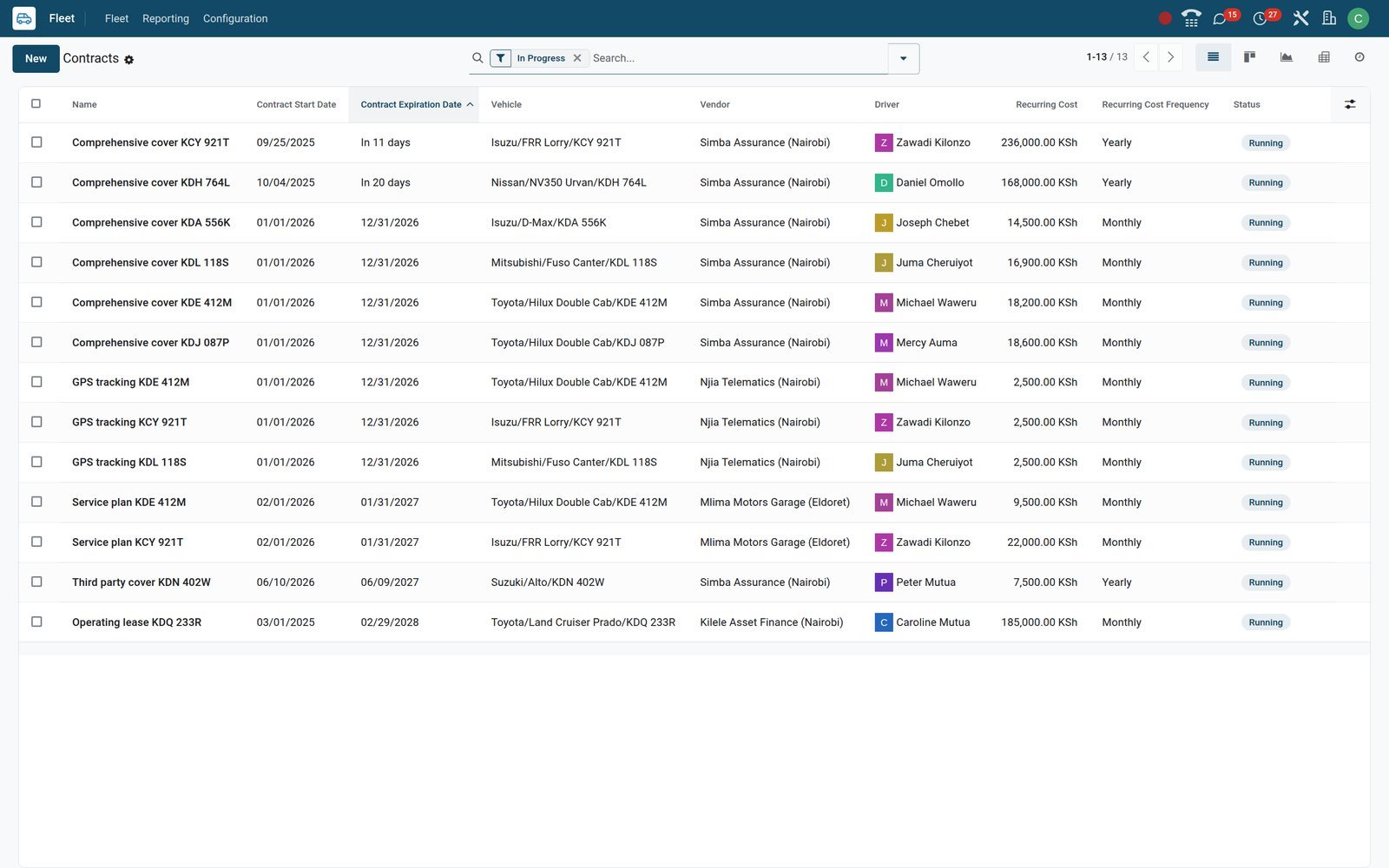
Contracts hold insurance, leases, service plans and tracking subscriptions with vendor, reference, dates and recurring cost. The list sorts by expiry date, counts the days left and flags what is about to end.
 Fleet
FleetRunning contracts, soonest expiry first
KCY 921T's comprehensive cover ends this month and KDH 764L's in early October, each carrying a Contract to Renew activity; leases and service plans follow below.
Explore Fleet →Fuel, servicing and repairs logged where they happen
Each service is a card with type, vehicle, driver, vendor, date and cost that moves from New to Running to Done. Odometer readings sit in an editable list and the vehicle always shows the latest one.
- Fleet
The workshop board
Booked jobs wait in New, the Fuso Canter's KES 68,000 clutch overhaul sits in Running, and finished oil changes, tyres, NTSA inspections and refuelling stack up in Done.
Explore Fleet →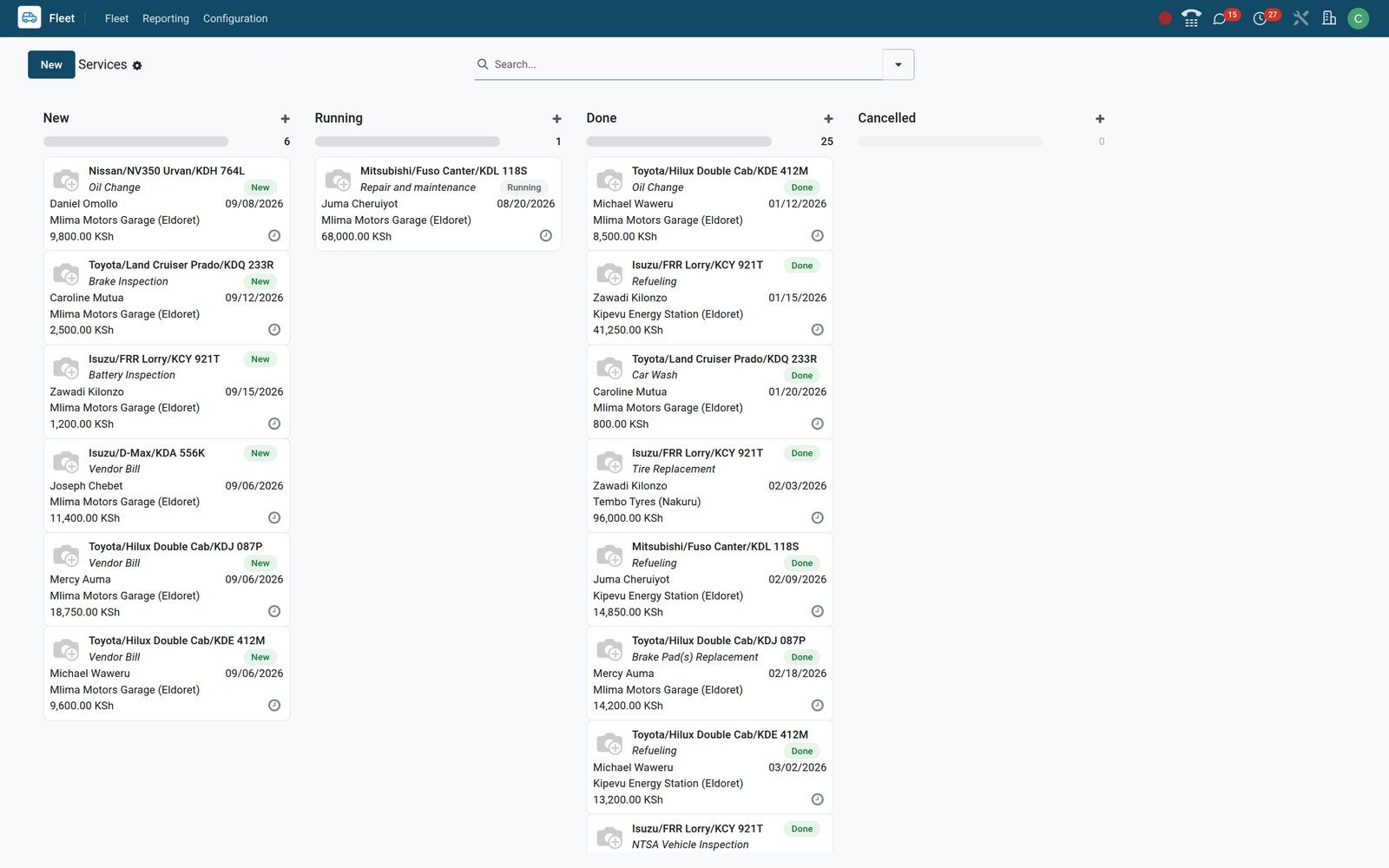
- Fleet
The odometer log
Readings by date for every vehicle with its driver, newest first; the vehicle form always shows the latest value as Last Odometer.
Explore Fleet →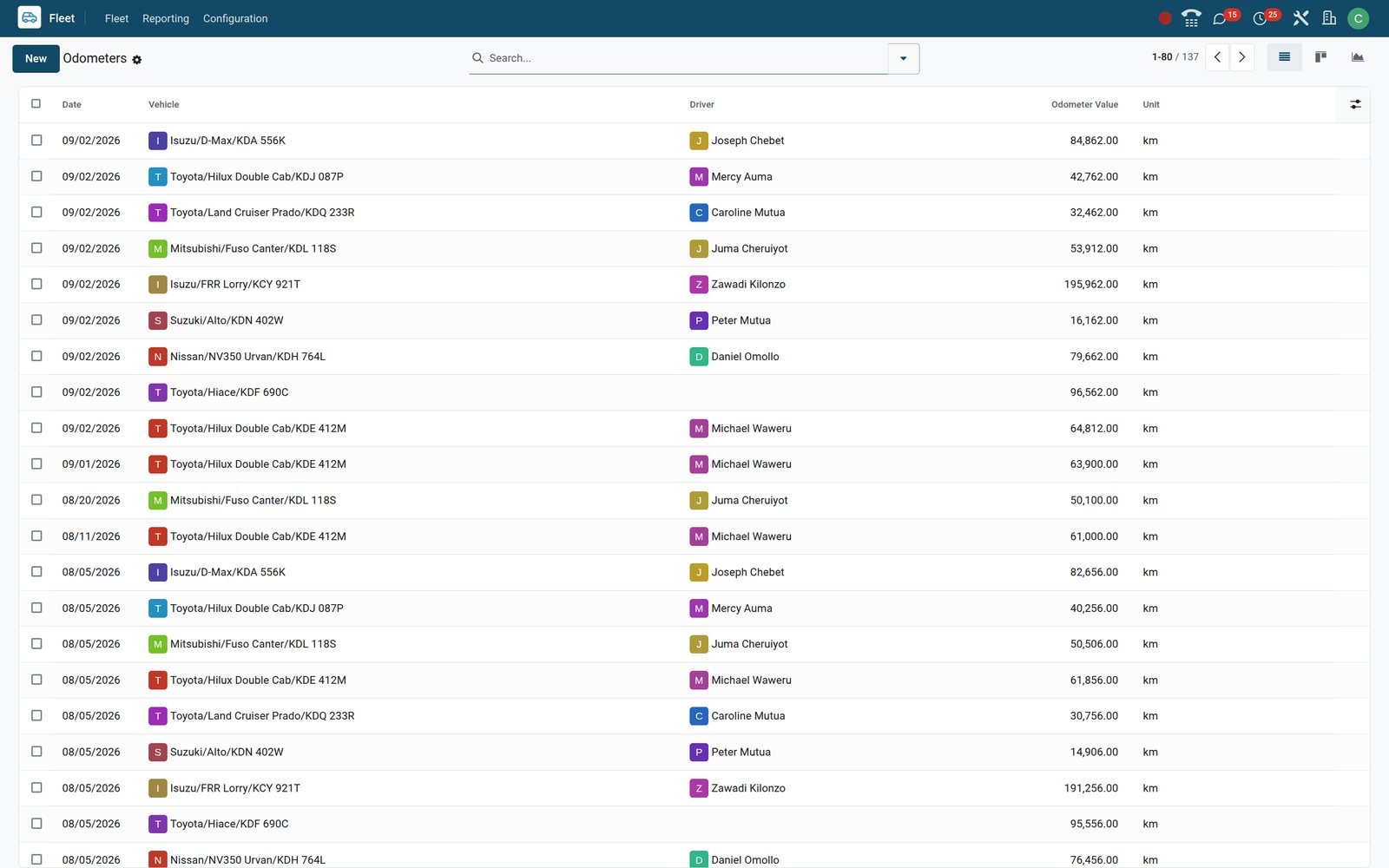
Know what each vehicle really costs to keep on the road
Costs analysis combines the recurring cost of every contract with every service entry. Switch between graph and pivot, filter by cost type or date, and group by vehicle or driver.
- Fleet
Spend by month, contract against service
The graph splits each month's spend into contract costs, meaning insurance, lease, service plan and tracking fees, and service costs such as fuel, tyres and repairs, in KES.
Explore Fleet →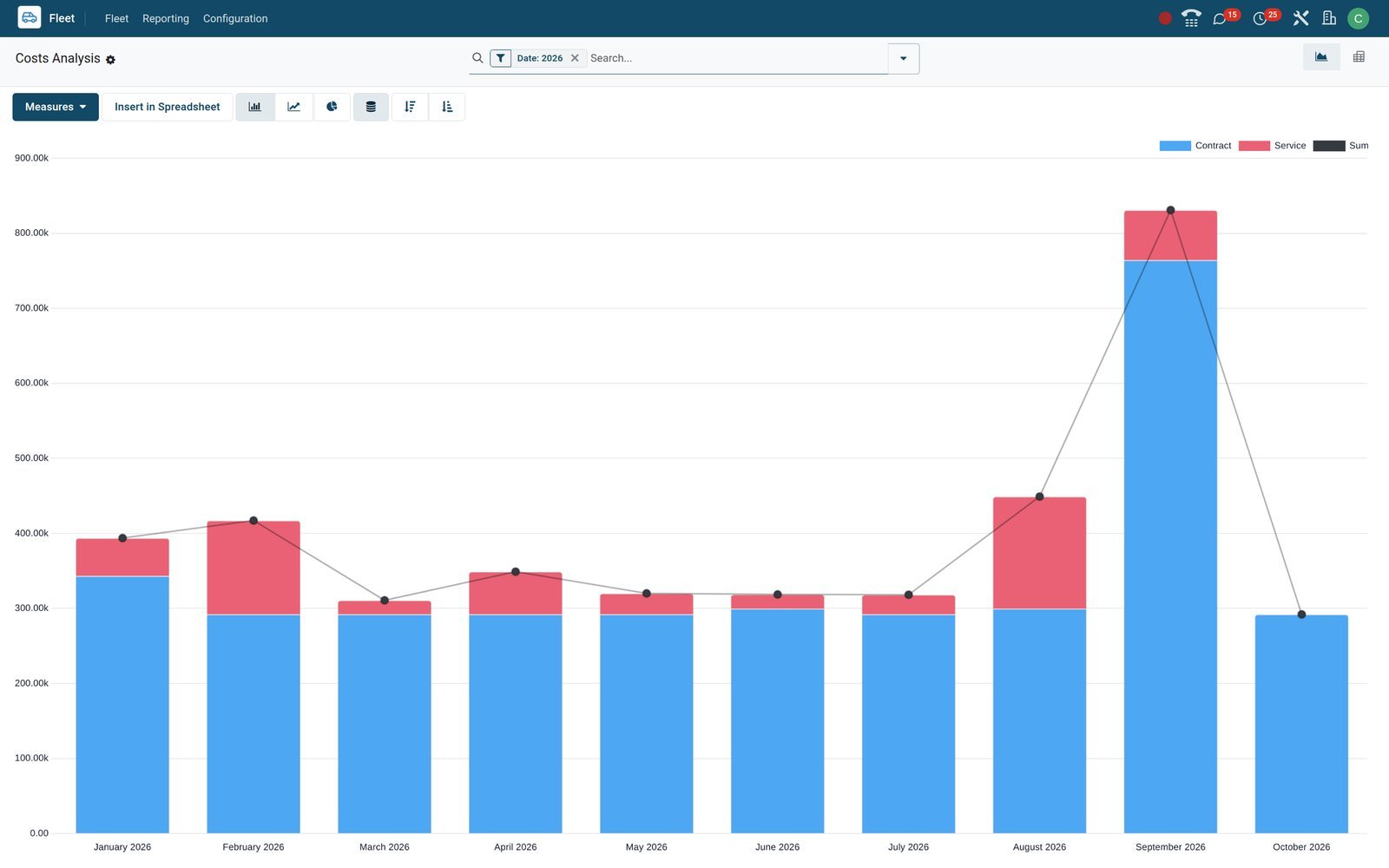
- Fleet
The per-vehicle pivot
One row per vehicle, contract and service spend split by quarter, sorted by total: the leased Land Cruiser Prado's payments sit beside the lorry's tyre and fuel bills.
Explore Fleet →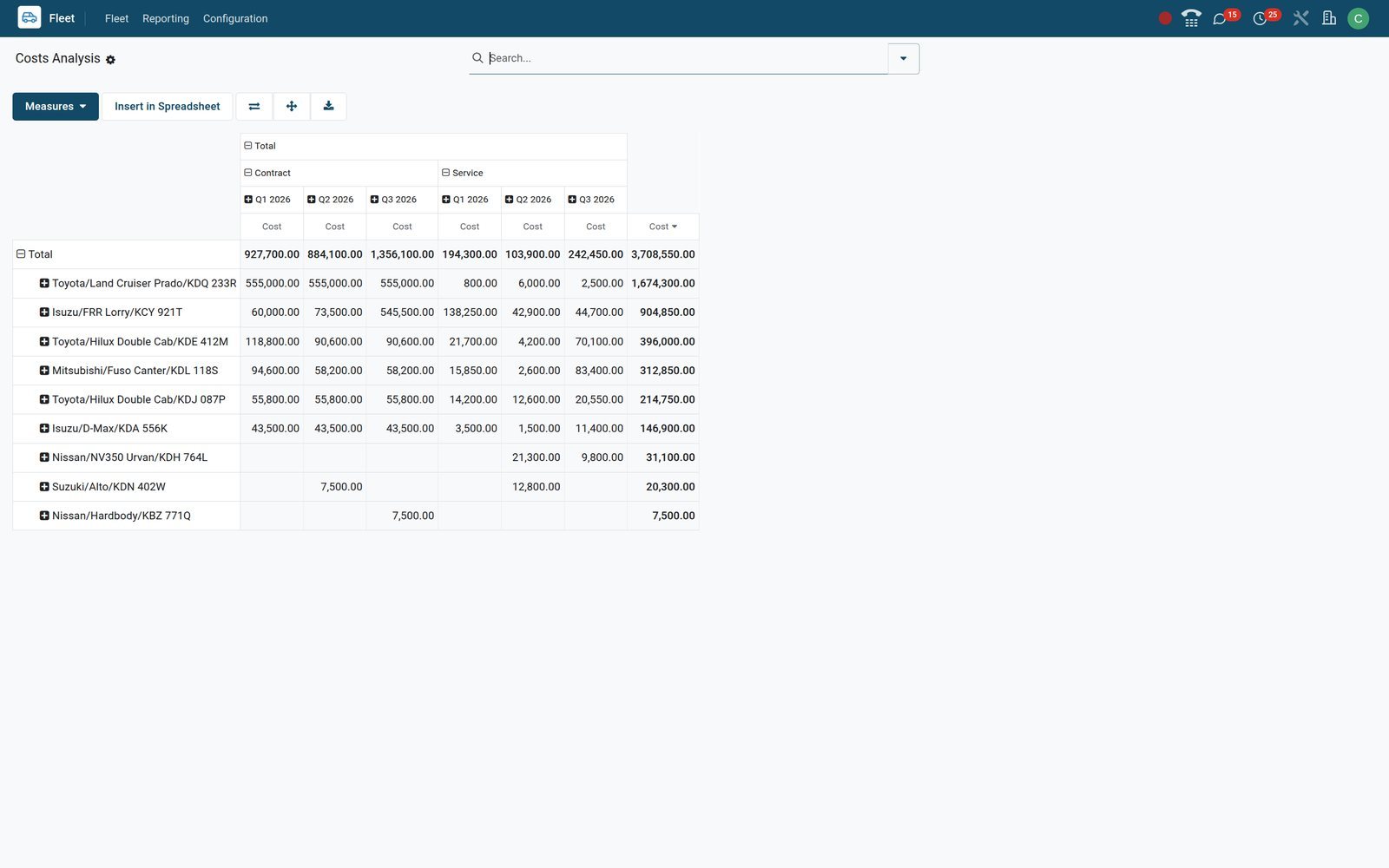
- Fleet
Services totalled by type
Group the services list by service type, fold the groups and sort on Cost: each type becomes one line with its count and KES total, biggest spend first.
Explore Fleet →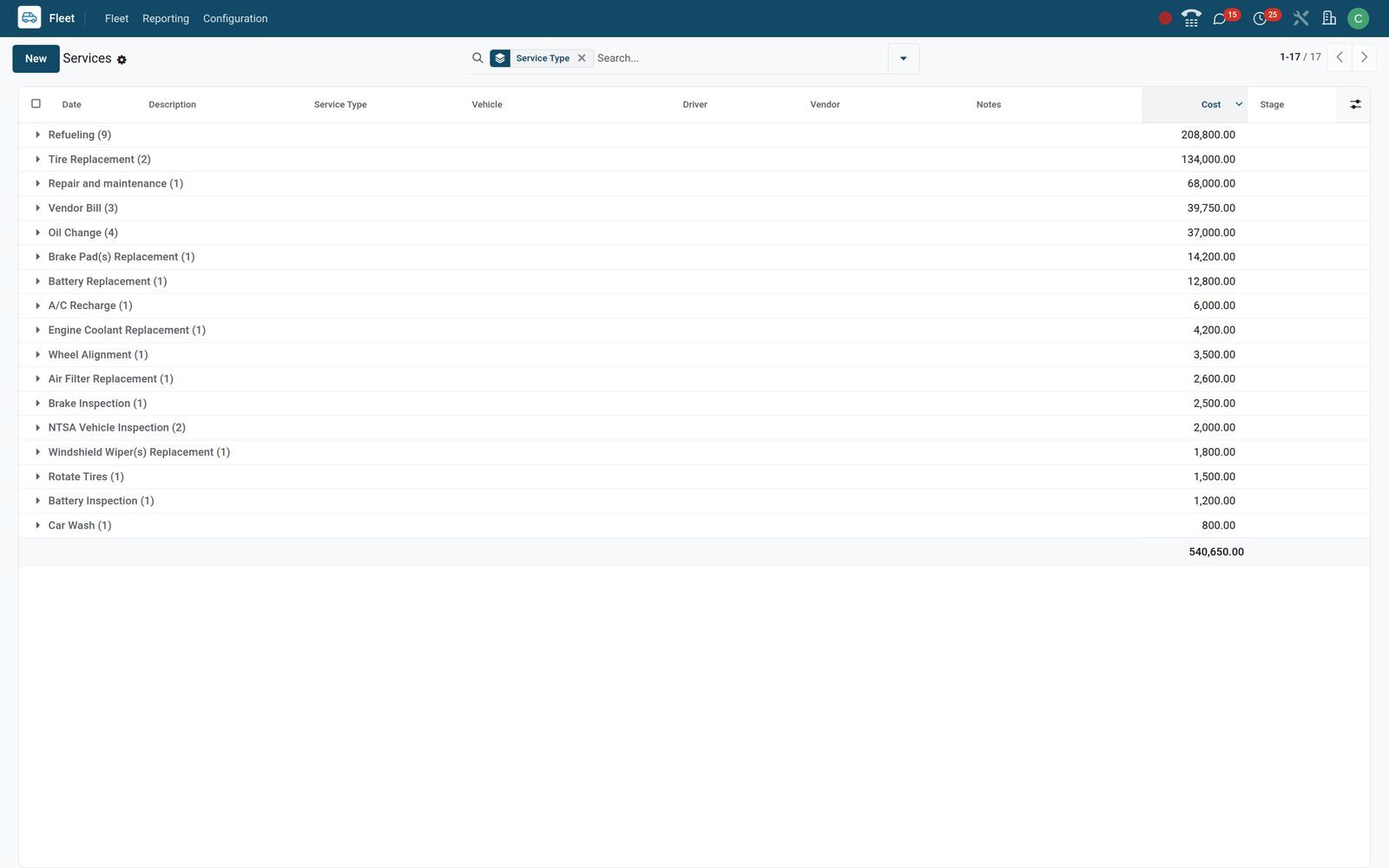
Who uses it
Who uses it, and what each person sees
Access follows two Fleet roles plus the Employees and Accounting apps, so a driver, a manager and an accountant each get their own slice.
Fleet administrator
Sees every vehicle, contract and service, edits Configuration, reads Costs analysis and receives the Contract to Renew activities as the responsible user on each contract.
Driver with the Officer role
Sees only the vehicles assigned to them, with those vehicles' contracts and services, and logs odometer readings from a phone; other vehicles stay hidden.
HR officer
Reads the vehicles that have an employee assigned, keeps the driving licence copy and company car plate on the employee file, and releases the car at departure.
Accountant
Enters the garage or fuel station bill in Accounting with the vehicle on each line; posting it writes the service entry and the vehicle's Bills button counts it.
Works with
Runs with the rest of BridgeERP
Fleet shares its drivers, vendors, bills and chatter with the apps installed next to it.
 EmployeesDrivers are employees: the employee file carries the plate, Cars button and Fleet Mobility Card, and every driver change writes to the vehicle's history.
 AccountingVendor bill lines name the vehicle and post as service entries; a fixed asset can point at the vehicle so depreciation runs in the books.
 InventoryWith Dispatch Management on, batch transfers take a vehicle, vehicle category, dock and driver, with weight and volume bars fed by the category's capacity.
 SignLease agreements, insurance schedules and vehicle handover forms go out for electronic signature, and the signed copies stay in Sign.
 ContactsGarages, tyre dealers, insurers, financiers and fuel stations are vendor contacts shared with Purchase and Accounting, with phone, email and city.
 ChatEvery vehicle, contract and service has a chatter for notes, attachments and scheduled activities, so the paper trail stays on the record.
In your country
Built for the roads and the books you actually run
Currency, plates, inspections, bills and phones the way they work where your vehicles run.
One currency per company on every cost
Contracts, services and the cost report follow the company currency, KES on this fleet, while sister companies in the same database keep their own currency and vehicles.
Plates, chassis numbers and roadworthiness inspections
Licence plate, chassis number, model year and colour are plain fields; a roadworthiness inspection, NTSA on the demo, is simply a service type logged with its fee and odometer.
Garage and fuel bills through the same books
Fuel and repair bills sit in Accounting beside every other vendor bill, in the same app that carries the country's chart of accounts and e-invoicing, Kenyan on the demo.
Works on the phone in the yard
The board, contracts, services and odometer list open in a phone browser, so a reading is logged beside the vehicle rather than typed up later.
Reports and control
Reports and control
Every analysis below is a menu or a view switch on the demo, not an add-on.
Costs analysis
Graph and pivot on contract and service spend under Reporting > Costs, with Service and Contract filters, a date filter and grouping by vehicle or driver.
Services analysis
The services list, graph and pivot group by service type and total the cost column, so tyre, fuel and repair spend is one glance away.
Contracts analysis
Contracts in list, kanban, graph, pivot and activity views, with In Progress and Expired filters that separate live cover from lapsed cover.
Odometer graph
Odometer values per vehicle drawn as a graph next to the editable log, so the high-mileage lorry stands out from the pool cars.
Vehicles pivot
Pivot the fleet by status, model, brand or fuel type, and use the Need Action filter to list vehicles with a renewal due soon or overdue.
Renewal activities
Activity views on vehicles, contracts and services line up Contract to Renew and other planned actions by due date, each with its responsible user.
What sets it apart
What sets it apart
Four things a fleet manager notices in the first week.
No hardware to buy before you start
The register, contracts, services and costs work from day one with nothing fitted to the vehicles; a GPS tracking subscription is simply a contract with a monthly cost.
The garage bill is typed once
A vendor bill line that names the vehicle becomes a service entry when posted, so the ledger and the cost report agree without a second entry.
Drivers, vendors and bills already live here
Because Fleet shares one database with Employees, Contacts and Accounting, a driver, a garage or a bill is created once and reused everywhere.
Requests, orders and reserves on the same board
A vehicle on order sits in To Order or Ordered with its future driver and assignment date long before it has a plate; a spare vehicle waits in Reserve.
Getting started
Getting started
A fleet of a dozen vehicles is usually on the board within an afternoon.
Import the register from a spreadsheet
Vehicles, models, contracts and odometer readings load through Import records on their lists, with column matching and a Test button that checks the file before loading.
Manufacturers and service types are already loaded
66 manufacturers and 74 service types come with the app; add your own models and categories under Configuration before the first vehicle goes in.
Two roles, set from Users
Give the fleet manager Administrator and each driver Officer on their user record; the record rules that keep drivers to their own vehicles are already in place.
One setting for alerts, one switch for dispatch
Fleet > Configuration > Settings holds the contract end-date alert in days; Inventory settings hold the Dispatch Management switch that puts vehicles on batch transfers.
Questions
Questions about Fleet
Not covered here? Contact us.
Does BridgeERP Fleet need GPS trackers or any hardware?
No. Fleet is the record system for vehicles, drivers, contracts, services, odometers and costs. A tracking subscription can be logged as a contract with its monthly fee, but the app does not read live positions.
How do contract renewal alerts work?
In Fleet > Configuration > Settings you set the number of days before the end date. A daily scheduler marks contracts past their date as Expired and schedules a Contract to Renew activity for the responsible user on those inside the window; the vehicle card and list row also turn amber or red.
Can a garage bill become a service entry?
Yes. On a vendor bill in Accounting each line can name the vehicle; when the bill is posted, a service entry of type Vendor Bill is created with the amount, vendor and description, and the vehicle's Bills button counts it.
Can drivers log their own odometer readings?
A driver given the Fleet Officer role sees the vehicles assigned to them, with their contracts and services, and can create odometer readings from a phone browser. Other vehicles stay out of sight.
Does it handle lorries, vans and minibuses as well as cars?
Categories are yours to define, such as Pickup, Lorry, Van or Minibus, and each can carry a weight and volume capacity that Inventory dispatch uses. Bicycles are a separate vehicle type with frame size and electric assistance.
Can several companies run their fleets in one database?
Yes. Every vehicle, contract and service belongs to a company and record rules keep them apart; the demo runs Kenyan companies in KES beside an Ethiopian company in ETB.
Where do fuel costs go?
Refuelling is a service type: log the fill with the cost, vendor and odometer, or bill the fuel station in Accounting with the vehicle on the line. Either way it lands in Costs analysis under Service.
Can I manage a vehicle that is still on order?
Yes. A vehicle can sit in New Request, To Order or Ordered without a plate, with its model, catalogue value, future driver and assignment date, and moves to Registered when it arrives.
Put Fleet to work
Add it to your plan and pay only for what you use, or see it running on your own demo first.