













 Laboratory: Test catalogue, sample tracking, analysers, result validation and reporting
No extra charge. Free instant access, no credit card required.
Works with
 HMS Core
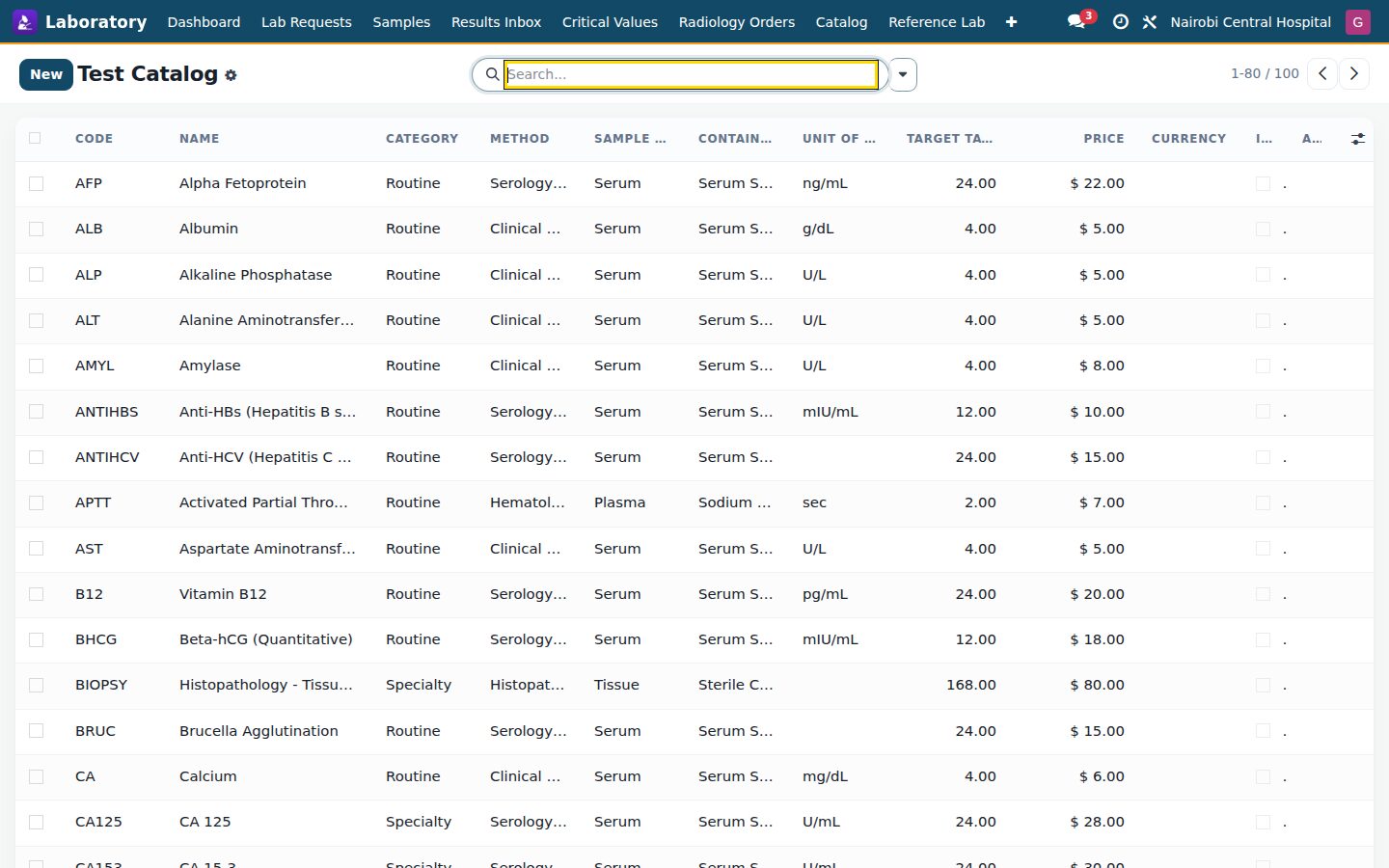
See it running
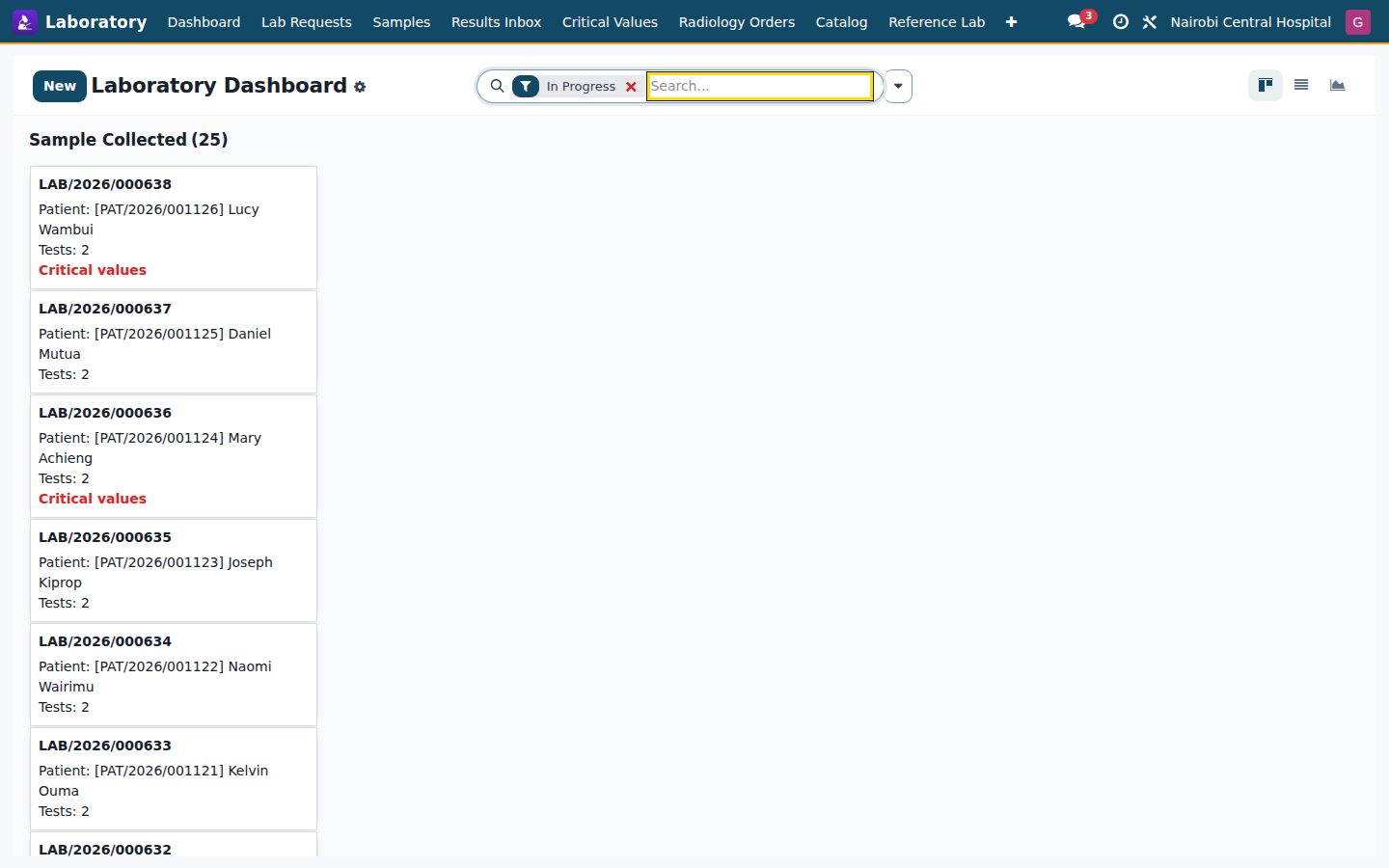
Laboratory, screen by screen
Real screens from the running product.
What's inside
Everything in Laboratory
78 items in 16 areas, every one shipping with the app today.
Test Catalog & Panels
- 80+ Seeded Test CatalogShips ~90+ ready-to-use lab tests across hematology, coagulation, chemistry, liver, lipid, thyroid, endocrine, serology, urinalysis, microbiology and cytology.
- LOINC-Coded TestsEach test carries a LOINC code, short name and translatable name for standards-based interoperability.
- Sample & Container MetadataEvery test defines its required sample type, collection container and analytical method so phlebotomy draws the right tube.
- Test Panels That CascadeEight bundled panels (CBC, RFT, LFT, Lipid, U&E, HbA1c, TFT, Urinalysis) auto-expand into their individual component result rows on ordering.
- Gender & Age-Banded Normal RangesReference ranges are stored per test with gender and age bounds plus critical low/
high limits, resolved automatically for each patient. - Automatic Value Classificationclassify_value() grades any measured number as low, normal, high, critical-low or critical-high against the patient-matched range.
Lab Request Lifecycle
- Full Request WorkflowLab requests move through draft, requested, sample collected, in progress, validated and reported states with guarded transition buttons.
- Order From ConsultationRequests link to a consultation and visit, and released lab results/
radiology surface as smart buttons on the consultation form. - Auto-Numbered ReferencesRequests, samples and radiology orders each draw human-readable sequences (LAB/, SMP/, RAD/ by year).
- Priority LevelsOrders can be routine, urgent or STAT, driving TAT targets and escalation.
- Automatic Panel ExpansionOn creation the request expands ordered panels into discrete test lines linked back to their parent panel.
- Live Count Smart ButtonsComputed tests, samples and results counts feed stat buttons for one-click navigation into each collection.
Specimen Management
- Code128 Barcode GenerationEach sample auto-generates a unique Code128 barcode on creation for scanning and tube labeling.
- Sample Lifecycle StatesSamples flow through collected, received, stored, rejected and disposed with dedicated action buttons.
- Sample & Container TypingSamples record specimen type and container (SST, EDTA, citrate and others) for pre-analytical accuracy.
- Guided Collection WizardA sample-collection wizard batches request lines into typed samples, records collector and note, and creates barcoded specimens in one step.
- Chain-of-Custody LogEvery handling action (collect, receive, store, dispose) writes a timestamped custody entry with user and location.
- Structured Rejection WorkflowSamples can be rejected with a coded reason and note, triggering a rejection notification to the ordering team.
Result Entry & Validation
- Multi-Step Result ValidationResults progress through entered, technician verified, supervisor verified and released, enforcing a two-tier sign-off before release.
- Automatic Result FlaggingNumeric results auto-flag normal, high, low or critical by comparing to the patient's resolved reference range.
- Reference Range Auto-DisplayEach result computes and stores its patient-specific reference-range string for the report.
- Critical-Value AlertingReleasing a critical result raises an alert and emails the ordering clinician via a dedicated mail template.
- Composite Sub-ValuesResults support child sub-value rows (e.g. differential parameters) each with its own value, unit, range and flag.
- Result Amendment WizardReleased results can be formally amended with a reason, creating a versioned amendment chained to the original.
Radiology & Imaging
- Multi-Modality OrderingRadiology orders cover X-Ray, ultrasound, CT, MRI, fluoroscopy, mammography, PET-CT and nuclear medicine.
- Modality-Specific Report TemplatesSelecting a modality auto-loads a structured technique/
findings/ impression template tailored to that study. - Contrast Allergy Safety CheckEnabling contrast triggers an onchange that warns of the patient's documented allergies and their severity.
- Radiology Workflow StatesOrders move through requested, scheduled, in progress, reported, released and canceled with scheduling timestamps.
- Laterality & Body PartOrders capture body part/
region and laterality (left, right, bilateral) for precise imaging requests. - PACS Viewer Deep-LinkA computed PACS viewer URL from base URL and DICOM study UID opens the study in the external image viewer.
Quality Control & Accreditation
- Westgard Multi-Rule QC EngineQC runs are evaluated against 1-2s, 1-3s, 2-2s, R-4s, 4-1s and 10-x Westgard rules to catch random and systematic error.
- QC Materials RegisterQuality-control materials record lot number, level, mean, SD, unit and expiry linked to test and analyzer.
- Automatic Z-Score & Rule FlaggingEach QC run computes its z-score from the material mean/
SD and auto-detects the triggered Westgard rule. - QC Run LogA QC run log stores measured value, operator, acceptance status and note per material over time.
- Proficiency Testing (EQA)Proficiency-testing records track EQA surveys with provider, peer-group mean, reported value and corrective action.
- EQA Pass/Fail ScoringDeviation percent computes against allowable total error to auto-grade each survey pass or fail.
Equipment & Analyzers
- Analyzer / Equipment RegisterLab equipment records manufacturer, model, serial, interface type, facility and department for each analyzer.
- Interface Type TrackingEach analyzer declares its connection interface for LIS-instrument integration planning.
- Tests-Per-Analyzer LinkageTests link to the analyzer that runs them, with a computed test count and drill-down button.
- QC & Maintenance DatesEquipment tracks last-QC date and next-maintenance date to keep analyzers compliant.
- Unique Equipment CodesA constraint enforces unique analyzer codes across the register.
Interoperability (HL7 & FHIR)
- HL7 v2.5 ORU^R01 BuilderGenerates real HL7 v2.5 ORU^R01 result messages with proper MSH/
PID/ OBR/ OBX segment structure and escaping. - HL7 ORU ParserParses inbound ORU^R01 messages back into structured data for round-trip verified ingestion.
- HL7 Round-Trip ConsoleA wizard builds an ORU message from a result, re-parses it and confirms round-trip integrity in one screen.
- HL7 Message IngestionHL7 ORU^R01 result messages from external analyzers are accepted into the LIS.
- FHIR R4 Observation BuilderBuilds FHIR R4 Observation resources per result with final/
preliminary status based on release state. - FHIR DiagnosticReport BuilderAssembles a FHIR R4 DiagnosticReport aggregating a request's released observations as final or partial.
- HL7 v2.5 ORU^R01 BuilderGenerates real HL7 v2.5 ORU^R01 result messages with proper MSH/
Configuration
- Settings
Laboratory
- Dashboard
- Lab Requests
- Samples
- Results Inbox
- Critical Values
- Radiology Orders
Quality
- QC Materials
- QC Runs
- Proficiency Testing
- TAT Report
Catalog
- Test Catalog
- Panels
- Equipment / Analyzers
Documents it prints
- Lab Result Report
- Sample Label (2x1)
- TAT Performance Report
- Radiology Report
- QC Daily Report
- Laboratory Request Form
It runs by itself
- HMS Laboratory - TAT breach escalationRuns hourly
Guided assistants
- BridgeERP HMS Laboratory Sample Collection Wizard
- BridgeERP HMS Laboratory Sample Collection Wizard Line
- BridgeERP HMS Laboratory Result Amendment Wizard
- BridgeERP HMS Laboratory HL7 Console
- BridgeERP HMS Laboratory FHIR Console
- Config Settings
What it sends
- BridgeERP HMS Lab: Critical Value Alert
- BridgeERP HMS Lab: TAT Breach Alert
- BridgeERP HMS Lab: Results Released
- BridgeERP HMS Lab: Sample Rejected
Works with
What Laboratory works with
Laboratory shares one database with the rest of the Bridge HMS Suite and BridgeERP: these are the apps it already talks to, with nothing to buy in between.
Builds on
Laboratory needs these to run; they come with it in the same plan.
Feeds
Records created here flow straight into these apps, with no export and no import.
And the wider platform
Any BridgeERP app can join the same database.
 AccountingFull double-entry accounting, bank reconciliation, assets, budgets and statutory reports.
 ExpensesEmployee expense claims with receipt capture and reimbursement.
 InvoicingCustomer invoices, vendor bills, payments and tax handling.
 SignSend documents for legally binding electronic signature.
 SubscriptionsRecurring contracts, automatic renewals and MRR reporting.
 EmployeesEmployee records, contracts, attendance, skills, appraisals and referrals.
In the suite
More Bridge HMS Suite apps
- HMS Core
 Reception
 Appointments
 Consultation / OPD
 Electronic Health Record
 Pathology
 Radiology & PACS
 Pharmacy
 Billing & Cashiering
 Insurance & Claims
 Wards & Inpatient
 Nursing
 Operating Theatre
 Intensive Care
 Emergency
 Blood Bank
 Dialysis
 Maternity
 Paediatrics
 Dental
 Ophthalmology
 Specialty Packs
 Telehealth
 Patient Portal
 Ambulance
 Mortuary
 Medical Stores
 Dietary
 CSSD
CSSD Infection Control
 Quality & Accreditation
 Health Analytics
 Bria Clinical AI
 Interoperability
 Public Health
 Country Compliance
 Biomedical Engineering
 Facility Helpdesk
 Housekeeping
Put Laboratory to work
Add it to your Bridge HMS Suite plan, priced per practitioner, or start a free trial and see it running first.