












 Telehealth: Remote consultations, e-prescribing and virtual waiting room
+$38.40/mo at 20 practitioners. Free instant access, no credit card required.
Works with
 Consultation / OPD
What's inside
Everything in Telehealth
72 items in 14 areas, every one shipping with the app today.
Video Session Management
- Scheduled video visitsA session record for each video visit, auto-numbered per day (TELE-YYMMDD-####) with required patient, clinician and facility.
- Unique room token & provider linkEach session gets a securely generated link token; the join link is built for Jitsi, looked up for Google Meet or taken from the configured provider endpoint.
- Passcode-protected patient linkAuto-generated 6-digit passcode and a patient join link on the patient portal so patients join securely.
- Multi-party attendeesAdditional attendees bring interpreters, supervising clinicians, family members or other parties into the call.
- Appointment linkageSession links to an appointment and can record a separate follow-up appointment.
- Scheduled vs actual durationTracks scheduled start/
duration/ end plus actual start/ end with computed actual duration in minutes.
Call Controls & Event Log
- Admit to waiting roomButton moves a scheduled session to the waiting room and creates a live queue entry for the patient.
- Start / Pause / End callButtons drive the state, stamp actual start/
end times and log corresponding in-call events. - No-show / Cancel / FailureButtons mark the patient a no-show, cancel the session, or flag it as a technical failure.
- Open video in new tabOne click opens the provider join link (Jitsi Meet etc.) in a new browser tab.
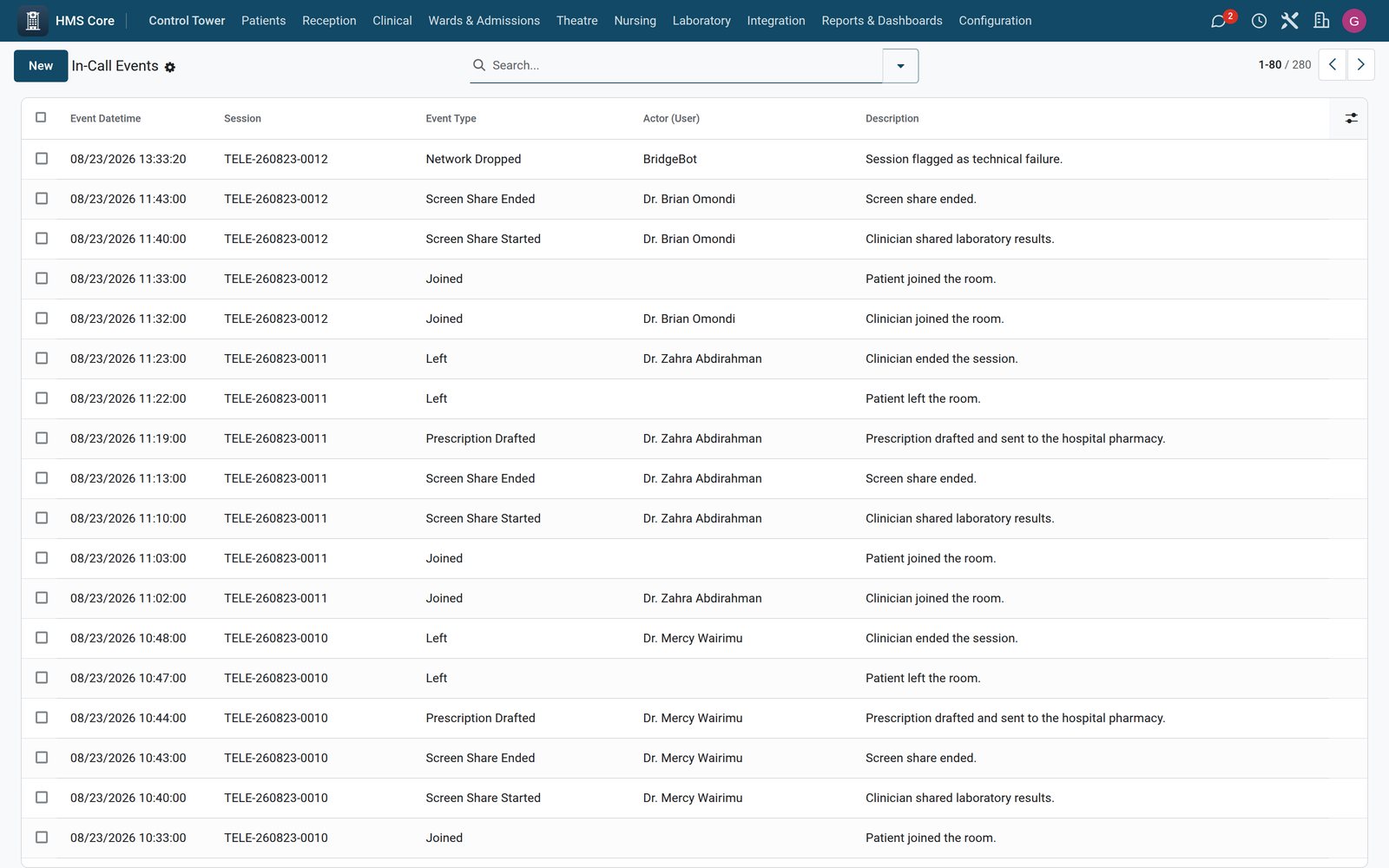
- In-call event timelineAn in-call event log records 17 event types: joins, mutes, screen-share, file share, recording, escalation, prescription, payment.
- Auto-logged call eventsStarting, pausing, ending or failing a session automatically records a timeline event with actor and description.
Virtual Waiting Room
- Per-facility waiting roomsVirtual waiting rooms with a unique name per facility and a cap on concurrent sessions.
- Hold experience settingsConfigurable hold-music URL, branding welcome message and after-hours message per room.
- Live room occupancyComputed count of patients currently waiting and of staffed clinicians in active sessions.
- Queue entriesEach waiting-room entry tracks the patient with entered, called and joined timestamps.
- Computed wait timeWait time in minutes, calculated from entry time to when the patient is called or joins.
- Entry state trackingEntry states waiting/
called/ in-session/ abandoned/ expired with call and abandon actions.
E-Consent Capture
- Pre-call e-consent recordA consent record captures the consent text and signed timestamp before the visit.
- Multiple signature methodsTyped name, drawn, click-to-accept or biometric signing, with signature image stored as attachment.
- Granular consent scopesSeparate flags for recording, third-party attendees and data storage consent.
- Signer identity & auditRecords signer as patient/
parent/ proxy plus witness user, IP address and browser user agent. - Sign & revoke workflowSigning stamps the signed time and passes recording consent on to the session; consent can be revoked; draft, signed and revoked states.
- Signed PDF attachmentAttaches a generated signed consent PDF.
Clinical Notes & Escalation
- SOAP consultation noteA consultation note with Subjective, Objective, Assessment and Plan fields.
- Video-based objective examHow the objective findings were taken over video: visual inspection, self-reported vitals, peripherals used or not applicable.
- Note sign & amendSigning stamps the clinician's e-signature and end time; signed notes can be amended; draft, signed and amended states.
- Prescriptions issuedPrescriptions link to both the note and the session.
- Emergency escalation recordEscalations with five types: life-threatening, urgent in-person, ambulance, mental-health crisis, unresolvable technical.
- Escalation routing & outcomeRoutes to in-person appointment, emergency department, ambulance or crisis hotline with outcome text and follow-up flag.
Connection Quality & Providers
- Pre-call bandwidth testBandwidth tests record download and upload Mbps, latency, jitter and packet loss with IP and country.
- Auto quality recommendationComputes HD, SD, audio-only or not-recommended plus guidance text from the measured connection metrics.
- Pluggable video platformsPlatform settings support Jitsi Meet, Zoom, Daily.co, Google Meet and native WebRTC.
- Provider configurationStores API endpoint, key, encrypted secret, max participants, default duration, region and E2EE toggle per provider.
- Default Jitsi provider seedShips a ready public meet.jit.si config; providers carry active/
testing/ deprecated state. - Jitsi embed helper serviceBackend JS service mounts a Jitsi Meet iframe into the form for future inline video embedding.
Billing & Recording
- Session billingBillable flag, charge amount, currency and payment method (insurance, cash, card, mobile money, bank transfer, waived).
- Referral & follow-upRecords referral made plus destination facility, and follow-up required with a linked follow-up appointment.
- Recording controlsRecording-consent flag, recording URL and configurable recording retention days.
- Recording-on ribbonForm displays a Recording On web ribbon whenever recording consent has been obtained.
Metrics & Analytics
- Daily facility metricsDaily metrics with scheduled, completed, no-show and failure counts, average duration, average wait, billable total and escalations.
- Metrics pivot & graphPivot and line-graph views of completed sessions by facility over time.
- Session analytics viewsSession pivot and line graph of call volume and actual duration by day/
month. - One metrics row per dayA database constraint keeps one metrics row per facility per day, so daily figures are never duplicated.
What it keeps
- Telehealth Daily Metrics
What it configures
- Telehealth E-Consent
- Telehealth In-Call Event
- Telehealth Pre-Call Bandwidth Test
- Telehealth Platform Configuration
- Telehealth Virtual Waiting Room
- Telehealth Video Session
What it configures (continued)
- Telehealth Waiting Room Entry
- Telehealth Consultation Note
- Telehealth Session Escalation
Clinical
- Today's Sessions
- Platform Configs
- Waiting Room
- Waiting Rooms
- Schedule Video Visit
- Consultations Done
- Metrics
- E-Consents
- Escalations
- Bandwidth Tests
- In-Call Events
It runs by itself
- BridgeERP HMS Telehealth: Pre-call remindersRuns every 5 minutes
- BridgeERP HMS Telehealth: Flag stuck sessionsRuns every 5 minutes
- BridgeERP HMS Telehealth: Aggregate daily metricsRuns daily
- BridgeERP HMS Telehealth: Clean expired join URLsRuns hourly
Roles it ships
- Telehealth: Patient Proxy
- Telehealth: Clinician
- Telehealth: Administrator
Works with
What Telehealth works with
Telehealth shares one database with the rest of the Bridge HMS Suite and BridgeERP: these are the apps it already talks to, with nothing to buy in between.
Builds on
Telehealth needs these to run; they come with it in the same plan.
And the wider platform
Any BridgeERP app can join the same database.
 AccountingFull double-entry accounting, bank reconciliation, assets, budgets and statutory reports.
 ExpensesEmployee expense claims with receipt capture and reimbursement.
 InvoicingCustomer invoices, vendor bills, payments and tax handling.
 SignSend documents for legally binding electronic signature.
 SubscriptionsRecurring contracts, automatic renewals and MRR reporting.
 EmployeesEmployee records, contracts, attendance, skills, appraisals and referrals.
In the suite
More Bridge HMS Suite apps
 HMS Core
 Reception
 Appointments
- Consultation / OPD
 Electronic Health Record
 Laboratory
 Pathology
 Radiology & PACS
 Pharmacy
 Billing & Cashiering
 Insurance & Claims
 Wards & Inpatient
 Nursing
 Operating Theatre
 Intensive Care
 Emergency
 Blood Bank
 Dialysis
 Maternity
 Paediatrics
 Dental
 Ophthalmology
 Specialty Packs
 Patient Portal
 Ambulance
 Mortuary
 Medical Stores
 Dietary
 CSSD
CSSD Infection Control
 Quality & Accreditation
 Health Analytics
 Bria Clinical AI
 Interoperability
 Public Health
 Country Compliance
 Biomedical Engineering
 Facility Helpdesk
 Housekeeping
Put Telehealth to work
Add it to your Bridge HMS Suite plan, priced per practitioner, or start a free trial and see it running first.