













 Electronic Health Record: Longitudinal record, problem lists, allergies, care plans and clinical decision support
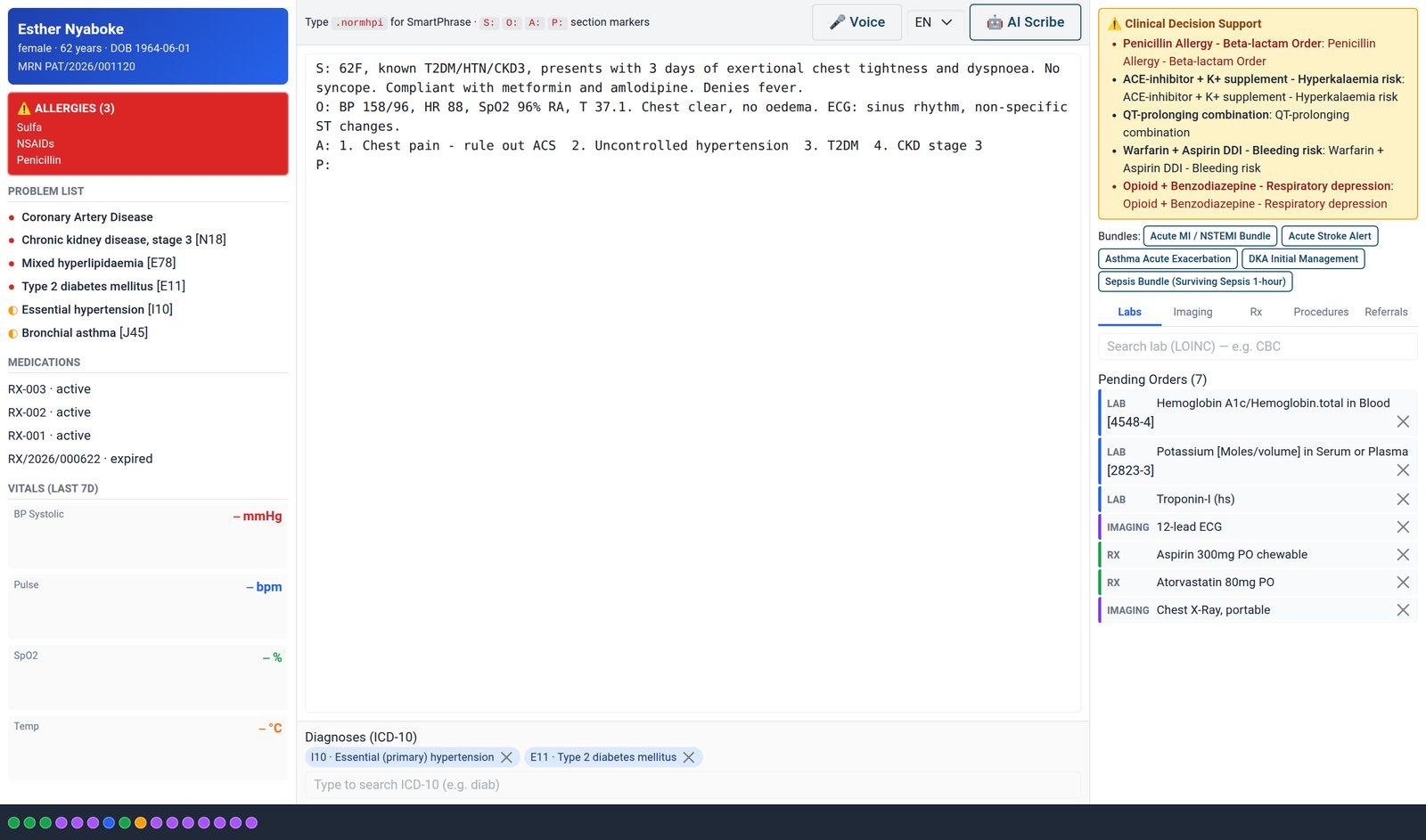
Full-screen 3-pane doctor chart desktop with smart-phrases, ICD-10/LOINC/RxNorm autocomplete, voice dictation, ambient AI scribe, CDS warnings, order pads and patient timeline.
No extra charge. Free instant access, no credit card required.
 Consultation / OPD
What's inside
Everything in Electronic Health Record
41 items in 8 areas, every one shipping with the app today.
Clinical Chart Desktop
- Full-Screen 3-Pane Chart WorkstationOWL client action opens a fullscreen Epic-style desktop with patient-summary, notes, and orders panes side by side.
- Launch From Consultation FormA blue Open Chart Desktop header button on any consultation launches the desktop pre-loaded with that patient and visit.
- Menu-Driven Chart LaunchChart Desktop app menu lets clinicians pick a consultation and open its chart from the consultation app root.
- Patient Header CardTop pane shows patient name, MRN, gender, age and date of birth pulled live from the patient record.
- Loading StateA loading placeholder renders while patient summary, timeline and order sets fetch on startup.
Patient Summary Pane
- Persistent Allergy BannerLeft pane shows a red allergy banner listing every recorded allergen so it is never missed during ordering.
- Critical Allergy HighlightBanner turns critical styling when any allergy is severe or life-threatening.
- Expandable Allergy DetailClicking the banner expands full allergen, severity and reaction detail; collapsed view shows the first three.
- NKDA IndicatorShows an explicit No Known Drug Allergies note when the patient has no recorded allergies.
- Problem List With ICD-10Displays chronic conditions with status icons (active/
managed/ resolved) and their ICD-10 codes. - Active Medication ListLists the patient's recent prescriptions with their state for medication reconciliation.
Notes & Documentation
- SOAP Note EditorCentral free-text editor for charting, parsed into Subjective/
Objective/ Assessment/ Plan on sign-off via S: O: A: P: markers. - SmartPhrase Dot-Phrase AutocompleteTyping a .trigger token surfaces a dropdown of matching smart-text phrases scoped to the user or shared.
- SmartPhrase Expansion With PlaceholdersSelecting a phrase inserts its body at the caret, with today's date, the clinician's name and the patient's name already filled in.
- SmartPhrase Usage TrackingEach expansion increments the phrase usage count and stamps last-used time for popularity analytics.
- WebKit Voice DictationMicrophone button streams browser speech recognition straight into the note text.
- Bilingual Dictation (EN/SW)Language selector switches voice recognition between English and Swahili on the fly.
- SOAP Note EditorCentral free-text editor for charting, parsed into Subjective/
Order Pads & Order Sets
- Tabbed Order PadsRight pane offers Labs, Imaging, Rx, Procedures and Referrals order tabs in one place.
- LOINC Lab OrderingLab pad autocompletes against LOINC concepts and adds them to the pending-orders list.
- Imaging OrderingImaging pad searches the concept dictionary for radiology orders like CXR or MRI.
- RxNorm Prescription OrderingRx pad autocompletes drugs against RxNorm concepts for structured prescribing.
- Free-Text Procedure OrdersProcedure tab captures free-text orders that flow to the consultation plan on sign-off.
- Referral OrdersReferral tab records referrals to a specialty or provider, saved as referral records on sign-off.
Clinical Decision Support
- Live CDS Warning BannerAdding or removing orders re-evaluates decision-support rules and shows warnings in the orders pane.
- Drug-Drug Interaction AlertsSurfaces drug-drug rules when two or more prescriptions are drafted together.
- Allergy Cross-CheckCompares each drug order against the patient's allergen list and raises a matching-allergy alert.
- Hard-Stop Severity FlaggingSevere-allergy or hard-stop rules are marked as hard stops and pinned to the top of the warning list.
- Severity-Styled WarningsWarnings render with per-severity styling so critical items stand out visually.
Ambient AI Scribe
- Ambient AI Scribe PanelA togglable panel accepts an encounter transcript and queues an AI note-generation task.
- Encounter Recording CreationTriggering the scribe creates an encounter recording linked to the patient, visit and consultation.
- Scribe Task QueueingCreates a scribe task with the chosen template and links it back onto the consultation.
- SOAP Template SelectionLooks up the requested scribe template (the general SOAP note by default) to shape the generated note.
Draft Safety & Collaboration
- 30-Second Draft Auto-SaveThe note draft auto-saves to the server every 30 seconds and only when the text has changed.
- Chart Session TokensOpening a chart issues a random session token used to validate autosave requests.
- Soft Concurrent-Edit LockRecords who last opened the chart and warns other clinicians that the record is being edited.
- Conflict Banner & NotificationsShows a conflict banner and toast when another user is editing, warning of last-write-wins.
- Draft Restore On ReopenReopening a chart restores the previously auto-saved draft text and last-save timestamp.
- Manual Save DraftA Save Draft button lets clinicians persist the note on demand between auto-saves.
Timeline & Prior-Visit Compare
- Patient Timeline StripA bottom strip plots color-coded dots for consults, prescriptions, vitals and visits across the patient history.
- Click-Through Timeline EventsClicking a timeline dot opens the underlying record (consult, Rx, vitals or visit) in a dialog.
- Side-by-Side Prior Visit CompareA toggle loads the most recent prior consultation's SOAP note alongside the current chart for comparison.
Works with
What Electronic Health Record works with
Electronic Health Record shares one database with the rest of the Bridge HMS Suite and BridgeERP: these are the apps it already talks to, with nothing to buy in between.
Builds on
Electronic Health Record needs these to run; they come with it in the same plan.
Feeds
Records created here flow straight into these apps, with no export and no import.
And the wider platform
Any BridgeERP app can join the same database.
 AccountingFull double-entry accounting, bank reconciliation, assets, budgets and statutory reports.
 ExpensesEmployee expense claims with receipt capture and reimbursement.
 InvoicingCustomer invoices, vendor bills, payments and tax handling.
 SignSend documents for legally binding electronic signature.
 SubscriptionsRecurring contracts, automatic renewals and MRR reporting.
 EmployeesEmployee records, contracts, attendance, skills, appraisals and referrals.
In the suite
More Bridge HMS Suite apps
 HMS Core
 Reception
 Appointments
- Consultation / OPD
 Laboratory
 Pathology
 Radiology & PACS
 Pharmacy
 Billing & Cashiering
 Insurance & Claims
 Wards & Inpatient
 Nursing
 Operating Theatre
 Intensive Care
 Emergency
 Blood Bank
 Dialysis
 Maternity
 Paediatrics
 Dental
 Ophthalmology
 Specialty Packs
 Telehealth
 Patient Portal
 Ambulance
 Mortuary
 Medical Stores
 Dietary
 CSSD
CSSD Infection Control
 Quality & Accreditation
 Health Analytics
 Bria Clinical AI
 Interoperability
 Public Health
 Country Compliance
 Biomedical Engineering
 Facility Helpdesk
 Housekeeping
Put Electronic Health Record to work
Add it to your Bridge HMS Suite plan, priced per practitioner, or start a free trial and see it running first.