













 Appointments: Clinician diaries, online booking and reminders
No extra charge. Free instant access, no credit card required.
Works with
 HMS Core
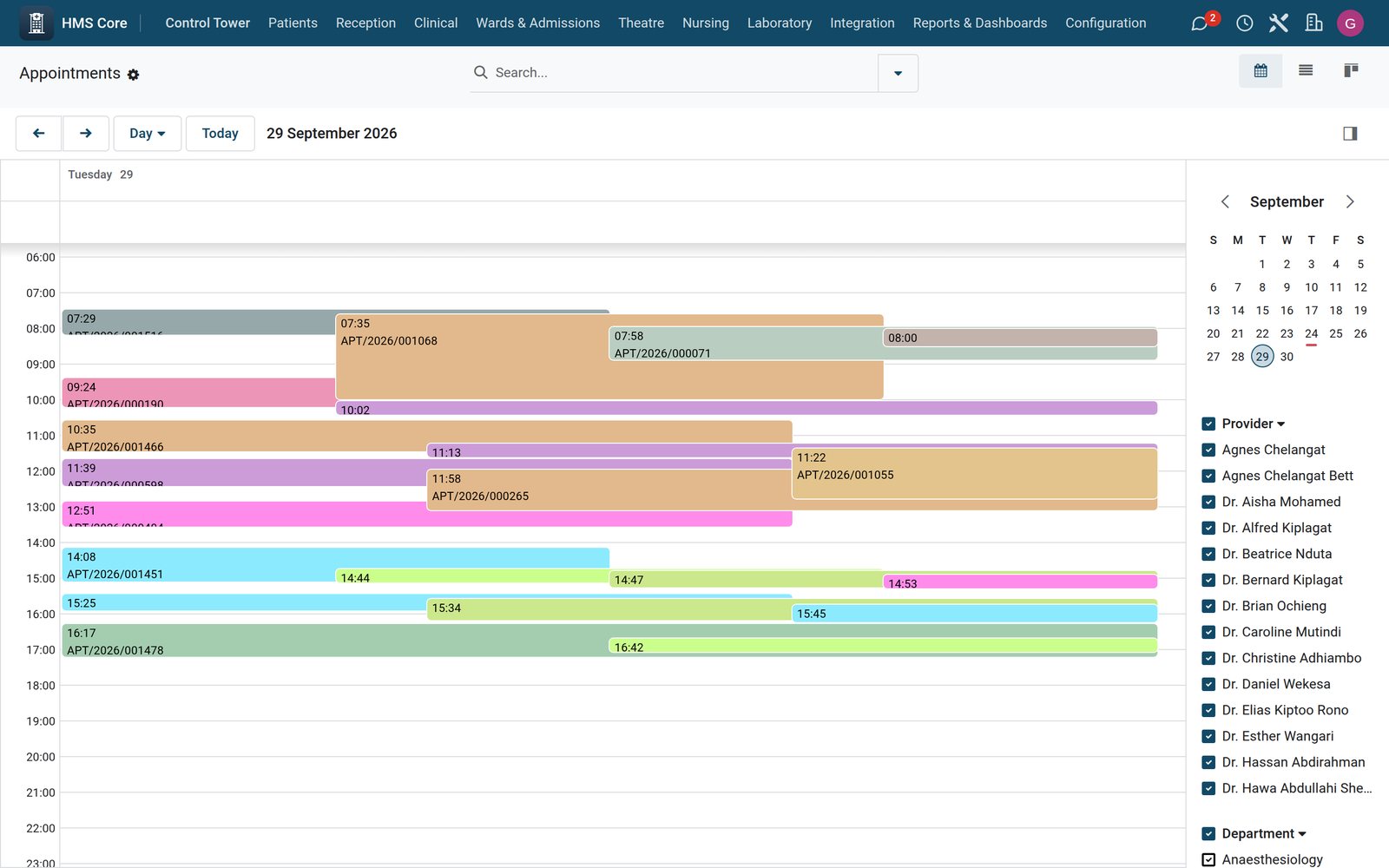
What's inside
Everything in Appointments
44 items in 8 areas, every one shipping with the app today.
Schedulable Resources
- Universal Resource RegistryOne model schedules providers, rooms, equipment, bed blocks, caregivers and interpreters side by side under a single Resources catalog.
- Six Resource KindsEach resource is typed as provider, room, equipment, bed block, caregiver or interpreter to drive slot-search rules.
- Concurrent-Capacity BookingPer-resource capacity lets one resource (e.g. a waiting room) accept several overlapping bookings while a scanner stays at one.
- Facility & Department TaggingResources link to an HMS facility and department so availability can be scoped to a site or clinic.
- Provider-to-Staff LinkingA provider resource links to a staff record so bookings can mirror the right doctor onto charts.
- Unique Resource CodesA per-company SQL constraint guarantees each resource code is unique to prevent duplicate scheduling entities.
Appointment Types & Composition
- Typed AppointmentsConfigurable appointment types carry duration, color, specialty and a translatable name to standardize scheduling.
- Required-Resource CompositionEach type declares whether it needs a provider, room, caregiver or interpreter so the engine assembles the full crew.
- Required-Equipment ListA type can pin specific equipment (e.g. MRI/
CT machines) that must all be free for a slot to be offered. - Per-Type Duration GridDuration in minutes drives slot length and the 15-minute search grid across the day.
- Waitlist Opt-In Per TypeAn allow-waitlist flag controls whether patients can queue for a given appointment type.
- Unique Type CodesA per-company constraint keeps appointment type codes unique across the catalog.
Slot Search & Booking Engine
- Decision-Tree Slot FinderThe engine walks the day in 15-minute steps and returns open slots where provider, room, equipment, caregiver and interpreter are all free.
- First-Free Resource PickingFor each role it auto-selects the first available candidate, so callers get ready-to-book resource sets.
- Provider & Facility FilteringSlot search can be constrained to a specific provider or facility for targeted availability lookups.
- Atomic All-or-Nothing BookingBooking a slot creates the booking and every resource line in one transaction that rolls back entirely if any resource conflicts.
- Resource-Conflict GuardBefore confirming, the booking re-checks that each linked resource is free and not blocked, raising a clear error otherwise.
- Re-Check on RescheduleEditing a booking's start, stop, resources or state re-runs the availability check to prevent double-booking.
Booking Lifecycle & Workflow
- Seven-State Booking MachineBookings move through draft, reserved, confirmed, in-progress, done, canceled and no-show with tracked transitions.
- One-Click Workflow ButtonsForm buttons Reserve, Confirm, Start, Done, Cancel and No-Show drive the booking through its states.
- Auto-Numbered BookingsEach booking gets a sequential SCHD/
year reference from a numbering sequence on creation. - Booking Source TrackingEvery booking records its origin: kiosk, reception, online, phone, fast-pass, recurring series or API.
- Chart Appointment MirroringConfirming a booking auto-creates a linked appointment (with doctor and facility) so it appears on the clinical desktop.
- Multi-Resource Line EditorA booking holds resource lines each tagged by role, giving a clear breakdown of who and what the visit reserves.
Wait-List & Fast-Pass
- Prioritized Wait-ListPatients queue per appointment type with Low/
Normal/ High/ Urgent priority ordering who gets offered first. - Automatic Fast-Pass OfferWhen a booking is canceled or no-show, the freed slot is auto-offered to the top matching wait-list patient.
- WhatsApp/SMS DispatchFast-Pass offers are sent via the HMS messaging provider (WhatsApp with SMS fallback) plus a chatter record.
- Secure Accept TokensEach offer carries a unique sequence-generated token so the patient can claim the slot securely.
- One-Click Fast-Pass AcceptAccepting an offer clones the vacated slot's resources into a new confirmed booking for the waiting patient.
- Offer Decline & StatesWait-list entries track waiting, offered, accepted, declined, expired and canceled with a Decline action.
- Prioritized Wait-ListPatients queue per appointment type with Low/
Recurring Series
- Clinical Recurrence PatternsSeries generate on weekly, Mon/
Wed/ Fri dialysis, Tue/ Thu/ Sat, monthly or every-3-weeks oncology-cycle cadences. - Bulk Occurrence GenerationOne Generate action creates all occurrences (default 13) as reserved bookings anchored to a set time of day.
- Series Resource ReuseChosen resources are copied onto every generated occurrence with correct role tagging.
- Series Lifecycle & CounterSeries track draft/
active/ completed/ canceled state and show a live count of generated bookings.
- Clinical Recurrence PatternsSeries generate on weekly, Mon/
Provider Templates & Time Blocks
- Provider Session TemplatesDefine recurring clinic sessions by day-of-week, start/
end hour and slot duration for each provider. - Template Validity WindowsTemplates carry valid-from/
to dates and an allowed-appointment-type list to scope when and what they schedule. - Session Time ValidationA constraint blocks templates whose end time is not after the start time.
- Resource Time BlocksBlock resources off for vacation, maintenance, training, sick leave or other reasons so they drop out of availability.
- Block Date ValidationA constraint ensures a block's end is after its start before it can be saved.
- Provider Session TemplatesDefine recurring clinic sessions by day-of-week, start/
Utilization KPIs & Reporting
- Daily Occupancy MetricsPer-resource-per-day rows compute occupancy percent from booked versus available minutes.
- No-Show & Cancellation CountsMetric rows tally no-shows and cancellations per resource per day for utilization analysis.
- Hourly Metric Recompute CronA scheduled job recomputes today's utilization for every active resource every hour.
- Rolling Utilization SummaryUtilization adds up booked and available minutes over a configurable trailing window (default 7 days).
- One-Per-Day IntegrityA unique constraint keeps exactly one metric row per resource per date.
Works with
What Appointments works with
Appointments shares one database with the rest of the Bridge HMS Suite and BridgeERP: these are the apps it already talks to, with nothing to buy in between.
Builds on
Appointments needs these to run; they come with it in the same plan.
And the wider platform
Any BridgeERP app can join the same database.
 AccountingFull double-entry accounting, bank reconciliation, assets, budgets and statutory reports.
 ExpensesEmployee expense claims with receipt capture and reimbursement.
 InvoicingCustomer invoices, vendor bills, payments and tax handling.
 SignSend documents for legally binding electronic signature.
 SubscriptionsRecurring contracts, automatic renewals and MRR reporting.
 EmployeesEmployee records, contracts, attendance, skills, appraisals and referrals.
In the suite
More Bridge HMS Suite apps
- HMS Core
 Reception
 Consultation / OPD
 Electronic Health Record
 Laboratory
 Pathology
 Radiology & PACS
 Pharmacy
 Billing & Cashiering
 Insurance & Claims
 Wards & Inpatient
 Nursing
 Operating Theatre
 Intensive Care
 Emergency
 Blood Bank
 Dialysis
 Maternity
 Paediatrics
 Dental
 Ophthalmology
 Specialty Packs
 Telehealth
 Patient Portal
 Ambulance
 Mortuary
 Medical Stores
 Dietary
 CSSD
CSSD Infection Control
 Quality & Accreditation
 Health Analytics
 Bria Clinical AI
 Interoperability
 Public Health
 Country Compliance
 Biomedical Engineering
 Facility Helpdesk
 Housekeeping
Put Appointments to work
Add it to your Bridge HMS Suite plan, priced per practitioner, or start a free trial and see it running first.