







Hotel Management: The hotel's whole day in one app

The hotel’s whole day in one app. The front desk opens on its arrivals, departures and rooms still to assign; the tape chart lays every room against the next two weeks, and walk-ins and room moves start from there. Every charge lands on a folio and becomes a real invoice in your accounting. The night audit closes the hotel day, and the Control Tower and the reports show how the house is doing.

No extra charge. Free instant access, no credit card required.

Works with
  • Hotel Foundation
Hotel Management in the Hotel Suite: The hotel's whole day in one app
01

The Front Desk and the Tape Chart

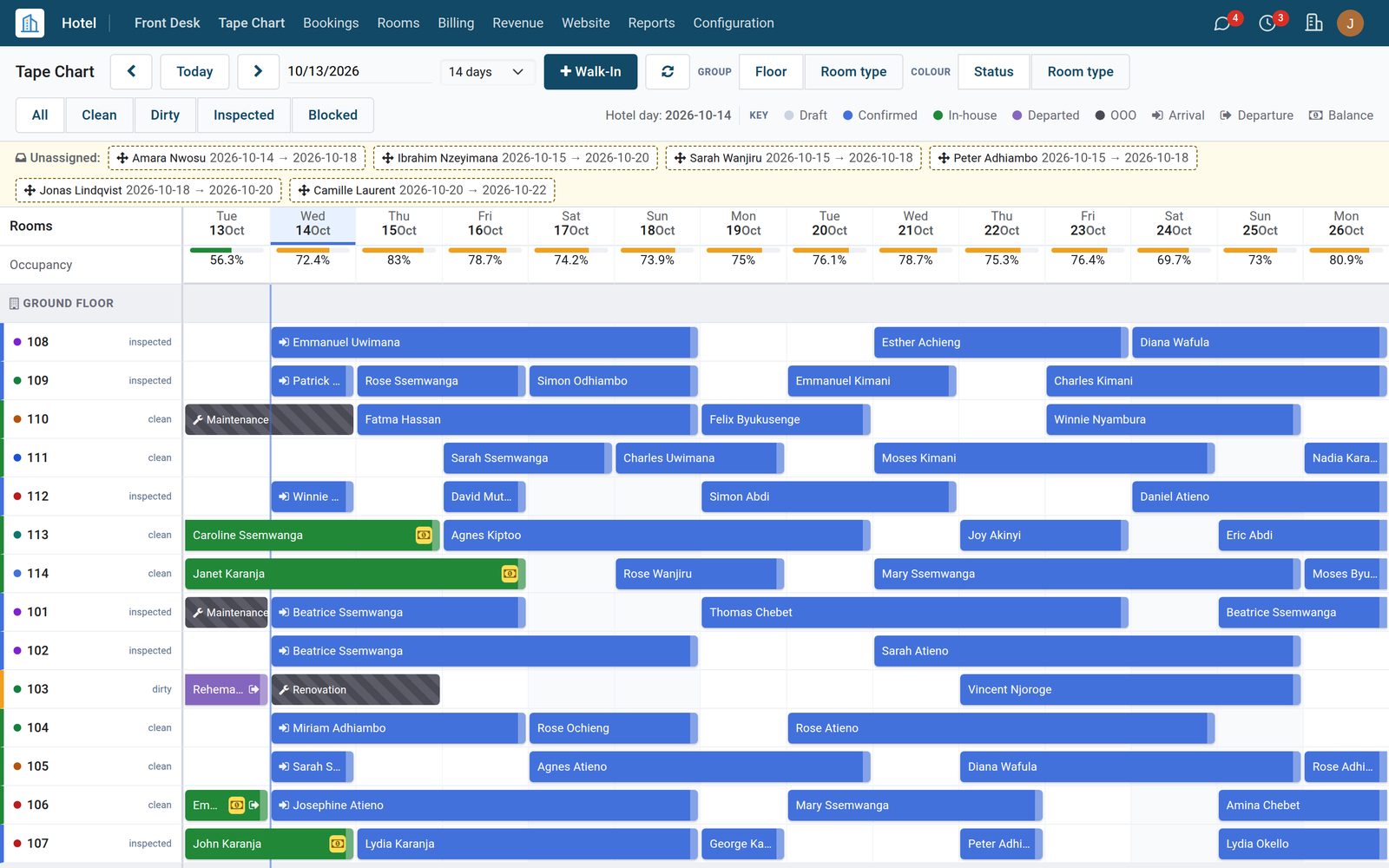
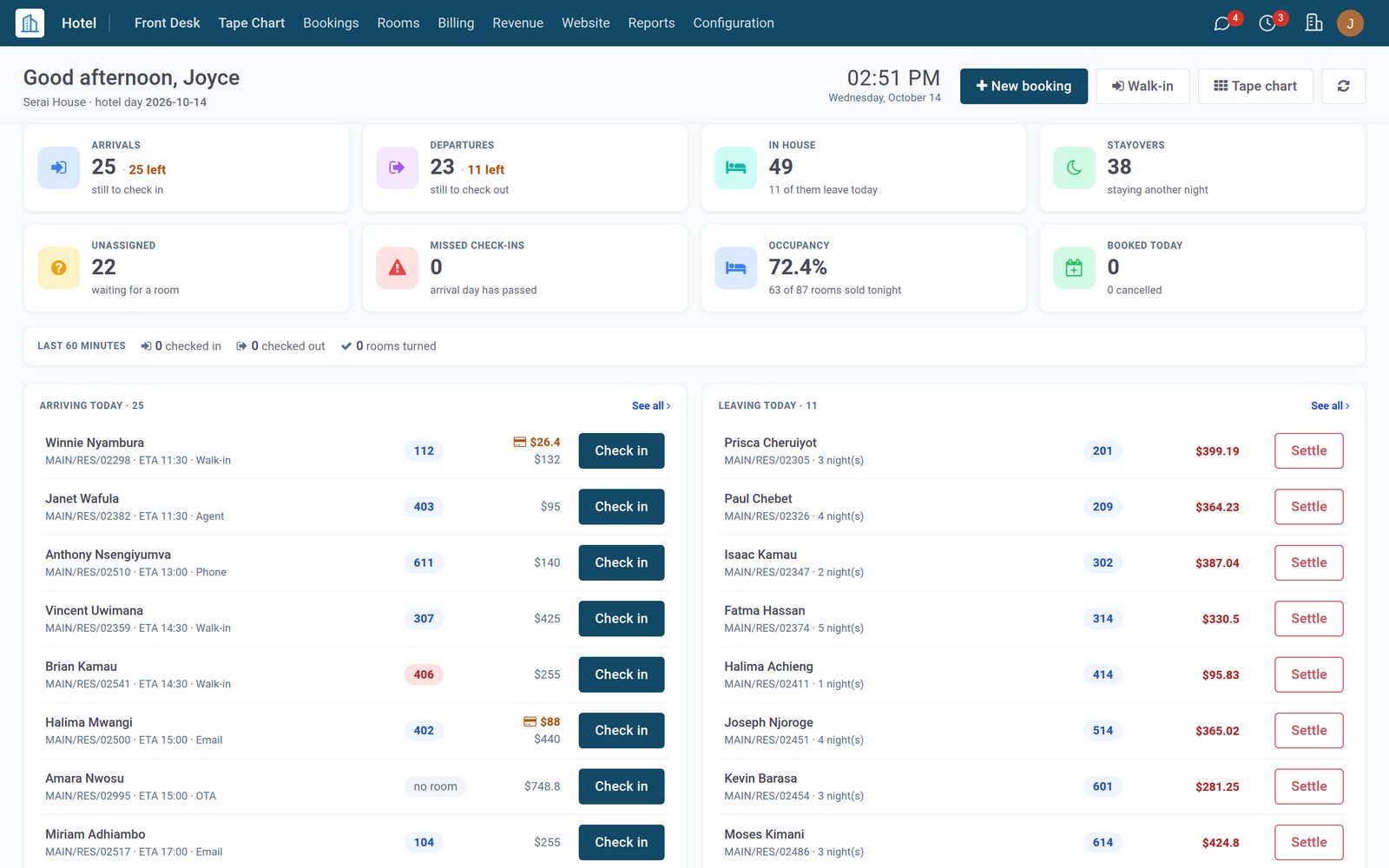
The Front Desk opens on the day: arrivals and departures with how many are still to do, guests in house, rooms not yet assigned, missed check-ins and tonight's occupancy, each arrival with its Check in button and each departure with Settle. The tape chart lays every room against the next two weeks: drag a stay to another room or other dates, or drag across empty nights to start a walk-in.
Hotel Management: The Front Desk and the Tape Chart
02

Folios That Bill the Stay

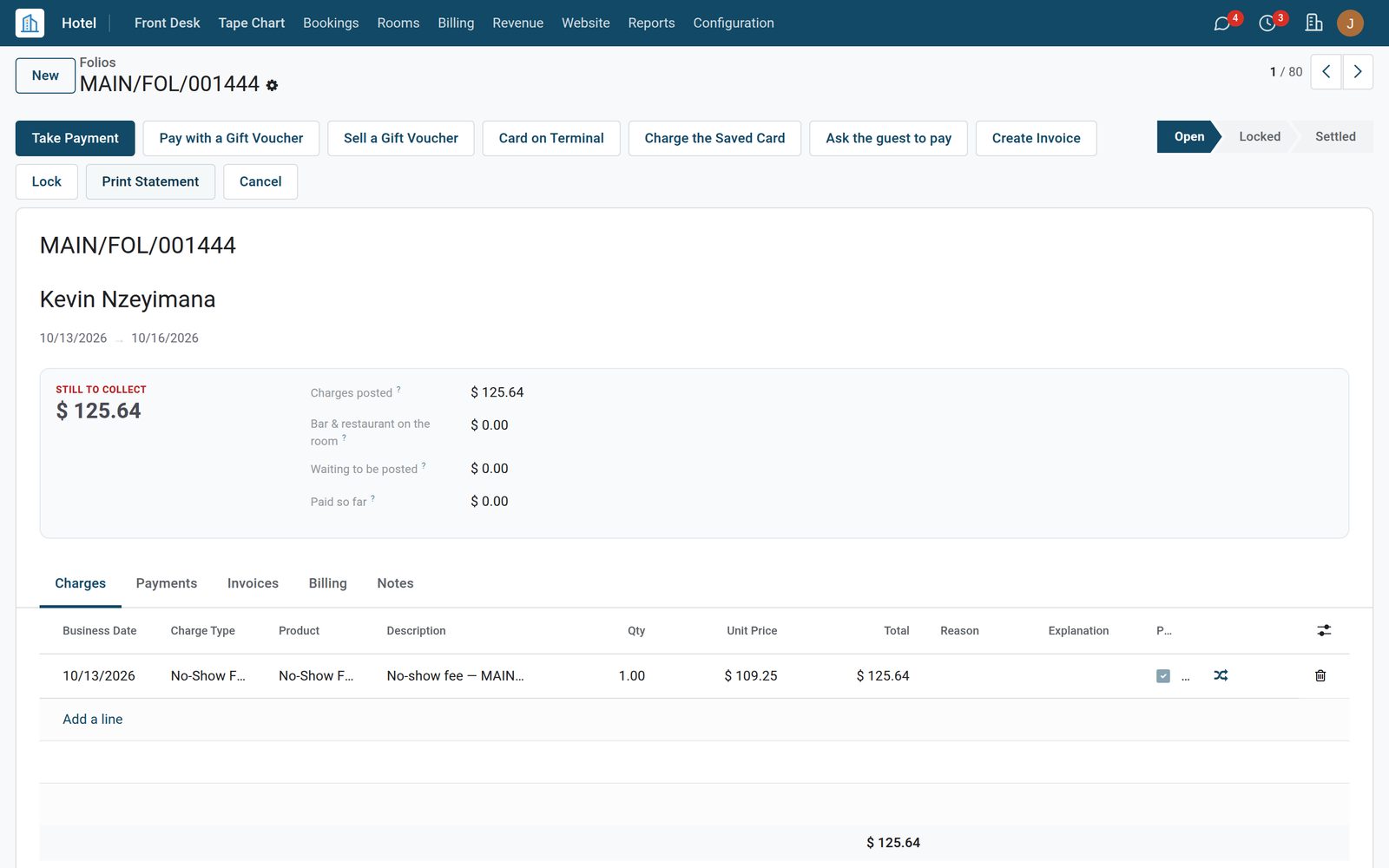
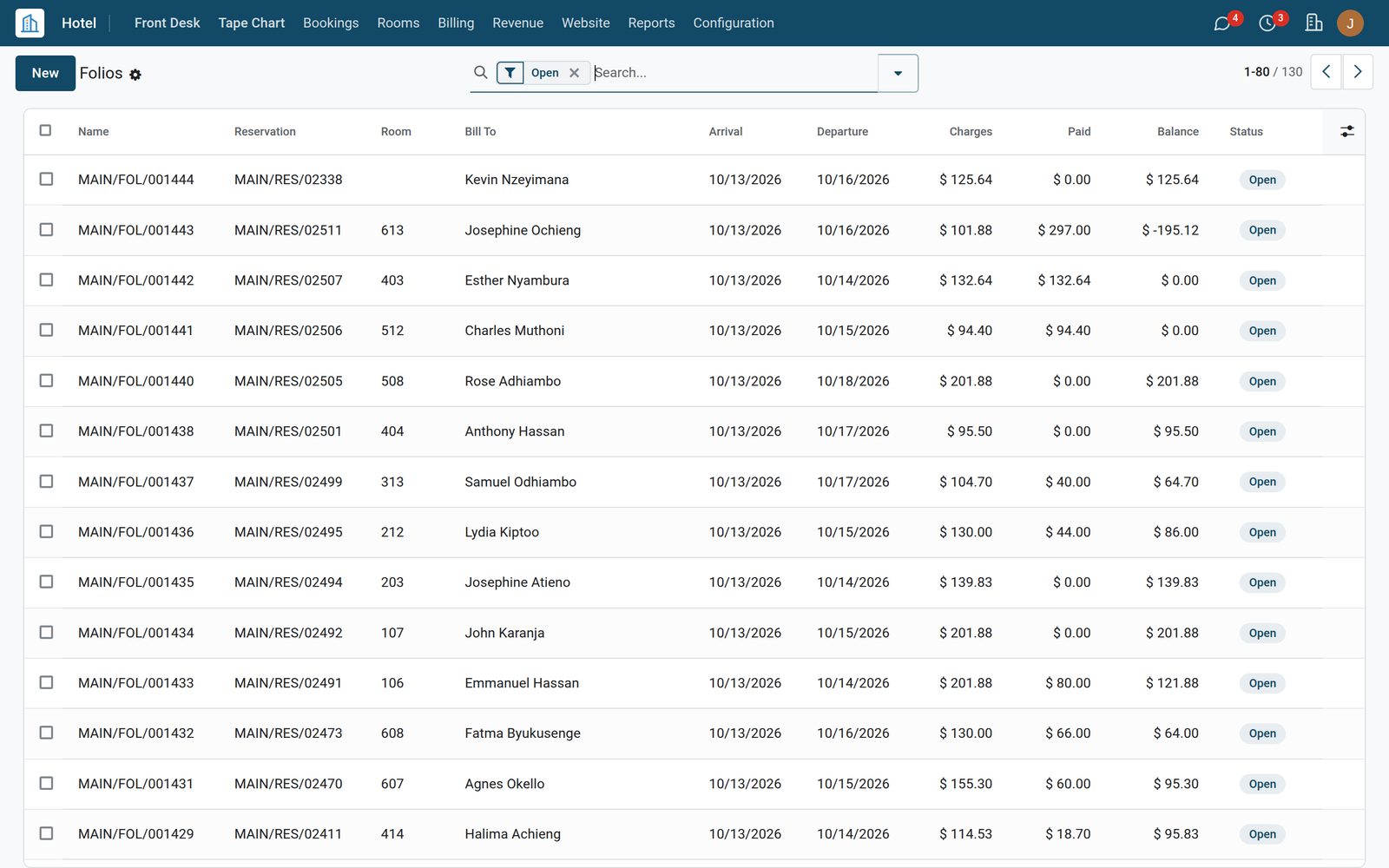
Every stay bills through its folios: guest, company, group master or desk, each with its own bill-to. Room and city tax post night by night and become real customer invoices at interim or final billing; a line can be split or moved. Payment requests ask for deposits and balances before arrival, and a company's balance moves to the city ledger, aged until it is paid.

Hotel Management: Folios That Bill the Stay
03

The Night Audit and the Cash Drawer

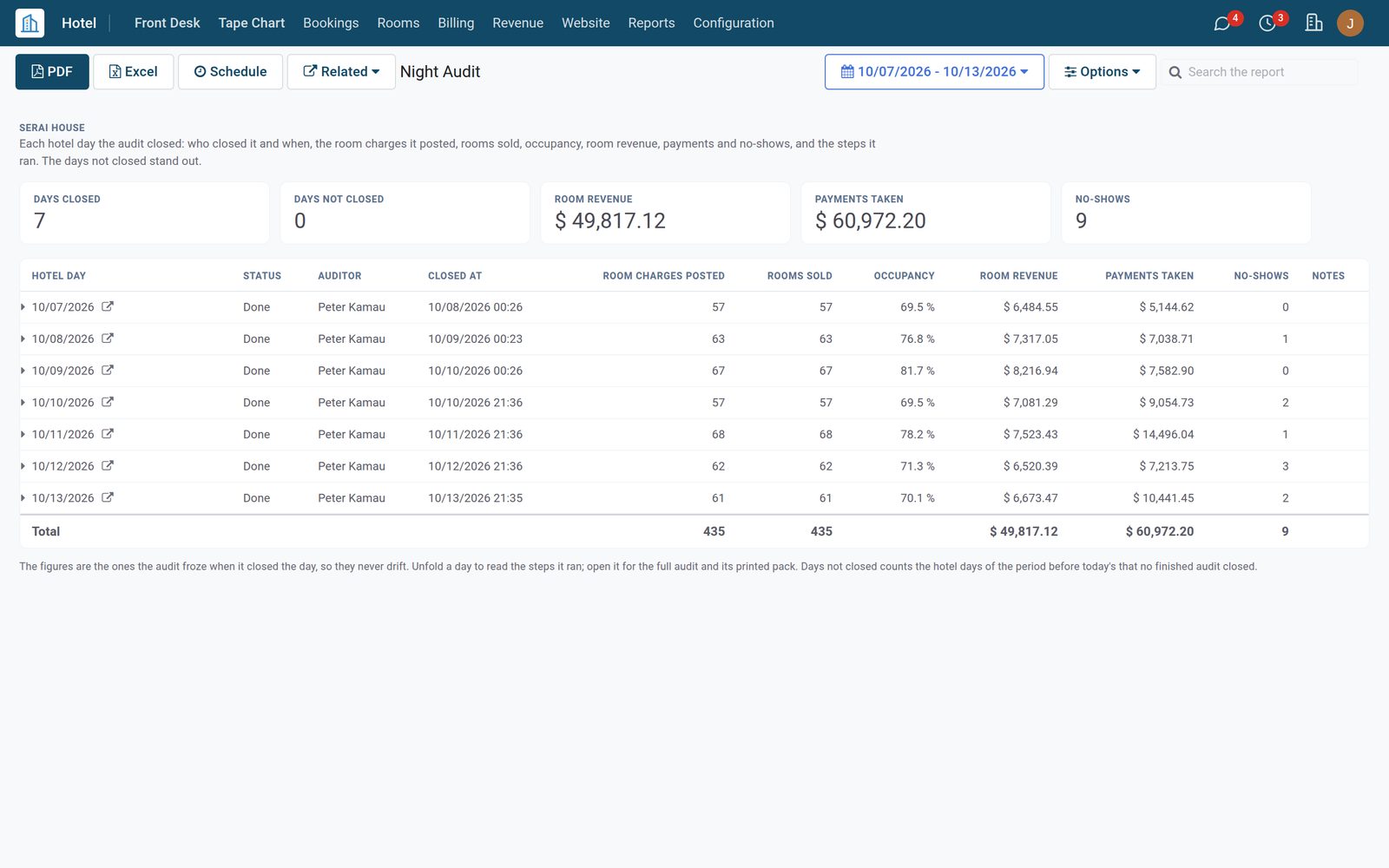
The night audit closes the hotel day in eight recorded steps: preflight, due departures, no-shows, the room-charge roll, the city ledger sweep, the extra steps of other apps, the figures and the new business date. Each cashier works a shift opened with a float and closed with a blind count, and any difference stays with that shift. The Cashier Report shows what each cashier took, by tender, and the cash to hand over.

Hotel Management: The Night Audit and the Cash Drawer
04

Prices and Selling Rules by Date

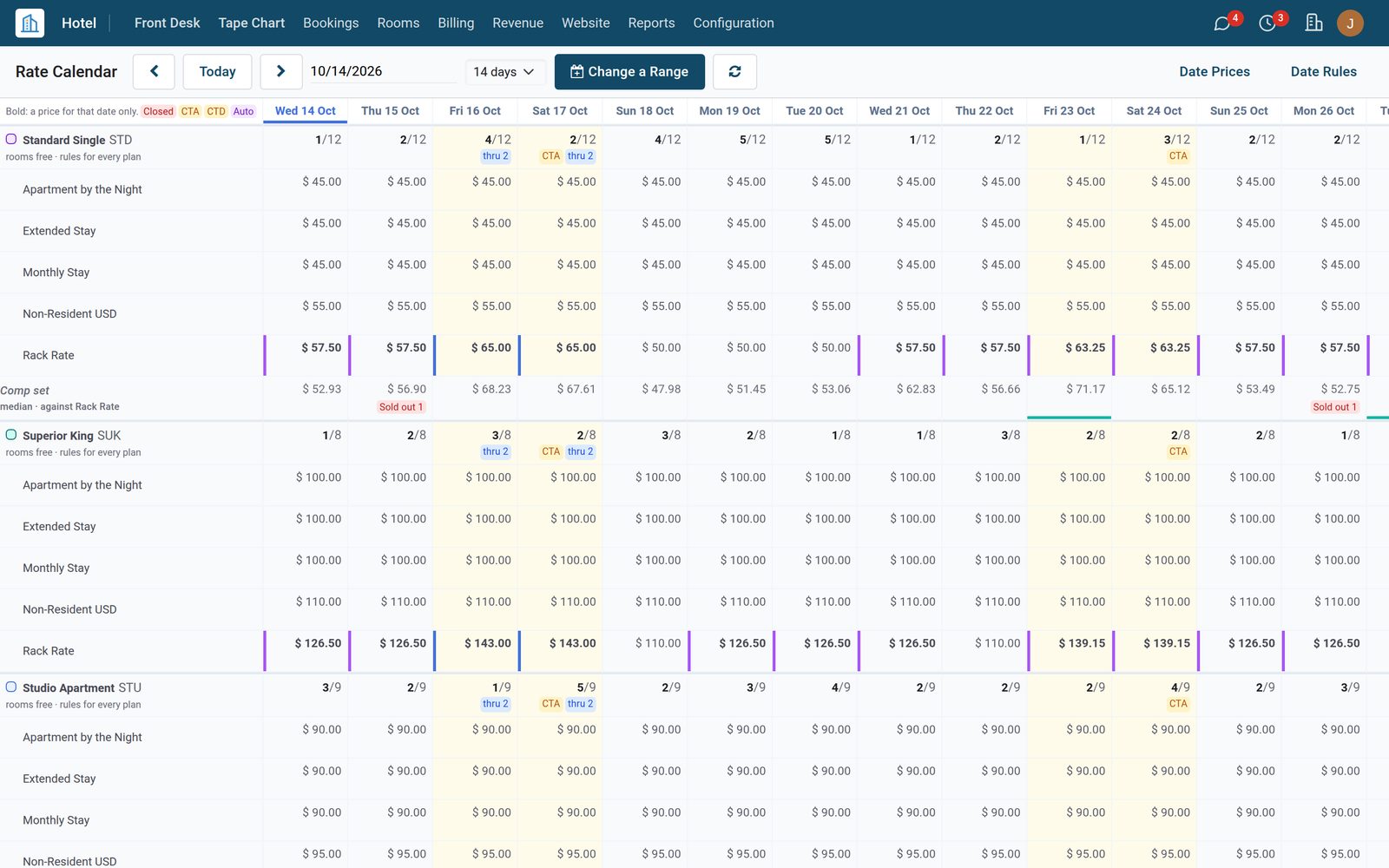
The Rate Calendar shows each room type night by night: the rooms still free, the price of every rate plan and the selling rules. A price set for one date is a Date Price; closed, closed to arrival or departure, a minimum or a maximum stay is a Date Rule. The booking form reads them before the rate plan, and checks the rules when a stay is sold. Where competitor rates are loaded, their median shows under the Rack Rate.

Hotel Management: Prices and Selling Rules by Date
05

The Control Tower and the Manager Report

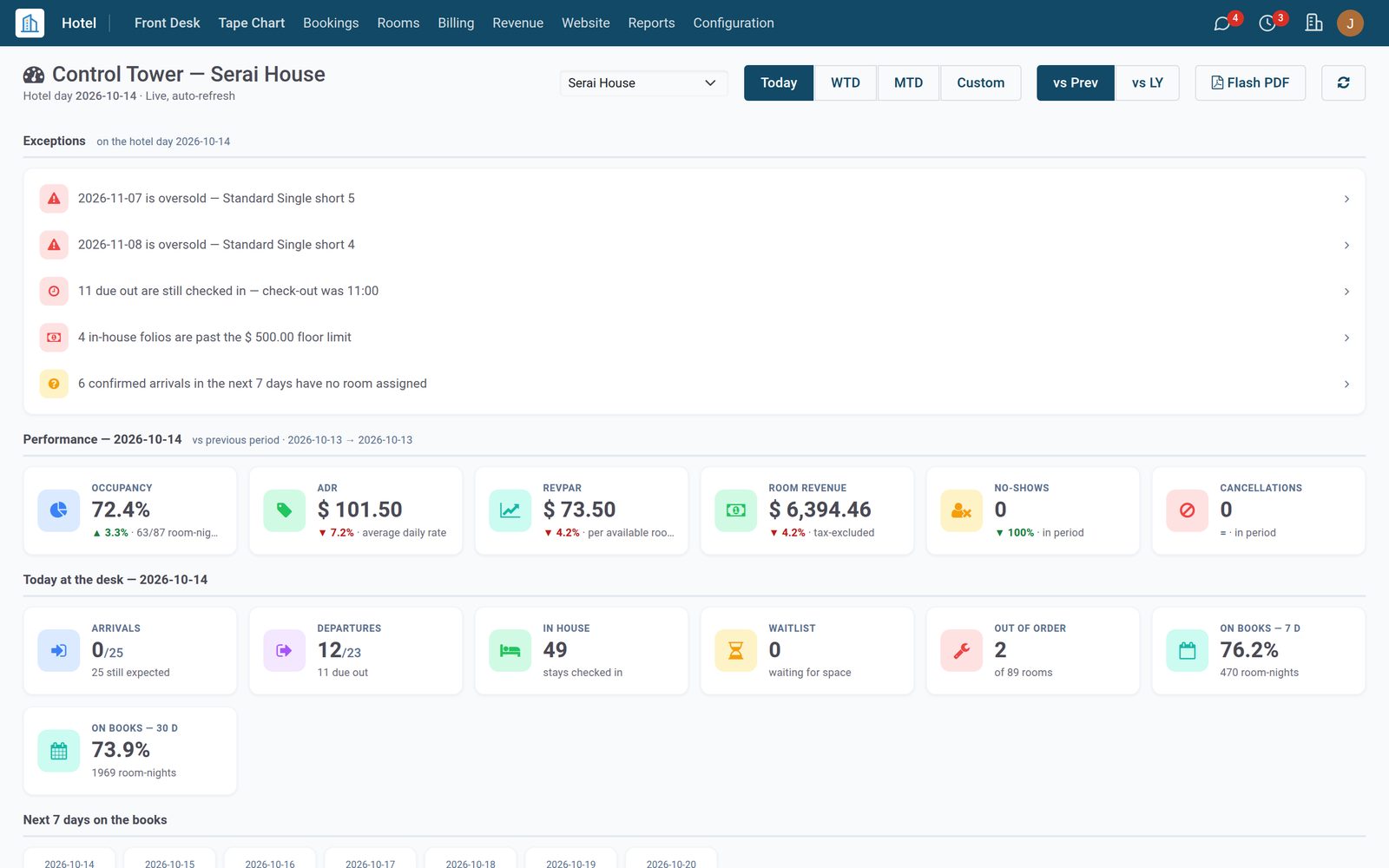
The Control Tower answers how the hotel is doing right now: the exceptions to act on, then occupancy, ADR, RevPAR, room revenue, no-shows and cancellations for today, the week or the month, against the previous period or last year. Below are the desk's figures and the next seven days on the books. Press a tile to open the bookings behind it.

Hotel Management: The Control Tower and the Manager Report
06

Reports for Every Role, as PDF, Excel or Email

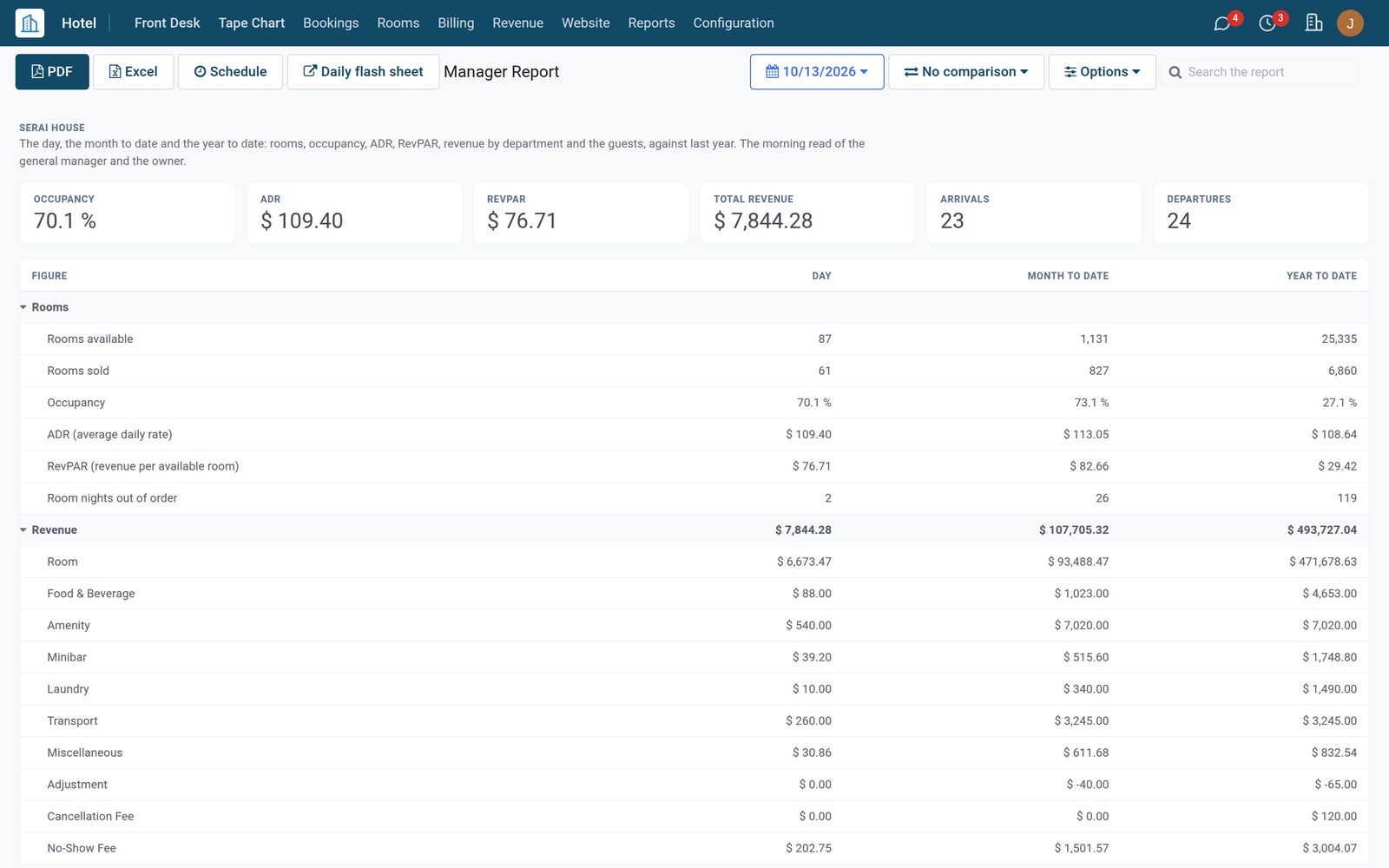
All Reports lists the reports area by area, each with a period, its filters and buttons for PDF, Excel and Schedule. Arrivals, the guest register, business on the books, rate analysis and revenue by department are among them. A scheduled report goes by email every day, on chosen days, once a month or after the night audit.

Hotel Management: Reports for Every Role, as PDF, Excel or Email

What's inside

Everything in Hotel Management

63 items in 6 areas, every one shipping with the app today.

  • Front desk and reservations

    • The Front Desk boardarrivals and departures with how many are still to do, in house, stayovers, unassigned rooms, missed check-ins, tonight's occupancy and the last hour's pulse.
    • Check in and settle from the listeach arrival has its Check in button and each departure its Settle, with the amount owed on the row.
    • The tape chartrooms by floor or by room type, stays as bars coloured by status or room type, the occupancy of every night on top.
    • Drag and dropmove a stay to another room or other dates, put an unassigned booking on a room, or drag over empty nights to start a walk-in.
    • A walk-in in one screenguest, document, nights, party and a room type with its free rooms and price, then Create & Check In.
    • Room moves that keep the billa move to another room type asks whether to reprice or give a complimentary upgrade, which needs a duty manager.
    • Assign Roomsa room planned for every arrival without one, by the guest's needs, the party, readiness and the gap in the calendar, with the reason kept.
    • The Room Queuea guest waiting for the room: its cleaning goes first, and the desk is told when the room is ready.
    • Guest requeststowels, a taxi or a repair, routed to the team with the time to meet; a late request tells the managers.
    • Search All Hotelsone stay searched across every hotel of the group, and All Hotels Today on one screen.
    • Booking guaranteescard, deposit, company or agent; unguaranteed rooms released on time.
    • Spa, activities and tablesa free therapist, room or table found for the booking, and the price on the room's bill.
  • Folios, payments and the city ledger

    • Four kinds of folioguest, company, group master and desk folios, each with its own bill-to.
    • Charges staged, then invoicedfolio lines become real customer invoices at interim or final billing.
    • Split or transfer a lineany line not yet invoiced moves to another folio or room, with the trail in the history.
    • Routing rulesroom and board to the company folio, extras to the guest, applied as charges post.
    • Deposits and settlementscustomer payments in your accounting, reconciled against the folio invoices at settlement.
    • Payment requestsdeposits and balances before arrival, with what was paid and what is still due.
    • Unmatched receiptsmoney received without a clear reference waits in its own list until it is allocated.
    • Terminal paymentsa payment taken on the hotel's card terminal lands on the guest's bill once, even if the terminal asks twice.
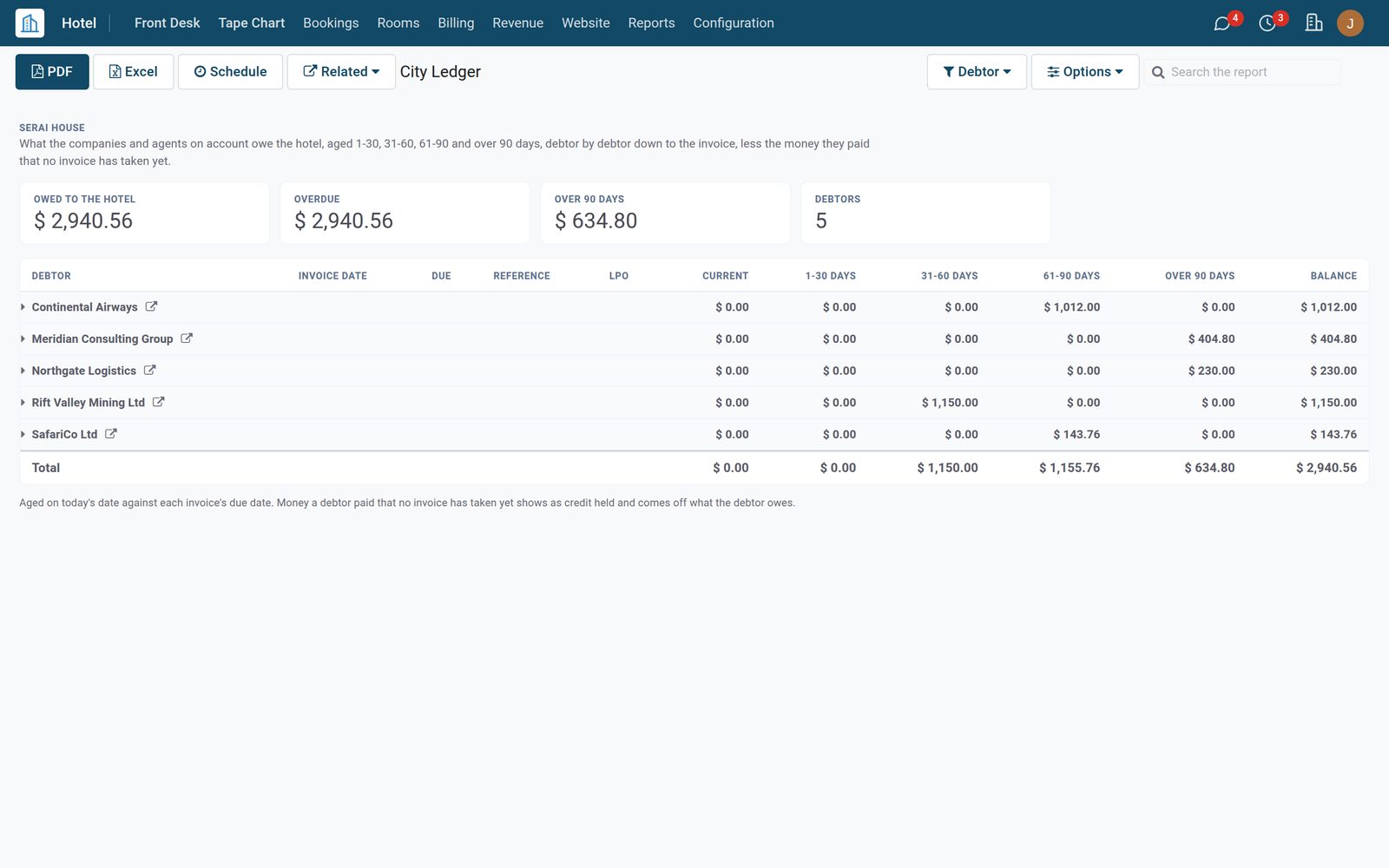
    • The city ledgera checked-out balance moved to the company as a receivable with its terms and LPO number, aged by 30, 60 and 90 days.
    • Statements and receiptsthe folio statement, deposit and payment receipts and the corporate statement, ready to print.
    • Paid-outs and currency exchangecash paid for a guest put on the bill with a voucher; foreign cash changed at your rate and margin.
    • Packagesroom, breakfast and allowances at one price, shown apart on the bill.
  • Night audit and cash

    • Eight recorded stepspreflight, due departures, no-shows, the room-charge roll, the city ledger sweep, extra steps of other apps, the figures and the new business date.
    • Resumes from a failureevery step commits on its own, so a failed audit starts again at the step that failed.
    • Closed days stay closeda posted line of a closed hotel day cannot change; a correction is an adjustment on the open day.
    • The flash with each nightoccupancy, ADR, RevPAR, revenue, arrivals and departures kept on the audit and printable.
    • A cash shift per cashieropened with the float; every payment of the desk is stamped on the shift.
    • A blind countthe cashier counts the drawer before seeing what it should hold, and explains any difference.
    • The difference bookedshort or over is posted to the cash journal's loss or profit account, as the Point of Sale does.
    • Drops, top-ups and currenciescash to the safe and cash added, each with a reason; one drawer line per cash journal and currency.
  • Rates and revenue

    • The Rate Calendarevery room type and rate plan by date, with the rooms still free and the selling rules.
    • Date Pricesa price for one rate plan, room type and date, read before the rate plan itself.
    • Date Rulesclosed, closed to arrival or departure, minimum and maximum stay, checked when a stay is sold.
    • A range in one stepa price or a rule set for one day or a whole range of dates.
    • Automatic pricingrules on occupancy, days before arrival, pickup and dates, within a floor and a ceiling; applied or suggested first.
    • Competitor ratesimported or posted by your rate shopping service; their median shows on the Rate Calendar.
    • The Control Towerexceptions first, then occupancy, ADR, RevPAR and revenue against the previous period or last year.
    • Every tile opensa figure on the Control Tower or the Front Desk opens the bookings behind it.
  • Reports

    • All Reportsthe reports the signed-in role may open, area by area, with a search and a star for favourites.
    • PDF, Excel, on screeneach report takes a period and its filters; PDF and Excel show what the screen shows.
    • Scheduled reportsby email every day, on chosen days, once a month or after the night audit, as each recipient may see them.
    • Front officeArrivals, Departures, In-House Guests, No-Shows and Cancellations, Room Moves and Upgrades, Guest Requests.
    • RevenueManager Report, Production by Source, Rate Analysis, Revenue by Department, Business on the Books.
    • FinanceCity Ledger, Cashier Report, Guest Ledger, Deposit Ledger, Virtual Cards and Cash Shifts.
    • Gueststhe Guest Register of every adult who checked in, and Booking Site Reviews.
    • Reservation Analysisbookings in pivot and graph by room type and month.
    • USALI operating statementrevenue and profit by department, GOP and EBITDA, with GOPPAR and TRevPAR, for owners and lenders.
    • Travel-agent commissionwritten at check-out on the room total before tax, billed once per agent.
    • Card disputesa chargeback answered by its date, with the evidence of the stay in one PDF pack.
  • Guests, identity and the booking sites

    • Channel manager through ChannexBooking.com, Expedia, Airbnb and others with your own Channex account; availability, rates and bookings both ways.
    • Booking site messages and reviewsthe guests' messages answered from the desk, and the reviews with their scores.
    • Guest messages and WhatsAppmessages at five moments of the stay; WhatsApp with your own Business account.
    • Loyalty points and tiersearned on settled bills, multiplied by the tier, spent as a discount on the bill.
    • Guest identity ruleswhat to ask, of whom and when, written by the hotel: block the step or warn and record it.
    • Verify without a copyrecord that a document was checked without keeping an image of it.
    • Passport and ID readingthe machine-readable zone read into the identity register, every check digit verified.
    • Police reportsItaly, Spain and Portugal sent with the hotel's own credentials; missing data named per guest.
    • Privacy requestsidentity checked, then export or erase; kept invoices stay.
    • Two languages and Hijri datesregistration card, confirmation and bill side by side in two languages, with Hijri dates where guests expect them.
    • Women-only and family floorsrooms go only to stays that qualify; an override needs a reason.
    • Contract lines on the billwith Hotel Banqueting & Events: Post to Folios puts a contract's lines on the guests' bills.

Put Hotel Management to work

Add it to your Hotel Suite plan, priced per room, or start a free trial and see it running first.