





Revenue Management: A recommended price for every room and night, with the reasons

A recommended price for every room type and night ahead, with the reasons in plain words: the rooms on the books against your target, the pace against last year, the competitors and the events. Accept, reject or keep a price set by hand; with Hotel Management an accepted price goes to the rate calendar. Add pickup, pace, booking curve and budget reports, competitor alerts, the guests you turned away, Ramadan, Eid and public holidays, selling rules that close and reopen nights, and group displacement.

+$11.80/mo at 40 rooms. Free instant access, no credit card required.

Works with
  • Hotel Foundation
Revenue Management in the Hotel Suite: A recommended price for every room and night, with the reasons
01

A Price for Every Room Type and Night

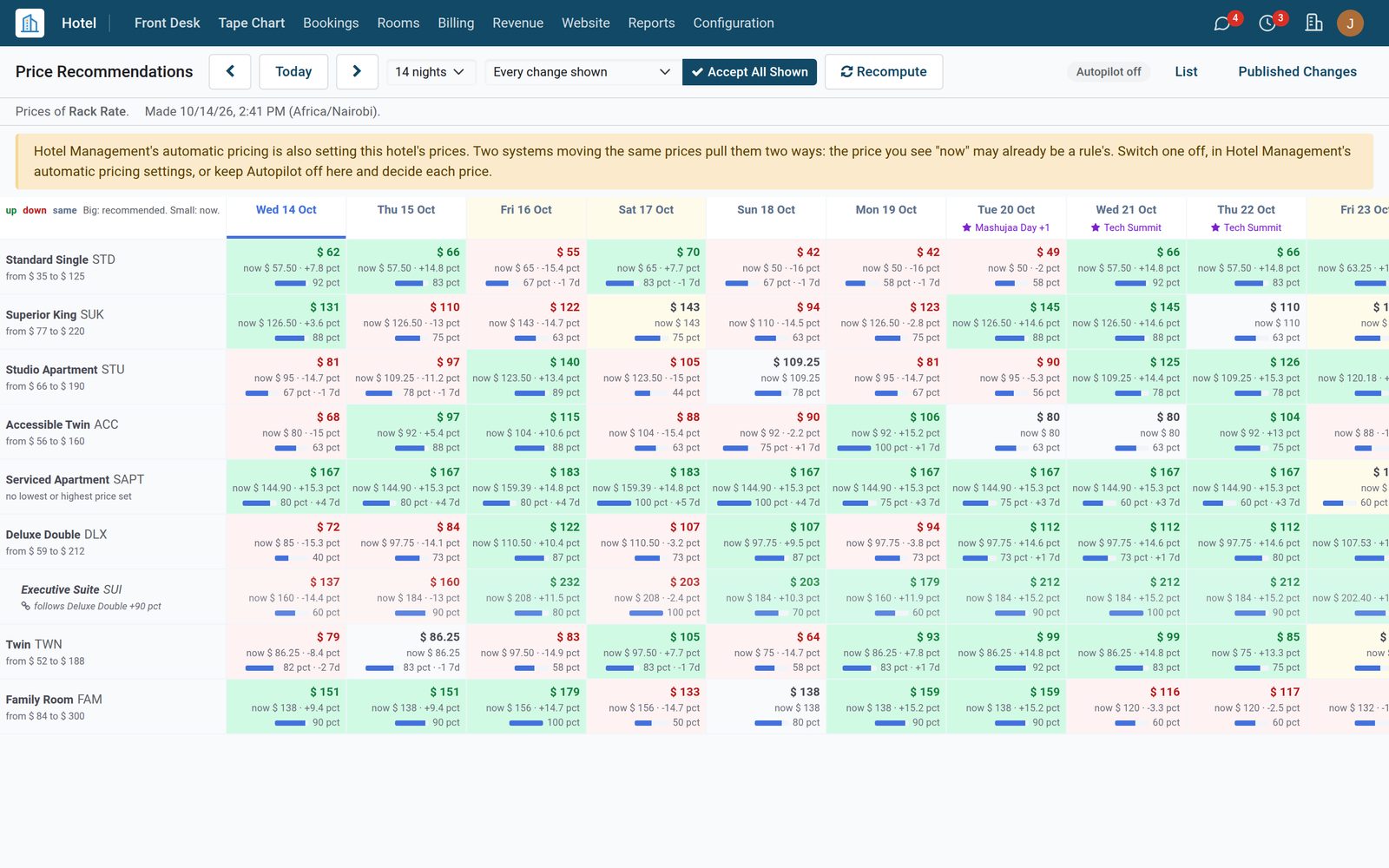
For each room type and night ahead the app recommends a price and says why: the rooms on the books against your target for that distance, the same time last year, the competitors' median, and the rounding. The grid shows the price now and the recommendation, up in green, down in red. Accept, reject, or keep a price set by hand. With Hotel Management an accepted price goes to its rate calendar, and every published price is logged.
Revenue Management: A Price for Every Room Type and Night
02

Ramadan, Eid and Public Holidays in the Forecast

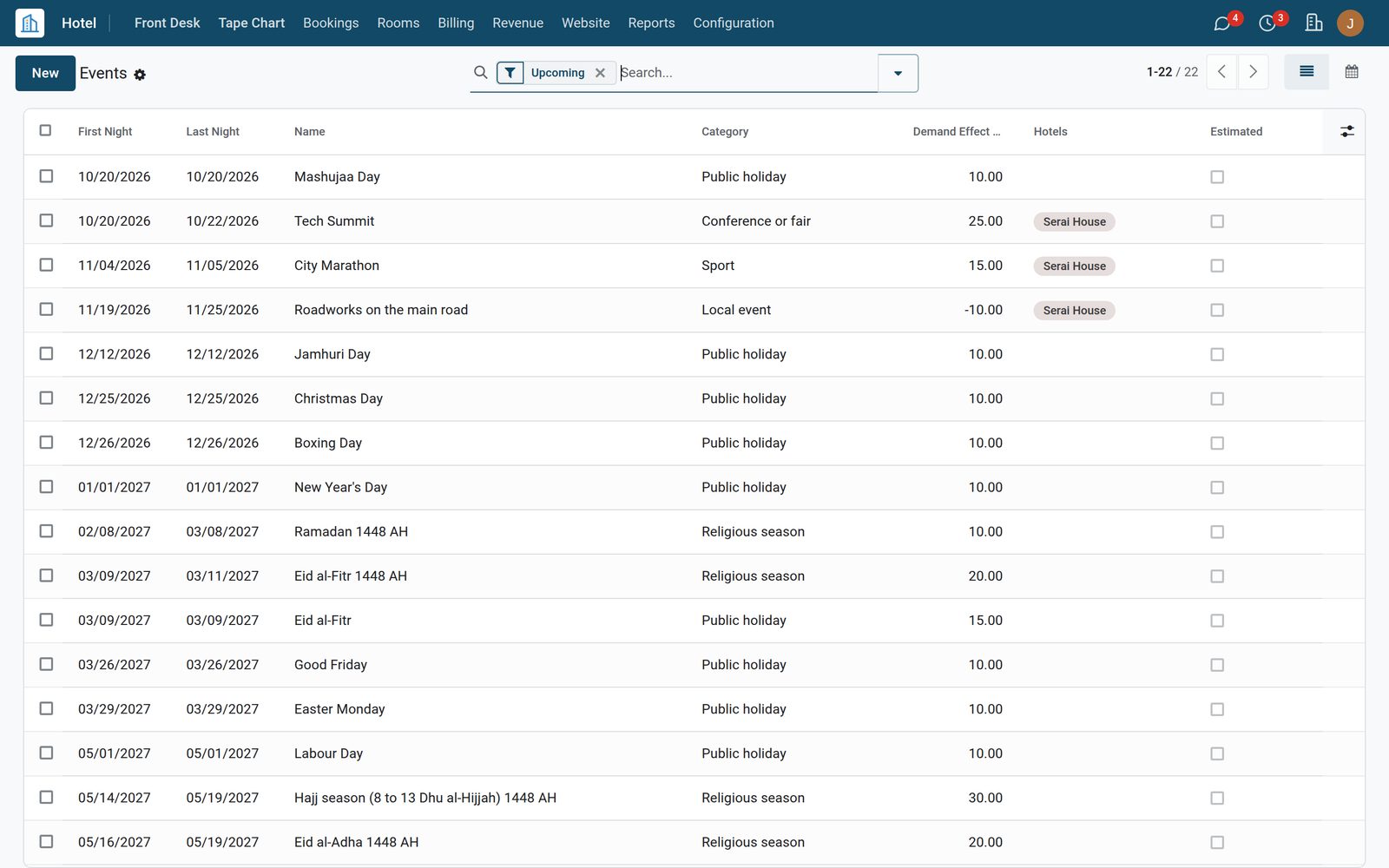
Ramadan, Eid al-Fitr, Eid al-Adha and the Hajj season come from the Umm al-Qura calendar, and 46 holidays ship for Kenya, Burundi, Saudi Arabia, the United Arab Emirates and Spain. Make a Year's Events builds a whole year in one go. Each event has a demand effect: it raises or lowers the pickup the forecast expects for those nights, and the recommended price follows. Add your own: a conference, a match, a local event.

Revenue Management: Ramadan, Eid and Public Holidays in the Forecast
03

Pickup, Pace and the Budget

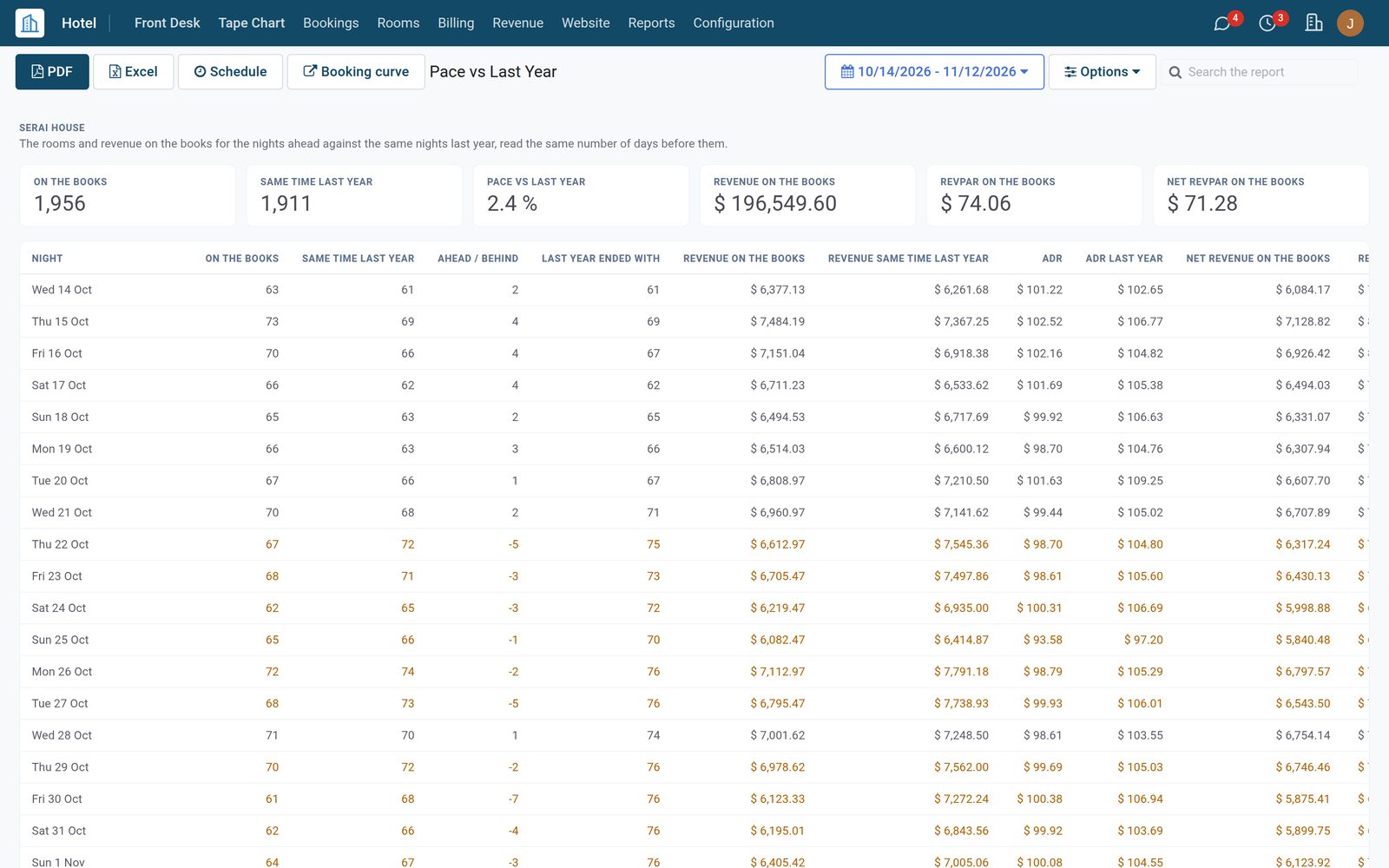
The rooms and room revenue on the books are kept every day for every night ahead. Pickup shows what was booked yesterday, in 7 days and in 30 days, net of cancellations. Pace vs Last Year sets each night against the same night last year, read the same number of days before, with RevPAR and net RevPAR. The booking curve draws this year against last year, and Budget vs Actual sets each month against its budget.

Revenue Management: Pickup, Pace and the Budget
04

Competitors and the Guests You Turned Away

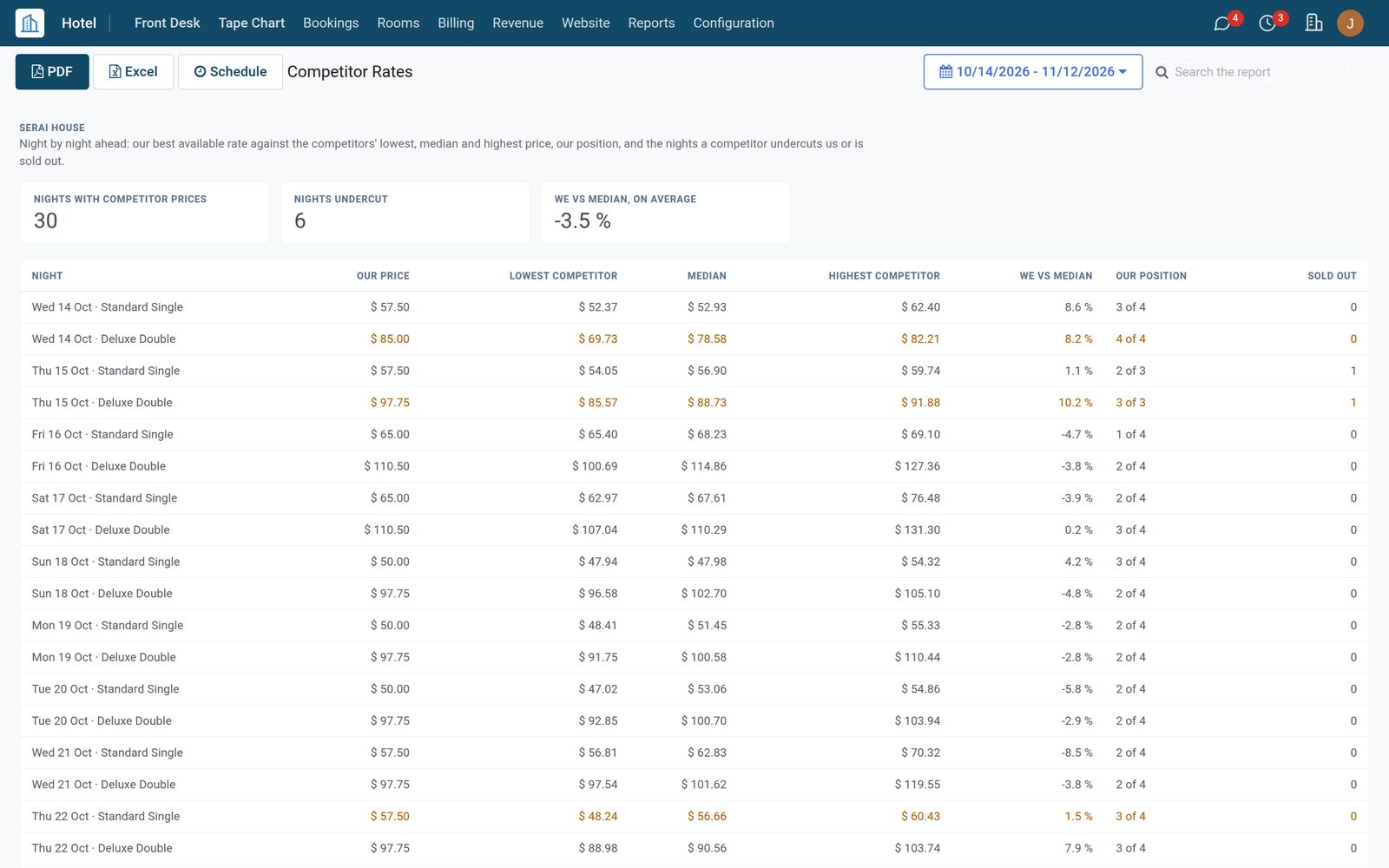
With Hotel Management's competitor rates, the Competitor Rates report sets your best available rate against the competitors' lowest, median and highest price, night by night, with your position and the nights a competitor is sold out. An alert with a to-do reaches the revenue manager when a competitor is cheaper or sells out. At the desk, Log a Turnaway keeps each guest you could not sell a room to, with the reason, the source and the rate quoted.

Revenue Management: Competitors and the Guests You Turned Away
05

Selling Rules That Close and Reopen Nights

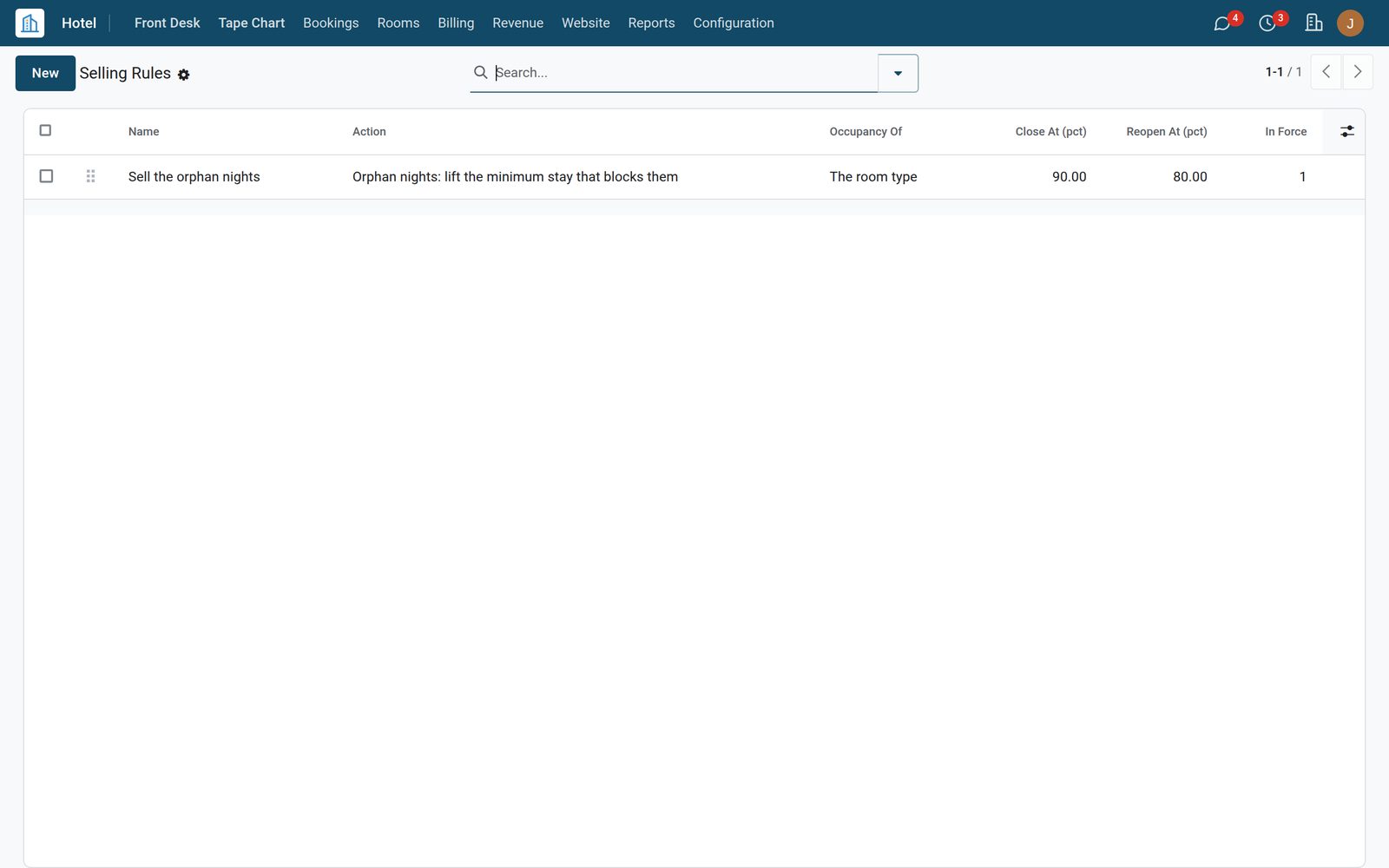
With Hotel Management, a selling rule sets stop sell, closed to arrival or departure, or a minimum stay when a night fills up, and lifts it when the night empties, never over a rule set by hand. An orphan-night rule finds the one or two nights left between sold-out nights; the demo rule lifts the minimum stay that blocks them, and Rules In Force shows the value it replaced. An administrator switches the rules on in Settings › Hotel.

Revenue Management: Selling Rules That Close and Reopen Nights
06

Groups, Every Hotel and Outside Systems

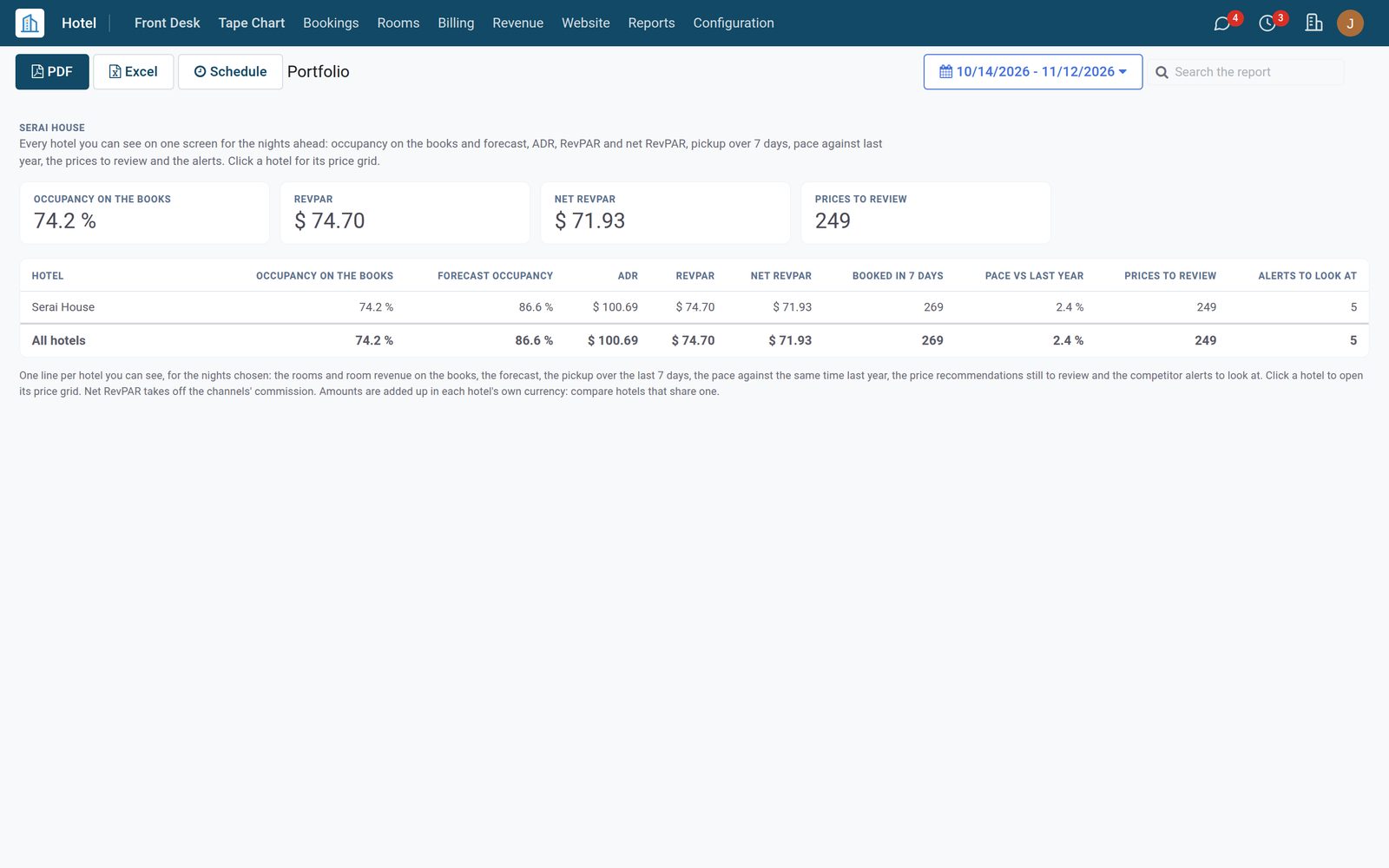
Group Displacement weighs a group against the guests it would push out, night by night, with the hurdle rate, and says accept, counter at the break-even rate, or decline, in plain words. The Portfolio puts every hotel you can see on one screen. Channel commissions per booking source or booking site give net RevPAR. A revenue data feed sends your figures to an outside revenue system as CSV or JSON, on a schedule.

Revenue Management: Groups, Every Hotel and Outside Systems

What's inside

Everything in Revenue Management

40 items in 6 areas, every one shipping with the app today.

  • Recommended prices

    • A price per room type and nightFor 120 nights ahead by default, starting from the price a guest pays now.
    • Why this price, in wordsThe rooms on the books against the target for that distance, the same time last year, the competitors' median and the rounding.
    • The price gridTwo weeks or more by room type: the price now, the recommendation, up or down, occupancy and pickup, with Today and the arrows.
    • Accept, reject or set your ownNight by night, or Accept All Shown for every change in the view; Recompute makes them again.
    • A price set by hand is keptIt stays unless you press Accept and Replace the Price Set by Hand.
    • Published to the rate calendarWith Hotel Management, an accepted price becomes the price of that night.
    • Published Price ChangesEvery published price with the old one, the new one and who published it.
    • Recommendations listFilters such as To Review and A Change, with the price now, the recommendation and the events of the night.
  • Your rules for the price

    • How hard to pushGentle, Balanced or Bold.
    • Max change per dayAs a percent of the price or as an amount.
    • Lowest and highest pricePer room type; a recommendation never leaves them.
    • Linked pricesA room type priced from another one, such as a suite at a set difference above the deluxe.
    • Price roundingRecommendations rounded the way the hotel prices.
    • Autopilot, off unless you switch it onPublishes the recommendations on its own, inside the same limits; a price set by hand is never replaced.
    • Recommend Prices NowWith Add Room Types and Default Targets and Read Back the Last 30 Days, on the hotel's Price Recommendations tab.
  • Pace, pickup and budget

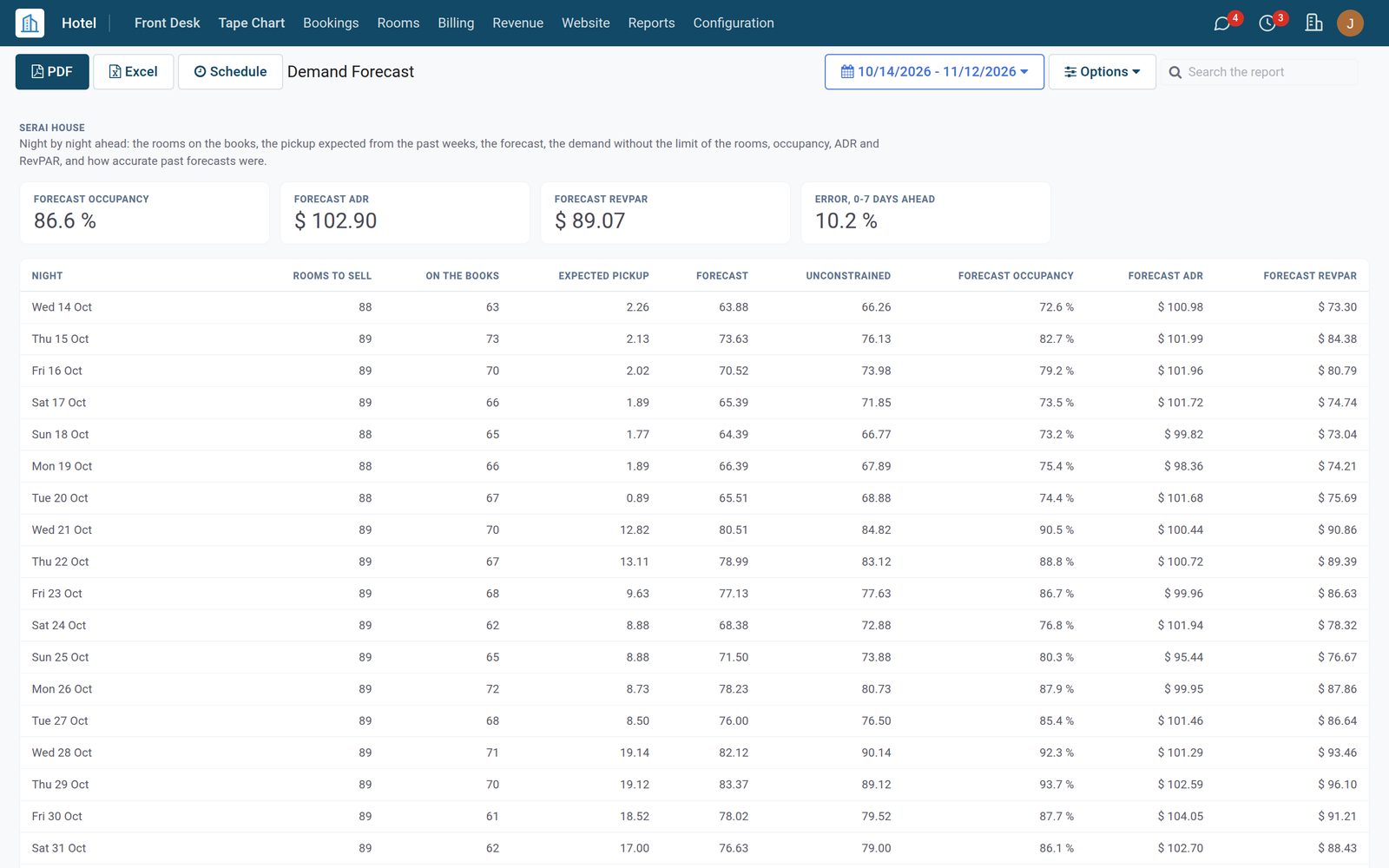
    • Demand forecastPer hotel, room type and night ahead: the rooms on the books plus the pickup the same weekday made before, with the guests turned away; each run's accuracy is measured once the nights pass.
    • Forecast settingsOn the hotel's Demand Forecast tab: how many nights ahead (90 by default) and how many past weeks of the same weekday the pickup is averaged over (8 by default); Make the Forecast Now runs it at once.
    • Books kept every dayThe rooms and room revenue on the books for every night ahead, in Books by Day.
    • PickupBooked yesterday, in 7 days and in 30 days, net of cancellations, with the revenue.
    • Pace vs Last YearEach night against the same night last year, read the same number of days before, with ADR, RevPAR and net RevPAR.
    • Booking curveThe rooms on the books at each number of days before the nights, this year against last year.
    • Monthly budgetRoom nights, ADR and room revenue per month.
    • Budget vs ActualEach month's budget against the nights sold and on the books, below budget in amber.
  • Events and holidays

    • Islamic seasonsRamadan, Eid al-Fitr, Eid al-Adha and the Hajj season from the Umm al-Qura calendar, 1446 to 1460 AH; later years estimated and marked so.
    • Make a Year's EventsA year of events for every hotel or some, with the public holidays of the countries you pick and a demand effect per season.
    • 46 holidays shippedFor Kenya, Burundi, Saudi Arabia, the United Arab Emirates and Spain: same date, days from Easter, or an Islamic date.
    • Your own eventsA conference, a fair, a match or a local event, with its dates, hotels and demand effect.
    • Demand effectRaises or lowers the pickup the forecast expects for those nights; the recommended price follows.
  • Competitors and turnaways

    • Rate shoppingWith Hotel Management: the competitors' rates pulled as JSON or CSV over HTTPS from the rate-shopping service you subscribe to, into the comp set.
    • Competitor Rates reportWith Hotel Management: our best available rate against the competitors' lowest, median and highest price, our position and the sold-out nights.
    • Competitor alertsA competitor cheaper than us, or sold out: an alert and a to-do for the revenue manager.
    • Log a TurnawayFrom the Reservations list: the stay asked for, the source, one of five reasons, the rate quoted and the lost room revenue.
    • Turned away guests countThey are added to the demand the recommendation reads for that night.
  • Selling rules, groups and more

    • Automatic selling rulesWith Hotel Management: stop sell, closed to arrival or departure, minimum stay on arrival or through, set as a night fills and lifted as it empties.
    • Orphan nightsGaps of one or two nights between sold-out nights: lift the minimum stay that blocks them, or set one that fills the gap exactly.
    • Rules In ForceEach night a rule set, with the value before; Run Now and Reopen All It Closed on the rule.
    • Group displacementA group against the guests it pushes out, night by night: accept, counter at the break-even rate, or decline, with the hurdle rate.
    • PortfolioEvery hotel you can see on one screen: occupancy, forecast, ADR, RevPAR, net RevPAR, pickup, pace, prices to review and alerts.
    • Channel commissionsPer booking source or booking site, for net RevPAR.
    • Revenue data feedOur figures out as CSV or JSON on a schedule, e-mailed or posted over HTTPS; an outside system's prices back in as recommendations.

Put Revenue Management to work

Add it to your Hotel Suite plan, priced per room, or start a free trial and see it running first.