





Saudi Pack: SHUMOOS and NTMP, made from what the desk already keeps

What a Saudi hotel owes the Ministry of Interior (SHUMOOS) and the Ministry of Tourism (NTMP, RASED), made from the records the desk already keeps. Every check-in and every check-out makes a report for each ministry, checked before it goes. The person in charge gets a to-do due at the deadline, keys the guests on the ministry's portal and records the reference it gives. Each closed day also makes its NTMP occupancy and rate sheet. One setup screen switches it on.

+$3.54/mo at 40 rooms. Free instant access, no credit card required.

Works with
  • Hotel Foundation
Saudi Pack in the Hotel Suite: SHUMOOS and NTMP, made from what the desk already keeps
01

Every Guest, at Check-In and at Check-Out

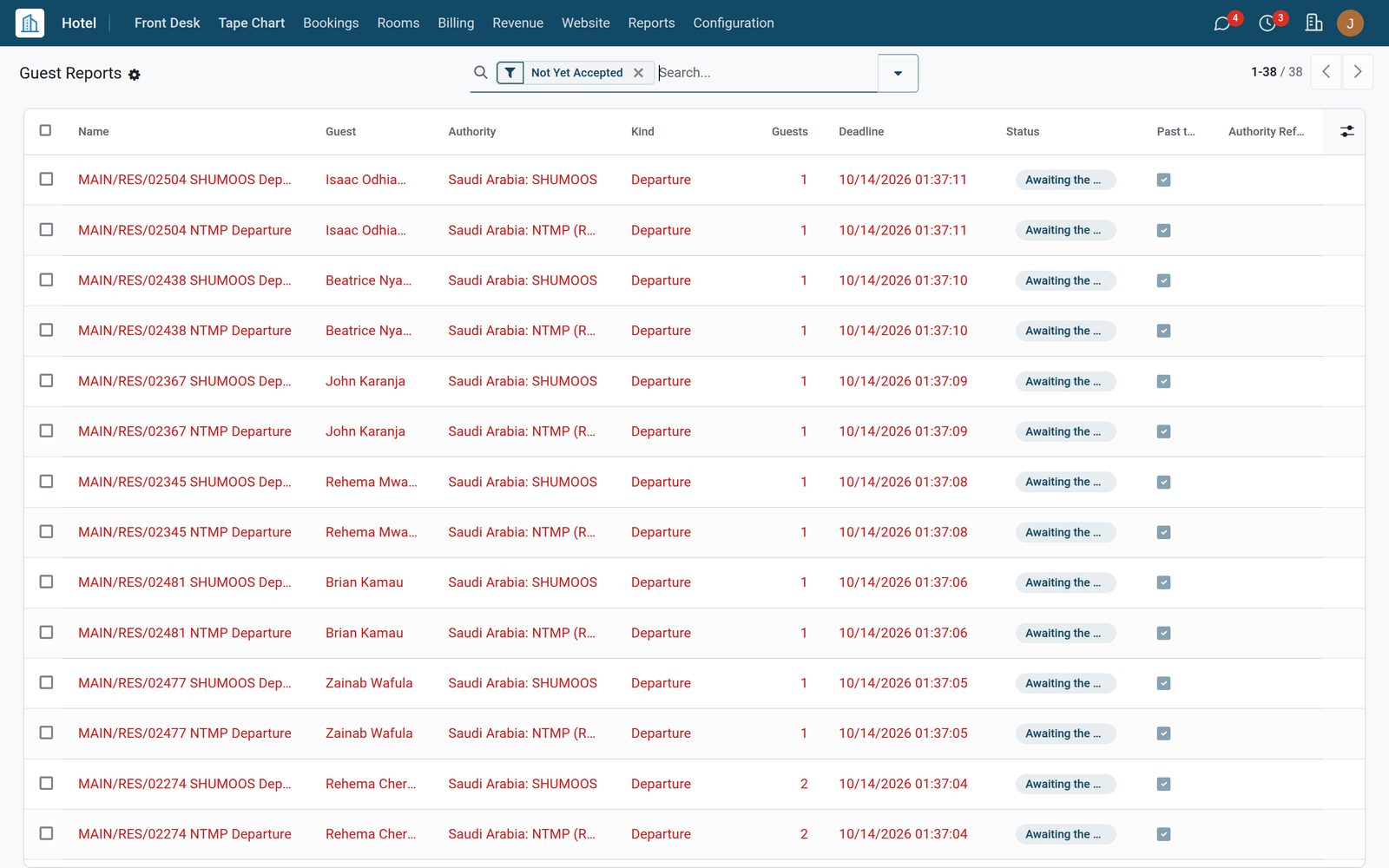
Each check-in and each check-out makes two reports from the guests on the booking: one for SHUMOOS (Ministry of Interior) and one for NTMP (Ministry of Tourism, RASED). The Guest Reports list filters them by ministry. Each report holds the exact lines to key: the room, the dates and nights, then every guest with the NTMP guest type, the ID and its number, nationality, birth date and gender.
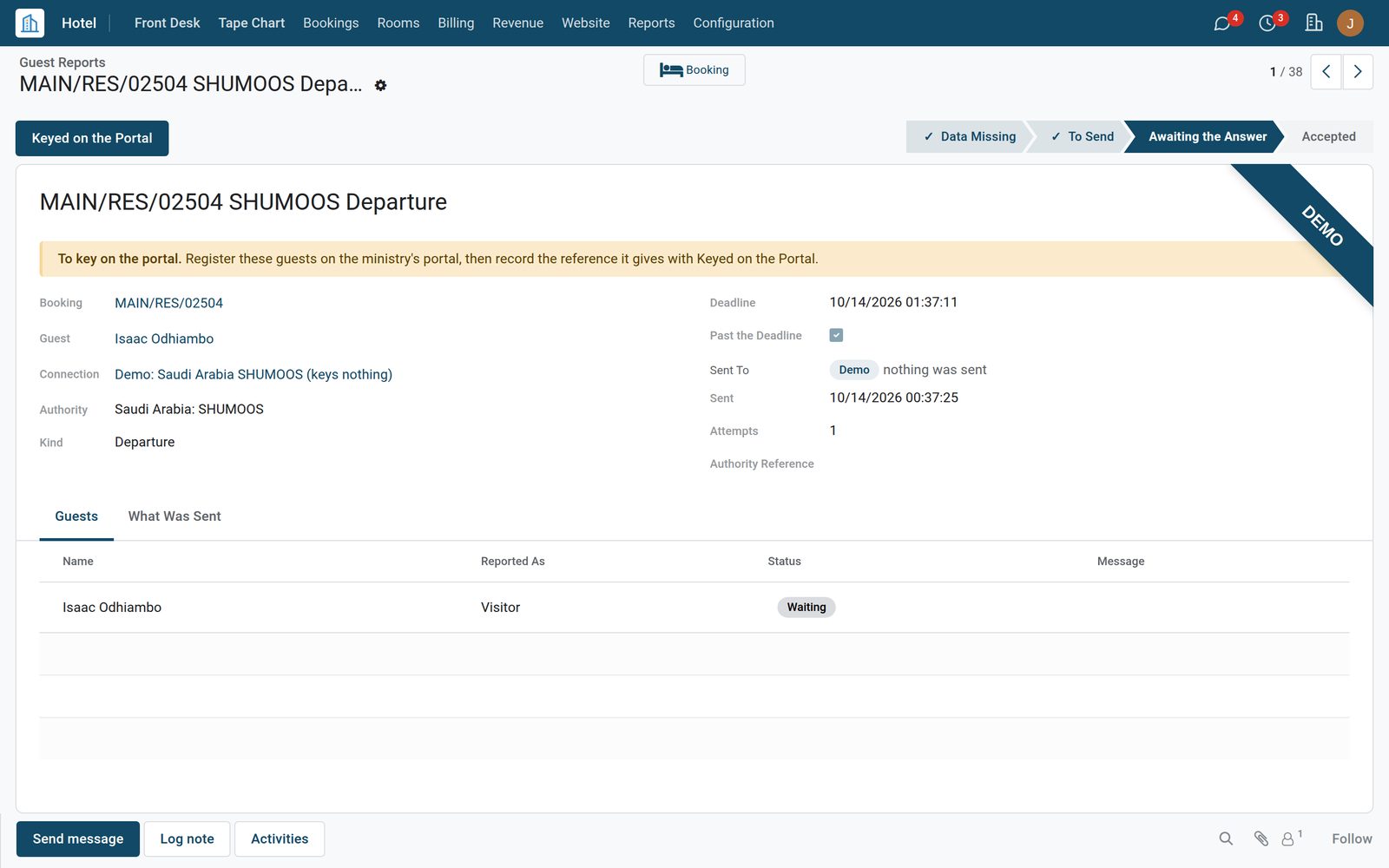
Saudi Pack: Every Guest, at Check-In and at Check-Out
02

NTMP Daily Figures, Each Closed Day

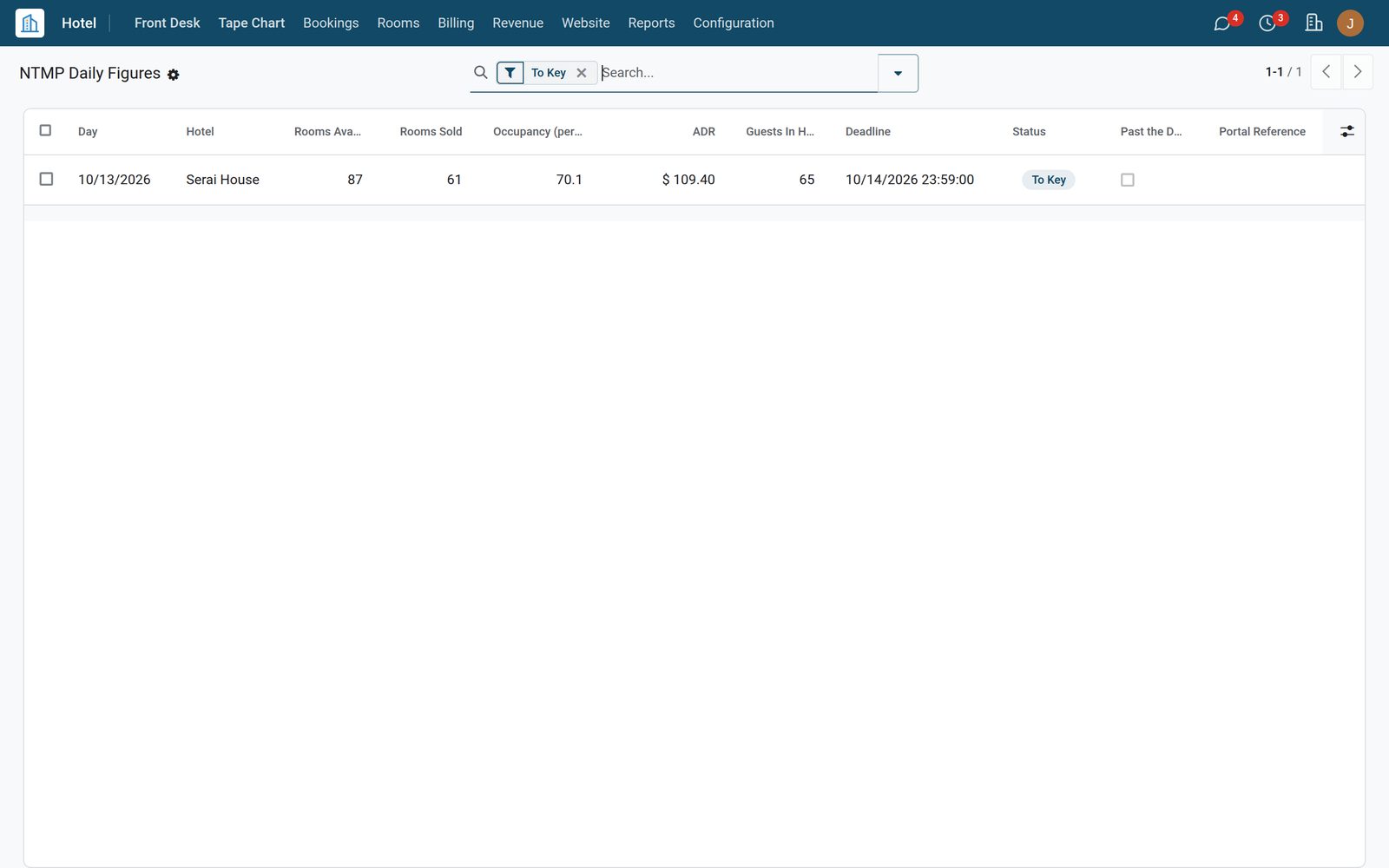
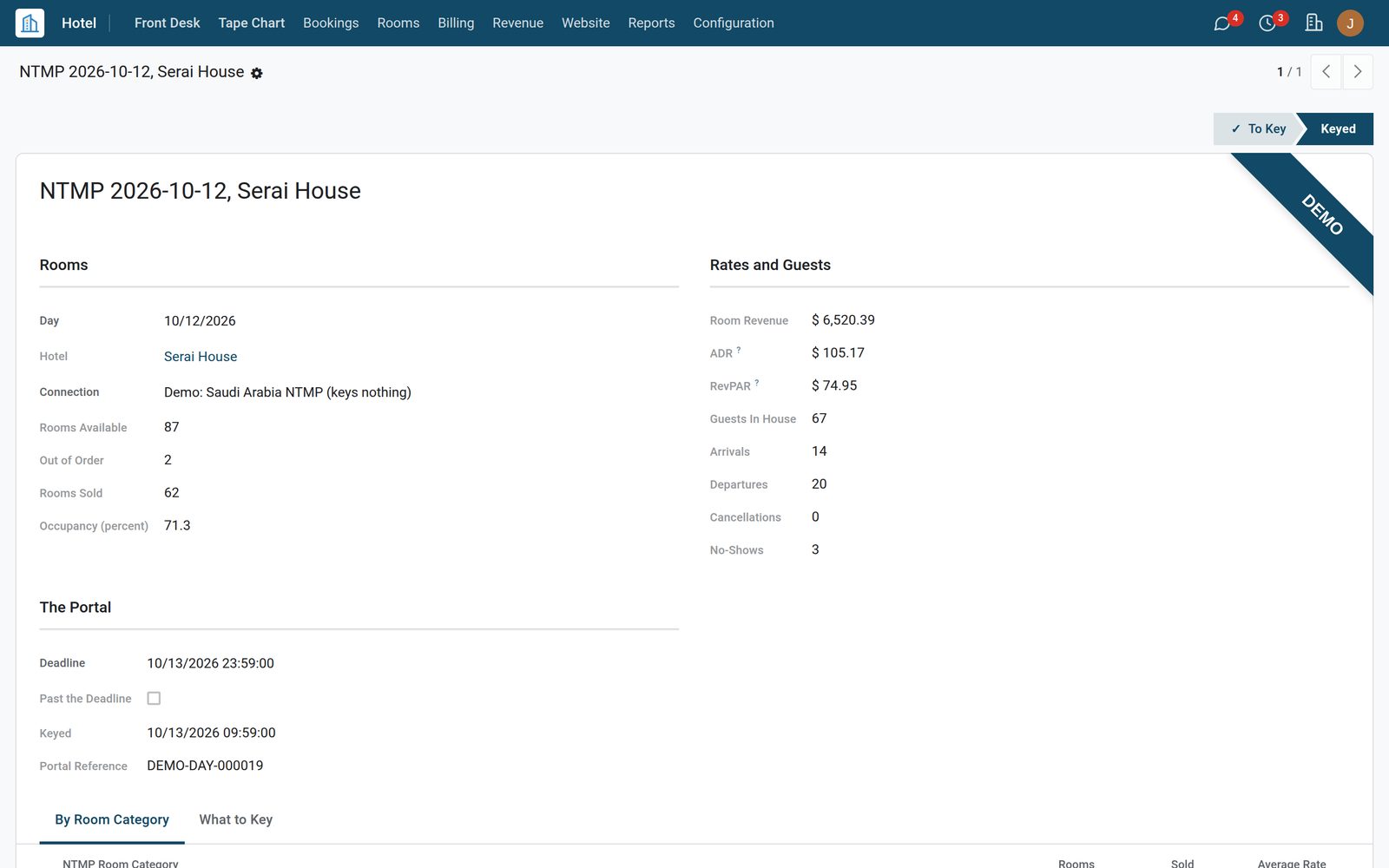
Each day the hotel closes makes its own NTMP sheet: rooms available, out of order and sold, occupancy, room revenue, ADR and RevPAR, guests in house, arrivals, departures, cancellations and no-shows. By Room Category splits rooms, sold and the average rate by NTMP category. What to Key is the sheet to type into the portal, with the guests by NTMP type, and each keyed day keeps the portal reference in the list.

Saudi Pack: NTMP Daily Figures, Each Closed Day
03

One Setup Screen, the Law Built In

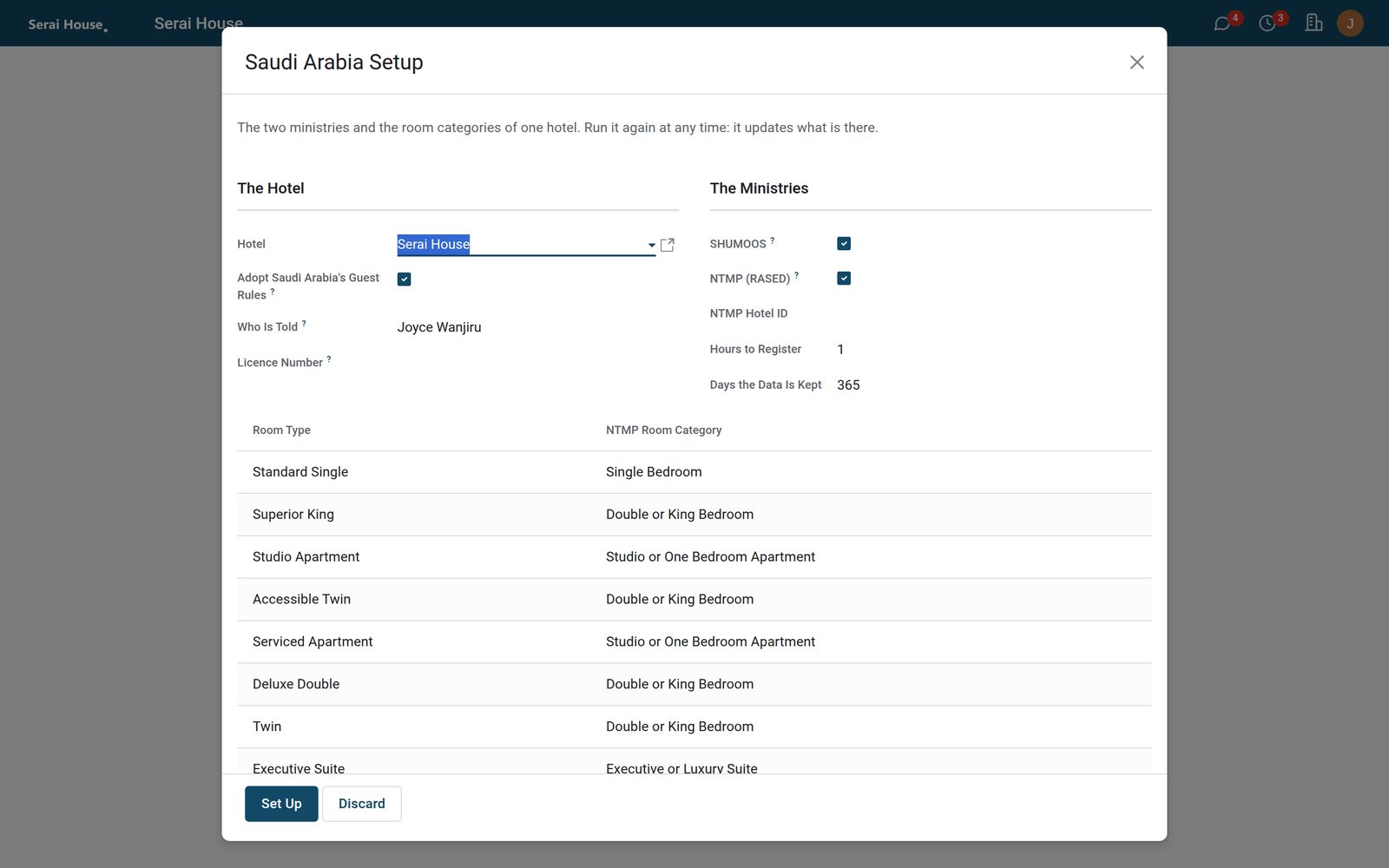
Saudi Arabia Setup puts one hotel on one screen: who is told, the licence number, SHUMOOS and NTMP, the NTMP Hotel ID, the hours to register, the days the data is kept and every room type's NTMP category. Each ministry becomes a guest-reporting connection. The data must be kept at least 365 days after the stay, then it is erased. The demo connections key nothing.

Saudi Pack: One Setup Screen, the Law Built In

What's inside

Everything in Saudi Pack

28 items in 5 areas, every one shipping with the app today.

  • The two ministries

    • SHUMOOS, Ministry of InteriorA report at every check-in and every check-out: each guest with ID type and number, issuing country, nationality, birth date and gender.
    • NTMP (RASED), Ministry of TourismThe stay under the hotel's NTMP Hotel ID, with room category, visit purpose, nights, guests and total, each guest with an NTMP guest type.
    • Each ministry apartGuest Reports filters SHUMOOS and NTMP, and each report is named after its booking, ministry and kind.
    • Checked before it goesA missing name, ID number, nationality, gender, birth date, visit purpose, room category or NTMP Hotel ID is named, and the report waits at Data Missing.
    • The deadline of the rulesWithin the hours the hotel sets after check-in and check-out, one by default; a report not keyed in time is marked Past the Deadline.
    • A to-do for the person in chargeOne per report to key, due at its deadline, with the report's name and what to do.
  • Keyed on the ministry's portal

    • The sheet to keyEach report holds the exact lines to type into the ministry's portal, in the hotel's language.
    • Keyed on the PortalShows the sheet once more and records the reference the portal gave; the report is accepted and the booking is told.
    • Always liveA SHUMOOS or NTMP connection has no test mode: the reports are keyed on the ministry's own portal.
    • Demo connectionsThe demo hotel's SHUMOOS and NTMP connections key nothing and send nothing; their reports wait for a reference as a live hotel's do.
  • NTMP's own codes at the desk

    • NTMP guest typesCitizen, Gulf citizen, resident or visitor, worked out from the nationality and the ID.
    • Residence Permit (Iqama)Added to the ID types of the guest and of the booking's guest list, so a resident counts as one.
    • NTMP purpose on the bookingFollows the Purpose of Visit; a company's stay starts as Business; the desk can choose a closer one.
    • Purpose asked at check-inThe check-in and walk-in dialog asks for it, and needs it where the hotel reports to NTMP.
    • NTMP cancellation reasonAsked in the cancel dialog, needed where the hotel reports to NTMP, and kept on the cancelled booking.
    • NTMP room categoryOn each room type, from NTMP's own list of fourteen categories.
  • NTMP daily figures

    • Each closed day, by itselfAn hourly check makes the sheet of each day the hotel has closed, with a to-do due the next day.
    • The day's totalsRooms available, out of order and sold, occupancy, room revenue, ADR and RevPAR.
    • By NTMP room categoryRooms, rooms sold and the average rate of each category.
    • Guests and movementsGuests in house by NTMP guest type, arrivals, departures, cancellations with their NTMP reason, and no-shows.
    • The same figures as your reportsWith Hotel Management, the day's totals are its own, and a day the night audit closed reads what the audit froze.
    • Figures AgainRebuilds a day not yet keyed from the records as they are now.
    • Keyed like the reportsKeyed on the Portal records the reference; a day not keyed in time is marked Past the Deadline.
    • Revenue stays privateManagers and revenue staff work the sheets; owners and auditors read them.
  • Set-up and the law

    • Saudi Arabia SetupOne screen per hotel for the two ministries and the room categories; run it again at any time to update what is there.
    • Saudi guest rules, with Hotel ManagementA valid ID for every guest, checked in the original, its number recorded and no copy kept, adopted in the same step.
    • Kept a year, then erasedAt least 365 days after the stay (it cannot be set lower), 1095 for three years, then the data sent is erased.
    • Multi-companyEach sheet belongs to its hotel and company; users see the hotels they work in.

Put Saudi Pack to work

Add it to your Hotel Suite plan, priced per room, or start a free trial and see it running first.