







Booking Engine & Website: Your own website takes the booking, commission-free

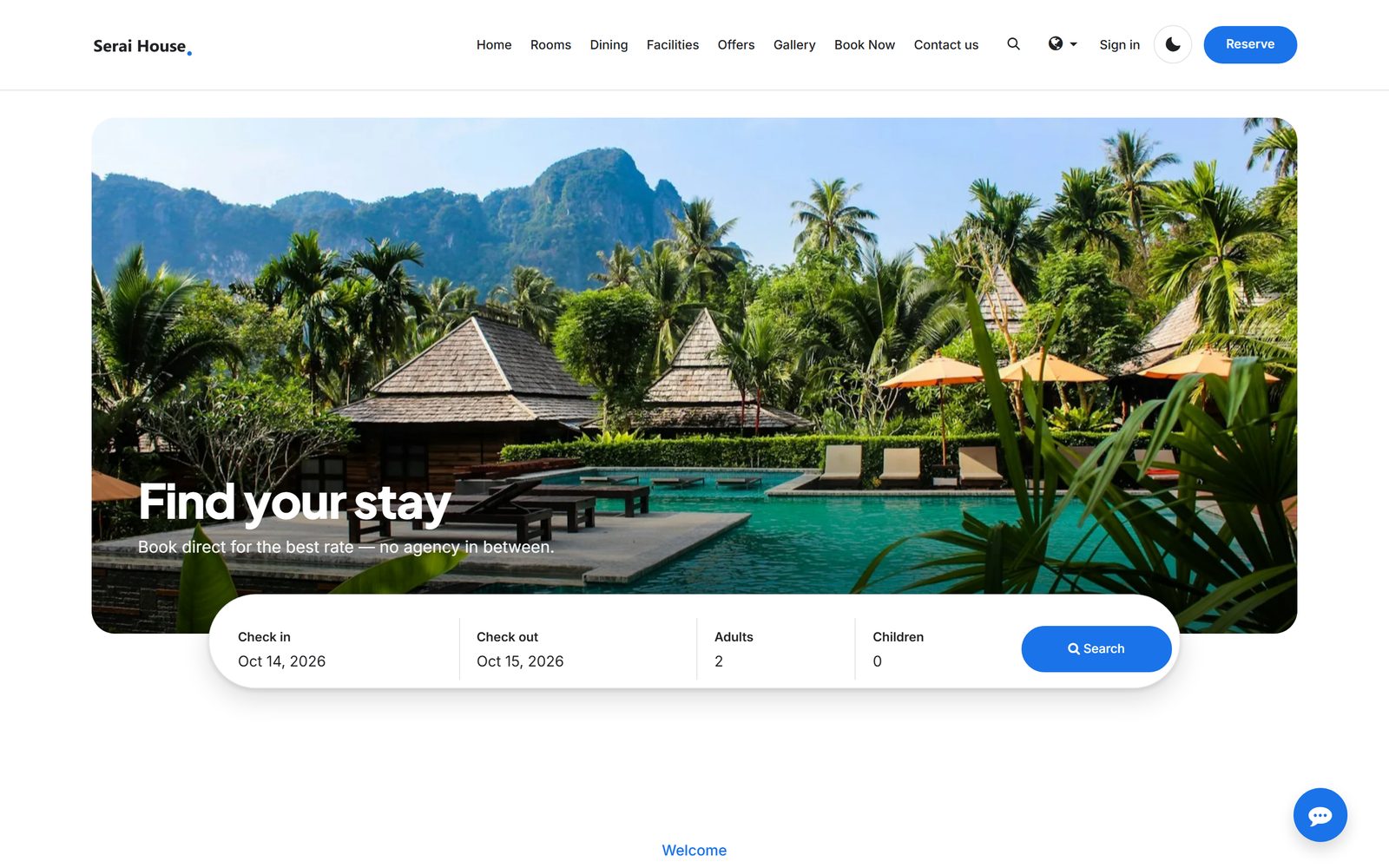
Your own website takes the booking. The guest picks dates, sees the rooms you still have and the price you actually charge, and confirms in three steps. What they see is read from the same availability calculation the front desk's own confirmation guard reads, so the website and the desk cannot disagree. Afterwards they keep a private link to that booking — no account and no password — where they can look at their stay and cancel it themselves while your cancellation window is still open.

No extra charge. Free instant access, no credit card required.

Works with
  • Hotel Foundation
Booking Engine & Website in the Hotel Suite: Your own website takes the booking, commission-free
01

Only What Can Be Booked, at the Real Price

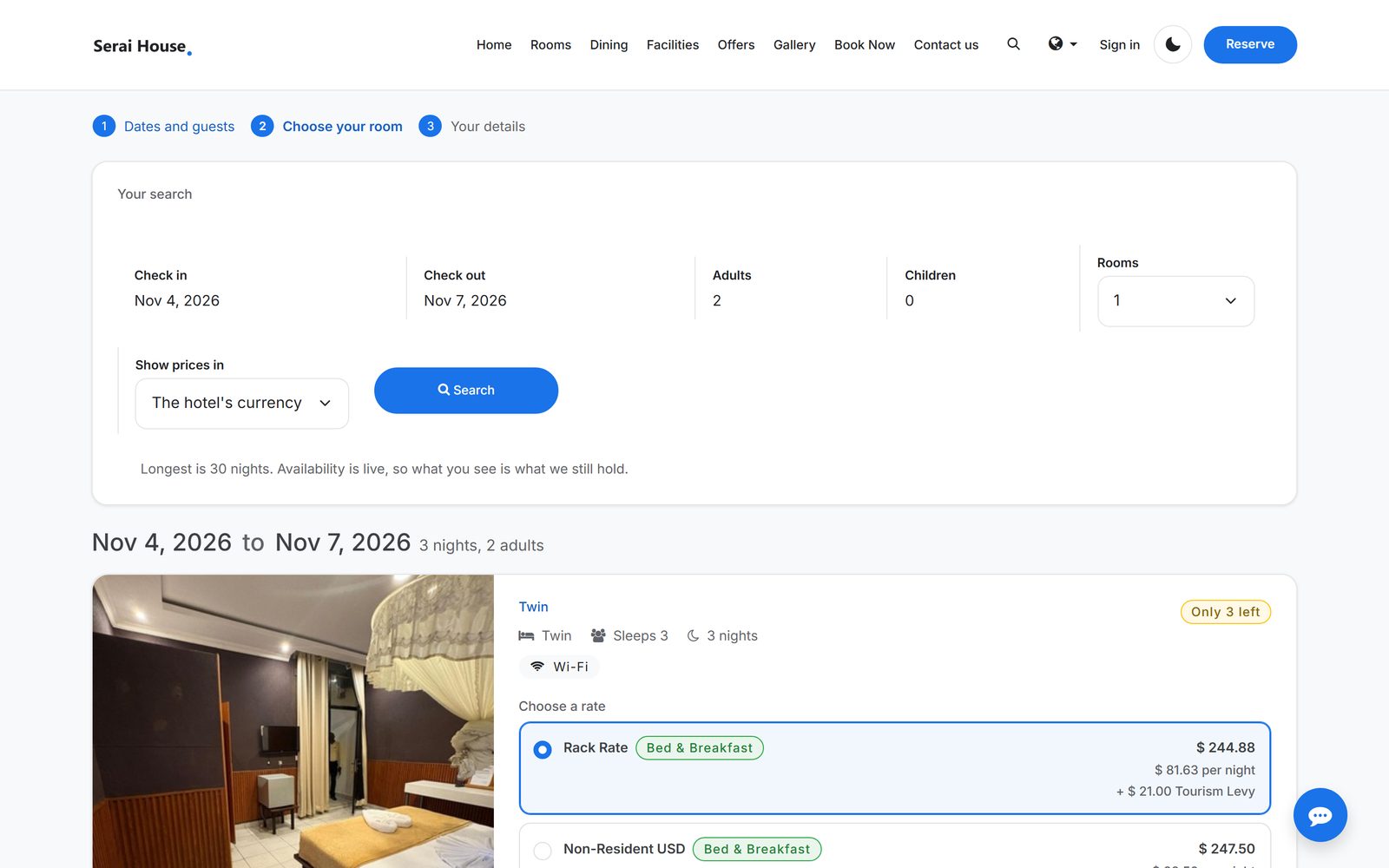
One card per room type that is free on every night of the stay, with the public rates that can sell it, the board basis, the stay total, the price per night and the city levy. The room list and each room page sell before a date is chosen, with photographs, beds, who it sleeps and the amenities.
Booking Engine & Website: Only What Can Be Booked, at the Real Price
02

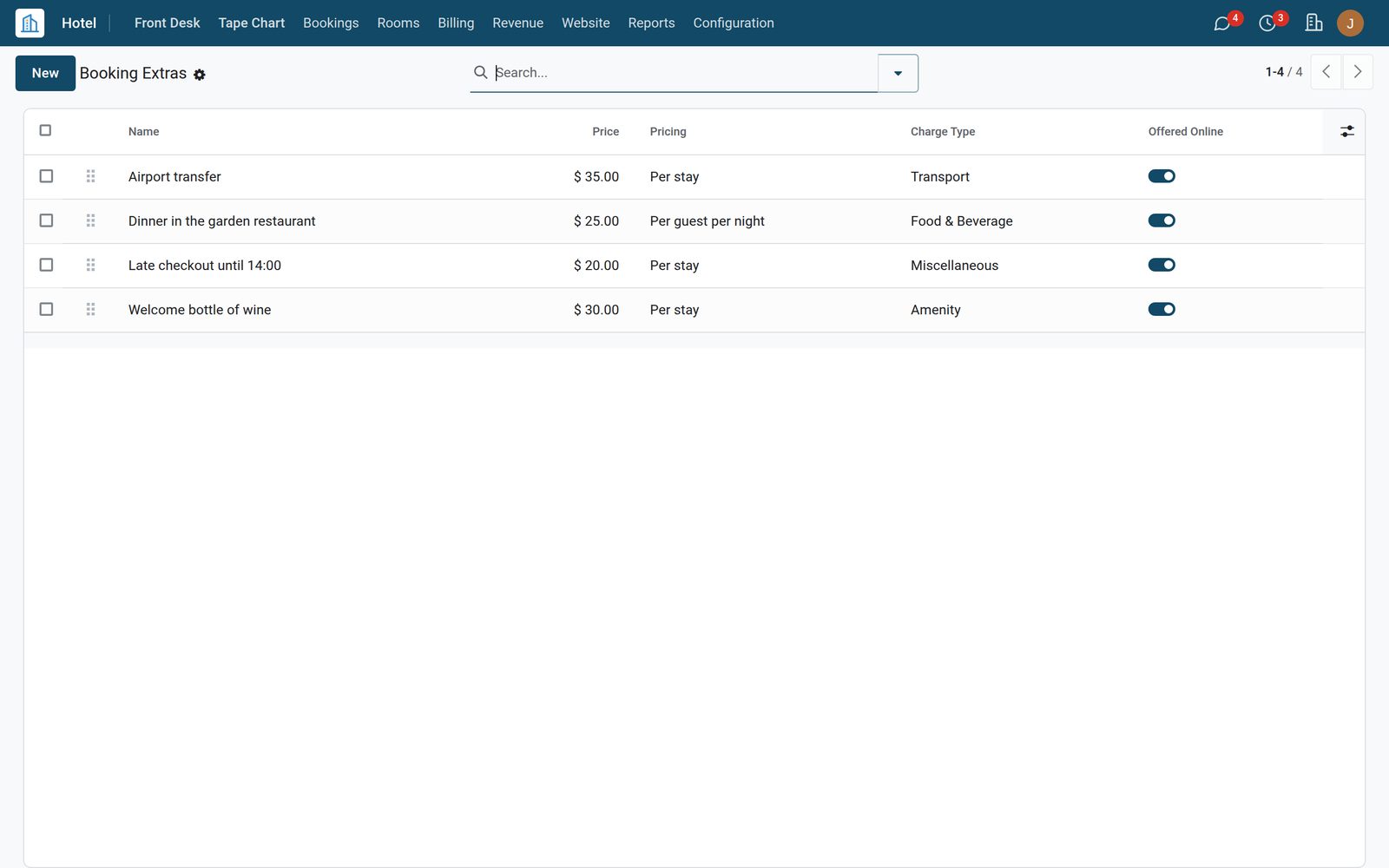
Extras and a Promo Code Before the Guest Commits

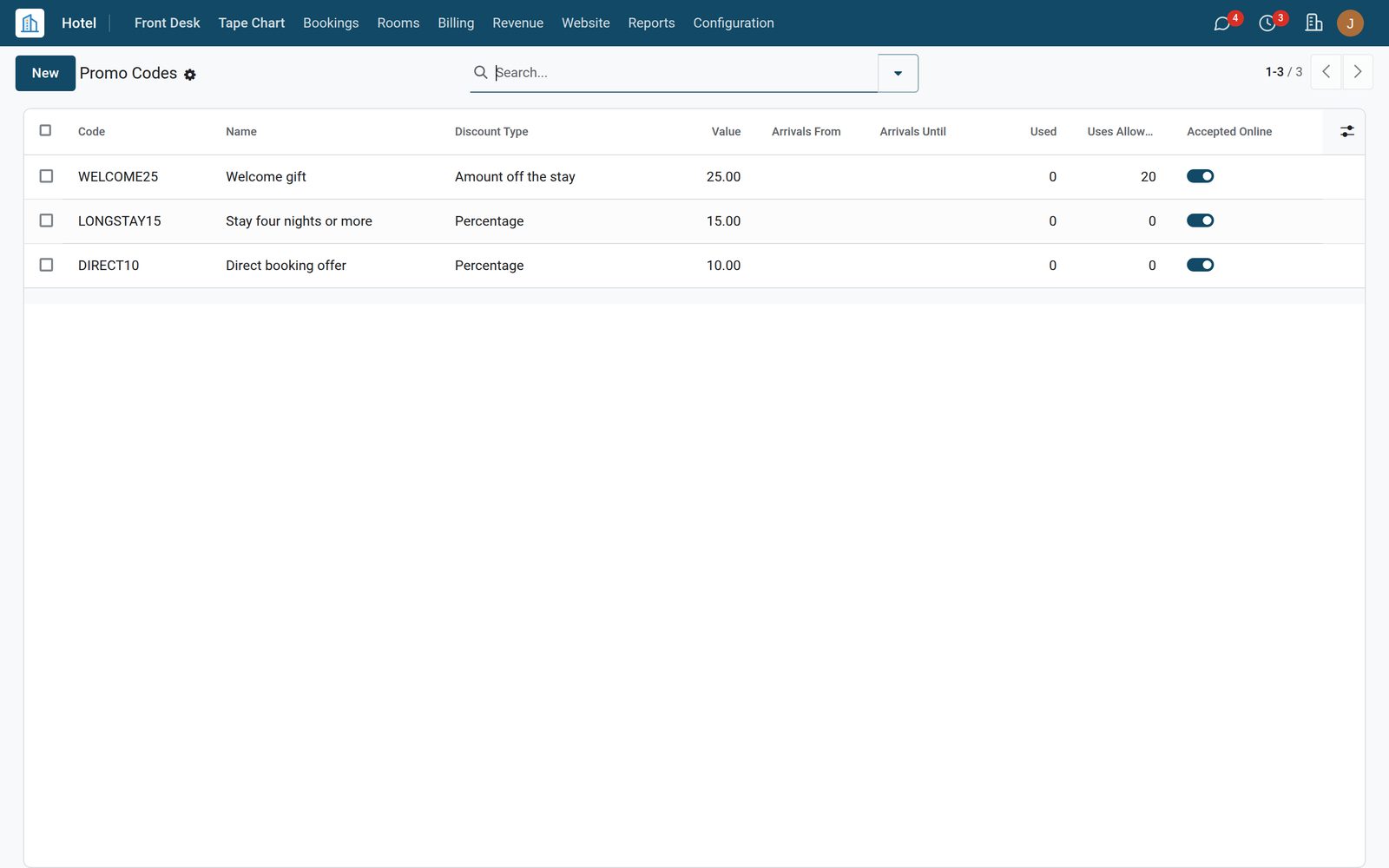
Breakfast, dinner, an airport transfer or a late checkout on the details page, priced per stay, per night, per guest or per guest per night, with the amount for this stay. A promo code takes a percentage or an amount off the room, within the dates, stays, room types, rate plans and number of uses you set; the guest sees the new total first.

Booking Engine & Website: Extras and a Promo Code Before the Guest Commits
03

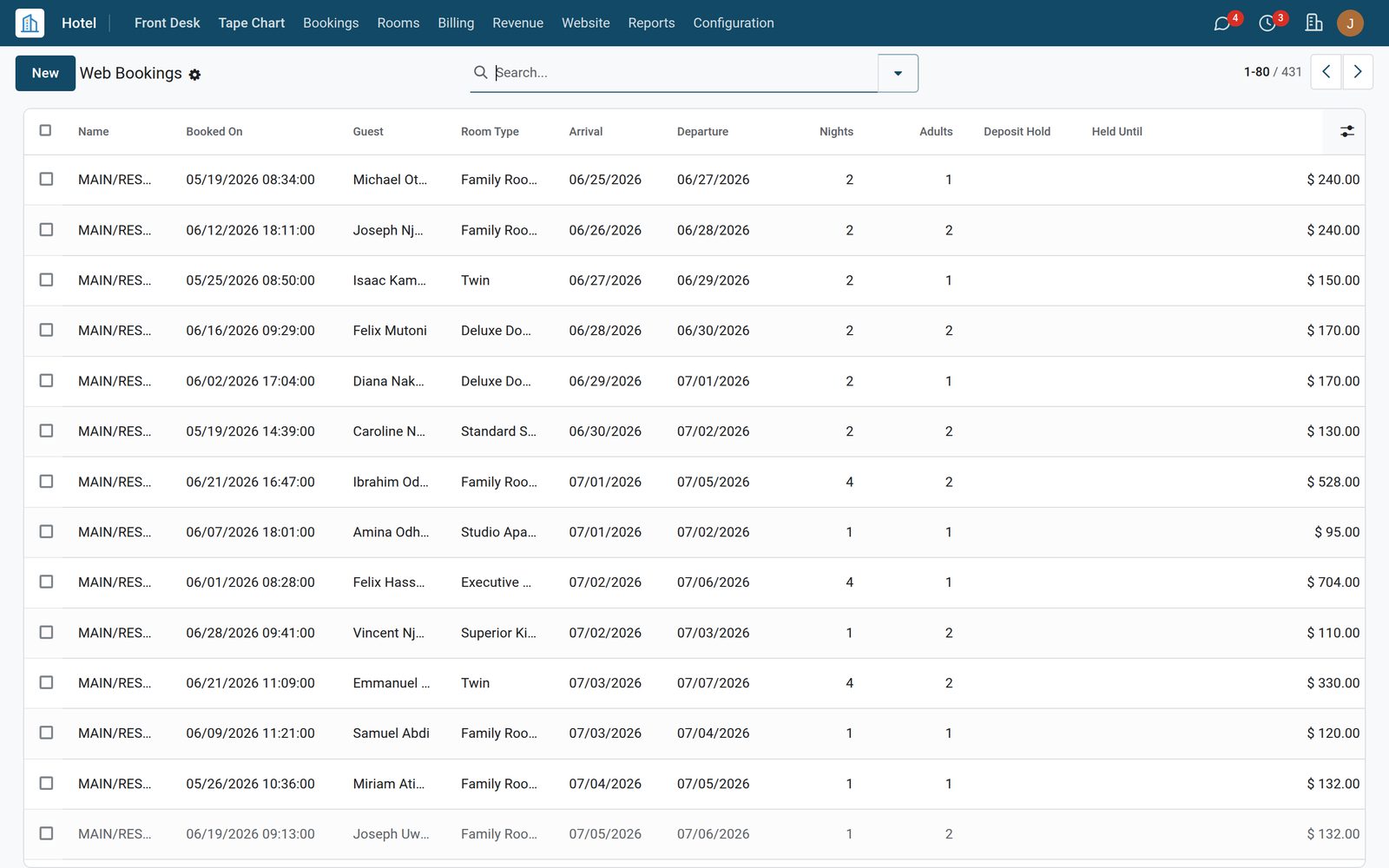
At the Desk, an Ordinary Reservation

A web booking is the same reservation the desk takes at the counter, in the same list, with its own Web Booking tab: the channel, the terms and the marketing consent, the guest's arrival time and the extras with the price the guest saw. The booking engine has its own section in Settings.

Booking Engine & Website: At the Desk, an Ordinary Reservation
04

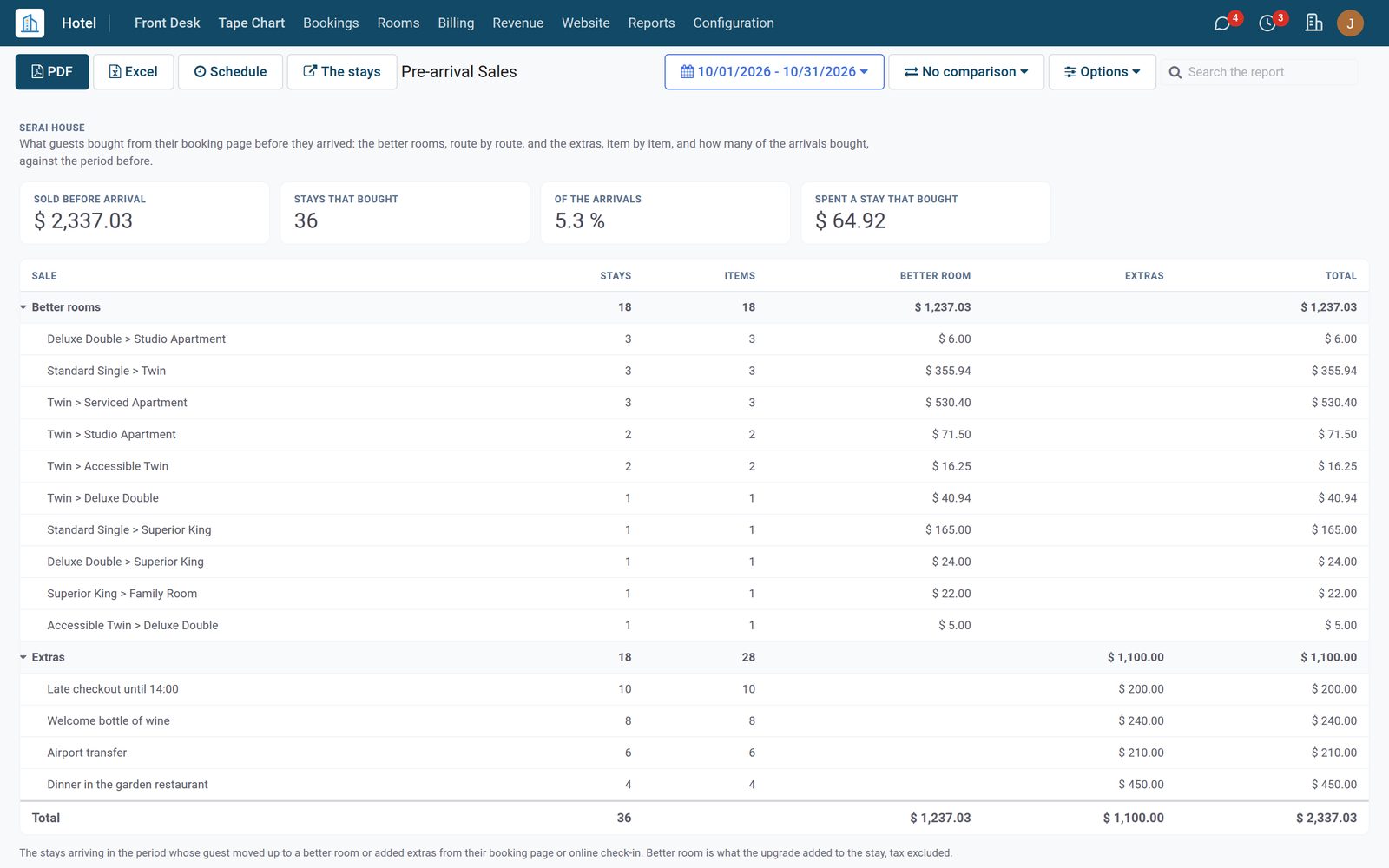
Upgrades and Extras Before Arrival

Before arrival the guest's booking page offers up to three better rooms, priced as the booking was and free on every night of the stay, and extras such as an airport transfer. The price is checked again when the guest accepts; a changed price is refused, never charged. The desk sees what was sold in its own report.

Booking Engine & Website: Upgrades and Extras Before Arrival
05

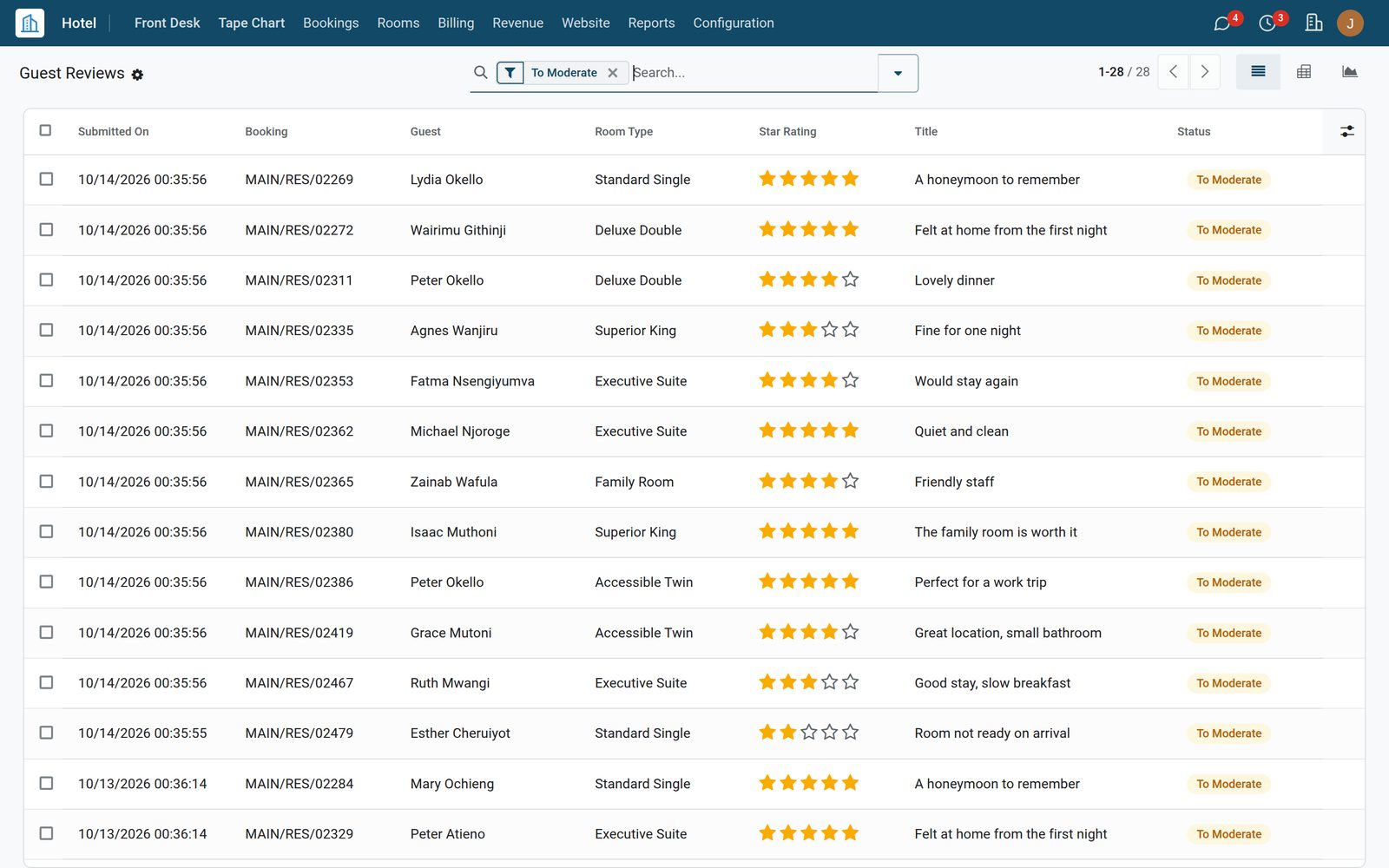
Guest Reviews on the Room Pages

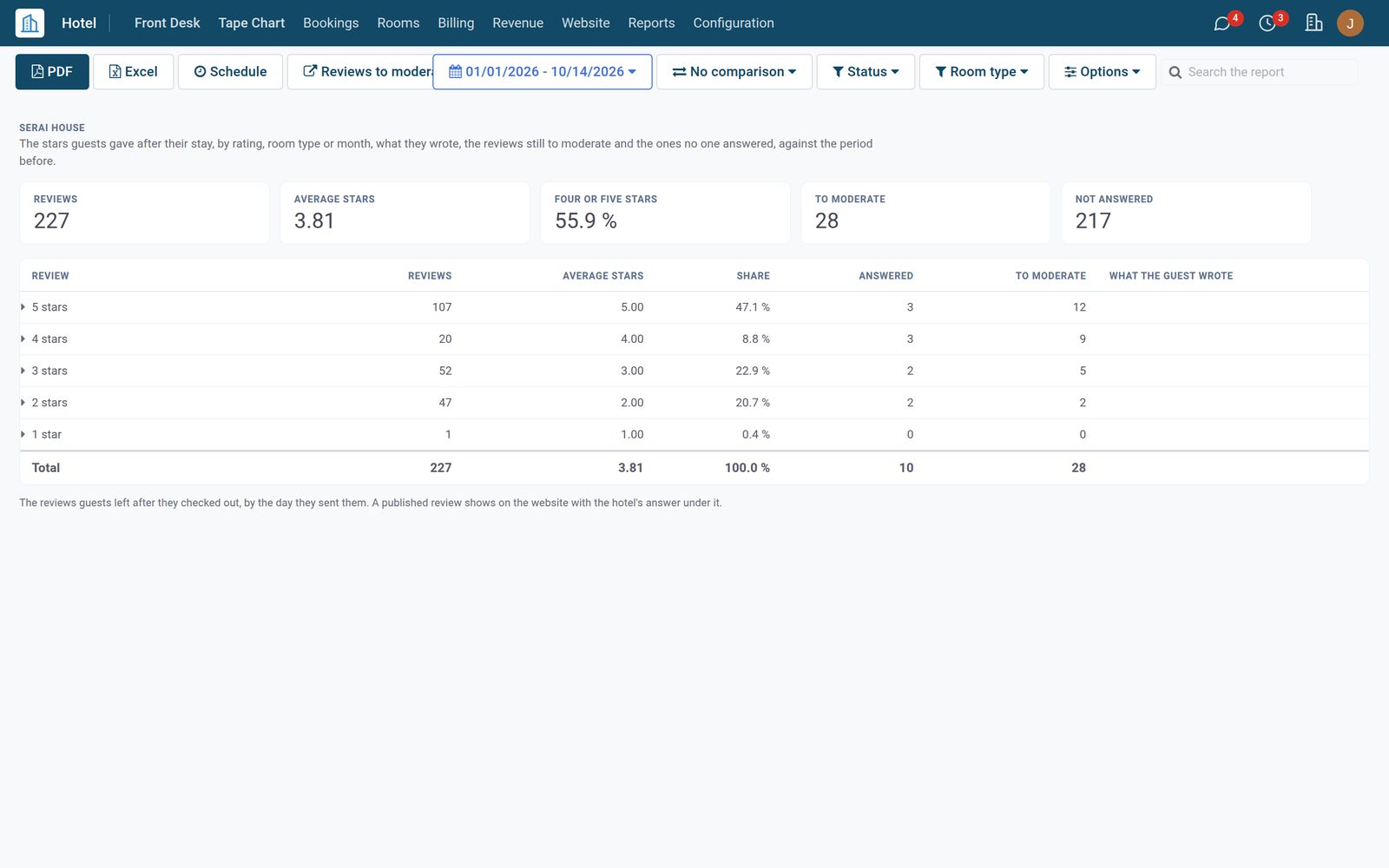
After check-out the guest reviews the stay, once. The desk publishes, rejects or replies; the guest's stars and words are never edited. The room page shows the average, the bars from five to one and the latest reviews with the hotel's replies, under the first name and initial only.

Booking Engine & Website: Guest Reviews on the Room Pages

What's inside

Everything in Booking Engine & Website

94 items in 16 areas, every one shipping with the app today.

  • Newest additions

    • Document read by the phoneon the online check-in page, the passport or ID card read by the camera or from a photo, and the form filled in for the guest to check.
    • Requests from the stay pagewith Hotel Management's Guest Requests: the guest asks for towels, a late check-out or a repair, and sees when it is done.
  • The booking flow

    • Three steps, no accountdates and guests, choose a room and a rate, then who is staying. A guest who has never signed in can complete the whole thing.
    • Only what can actually be booked is offeredno free room on every night of the stay, no room for the party size, or no public rate that resolves — and the room type is simply absent from the results.
    • The stay total and the price per nightevery night priced on its own and totalled, with the nightly breakdown available to the guest, in the rate plan's own currency.
    • Board basis on every rateroom only, bed and breakfast, half board or full board — carried straight off the rate plan, with the plan's own note beside it.
    • Rooms left is a real numberthe scarcity marker on a card is the lowest availability across the nights of that stay, not a nudge someone invented.
    • A rejected search goes back to the formcarrying its own reason — too short a stay, too far ahead, departure before arrival — because the guest is usually one date away from a booking.
    • Stated arrival windowthe guest says roughly when they will turn up, from a fixed list of slots. It lands in its own field and never overwrites the desk's own expected-arrival note.
    • Guest requests kept separatea cot, a quiet room, a late arrival — stored in their own field so the guest's words and the desk's notes never overwrite each other.
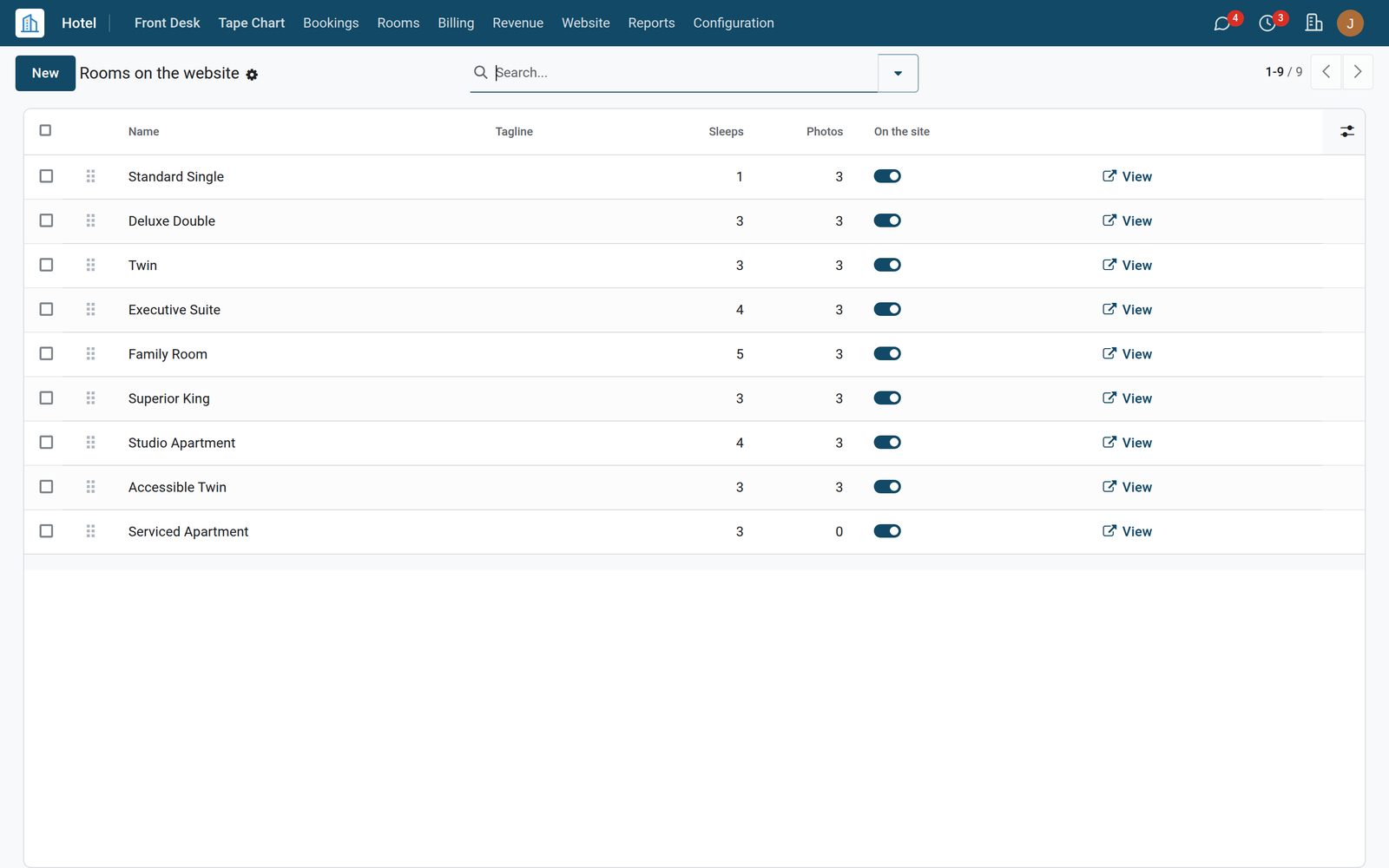
    • Public room pages, in the sitemapa page per room type with your tagline, your long copy, the bed, who it sleeps and the amenities — and the booking page and room list are offered to search engines.
  • One availability, one price

    • The website reads the desk's own availabilityone calculation, called by the public pages and by the guard that confirms a reservation at the counter. There is no second inventory to keep in step.
    • Prices come from your rate resolverseasons in priority order, the weekday row, derived plans resolved through their parent, and the extra adult and extra child amounts — the same resolution the desk quotes from.
    • Only public rate plans reach the websitea plan is offered online only when you mark it public, and a negotiated plan tied to named partners is excluded whatever its flag says — a corporate rate can never leak onto the open web.
    • Availability is re-checked inside the transactionimmediately before the reservation is created, and again by the confirmation guard under a row lock. A guest who sat on the form does not take a room that has gone.
    • The web cannot quietly sell past availabilityunder the default overbooking policy, selling past availability is a manager decision, and a public web request is not a manager. The booking is refused, the draft is removed rather than left orphaned, and the guest is told plainly.
    • A web booking is an ordinary reservationsame record, same statuses, same confirmation action, same reference sequence — with a room type and no room assigned, exactly like a booking taken at the counter before housekeeping decides.
    • Rounded in the plan's own currencythree decimals for a dinar hotel, none for a yen one. Plans in different currencies are ranked after conversion into one, so a weak currency does not fake a cheap room.
    • A rate plan's own stay limits still applya plan with a minimum or maximum length of stay is dropped from the offer when the requested stay falls outside it, on the results page and again at review.
    • Machine-readable availability feedthe same validation, the same availability and the same rate resolution as the pages, returned as data for a widget. It never raises: a failure comes back as a readable message, not a stack.
  • What the hotel controls

    • A master switchoff, and every public page answers with your closed notice instead. A company with no property configured degrades to the same notice rather than to an error.
    • Confirm instantly, or hold as a requestinstant holds the room the moment the guest confirms; request leaves a draft for the desk to approve. Availability is checked either way, and the guest's email matches the mode.
    • Minimum lead time and booking windowhow soon and how far ahead the site will sell, counted from your own hotel day — not from the server's calendar.
    • Shortest and longest stay, and occupancy limitsmaximum adults and children per web booking, plus extra guest slots if you will sell a room type above its stated capacity and charge the extra-guest amounts for it.
    • Publish room types one at a timethe standard publish toggle on the room type itself, with your own website order, tagline and long copy separate from the staff-facing description.
    • Show prices, or take enquiries insteadswitch amounts off and every public page hides them, presenting the stay as a request. The reservation still carries the resolved price for the desk.
    • Your words on your pagesbooking page title and subtitle, your booking terms and an optional link to the full terms page, your booking contact email and phone — all translatable.
    • A free-cancellation deadline that respects your clockset the window in hours before check-in; the deadline is worked out from the property's own check-in time and timezone, and shown to the guest with their booking.
    • Settings live on the companyevery rule above is a company setting, and the site sells the property of the company that website belongs to — so two hotels on one system keep two sets of rules.
  • Built for a public internet

    • Nothing a stranger types reaches a querythe public pages hand a plain dictionary to the server-side engine, which coerces and validates every value before it goes anywhere near a search or a write.
    • A private booking link, not a guessable numberevery reservation gets its own unguessable link, made the way a password-reset link is, and no two bookings can ever share one.
    • Every booking link is checked safelyand a wrong one answers not-found rather than forbidden, so the address cannot be used to discover that a booking exists at all.
    • Per-visitor hourly limitsseparate allowances for searching and for submitting, so a robot exhausting one cannot eat the other. Failed attempts count too, which is exactly the case a robot produces.
    • A hidden field no human ever fillsthe booking form carries a trap input; a submission that fills it is discarded, and answers exactly like an over-limit visitor so the two cannot be told apart from outside.
    • The visitor's address is never storedonly a salted digest of it, so abuse can be traced without your hotel holding data it has no reason to keep. The counters clear themselves weekly on a scheduled check.
    • A form can never overwrite a real customera contact with the same email is reused and never written to, so a returning guest keeps one history and a stranger cannot rewrite someone's details by claiming their address.
    • Consent is recorded, never assumedterms acceptance and marketing opt-in are separate boxes, neither pre-ticked, each stored on the reservation with the moment it was given.
    • Cross-site request protection on both posted stepsthe platform's own form protection, built into the review form and the submit form, never switched off.
    • Failure is a page, never a tracebacka mistyped date, a room sold while the guest typed, a robot over its limit — each gets a readable page. No stack, no field name, no record identifier ever reaches a stranger.
    • The guest sees their own stay and nothing elsethe public pages render a flat set of values prepared by the server — no other booking, no folio, no identity field the guest did not type, and no amount at all when you hide prices.
  • What the desk gets

    • The guest's own email, in your nametwo templates, one for a confirmed booking and one for a booking held as a request, sent automatically and marked on the reservation once sent.
    • A mail server that is down never loses a bookingthe email is sent outside the transaction that created the reservation, on purpose, and a failure is logged instead of rolling the booking back.
    • An audit line on the reservationnoted in the reservation's own history: that it came from your website, under which confirmation mode, whether terms were accepted and whether marketing consent was given.
    • A booking channel you can filter and group byweb bookings are marked as such and indexed, so direct business is one filter away. It is empty on a desk booking, which is how you tell them apart.
    • New guests tagged as direct bookersa contact created by the website carries a Direct Booking tag from the moment it exists, ready for the mailing list you were always going to build.
    • Nothing changes for staff who never touch the websiteevery field this app adds to a reservation is optional and empty on a desk booking, so the counter, the tape chart and the folio work exactly as they did.
  • The guest portal

    • A private link, not an accountthe guest reaches their own booking straight from the link on the confirmation and in their email. Nothing to sign up for, nothing to remember, nothing to reset.
    • Their stay, as they booked itthe reference and its status, arrival and departure against your own check-in and check-out times, the nights, the party, the room type and the rate with its board basis.
    • What it costs, only if you publish pricesthe stay total in the rate plan's own currency — and switch amounts off and the page carries no figure at all, because the same setting governs it.
    • They cancel it themselves, until your window closesthe deadline is worked out from your check-in time and the property's timezone, printed on the page in plain words, and enforced again on the server when the button is pressed.
    • A guest cancellation is a real cancellationit runs the foundation's own cancel action — the same one the desk presses — so the status, the release of the room and the history behave identically. The room genuinely goes back on sale.
    • The desk can see it was the guesta guest cancellation is marked as one on the reservation, carries the reason they typed if they typed one, and says so in the record's own history.
    • Only the bookings the web madeself-cancellation is offered on web bookings and on states that can still be cancelled — never on the reservation your desk keyed in, whoever holds the link.
    • A wrong link, or none, does not resolvethe link is checked safely and a wrong one answers not-found, exactly as an invented booking would — so the address can never be used to discover which reservations exist.
    • A guest who does sign in gets the listtheir stays in the standard customer portal, paged and sortable, scoped to the partner on the server — never to anything the caller can put in the address. A company booker sees what was booked under the company.
    • One odd booking never blanks the lista stay that cannot be rendered is logged and skipped, and the guest still sees all the others — rather than an empty page and a support call.
    • A refusal is a sentence on the pagea cancellation that arrives too late comes back on the stay page as a readable message telling the guest to contact the hotel — never as a traceback.
  • Extras at booking

    • Sold on the review pagebreakfast, dinner, a transfer or a late checkout, priced per stay, per night, per guest or per guest per night, with this stay's amount shown.
    • Only where it belongslimit an extra to some room types, or to room-only rates so a meal is never sold twice.
    • The price the guest sawis kept on the booking. The desk adds extras on the same page, and they go on the folio at check-in with Hotel Management, following the routing rules.
  • Promo codes

    • A code with its rulesa percentage or an amount off the room, for the booking and arrival dates, minimum stay, room types and rate plans you choose, with a usage limit.
    • The real total firstthe guest applies it on the review page and sees the new total, the city levy and the deposit on the discounted price. Attempts are counted per visitor.
    • At the desk tooany active code applies on the booking; its own discount passes the desk's 10 percent rule, anything beyond still needs a duty manager.
    • Named everywhereon the confirmation page, the guest portal and the guest mail; each code lists the bookings that used it.
  • Guest reviews

    • Asked the day aftera “How was your stay?” mail with stars to pick, for stays that leave after the hotel switches it on.
    • One review per stayfrom the mail link or the guest's stay page; it waits for the hotel, or four and five stars publish at once if you choose.
    • Moderated, never editedpublish, reject or reply from Front Desk, Guest Reviews; the stars and words stay the guest's.
    • Stars on the room pagesthe stars and count on every room card, the latest reviews and replies on the room's own page, first name and initial only.
  • Online check-in before arrival

    • Everyone in the roomnames, and each identity document under the hotel's own capture policy.
    • Signed on screenthe registration card kept word for word, with the time and a fingerprint of the text.
    • Balance and arrival timeany balance due is shown with a pay link; the guest says when they arrive.
    • Only the key remainsthe desk sees Checked in online on the booking.
  • Upgrades and extras before arrival

    • Up to three better roomspriced as the booking was, free on every night of the stay.
    • Extrassuch as an airport transfer, added to the stay.
    • Checked again on accepta changed price is refused, never charged.
    • Seen at the deskits own tab on the booking, and a report.
  • Lobby self check-in kiosk

    • Surname and referenceours or the booking site's reference; the same answer for every miss.
    • Sign, pay, check ina free, ready room of the booked type, and the door code with a lock system.
    • Sent to the desk in plain wordsa room still being prepared, the identity rules, a hold on the guest; the reason is on the visit.
    • Safe on a shared tabletthe screen clears itself; a new address stops the old one; too many wrong answers send everyone to the desk for the hour.
  • Your own prices on Google Hotel Search

    • Three files, Google's formatsthe hotel list, the landing pages and the prices.
    • The website's own priceper room type and rate, with taxes and the city tax, refundable or not, or the reason it cannot be sold.
    • Changes pushedGoogle is told which dates to ask again when a booking, a rate or a closed date changes.
    • Marked as from Googlethe booking is marked as from Google, free link or ad; a log lists every question.
  • Reviews on the Room Page, and Two Reports on Screen

    • The rating firstaverage, stars, count and the bars from five to one on the room page, then the three latest reviews.
    • Pre-arrival Sales on screenthe better rooms and the extras guests bought from their booking page, against the arrivals of the period.
    • Guest Reviews on screenthe reviews and their scores over a period, with PDF and Excel.
  • Switches in the hotel settings

    • Several rooms in one bookingone booking reference, the party total with the mandatory fees.
    • Prices in the visitor's currencythe hotel still charges in its own.
    • Metasearch feedsinventory, availability and rate feeds, bookings attributed to the channel.
    • Access needs onlineonly room types with a matching room are offered.
    • Mandatory fees in the priceon the room list and the confirmation, the levy listed apart.
    • Organiser portala group organiser keeps the rooming list on their own page.
    • Hourly stays and dorm beds onlinewhen switched on in the foundation and here.

Put Booking Engine & Website to work

Add it to your Hotel Suite plan, priced per room, or start a free trial and see it running first.