

Inventorylesson 2 of 4
Written lesson
Set a minimum and a maximum per product, so BridgeERP tells you what to buy or make, and how much.
Read the lesson →Restock with reordering rules
Course contentslesson 2 of 4
Inventory basics4 min
Replenishment6 min
Warehouse transfers5 min
Daily operations5 min
What Replenishment gets you to
- Restock with minimum and maximum rules instead of guesswork
A reordering rule says: when the forecast for this product falls below the minimum, bring it back up to the maximum. A product's rules open from its form (the button showing its Min and Max), and the ones waiting for you are listed in Inventory › Operations › Replenishment.
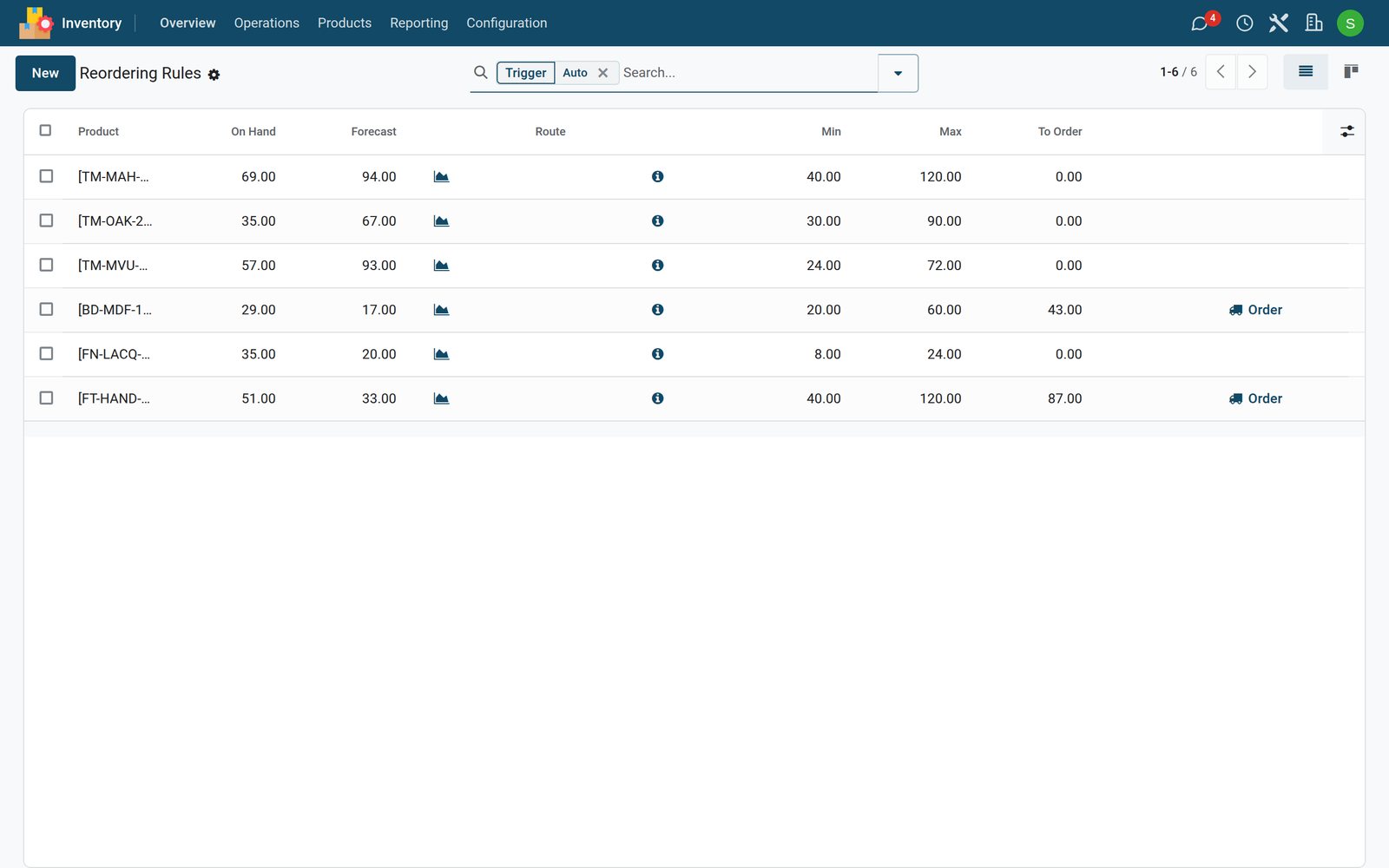
- On Hand is in stock now. Forecast adds what is coming in and takes off what is promised out.
- Min and Max are the limits you set.
- To Order is the quantity that brings the forecast back to the maximum: MDF sheets forecast at 17 with a maximum of 60, so 43.
- Order creates it: a request for quotation to the product's vendor or, for a product you make, a manufacturing order.
The Trigger decides who acts: Auto rules are run by the scheduler on their own; Manual ones wait in Replenishment for you to click Order.
Check what you learned
Loading the quiz…
These lessons were recorded on a working BridgeERP. Start a free trial and follow them on your own.