

Inventorylesson 4 of 4
Written lesson
Record what is really on the shelf and let BridgeERP correct the stock.
Read the lesson →Count your stock
Course contentslesson 4 of 4
Inventory basics4 min
Replenishment6 min
Warehouse transfers5 min
Daily operations5 min
What Daily operations gets you to
- Count the stock and correct the difference
Stock in the system drifts from stock on the shelf: breakage, mistakes, theft. A count puts them back in line. Open Inventory › Operations › Physical Inventory.
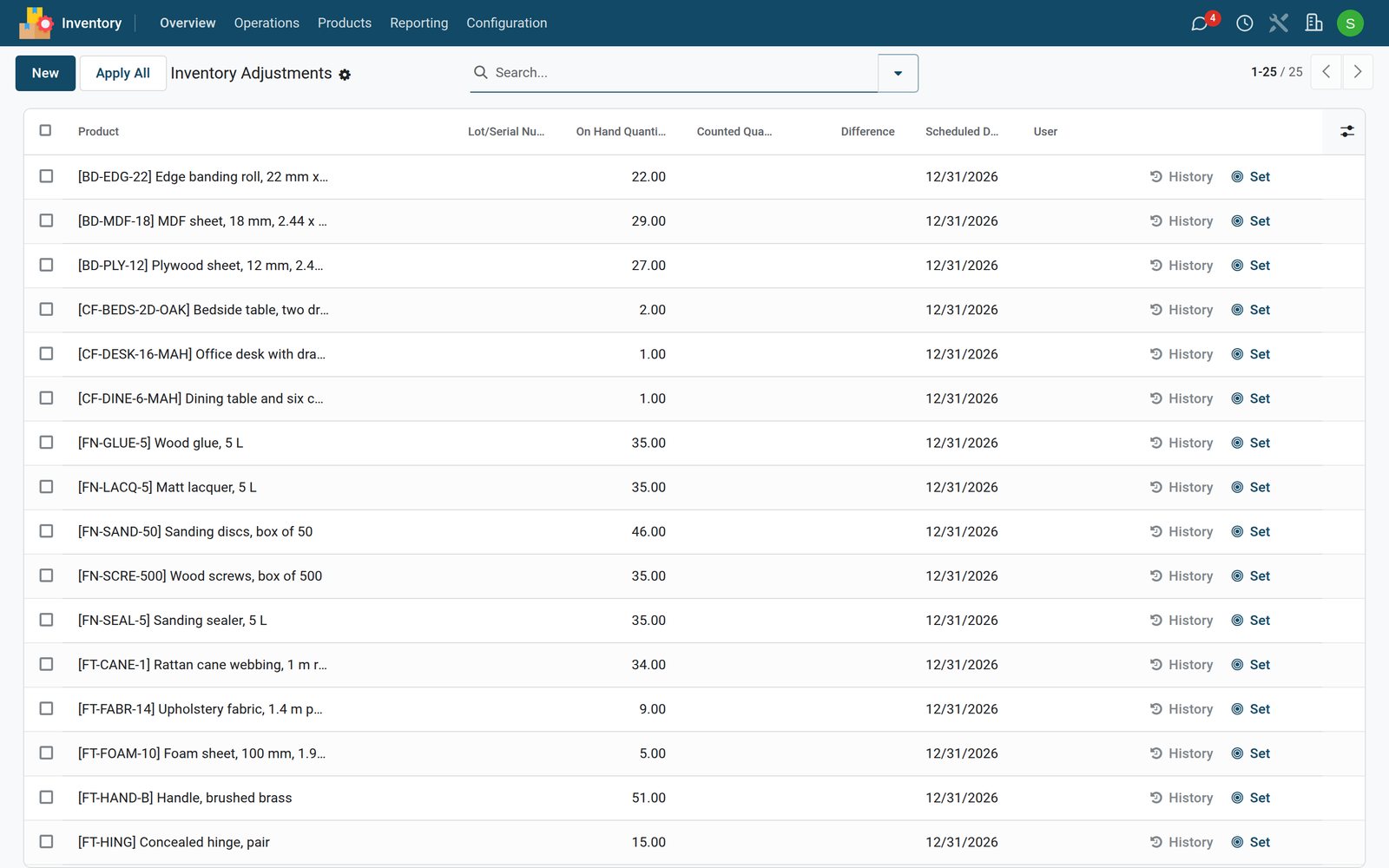
- Find the product: search, or filter by location or category.
- Type what you counted in Counted Quantity. The Difference shows at once.
- If the shelf matches, Set copies the on-hand figure as counted.
- Click Apply on the line, or select several lines and apply them together. Apply All applies every counted line.
Each correction is kept as a stock move, so History shows who changed what and when, and the stock value follows.
The Scheduled Date on every line is your next planned count. Set your annual inventory day in the Inventory settings (Annual Inventory Day and Month).
Check what you learned
Loading the quiz…
These lessons were recorded on a working BridgeERP. Start a free trial and follow them on your own.