

Inventorylesson 3 of 4
Deliver an order
Course contentslesson 3 of 4
Inventory basics4 min
Replenishment6 min
Warehouse transfers5 min
Daily operations5 min
What Warehouse transfers gets you to
- Deliver an order and handle a partial delivery
Confirming a sales order creates its delivery order. The Source Document field shows which order it came from.
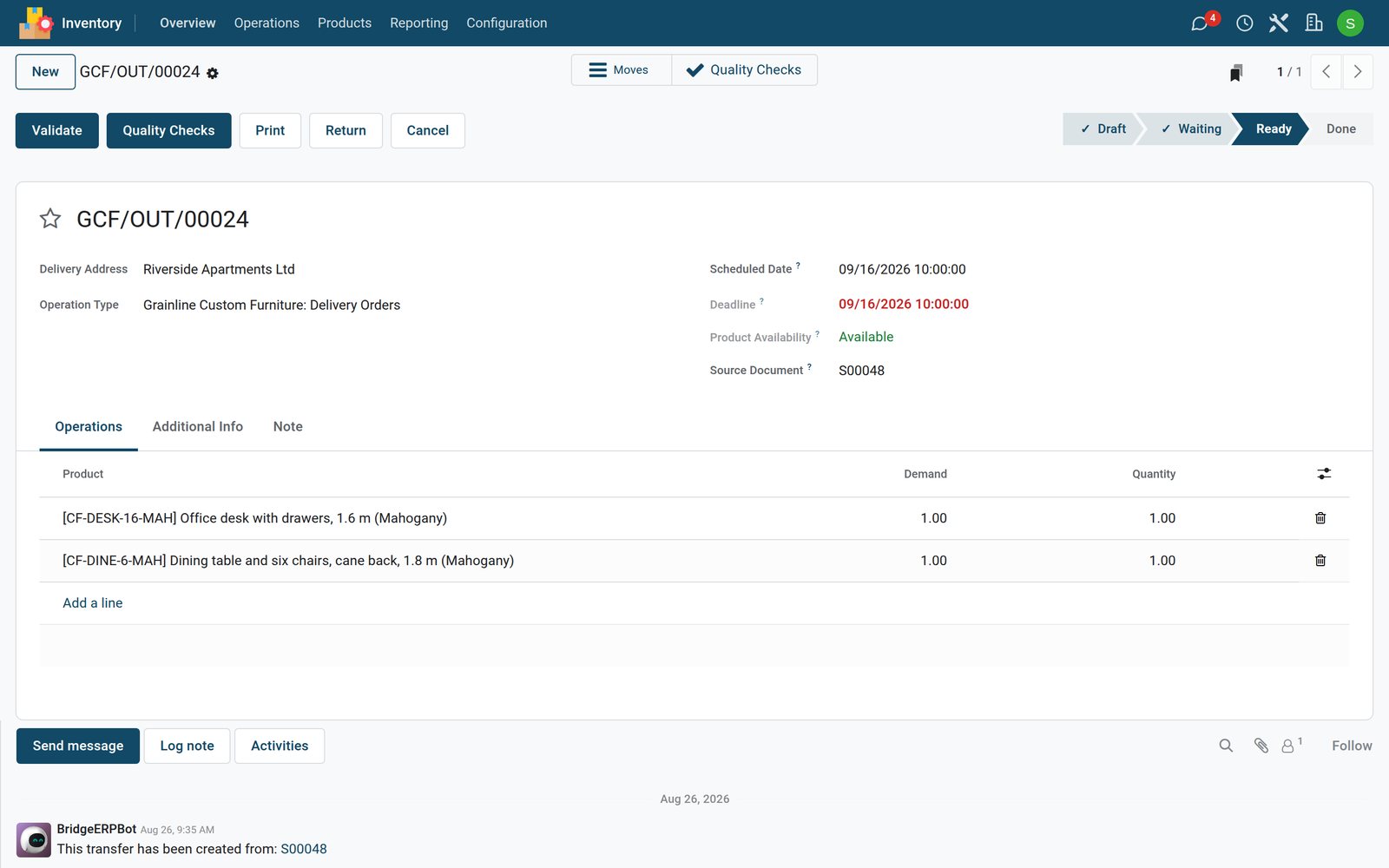
- Check Product Availability: Available means the stock is reserved for this delivery.
- On the Operations tab, Demand is what the customer ordered and Quantity is what you are sending.
- Click Validate when the goods leave. The stock goes down and the sales order shows them as delivered.
If you send less than the demand, BridgeERP offers a backorder for the rest, as with receipts. Print gives you a delivery slip to go with the goods, and Return on a done delivery brings goods back into stock when a customer returns them.
Check what you learned
Loading the quiz…
These lessons were recorded on a working BridgeERP. Start a free trial and follow them on your own.