

Purchaselesson 3 of 3
Written lesson
Create the vendor bill from the purchase order, so you only pay for what was ordered and received.
Read the lesson →Bill the vendor from the order
Course contentslesson 3 of 3
What Manage Deals gets you to
- Bill the vendor from the order, so you only pay for what was ordered and received
When the vendor's invoice arrives, do not type it from scratch. Open the purchase order and click Create Bill.
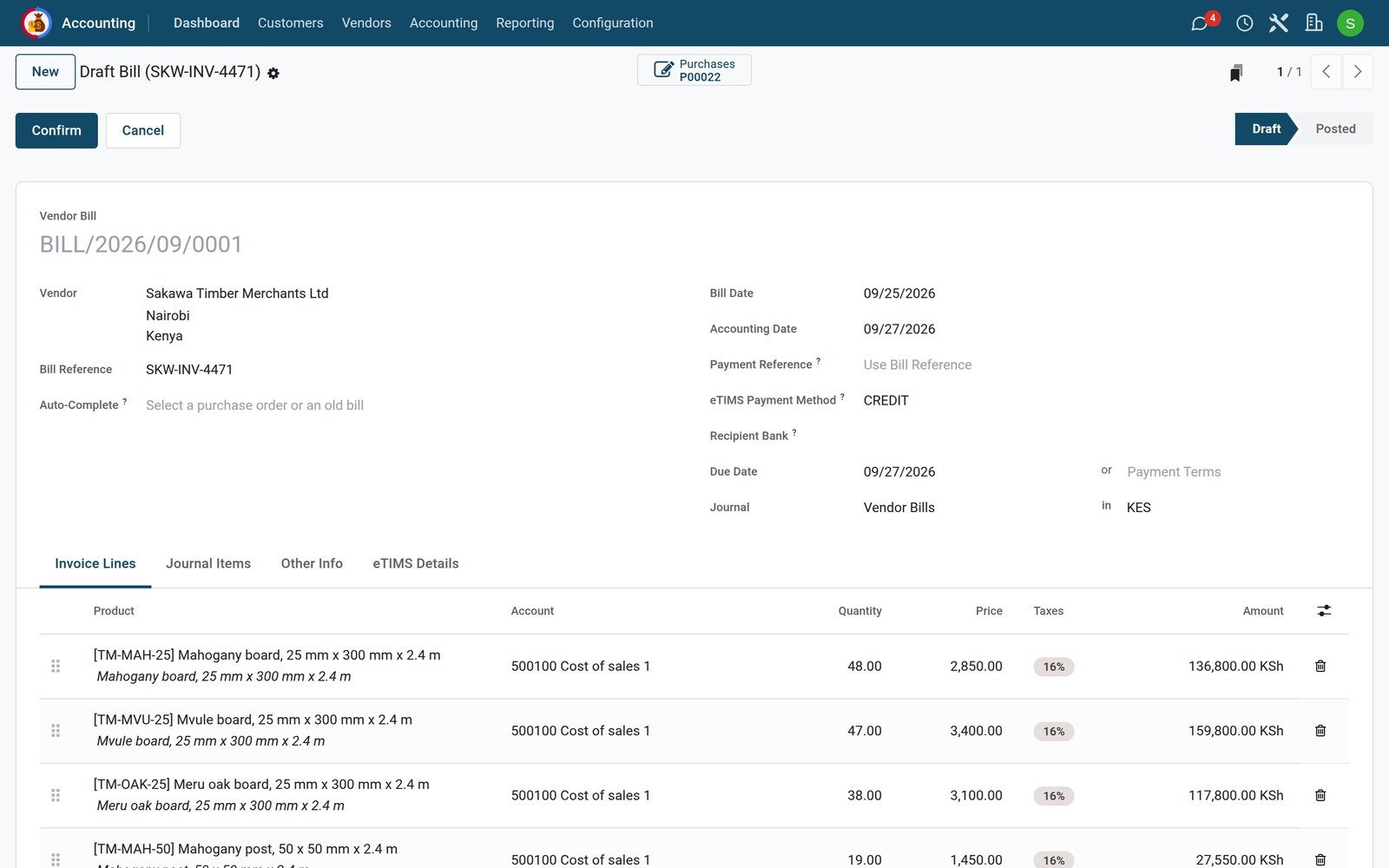
- BridgeERP creates a draft bill with the vendor, the products, the quantities, the prices and the taxes of the order.
- Type the vendor's invoice number in Bill Reference and the Bill Date printed on it.
- Compare it with the vendor's invoice, then click Confirm.
Pay only for what arrived
By default products are billed on received quantities: you can only bill what has been received. This is the three-way match (ordered, received, billed), and it stops you paying for goods that never came. You can bill on ordered quantities instead in Purchase › Configuration › Settings (Bill Control), which suits services and advance payments.
The Purchases button on the bill takes you back to the order, and the order's Billed column shows what has been invoiced.
Check what you learned
Loading the quiz…
These lessons were recorded on a working BridgeERP. Start a free trial and follow them on your own.