

Music School Management: Every lesson, teacher, room and tuition fee in one system
Timetable weekly lessons against teachers and rooms, take registers, set practice, grade exams on your own scales and collect termly fees online through mobile money or card gateways such as M-Pesa, Airtel Money and Pesapal.
Free instant access. No credit card required.
 Academics
 Fees & Billing
 Timetable
 Assessment Engine
 Payments & Mobile Money
 Invoicing
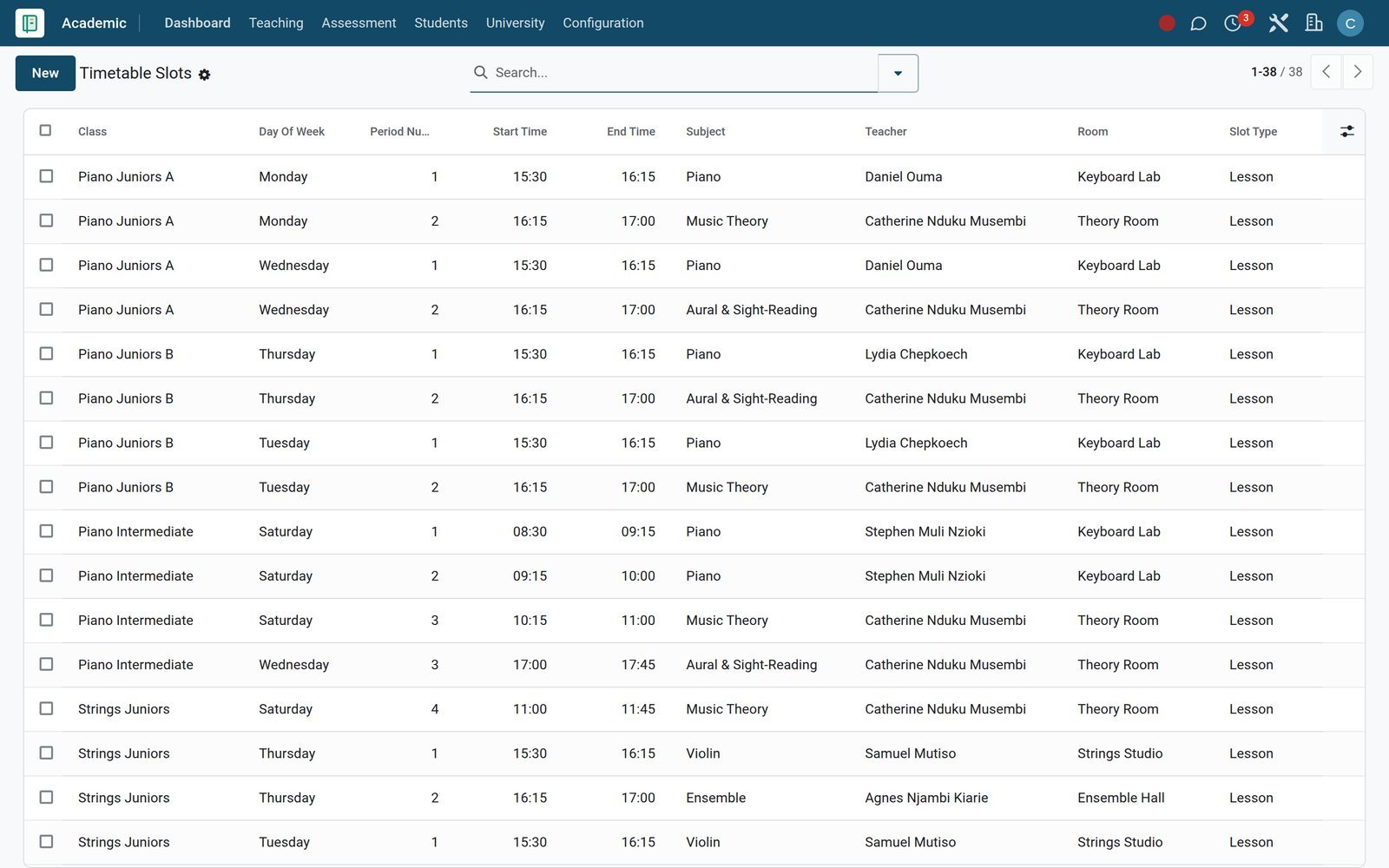
Know which teacher is in which room, every period of the week
Lessons sit on a timetable built from rooms and teacher assignments, and Teaching Load counts each teacher's weekly periods against the permitted maximum.
- Timetable
Assign teachers to subjects and classes
Teacher Assignments links each teacher to a subject and class for the term, with weekly periods and a class-teacher flag, all on one board.
Explore Timetable →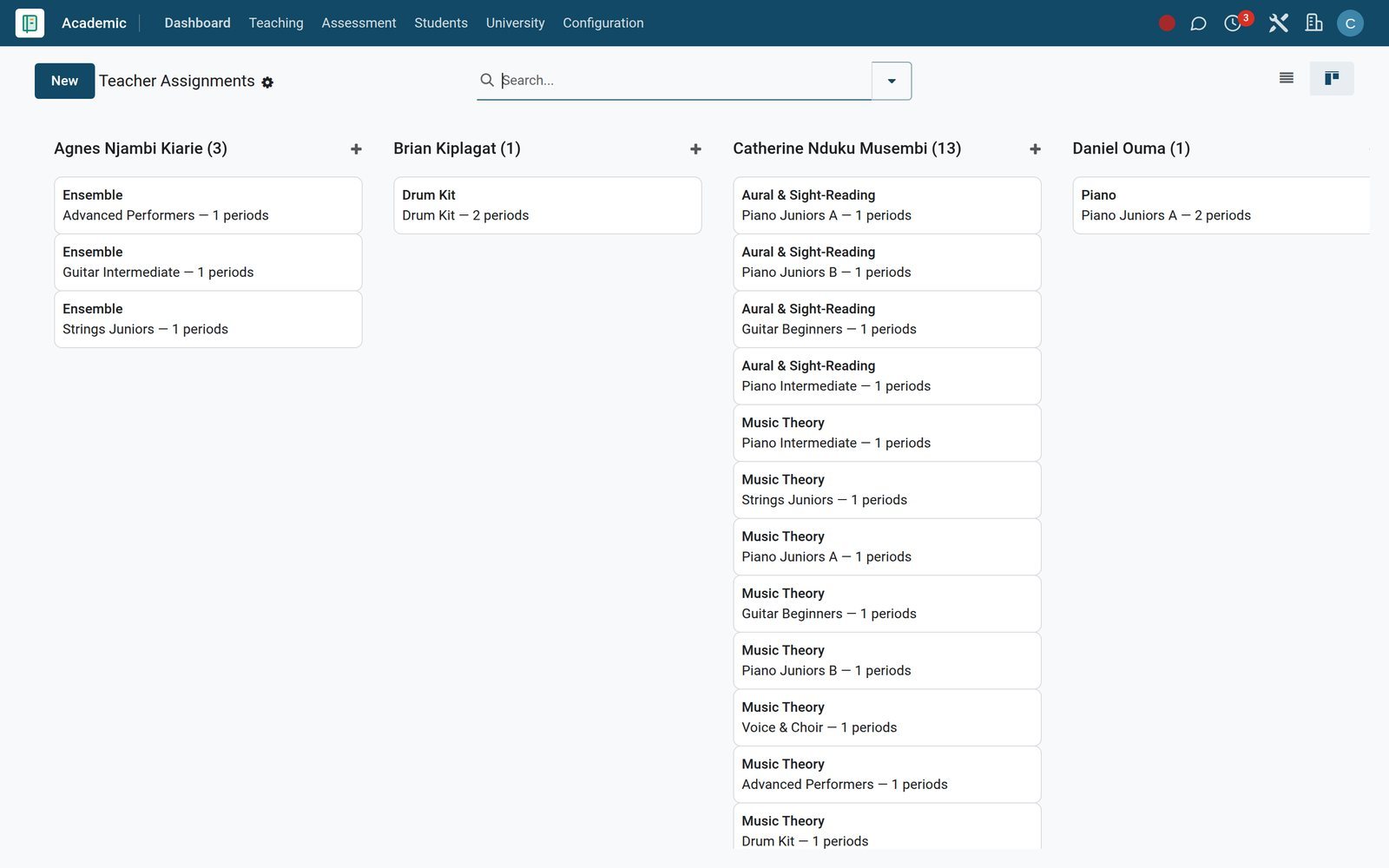
- Timetable
Stop overloading your busiest teachers
Teaching Load totals each teacher's periods per week, classes and subjects, and flags anyone above the permitted maximum before the timetable goes live.
Explore Timetable →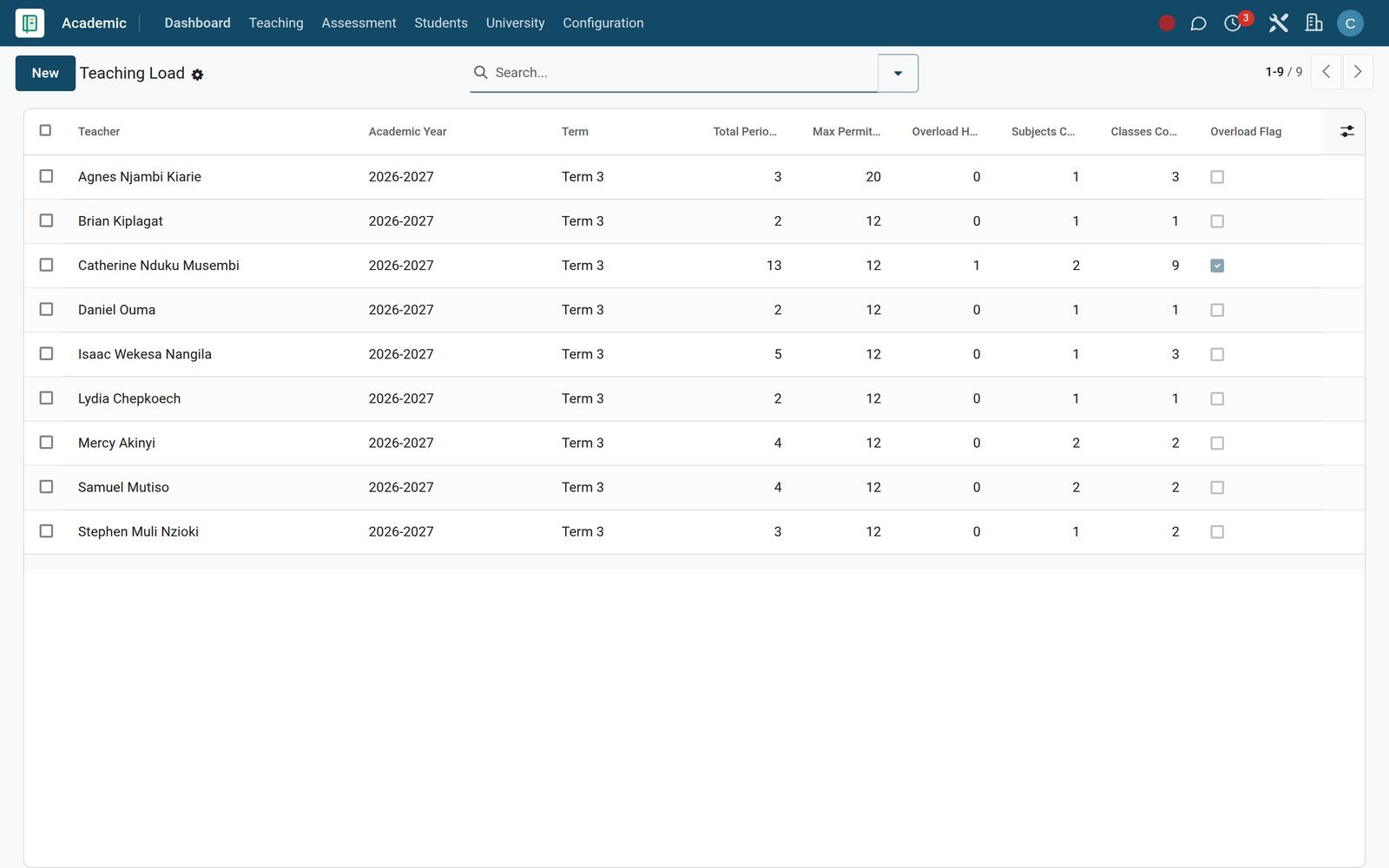
- Timetable
Give every studio a type and a capacity
Rooms records each practice studio, hall or classroom with building, capacity and room type, so lesson slots and exam sittings land in a space that fits.
Explore Timetable →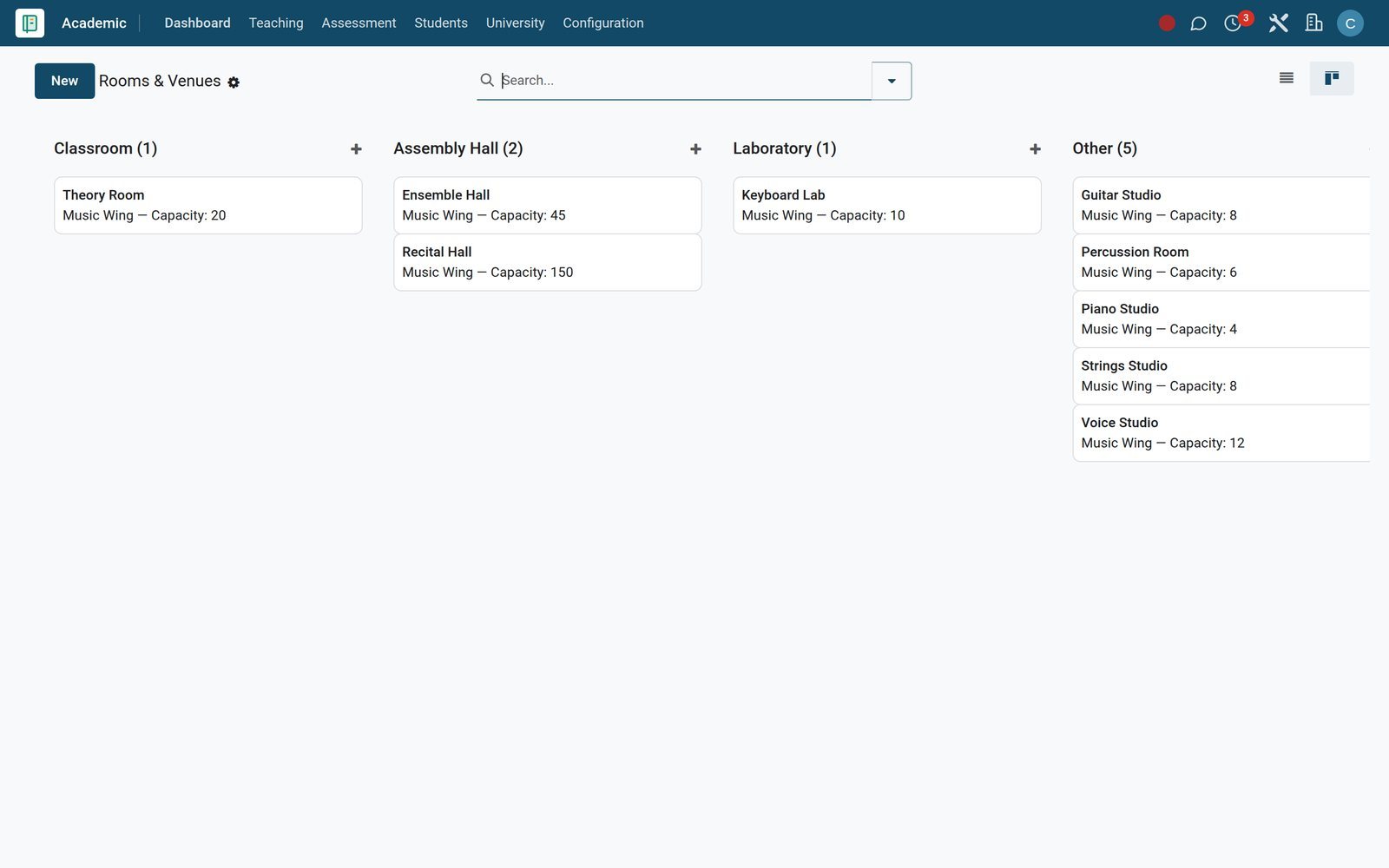
By the numbers
Set up for the way music schools bill, grade and talk to families
Counted on the BridgeERP demo school you can explore today.
- 16
- fee categories, each marked mandatory or optional and one-off or recurring
- 30
- grading scales, each with its own grade lines for exams and report cards
- 3
- payment gateways set up for fee links: M-Pesa STK Push, Airtel Money and Pesapal
- 9
- interface languages active, including Kiswahili and French, for staff and families
Inside the app
Everything a music school runs, grouped the way you work
Real menus from the Academic and Fees & Finance apps, organised by the job each one does.
Timetable and rooms
Timetables, Slots, Rooms and Slot Swap Requests fix each lesson's day, period, times, teacher and room, and route every swap for approval.
Teachers and workload
Teachers, Teacher Assignments and Teaching Load show who teaches which subject and class, and how many periods each person carries every week.
Attendance
Daily Attendance, Per-Period Attendance and Details record present, absent, late and excused marks for every lesson and every student.
Practice and lesson planning
Homework, Submissions and Lesson Plans set weekly practice with due dates, collect student work and keep each lesson's outcomes and resources.
Exams and marking
Exam Schedule, Examinations, Mark Entry and Bulk Mark Entry plan each sitting with room and invigilator, then capture scores class by class.
Progress reporting
Report Cards, Transcripts, Class Rankings and Grade Results turn marks into termly reports with class-teacher and principal comments.
Tuition billing
Fee Structures, Bulk Assign Structure, Installment Plans and Generate Invoices bill a whole class for the term in a single run.
Collections and financial aid
Overdue Pipeline, Bulk Reminder, Dunning Policies, Scholarships and Bursaries chase open balances and fund the students who need help.
Step by step
From audition to a paid-up term in six steps
Each step happens in a BridgeERP app and hands its record straight to the next.
- Step 1
Audition and admit
Admissions records each applicant with interview date, interview notes and an evaluation score, and the Admission Pipeline report shows where everyone stands.
- Step 2
Enrol in subjects
Subject Enrollments in Academic place each student on their instrument and theory subjects for the term, with elective flags and final grades.
Academics - Step 3
Timetable the lessons
Academic places each class and subject into timetable slots with day, period, start and end time, teacher and room.
Timetable - Step 4
Teach and take the register
Teachers open Today's Timetable, mark the Attendance Register and set practice as Homework, all from the Today menu in Academic.
Academics - Step 5
Bill the term
Fees & Finance assigns the fee structure to each class, applies sibling discounts and instalment plans, then generates the term's invoices.
Fees & Billing - Step 6
Collect and report
Families pay online by mobile money or card, Accounting reconciles each payment, and Report Cards close the term for every student.
Accounting
See who missed a lesson before the parent calls
Registers are taken per day or per period, and every mark feeds Attendance Analytics and the attendance figure on each report card.
 Academics
Every mark, for every student
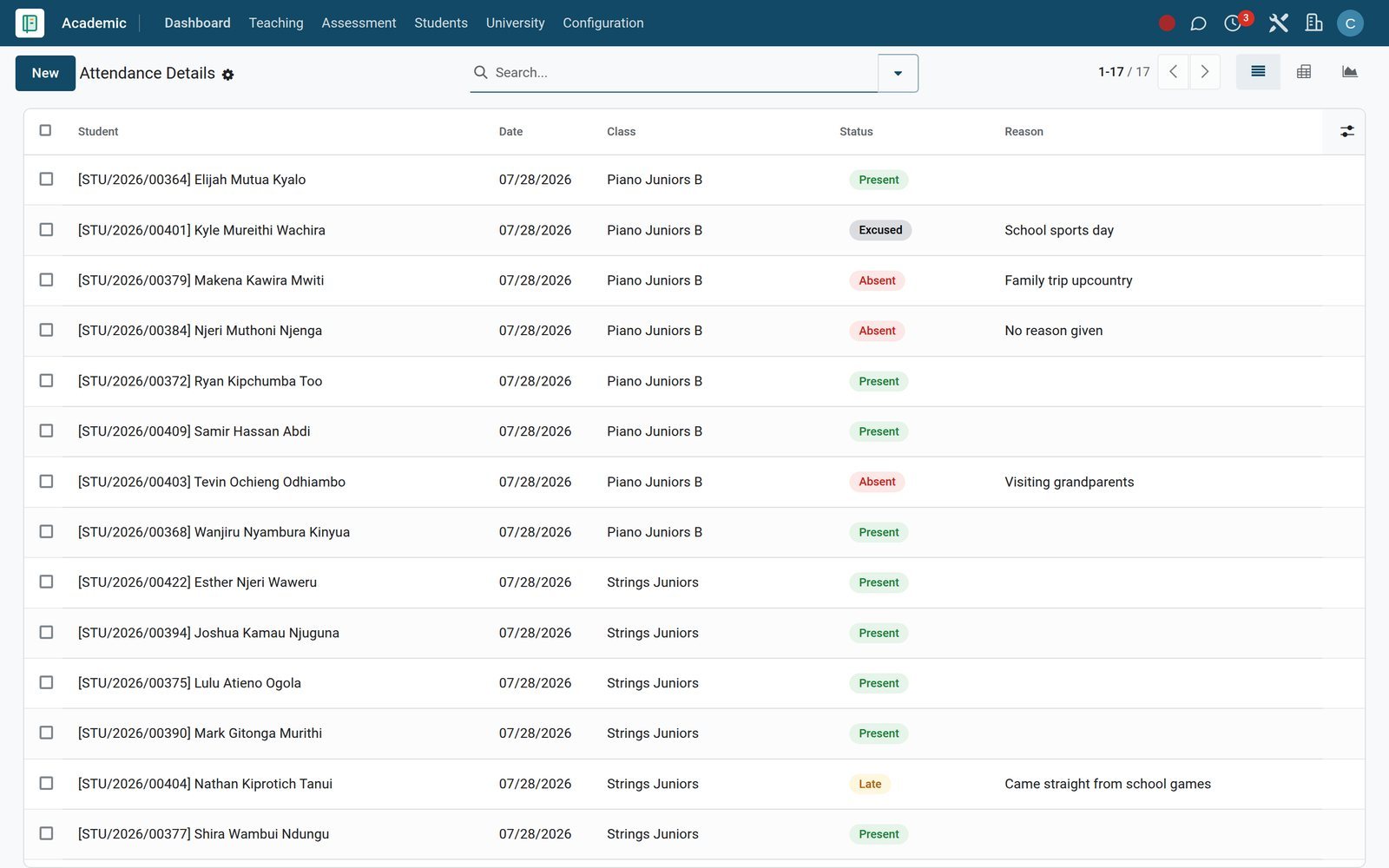
Attendance Details lists each student's status on every register, present, absent, late or excused, with the date, class and reason beside it.
Explore Academics →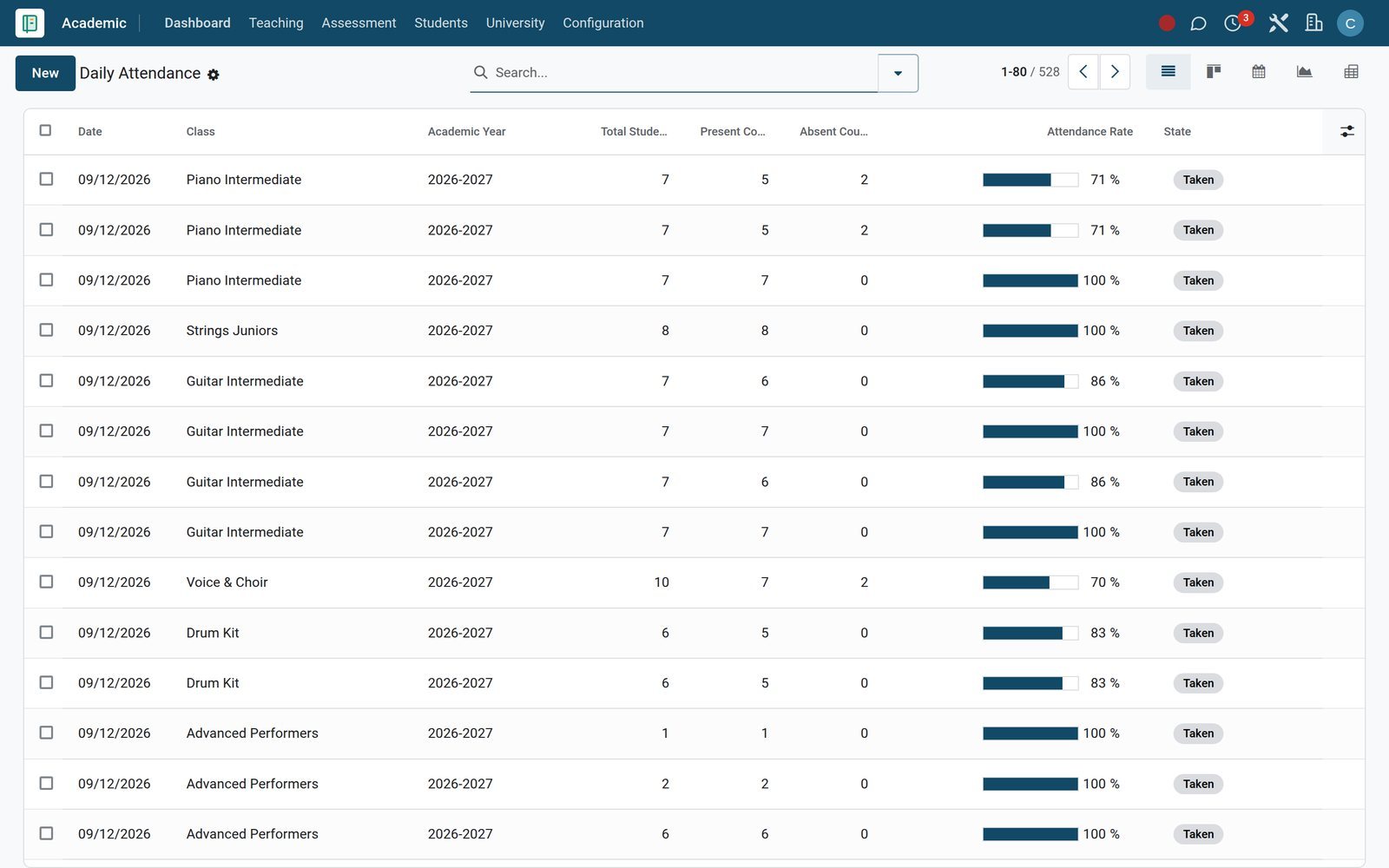 Academics
Registers with a rate and an absence text
Each Daily Attendance register shows present and absent counts with the attendance rate, and carries a Send absence SMS option for parents.
Explore Academics →Set weekly practice and see who did it before the next lesson
Homework is how practice gets assigned, handed in, graded and answered with written feedback.
 Academics
Practice tasks with a time target
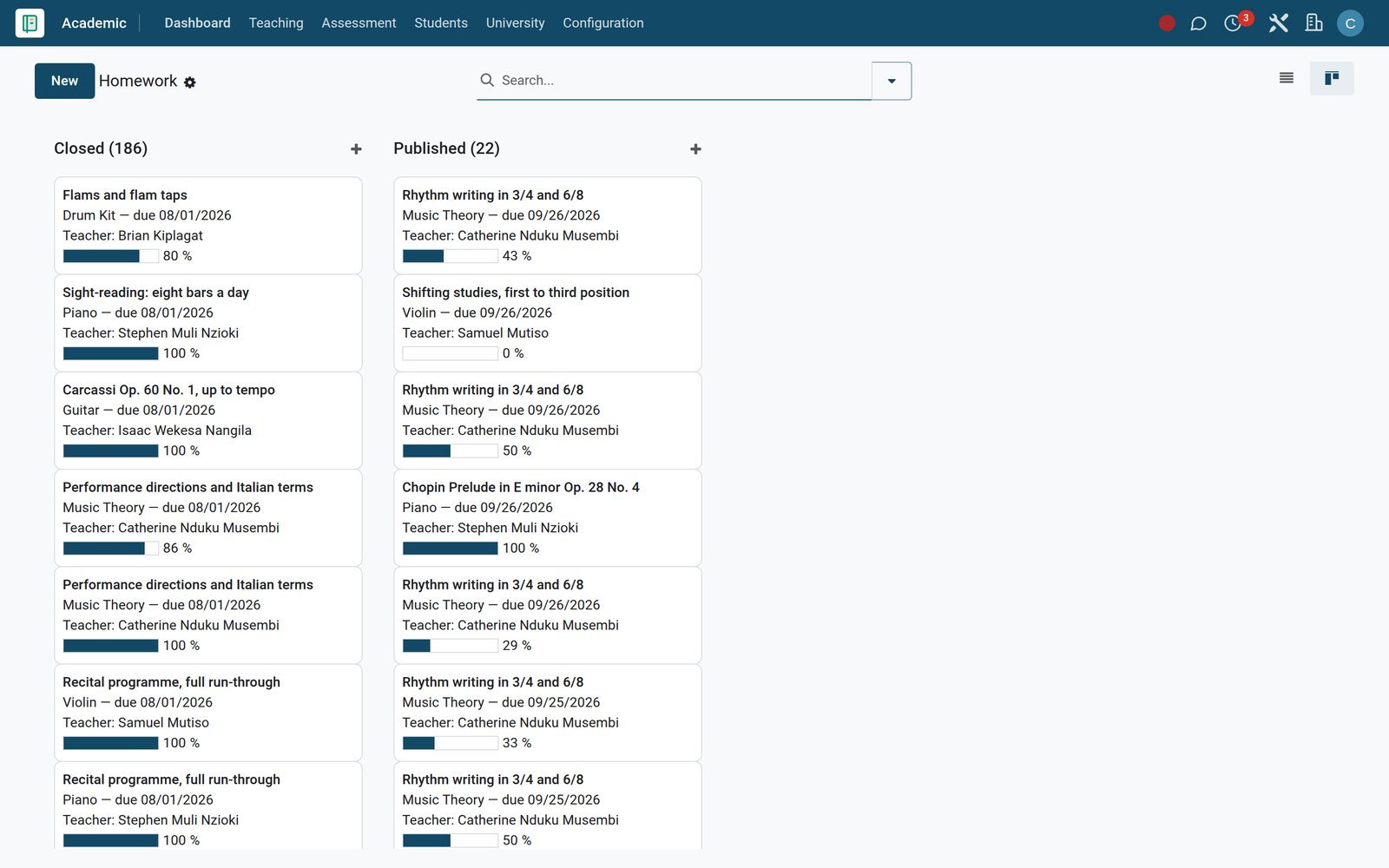
Homework sets the task, subject, classes, due date and expected duration in minutes, with attachments or links for scores and backing tracks.
Explore Academics →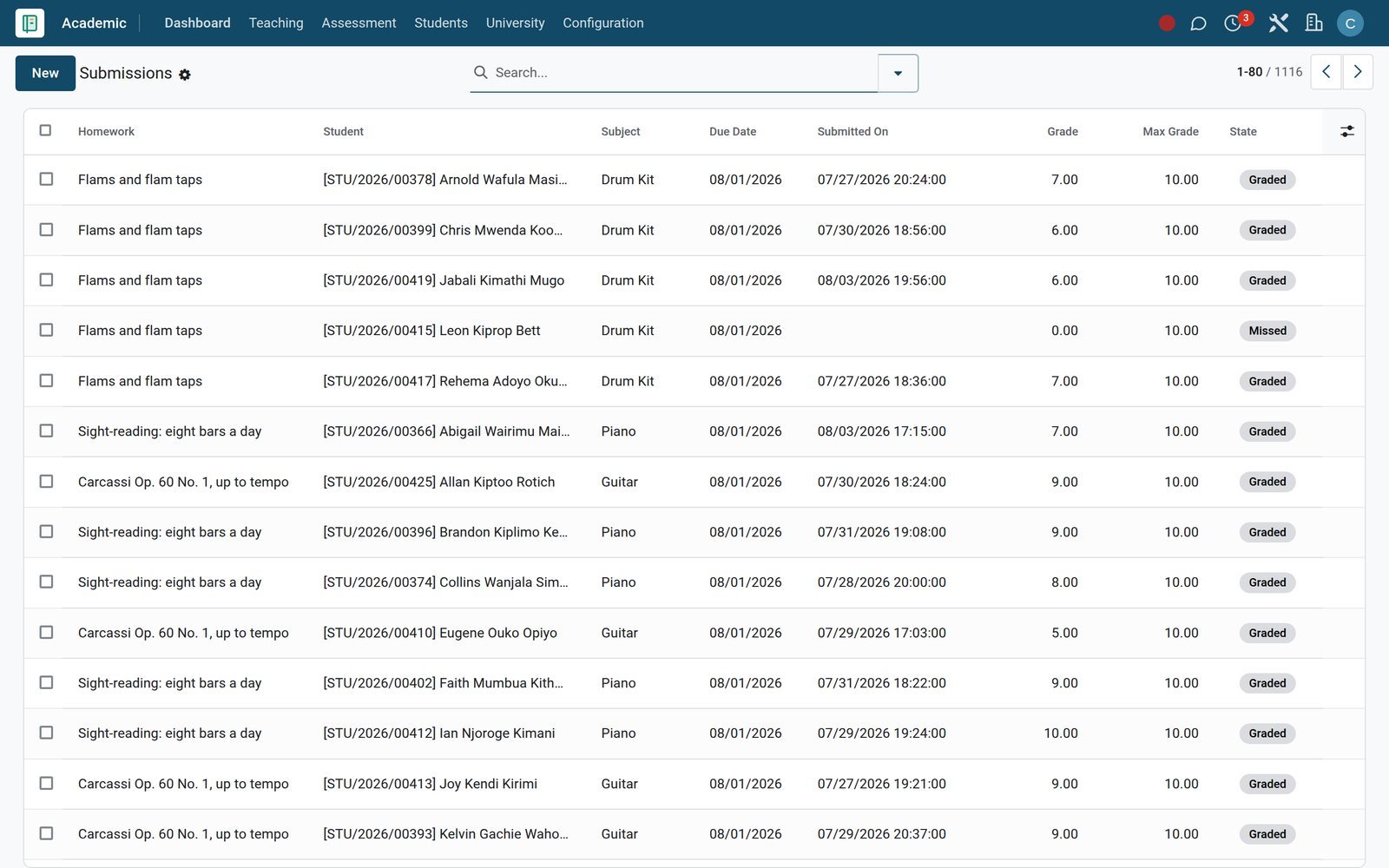 Academics
Feedback on every hand-in
Submissions shows each student's hand-in with submitted date, late flag, grade out of the maximum and the teacher's written feedback.
Explore Academics →Run graded exams and termly reports without a spreadsheet
Plan each sitting, capture marks once, then publish report cards with averages, class rank and attendance.
- Assessment Engine
Exam sittings with room and invigilator
Exam Schedule lists each sitting by date, start and end time, class, room and invigilator, with a calendar view for the whole exam season.
Explore Assessment Engine →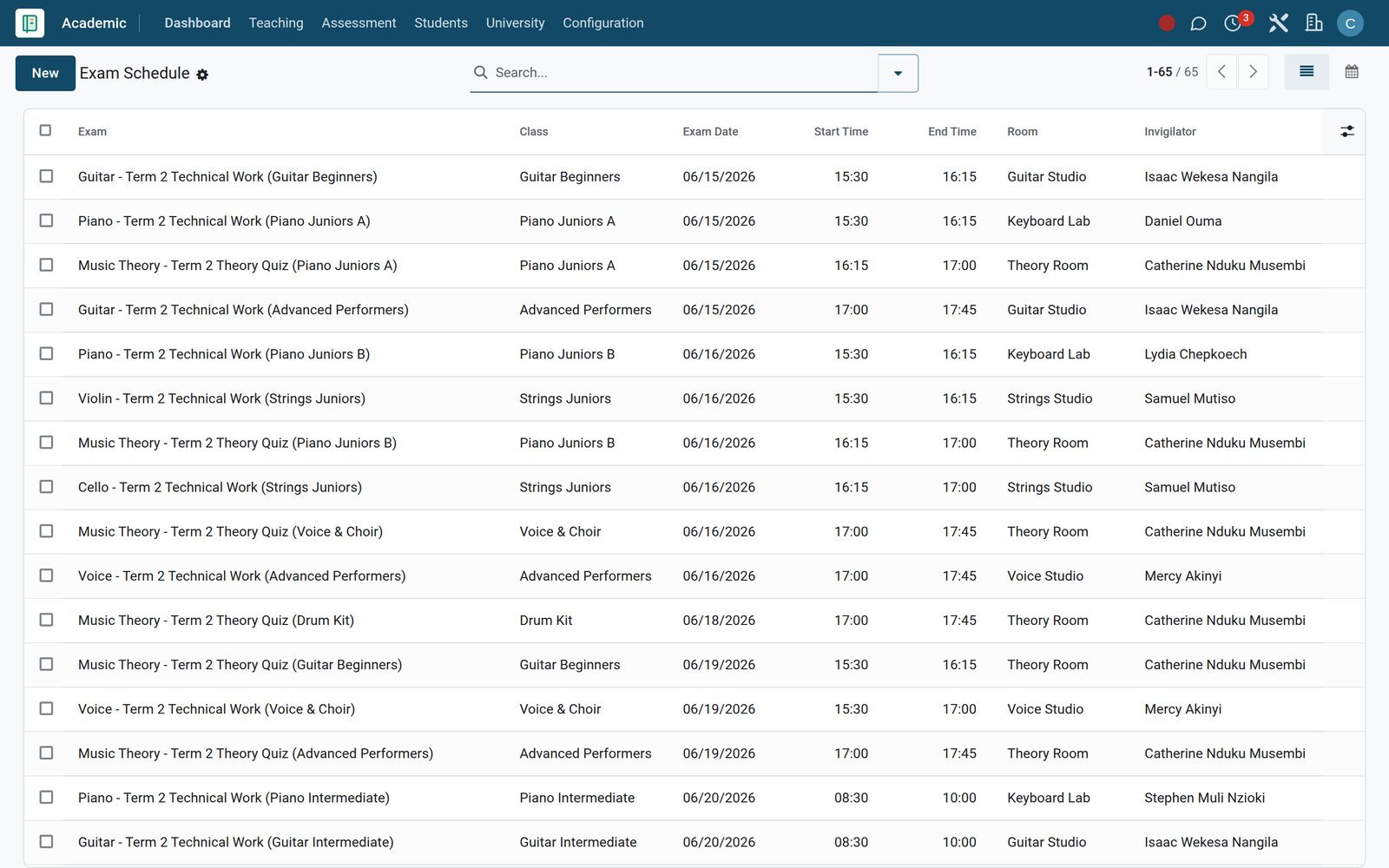
- Assessment Engine
Marks entered once, checked by a named reviewer
Mark Entry records each student's score, percentage and remarks per exam, with absence reasons and validation by a named member of staff.
Explore Assessment Engine →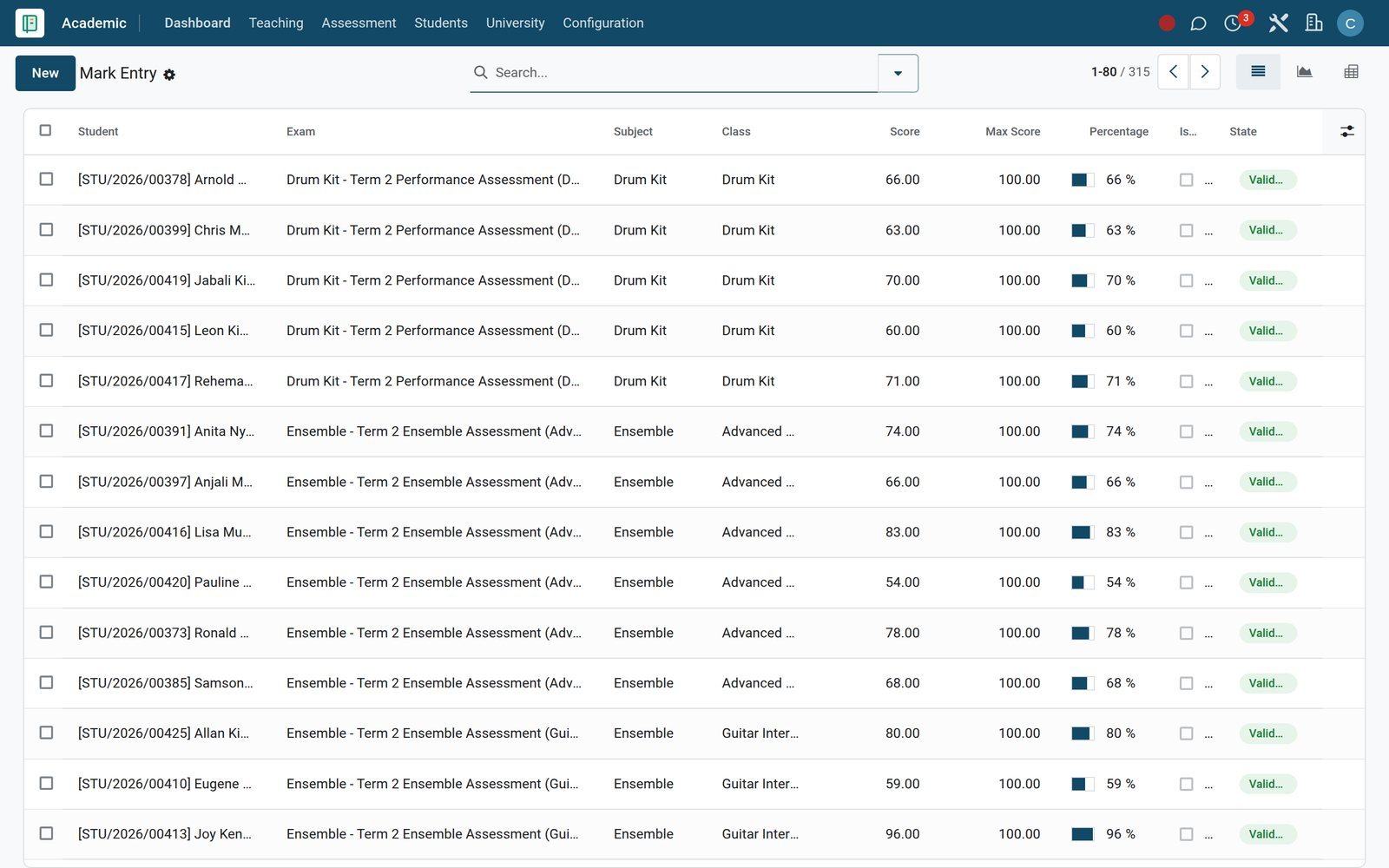
- Assessment Engine
Report cards families can read
Report Cards gather total marks, average, class rank and attendance for the term, with class-teacher and principal comments before publishing.
Explore Assessment Engine →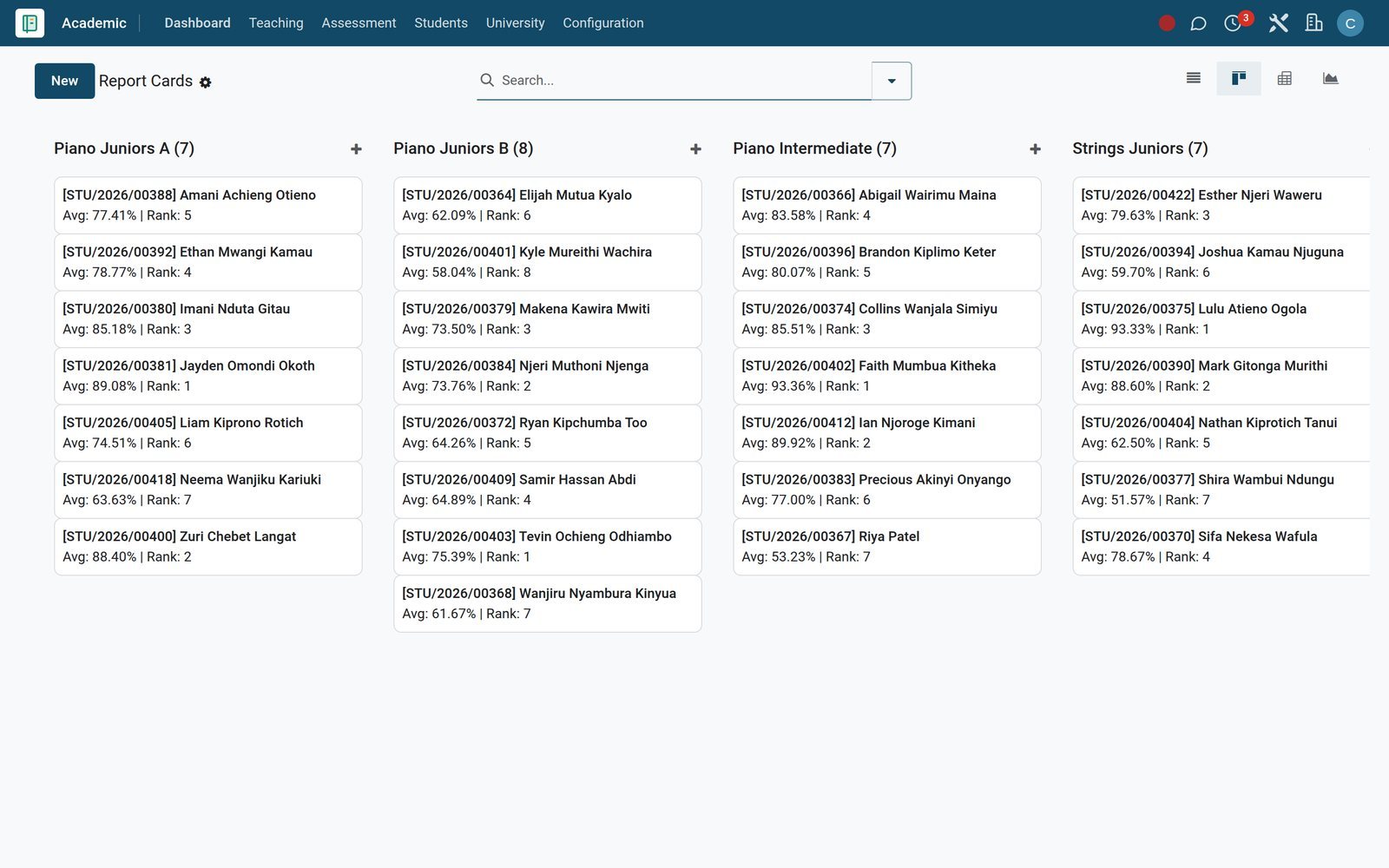
Collect every term's tuition and know exactly who still owes
Fees & Finance bills from fee structures, tracks each student's balance and ages whatever is still outstanding.
- Fees & Billing
One card per student fee account
Revenue Board shows each student's fee account for the term with total, amount paid and remaining balance, grouped by payment state, with any discount kept on the account.
Explore Fees & Billing →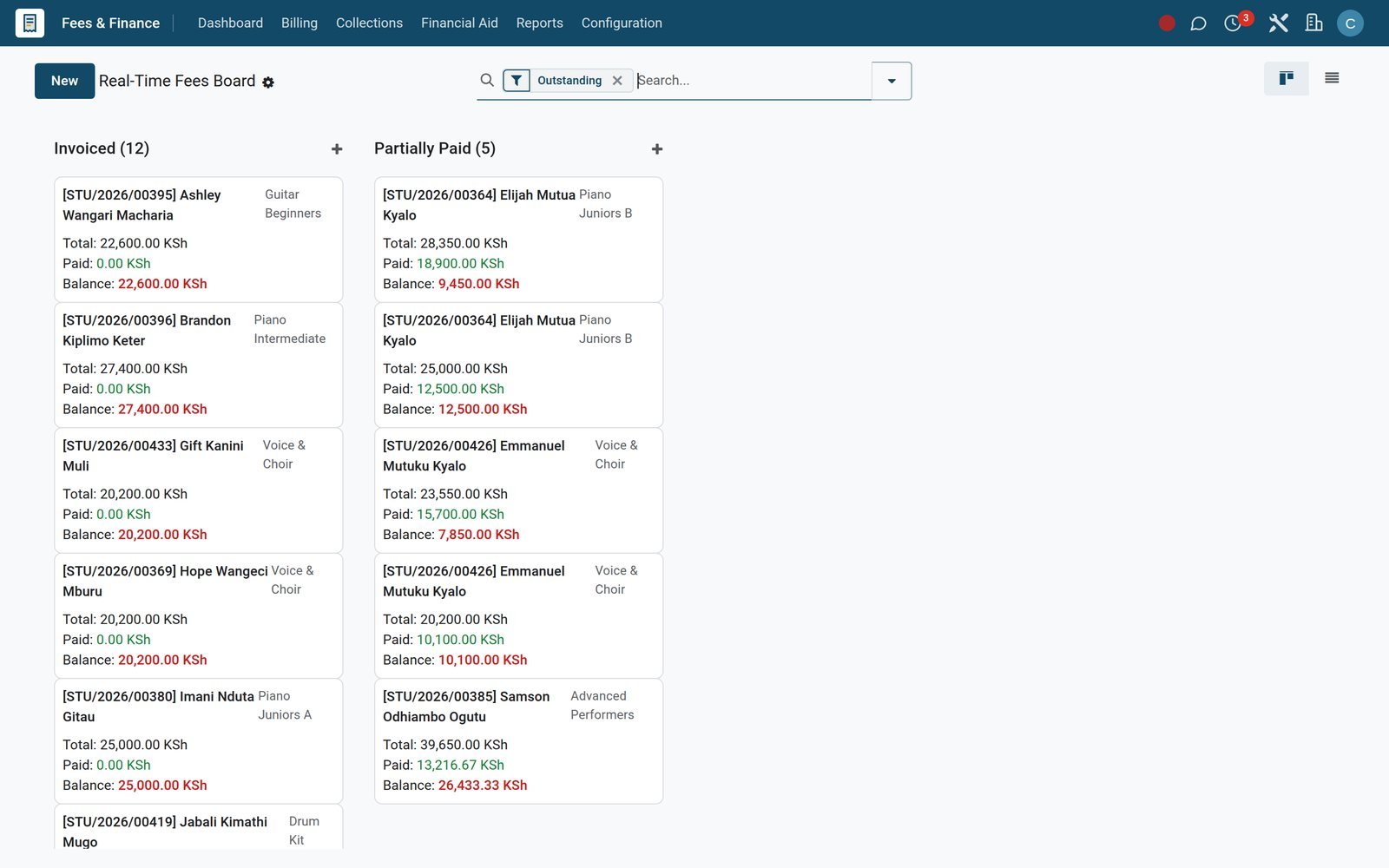
- Fees & Billing
Invoices that carry a payment link
Fee Invoices list each invoice's student, term, instalment, due date, total and amount outstanding, and every invoice carries its own online payment link.
Explore Fees & Billing →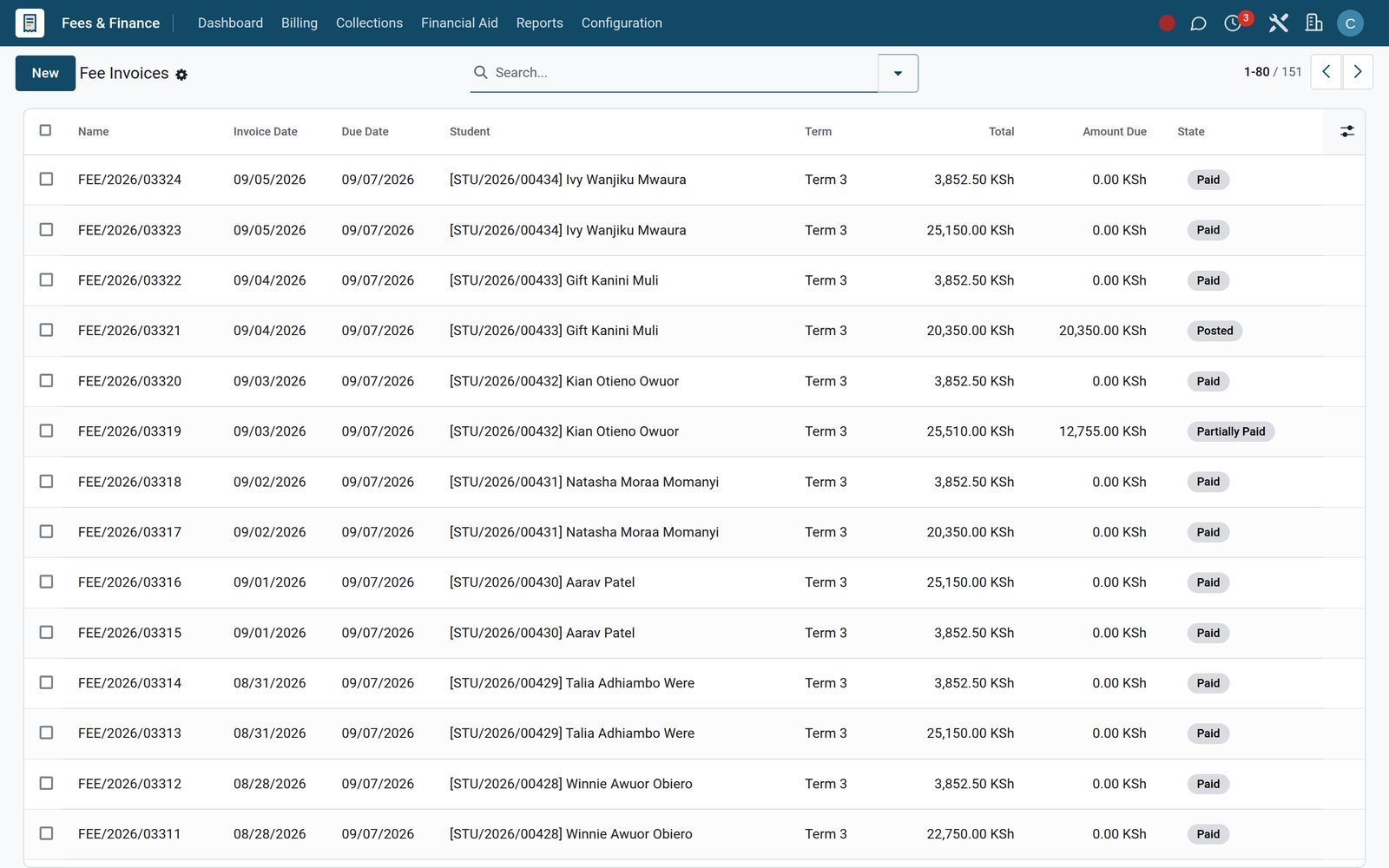
- Fees & Billing
Ageing you can act on
Outstanding Aging pivots the fees of every account still owing by ageing bucket, class and fee category, so reminders reach the right families first.
Explore Fees & Billing →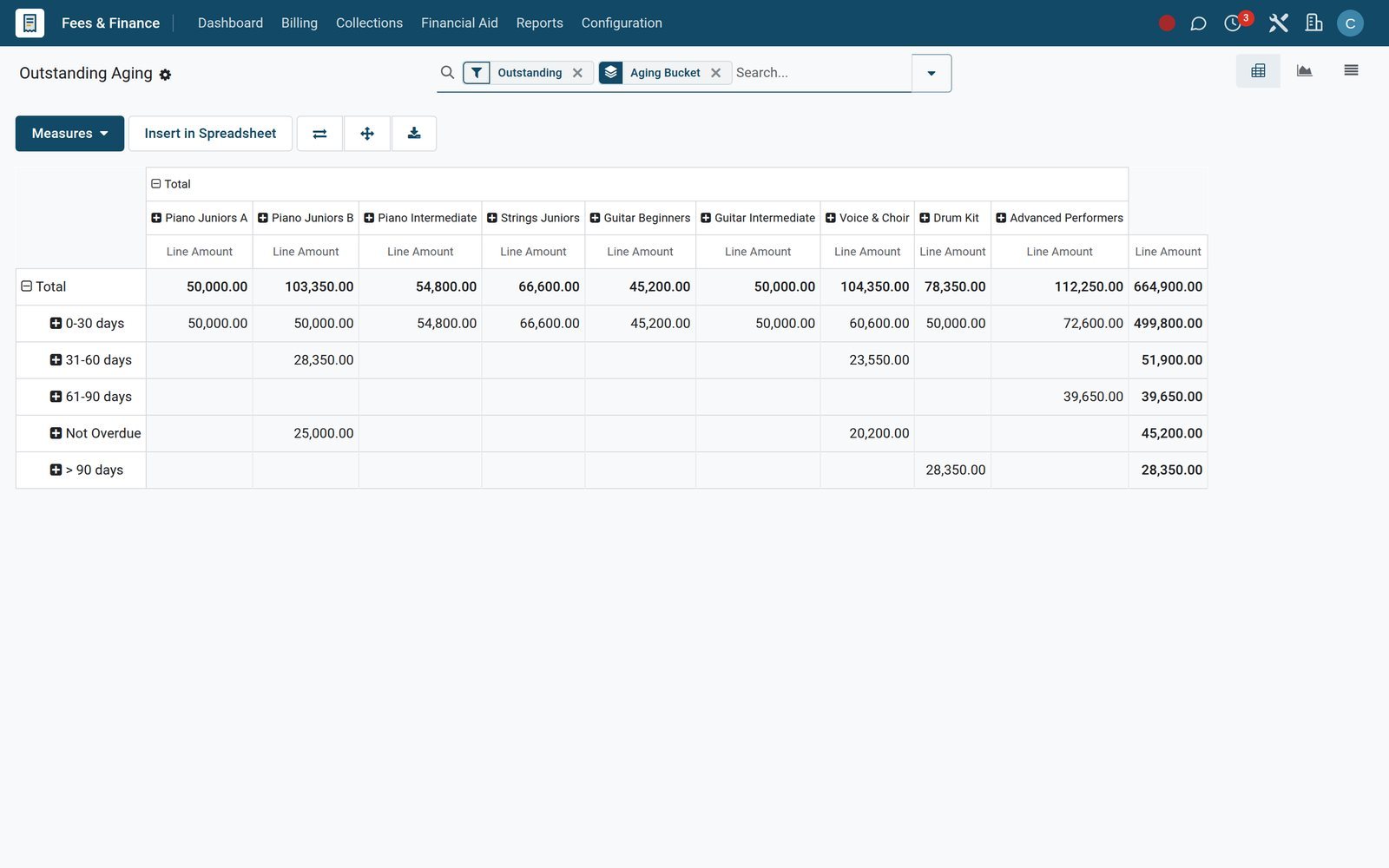
Ensembles, recitals and the life between lessons
The same database runs the groups, performances and resources that make a music school more than a timetable.
Choirs, bands and ensembles
Run each ensemble as a Club with a coach, meeting day, time and location, member roles, a membership fee and a cap on places.
Recitals and concerts
Events plans each recital with dates, seats, registrations, volunteer roles and a planned budget set against actual spend.
Festivals, competitions and awards
Competitions records each festival or contest with level, venue, organiser and participants, and Awards keeps positions and certificates on the student's record.
Online lessons
Virtual Classroom schedules live sessions with a Zoom join link, keeps the recording link and pulls attendance back once the lesson ends.
Scores and method books
Library catalogues method books and scores with copies and shelf location, and issues them with due dates, renewals and overdue fines.
An instrument register
Labs & Equipment lists each instrument with serial number, asset code, room and next service date, so tuning and repairs are planned ahead.
Hall and studio bookings
Facilities books the hall or a studio for rehearsals with start and end times, purpose and the number of expected attendees.
A school shop on the fees account
The School Shop till sells books and accessories, and families can settle with the Charge to Student Fees payment method instead of cash.
Who uses it
What each person at the school opens first
Menus and reports map to the people who run a music school from day to day.
Director
Revenue Board, Collection Rate and the fee forecast show tuition billed, collected and due, beside Academic Performance for the whole school.
Head of music
Timetables, Teaching Load, Slot Swap Requests and Approval Logs let the head of department balance workloads and sign off timetable changes.
Instructor
The Today menu opens Today's Timetable, the Attendance Register, Lesson Plans Due and Assessments Due, so the teaching day starts in one place.
Registrar
Admissions, the Admission Pipeline report and Subject Enrollments take a student from applicant to timetabled learner, with siblings grouped in Family Groups.
Bursar
Overdue Pipeline, Bulk Reminder, Fee Waivers and Refunds keep collections moving, while Accounting reconciles every payment against its invoice.
Parents
Families receive announcements by email, SMS or WhatsApp, join parent meetings by video link and pay fee invoices through a payment link.
In your country
Built for how families pay and talk, wherever the school is
Mobile money, local currency and local languages are switched on in the demo school, not promised for later.
Mobile money prompts on fee invoices
Parents open the invoice's payment link and approve a mobile-money prompt on their phone, an M-Pesa STK Push on the demo, while Payment Audit logs each gateway event.
Other wallets and cards
On the demo, Airtel Money and Pesapal sit beside M-Pesa under Payment Providers, so each family pays with the wallet or card it already uses.
Bill in one currency, report in another
On the demo, fee invoices are raised in Kenya shillings while the books run in US dollars, and Unrealized Currency Gains/Losses revalues the open balances.
Reminders by SMS and WhatsApp
Bulk Reminder sends fee reminders by email, SMS or WhatsApp to a class or an ageing bucket, and announcements use the same channels.
Many languages for staff and parents
On the demo, Kiswahili, French, Arabic and Portuguese are among the active languages, so each user works in the language they read most easily.
Instalments and sibling discounts
Installment Plans split a term's fees by frequency and due dates, and Family Groups apply a sibling discount across brothers and sisters.
Works with
Apps that run alongside your music school
Installed on the same BridgeERP database, sharing the same students, families and invoices.
 AccountingFee invoices post to the ledger for reconciliation and statements.
 EventsRecitals and concerts with registrations and volunteers.
 eLearningOnline courses for theory and listening work.
 WebsiteThe school's public site and event pages.
 Point of SaleSchool Shop till for books and accessories.
 CRMEnquiries from prospective families.
 EmployeesTeacher records and contracts.
 Email MarketingNewsletters and term updates to families.
 SurveysFeedback forms for parents and students.
 SignAdmission offers signed online.
 DocumentsStudent files kept in one place.
 DiscussStaff chat and channels.
Reports and control
Reports that answer the director's Monday questions
Each one is a live report or dashboard you can filter, group and pivot in place.
Collection Rate
Collection Rate compares billed and paid tuition by class, fee category and academic year, in graph, pivot or list view.
Outstanding Aging
Outstanding Aging groups unpaid balances by days overdue, so the bursar sees which families slipped behind this month.
Attendance Analytics
Attendance Analytics charts presence and absence by class, term and date to catch students drifting away early.
Academic Performance
Academic Performance pivots scores and percentages by subject, class and term, showing which instrument or theory groups need attention.
Class Rankings and Transcripts
Class Rankings order students by average score within each class, and Transcripts carry cumulative averages across every term studied.
Payment Audit
Payment Audit logs every gateway event with provider, reference, amount and state change, so a disputed mobile money payment is traced quickly.
Approval trail
The Approval Matrix sets which group signs off academic changes, and Approval Logs keep a dated record of every decision.
Financial statements
Aged Receivable, Profit and Loss, Balance Sheet and Cash Flow Statement run on the same fee invoices and payments, with no export step.
Getting started
Set it up once, then run every term the same way
Setup happens in the same menus your staff will use every day.
Import students and families
Bring student, guardian and teacher lists in from Excel or CSV, map each column to a field and test the file before anything is saved.
Correct records in bulk
Re-import a corrected spreadsheet with the same external IDs and the existing records update instead of being created twice.
Build the timetable
Create Rooms, then a Timetable for each class with periods per day, period length and first period start, and add the Slots.
Set up fees once
Define Fee Categories and Fee Structures, attach an instalment plan, then use Bulk Assign Structure to bill whole classes at once.
Choose how you grade
Pick Grading Scales, Assessment Types, Competency Levels and Rubrics under Academic Configuration before the first exam is marked.
Switch on payments
Enable your payment providers, such as M-Pesa, Airtel Money or Pesapal, under Payment Providers, then share each fee invoice's payment link with the family.
Questions
Questions about Music School Management
Not covered here? Contact us.
How are lessons scheduled?
Each class gets a Timetable with periods per day and period length. Slots then fix the day, start and end time, subject, teacher and room, and teachers can raise Slot Swap Requests that are approved or rejected with a reason.
Can parents pay tuition with mobile money?
Yes. On the demo, M-Pesa STK Push, Airtel Money and Pesapal are set up as payment providers, and every fee invoice carries its own payment link. Each gateway event is written to the Payment Audit log.
Can we split fees into instalments and give sibling discounts?
Installment Plans split a fee structure by frequency and due dates. Family Groups gather siblings under one guardian, show a consolidated balance and apply a sibling discount percentage.
How do we follow a student's progress between exams?
Set practice as Homework, grade Submissions with written feedback, score work against Rubrics and Competency Levels, and publish Report Cards with averages, class rank and attendance at the end of term.
Can we run recitals, concerts and ensembles?
Recitals and concerts run in Events with registrations, volunteer roles and a planned budget. Choirs, bands and ensembles run as Clubs with a coach, meeting schedule, member roles and a membership fee.
Can teachers give lessons online?
Yes. Virtual Classroom sessions hold the Zoom join link, the recording link and the attendee list, and attendance can be pulled back once the session ends.
Can we bring our existing student list across?
Yes. Import students, guardians and teachers from Excel or CSV, map each column to a field and run a test before saving. Re-importing with the same external IDs updates records instead of duplicating them.
Does it work in other languages, such as Kiswahili and French?
Yes. On the demo, Kiswahili (Kenya and Tanzania), French, Arabic, Portuguese, Spanish, German and Chinese are active alongside English, and each user chooses their own language.
Tax compliance
Invoices your tax authority accepts
In Kenya, Uganda, Rwanda, Burundi and Zambia, each invoice, receipt and stock movement goes to the tax authority's own system when you post it. Ghana and Pakistan come next, and we connect 73 more countries on request.
- KenyaReady
eTIMS KRA
Invoices, credit notes, POS receipts and stock movements
- UgandaReady
EFRIS URA
Invoices, POS receipts and stock
- RwandaReady
EBM RRA
Invoices, POS receipts, stock and imports
- BurundiReady
EBMS OBR
Invoices, POS receipts, stock and manufacturing
- ZambiaReady
Smart Invoice ZRA
Invoices, POS receipts, stock and imports
Music School Management, app by app
One connected flow instead of separate systems — the work moves from one team to the next without re-typing anything.
Every stop is a real app in your plan, and the hand-offs between them are the product.
- Operations
- Finance
Academics
Courses, batches, subjects, enrolment, attendance and gradebook.
Academics →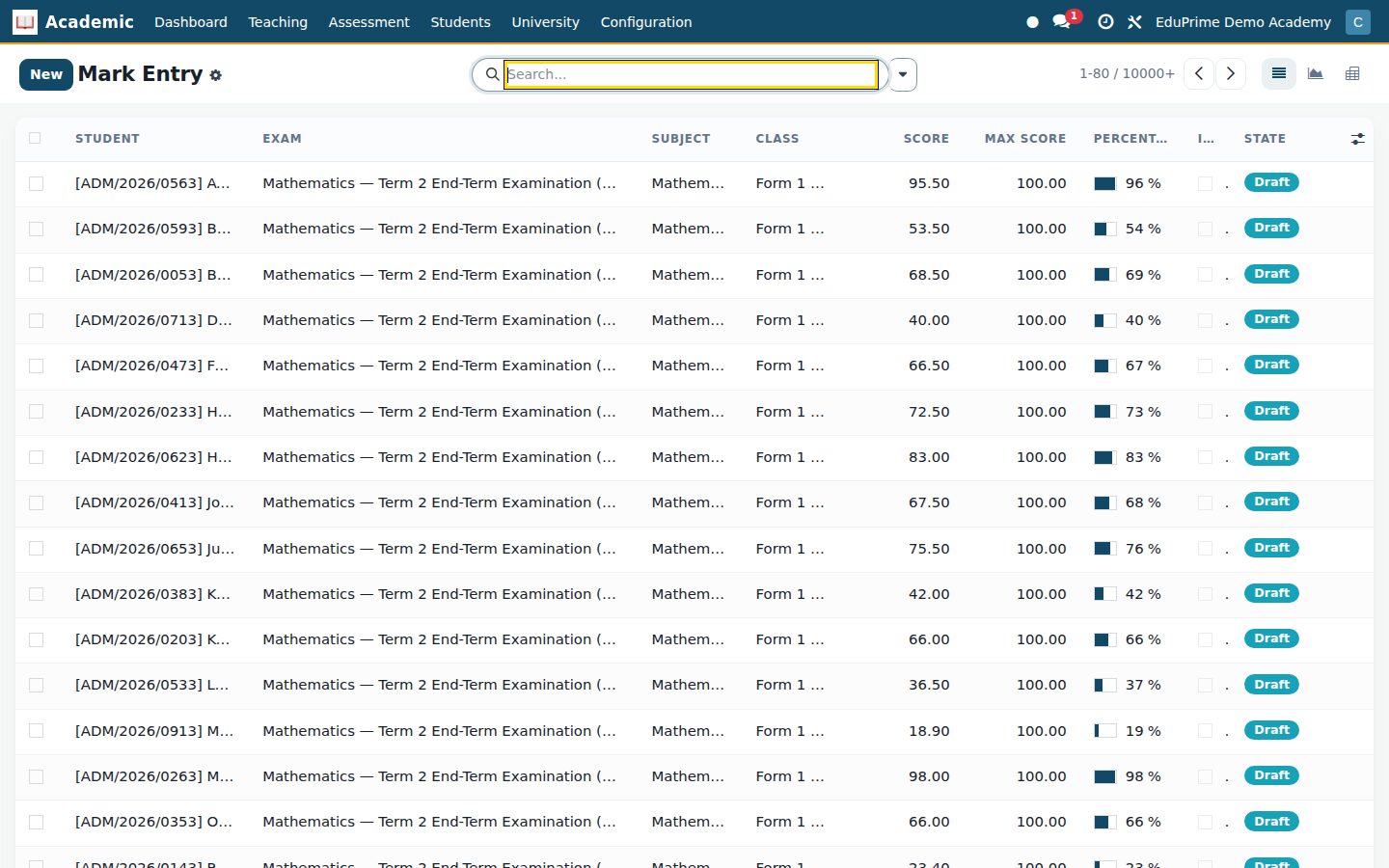
Ready when you are
Open the plan builder with the right apps for this industry already selected, or see it running first.