

 Surveys: Ask the right questions, and read the answers in one place
BridgeERP Surveys builds feedback forms, quizzes and certification exams, sends them by link or email, and scores every answer.
Free instant access. No credit card required.
Build the form question by question
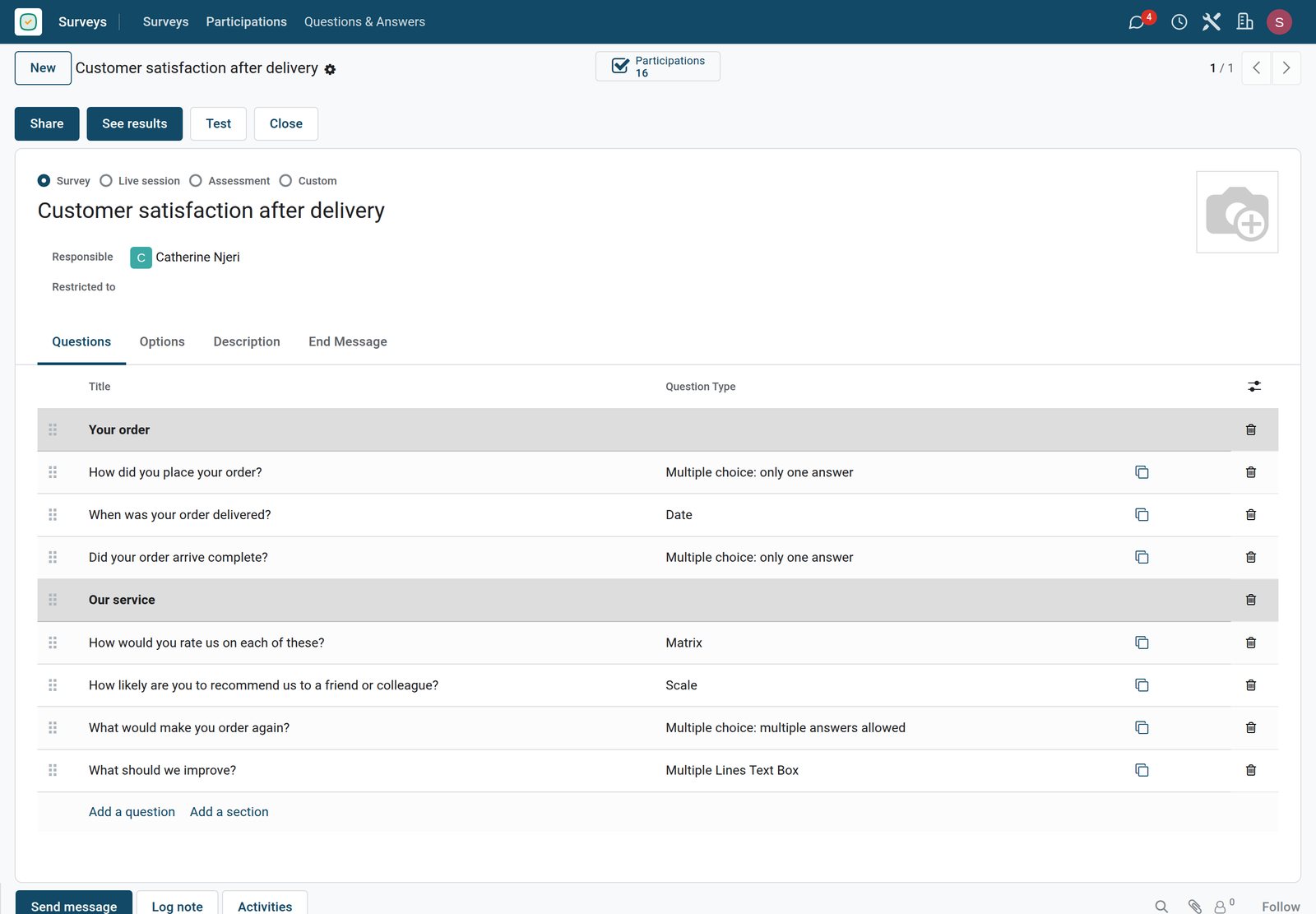
Each survey lists its questions with their type, so a form mixes free text, choices, dates and grids.
 Surveys
A customer satisfaction form
Customer satisfaction after delivery asks seven questions in two sections, from how the order was placed and when it arrived to a rating matrix, a recommendation scale and what to improve.
Explore Surveys →By the numbers
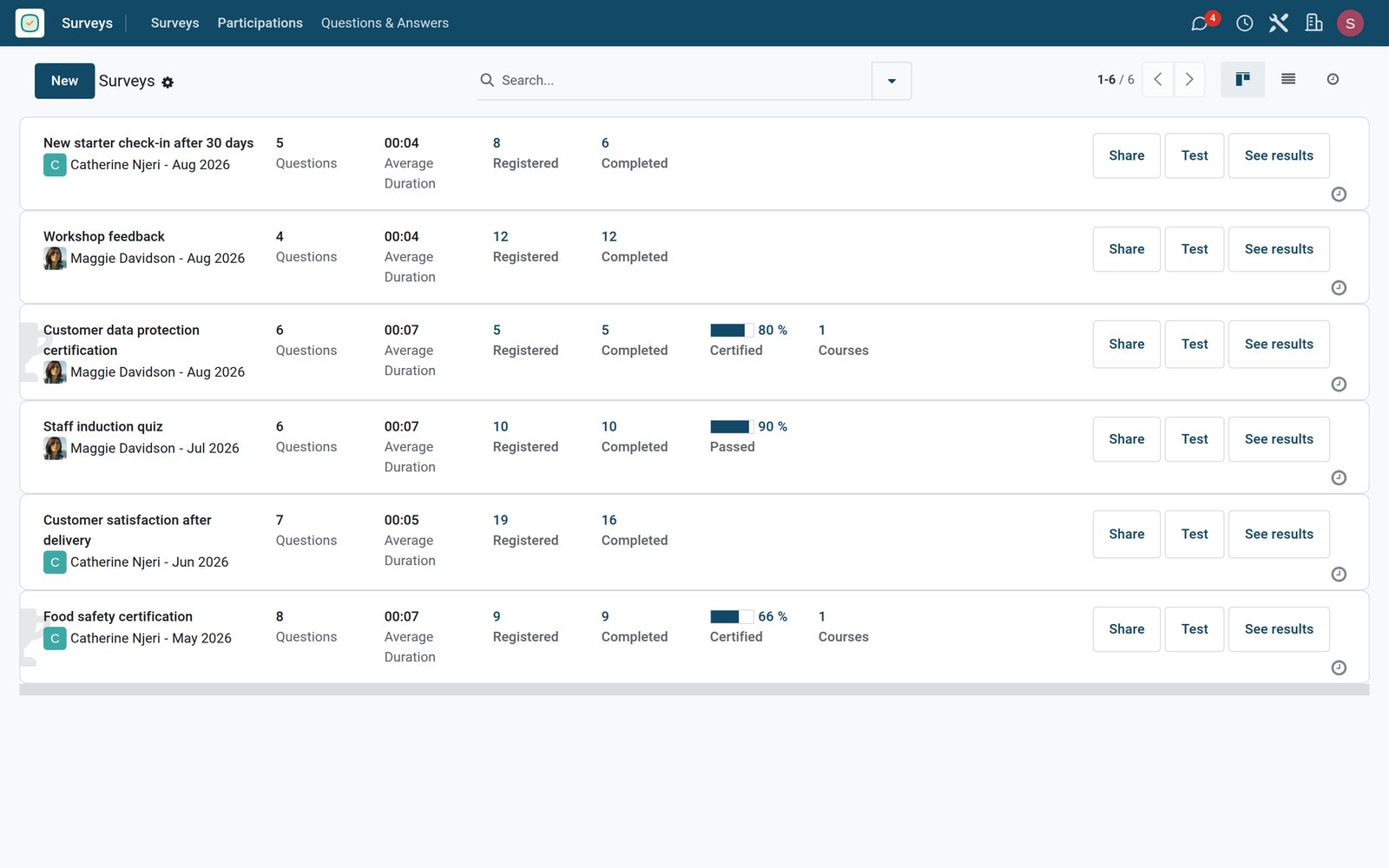
What ships inside the Surveys app
Counted in the product and on the demo database.
- 9
- question types, from free text and numbers to dates, choices and matrices
- 4
- ways to score: no score, answers shown after each page, at the end, or never
- 63
- participations in the six demo surveys: three feedback forms, a staff quiz and two certifications
Inside the app
What is inside
The parts of the Surveys app, grouped by what they do.
Question types
Mix single and multiple choice, text, numbers, dates and matrices in the same survey.
Sections and layout
Show the whole survey on one page, one section per page, or one question at a time.
Conditional questions
Show a question only when an earlier answer calls for it, so people skip what does not concern them.
Scoring
Give each answer points, set a passing score, and show the correct answers or keep them hidden.
Certifications
Turn a scored survey into a certification with a certificate for everyone who passes.
Time and attempt limits
Limit how long an exam lasts and how many times one person may try it.
Random questions
Draw a random set of questions from each section, so no two exams are the same.
Live sessions
Run a quiz live in a room, with a code to join and the results shown as people answer.
Step by step
From question to decision
How a survey runs in BridgeERP, and which app does each step.
- Step 1
Build
Write the questions, group them in sections and choose how the survey is scored.
Surveys - Step 2
Share
Send the link to anyone, or invite named contacts by email with their own access.
Email Marketing - Step 3
Answer
People answer on a phone or computer, and each participation is saved as it progresses.
Surveys - Step 4
Score
Scored surveys calculate the percentage and mark who passed the minimum.
Surveys - Step 5
Review
Detailed answers can be filtered by question, to act on what customers or staff said.
Surveys

Every answer, from every person
Participations list who answered which survey, how far they got and their score.
 Surveys
Participations, newest first
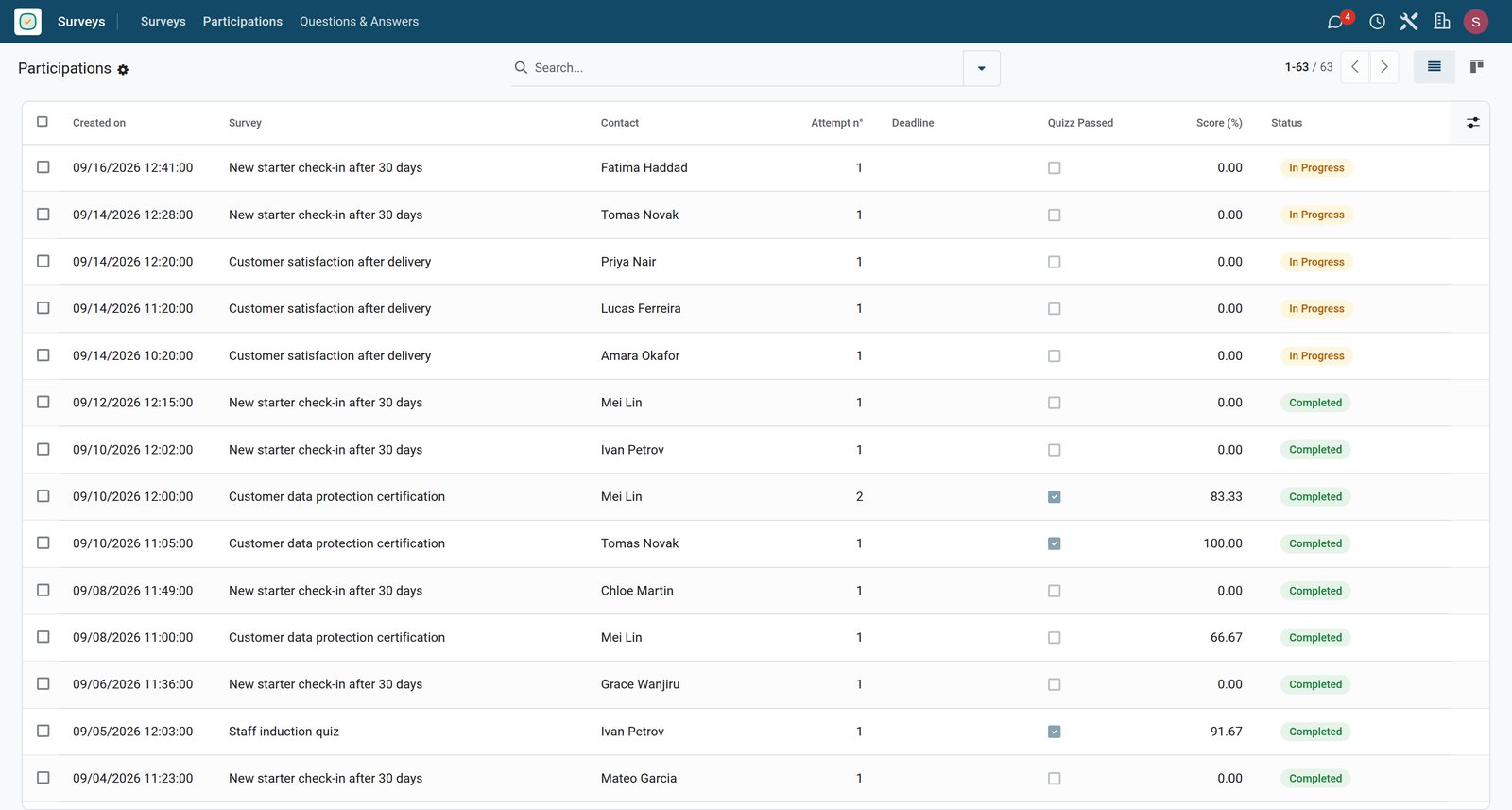
The 63 participations of the six surveys in one list, newest first, with the survey, the person, the attempt, whether the quiz was passed, the score and whether it is still in progress.
Explore Surveys →Quizzes and exams that score themselves
Each scored survey keeps the answers, the points and the result per person.
 Surveys
One person's scored answers
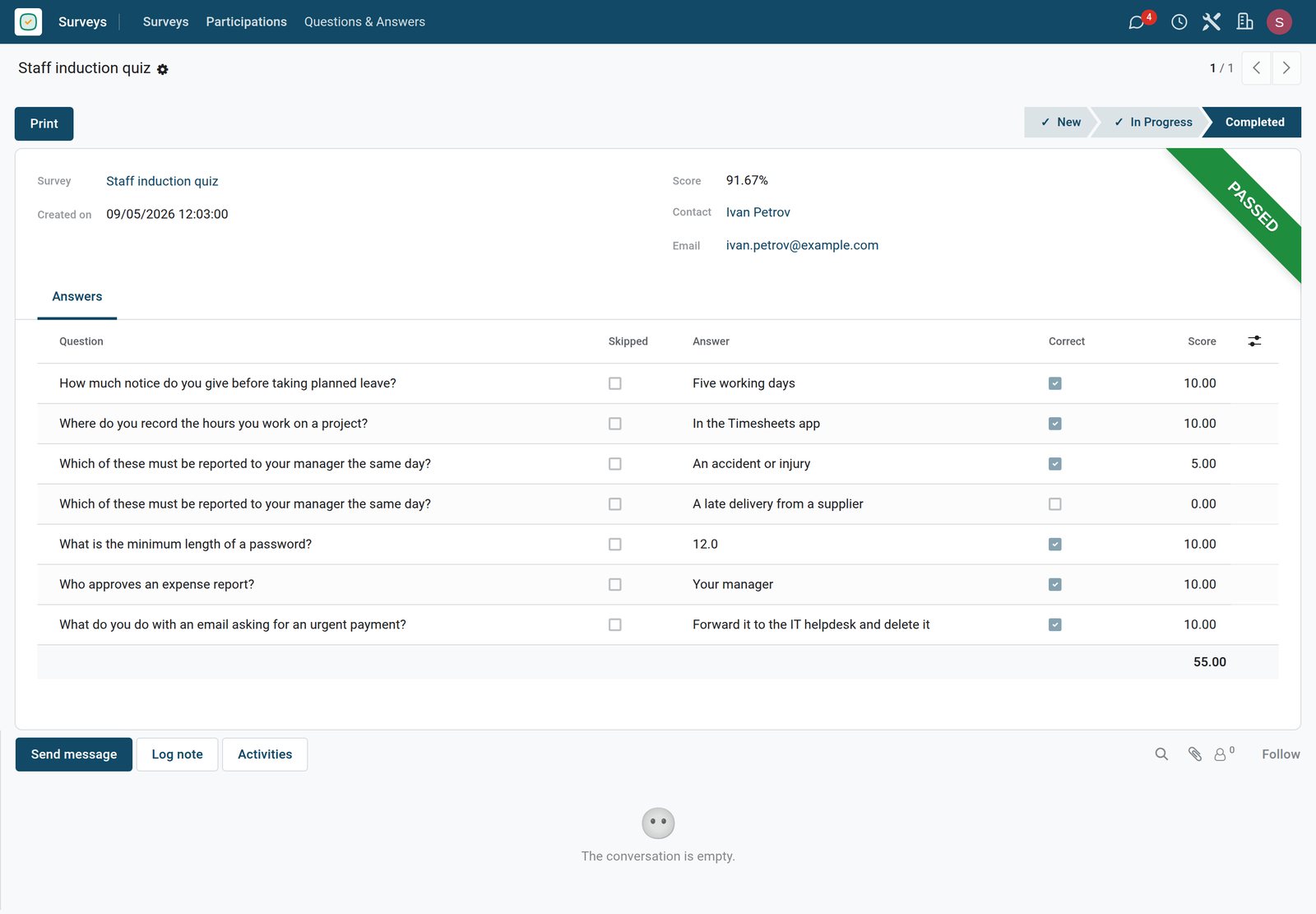
Ivan Petrov's staff induction quiz shows each answer, whether it was right and the points it earned: 55 points, a score of 91.67 percent and a pass.
Explore Surveys →Certify people with an exam
A certification sets the passing score, the attempts allowed and the certificate people receive.
 Surveys
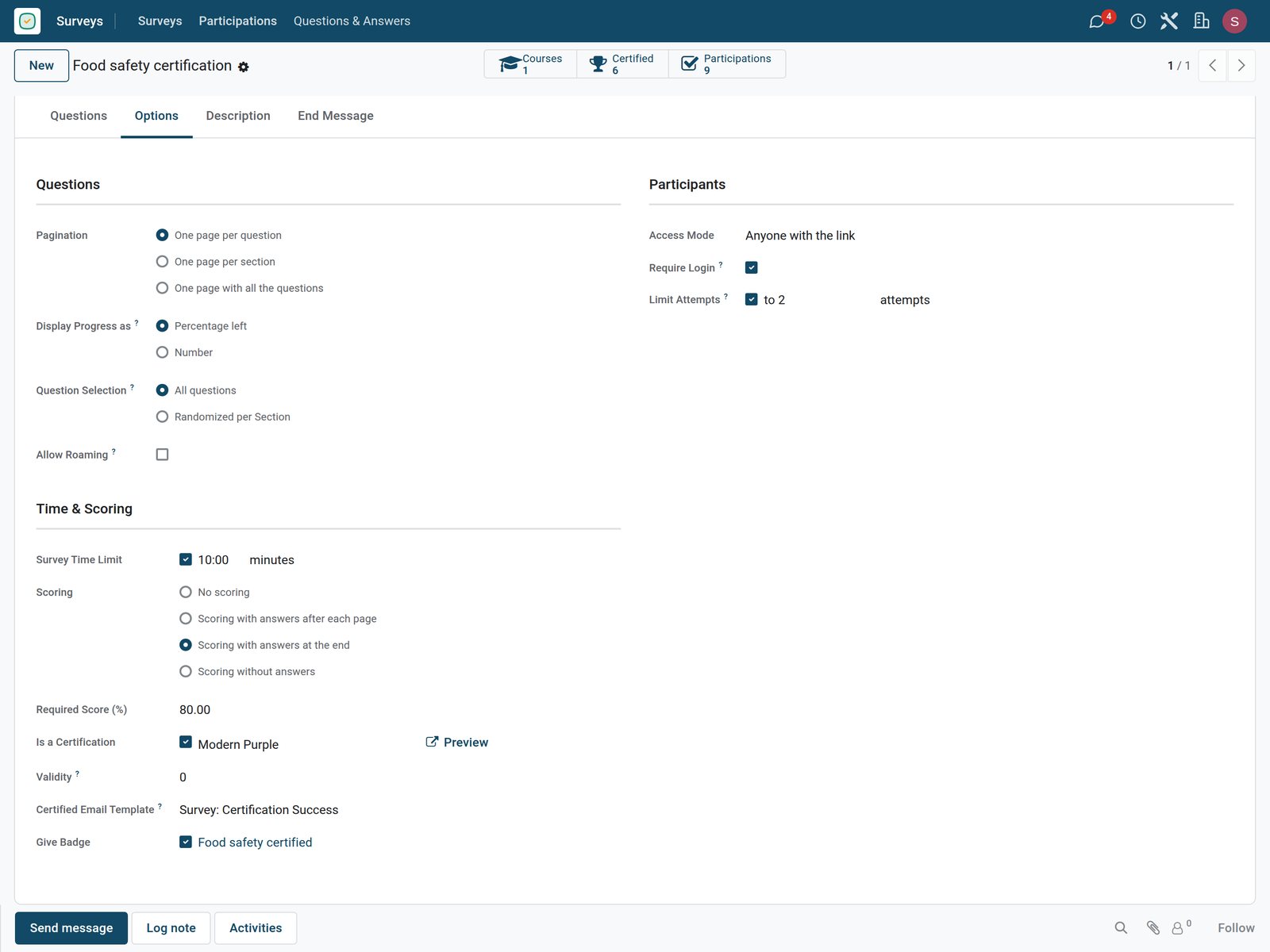
The options of a certification exam
The food safety certification needs a login, allows two attempts of ten minutes, scores the answers at the end, needs 80 percent and gives a certificate and a badge.
Explore Surveys →Who uses it
Who uses it, and what they see
Surveys is used by anyone who needs answers from people.
Marketing team
Asks customers for feedback after a purchase and reads the answers per question.
Trainer or HR
Runs quizzes and certification exams for staff, with a passing score and certificates.
Participant
Answers on any device through a link, and sees the score at the end when it is shown.
Manager
Reviews participations and success rates to decide what to improve.
Works with
Runs with the rest of BridgeERP
Apps that use surveys on the demo.


In your country
Built for teams in any country
What changes when feedback no longer travels on paper forms.
Answer from a phone
Participants open the link on their phone, answer, and their progress is saved as they go.
One question at a time
Show one question per page so a survey stays easy to answer on a small screen.
Exams without printing
Staff and suppliers take certification exams online, scored the moment they finish.
Getting started
Getting started
How a team sends its first survey.
Start with five questions
Write the few questions you really need, and make only the key ones mandatory.
Choose the layout
One page for short forms, one question per page for phones and exams.
Share the link
Send the public link, or invite contacts by email to get named answers.
Try it on the demo
The demo has three feedback forms, a staff quiz and two certifications, with their answers to open.
Questions
Questions about Surveys
Not covered here? Contact us.
Can people answer without an account?
Yes. A survey can be open to anyone with the link, or limited to invited contacts or signed-in users.
Can I score a quiz automatically?
Yes. Give answers points and set a passing score; the result is calculated when the person finishes.
Can a question depend on an earlier answer?
Yes. A conditional question is shown only when the answer that triggers it is chosen.
Can I limit an exam's time or attempts?
Yes. Set a time limit and the number of attempts allowed per person.
Can I give certificates?
Yes. A certification survey issues a certificate to everyone who reaches the passing score.
Where do I read the answers?
In participations per person, and in detailed answers per question.
Put Surveys to work
Add it to your plan and pay only for what you use, or see it running on your own demo first.