

 eLearning: Train your team and your customers with courses they finish
BridgeERP eLearning builds courses from documents, videos, articles and quizzes, publishes them on your website, and certifies the people who pass.
Free instant access. No credit card required.
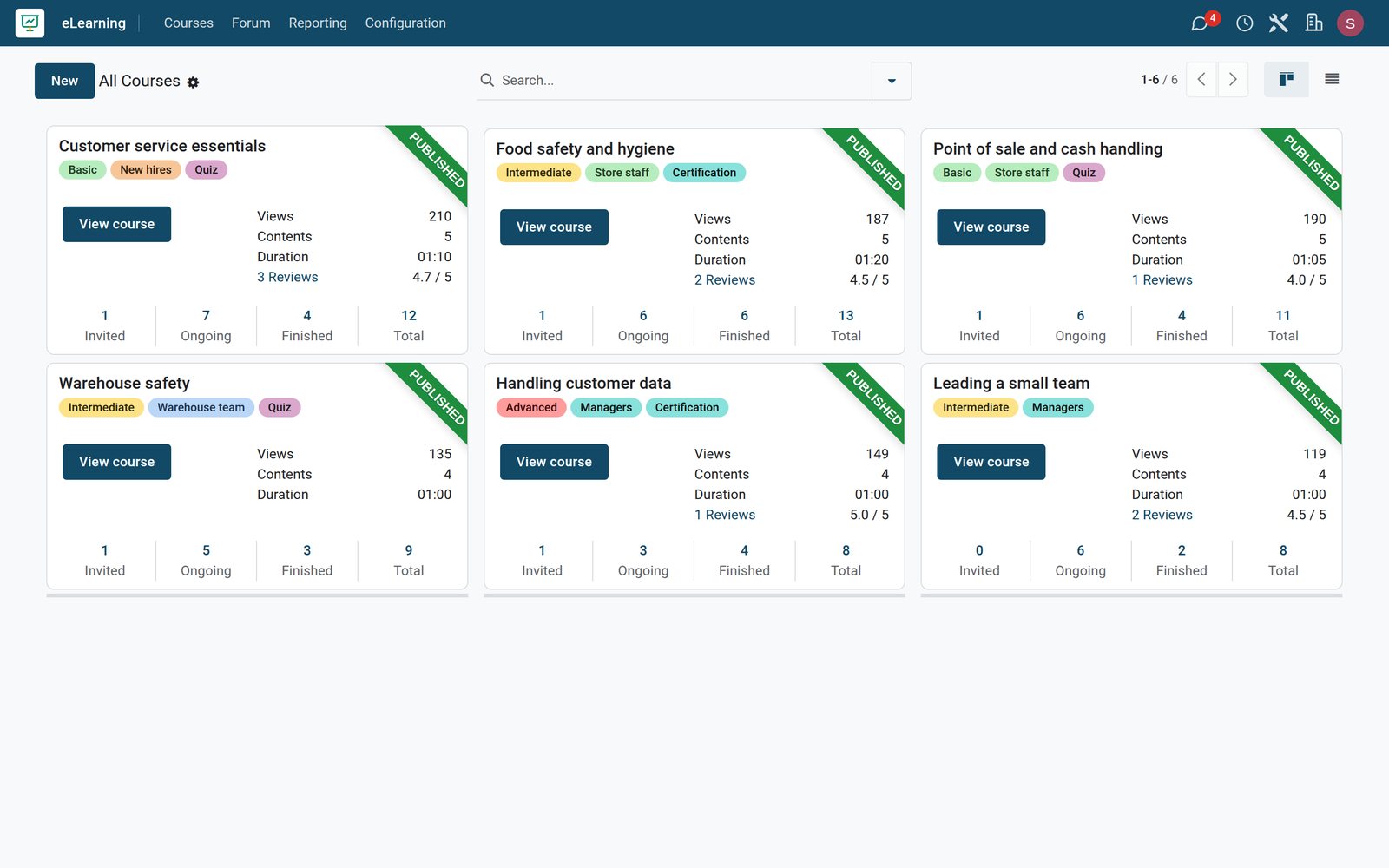
A course is a list of lessons, in sections
Each course keeps its lessons in order, with the time each one takes and what it contains.
 eLearning
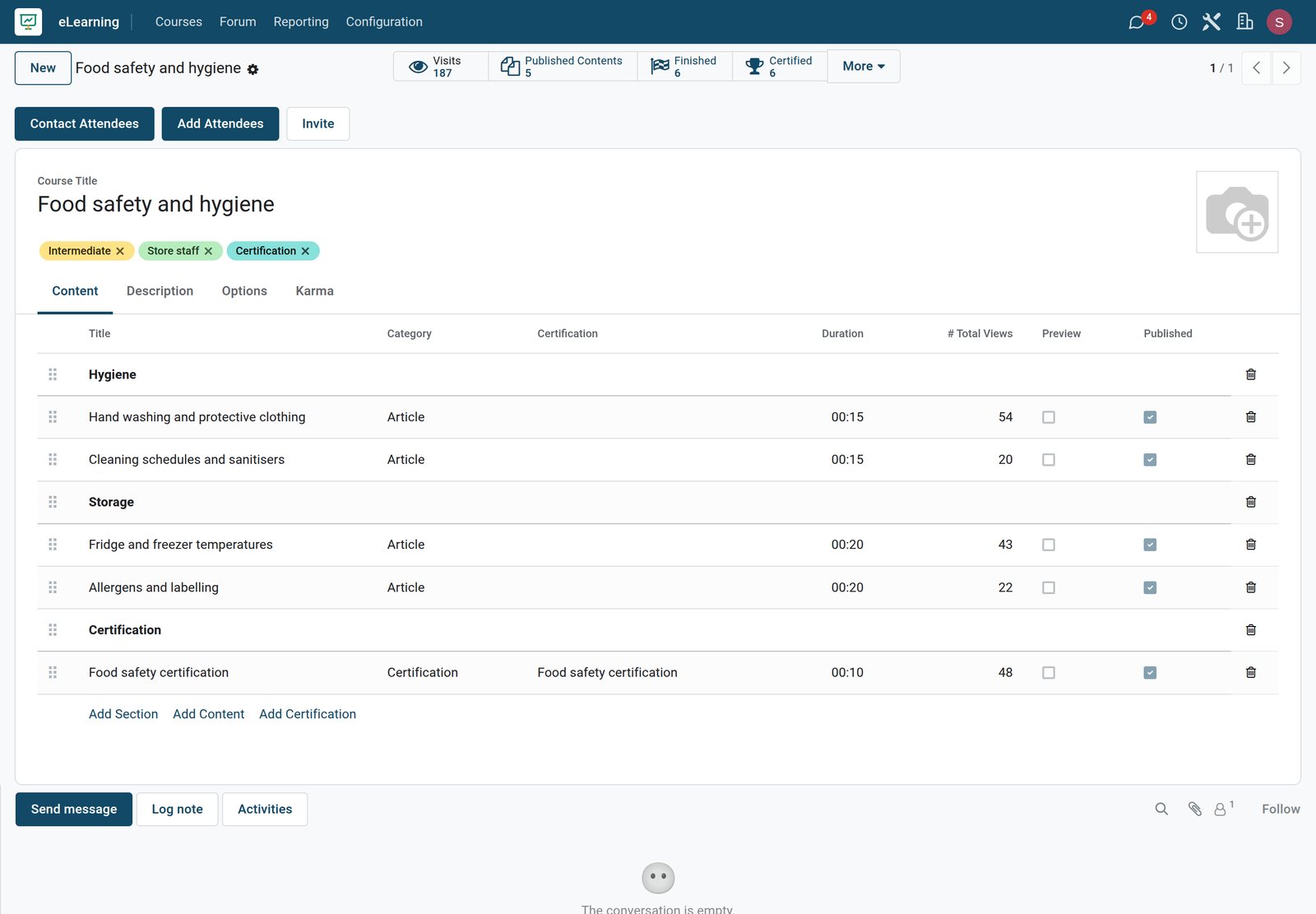
The content of a course
Food safety and hygiene splits five lessons into three sections, from hand washing and fridge temperatures to the final certification, with the time and the views of each lesson.
Explore eLearning →By the numbers
What ships inside the eLearning app
Counted in the product and on the demo database.
- 6
- kinds of lesson: documents, images, articles, videos, quizzes and certifications
- 3
- ways to open a course: to everyone, on invitation, or on payment
- 6
- courses on the demo with 27 lessons, from customer service essentials to leading a small team
Inside the app
What is inside
The parts of the eLearning app, grouped by what they do for trainers and learners.
Courses and sections
Group lessons into sections, set the order, and show each lesson's time so learners can plan.
Every kind of content
Upload documents and infographics, embed videos, write articles and add quizzes to the same course.
Quizzes with points
Each quiz awards points on the first, second and later attempts, so learners try until they get it right.
Certifications
End a course with a certification exam, a passing score and a certificate for those who succeed.
Paid courses
Sell a course as a product in the website shop, and give access as soon as the order is paid.
Who can see and join
Show a course to everyone, to signed-in visitors or to members only, and choose how people enrol.
Karma and ranks
Learners earn karma for finishing courses and voting, which unlocks reviews and comments.
Reviews and forums
Learners rate a course and ask questions in its forum, which trainers answer for everyone.
Step by step
From first lesson to certificate
How a course runs in BridgeERP, and which app does each step.
- Step 1
Build
The trainer creates the course, adds sections and lessons, and sets how long each lesson takes.
eLearning - Step 2
Publish
The course goes live on the website, open to everyone, to members or on payment.
Website Builder - Step 3
Enrol
Learners join a free course, accept an invitation, or buy the course in the shop.
eCommerce - Step 4
Learn
They follow the lessons, answer the quizzes for points, and their progress is saved.
eLearning - Step 5
Certify
The final exam is scored, and those who pass receive their certification.
Surveys


Every lesson of every course in one list
Trainers see all the content at once, with its course, publish date and duration.
 eLearning
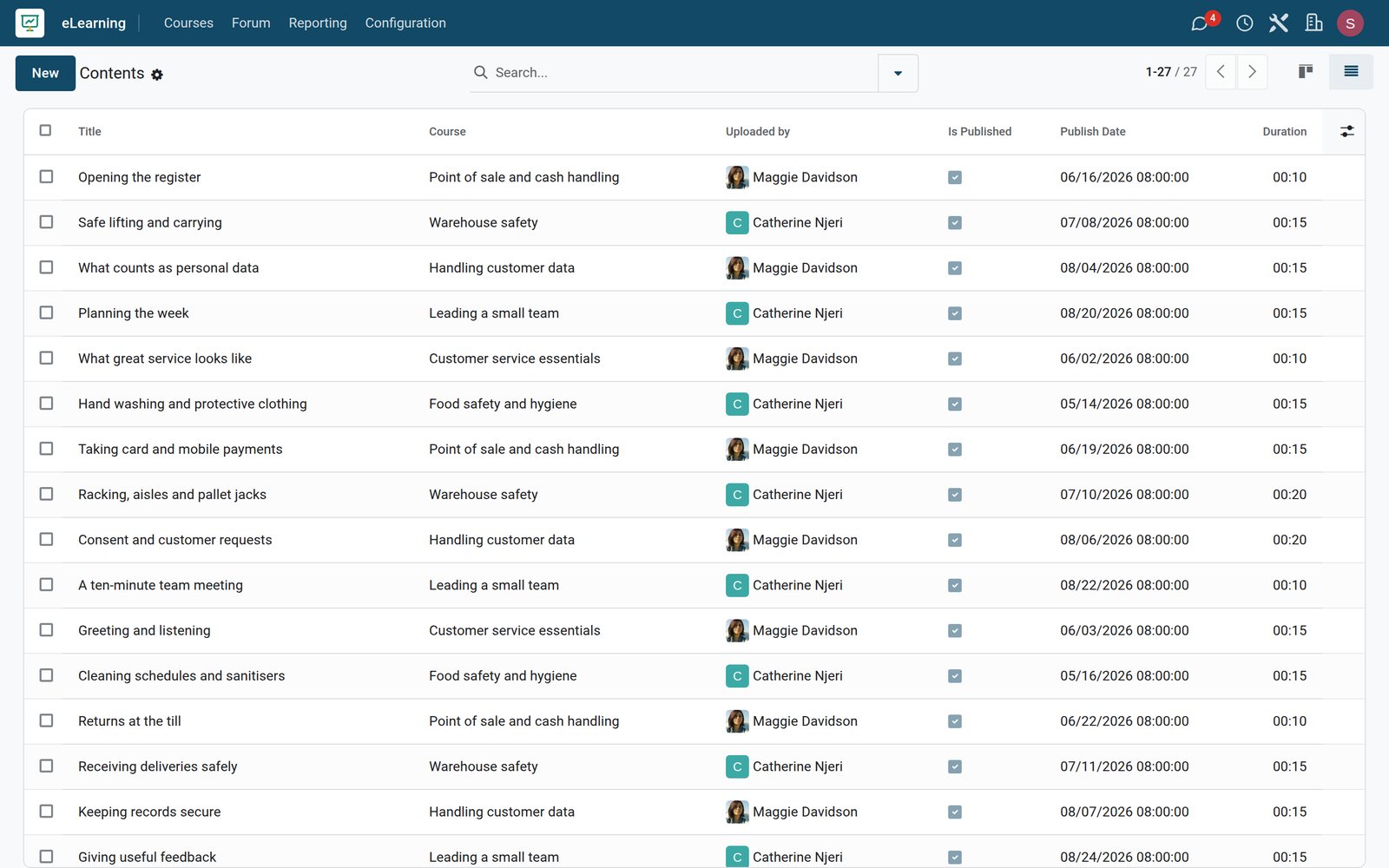
All lessons across the courses
The contents list shows the 27 lessons of the six courses, each with its course, who uploaded it, when it was published and how long it takes.
Explore eLearning →Quizzes that check what was learned
A quiz sits between lessons, with its questions, answers and the points it gives.
 eLearning
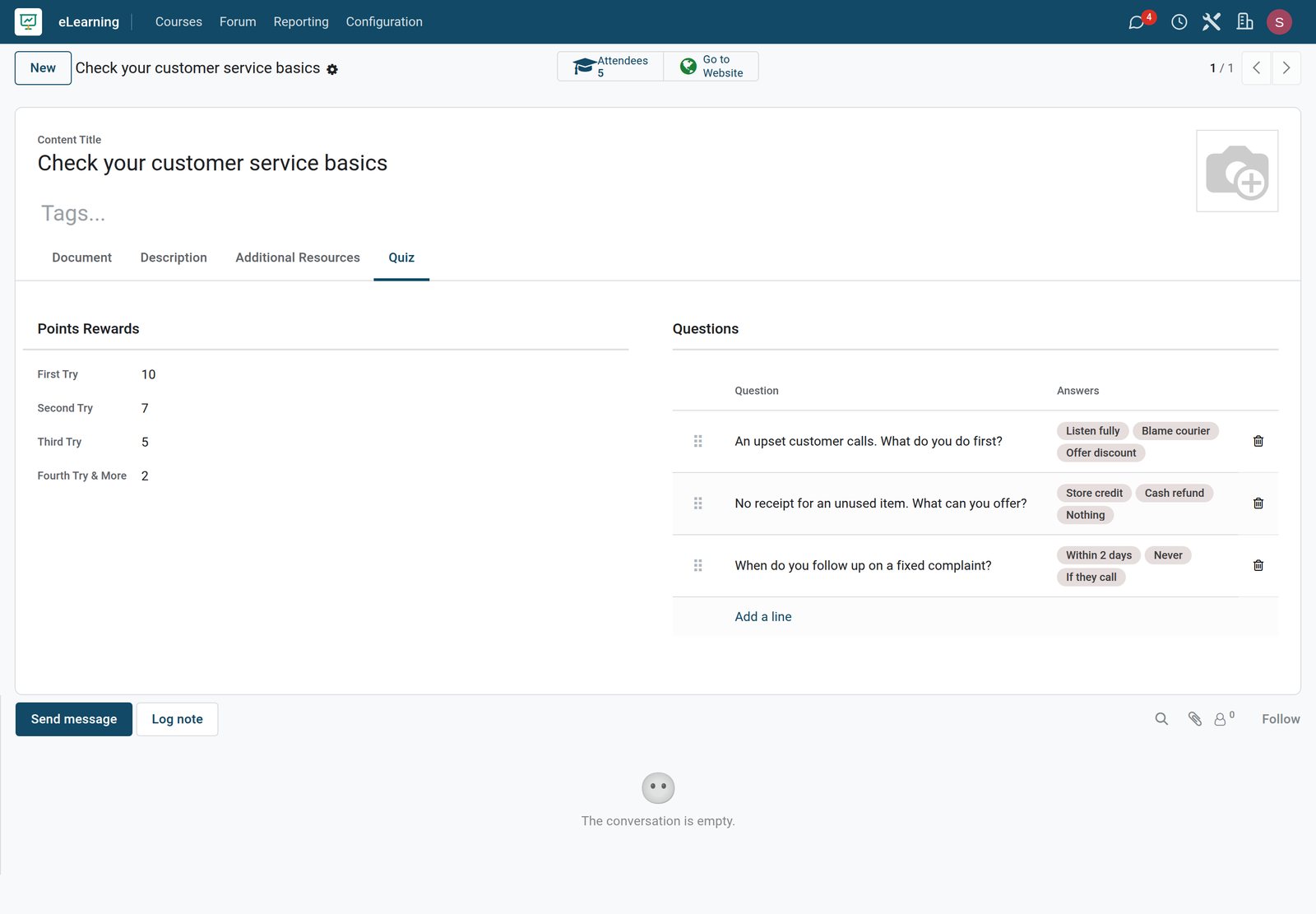
A quiz inside a course
The quiz of Customer service essentials asks three questions with their answer choices, and gives 10, 7, 5 or 2 points depending on the attempt.
Explore eLearning →Certify the people who pass
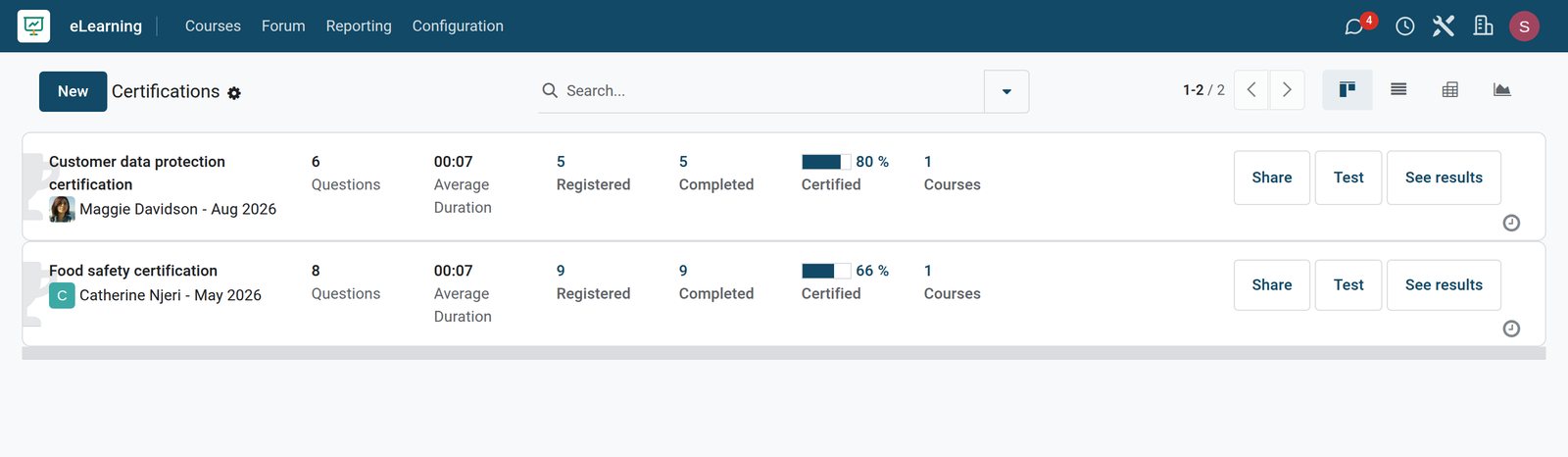
Certification exams score each attempt and show how many people succeed.
 Surveys
Certifications and their success rate
Each certification shows its questions, the average time taken, how many people registered and completed it, the share certified and the course it belongs to.
Explore Surveys →Who uses it
Who uses it, and what they see
eLearning is used by trainers, learners and the people who sell courses.
Trainer
Builds courses from lessons and quizzes, answers questions in the forum and follows progress.
Learner
Follows the lessons on the website, earns points in quizzes and gets certified at the end.
Training manager
Sees which courses are followed and finished, and which lessons people skip.
Sales team
Sells courses as products in the shop and follows course revenue in reporting.
Works with
Runs with the rest of BridgeERP
Apps that work with eLearning on the demo.


In your country
Built for training in any country
What changes when training reaches people outside the classroom.
Light on mobile data
Courses mix documents and infographics with video, so learners on phone data still get the lesson.
Train branches at once
One course reaches staff in every town, with progress followed from head office.
Sell to your market
Courses are sold as shop products priced in your company's currency, with the order and invoice kept.
Getting started
Getting started
How a team puts its first course online.
Start with one course
Pick a topic people ask about most, and split it into short lessons of a few minutes each.
Add a quiz
Close each section with a short quiz so learners check what they understood.
Decide who can join
Open the course to everyone, invite a team, or put a price on it in the shop.
Try it on the demo
The demo has six courses with articles, quizzes and two certifications to open.
Questions
Questions about eLearning
Not covered here? Contact us.
Can I sell courses?
Yes. A course can be sold as a product in the website shop, and access is given once the order is paid.
Can I keep a course for my staff only?
Yes. Show it to members only and enrol people by invitation.
What kind of content can a lesson be?
A document, an infographic, an article, a video, a quiz or a certification exam.
How do learners get a certificate?
The course ends with a certification exam; those who reach the passing score are certified.
Can I see how far each learner got?
Yes. Attendee reporting shows each member's course and completion.
Can learners ask questions?
Yes. A course can have its own forum, and learners can rate and review it.
Put eLearning to work
Add it to your plan and pay only for what you use, or see it running on your own demo first.