

Accounting and Invoicinglesson 1 of 5
Written lesson
What each card on the accounting dashboard tells you, and where its buttons lead.
Read the lesson →The accounting dashboard
Course contentslesson 1 of 5
Accounting Basics4 min
Invoicing6 min
Bank and Cash6 min
What Accounting Basics gets you to
- Know what each card on the accounting dashboard is telling you
Accounting opens on a dashboard with one card per journal: customer invoices, vendor bills, the bank, cash and any others you use.
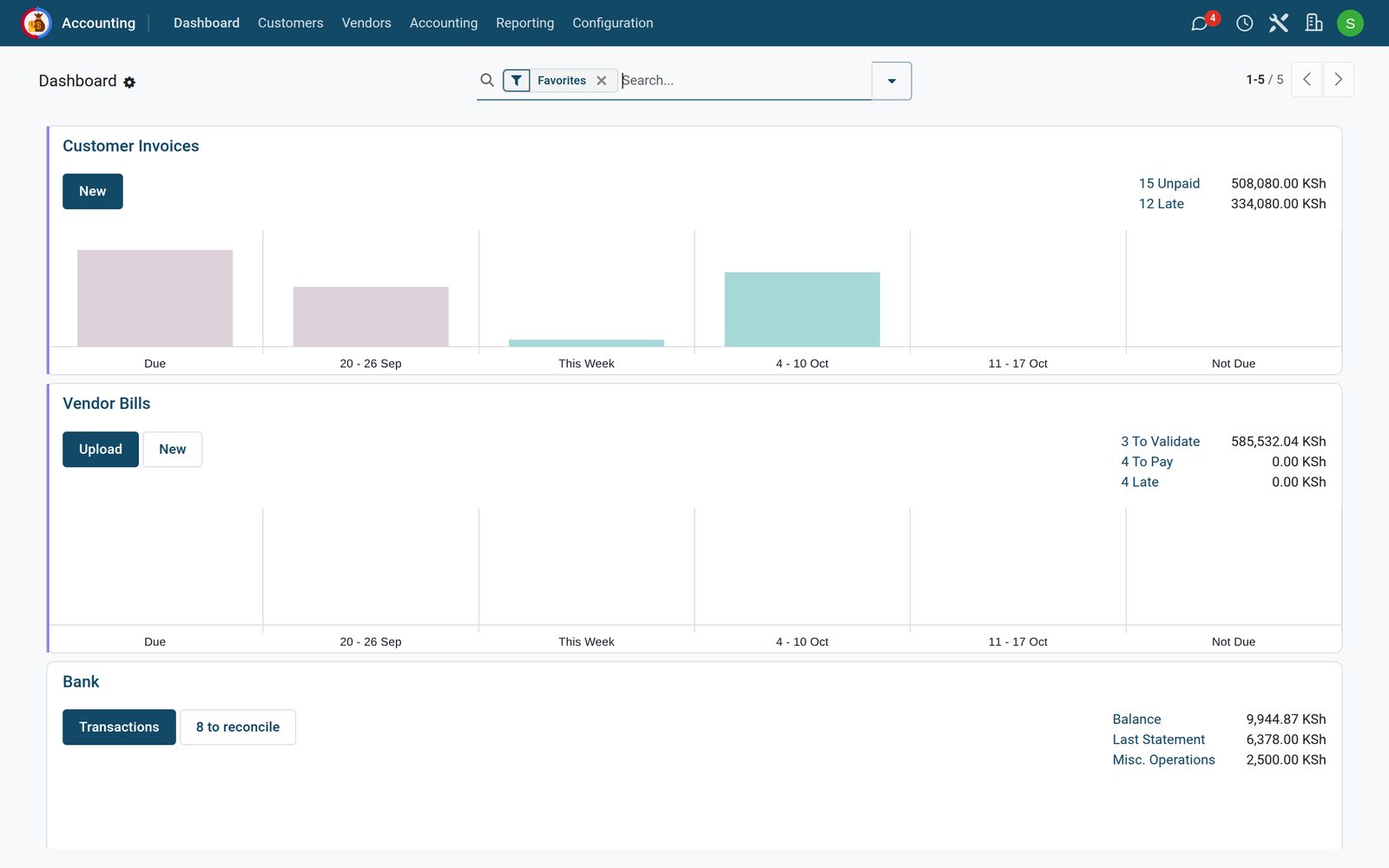
- Customer Invoices: how many invoices are unpaid and how many are late, with the amounts. The bars show what falls due when: already due, this week, the weeks ahead.
- Vendor Bills: bills to validate (drafts), to pay and late. Upload takes a PDF or a photo of a bill and makes a draft from it.
- Bank: the balance in BridgeERP, the balance of the last bank statement, and how many transactions are still to reconcile.
The menus across the top hold the rest: Customers (invoices, credit notes, payments), Vendors (bills, refunds, payments), Accounting (journal entries) and Reporting (profit and loss, balance sheet and more).
Check what you learned
Loading the quiz…
These lessons were recorded on a working BridgeERP. Start a free trial and follow them on your own.