

Accounting and Invoicinglesson 4 of 5
Written lesson
Match each bank transaction with what it pays: an invoice, a bill, or a cost such as bank charges.
Read the lesson →Reconcile the bank
Course contentslesson 4 of 5
Accounting Basics4 min
Invoicing6 min
Bank and Cash6 min
What Bank and Cash gets you to
- Match every bank transaction with what it paid
Reconciling means telling BridgeERP what each line of your bank statement was for. Open it from the dashboard: to reconcile on the bank card.
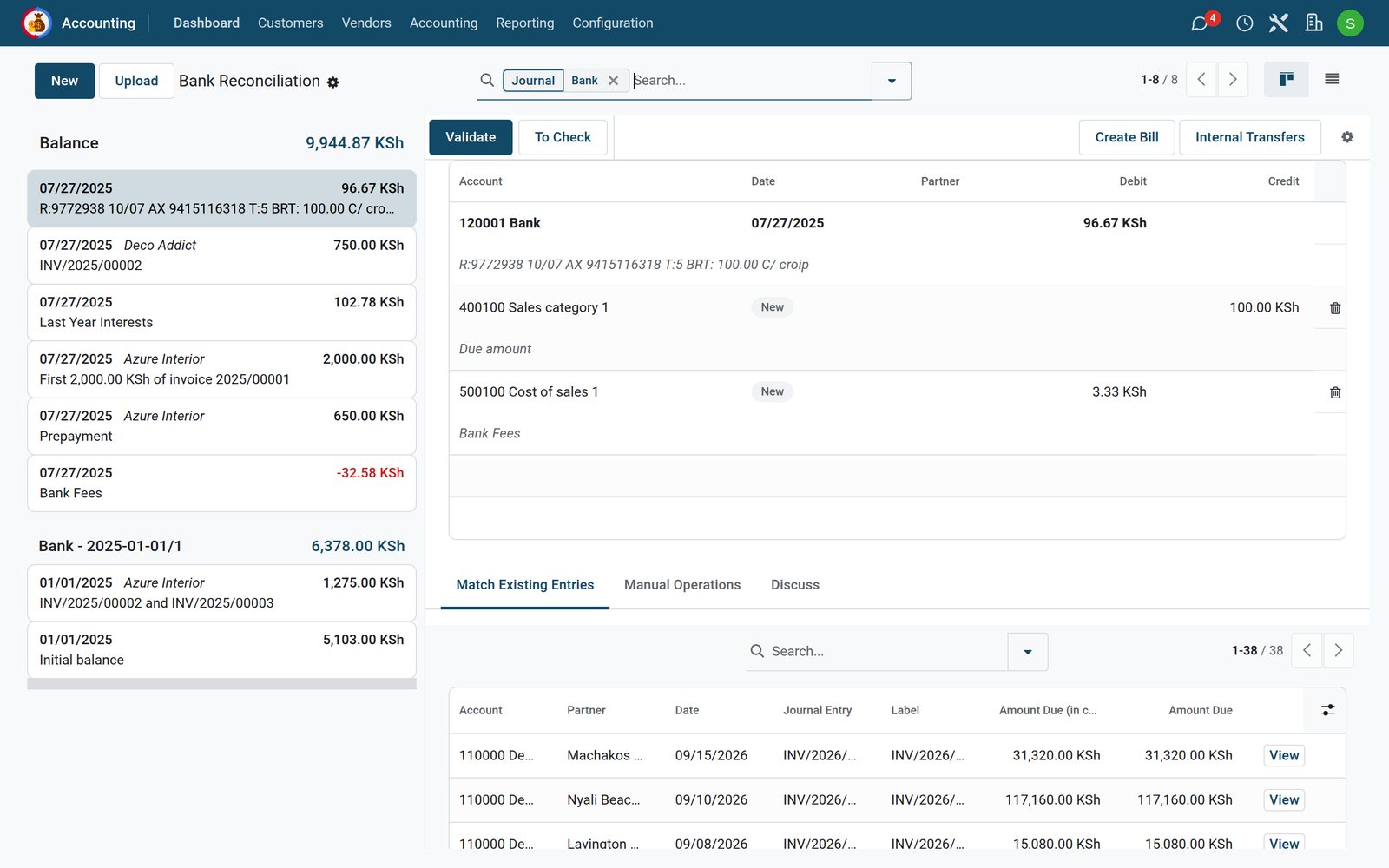
- Select a transaction on the left.
- Under Match Existing Entries, BridgeERP lists open invoices, bills and payments, and suggests the ones whose amount, reference or partner fit. Click one to add it.
- If the line is not an invoice (bank charges, interest, a fee), use Manual Operations to choose the account instead.
- When the line balances, click Validate. The next transaction opens.
Flag a line you are unsure about with To Check for your accountant. Recurring cases, such as the monthly bank fee, can be handled automatically with reconciliation models (Accounting › Configuration › Reconciliation Models).
Once a payment is reconciled with the bank, the invoice it paid turns from In Payment to Paid.
Check what you learned
Loading the quiz…
These lessons were recorded on a working BridgeERP. Start a free trial and follow them on your own.