

Accounting and Invoicinglesson 3 of 5
Written lesson
Register a payment against an invoice, including a partial one, and see why an invoice shows In Payment.
Read the lesson →Record a customer payment
Course contentslesson 3 of 5
Accounting Basics4 min
Invoicing6 min
Bank and Cash6 min
What Payments gets you to
- Record a full or partial payment against an invoice
When the customer pays, open the invoice and click Pay.
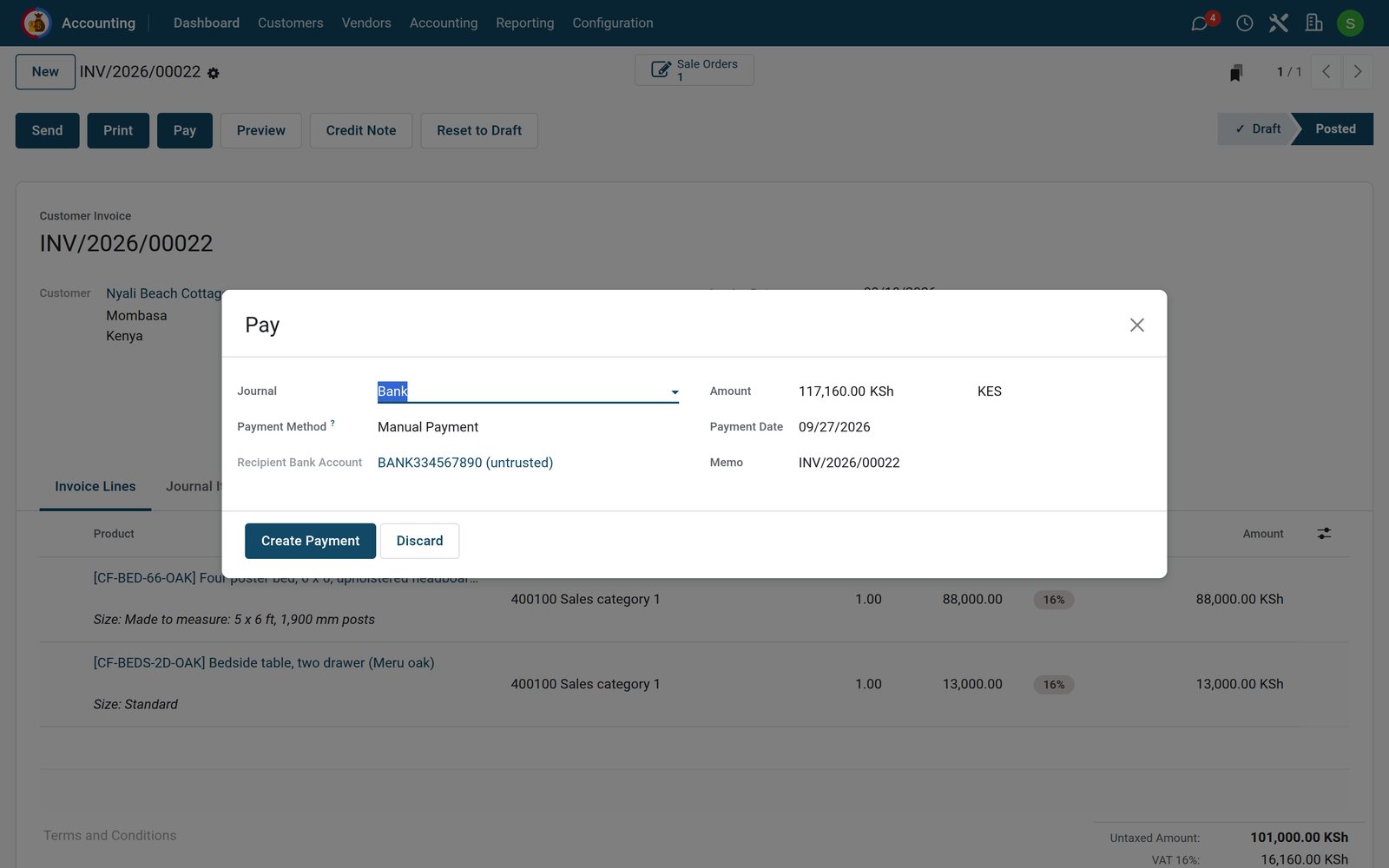
- Choose the Journal the money went into: the bank, or cash.
- Check the Amount and the Payment Date. The Memo carries the invoice number, which helps match the payment with the bank statement later.
- Click Create Payment.
If the amount is less than the invoice, BridgeERP asks what to do with the difference: Keep open leaves the rest due; Mark as fully paid closes the invoice and posts the difference to an account you choose, which suits bank charges or a small discount.
In Payment or Paid?
After a payment an invoice can show In Payment: the payment is recorded but not yet matched with the bank transaction. It turns Paid when you reconcile the bank, which is the next lesson.
Check what you learned
Loading the quiz…
These lessons were recorded on a working BridgeERP. Start a free trial and follow them on your own.