

 Rental: Know what is out, what is due back and what is free to rent
Rental orders, period prices, serial-numbered pickups and returns, late fees and invoices share one BridgeERP database with your stock and your accounts.
Free instant access. No credit card required.
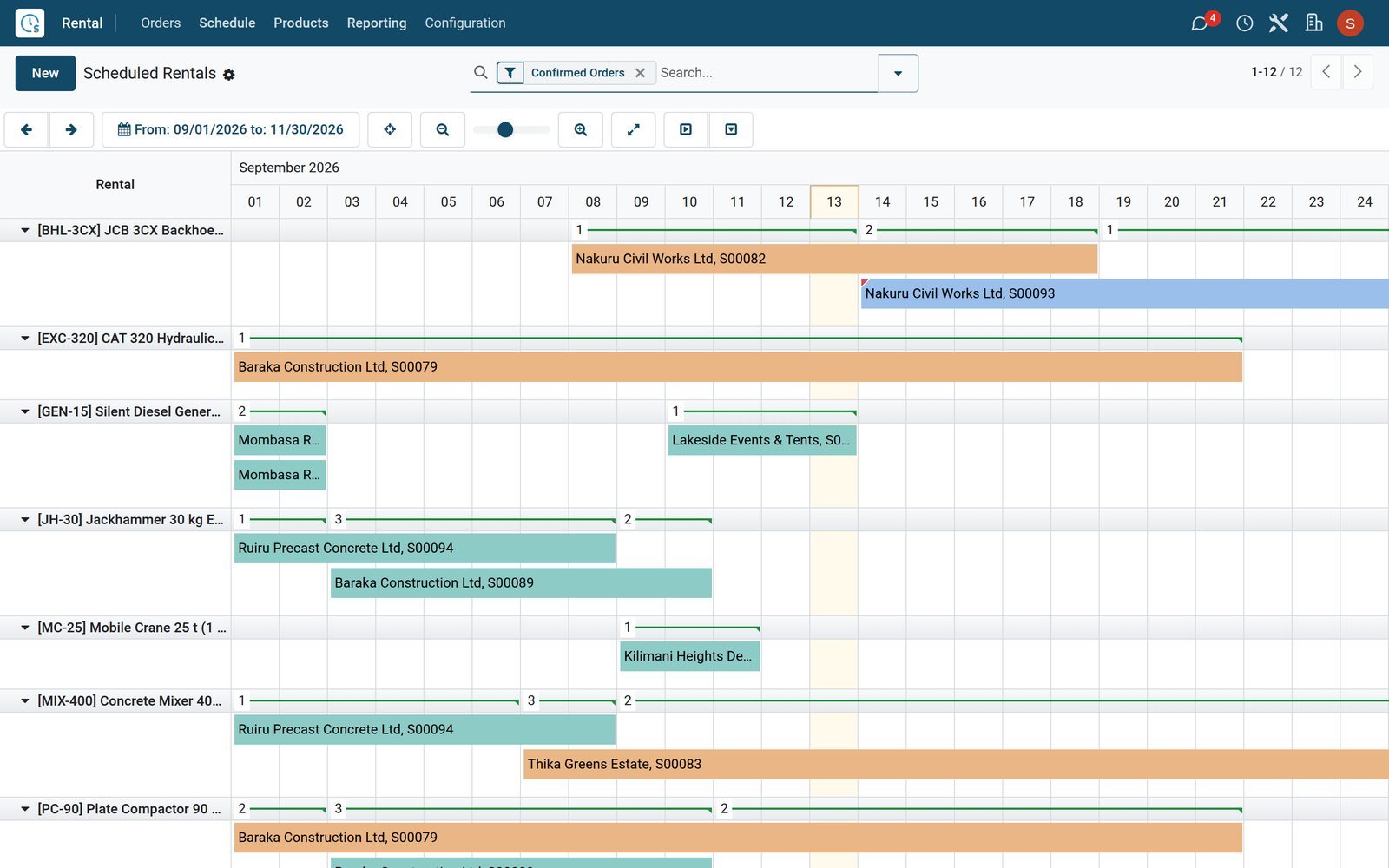
Every rental order, from quotation to return, in one list
The rental desk works from one list: who has what, when it goes out, when it is due back and whether it has been invoiced.
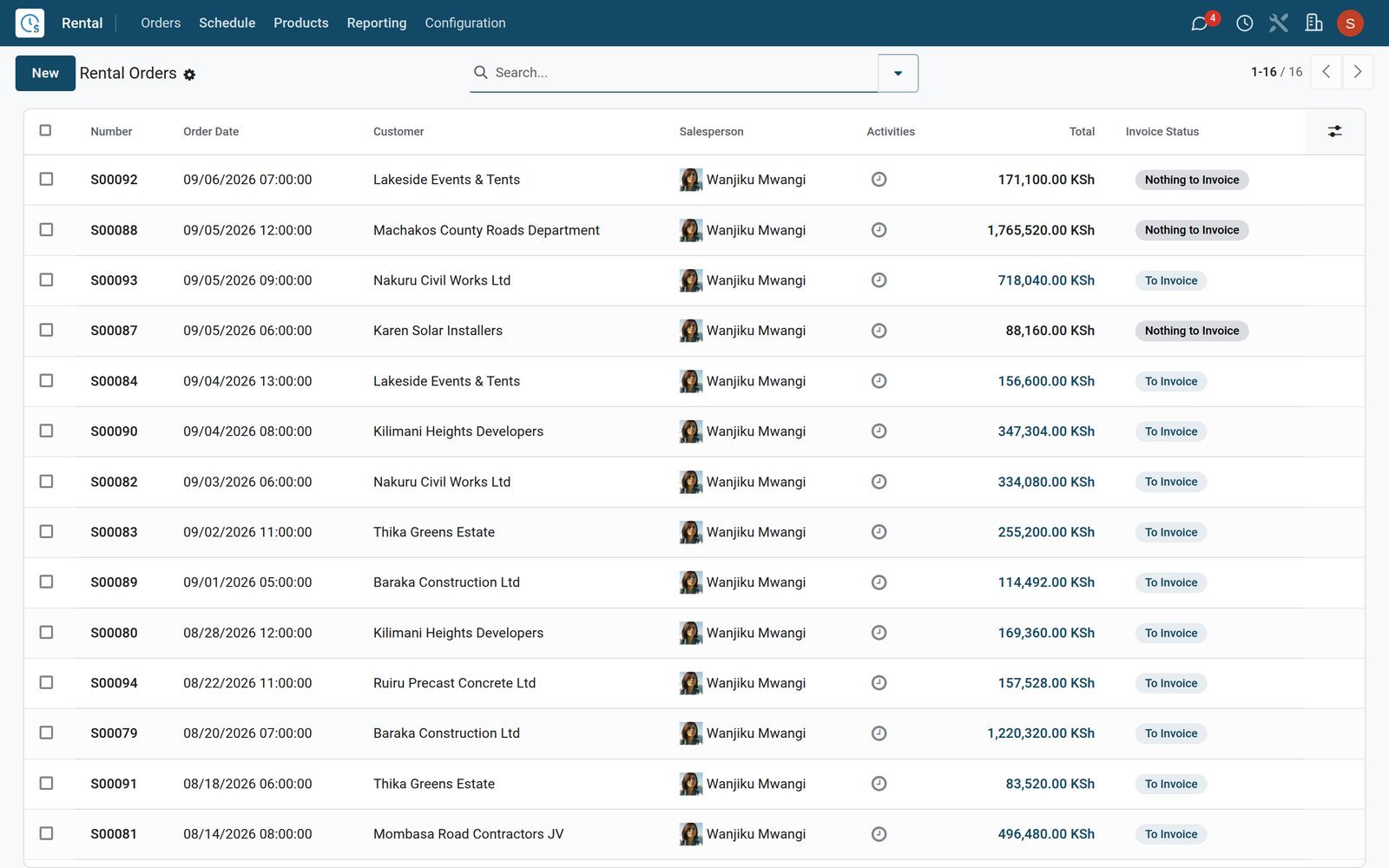 Rental
Rental orders the whole desk can read
Rental / Orders lists every rental with its customer, salesperson and total; filter by rental status to see quotations, booked items, items out and returns.
Explore Rental →By the numbers
Built for renting, not bolted on to a sales app
The Rental app ships with rental-specific periods, statuses and serial-number checkpoints ready to use from day one.
- 10
- rental periods preset, from hourly hire up to a five-year lease
- 5
- time units to price by: hour, day, week, month and year
- 6
- rental statuses on every order, from quotation to booked, picked up and returned
- 3
- serial-number checkpoints on each order line: reserved, picked up and returned
Inside the app
Everything a rental counter needs, under one menu
Each card below is a real menu in the BridgeERP Rental app, grouped by the job it does.
Rental orders
Quote, confirm, pick up and return from Rental / Orders; each order carries its rental period, duration and next pickup or return date.
Schedule
A Gantt chart of every rented line by product, so the counter sees clashes, gaps and late returns before promising a date.
Rentable products
Mark any product as rentable and give it prices per period, extra-hour and extra-day rates, and padding time between bookings.
Rental periods
Hourly, daily, weekly, monthly and yearly periods come preset in Configuration; add your own, such as a weekend or a quarterly site hire.
To Do Today
The Pickup and Return lists under To Do Today show only the orders leaving or coming back today, ready for the yard team.
Quotation templates
Save standard packages, such as a generator with cables and a fuel bowser, as templates with signature and prepayment rules already set.
Customers
Rental / Orders / Customers opens the shared contact book, with each renter's orders, invoices and addresses one click away.
Reporting
Rental / Reporting turns every rented line into graphs and pivots of ordered, picked-up and returned quantities and their amounts.
Step by step
From first call to paid invoice in six steps
Each step happens in a named BridgeERP app, on the same rental order record, so nothing is typed twice.
- Step 1
Quote the period
Pick the items and the pickup and return dates; the price follows each product's period rates, whether hourly, daily, weekly or monthly.
Rental - Step 2
Confirm and sign
The customer signs the quotation online from its link; confirming the order marks it Booked and holds the items on the schedule.
Sales - Step 3
Hand it over
At pickup the desk records the serial numbers going out, and the stock moves to the company's rental location in Inventory.
Inventory - Step 4
Take it back
At return the desk ticks the serials coming back; a late return adds a delay cost using the product's extra-hour or extra-day rate.
Rental - Step 5
Invoice the hire
Invoice straight from the order, delay costs included; the demo's Kenyan company reports its invoices to KRA eTIMS through the OSCU connector.
Accounting - Step 6
Read the results
Rental / Reporting and the Rental dashboard show what was rented, to whom and for how much, per product and per day.
Rental
Charge by the hour, the day or the month on the same item
Each rentable product keeps its own table of period prices, so a generator can carry one rate per day and a lower rate per week.
- Rental
A catalogue that knows its rates
Rental / Products shows every rentable item as a card; open one to set prices per period, extra-hour and extra-day rates and padding time.
Explore Rental →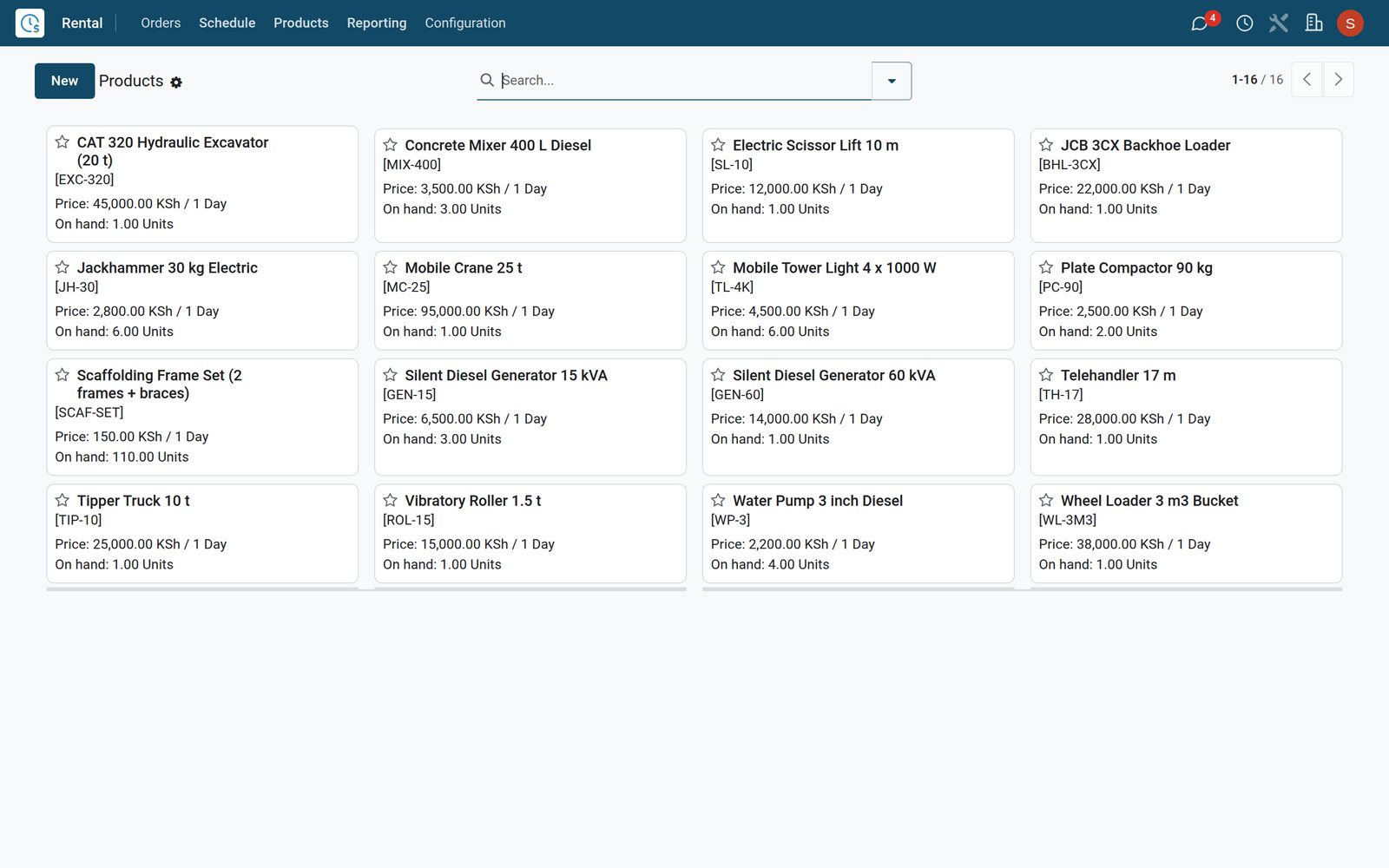
- Rental
Periods you define once
Rental periods lists every billing unit from hourly to five-year; add a weekend or quarterly period and it becomes available on every product's price table.
Explore Rental →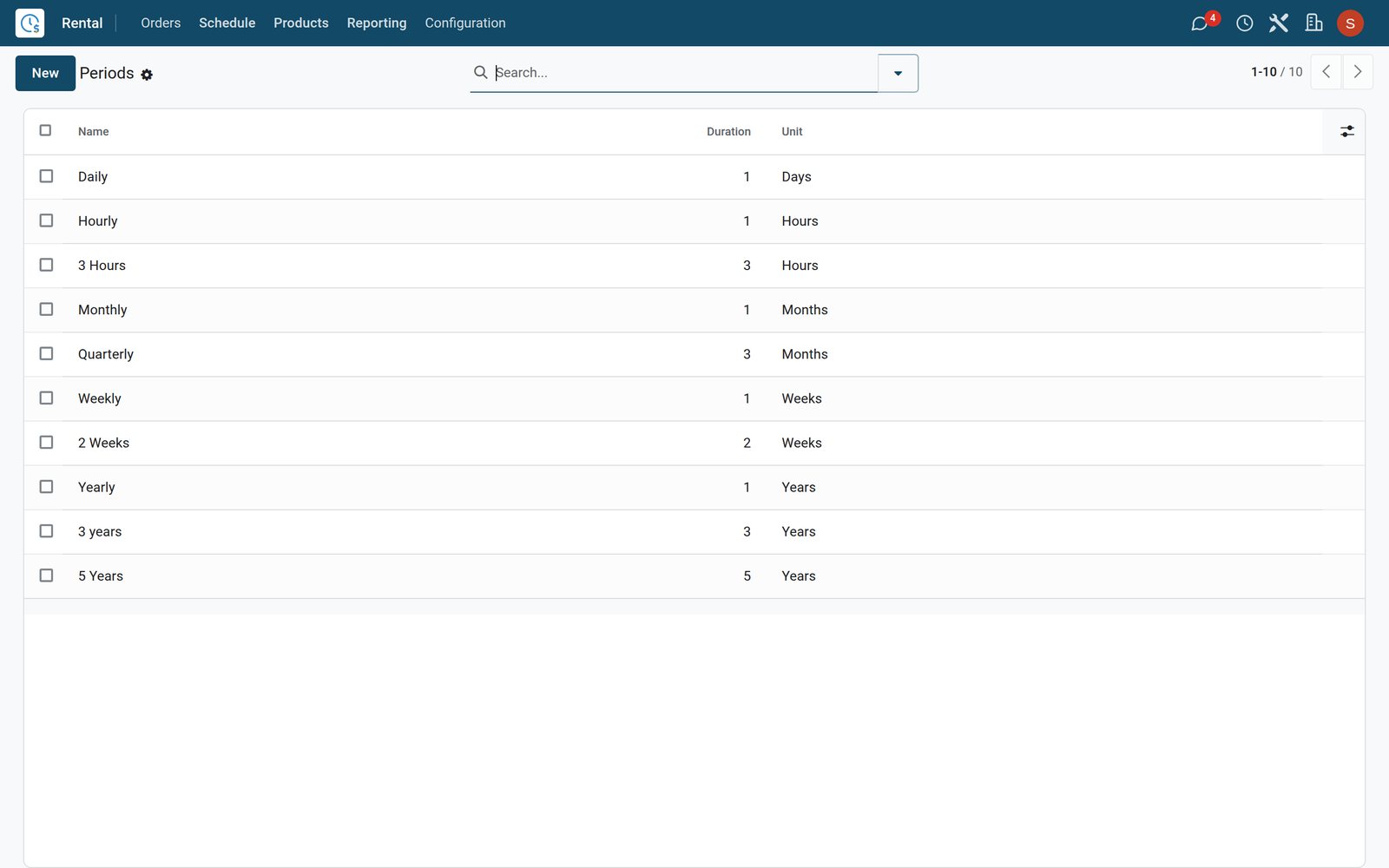
See at a glance which quotes became bookings
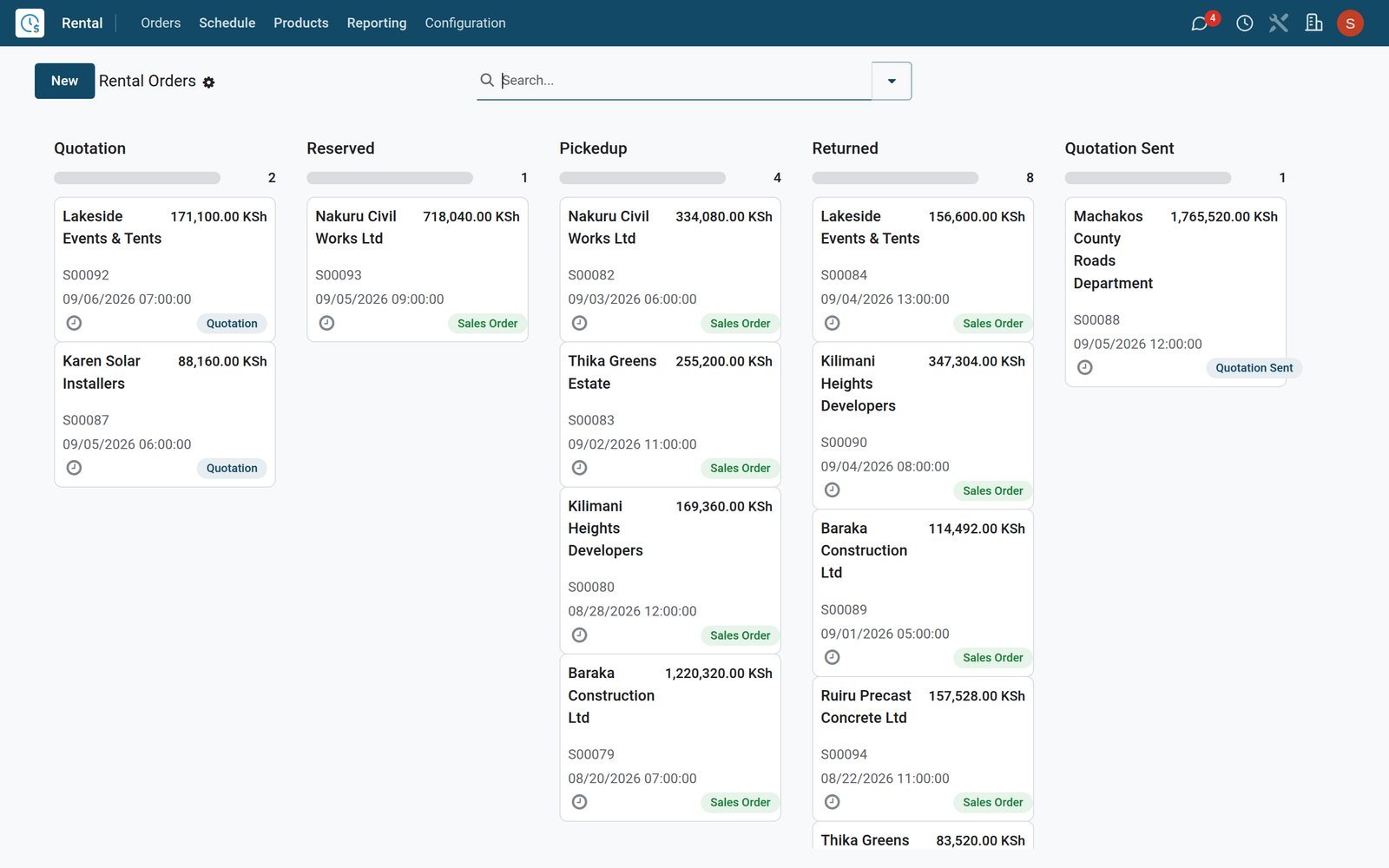
Group rental orders by status to run the day like a board: quotations to chase, bookings to prepare and items out on hire.
 Rental
One board from quote to return
Grouping rental orders by rental status turns the list into columns such as Quotation, Reserved and Returned, each card showing the customer and order value.
Explore Rental →Find the items that earn and the ones that sit idle
Rental Analysis works on every rented line day by day, so you compare products, customers and months without exporting anything first.
- Rental
Rented quantity over time
The Rental Analysis graph plots ordered, picked-up and returned quantities day by day; switch the measure to amount to see what each day earned.
Explore Rental →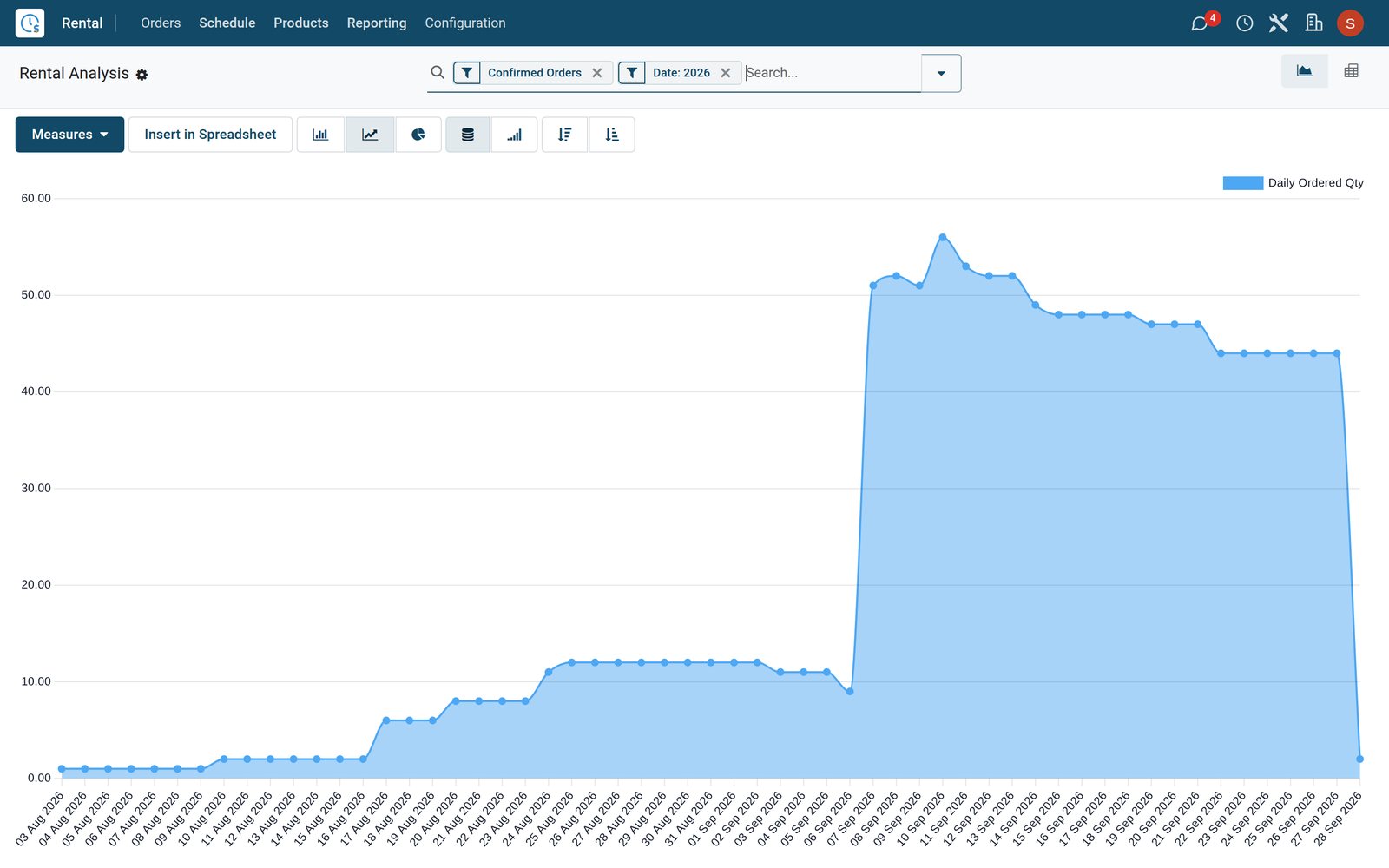
- Rental
Products against months in one pivot
The pivot view breaks the same data down by product, category, customer, salesperson or serial number, and downloads to a spreadsheet in one click.
Explore Rental →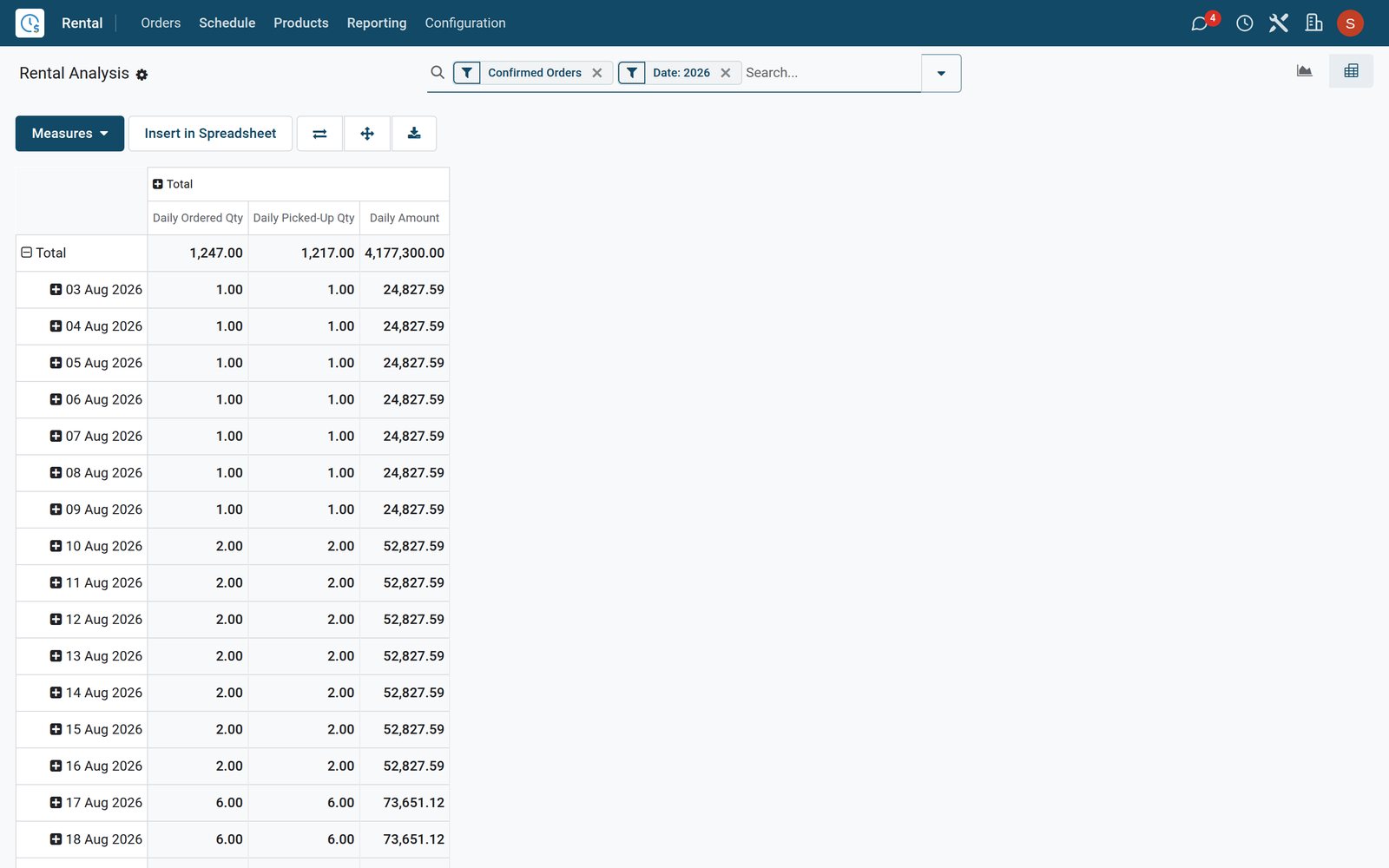
What sets it apart
Controls that stop double bookings and lost revenue
Rental controls that work because stock, sales and accounts share one record instead of three separate systems.
Serial numbers held per order
Reserve specific serial numbers on an order line; serials already out for overlapping dates are flagged as unavailable, so one compressor is never promised twice.
Padding time for cleaning and checks
Set padding time on a product or as a company default, keeping a minimum gap between two rentals of the same item for cleaning and inspection.
Late fees without arguments
Extra-hour and extra-day rates live on each product; a late return adds the delay cost to the order, after a grace period you set in Settings.
Stock that knows what is on hire
Picked-up items move to the company's rental location and back into stock on return, and each product shows how many units are out.
Signed before it leaves the yard
Rental quotations can require the customer's online signature, and the signer's name and signing date are stored on the order for any later dispute.
One record from quote to ledger
The same rental order drives pickup, return, invoice and analysis, so nobody retypes a price between the counter, the yard and accounts.
Who uses it
Each role sees the part of the rental it owns
One app, four daily views: the owner, the counter, the yard and the accountant each start from a different screen.
Owner or general manager
Opens the Rental dashboard and Rental Analysis to see rented quantities, top customers and amounts per product without waiting for a monthly report.
Rental desk
Quotes periods, confirms bookings and works the Pickup and Return lists under To Do Today, with the schedule open to check availability.
Yard and delivery crew
Hands items over and takes them back by serial number, and processes rental deliveries and receipts in Inventory or the Barcode app.
Accountant
Filters rental orders waiting for an invoice, bills delay costs with the hire and reconciles cash and bank takings in Accounting.
Works with
Runs with the apps a rental business already needs
Rental shares customers, products, stock and journals with these BridgeERP apps, all installed on the same database.
 SalesRental orders are sales orders, sharing quotation templates, customers and online signatures.
 InventoryRental transfers, serial numbers and the rental stock location.
 AccountingInvoices, delay costs, country taxes and bank reconciliation.
 PurchaseBuy new equipment and spares; vendor bills flow to Accounting.
 SignSend rental agreements and hand-over forms for electronic signature.
 DocumentsKeep ID copies, delivery notes and signed agreements together.
 HelpdeskLog breakdown calls from renters as tickets and close them out.
 PlanningPlan shifts for drivers, technicians and counter staff.
 EmployeesStaff records for the counter, yard and delivery teams.
 PayrollPayslips with statutory deductions for your crew, Kenyan rules on the demo.
 ApprovalsRoute equipment purchases and other requests for sign-off.
 DiscussChat on each order's thread and keep the desk informed.
In your country
Priced in your currency, taxed your country's way, run from the yard
What a rental business needs from day one, in any country, shown on a database with a Kenyan company and US companies side by side.
Several currencies on one system
Kenyan rental orders price in KES while the US companies quote in USD, with both currencies active in the same database.
Companies in different countries together
Run a Kenyan company and US companies side by side, each with its own currency, taxes and journals, and switch between them from the top bar.
E-invoicing on rental invoices
Country e-invoicing runs from Accounting without a separate tool; on the demo, the Kenyan company's eTIMS OSCU connector reports rental invoices to KRA.
Country VAT and reports loaded
Each company gets its country's chart of accounts, sales taxes and tax reports; on the demo the Kenyan company's are installed, ready to book rental income.
Counter cash and bank transfers
Record cash taken at the counter and bank transfers against rental invoices in separate Cash and Bank journals, then reconcile them in Accounting.
Scan at the gate
The Barcode app processes rental deliveries and receipts by scanning product and serial barcodes with a handheld scanner or a phone.
Reports and control
Reports that show where every item and every payment is
The reports and control screens that come with Rental, all reading the same live orders.
Rental Analysis
Graph and pivot views of daily ordered, picked-up and returned quantities and amounts, by product, category, customer, salesperson or serial number.
Rental dashboard
A ready-made Rental dashboard sits in Dashboards beside the other app dashboards, for owners who want the headline figures first.
Late returns flagged
The Rental Schedule marks lines whose return date has passed as late, so the desk calls the customer before the next booking suffers.
Today's pickups and returns
To Do Today lists the orders due out and due back today; open one and record the pickup or the return straight from the order.
Pickup and Return Receipt
Print a Pickup and Return Receipt from the order, listing what was handed over and what came back, for the customer to keep.
Orders still to invoice
Filter rental orders by invoice status to catch bookings not yet billed, then chase unpaid invoices with Accounting's follow-up reports.
Getting started
Go from spreadsheet to first booking with your own team
The setup steps are standard screens in the app, so your own team can load equipment, prices and customers.
Import your equipment list
Load products and their details from an Excel or CSV file: map the columns, click Test to check the file, then import.
Set your rental periods
Keep the preset hourly to yearly periods or add your own, then attach a price per period on each rentable product.
Default delay costs and padding
In Rental settings, set the default extra-hour and extra-day charges, the grace period and the default padding time between rentals.
Turn on rental transfers
Switch on Rental Transfers in settings to create delivery and receipt transfers for every pickup and return, handled by your warehouse team.
Build quotation templates
Create templates for your common packages with default lines, signature and prepayment rules, so a new quotation takes a few clicks.
Bring your customers across
Import customers from your old system with External IDs, so a second import updates them instead of creating duplicates.
Questions
Questions about Rental
Not covered here? Contact us.
Can one item have hourly, daily and monthly prices?
Yes. Each rentable product has a rental price table with one line per period, such as hourly, daily, weekly or monthly, and the order applies the matching rate for the booked duration.
How does the app stop two customers booking the same item?
The Rental Schedule shows every booked line per product over time. For serial-tracked items you reserve specific serial numbers on the order, and serials already booked for overlapping dates are flagged as unavailable.
What happens when equipment comes back late?
Set extra-hour and extra-day rates on the product, or defaults in Rental settings, plus a grace period. When a late return is recorded, a delay cost is added to the order so it can be invoiced.
Can I leave time between rentals for cleaning and inspection?
Yes. Padding time can be set as a company default in Rental settings and on each product, keeping a minimum gap between two rentals of the same item.
Does rented equipment show in my inventory?
Yes. Picked-up items move to the company's rental location and come back into stock on return. Turning on Rental Transfers also creates delivery and receipt transfers that the warehouse can process or scan.
Can customers sign the rental quotation online?
Rental quotations can require an online signature. The customer signs from the quotation link, and the signer's name and date are stored on the order. The Sign app is available for separate agreements.
Can I invoice in several currencies, with e-invoicing?
Yes. Each company prices and invoices in its own currency in one database, as the demo's Kenyan company does in KES beside US companies in USD, and country e-invoicing, such as the KRA eTIMS OSCU connector, runs from Accounting.
How do I move my equipment list out of spreadsheets?
Import products and customers from Excel or CSV: map the columns to fields, click Test to check the file, then import. External IDs let you re-import updates without creating duplicates.
Put Rental to work
Add it to your plan and pay only for what you use, or see it running on your own demo first.