

High School & Junior School Management: From the morning register to the signed report card
Timetables, attendance, exams, mark entry, report cards, fees and parent alerts for junior and high schools, with national and international grading scales, from a country's own curriculum to IGCSE and IB, and mobile money fee payments.
Free instant access. No credit card required.
 Academics
 Fees & Billing
 Assessment Engine
 Timetable
 Parent Portal
 Payments & Mobile Money
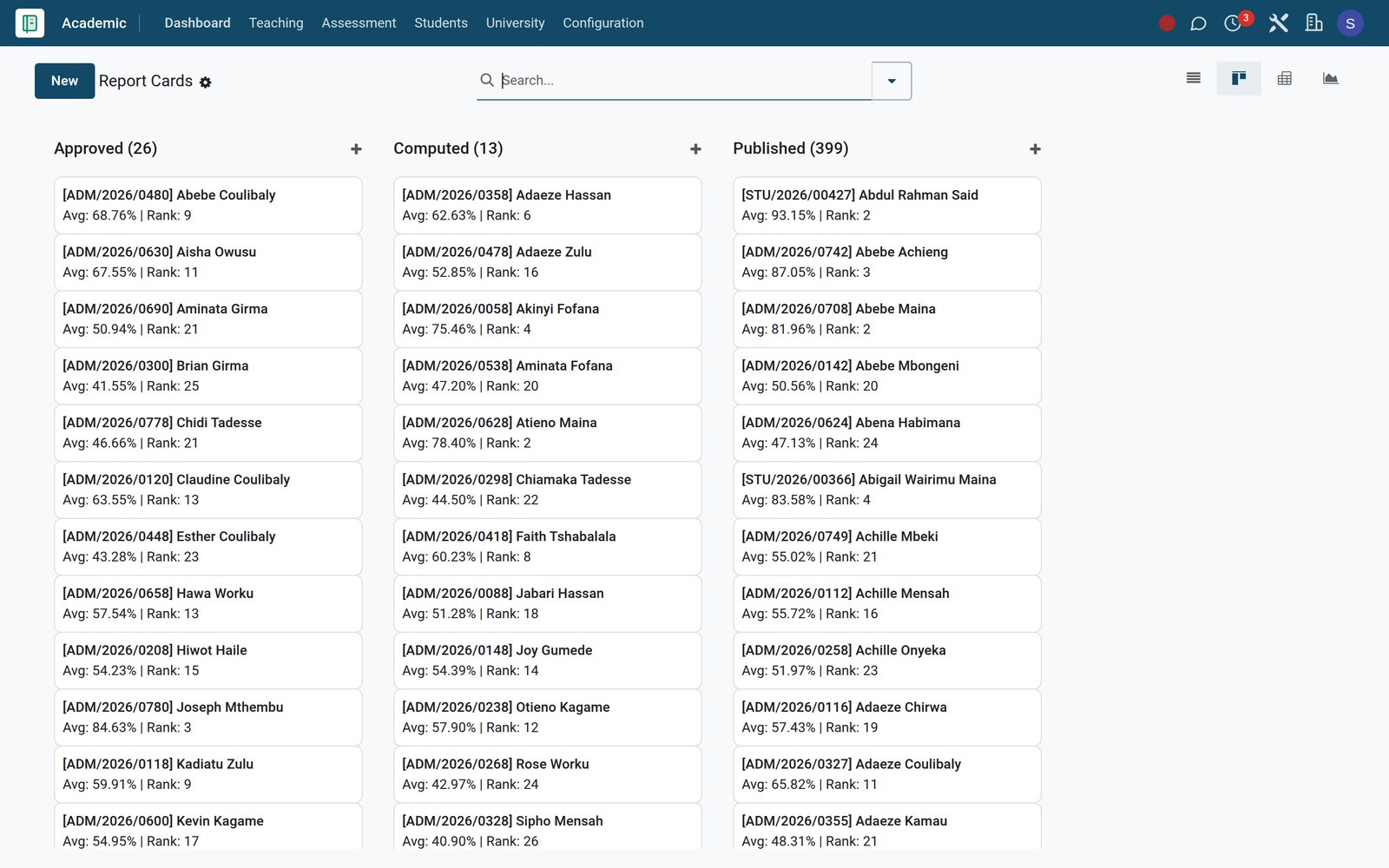
Turn a term of marks into report cards parents can read
Subject teachers enter scores, heads of department check the spread, and every report card carries averages, class rank, attendance and comments.
- Academics
Mark a whole class in one grid
Bulk Mark Entry lists student, subject, exam, score out of the maximum and percentage; absent learners are flagged with a reason instead of a zero.
Explore Academics →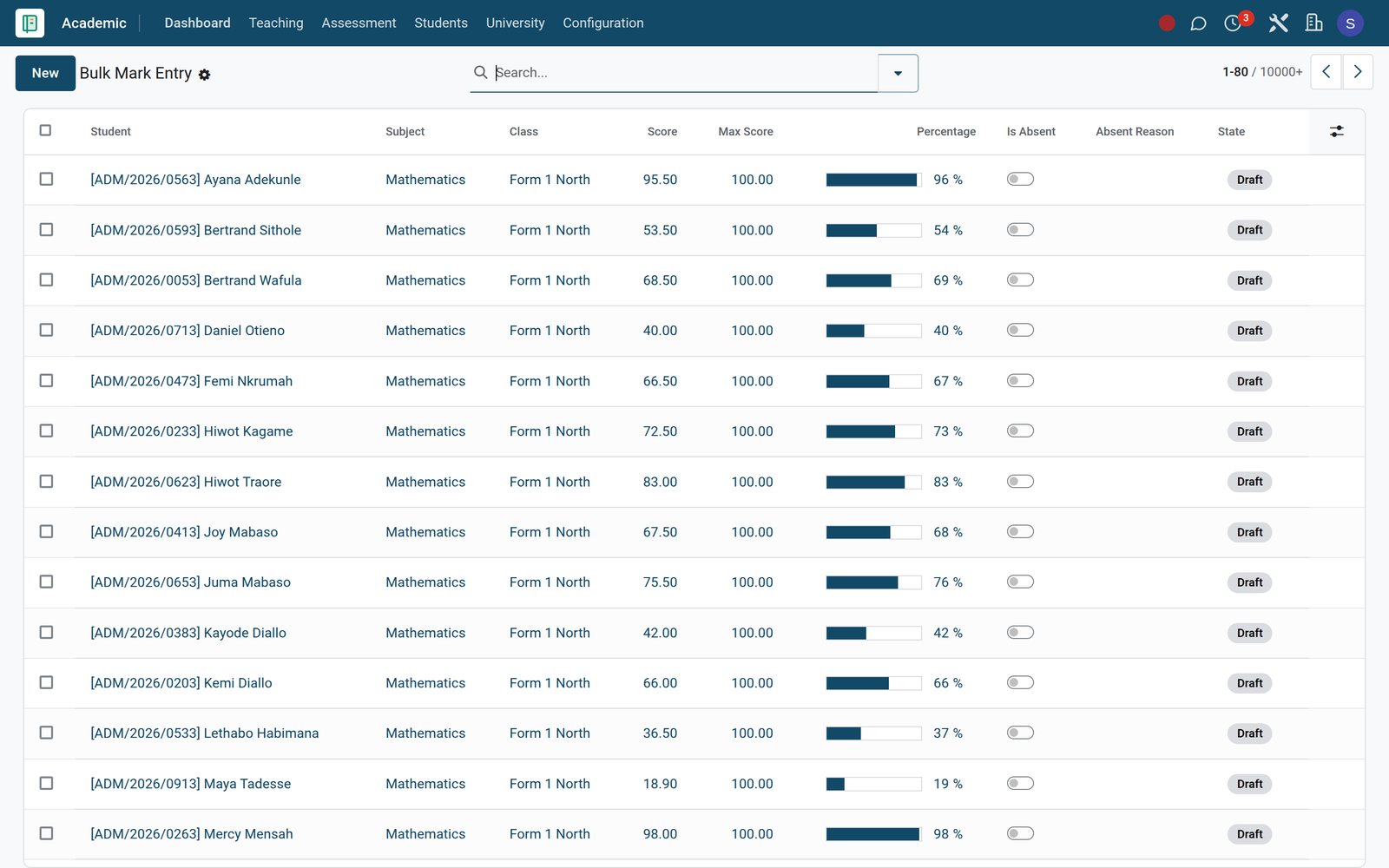
- Academics
Check every subject before results go out
Mark Sheets give each class, subject and exam its average, highest and lowest score, pass and fail counts and pass rate, so outliers surface early.
Explore Academics →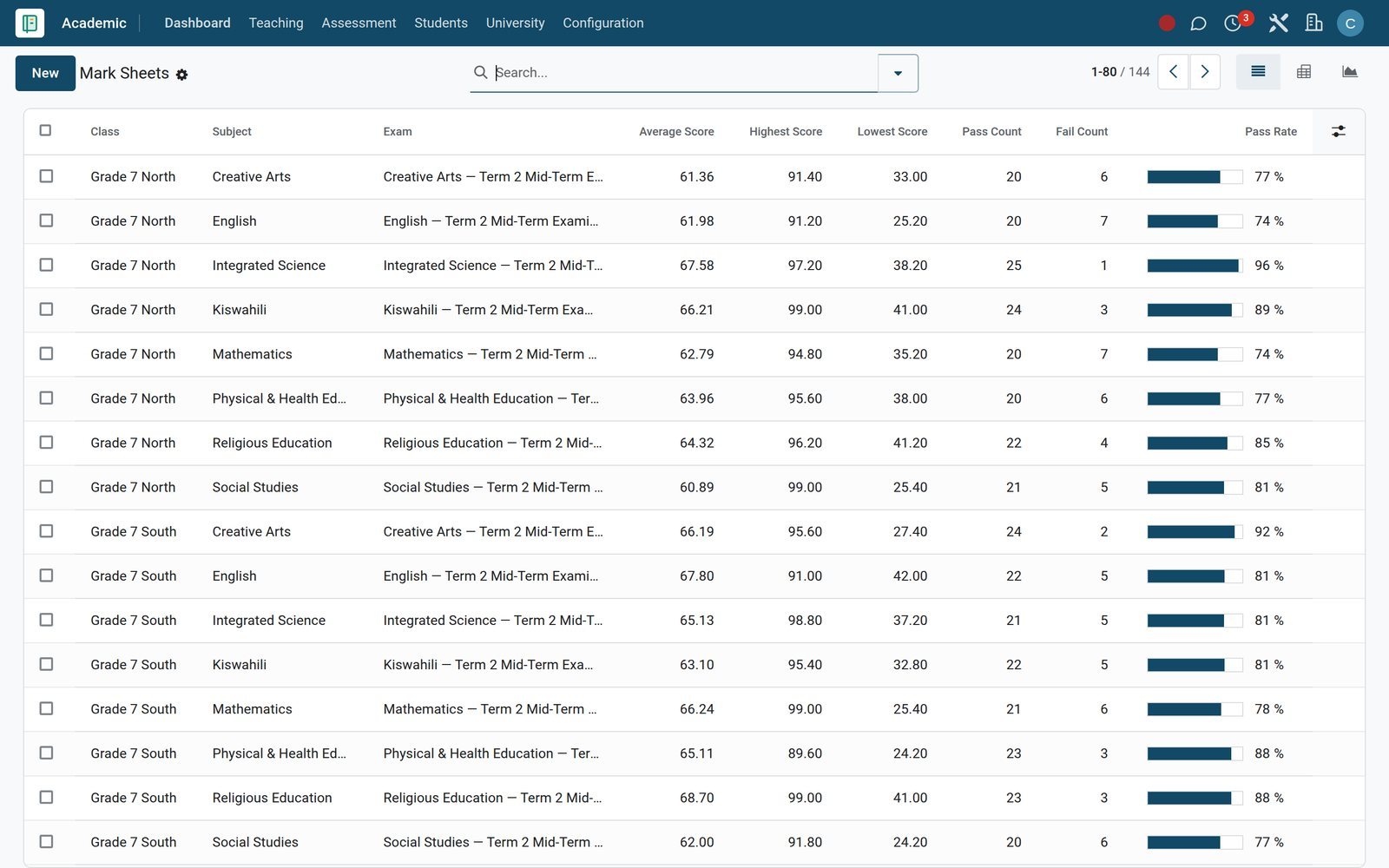
- Academics
See which classes and subjects need help
Academic Performance charts scores by class, subject, term and competency, and switches to a pivot table when the department meets to compare results.
Explore Academics →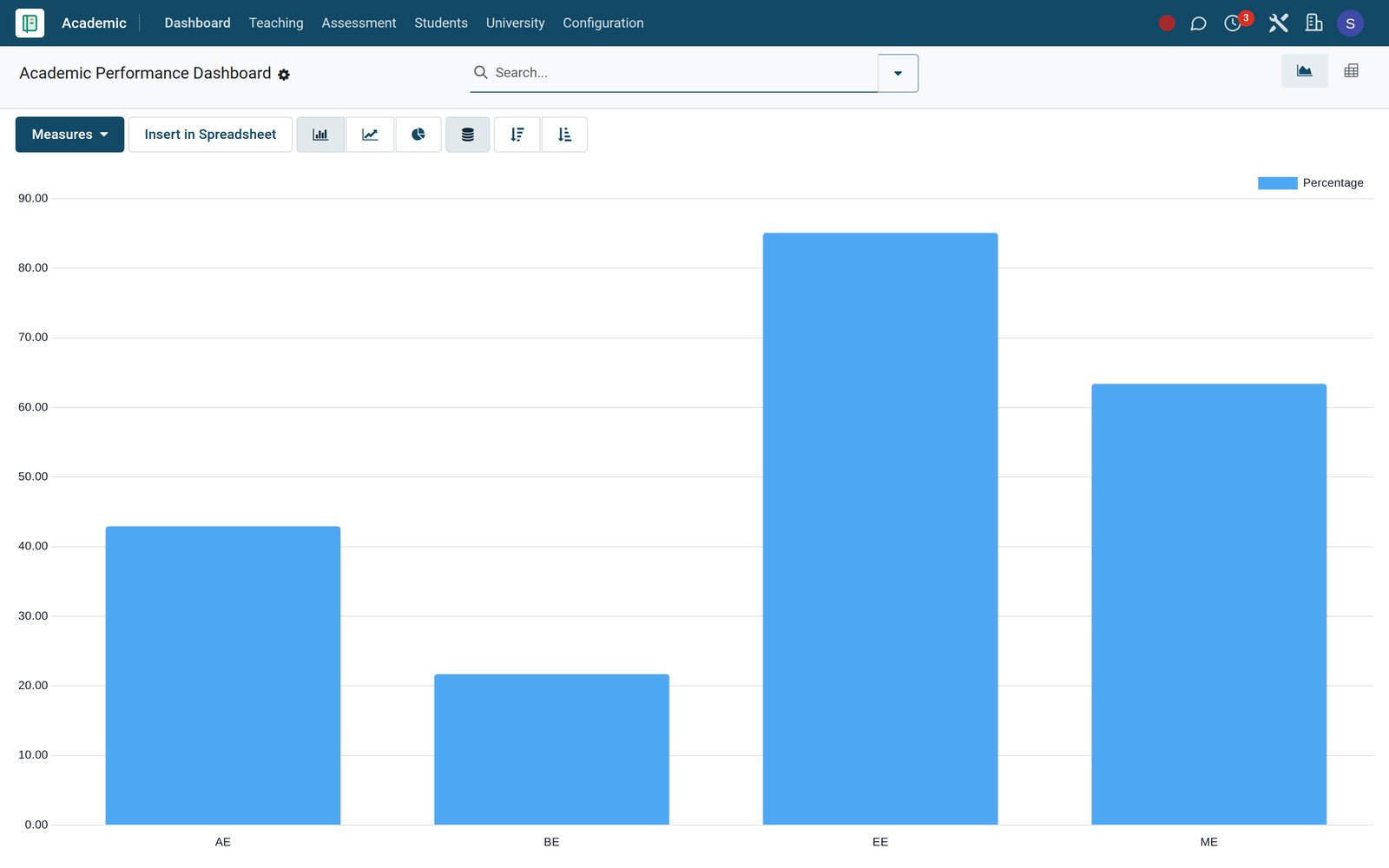
By the numbers
Built for the way secondary schools grade and report
Counts of what is configured on the BridgeERP school demo, not estimates.
- 30
- grading scales on the demo school, covering CBC, 8-4-4, IGCSE and IB curricula side by side.
- 8
- academic report screens, from performance and attendance analytics to class rankings, KPSEA readiness, report cards and transcripts.
- 5
- delivery channels on every parent alert rule: email, SMS, WhatsApp, push notification and the parent portal.
- 9
- interface languages active on the demo, including Kiswahili for Kenya and Tanzania, French and Arabic.
Inside the app
Everything a junior or high school runs, under one login
The Academic, Fees & Finance and Parent Engagement apps, grouped the way a school office thinks about its year.
Student records
Academic Records, Subject Enrollments with elective flags, and Achievements for awards and competitions keep each learner's history in one file.
Curriculum and syllabus
Learning Areas, Strands, Sub-Strands, Subjects and Syllabi, with Curriculum Versions and a Syllabus Coverage list that tracks hours allocated against hours used.
Timetable and workload
Timetables, period Slots, Rooms and Slot Swap Requests, plus Teaching Load, which sets each teacher's periods per week against a permitted maximum.
Lessons and homework
Lesson Plans with learning outcomes and key inquiry questions, Homework with due dates and difficulty, and Submissions graded with written teacher feedback.
Attendance
A Daily Attendance register per class and session, Per-Period Attendance for subject lessons, and a Details list of every learner's status and reason.
Exams and marks
Examinations, Exam Schedule, Exam Seating and Academic Rooms, then Mark Entry, Grade Entries and Grade Results with continuous assessment and exam weights.
Report cards and promotion
Report Cards, Class Rankings and Transcripts at term end, then Promotion Batches that apply your Promotion Rules to move each class up a year.
Fees and parents
Fee structures, invoices, bursaries and collections in Fees & Finance; announcements, alert rules and parent-teacher meetings in Parent Engagement.
Step by step
One term, six steps, no re-typing between offices
Each step starts from the records the previous one created.
- Step 1
Enrol and allocate
Place learners in classes and enrol their subjects; Subject Allocation gives every class-subject pair a teacher and a number of weekly periods.
Academics - Step 2
Timetable the week
Timetable Slots fix day, period, time, teacher and room; a teacher who needs a change raises a Slot Swap Request for approval.
Timetable - Step 3
Teach and take the register
Lesson Plans, Homework and the Daily Attendance register run each day, and every register carries an option to text families about absences.
Academics - Step 4
Examine and mark
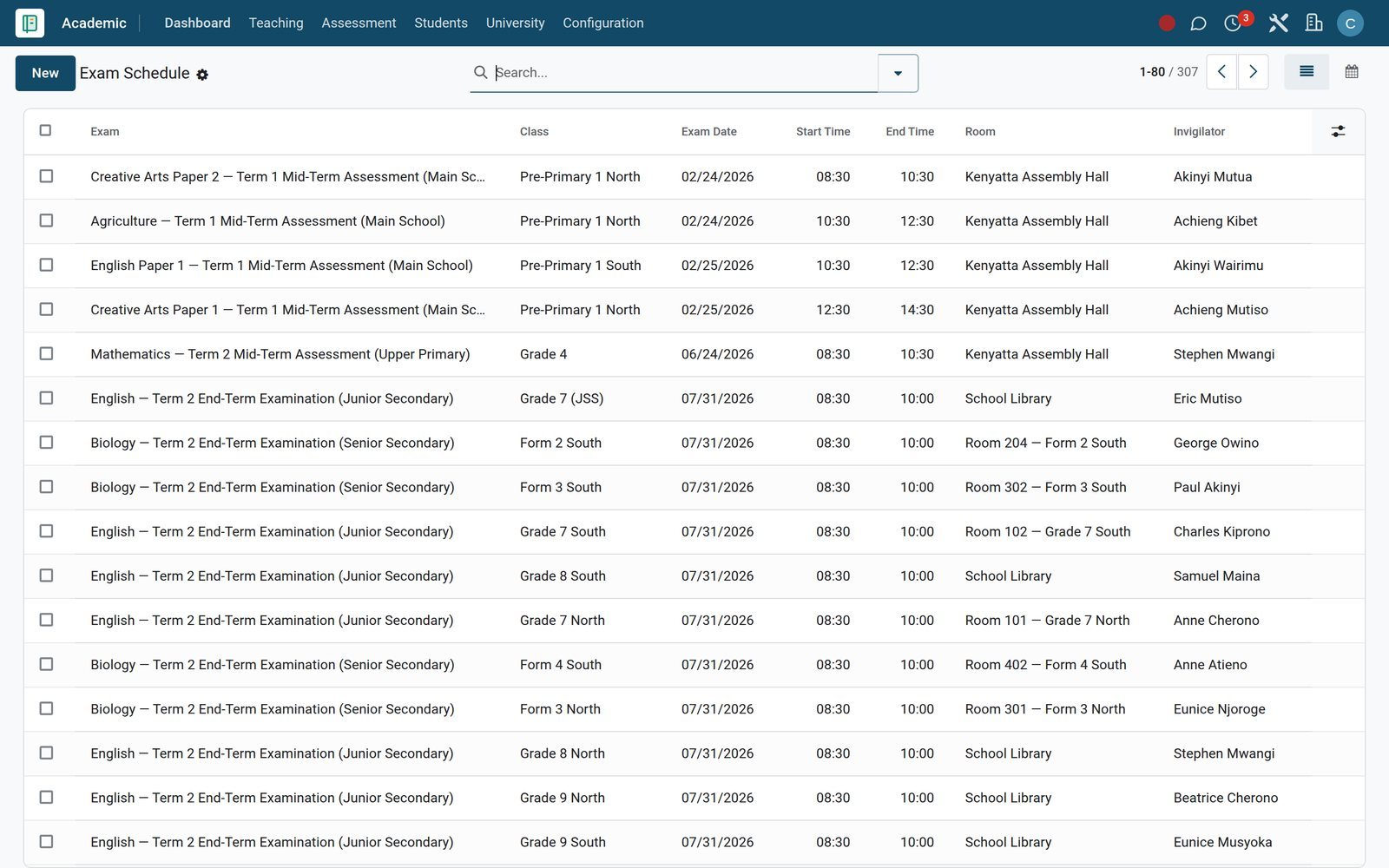
The Exam Schedule books rooms and invigilators, Exam Seating assigns seats, and marks entered per exam are validated before they count.
Assessment Engine - Step 5
Report to families
Report Cards publish averages, rank and comments, while Alert Rules message parents about absences, grades and fees on their chosen channels.
Parent Portal - Step 6
Bill and collect
Fee assignments become invoices posted to Accounting, parents pay by mobile money or card, and the Overdue Pipeline shows who still owes.
Fees & Billing
A timetable teachers can teach from, and workloads you can defend
Heads of department see periods, rooms and loads in the same place where teachers set and mark homework.
- Timetable
Every period, teacher and room on one list
Timetable Slots show day of the week, period number, start and end time, class, subject, teacher, room and whether the slot is a lesson or a break.
Explore Timetable →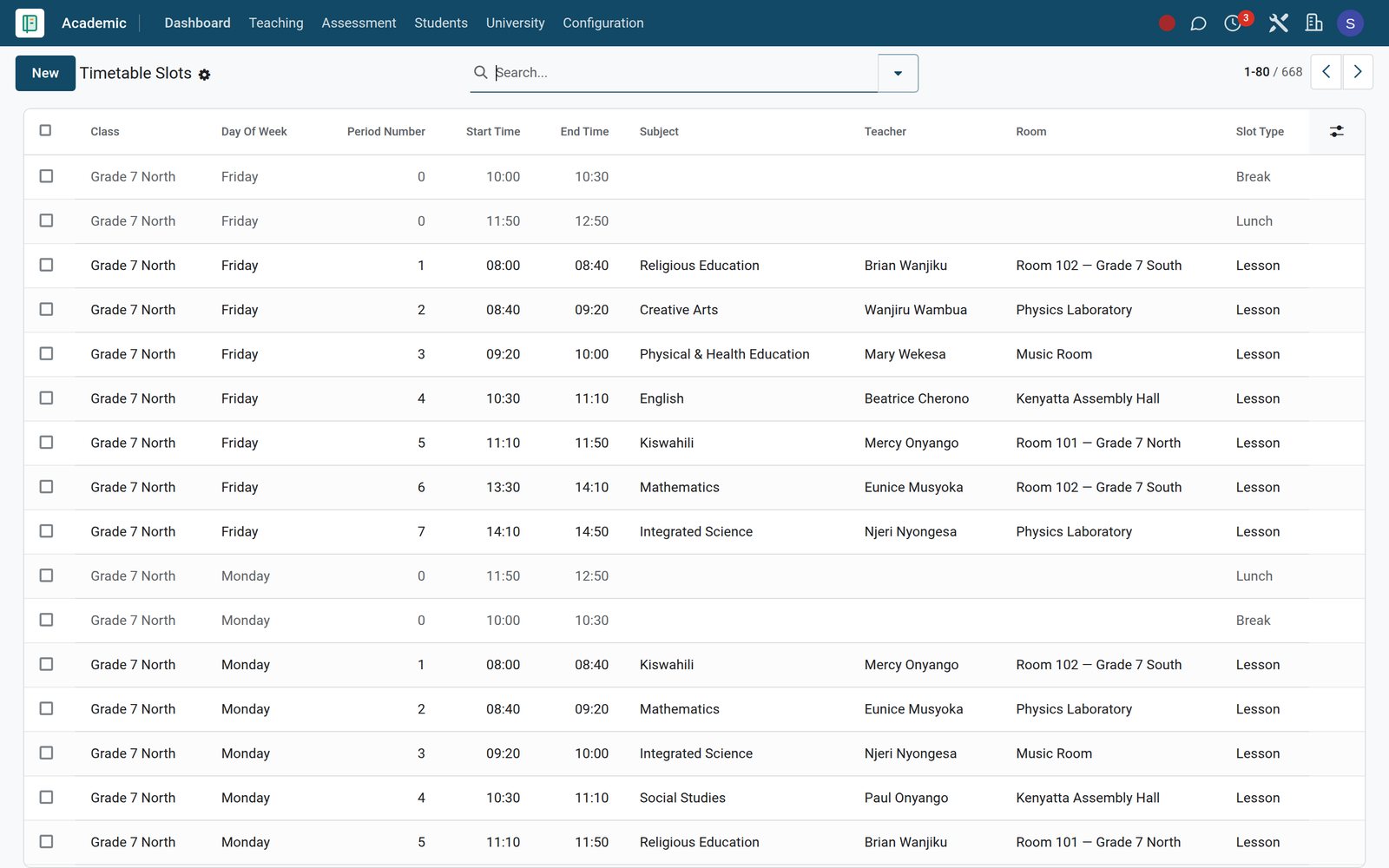
- Timetable
Spot an overloaded teacher before term starts
Teaching Load totals each teacher's periods per week, classes and subjects against the maximum permitted, and raises an overload flag with the extra hours.
Explore Timetable →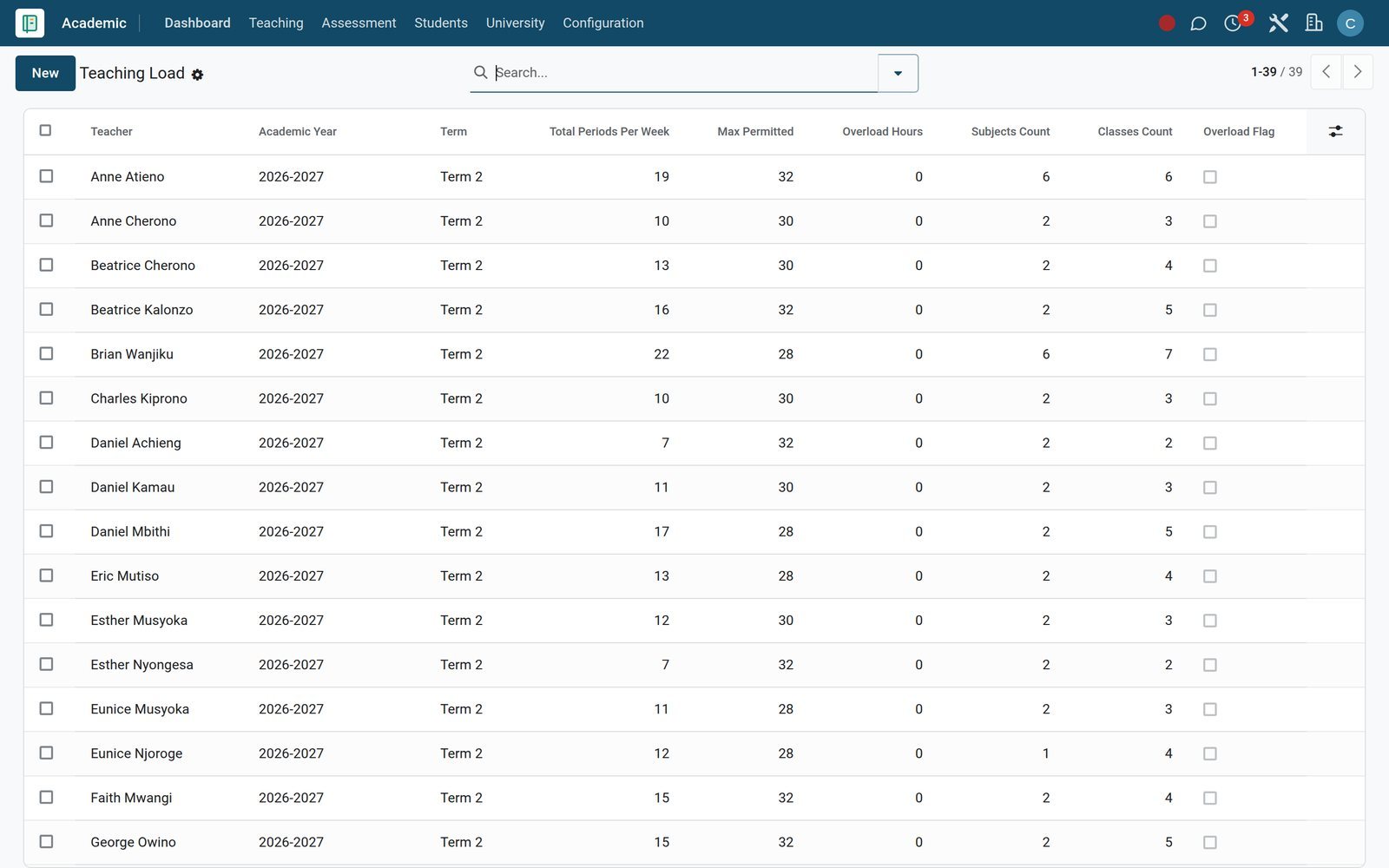
- Academics
Homework that is tracked, not just set
Submissions record when each learner handed work in, whether it was late, the grade out of the maximum and the teacher's written feedback.
Explore Academics →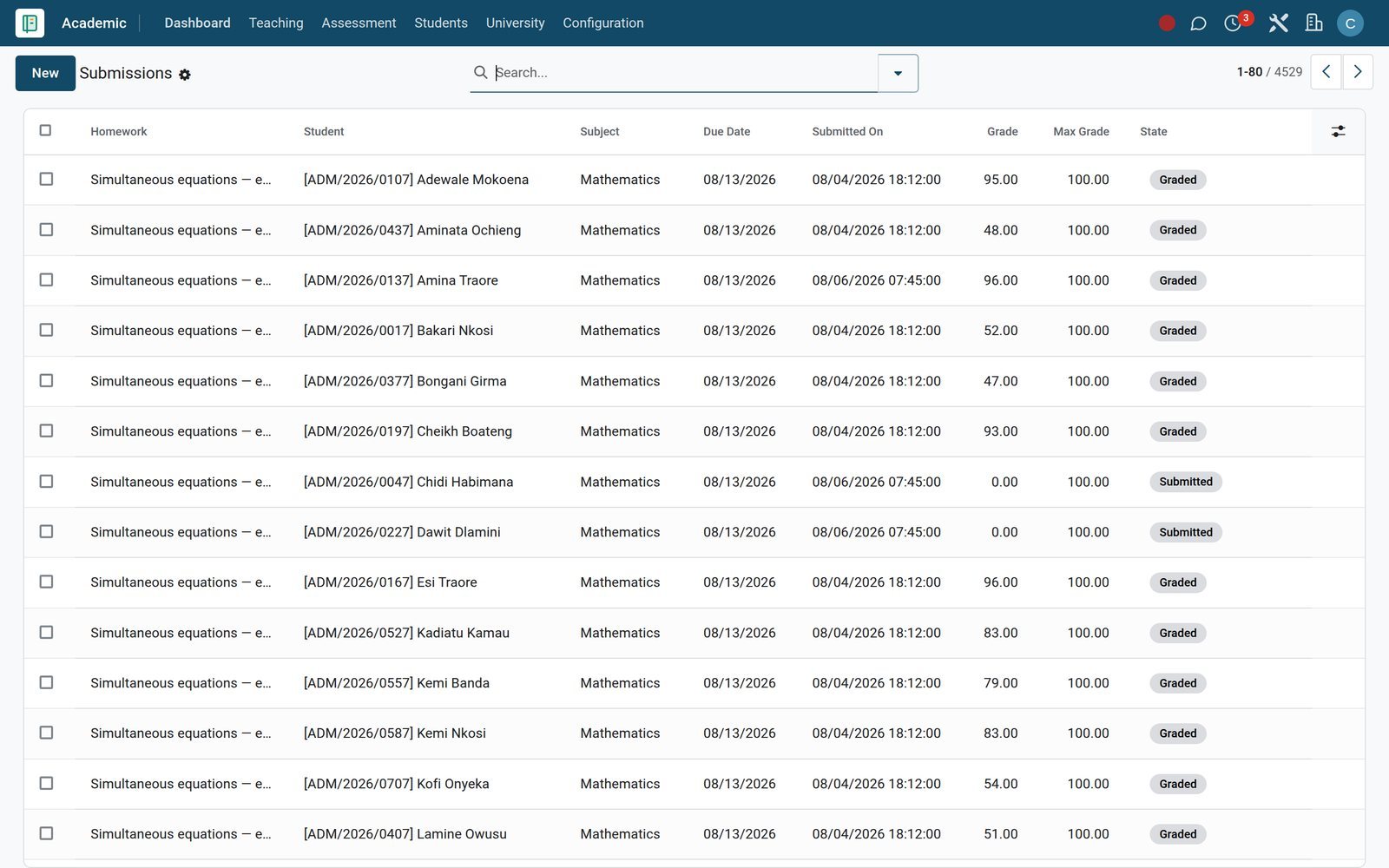
Run exam week from a schedule, not a noticeboard
Rooms, invigilators and seats are set once, and the mark sheets follow from the same exam record.
 Assessment Engine
Rooms and invigilators booked per paper
The Exam Schedule lists each exam by class with date, start and end time, room and invigilator, and opens as a calendar when you need one.
Explore Assessment Engine →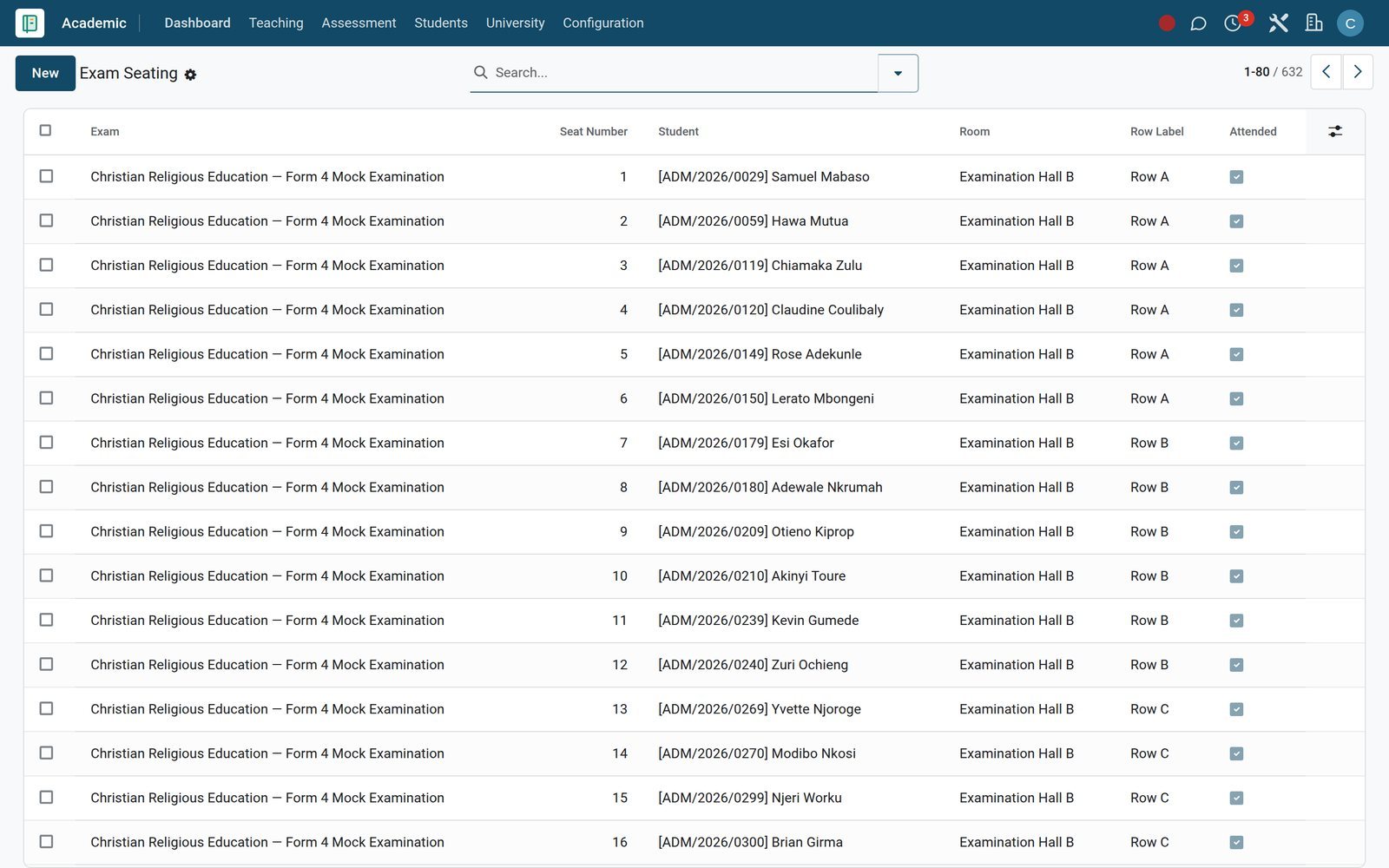 Assessment Engine
Seating plans with attendance at the door
Exam Seating gives every candidate a room, row and seat number and records whether they sat the paper; each exam stores its seating plan method.
Explore Assessment Engine →Parents hear about an absence the same morning
The register, the alert and the follow-up meeting are linked records, not three separate systems.
- Academics
A register that counts itself
Daily Attendance shows class, date and session with present and absent counts, the attendance rate, and a switch to send absence SMS to families.
Explore Academics →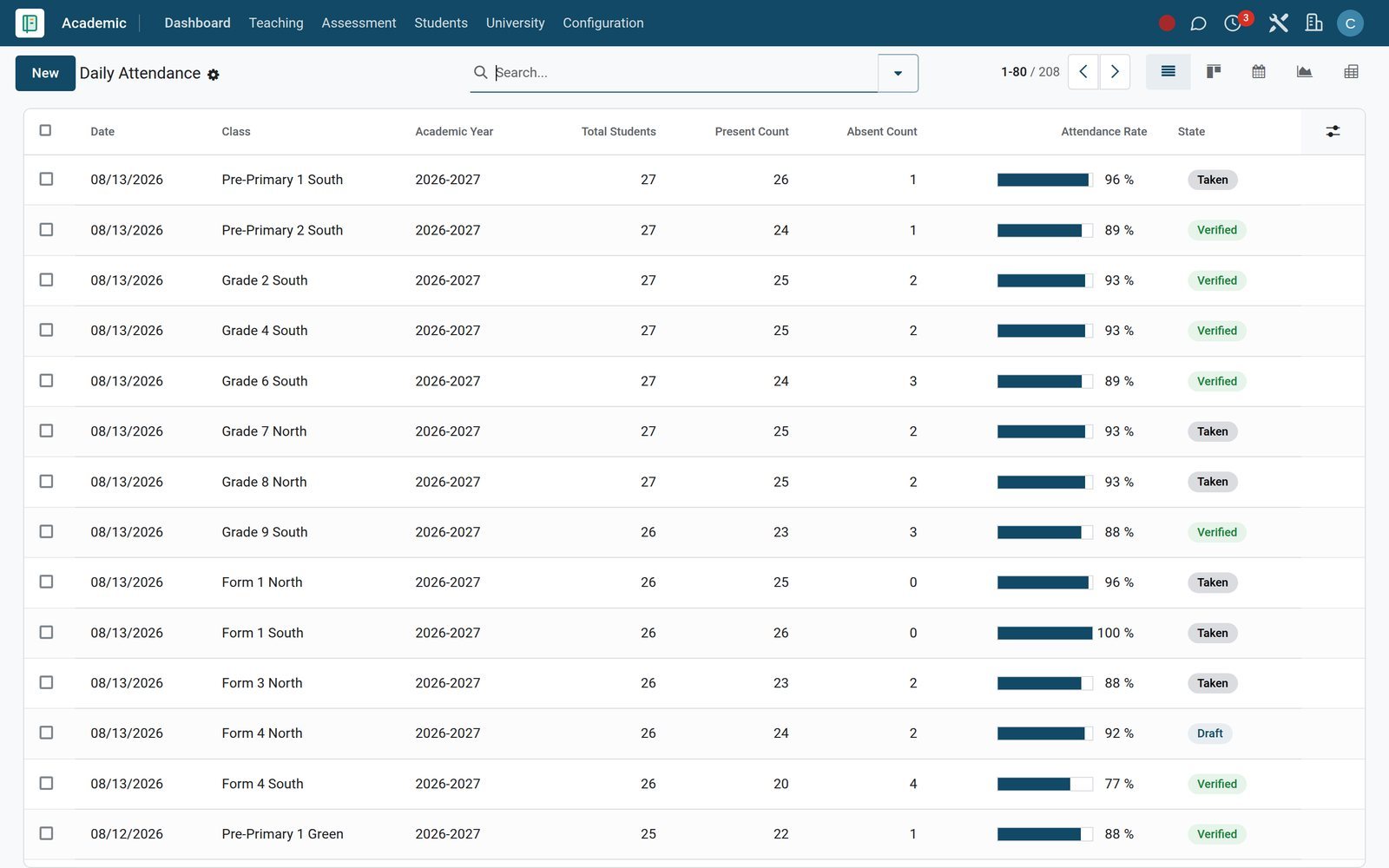
- Parent Portal
Every alert logged, by channel
The Alert Log records each message with its rule, student, parent, channel and sent status, so the office can show that a family was told.
Explore Parent Portal →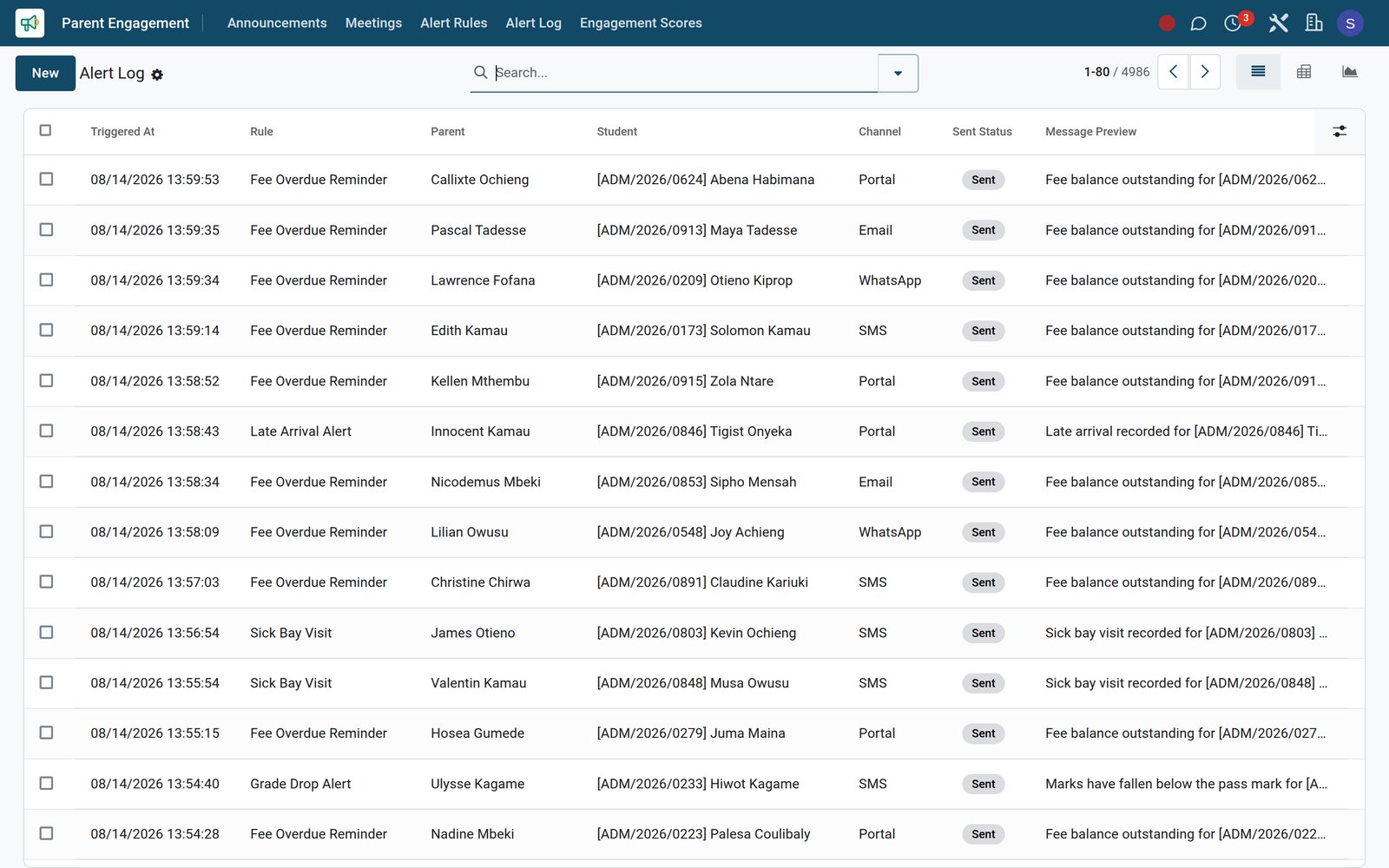
- Parent Portal
Parent-teacher meetings with action items
Meetings hold the teacher, parent, student, topic, agenda and date, with a video link for parents who cannot come in and agreed action items afterwards.
Explore Parent Portal →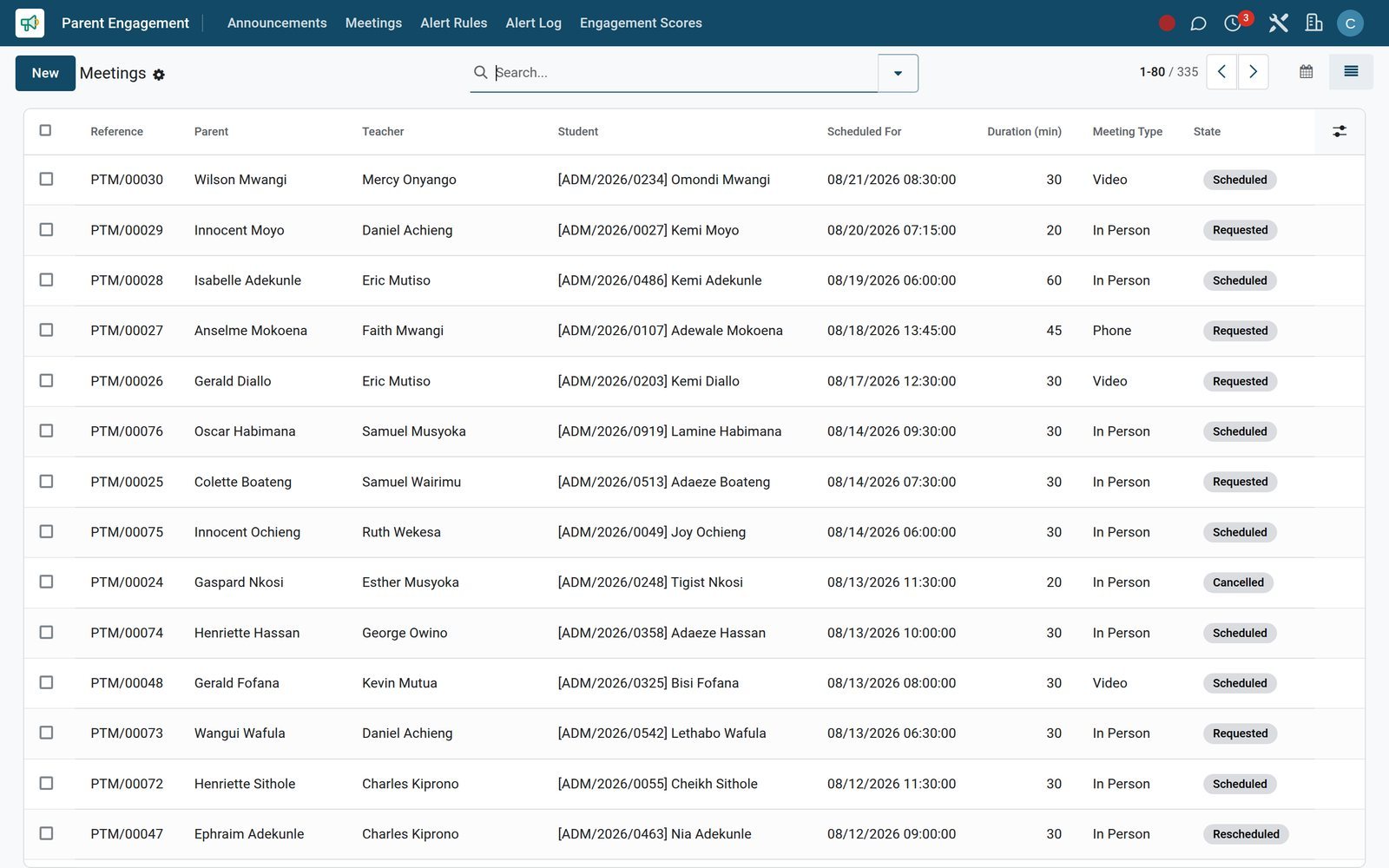
Know which families owe what before the term closes
Fees & Finance bills from fee structures and posts to Accounting, so the bursar and the head read the same balance.
- Fees & Billing
A board of every student's fee account
The Revenue Board shows each student's fee assignment for the term with its structure, total amount, amount paid and the balance still due.
Explore Fees & Billing →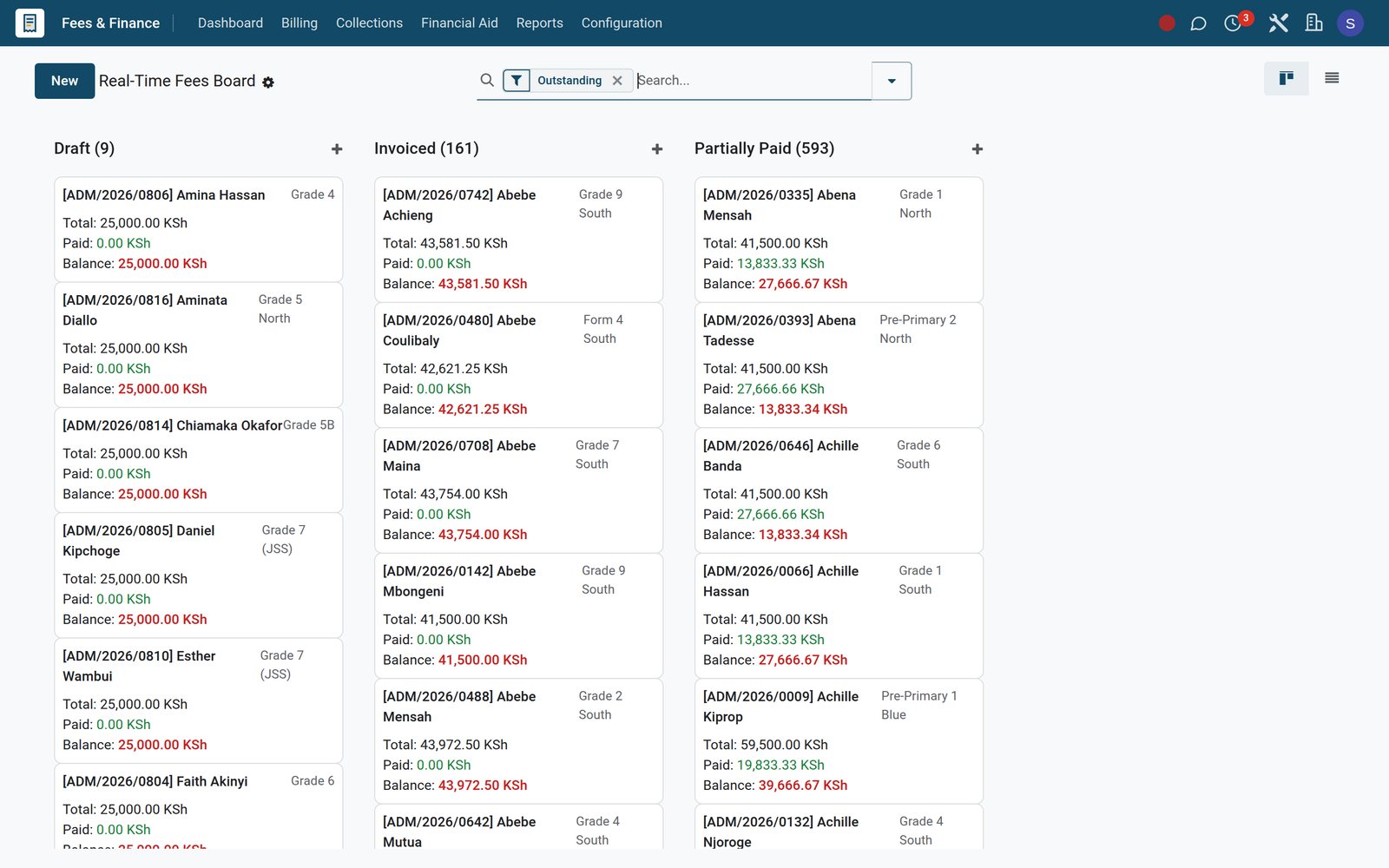
- Fees & Billing
Chase only the accounts that are open
The Overdue Pipeline filters to invoiced or part-paid assignments with a balance, ready for a Bulk Reminder and the stages of your Dunning Policy.
Explore Fees & Billing →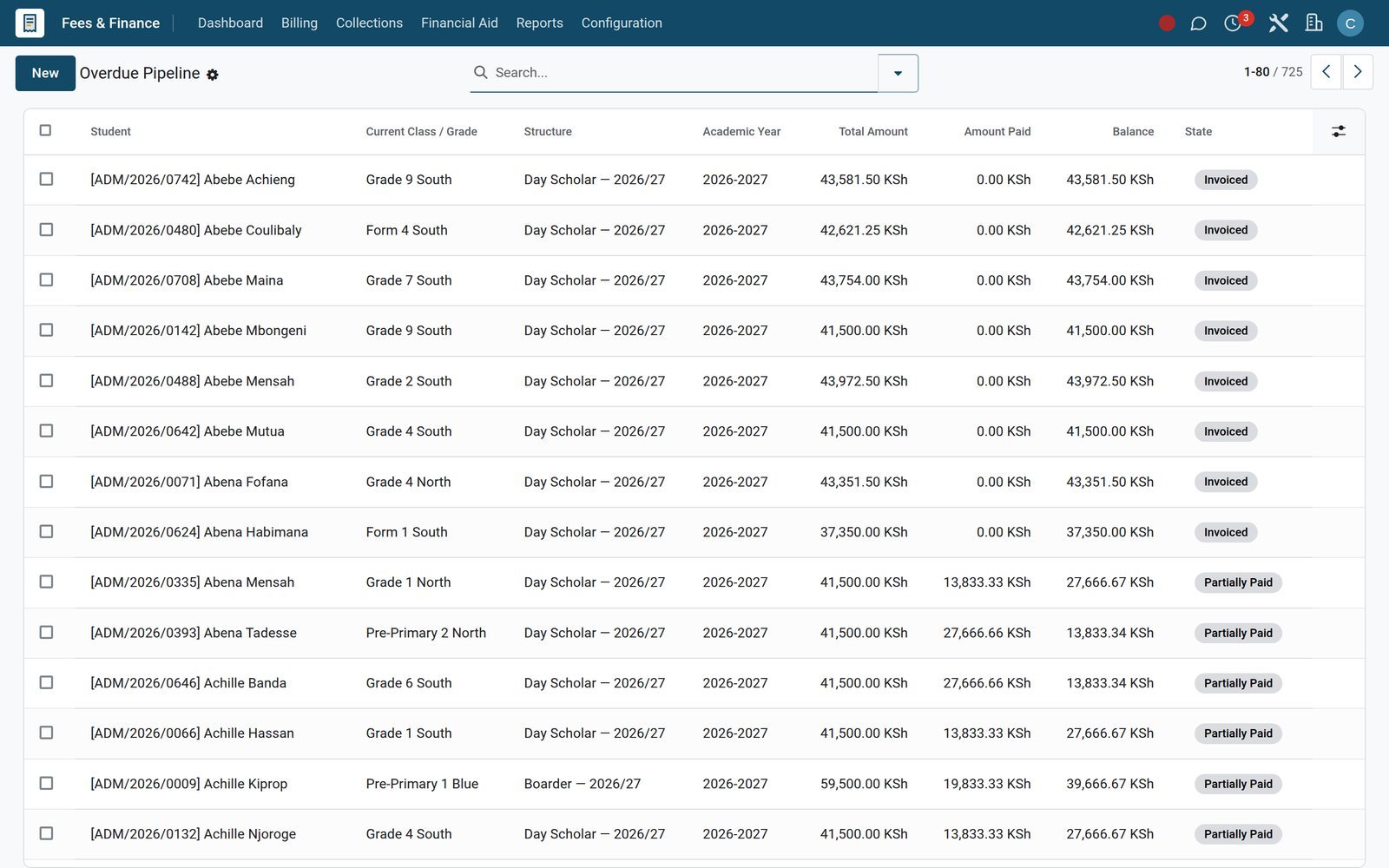
- Fees & Billing
Ageing by class and fee category
Outstanding Aging pivots unpaid balances by ageing bucket, class and fee category, with the days overdue behind every figure.
Explore Fees & Billing →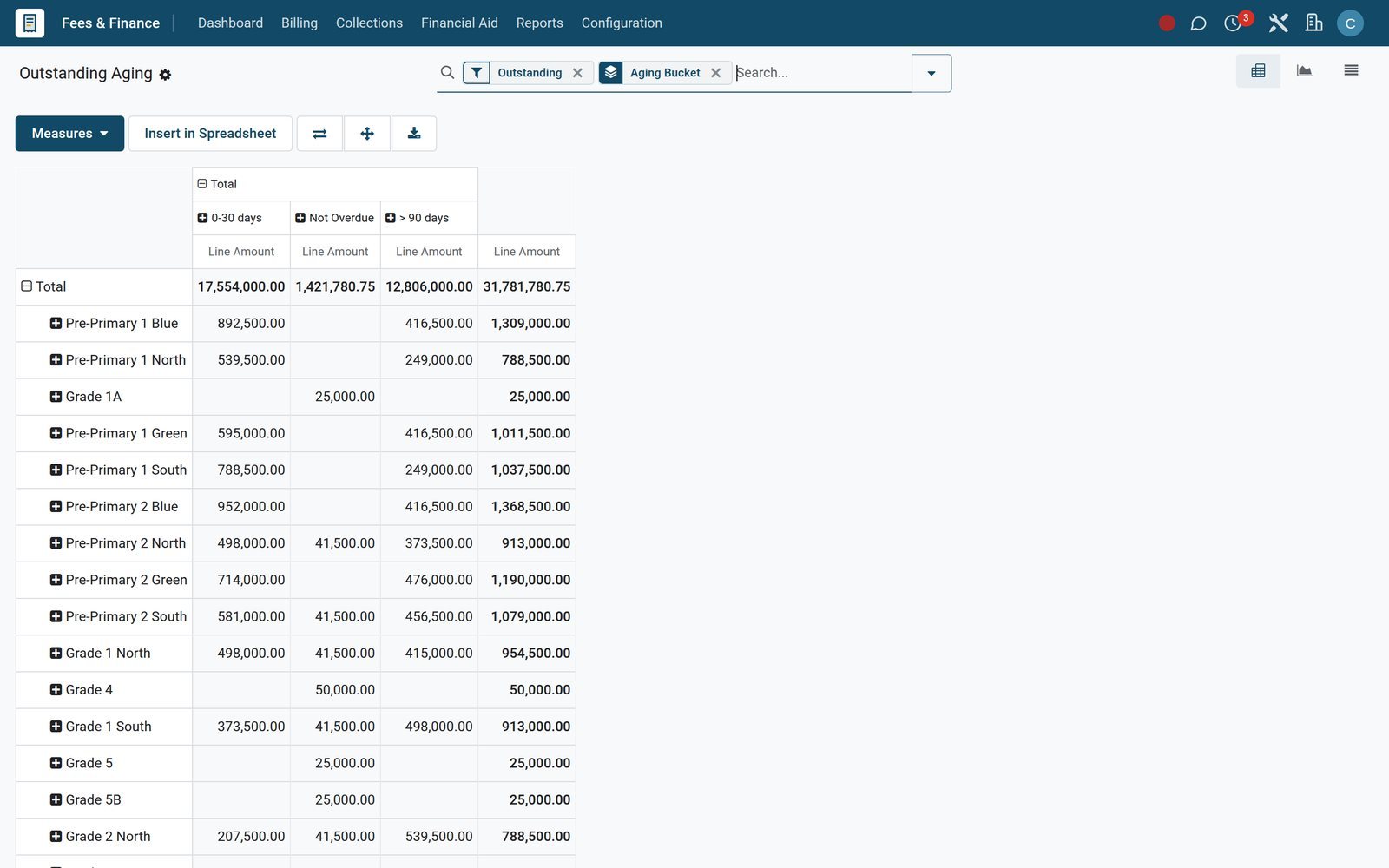
Who uses it
What each person in the school works from
The same records, opened from a different starting screen for each role.
Principal
Reads Academic Performance and Class Rankings, signs off report cards with a principal's comment, and follows the Collection Rate through the term.
Director of studies
Builds Timetables, balances Teaching Load, approves Slot Swap Requests and publishes the Exam Schedule with its rooms and invigilators.
Class teacher
Takes the Daily Attendance register, follows up absences through the Alert Log and writes the class teacher's comment on each report card.
Subject teacher
Works from Today's Timetable, writes Lesson Plans, sets and grades Homework, and enters scores in Mark Entry for each exam.
Bursar
Assigns fee structures in bulk, generates invoices, applies bursaries and waivers, and works through the Overdue Pipeline and the Dunning Log.
Parent
Receives absence, grade and fee alerts by SMS, WhatsApp, email or the portal, pays through the link on each fee invoice and meets teachers by video.
What sets it apart
The details that save a school office hours every term
Rules and records that most schools still keep in spreadsheets.
Continuous assessment and exam weighting
Grade Results store the continuous assessment score and weight, the exam score and weight, the final score, GPA points and grade for every subject.
Promotion by rule, not by memory
Promotion Rules set a minimum average, minimum attendance and maximum failed subjects, allow conditional promotion, and each batch reports promoted and retained learners.
Approvals with a trail
The Approval Matrix routes academic records to an access group with a final approver, and Approval Logs keep a record of who approved what.
Siblings billed as one family
Family Groups link brothers and sisters to one guardian, apply a sibling discount percentage and show the consolidated total, amount paid and balance.
Syllabus coverage you can measure
Syllabus Coverage lists each chapter with hours allocated, hours used, the teacher and completion date, so heads of department see which classes are behind.
Parent engagement, scored
Engagement Scores rate each family on portal logins, meetings and form responses and give an engagement level the school can act on early.
Works with
Add the rest of school life when you need it
Each app installs on its own and works from the same student record.
 LibraryBook catalogue, circulation and issues, with every loan recorded against the student who borrowed it.
 TransportRoutes, stops, vehicles and trips for day scholars, with transport charges billed through Fees & Finance.
 HostelBoarding rooms, roll calls and leave passes for boarders, with hostel charges billed through Fees & Finance.
 MealsMenus with dietary and allergy records for each learner, and meal charges billed through Fees & Finance.
 eLearningOnline courses linked to school subjects, with homework that can send learners to a course or a quiz.
 DisciplineBehaviour incidents and merits recorded against each student, so patterns become visible early in the term.
 CounselingCounselling cases and sessions for learners who need support, managed in an app of their own.
 Clubs & Extra-CurricularClubs and memberships for activities outside the classroom, with club charges billed through Fees & Finance.
 AdmissionsApplications and interviews for each new intake, handled before learners are enrolled into their classes.
 School ShopSchool, sports and tuck shop tills with a Charge to Student Fees payment method at checkout.
 HR & PayrollTeacher and support-staff contracts, leave and payslips, built on the same employee records as Teachers.
 Special NeedsIndividual education plans and support plans for learners with additional needs, kept beside their marks.
In your country
Made for how schools bill, teach and report, country by country
Payment rails, curricula, currencies and languages that match where your school operates.
Mobile money from the parent's phone
Parents approve fee payments from their phones: M-Pesa STK Push and Airtel Money are configured as payment providers on the demo school.
Cards and regional gateways
Pesapal and Flutterwave connectors are installed for card and mobile-money payments when M-Pesa is not the family's first choice.
National curricula such as Kenya's CBC
Competency Levels, Learning Areas, Strands, Sub-Strands and Learning Indicators model the competency-based curriculum, with Rubrics for assessing each indicator.
KPSEA readiness per learner
KPSEA Readiness scores critical thinking, creativity, digital literacy, citizenship and communication, with an intervention plan and a parent-informed tick.
Shop purchases charged to fees
The school shop's Charge to Student Fees payment method lets learners buy without cash, posting to a School Shop Charge to Fees journal.
Local and foreign currencies
On the demo, KES and USD are both active, and every fee invoice carries its own currency for local fee billing and international-curriculum tuition.
Staff work in their own language
Staff can work in Kiswahili for Kenya or Tanzania, in French or in Arabic, each installed as an interface language on the demo.
Statutory returns by country
The Compliance & Returns app carries country packs for Kenya, Nigeria and South Africa, working from the school's own academic records.
Reports and control
The reports the head, the board and the bursar ask for
Graph, pivot and list reports that read live records, with nothing to export first.
Academic Performance
Percentages by class, subject, term and competency as a graph or pivot, drilled down to each learner's individual score.
Attendance Analytics
Present and absent status by class, term and date, charted for the whole school or narrowed to a single class.
Class Rankings
Each learner's rank, average score and overall grade against the number of learners in the class, term by term.
Report Cards
Each card holds total marks out of possible, the average, class rank, days present out of total days and a published date.
Transcripts
Numbered transcripts with cumulative average percentage, cumulative GPA and overall grade across terms, ready for transfers and university applications.
Collection Rate and Fee Statement
Billed, paid and outstanding amounts by class, fee category and structure, as a graph, pivot or list for the finance committee.
Outstanding Aging
Unpaid fees in ageing buckets with days overdue, so the bursar can tell a late week apart from a lost term.
Aged Receivable and Profit and Loss
Fee invoices post to Accounting, so Aged Receivable, the Balance Sheet and Profit and Loss reflect term billing and collections.
Getting started
Up and running before the next term opens
Set the school up once; every term after that reuses the same structures.
Bring your records in from Excel
Import students, guardians and staff from CSV or Excel files: map each column to a field and test the file before anything is saved.
Configure curriculum and grading
Choose the curriculum version, then set Grading Scales, Assessment Types and Competency Levels under Academic Configuration before the first exam.
Build fee structures once
Define Fee Categories, Fee Structures, Installment Plans, Discounts and Late Fee Policies, then use Bulk Assign Structure to bill a whole class.
Invoice the term in one run
Generate Invoices creates the term's fee invoices in bulk, and Consolidate Siblings rolls brothers and sisters into a single family bill.
Close the year with a promotion batch
Promotion Batches apply a promotion rule to a class and record how many learners were promoted and retained, ready for the new year.
One database for several campuses
Run a junior and a senior campus as separate companies in one database, sharing or ring-fencing records and switching between them from the top bar.
Questions
Questions about High School & Junior School Management
Not covered here? Contact us.
Does it handle national curricula as well as IGCSE and IB?
Yes. Each grading scale is tagged with its curriculum, so CBC competency levels, 8-4-4 grades, IGCSE and IB scales run side by side. CBC strands, sub-strands, learning indicators and KPSEA readiness have their own screens, and an IB Diploma app covers the extended essay and CAS.
Can parents pay school fees by mobile money?
Yes. On the demo, M-Pesa STK Push and Airtel Money are set up as payment providers, with Pesapal and Flutterwave connectors alongside. Every fee invoice carries a payment link and is tied to an accounting invoice, so the payment is reconciled in Accounting.
How are report cards produced at the end of term?
Teachers enter marks per exam and the marks are validated. Report Cards then bring together total marks, the average, class rank, attendance and days present. The class teacher and the principal add their comments before the card is published.
Can we alert parents automatically about absences or unpaid fees?
Yes. Alert Rules have triggers for absences, grades and fees and can send by email, SMS, WhatsApp, push notification or the parent portal. Every message is kept in the Alert Log with its channel and sent status.
Can the junior and senior sections follow different promotion rules?
Yes. Promotion Rules are set per curriculum with a minimum average, minimum attendance and maximum failed subjects, and each Promotion Batch applies one rule to one class. Separate campuses can also run as separate companies in one database.
How do we move from our current school system or spreadsheets?
Students, guardians, staff and fee data can be imported from CSV or Excel files. Each column is mapped to a field and the file is tested before import, so errors are caught before any record is created.
Does it deal with bursaries, scholarships and sibling discounts?
Yes. Fees & Finance has bursary applications that move from draft through review to approval and disbursement, scholarship funds and awards, subsidy schemes, fee waivers, and Family Groups that apply a sibling discount and show one consolidated balance.
How are timetable changes handled once term has started?
A teacher raises a Slot Swap Request naming the two slots, the reason and the effective date. The request is approved or rejected with a reason, and the approver and approval date stay on the record.
Tax compliance
Invoices your tax authority accepts
In Kenya, Uganda, Rwanda, Burundi and Zambia, each invoice, receipt and stock movement goes to the tax authority's own system when you post it. Ghana and Pakistan come next, and we connect 73 more countries on request.
- KenyaReady
eTIMS KRA
Invoices, credit notes, POS receipts and stock movements
- UgandaReady
EFRIS URA
Invoices, POS receipts and stock
- RwandaReady
EBM RRA
Invoices, POS receipts, stock and imports
- BurundiReady
EBMS OBR
Invoices, POS receipts, stock and manufacturing
- ZambiaReady
Smart Invoice ZRA
Invoices, POS receipts, stock and imports
High School & Junior School Management, app by app
One connected flow instead of separate systems — the work moves from one team to the next without re-typing anything.
Every stop is a real app in your plan, and the hand-offs between them are the product.
- Operations
- Finance
Academics
Courses, batches, subjects, enrolment, attendance and gradebook.
Academics →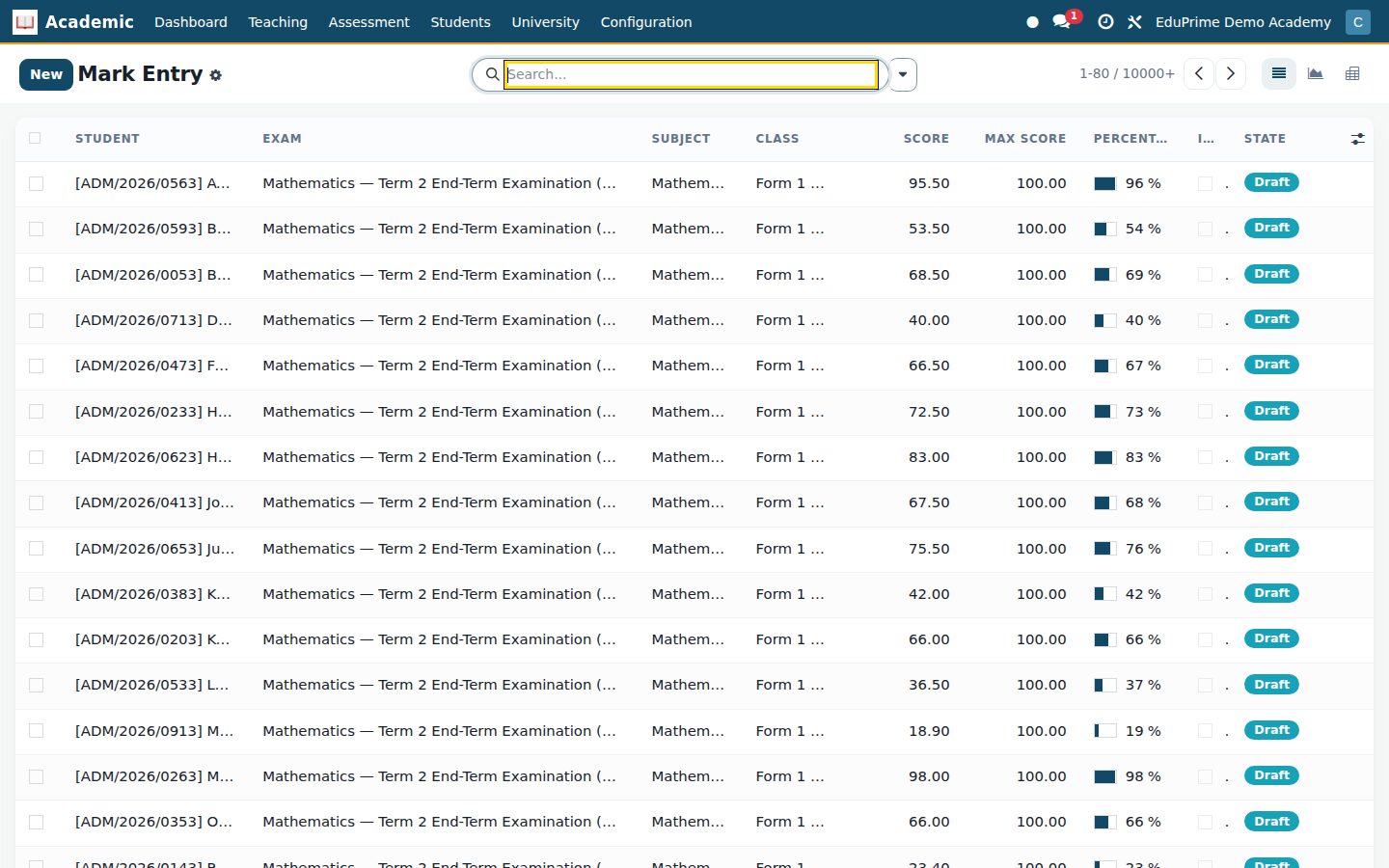
Ready when you are
Open the plan builder with the right apps for this industry already selected, or see it running first.