

University Management: Run your university from first enquiry to final transcript
Admissions, course registration, timetables, exams, CGPA transcripts, fees, hostels, library and research administration in one BridgeERP system, with mobile money and card payments for tuition.
Free instant access. No credit card required.
 Academics
 Fees & Billing
 Assessment Engine
 Timetable
 Admissions
 Library
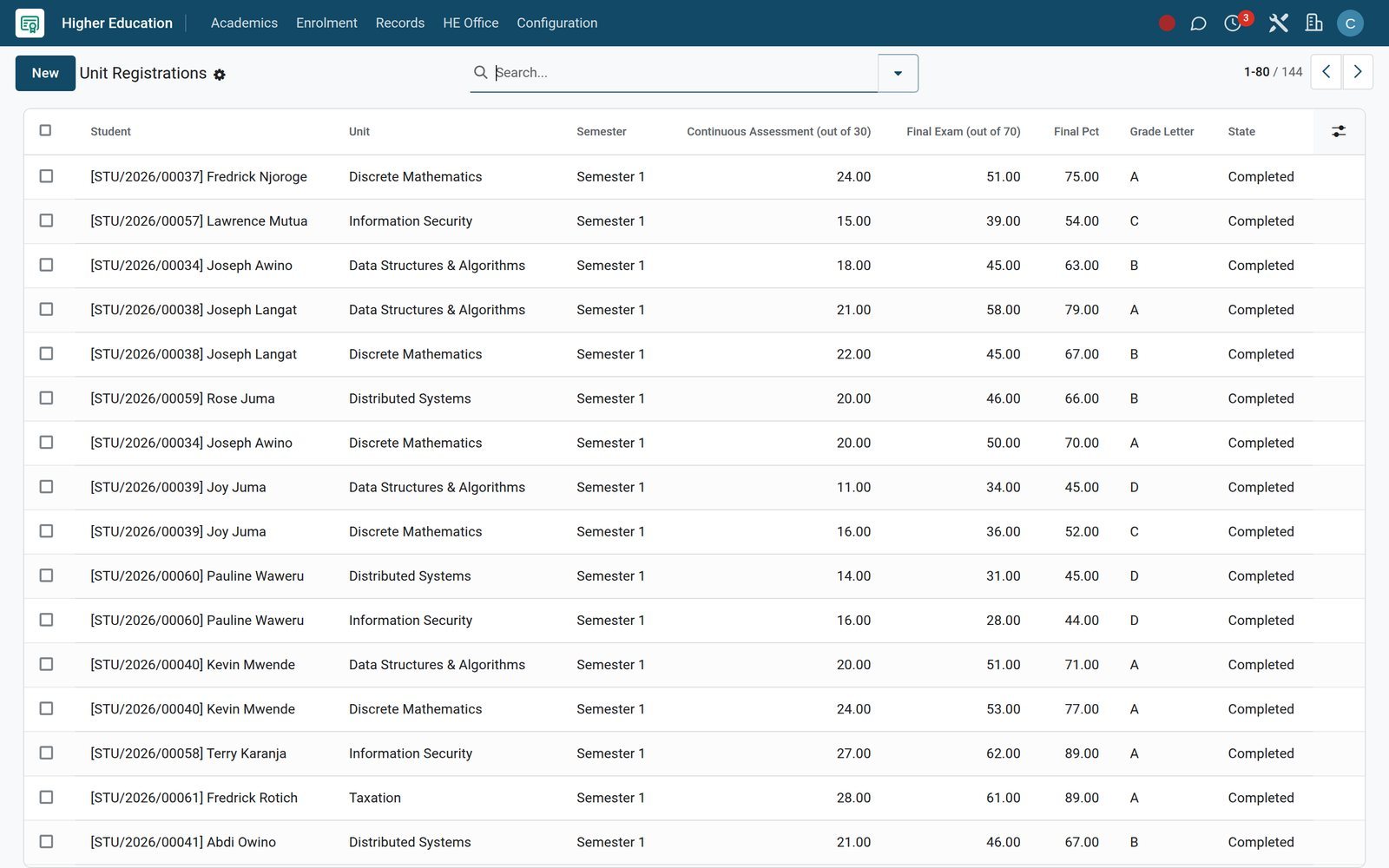
See every student's courses, credits and grades on one register
Registration, grading and transcripts share one student record, so the registrar never re-keys a result from a department spreadsheet.
 Academics
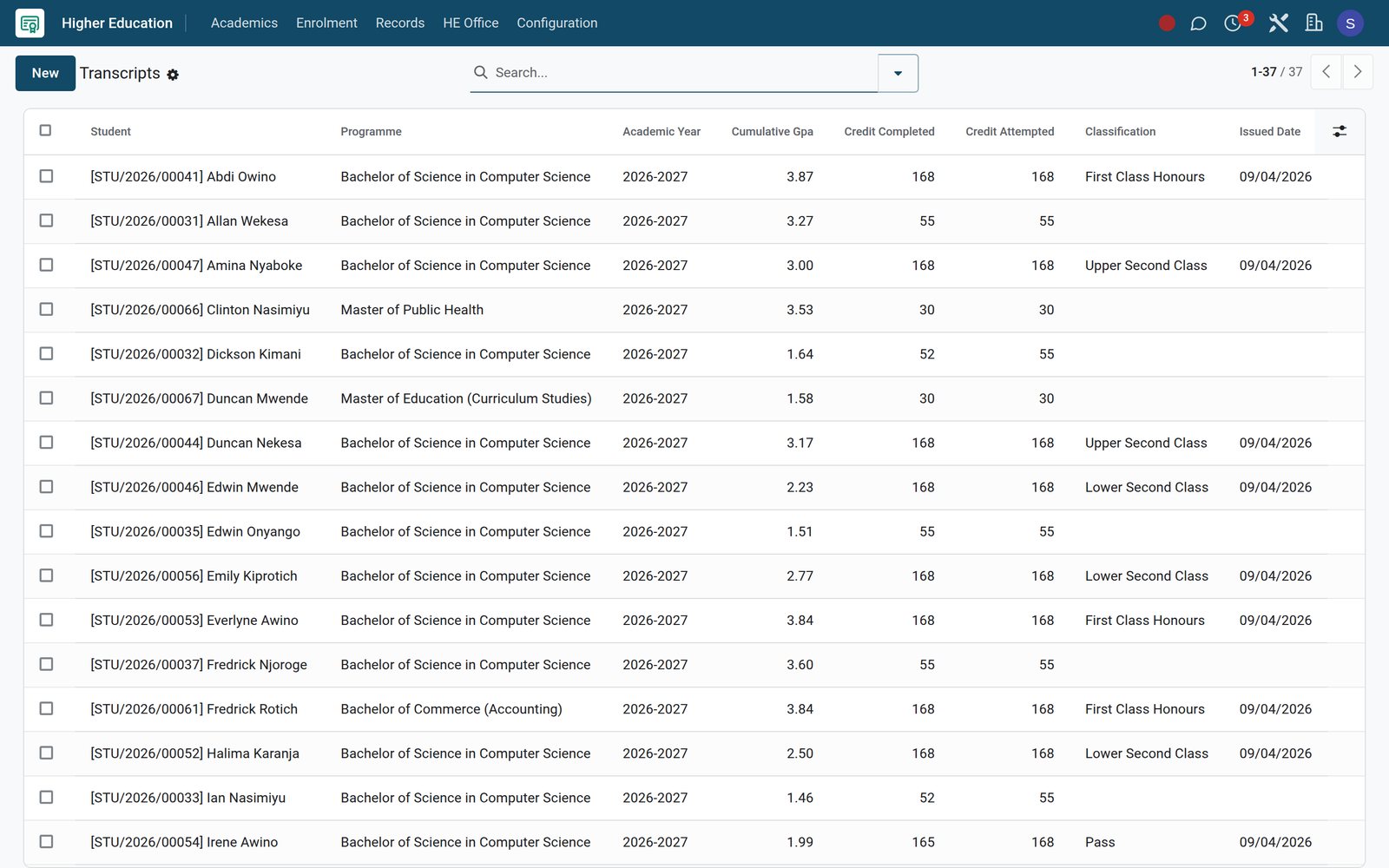
Transcripts with cumulative GPA and classification
Each transcript carries the programme, academic year, cumulative GPA, credits completed against credits attempted, the degree classification for finalists and the date it was issued.
Explore Academics →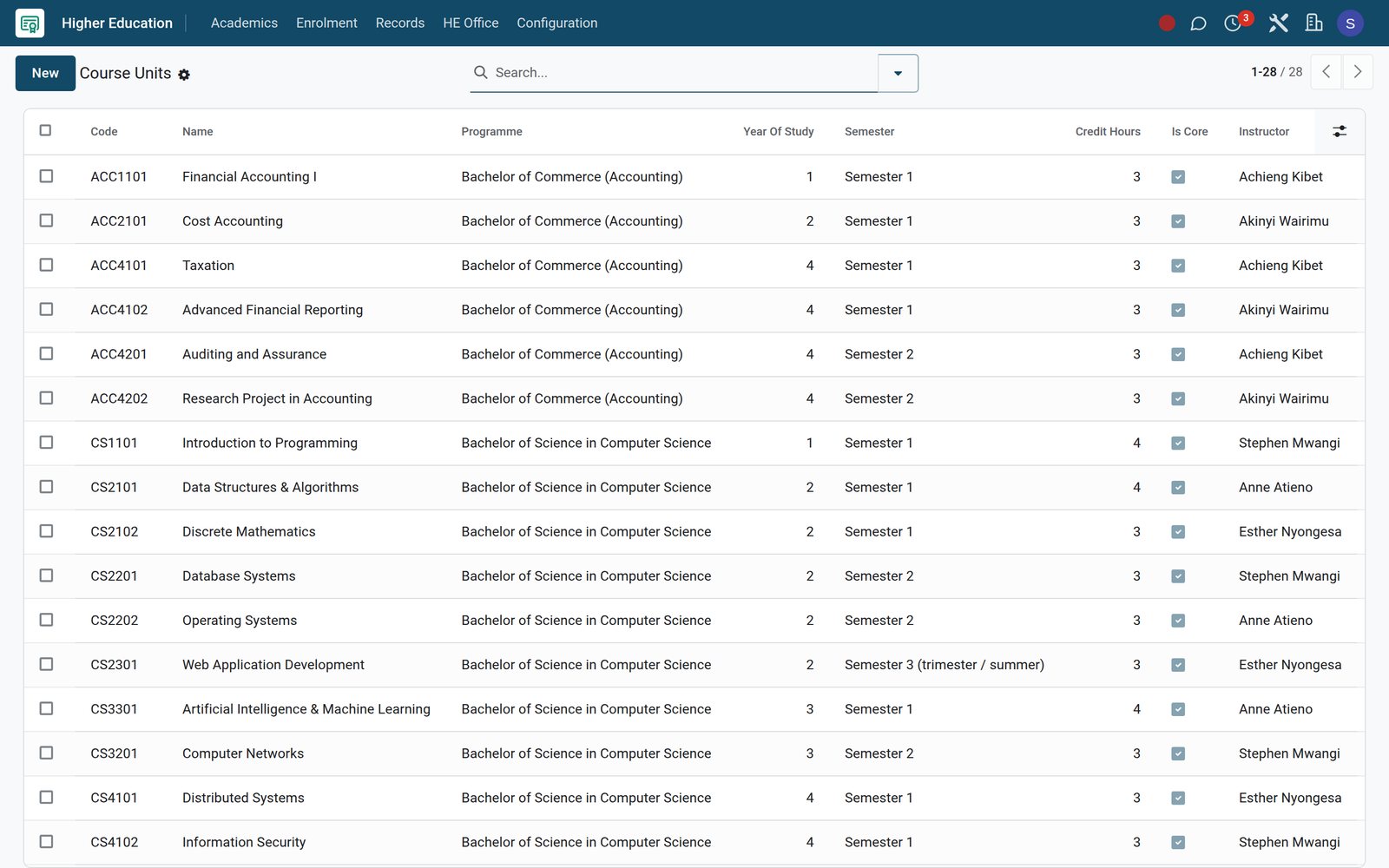 Academics
Course units with credit hours and a lecturer
Course Units set the code, programme, year of study, semester, credit hours and whether a unit is core, with the lecturer who teaches it; each semester's registrations draw on them.
Explore Academics →By the numbers
Built for the registrar, the bursar and the research office
Counts of screens and settings in the product, taken from the university demo.
- 8
- academic report screens, from class rankings and report cards to transcripts and attendance analytics
- 4
- research registers for projects, grants, papers and ethics reviews under the University menu
- 3
- online payment providers configured for fees: M-Pesa STK Push, Airtel Money and Pesapal
- 9
- interface languages, including French, Kiswahili, Arabic and Portuguese for multilingual campuses
Inside the app
Everything a university office opens each morning
The university menus of the demo, grouped by the office that works in them.
Admissions and recruitment
Programmes with intake, capacity, deadline and application fee, plus an enquiry-to-enrolment pipeline with interviews, offers, waitlist and recommendation letters.
Course registration
Course Enrollments per semester with credit hours and grade points, Subject Enrollments for each learner, and configurable CGPA Scales with a default.
Timetabling and rooms
Timetables built from slots with day, period, room and lecturer, Slot Swap Requests for changes, and Teaching Load against the permitted maximum.
Examinations
Exam Schedule with rooms and invigilators, Exam Seating by row and seat number, then Bulk Mark Entry, Mark Sheets and weighted Grade Results.
Transcripts and progression
Transcripts with cumulative GPA, Class Rankings, Promotion Rules and Promotion Batches that count promoted and retained students for each term.
Research office
Research Projects with principal investigator and budget, Grants with amounts spent and remaining, Papers with DOI, and Ethics Reviews with expiry dates.
Student finance
Fee structures, fee assignments and invoices, installment plans, scholarships, bursaries, subsidies, refunds and dunning, all under the Fees & Finance app.
Housing and library
Hostel allocations by building, room and bed with roommate matching, and a library with barcoded copies, course reserves and inter-library loans.
Step by step
One record carries the student from enquiry to transcript
Each office works on the same student record, in this order.
- Step 1
Capture the enquiry
Enquiries land in the Admissions pipeline with their source, so the Source Attribution report shows which channels bring in applicants.
Admissions - Step 2
Interview, review and offer
Schedule interviews, score applications in Reviews, then move applicants to Offers or the Waitlist from the same admissions pipeline.
Admissions - Step 3
Bill fees and collect
Assign a fee structure, generate the invoices and let students or sponsors pay online by mobile money or card, such as M-Pesa STK Push, Airtel Money or Pesapal.
Fees & Billing - Step 4
Register for courses
Course Enrollments record each student's courses for the semester with credit hours, linked to eLearning courses where teaching runs online.
Academics - Step 5
Teach and examine
Timetable slots place lecturers in rooms, the Exam Schedule assigns invigilators, and Exam Seating fixes every candidate's row and seat.
Timetable - Step 6
Grade and issue transcripts
Grade Results weight continuous assessment against the exam, course enrolments hold grade and quality points, and Transcripts show cumulative GPA.
Academics
Fill every programme before the intake deadline
Programmes carry their credits, duration and accreditation, and every intake opens with its own capacity, deadline and application fee.
 Academics
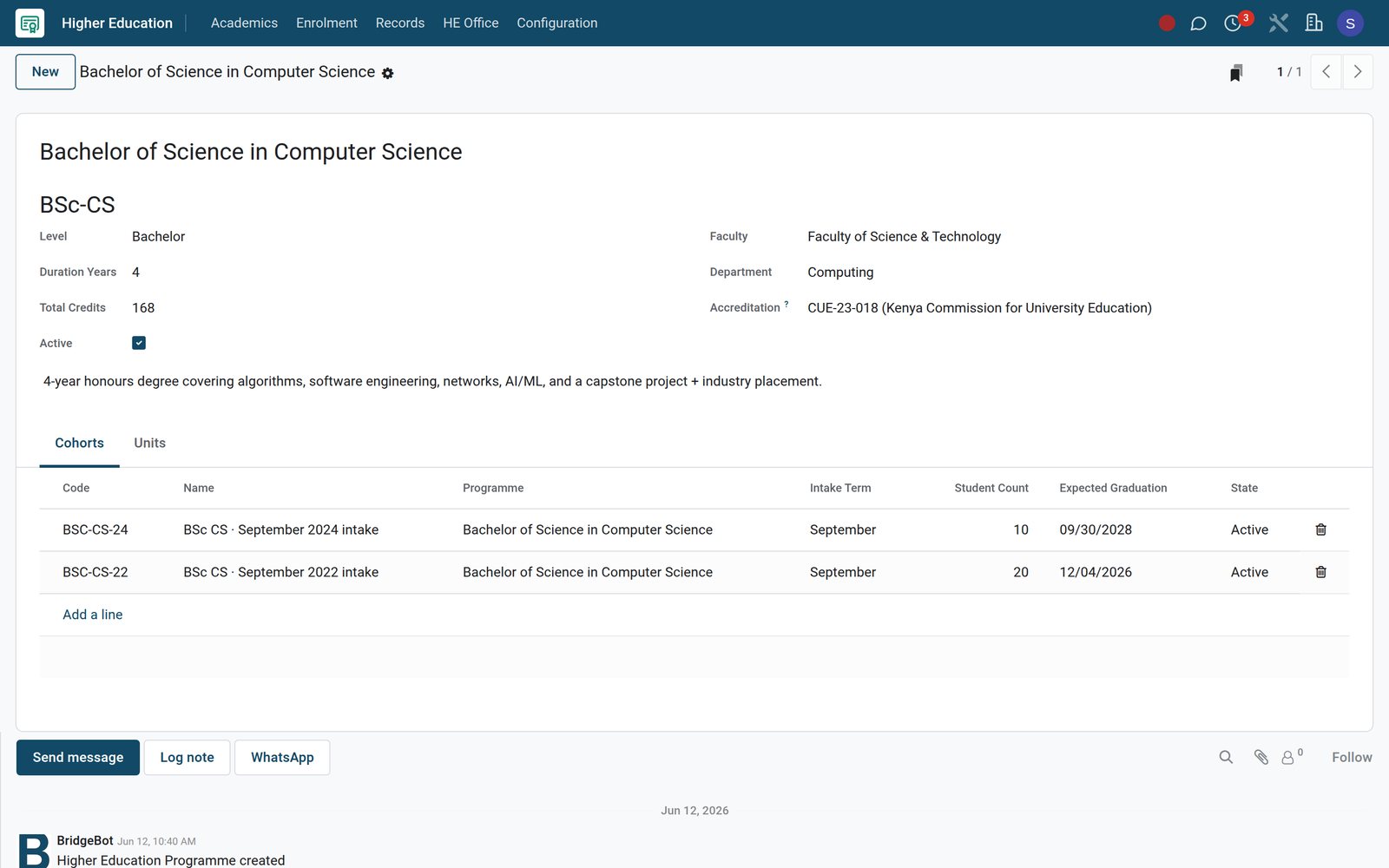
Programmes with credits, duration and accreditation
A programme holds its code, level, duration, total credits, faculty, department and accreditation, with its cohorts and course units on tabs.
Explore Academics →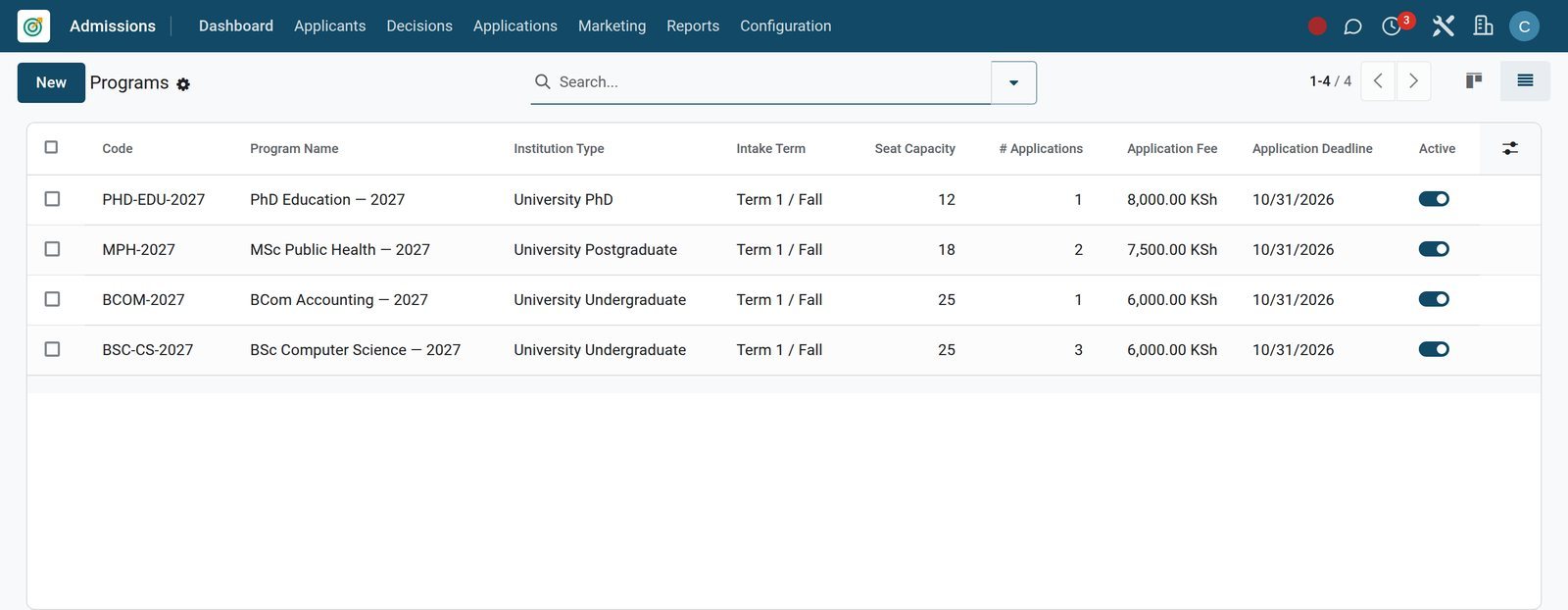 Admissions
Intakes with capacity, deadline and fee
Admissions Programs open each intake with its capacity, application deadline and fee, and count the applications received so far.
Explore Admissions →Balance lecturer workloads and take finalists to the senate
Workload, degree audits and graduation sit in the HE Office, on the same staff and student records the registrar uses.
 Academics
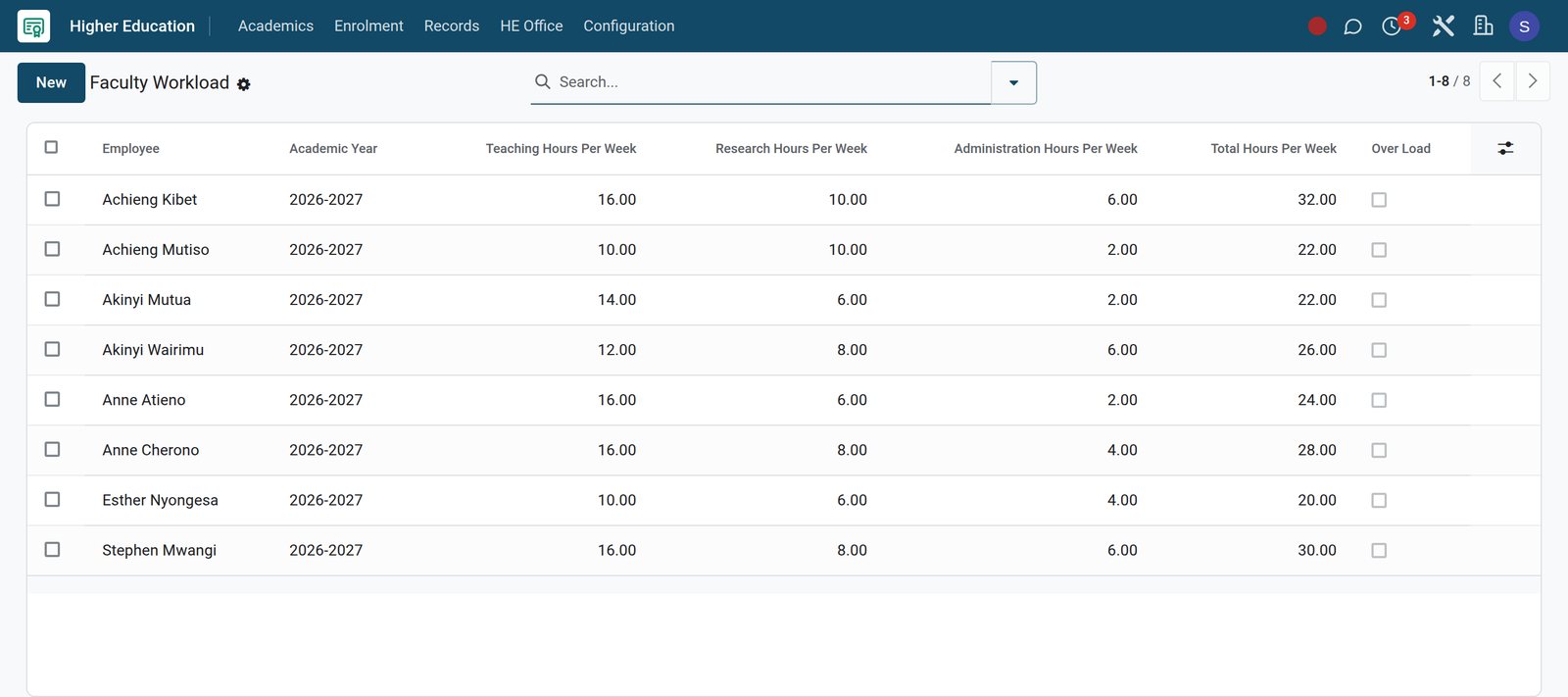
Faculty workload in hours per week
Each lecturer's teaching, research and administration hours add up to a weekly total, and an overload flag marks anyone carrying too much.
Explore Academics →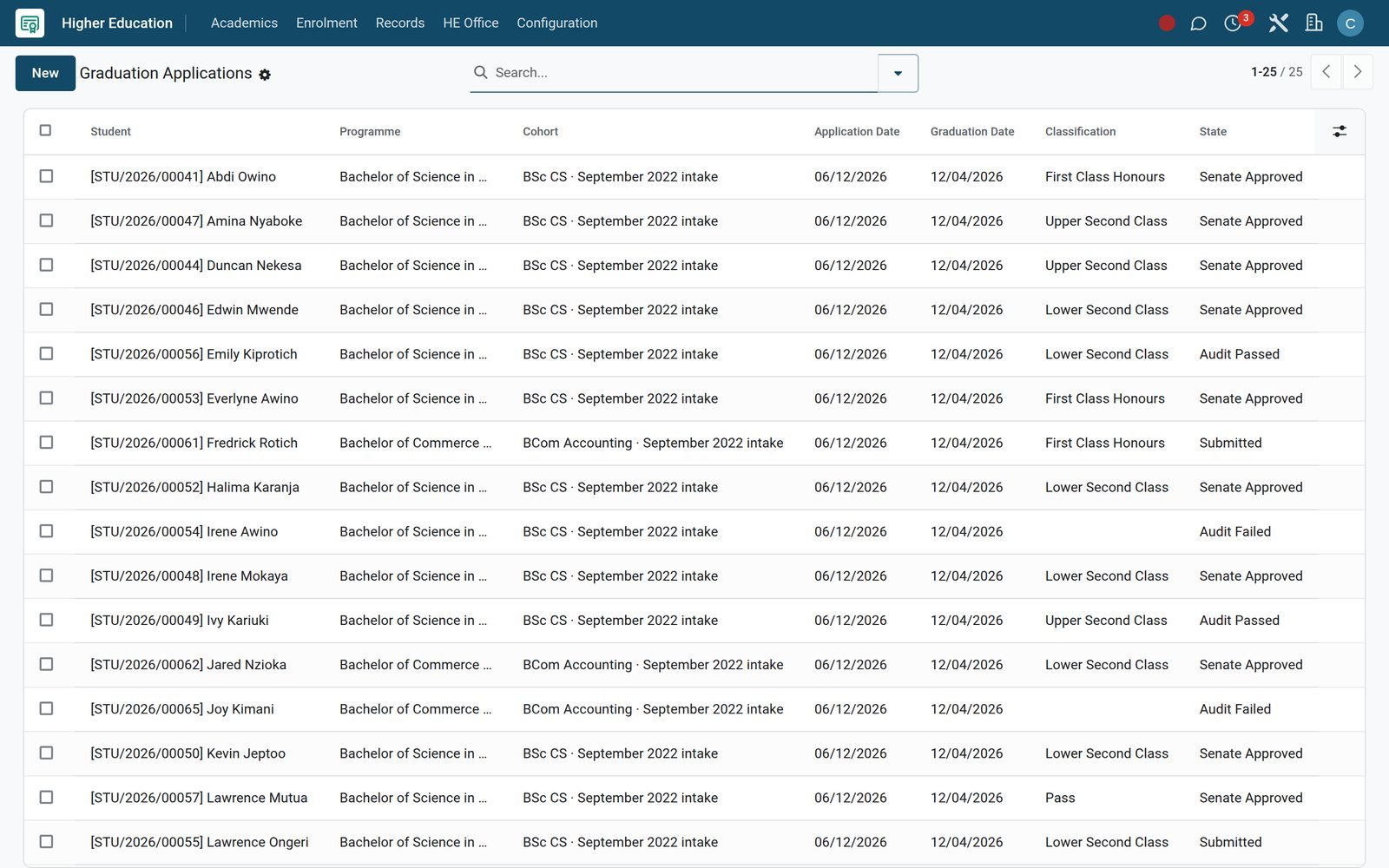 Academics
Graduation applications from audit to senate
Finalists apply to graduate, the degree audit passes or fails the application, and approved candidates carry their classification and graduation date to the senate.
Explore Academics →Know every bursary, student loan and scholarship a student holds
Financial aid sits on the student record beside results, so the bursar sees what each sponsor has paid and what is still to come.
 Academics
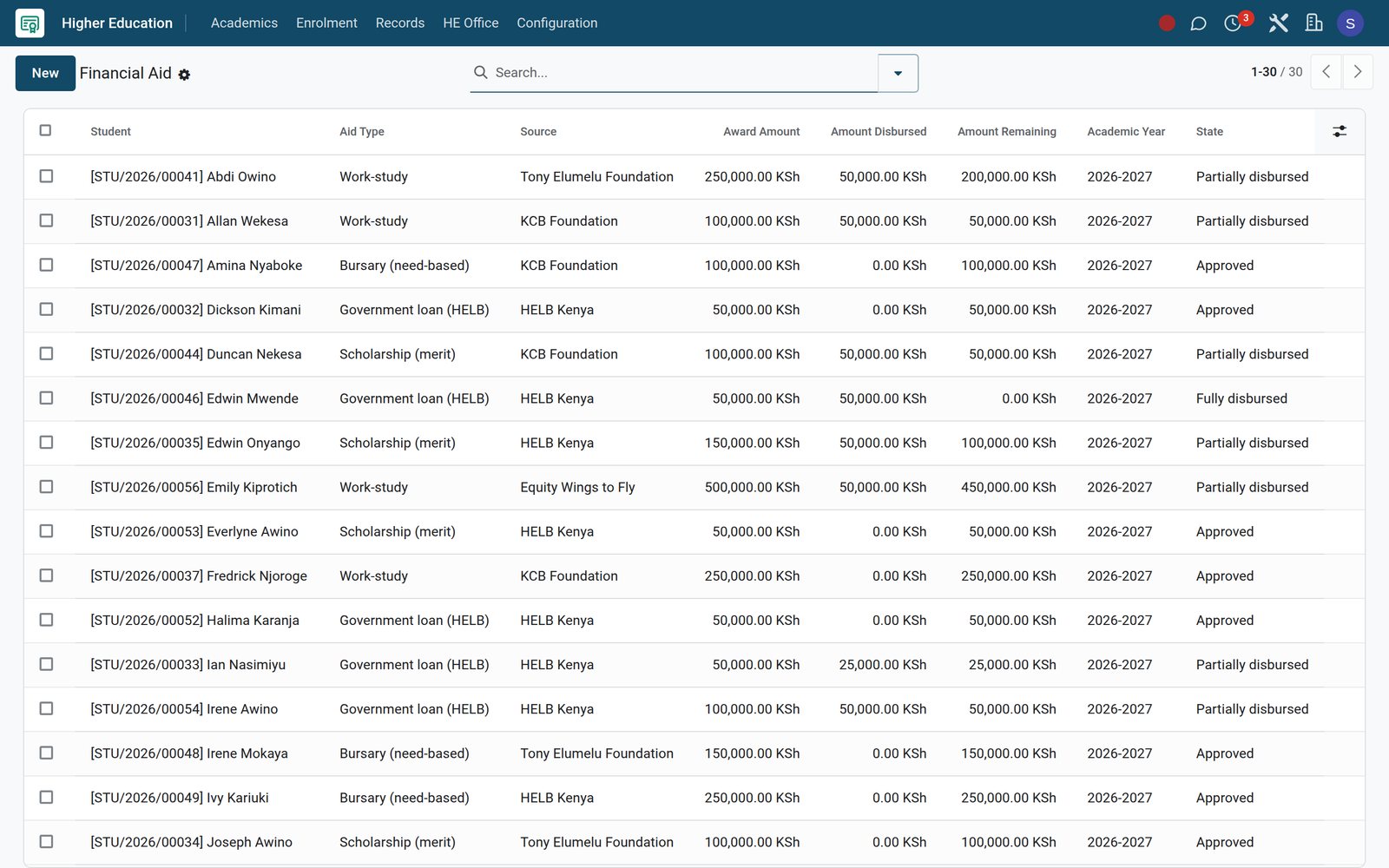
Awards with what is disbursed and what remains
Each award records its type, such as a merit scholarship, need-based bursary, HELB loan or work-study, with the sponsor, the amount awarded, disbursed and remaining, and its state.
Explore Academics →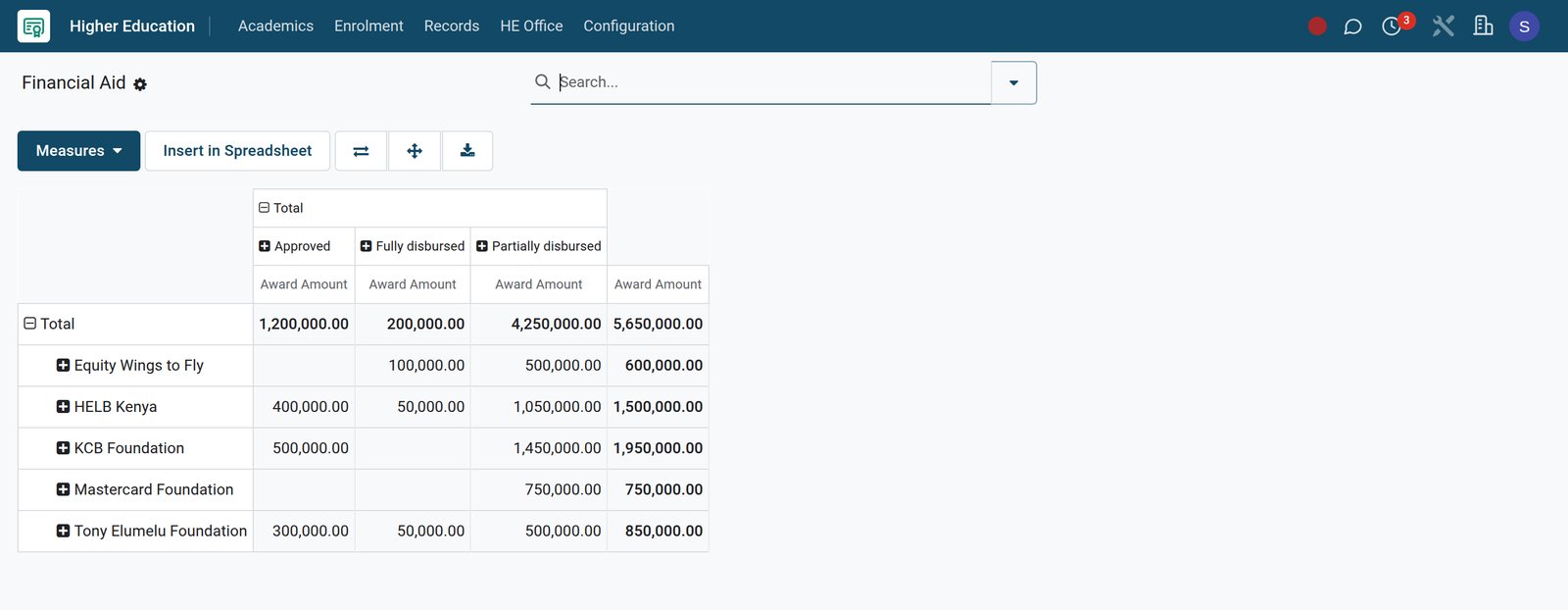 Academics
Aid by sponsor, at a glance
The same awards as a pivot show how much each sponsor has committed, split by whether it is approved, partly paid or fully paid.
Explore Academics →Know which bed and which books every student holds
Hostel and library run on the same student records as the registrar, so a student's room and loans are one search away.
Hostel allocations by building, room and bed
Allocations hold each student's building, room and bed with check-in date, contract type and security deposit, alongside Roommate Preferences and a Roommate Matching wizard.
Library loans, fines and reserves
The Overdue list shows each loan's book, barcoded copy, due date, days overdue and fine, and Course Reserves and Inter-Library Loans keep their own registers.
Roll call, visitors and leave from the halls
Wardens take roll call per building with present, absent, late and sick counts, sign visitors in and out against the student they came to see, and approve leave passes with destination and return date.
Give the research office its own grants, ethics and publications ledger
Research administration and accreditation sit in the same system as teaching, under the University menu.
Projects with budget and outputs
Research Projects hold a code, title, principal investigator, department, budget, dates, deliverables and outcomes, with linked grants and papers counted on each.
Grants tracked to the last cent
Grants record the grant number, funding agency, award date and award letter, and the amount total, amount spent and amount remaining.
Ethics approvals with expiry dates
Ethics Reviews store the IRB reference, review board, outcome, conditions, approval letter, expiry date and next review due for every project.
Publications with DOI and citations
Papers carry the DOI, publication venue, peer-review and open-access flags, lead author ORCID, citation count and journal impact factor.
Research funding with overheads
Under University Finance, Research Funding shows awarded and active grants with funder type, grant amount, overhead percentage, direct amount and reporting frequency.
Accreditation renewals on time
Accreditations record the accrediting body, programme, certificate number, validity dates, days to expiry and how many days ahead to remind for renewal.
Who uses it
Each office opens the screen it needs
What each role works from on a normal day, all menus found on the demo.
Registrar
Course Enrollments, Transcripts, CGPA Scales and Promotion Batches, plus the Approval Matrix and Approval Logs for academic approvals.
Admissions officer
The Pipeline, Interviews, Offers and Waitlist, Tour Bookings for campus visits, and the Funnel and Source Attribution reports.
Dean or head of department
Teaching Load per lecturer, Subject Allocation, Class Rankings and Academic Performance analysis, plus Accreditations for the department's programmes.
Lecturer
Today's Timetable, Lesson Plans, Homework, Submissions and Syllabus Coverage under Teaching, with Mark Entry under Assessment.
Bursar and finance office
Fee assignments and invoices, the Overdue Pipeline, Scholarship Utilization and bursaries, then Aged Receivable and the General Ledger in Accounting.
Research office
Projects, Grants, Papers and Ethics Reviews, with Research Funding under University Finance showing overheads and reporting frequency.
Hostel warden
Active allocations, Roll Call (Today), Leave Passes, the Visitor Log, Incidents, Inspections and Medical Stays for every residence.
Librarian
Loans, Overdue, Reservations, Course Reserves and Inter-Library Loans, with MARC21 import and export and ISBN auto-fill for cataloguing.
Works with
Runs with the rest of BridgeERP
Apps installed on the university demo that share its student, staff and finance records.
- CRMAdmission enquiries sit in the CRM pipeline, beside every other contact the university deals with.
 AccountingInvoices, payments, reconciliation, lock dates and financial statements for the finance office in one ledger.
 eLearningOnline courses link to course enrolments, so completion shows next to the student's grades.
 SurveysQuiz surveys for courses and feedback forms, built, sent and scored in one app.
 SignSend agreements and forms for electronic signature and keep the signed copy on record.
 DocumentsStore student and staff files in organised folders with tags, previews and sharing links.
 Email MarketingAdmissions campaigns and email templates reach enquirers from the Admissions Marketing menu.
 EmployeesLecturer and staff records feed Teachers, Teacher Assignments and Teaching Load in Academic.
 RecruitmentAdvertise academic and support posts, screen applicants and hire them into Employees.
 EventsRun open days, conferences and graduation ceremonies with online registration, tickets and attendee lists.
 Point of SaleThe campus shop sells with cash, card or a Charge to Student Fees method.
 HelpdeskA service desk for student and staff requests, with teams, priorities and deadlines.
In your country
Take fees the way students and sponsors actually pay
Mobile money, local currency and local languages come configured on the demo.
Mobile money prompts
The M-Pesa STK Push provider sends a payment prompt to the payer's phone, so tuition can be paid without a trip to the bank.
A second mobile wallet
On the demo, Airtel Money is enabled as a payment provider, giving payers on Airtel wallets a second mobile-money rail for tuition and hostel fees.
Pesapal and Flutterwave
Pesapal is configured as an online payment provider and the Flutterwave connector is installed, for institutions that collect through regional gateways.
Local and foreign currencies together
On the demo, KES and USD are both active, so international students can be invoiced in dollars while local fees stay in shillings.
Nine interface languages
The interface runs in nine languages, including French, Kiswahili for Kenya and Tanzania, Arabic, Portuguese and Chinese, chosen per user.
Instalments, bursaries and subsidies
Installment Plans split fees into dated instalments by frequency, and Bursaries, Scholarships and Subsidy Schemes link financial aid to each student.
Campus shop charged to fees
The campus shop's Point of Sale offers a Charge to Student Fees payment method next to cash and card at the till.
WhatsApp alongside email
The WhatsApp app is installed next to email, so offices can message students and guardians with approved WhatsApp templates from their records.
Know which students are slipping before the exam board does
Degree audits compare each student's credits and GPA with what the programme requires, and every student has an academic advisor with the next meeting booked.
 Academics
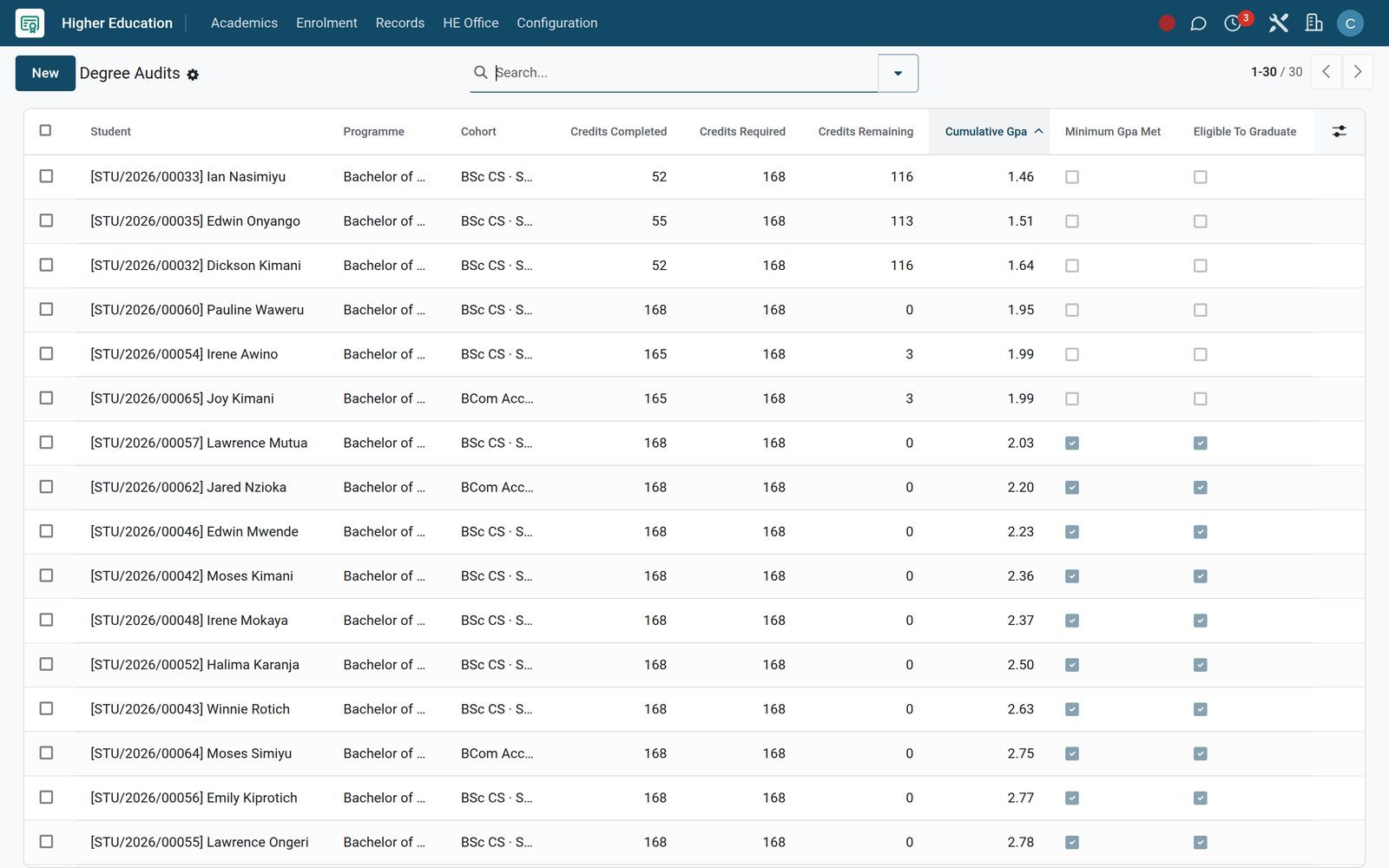
Degree audits with the gap written in credits
An audit sets credits completed against credits required, shows the credits remaining and the cumulative GPA, and flags whether the minimum GPA is met and the student can graduate.
Explore Academics →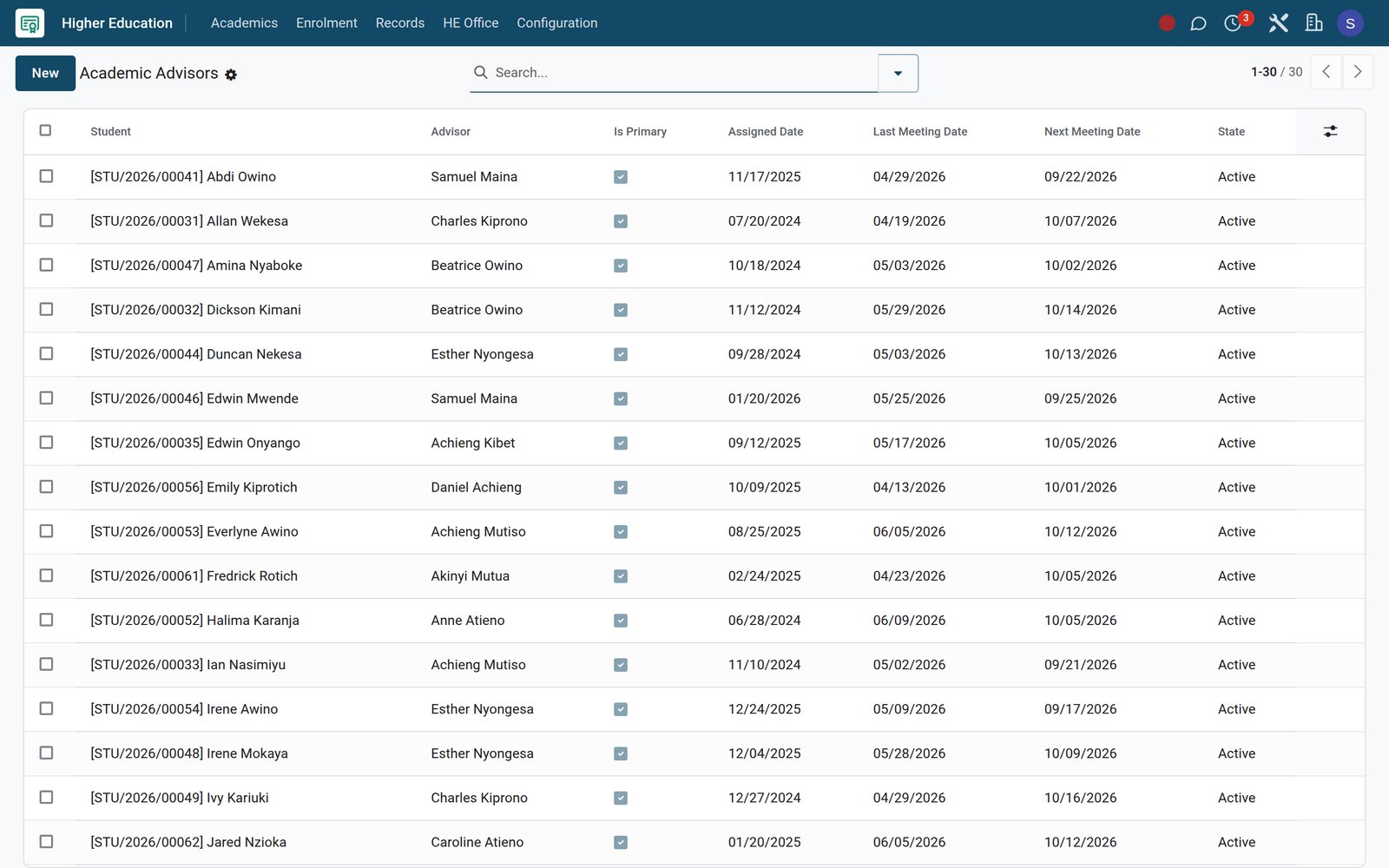 Academics
An academic advisor for every student
Advisors are assigned per student with a primary flag, the date of the last meeting and the next one booked, so every student's next conversation is already in the diary.
Explore Academics →Getting started
Go live on your current data, one office at a time
Setup uses the standard import tools and the configuration menus already on the demo.
Import from spreadsheets
Bring students, courses, balances and staff in from Excel or CSV, map columns to fields and run a test before anything is saved.
Set grading and CGPA rules
Configure Grading Scales, Grade Lines, Assessment Types and Rubrics, then CGPA Scales with a maximum GPA and a default scale.
Define programmes and intakes
Create each programme with faculty, department, intake term and year, capacity, deadline, application fee and the documents it requires.
Load fee structures
Set Fee Categories, Fee Structures, Discounts, Late Fee Policies and Installment Plans, then use Bulk Assign Structure to bill many students at once.
Migrate the library catalogue
Import existing catalogue records with MARC21 Import, fill new titles by ISBN Auto-fill, and create copy barcodes with Generate Barcodes.
Connect payments
Switch on your payment providers, such as M-Pesa, Airtel Money or Pesapal, under Payment Providers and try them in test mode before taking live fees.
Questions
Questions about University Management
Not covered here? Contact us.
Does it handle credit hours, GPA and CGPA?
Yes. Each course enrolment records credit hours, grade letter, grade points and quality points, and CGPA Scales set the maximum GPA. Transcripts show the cumulative GPA and overall grade.
Can students pay tuition by mobile money?
The demo has M-Pesa STK Push, Airtel Money and Pesapal set up as online payment providers, and a Flutterwave connector is installed. Installment Plans can split fees into instalments.
Can we run admissions for several programmes and intakes at once?
Yes. Each programme carries its own faculty, intake term and year, capacity, deadline, application fee and document requirements, and applicants move through one pipeline from enquiry to enrolment.
Does it cover research administration?
The University menu includes Research Projects, Grants, Papers and Ethics Reviews, and Fees & Finance adds Research Funding with overhead percentages and reporting frequency.
Can it run student housing and the library too?
Yes. The Hostel app allocates buildings, rooms and beds with roommate matching, roll call and leave passes; the Library app handles loans, fines, course reserves, inter-library loans and MARC21 cataloguing.
How do we move our existing records across?
Students, courses, balances and staff can be imported from Excel or CSV files with a test run before saving, and library catalogues come in through MARC21 Import.
Does it connect to online learning?
Course enrolments can link to eLearning courses and record completion, and modules for LTI launch, SCORM and xAPI are installed on the demo.
Which languages does the interface support?
Nine languages are active on the demo: English, French, Kiswahili (Kenya and Tanzania), Arabic, Portuguese, Spanish, German and Chinese.
Tax compliance
Invoices your tax authority accepts
In Kenya, Uganda, Rwanda, Burundi and Zambia, each invoice, receipt and stock movement goes to the tax authority's own system when you post it. Ghana and Pakistan come next, and we connect 73 more countries on request.
- KenyaReady
eTIMS KRA
Invoices, credit notes, POS receipts and stock movements
- UgandaReady
EFRIS URA
Invoices, POS receipts and stock
- RwandaReady
EBM RRA
Invoices, POS receipts, stock and imports
- BurundiReady
EBMS OBR
Invoices, POS receipts, stock and manufacturing
- ZambiaReady
Smart Invoice ZRA
Invoices, POS receipts, stock and imports
University Management, app by app
One connected flow instead of separate systems — the work moves from one team to the next without re-typing anything.
Every stop is a real app in your plan, and the hand-offs between them are the product.
- Customers & sales
- Operations
CRM
Leads, opportunity pipeline, activities and sales forecasting.
CRM →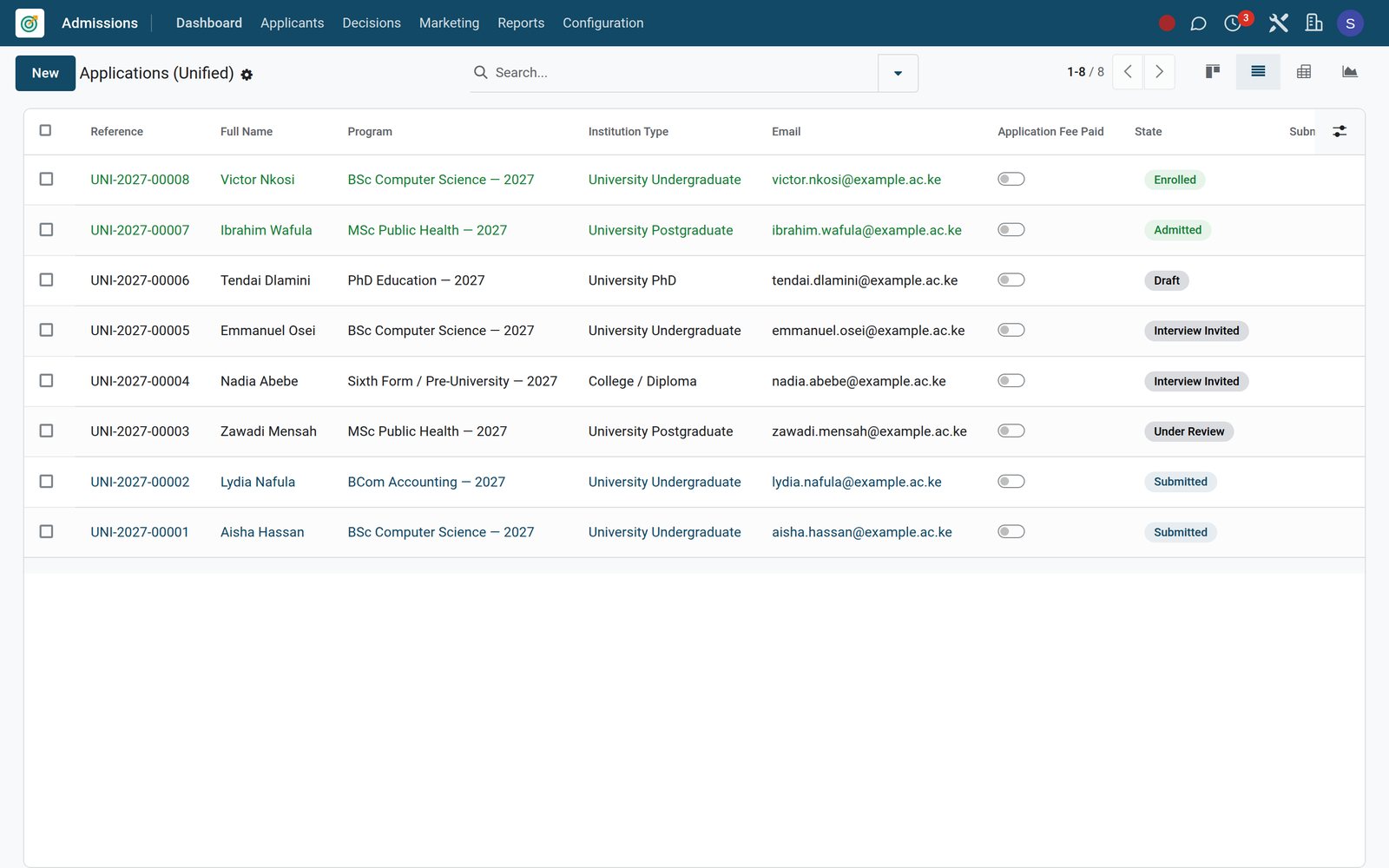
Ready when you are
Open the plan builder with the right apps for this industry already selected, or see it running first.