

CRMlesson 1 of 4
Written lesson
Read the CRM pipeline: stages, cards, expected revenue and the filter that decides whose opportunities you see.
Read the lesson →Your pipeline at a glance
Course contentslesson 1 of 4
Lead Management13 min
Performance Analysis5 min
What CRM Basics gets you to
- Read the pipeline and see at a glance what needs attention
The pipeline is where a sales team lives. Open CRM and every open opportunity is a card, in columns that follow your sales process.
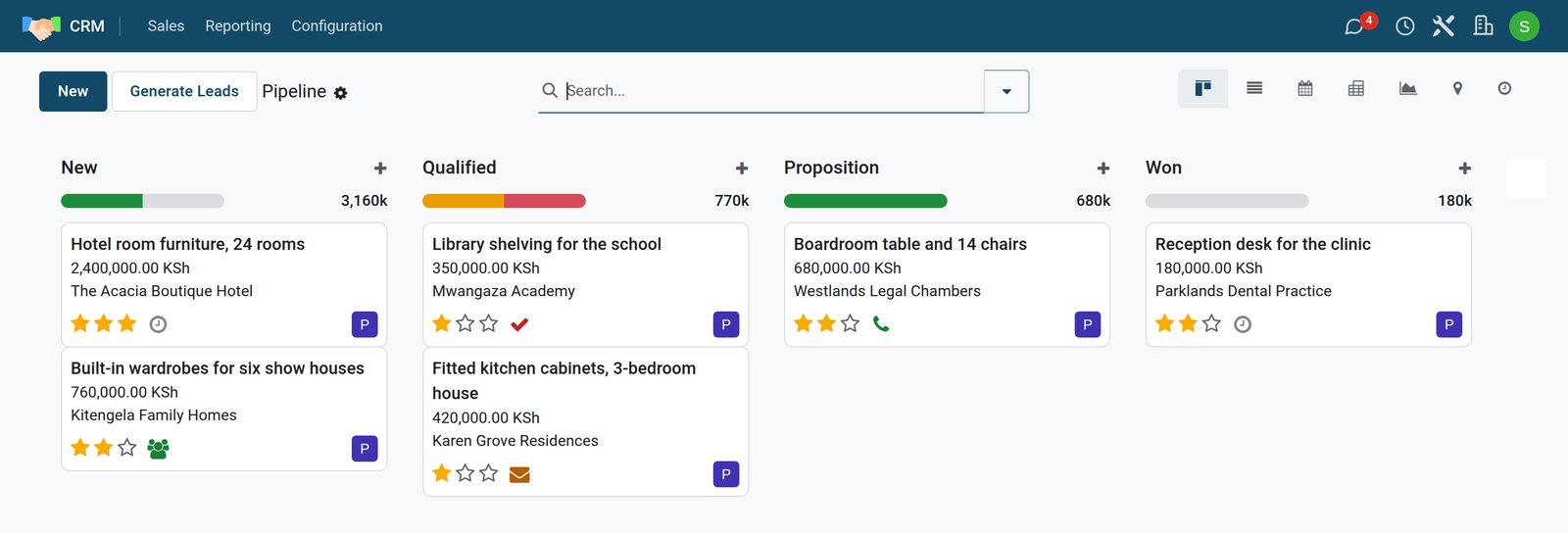
Read a card
- The opportunity: what the customer wants, such as a boardroom table and 14 chairs.
- Expected revenue and the customer.
- Stars: the priority you gave it, from none to three.
- The activity icon: a clock when nothing is planned; otherwise the icon of the next step (a call, an email, a meeting), green when planned, orange when due today, red when overdue.
- The avatar of the salesperson who owns it.
Stages
The coloured bar under each stage name splits the column by the state of the next activities, in the same green, orange and red. Click a colour to show only those cards. Move an opportunity forward by dragging its card to the next column, or by clicking the stage in the status bar at the top of the opportunity.
Whose opportunities you see
The pipeline opens with the My Pipeline filter: only the opportunities where you are the salesperson. Remove it (the × on the filter) to see the whole team. The buttons at the right show the same opportunities as a list, a calendar, a pivot table, a graph, a map or the activity view.
Try it: the + at the top of a column creates an opportunity right there. A short form asks for the customer, the opportunity and the expected revenue; the rest can wait.
Check what you learned
Loading the quiz…
These lessons were recorded on a working BridgeERP. Start a free trial and follow them on your own.