

Hospital Management: Every bed, clinic, lab and theatre on one hospital system
Reception, outpatient clinics, laboratory, wards, theatre, emergency and billing work on the same patient visit, so every test, bed night and procedure reaches the bill.
Free instant access. No credit card required.
 Reception
 Appointments
 Consultation / OPD
 Electronic Health Record
 Laboratory
 Radiology & PACS
Know who is booked, who has arrived and who the doctor is seeing
The day starts at reception and moves into the consulting room without anyone re-typing the patient's details.
 Reception
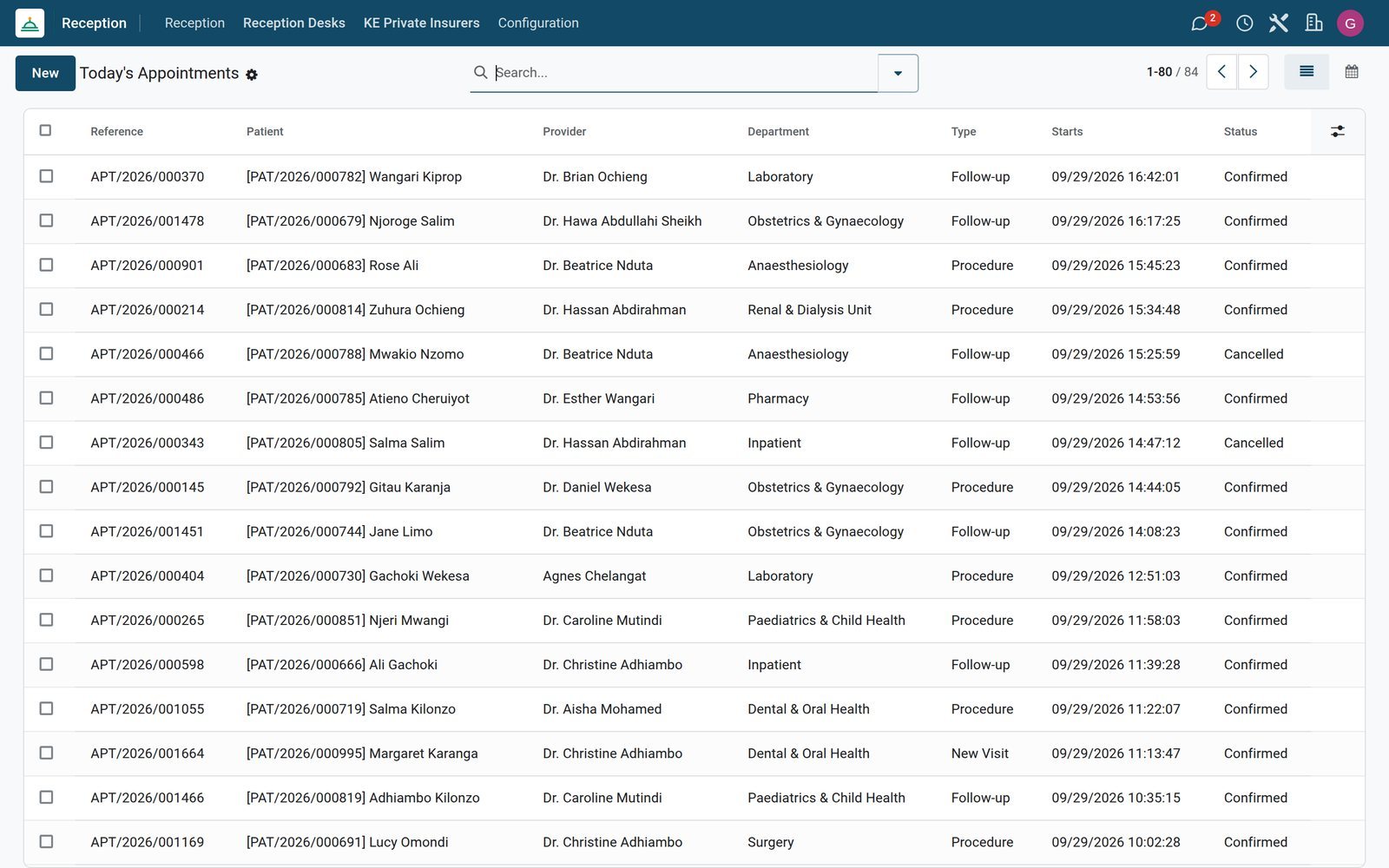
Appointments ready at the desk
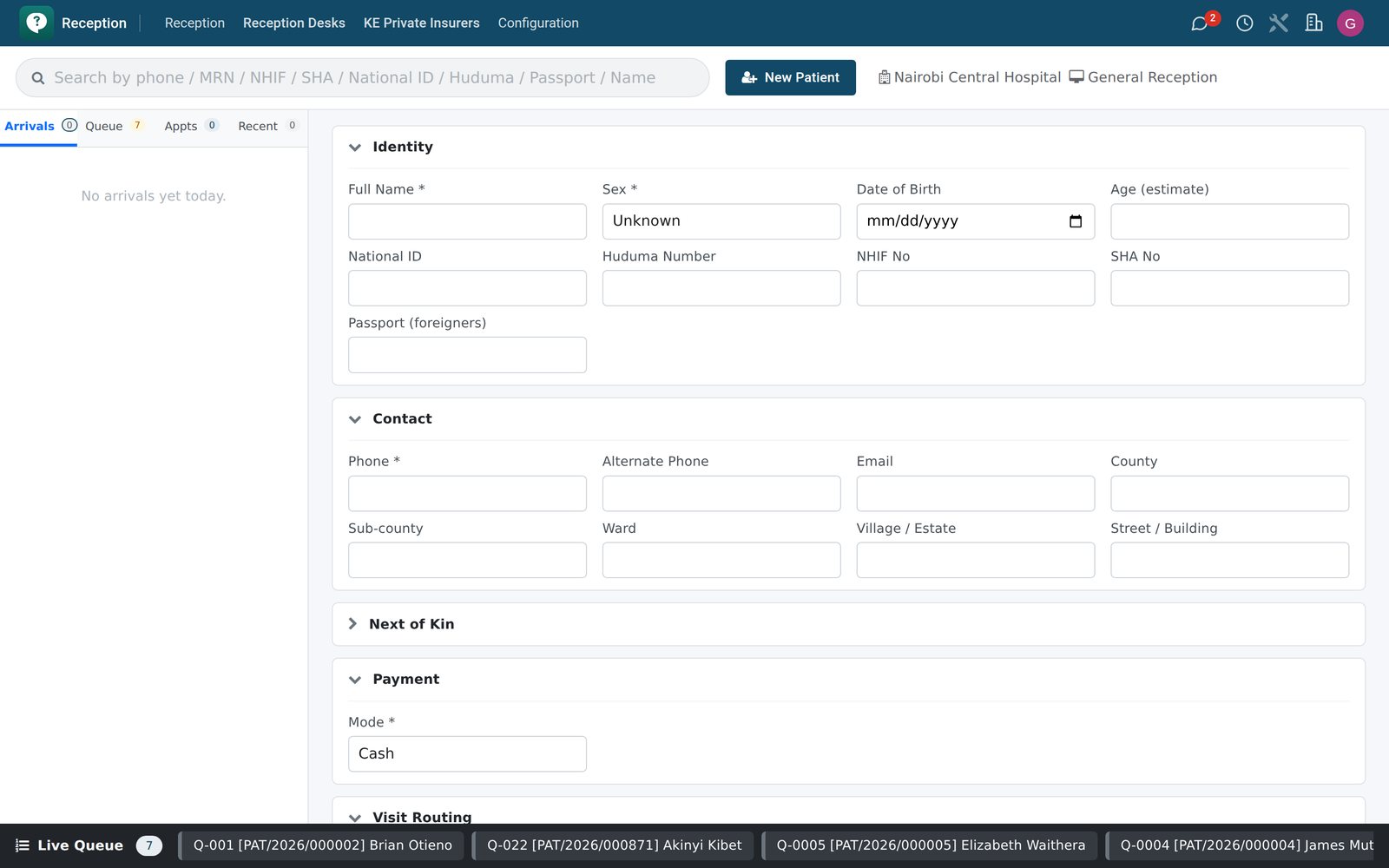
Reception's Appointments list holds every upcoming booking by patient and doctor, beside walk-in registration, returning-patient lookup, queue tickets and the TV queue board.
Explore Reception →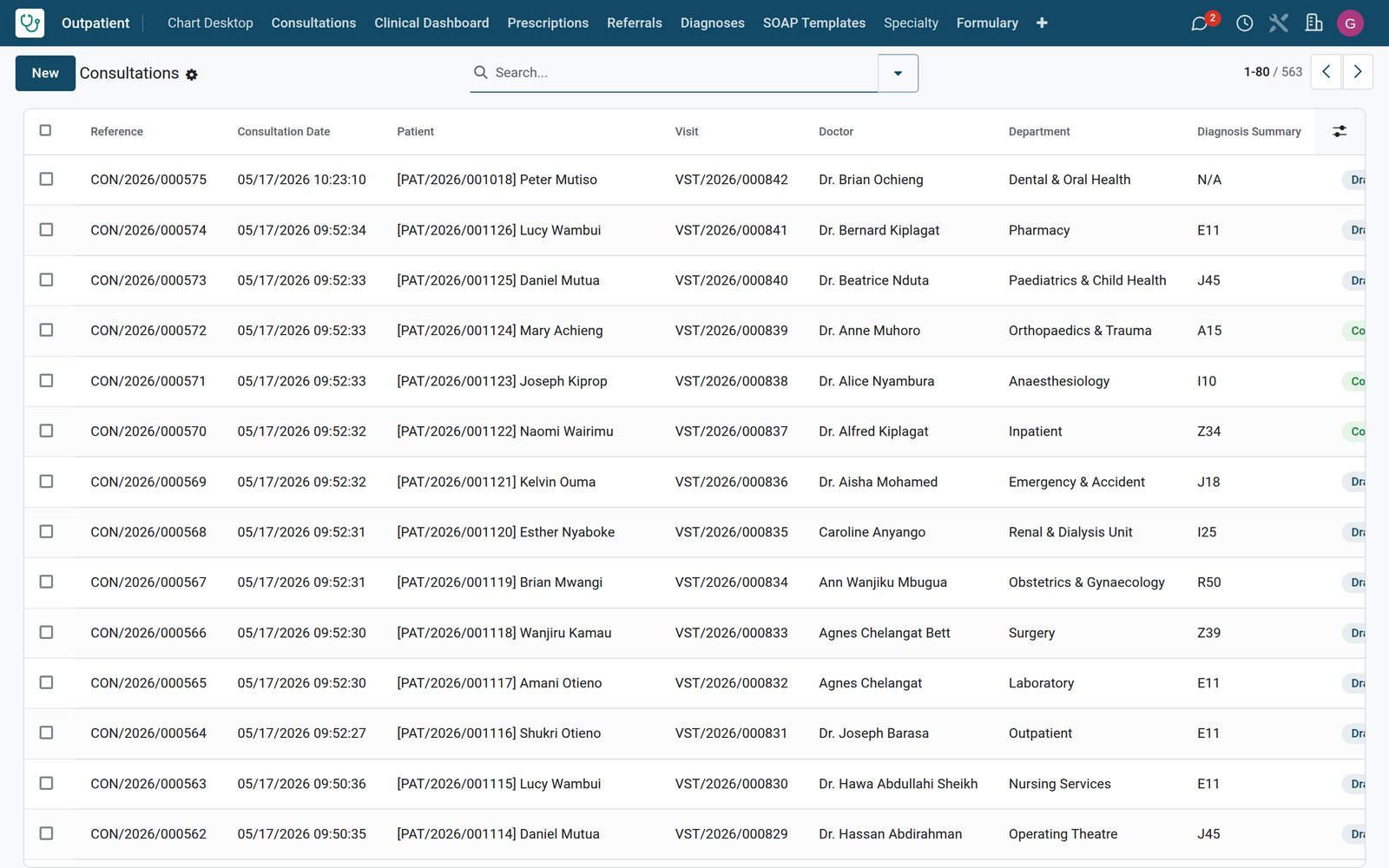 Consultation / OPD
SOAP notes, diagnoses and orders in one chart
Outpatient Consultations capture subjective, objective, assessment and plan, with diagnoses, prescriptions, lab requests and referrals raised from the same consultation.
Explore Consultation / OPD →By the numbers
Set up for a working hospital
Catalogues and specialty apps already configured on the demo hospital, ready to adapt to your own services.
- 16
- specialty apps, from oncology and neurosurgery to palliative care and sleep medicine
- 100
- laboratory tests in the Test Catalog, plus 8 panels, each ready to order from a consultation
- 55
- surgical procedures in the theatre Procedure Catalogue, picked when an operating room is booked
- 130
- emergency intervention types, 11 body regions and 10 injury types for coding care in the Emergency app
Inside the app
What is inside the hospital suite
Each department works in its own app, and all of them read and write the same patient visit.
Reception and queues
Walk-in and returning-patient registration, appointments, queue tickets, Call Next Patient, a check-in kiosk and a TV queue board for the waiting room.
Outpatient clinic
Consultations with SOAP templates, diagnoses, prescriptions, a drug-interaction table, quick order sets, immunisation schedules and specialty charts such as dental.
Laboratory
Lab requests, samples, a results inbox, a critical-values list, an analyser register, QC runs, proficiency testing and send-outs to reference labs.
Theatre
OR schedule, pre-op checklists, anaesthesia records, operative notes, PACU recovery, an implant register, complications and a voice cockpit for the WHO checklist.
Wards and admissions
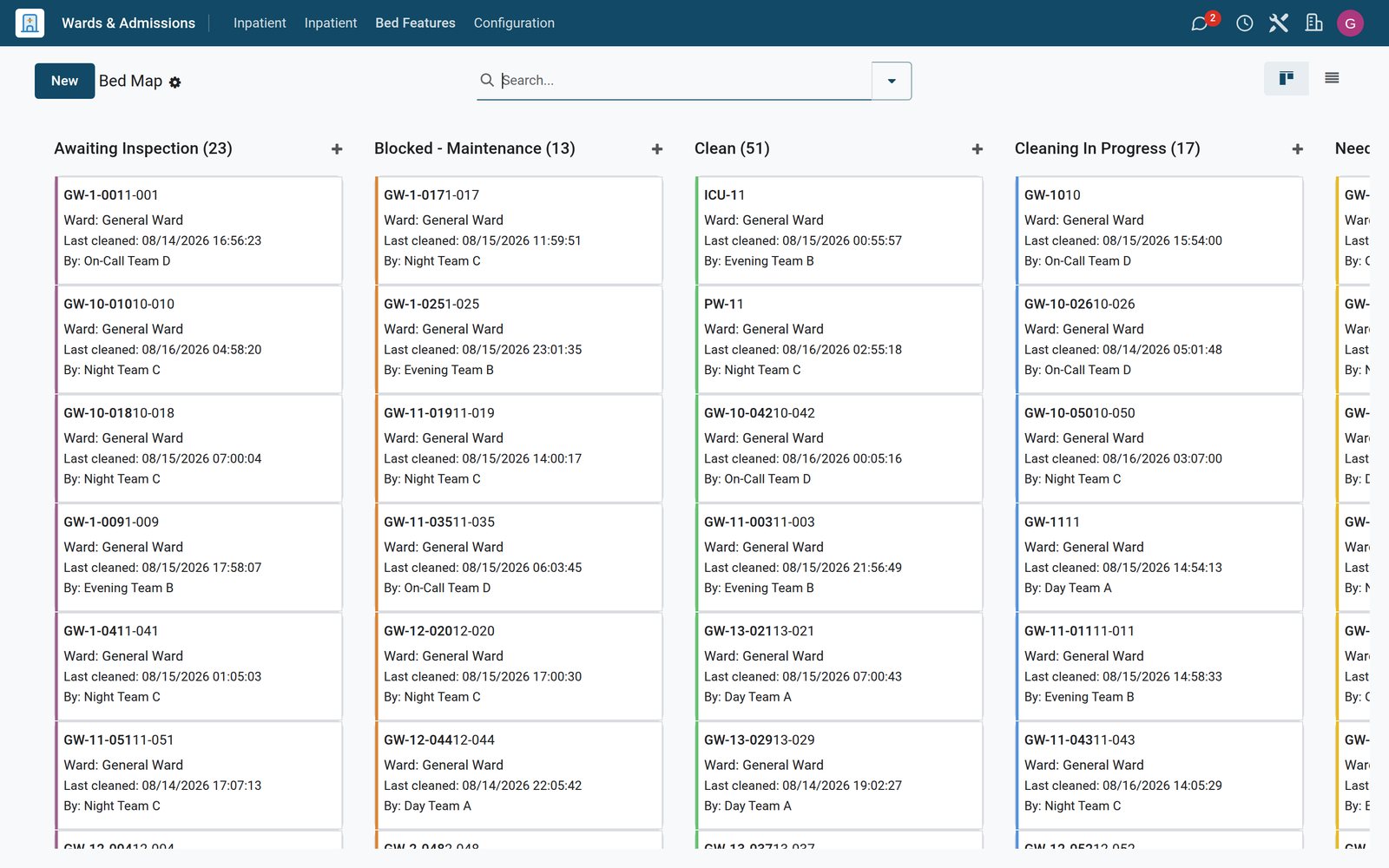
Pre-admission, admission, transfers and discharge, a bed map by ward, bed cleaning and maintenance queues, length-of-stay reporting and mortuary intake.
Emergency department
Rapid triage into red, yellow and green, an ED whiteboard, trauma documentation, observation charts, handovers, ambulance receive and mass-casualty activation.
Billing and cashier
Charges from every department roll into bills, with deposits, discount requests, refunds, cash sessions, a cashier checkout and service tariffs.
Pharmacy and stores
Prescriptions, pharmacy dispensing and a pharmacy till with its own payment methods, while hospital stores log requisitions, cold-chain checks, donations, wastage and audits.
Step by step
Follow one patient from the front desk to a paid bill
Each step belongs to a different department and app, all working on the same visit record.
- Step 1
Register and queue
Reception registers the walk-in or finds the returning patient, books the appointment and issues a queue ticket for the waiting-room board.
Reception - Step 2
Consult and order
The doctor opens the chart, writes the SOAP note, records the diagnosis, prescribes and raises lab requests from the consultation itself.
Consultation / OPD - Step 3
Test and dispense
The laboratory collects samples and releases flagged results, while pharmacy dispenses the prescription and the dispensing lands on the patient's charges.
Laboratory - Step 4
Admit or operate
When needed, the patient is admitted to a free bed from the Bed Map or booked into theatre with a pre-op checklist.
Wards & Inpatient - Step 5
Bill and collect
Charges gather on the bill, split between patient and insurer, and the cashier collects at Cashier Checkout or sends a mobile money request such as an M-Pesa STK push.
Billing & Cashiering - Step 6
Post and report
Bills raise customer invoices for patient and insurer in Accounting, and the revenue, collection-rate and service-profitability reports pick them up.
Accounting
Keep every sample, result and turnaround time in sight
The lab works from its own board of requests, and doctors see released results against the consultation that ordered them.
 Laboratory
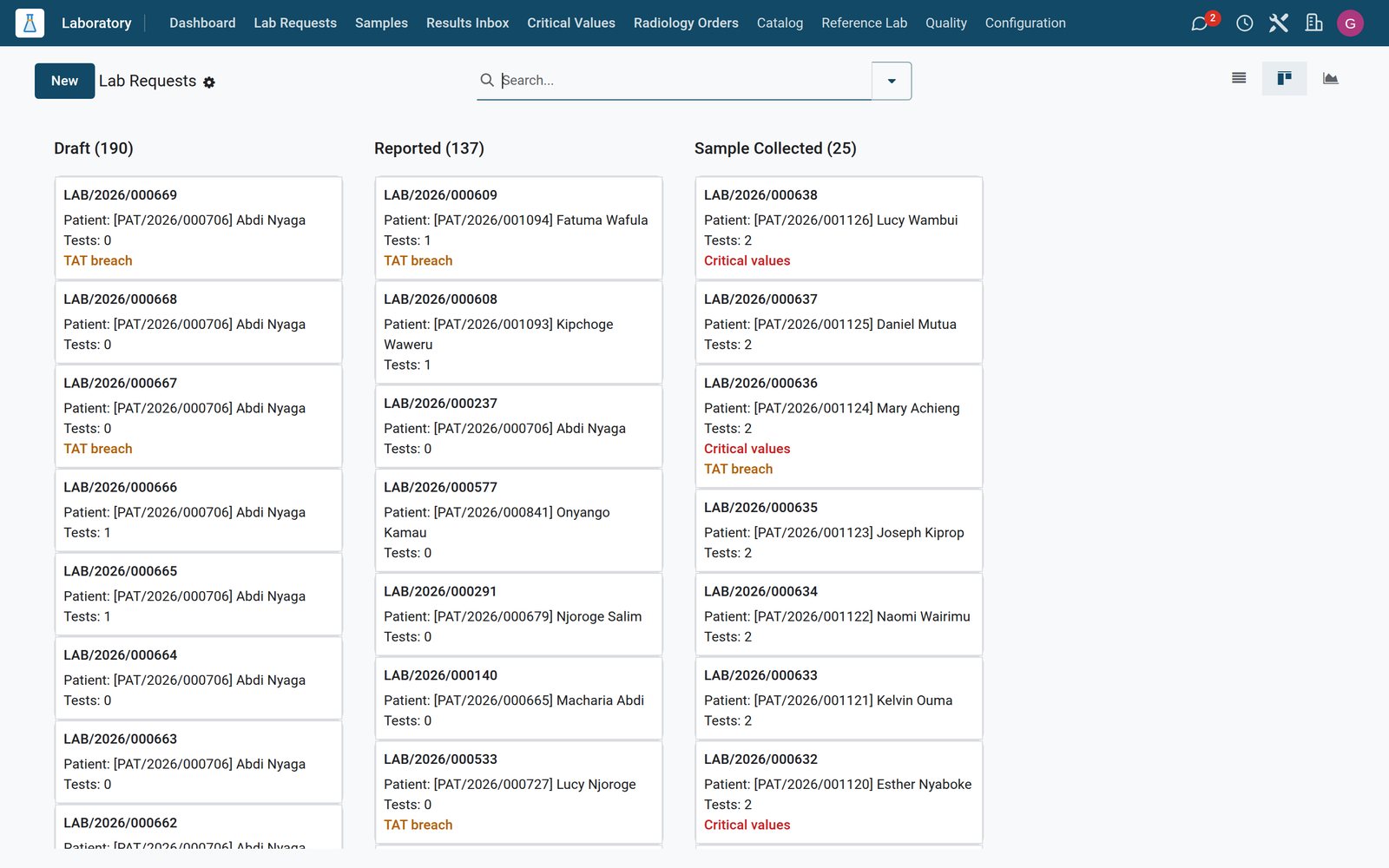
Every request on one board
Each lab request carries its priority, target and actual turnaround hours and a breach flag, so late work stands out before a doctor has to chase it.
Explore Laboratory →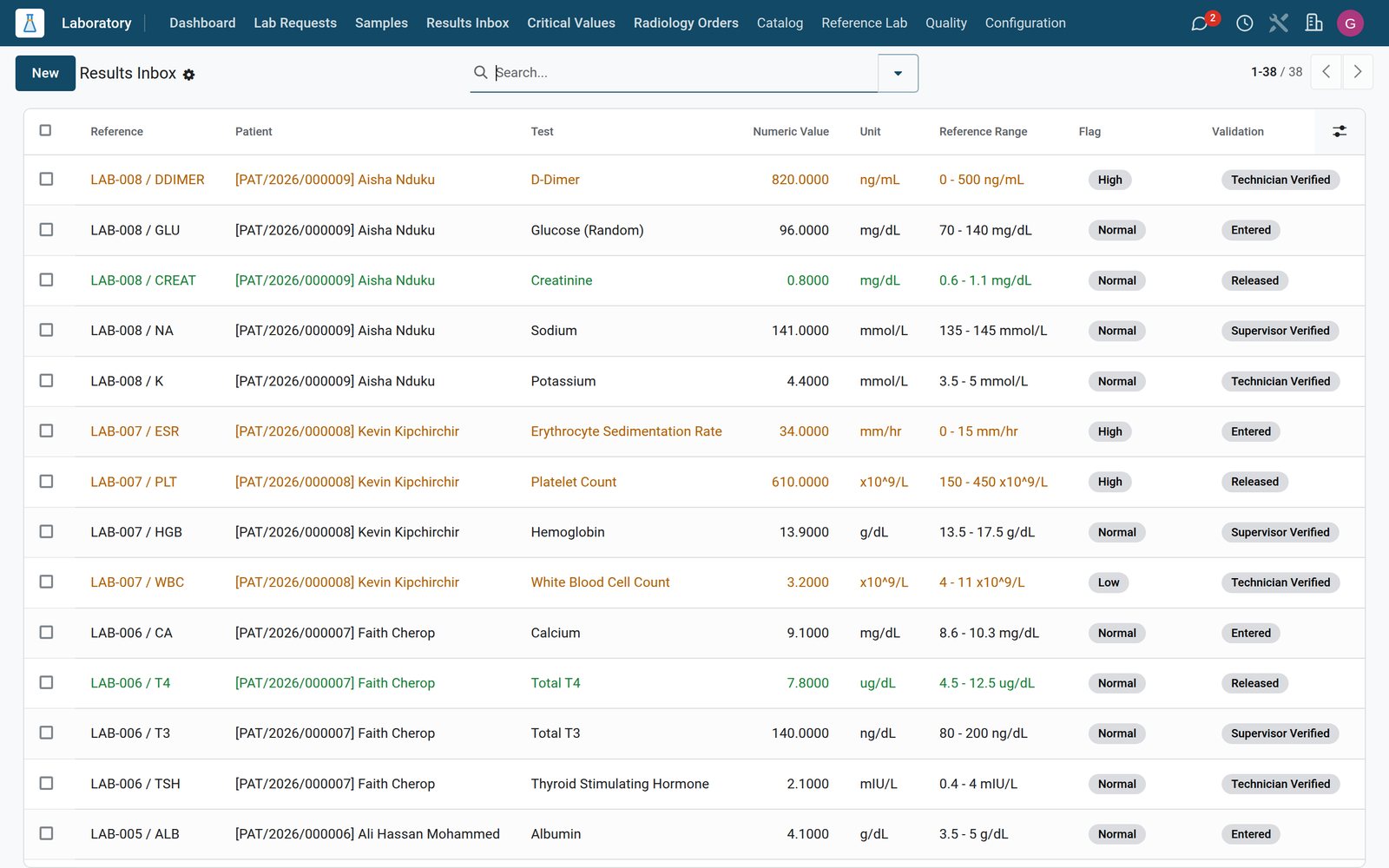 Laboratory
Abnormal results flagged for review
The Results Inbox lists each value with its reference range, flag and validation stage, and critical highs and lows get their own Critical Values list for immediate follow-up.
Explore Laboratory →Book the theatre, run the checklist, record the outcome
Theatre keeps the whole surgical episode together, from the booking to the recovery room, for each of your operating rooms.
 Operating Theatre
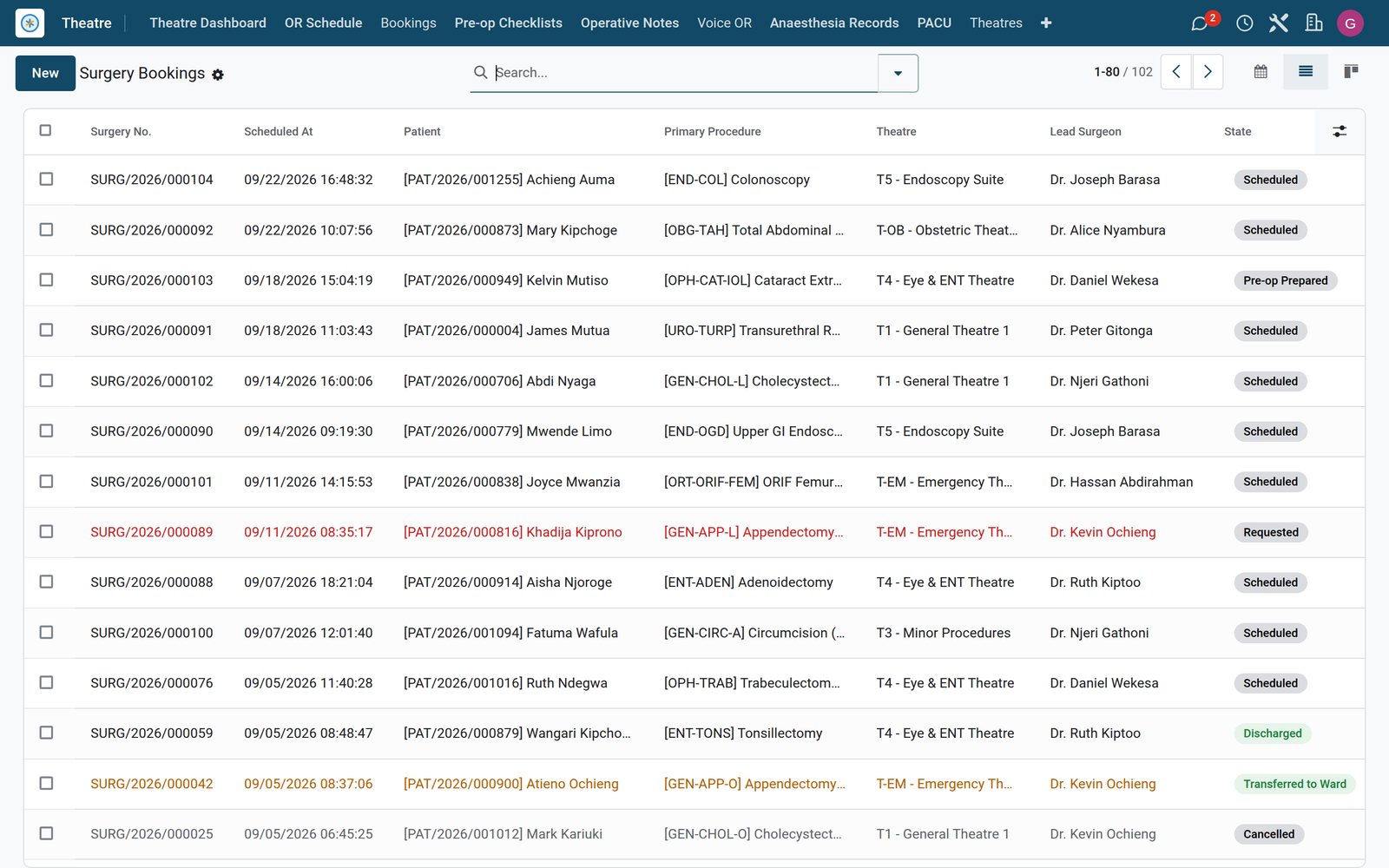
An OR schedule for every theatre
Each booking holds the procedure, lead surgeon, anaesthetist, scrub nurses, theatre room, ASA grade and scheduled duration, and links the pre-op checklist.
Explore Operating Theatre →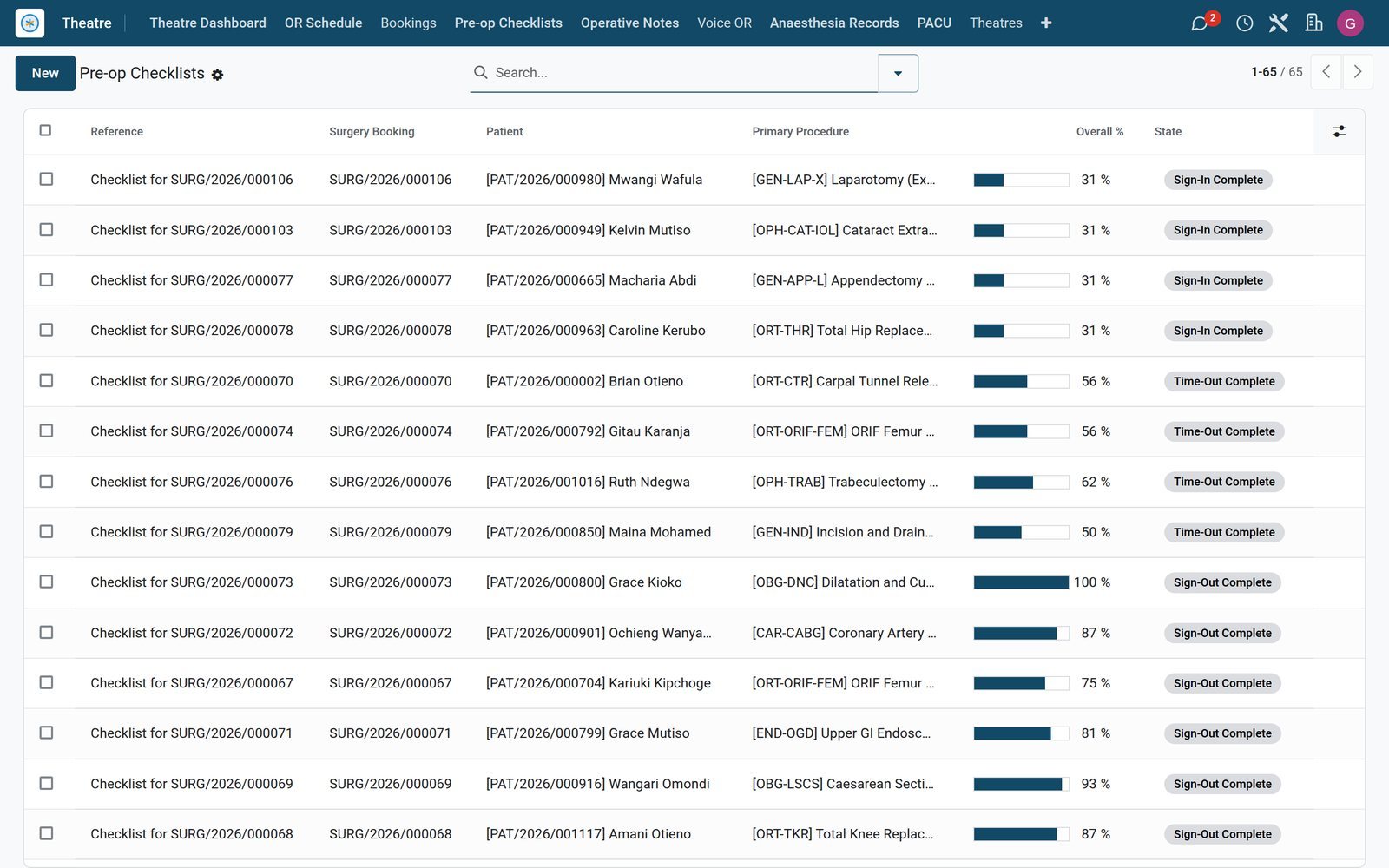 Operating Theatre
Safety records that stay with the patient
Pre-op checklists, anaesthesia records, operative notes and PACU recovery records sit on the booking, with complications and implants logged for audit.
Explore Operating Theatre →Admit, transfer and discharge without losing track of a bed
Ward staff see who is in which bed, who is waiting for one and how long patients have stayed.
 Wards & Inpatient
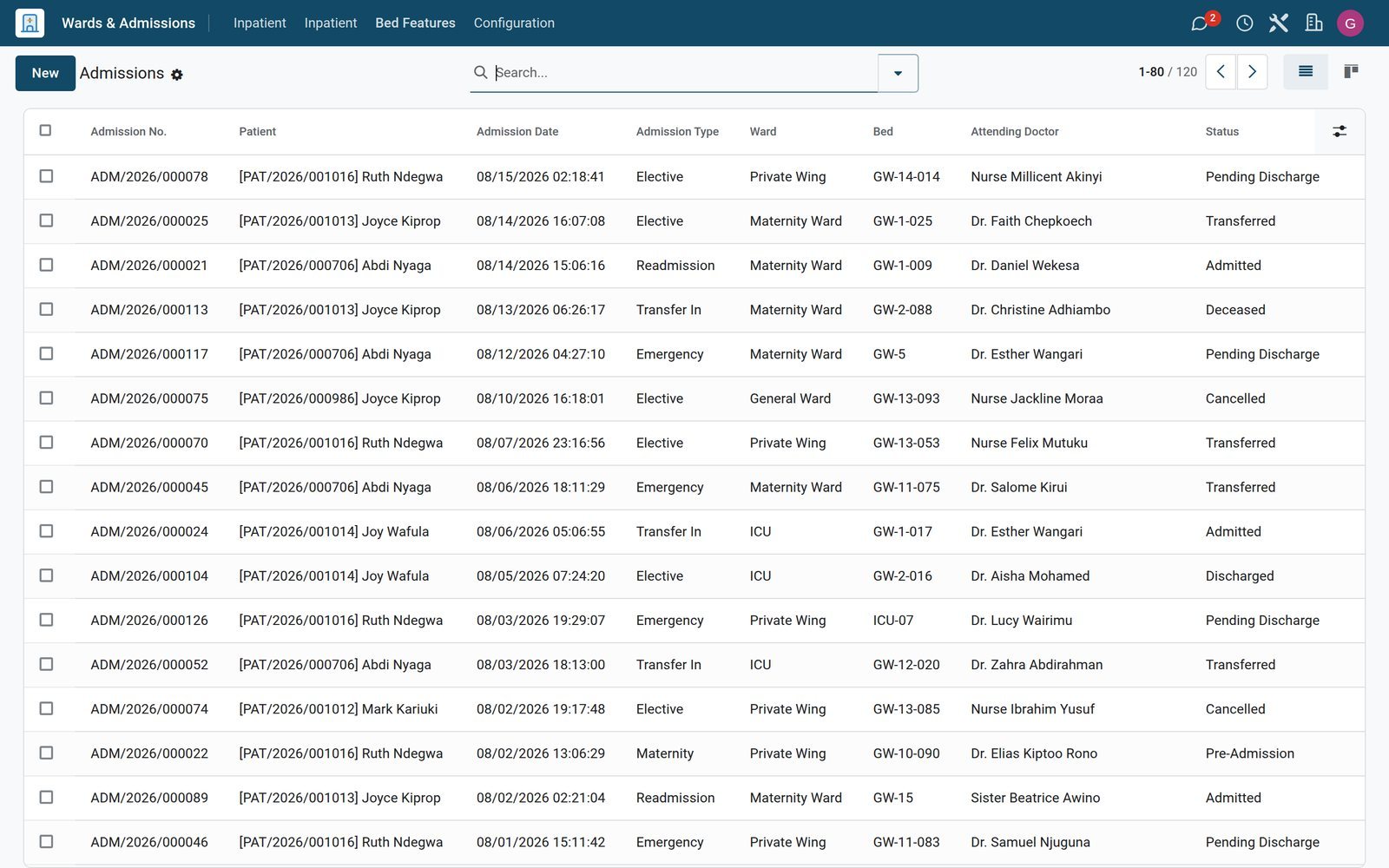
Admissions from pre-admission to discharge
Each admission records ward, bed, attending doctor, admission type and route, deposit required and paid, expected discharge date and running bed charges.
Explore Wards & Inpatient →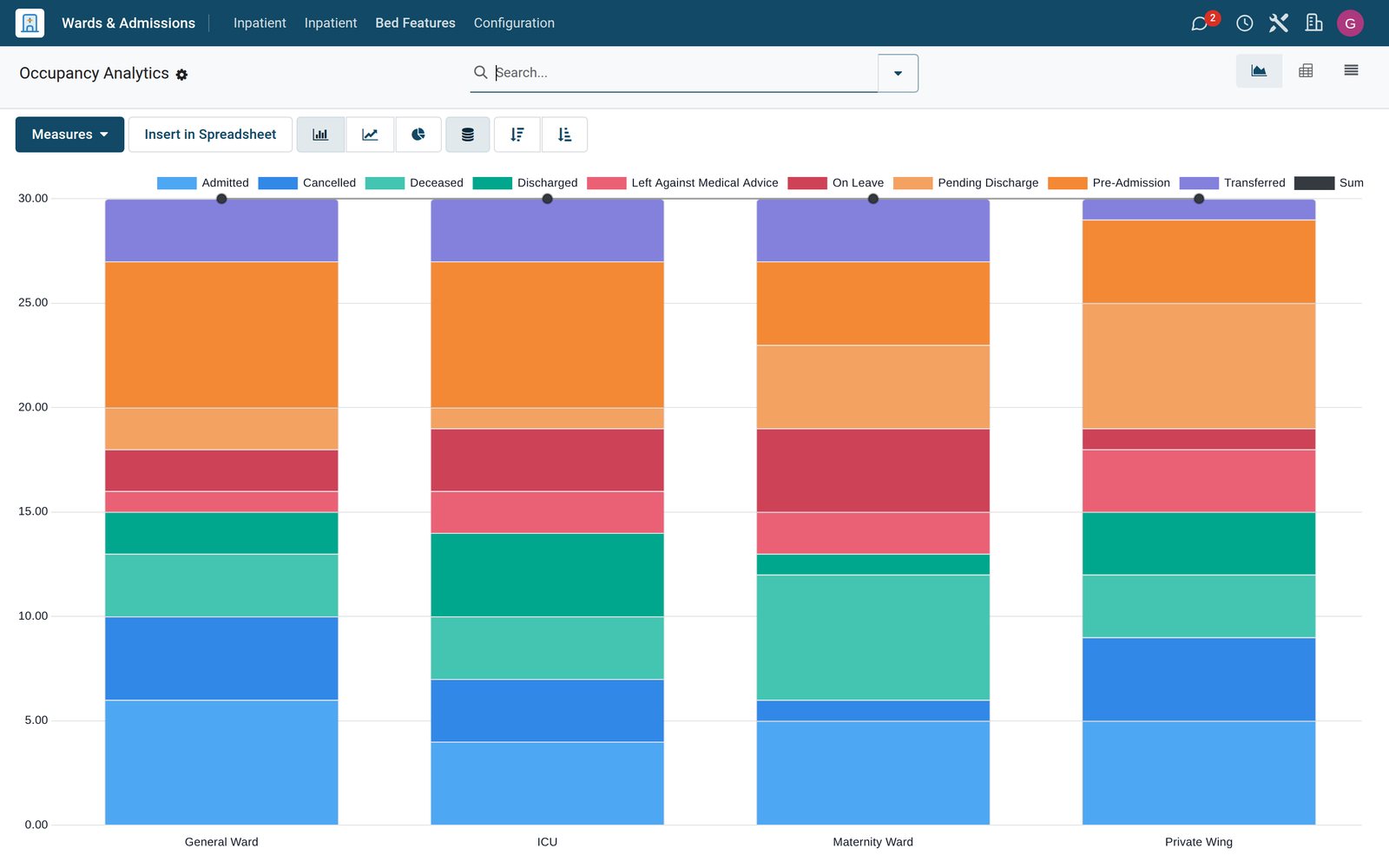 Wards & Inpatient
Occupancy you can chart
The Occupancy report graphs admissions, alongside Length of Stay, readmission and Bed Turnover reports in the same Inpatient menu.
Explore Wards & Inpatient →Every test, bed night and procedure reaches the bill
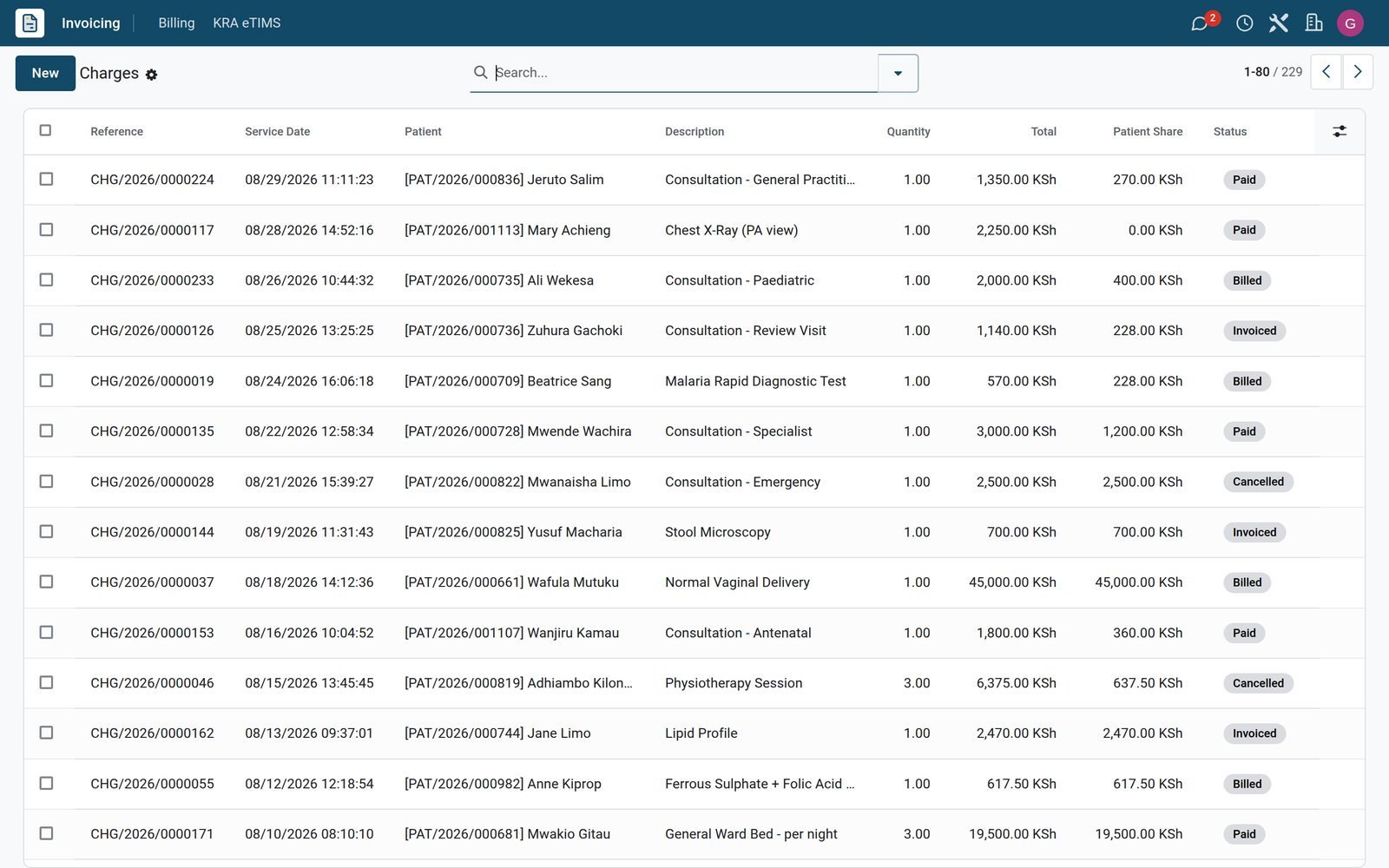
Departments raise charges as they deliver care, and the cashier and the insurer each see their own share.
 Billing & Cashiering
Charges split between patient and insurer
Each charge carries its tariff, quantity, discount, tax, insurer share and patient share, and links back to the lab request, admission or surgery.
Explore Billing & Cashiering →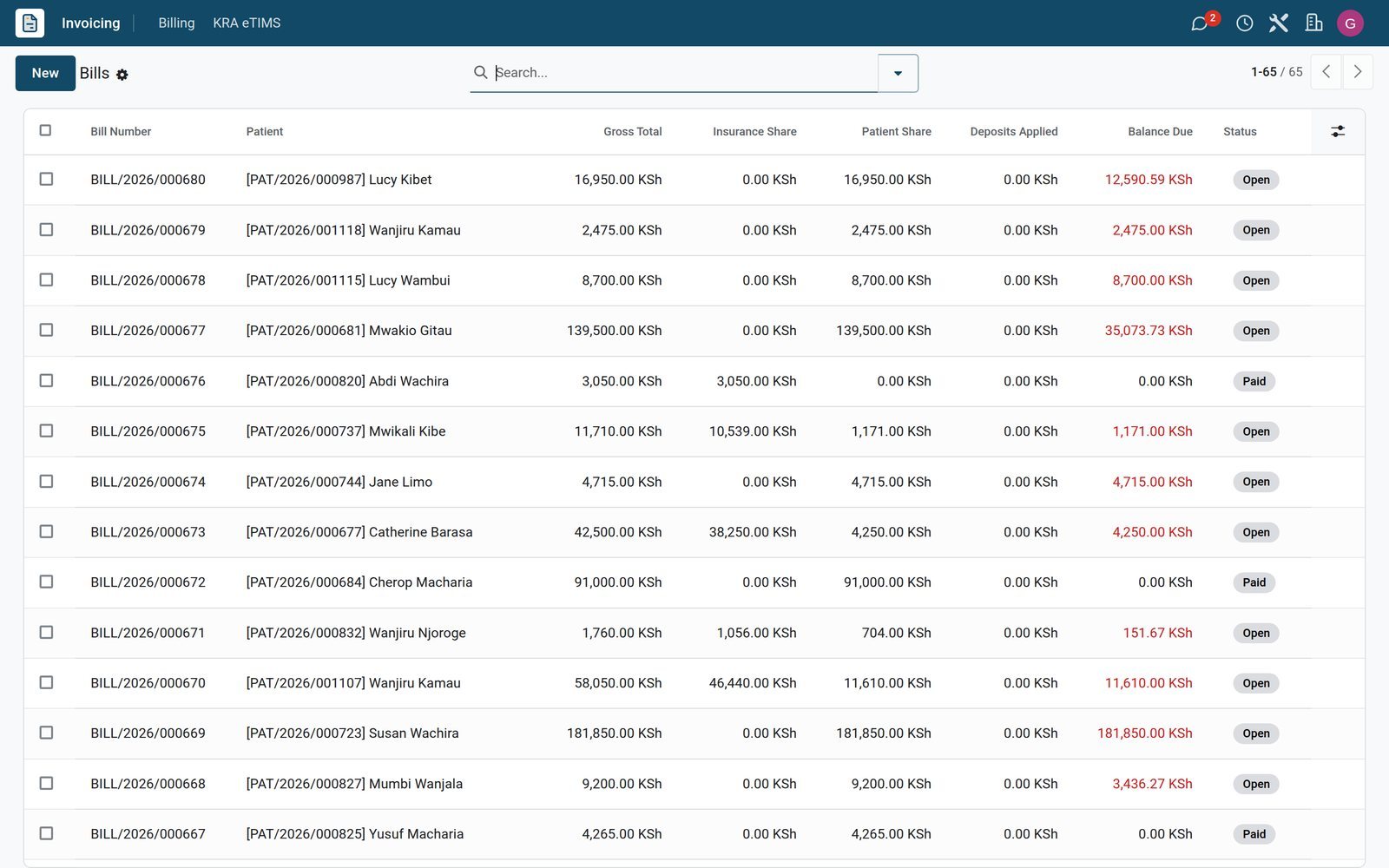 Billing & Cashiering
Bills, deposits and mobile money on one record
A bill totals the charges, deposits, discounts and M-Pesa payments, shows the balance due and raises separate invoices for the patient and the insurer.
Explore Billing & Cashiering →Tools that help clinicians spend less time on paperwork
Modules installed alongside the core departments, ready to switch on as each team adopts them.
Ambient scribe for consultations
An ambient recording can be attached to a consultation, and AI draft notes are generated from it for the doctor to review and accept.
Voice cockpit in theatre
Theatre teams can work through the WHO surgical safety checklist from a voice cockpit, with 19 checklist items and 13 voice commands configured.
Medication administration record
Nurses record doses against each admission's medication administration record, with a barcode medication administration module for scanning at the bedside.
Decision support for prescribers
Clinical decision support and clinical-alert modules sit beside a drug-interaction table of 26 rules that pharmacists and doctors can extend.
Telehealth from the same diary
Appointments can carry a teleconsultation link or a Google Meet address, so doctors see remote patients from the same schedule as walk-ins.
Reminders by SMS, WhatsApp and email
Each appointment tracks whether its email, SMS and WhatsApp reminders have gone out, and WhatsApp runs as its own app for patient messages.
Patient portal and after-visit summaries
After-visit summaries are generated in the patient's language and published to the patient portal, which also takes online booking requests.
Standards-based interoperability
FHIR and HL7 bridge modules connect the hospital to other clinical systems, and a DHIS2 module supports national health-information reporting.
Who uses it
What each person in the hospital opens first
Menus are grouped by department, so each role lands on the screens it uses all day.
Receptionist
Reception Desktop, walk-in registration, returning-patient lookup, today's queue and Call Next Patient, with arrivals and visitors logged at the desk.
Doctor
The Chart Desktop opens a consultation with quick order sets and SOAP templates, next to the Clinical Dashboard, prescriptions and referrals.
Ward nurse and bed manager
The Bed Map by ward, active admissions, the bed cleaning queue, beds under maintenance and transfers between wards, all in one Inpatient menu.
Laboratory scientist
The lab dashboard, samples, results inbox and critical values, with QC runs, proficiency testing and the turnaround-time report for quality.
Cashier
Cashier Checkout, today's cash session, deposits and refunds, the M-Pesa STK push and unreconciled C2B payments waiting to be matched to bills.
Management and finance
CEO, CFO and operations dashboards, daily snapshots against benchmarks, and profit and loss or aged receivables in Accounting.
In your country
Made for how hospitals get paid and report, country by country
Mobile money, national tax rules, local insurers, two currencies and six languages are already set up on the demo hospital, which runs the Kenyan pack.
Mobile money at the cashier
With M-Pesa on the demo, send an STK push to the patient's phone, receive paybill C2B payments, handle reversals and match unreconciled receipts to bills.
Mobile money at the pharmacy till
On the demo, the pharmacy point of sale has its own M-Pesa STK, cash, card and insurance payment methods, kept apart from the main hospital cashier.
Tax authority e-invoicing
On the demo's Kenyan pack, a KRA eTIMS menu covers item registration, KRA PIN verification, tax rates, transmissions with a retry queue and daily Z-reports.
Local private insurers
On the demo, ten Kenyan private insurers are listed at Reception, and each admission records the insurer's pre-authorisation number and the date it expires.
Country modules across the continent
Country localisation modules sit beside the core hospital apps, with packs today for Kenya, Uganda, Tanzania, Rwanda, Nigeria, Ghana, Ethiopia and South Africa.
Several currencies side by side
KES and USD are both active, and each company in the database keeps its own currency, as the demo's Nairobi hospital bills in USD.
Six languages for staff and patients
On the demo, English, Swahili, French, Arabic, Portuguese and Spanish are active, and after-visit summaries record the language they were issued in.
Ministry and programme reporting
Modules for Ministry of Health reports, DHIS2, Pharmacy and Poisons Board reports, immunisation, TB DOTS and HIV ART programmes are installed.
Reports and control
See revenue, occupancy and lab turnaround before the board asks
Every report below is a menu on the demo hospital, built from the same records the departments work in.
Executive dashboards
CEO, CFO, CMO and Operations dashboards give each leader one view of activity, money and clinical work across the hospital.
Daily snapshots and benchmarks
Daily Snapshots keep the hospital's key figures day by day for graph and pivot analysis, compared with benchmark sources you configure.
Billing analytics
Daily Revenue, MTD Revenue, Collection Rate and Services Profitability reports read straight from hospital charges, in pivot and graph views.
Inpatient reports
Occupancy, Length of Stay, readmissions and Bed Turnover reports, built from admission records and the bed-cleaning log.
Laboratory quality
A turnaround-time report, QC materials and runs, proficiency testing and the critical-values list keep the laboratory accountable.
Theatre outcomes
Surgical outcomes, complications, the equipment usage log and the implant register give the theatre manager an audit trail per procedure.
Financial statements
Profit and loss, balance sheet, cash flow, aged receivables and the general ledger, built from the invoices that hospital billing creates.
Custom and scheduled reports
Build your own report, share it with colleagues or schedule it by email, next to digest subscriptions for regular summaries.
Works with
The apps that run with it
Clinical departments, finance, stock and people share one database, so nothing is re-keyed between them.
- ReceptionRegistration, appointments and queues
- OutpatientConsultations, prescriptions and referrals
- LaboratoryRequests, samples, results and QC
 PharmacyDispensing and the pharmacy till
- Wards & AdmissionsBeds, admissions, transfers and discharge
 NursingMedication administration and care
- TheatreOR schedule, anaesthesia and recovery
 EmergencyTriage, whiteboard and trauma records
- BillingCharges, bills, deposits and cashier
 InsuranceInsurers, pre-authorisation and claims
 InventoryHospital stores and stock levels
 AccountingInvoices, ledgers and statements
Getting started
Go live one department at a time
Set up the catalogues first, import what you already have, then open each department once its staff are ready.
Load your price list
Enter or import service tariffs, bed-night rates and payer contracts, the prices that every department's charges are raised against.
Map wards, beds and theatres
Create wards, beds with their features and night rates, and theatre rooms, and the Bed Map and OR schedule fill themselves in.
Tune the lab catalogue
Adjust the Test Catalog and panels, register your analysers and add the reference laboratories you send specialist tests to.
Import patients, suppliers and products
Contacts, products and opening entries import from Excel or CSV files, with a Test button that checks the file before anything is written.
Desks, tills and mobile money shortcodes
Configure reception desks, cashier registers and mobile-money shortcodes, such as M-Pesa's, so each desk and cash session is set up before the first patient arrives.
Roles and more sites
Give each role its own apps through access groups and record rules, and add further hospitals or clinics as companies in one database.
Questions
Questions about Hospital Management
Not covered here? Contact us.
Does it cover both outpatient clinics and inpatient wards?
Yes. Reception, Outpatient, Laboratory, Wards & Admissions, Theatre and Emergency are separate apps working on the same patient visit, so a clinic can start with outpatients and add wards later.
Can patients pay by mobile money such as M-Pesa?
Yes. With M-Pesa, for example, the cashier can send an STK push to the patient's phone or receive paybill payments, and unreconciled M-Pesa receipts are listed for matching to bills. The pharmacy till has its own M-Pesa payment method.
How is medical insurance handled?
Each charge splits into an insurer amount and a patient amount, bills raise separate invoices for each, admissions record pre-authorisation numbers, and insurers and payer contracts are kept in the system.
Is it ready for tax authority e-invoicing, such as KRA eTIMS?
Yes, through the country pack. With the Kenyan pack, for example, the Invoicing app has a KRA eTIMS menu for item registration, KRA PIN verification, tax rates, transmissions with a retry queue and daily Z-reports.
Can we run several hospitals or clinics in one system?
Yes. Each facility can be its own company in one database, with its own currency and tax settings, and staff switch between the companies they are allowed to see.
Can we bring in our existing patients, suppliers and price list?
Yes. Contacts, products and other records import from Excel or CSV with a test run first, and service tariffs can be entered or imported before go-live.
Can each member of staff see only what they need?
Access is set per app through user groups, from user up to administrator, and record rules narrow which records each group can open.
Which languages can staff and patients use?
English, Swahili, French, Arabic, Portuguese and Spanish are active on the demo hospital, and after-visit summaries record the language they were issued in.
Tax compliance
Invoices your tax authority accepts
In Kenya, Uganda, Rwanda, Burundi and Zambia, each invoice, receipt and stock movement goes to the tax authority's own system when you post it. Ghana and Pakistan come next, and we connect 73 more countries on request.
- KenyaReady
eTIMS KRA
Invoices, credit notes, POS receipts and stock movements
- UgandaReady
EFRIS URA
Invoices, POS receipts and stock
- RwandaReady
EBM RRA
Invoices, POS receipts, stock and imports
- BurundiReady
EBMS OBR
Invoices, POS receipts, stock and manufacturing
- ZambiaReady
Smart Invoice ZRA
Invoices, POS receipts, stock and imports
Hospital Management, app by app
One connected flow instead of separate systems — the work moves from one team to the next without re-typing anything.
Every stop is a real app in your plan, and the hand-offs between them are the product.
- Operations
Ready when you are
Open the plan builder with the right apps for this industry already selected, or see it running first.