

College Management: Run your college from first enquiry to final transcript
Admissions, course registration, timetables, exams, fees and the library share one student record, so the registrar, bursar and lecturers work from the same figures.
Free instant access. No credit card required.
 Academics
 Fees & Billing
 Assessment Engine
 Timetable
 Admissions
 Library
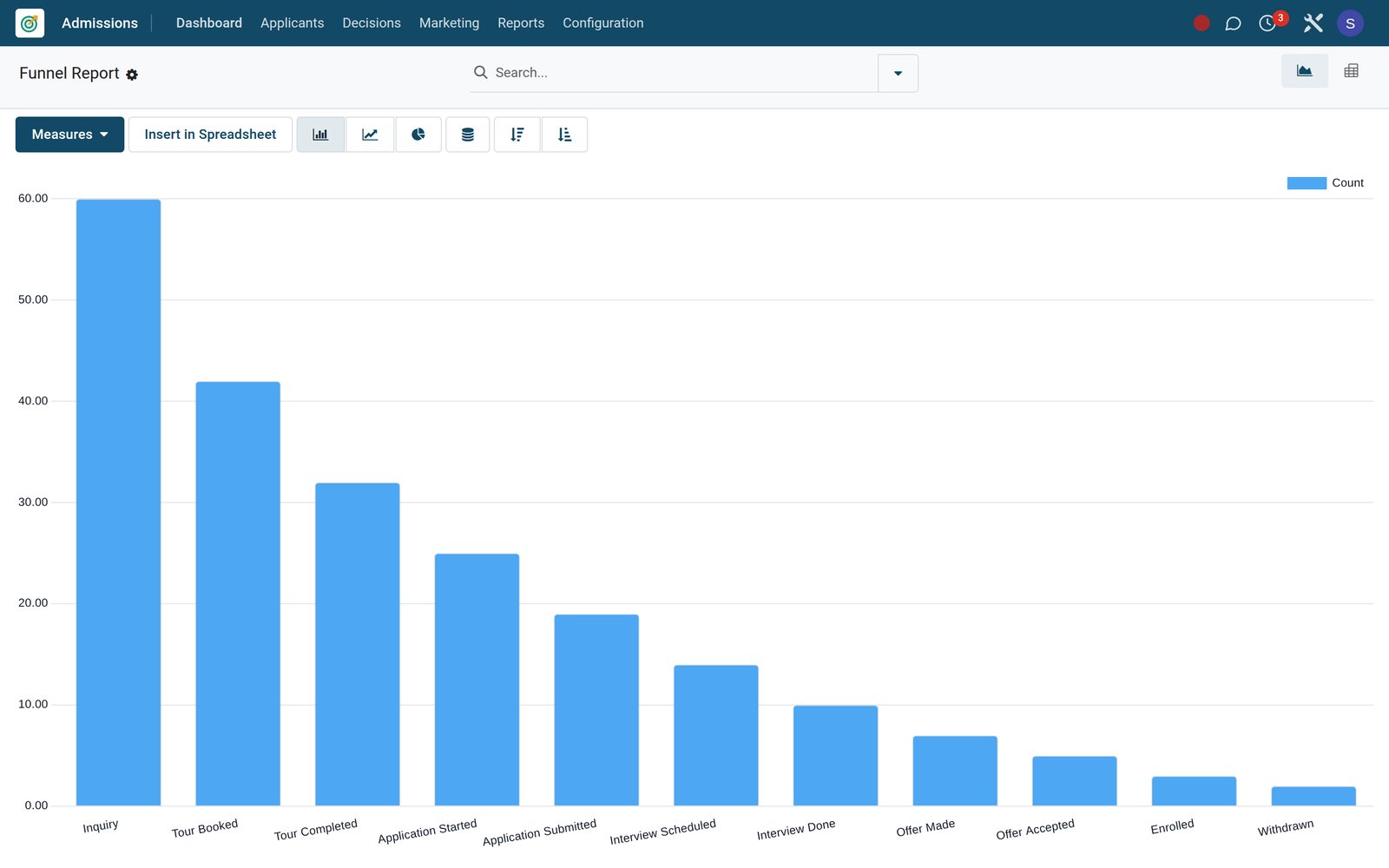
Fill every course and cohort before it starts
Short courses and degree cohorts each carry their own dates, capacity and intake, so the admissions office knows where places remain.
 Continuing Education
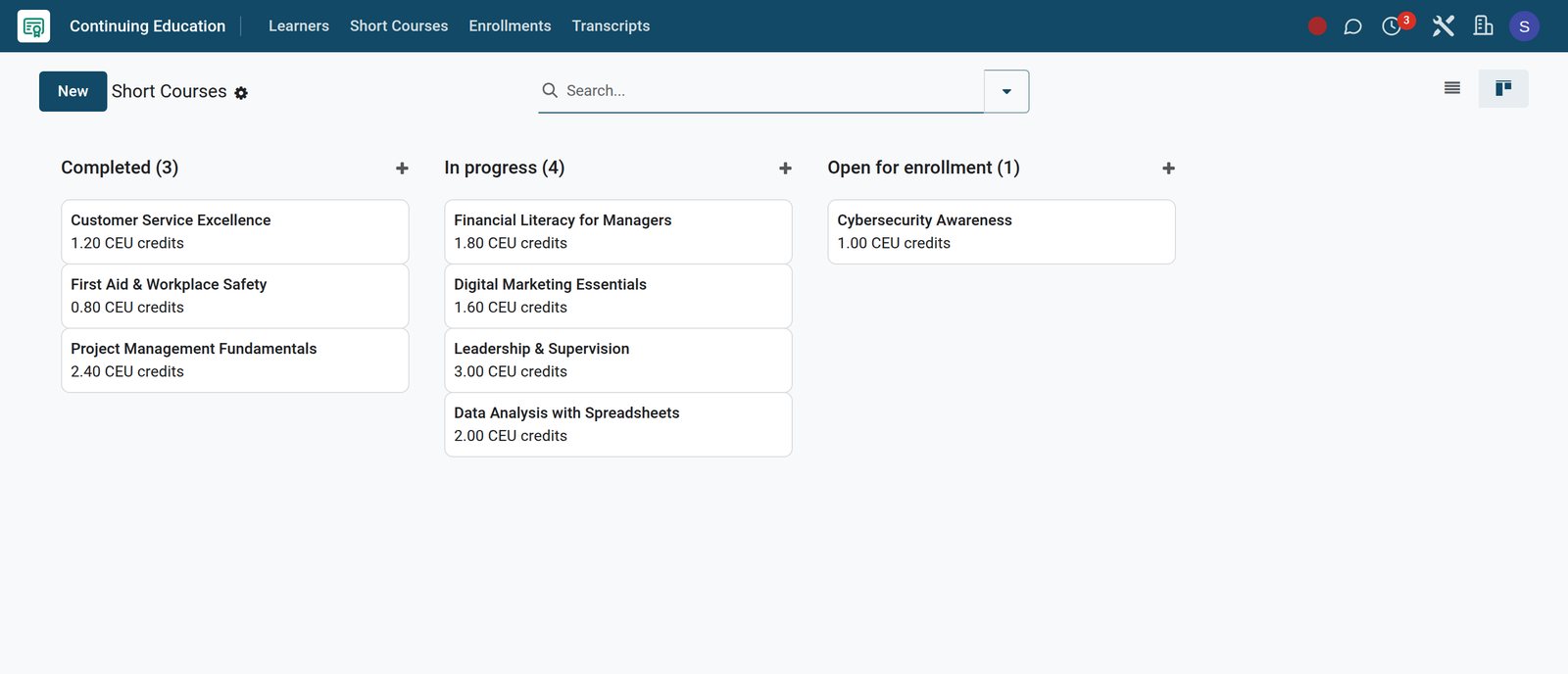
Short courses by state
Short Courses show each course's CEU credits and move from open for enrolment to in progress and completed, with delivery mode, contact hours, capacity and fee on the course record.
Explore Continuing Education →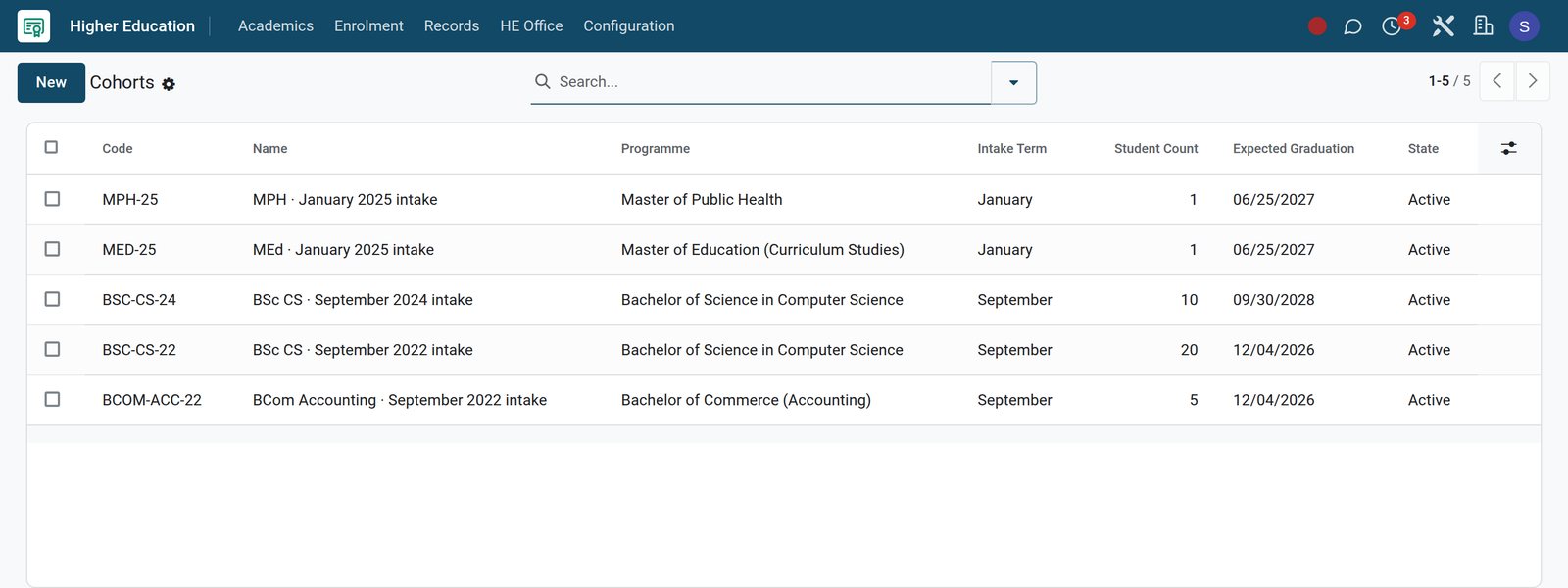 Academics
Degree cohorts by intake
Cohorts group students by programme and intake term, with the number of students and the expected graduation date.
Explore Academics →By the numbers
The college stack, in numbers
Counts taken from the product's own menus and settings, not from marketing estimates.
- 8
- report views under Academic, Assessment, Reports, from class rankings and report cards to attendance analytics and transcripts
- 3
- financial-aid registers in Fees & Finance: bursaries, scholarships and subsidy schemes, alongside fee waivers and discounts
- 3
- online payment providers configured: M-Pesa STK Push, Airtel Money and Pesapal, with a pay link on every fee invoice
- 9
- interface languages active, including Kiswahili for Kenya and Tanzania, French, Arabic, Portuguese, Spanish and Chinese
Inside the app
Everything a college office runs, in one place
Each card maps to real menus in the Admissions, Academic, Fees & Finance and Library apps.
Admissions and recruitment
Inquiries, campus tour bookings, interviews, reviewer scorecards, offers and a waitlist, with admissions email campaigns and templates in the same app.
Programmes and course registration
Programmes carry intake, deadline, capacity and application fee; Course Enrollments record each student's courses, semester, credit hours and final grade.
Curriculum and teaching
Subjects, syllabi and syllabus coverage, lesson plans, homework and submissions, with teacher assignments and a teaching-load check per lecturer.
Timetable, rooms and attendance
Timetables built from slots with day, period, room and lecturer, slot swap requests, and attendance taken per period or per day.
Examinations and grading
Examinations, exam schedules with rooms and invigilators, seating plans, bulk mark entry, rubrics, grading scales and weighted grade results.
Records and transcripts
Academic records, mark sheets with pass rates, class rankings, awards and transcripts carrying cumulative GPA, average percentage and overall grade.
Fees and financial aid
Fee structures and categories, installment plans, invoices, dunning, refunds with approval, bursaries, scholarships, subsidy schemes and waivers.
Library
Books and barcoded copies, loans, reservations, course reserves, inter-library loans, periodicals, digital resources and a public online catalogue.
Step by step
One student record from enquiry to graduation
Each step hands the same student to the next app, so nobody retypes names, programmes or balances.
- Step 1
Capture the enquiry
In CRM, enquiries arrive as admission leads and move through the Admissions pipeline from Inquiry to interview, with activities and emails logged.
CRM - Step 2
Review and make offers
Admissions records interviews, reviewer scores and recommendations, and test codes, then moves each applicant to Offer, Waitlist or Enrolled.
Admissions - Step 3
Bill the semester
Fees & Finance assigns a fee structure to each student and generates installment invoices, each with a pay link and an accounting entry.
Fees & Billing - Step 4
Register courses and rooms
Academic enrols students on courses for the semester with their credit hours, and the timetable places each class in a slot, room and lecturer.
Timetable - Step 5
Assess and grade
Lecturers enter marks in Academic, and grade results combine continuous assessment and exam scores by their weights into a final score and GPA points.
Assessment Engine - Step 6
Issue the transcript
Academic compiles each transcript with a transcript number, cumulative GPA, average percentage and overall grade, and records the date it was issued.
Academics
Know what each programme costs and who is sponsoring whom
Fee policies price a year of study, sponsors' awards sit on the student record, and short-course payments are tracked on each enrolment.
- Academics
Fee policies priced per credit hour
A fee policy prices a programme's year of study per credit hour and adds the registration, examination, library and technology fees.
Explore Academics →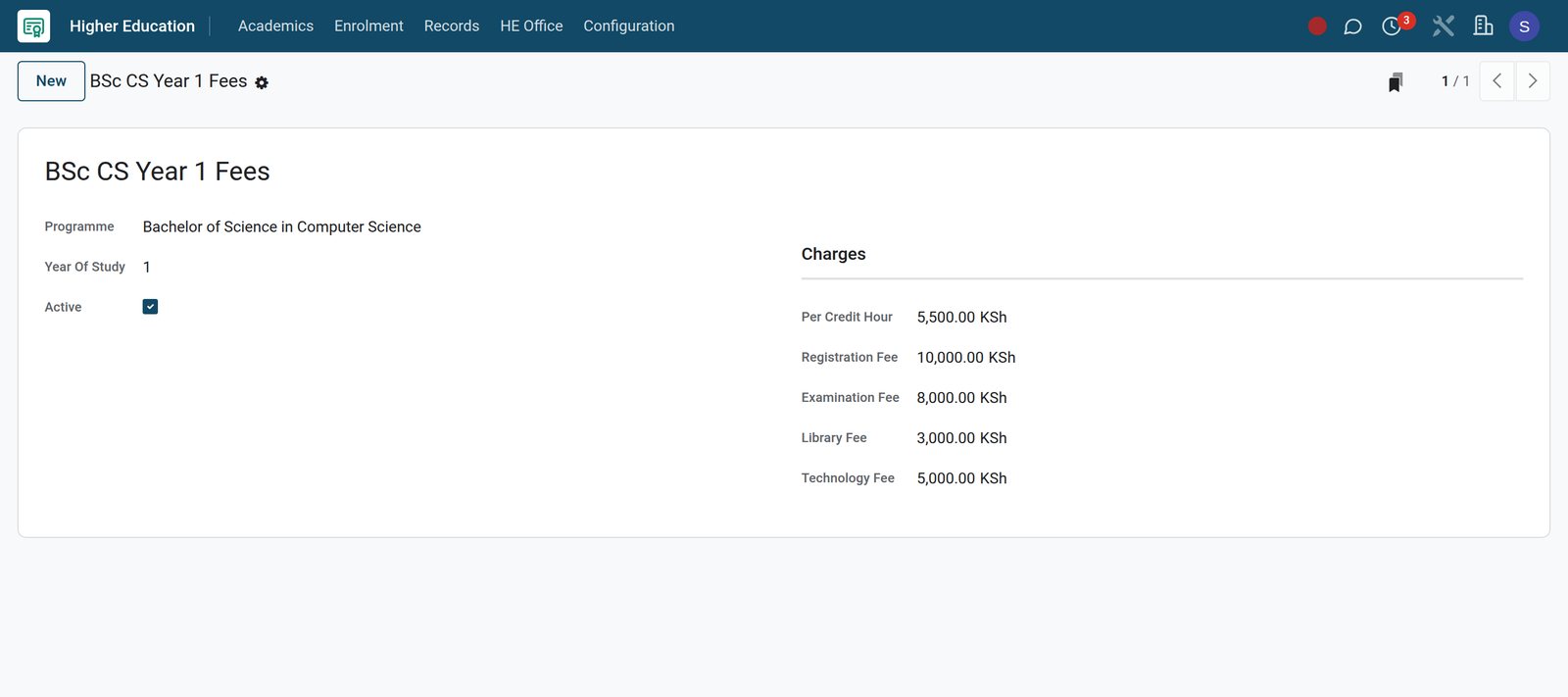
- Academics
Sponsors, loans and bursaries per student
Financial Aid lists every award with its type, sponsor, the amount awarded, disbursed and remaining, and whether it is approved or paid out.
Explore Academics →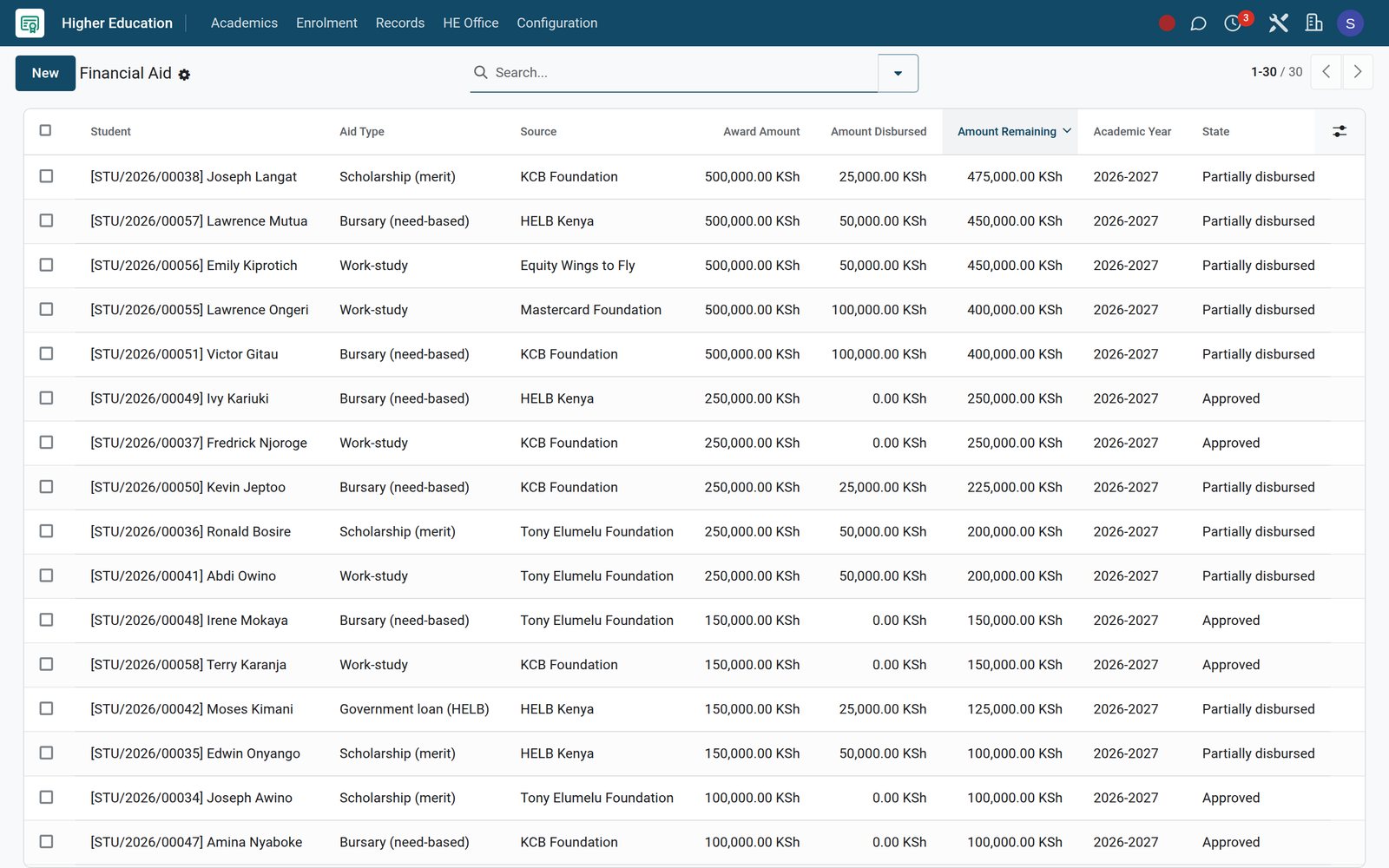
- Continuing Education
Short-course payments on every enrolment
Each short-course enrolment records whether the learner has paid in full, paid part or is on a scholarship, beside attendance and credits.
Explore Continuing Education →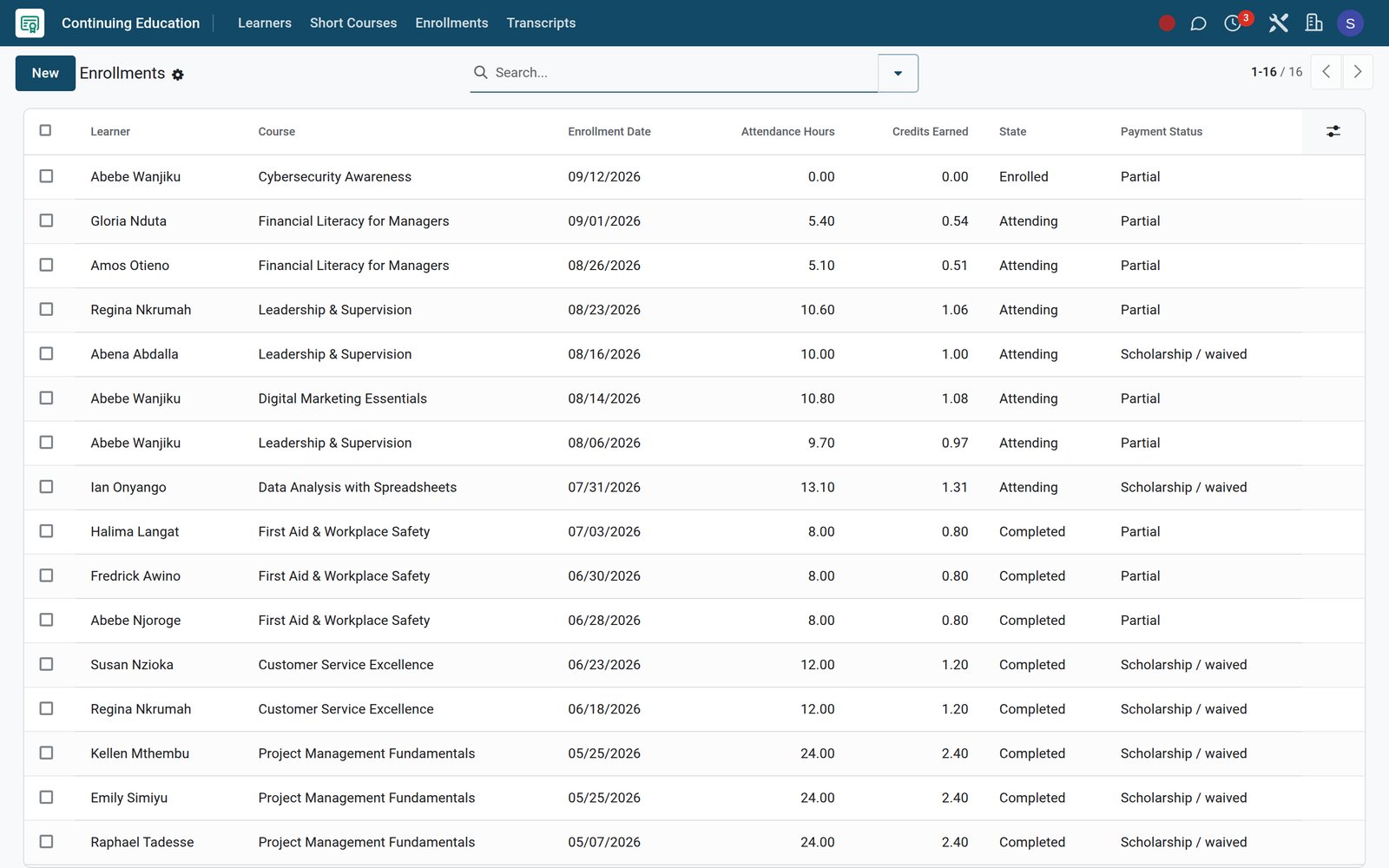
Put every student on the right courses, credits and rooms
Unit registration and the unit catalogue live in the Higher Education app, beside the student's record.
 Academics
Unit registrations with CAT and exam marks
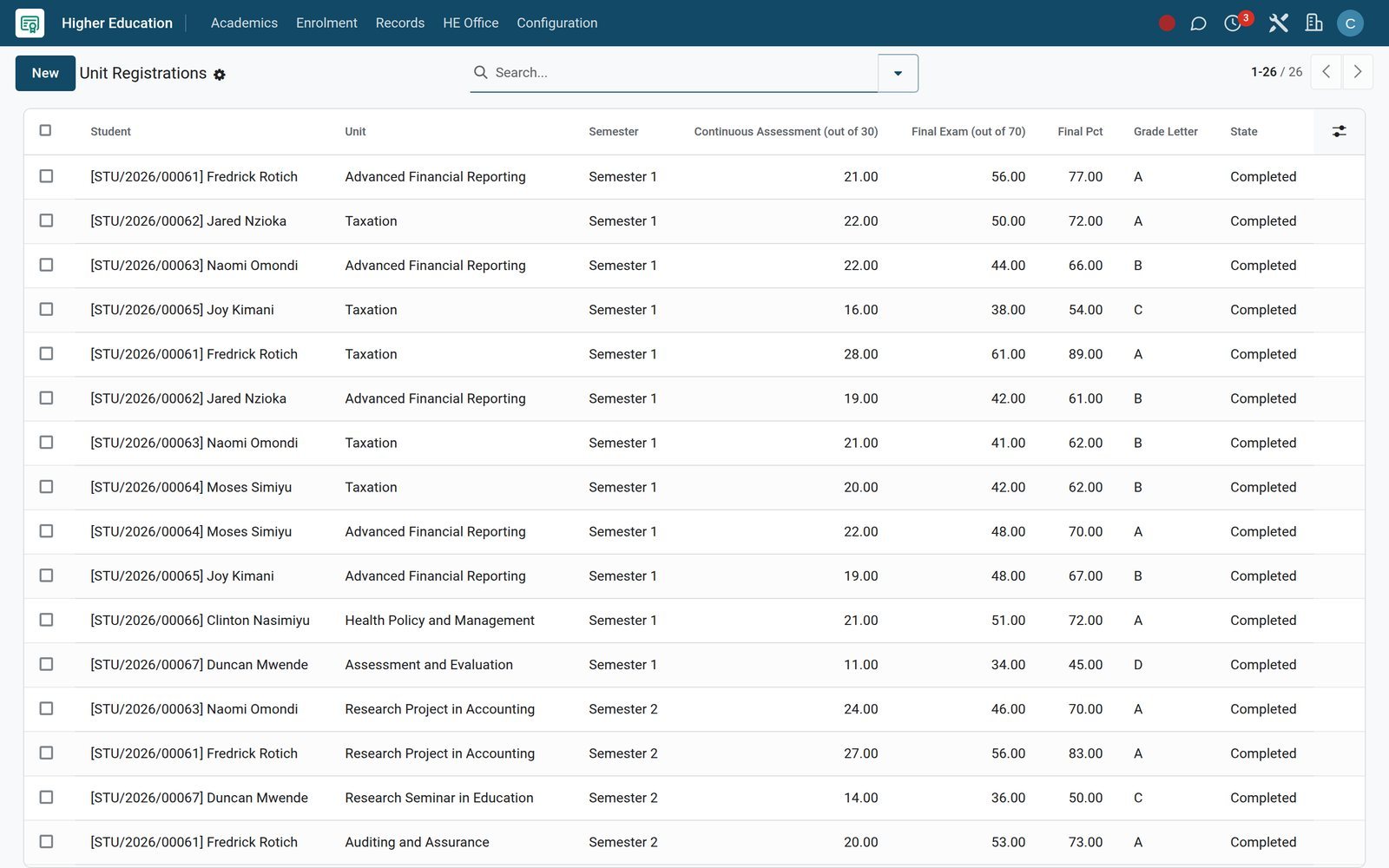
Registrations record each student's unit and semester, then the CAT score, exam score, final percentage and grade letter.
Explore Academics →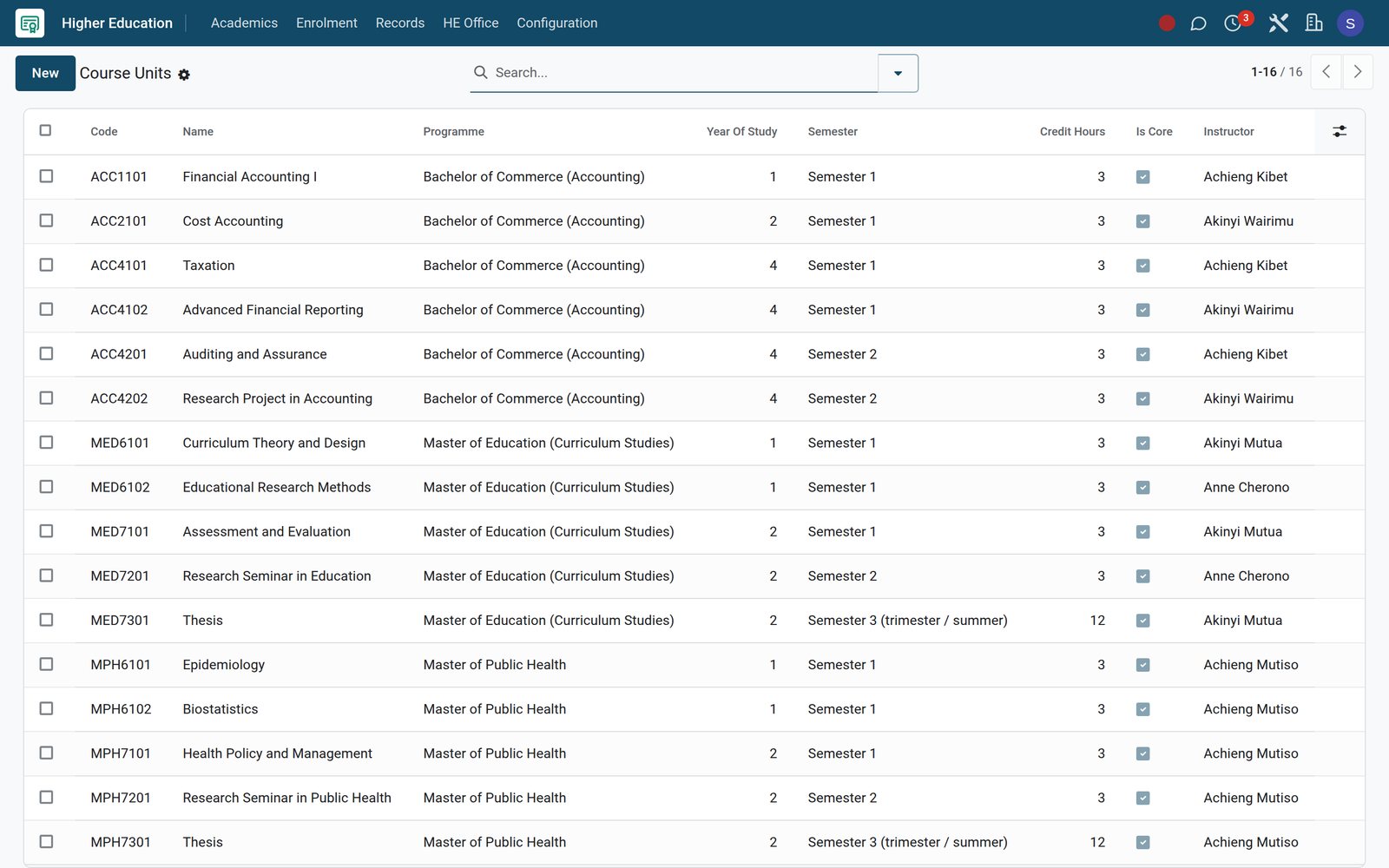 Academics
A unit catalogue with credits and lecturers
Course Units give each unit its code, year of study, semester, credit hours and lecturer, and mark which units are core.
Explore Academics →Turn marks into grades, GPAs and transcripts
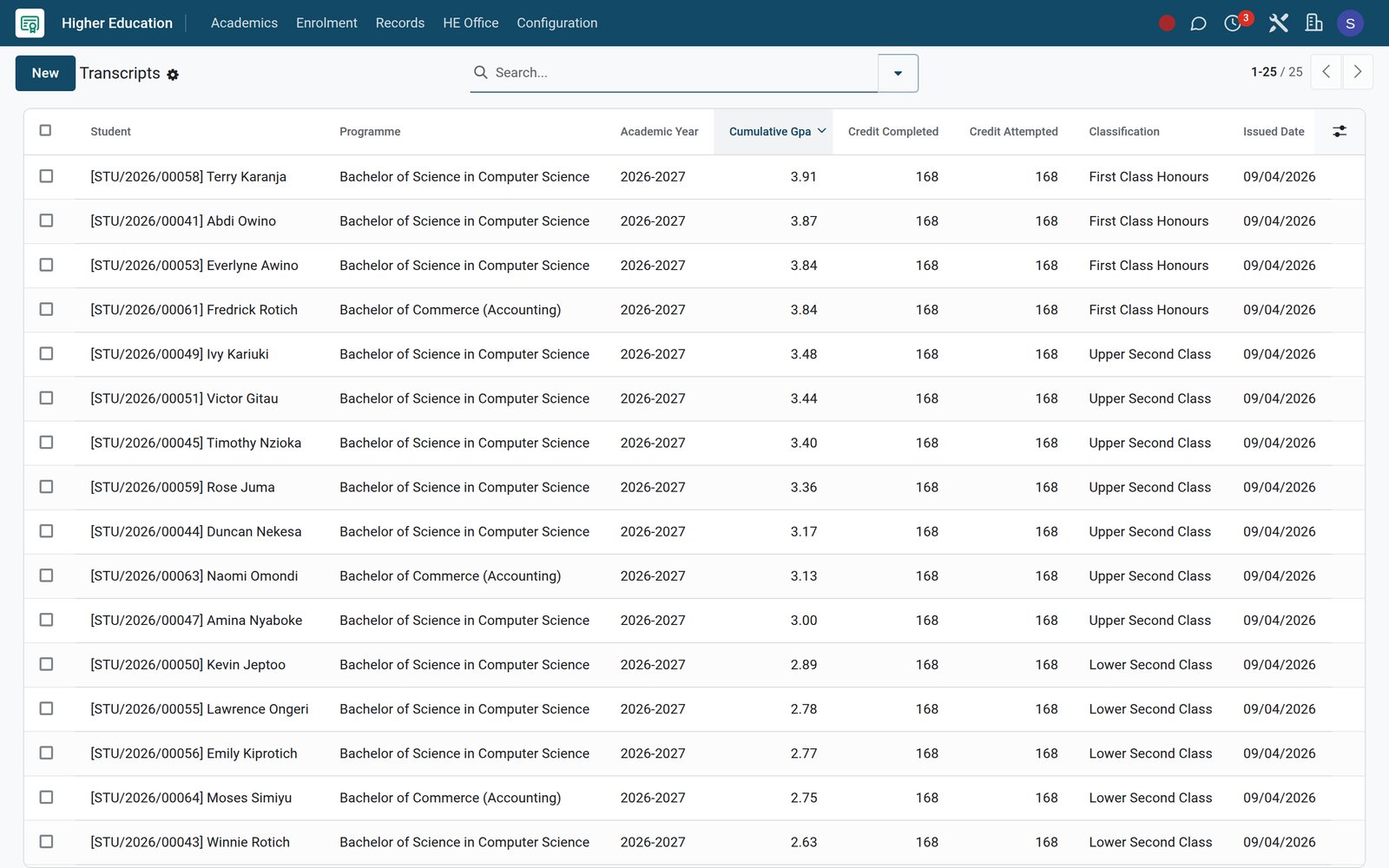
Marks roll into cumulative GPA and classification on the degree transcript, and short courses issue their own credit transcripts.
 Academics
Degree transcripts with classification
Transcripts hold the cumulative GPA, credits completed and attempted, and the classification a finalist has earned, with the issue date.
Explore Academics →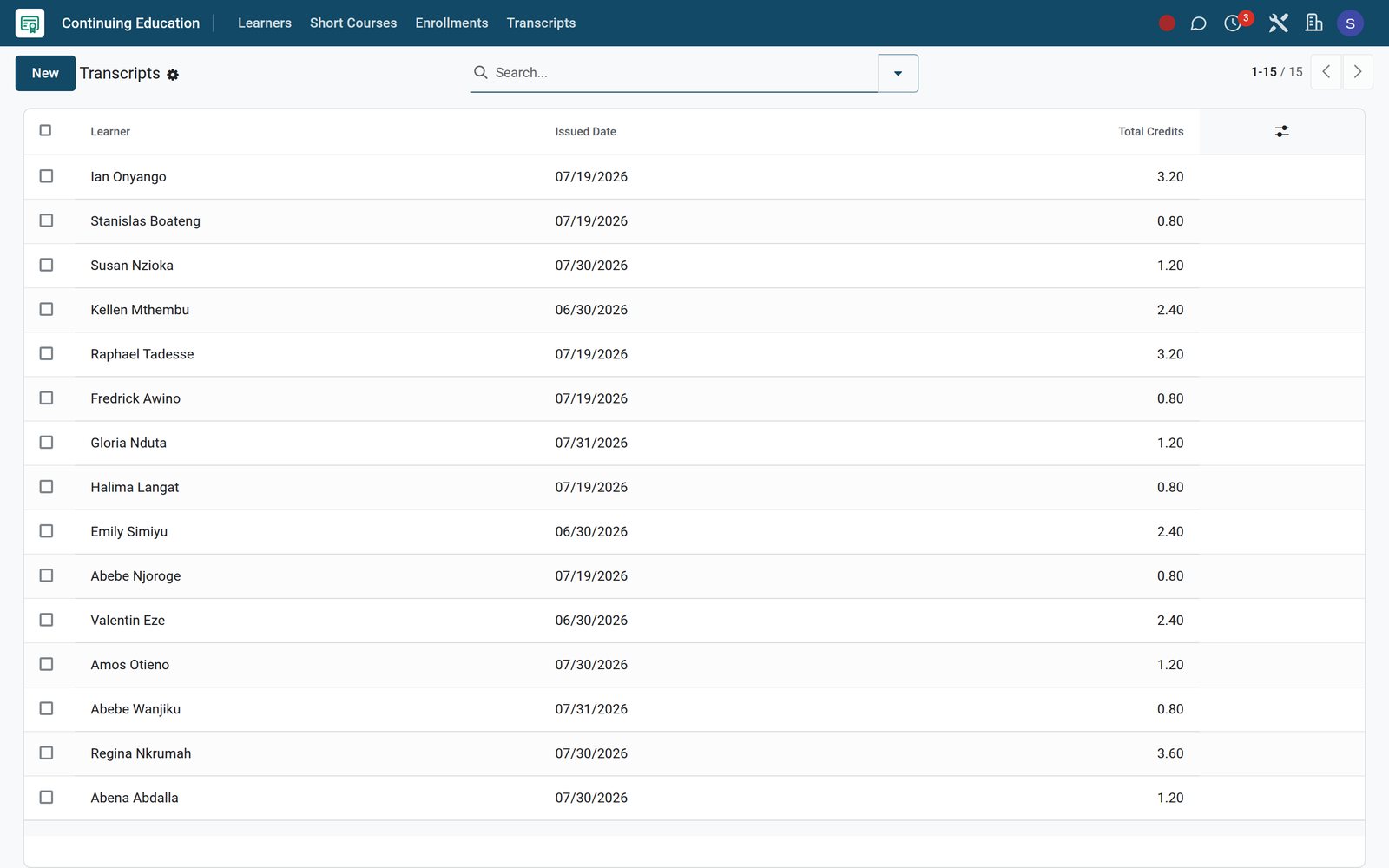 Continuing Education
Short-course transcripts in CEU credits
Continuing Education issues each learner a transcript that totals the CEU credits earned across completed short courses.
Explore Continuing Education →Run the college library from catalogue to overdue fines
Cataloguing, circulation and the public catalogue use the same student records as admissions and fees.
A catalogue with ISBN and Dewey
Each book carries ISBN, Dewey class, call number and shelf location, with available, issued and reserved copy counts on the record.
Loans, due dates and fines
Loans track issue and due dates, renewals, days overdue and the fine owed; overdue loans get their own list for the librarian to chase.
A public catalogue, booklists and a self-checkout kiosk
Students search the OPAC from any browser and browse the librarian's public booklists, and the self-checkout kiosk issues or returns a book from the patron card and the copy barcode.
Built for diploma and degree-awarding institutions
The university and college tools that sit inside the same apps, not in separate systems.
Accreditation that cannot lapse unnoticed
Accreditations record the awarding body, programme, certificate number and validity dates, counting the days to expiry against a renewal reminder window.
A research office in the same system
Research projects link the principal investigator, collaborators, ethics reviews, papers and grants, with each grant's amount spent and remaining.
Exam halls planned seat by seat
Exam Seating gives each candidate a room, row and seat number and records attendance, while the Exam Schedule names the invigilator per paper.
Online tests with proctor flags
The Assessments app builds tests from a question bank and sections, times every attempt, and logs proctor flags with a timestamp for review.
Grants and tuition insurance
University Finance tracks grants, research funding and tuition insurance claims inside Fees & Finance, next to the student fee ledger.
Placements and attachments
The Placement Office app records vacancies and student applications with CV and cover letter, plus diary entries kept during each placement.
Your own CGPA scale
CGPA Scales define the grade bands and maximum GPA, and every course enrolment records which scale converted its grade into points.
Teaching load kept in check
Teaching Load totals each lecturer's periods per week against the maximum permitted and flags anyone carrying overload hours.
Who uses it
Each office starts from the screen it needs
Same records, different starting points for the people who run the college.
Registrar
Course Enrollments, academic records, promotion batches and transcripts, with approval logs showing who approved each academic change and when.
Admissions officer
The pipeline, interviews, tour schedule, offers, waitlist and reviewer scorecards, plus email campaigns to prospective students from the Marketing menu.
Lecturer
The Today menu gathers the day's timetable, lesson plans due, assessments due and attendance register, beside mark entry and homework submissions.
Bursar
Revenue Board, Overdue Pipeline, dunning log, refunds pending approval and the collection-rate dashboard, broken down by programme and class.
Librarian
Loans, overdue items, reservations, course reserves, inter-library loans and the offline circulation queue, all from one Library app.
Accountant
Fee invoices post as accounting entries, so the Accounting dashboard, bank reconciliation, aged receivables and profit and loss stay current.
Works with
Runs with the rest of BridgeERP
The college apps share students, staff and money with these apps on the same database.
 AccountingFee invoices post as customer invoices with full financial reporting.
- CRMAdmission leads, activities and pipeline stages for every enquiry.
 eLearningOnline courses linked to students' course enrolments.
 Email MarketingAdmissions campaigns and reusable email templates.
 SurveysQuestionnaires for students, parents and staff.
 SignElectronic signatures on offer letters and forms.
 DocumentsA central store for student and staff files.
 EmployeesLecturer and staff records; teachers are employees.
 RecruitmentHiring pipeline for lecturers and support staff.
 Point of SaleCampus shop tills that can charge purchases to fees.
 WebsiteThe public college site and online catalogue.
 InventoryLibrary copies tracked as stock lots by location.
In your country
Made for fees paid by phone and campuses with patchy internet
Payment rails, currencies and languages that match how colleges actually operate.
Fees paid by mobile money
On the demo, M-Pesa STK Push is configured as a payment provider, and every fee invoice carries a pay link that students or sponsors can open on a phone.
More wallets and card gateways
On the demo, Airtel Money is enabled and Pesapal is configured next to M-Pesa, with a Flutterwave connector also installed for colleges that need it.
Two currencies on one ledger
On the demo, Kenyan shillings and US dollars are both active, and the Unrealized Currency Gains/Losses report revalues open foreign-currency balances at a chosen date.
Screens in each user's language
On the demo, Kiswahili for Kenya and Tanzania, French, Arabic, Portuguese, Spanish, German and Chinese are active beside English, chosen per user.
Circulation that survives a dropped network
Loans and returns captured on a disconnected device wait in the Offline Queue with barcode, patron card and timestamp until they become loans.
Campus shop charged to fees
At the campus shop till, Charge to Student Fees is a payment method, so purchases are billed through the student's fee account instead of cash.
Know which students are slipping before the exam board does
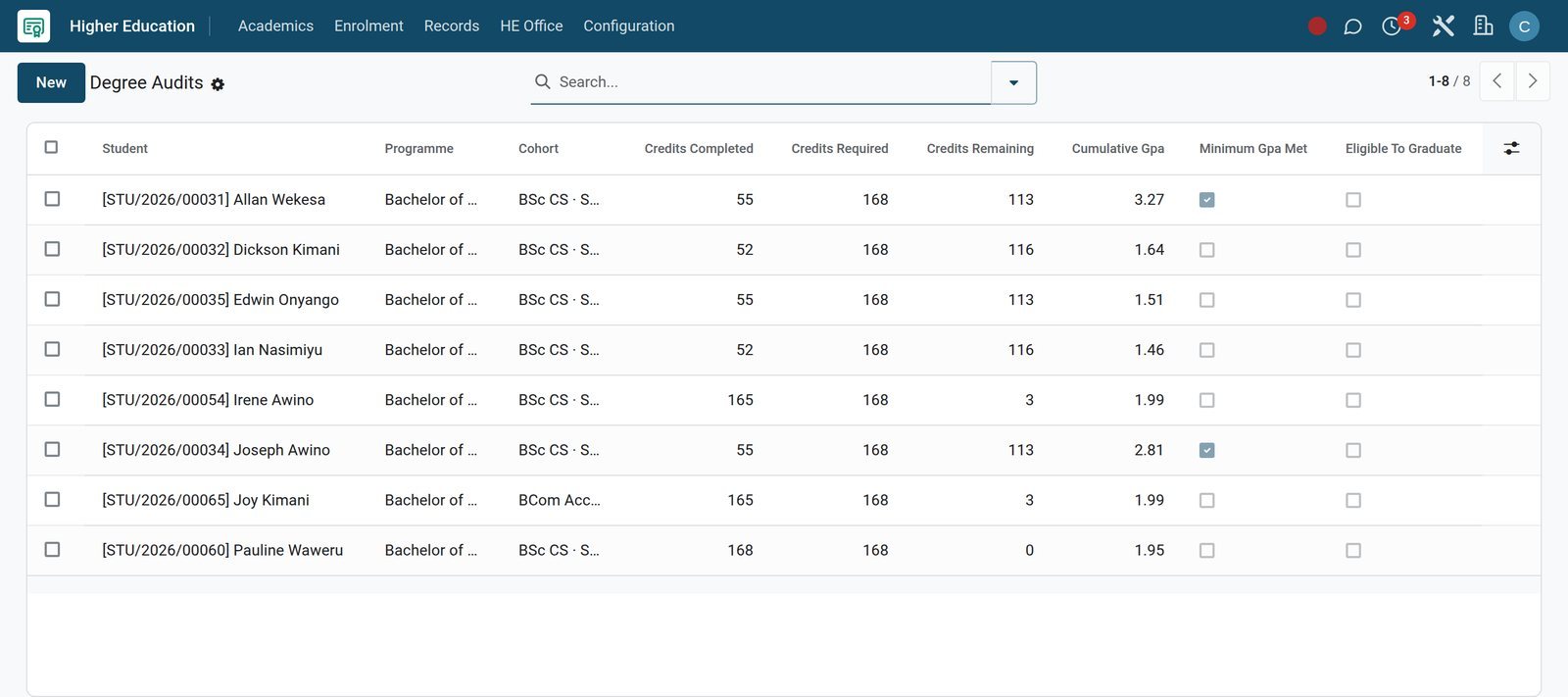
Degree audits show who cannot graduate yet and why, and each student's academic advisor already has the next meeting booked.
 Academics
Finalists who cannot graduate yet
Degree audits flag students whose credits, GPA or capstone fall short, with the credits still remaining written on each line.
Explore Academics →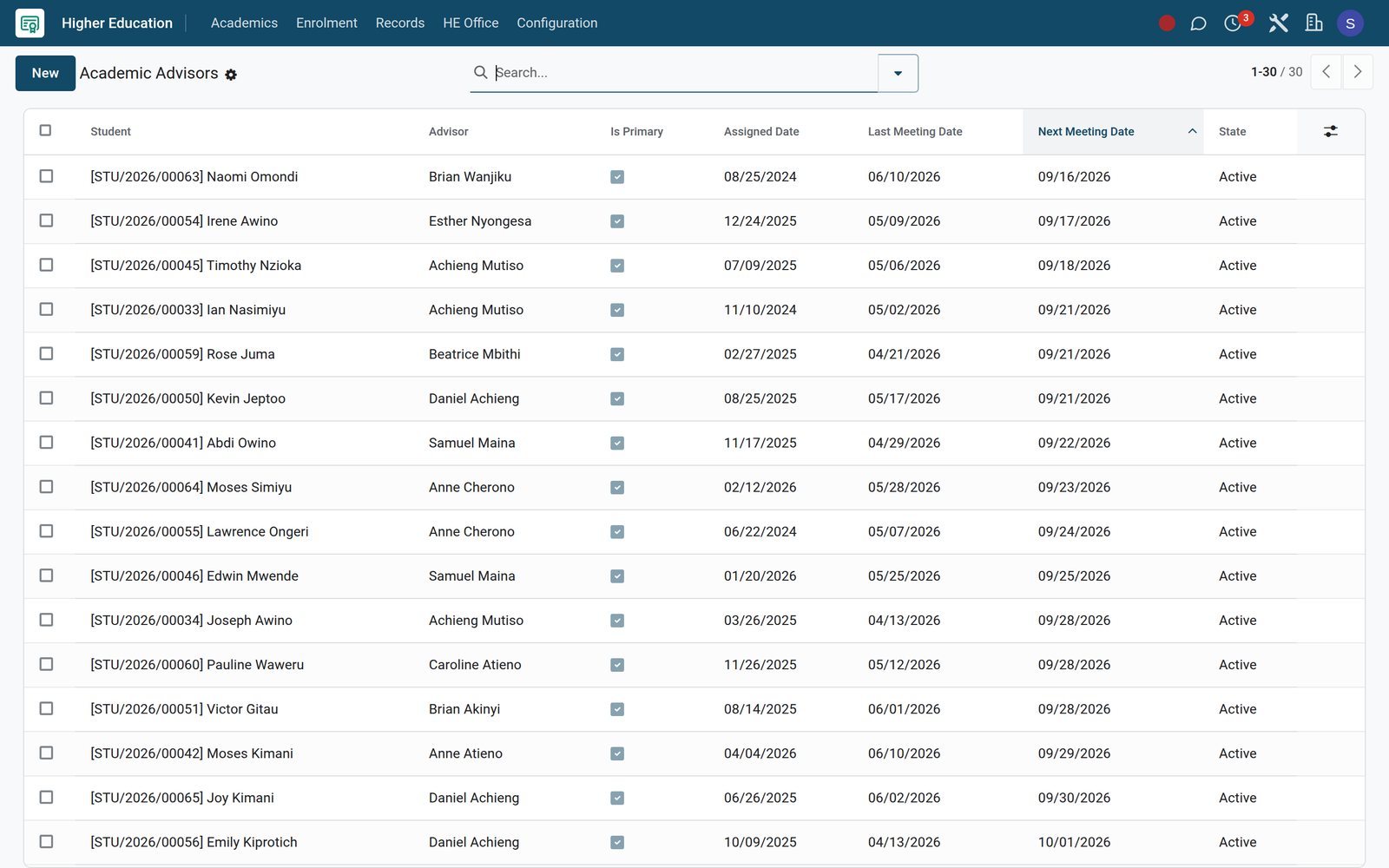 Academics
Advisor meetings in the diary
Every student has an academic advisor, with the last meeting and the next one recorded, sorted so the soonest meetings come first.
Explore Academics →Getting started
Bring your existing records across
Setup uses import files, bulk wizards and configuration menus that already exist in the product.
Import from spreadsheets
Students, courses, fee structures and book lists import from Excel or CSV files, with column mapping and a test run before anything is saved.
Set grading rules once
Grading Scales, CGPA Scales, Assessment Types and Promotion Rules are set up once in Academic, and every later result follows them.
Bill a whole intake at once
Bulk Assign Structure puts a fee structure on many students together, and Generate Invoices creates their installment invoices in one run.
Catalogue books by ISBN
ISBN Auto-fill fetches book details, MARC import brings records across from another library system, and Generate Barcodes creates barcodes for the copies.
Marks for a whole class
Bulk Mark Entry lists a class's marks for an examination together, with absences and remarks, so lecturers record scores in one sitting.
Promote a year group in one batch
Promotion Batches apply your promotion rules to a class, counting who was promoted and who was retained, and keep each batch on record.
Questions
Questions about College Management
Not covered here? Contact us.
Does it handle semesters, credit hours and CGPA?
Yes. Course enrolments record the semester and credit hours, grades convert to grade points through your CGPA scale, and transcripts carry the cumulative GPA.
Can students pay fees with mobile money?
Yes. Mobile-money and card providers such as M-Pesa STK Push, Airtel Money and Pesapal are available, and each fee invoice carries a pay link that students or sponsors can use.
Can we run bursaries, scholarships and installment plans?
Yes. Fees & Finance has bursary applications with a need assessment, scholarship funds and awards, subsidy schemes, waivers, discounts, and installment plans that split fees into dated invoices.
Does it replace our library system?
The Library app covers cataloguing with ISBN and Dewey, MARC import and export, barcoded copies, loans, fines, reservations, course reserves, inter-library loans and a public catalogue.
Can lecturers teach and test online in the same system?
Yes. Course enrolments can link to eLearning courses, a Virtual Classroom app is installed, and the Assessments app runs tests from a question bank with proctor flags.
How do we move our existing student data?
Records import from Excel or CSV with column mapping and a test run first; library records can come in by MARC file, and fee structures are assigned in bulk.
Does it work in other languages, such as Kiswahili or French?
Yes. Each user picks an interface language; on the demo, Kiswahili, French, Arabic, Portuguese, Spanish, German and Chinese are active alongside English.
Can we track accreditation and research?
Accreditations record the awarding body, validity dates and days to expiry per programme, and the Research menu covers projects, papers, grants and ethics reviews.
Tax compliance
Invoices your tax authority accepts
In Kenya, Uganda, Rwanda, Burundi and Zambia, each invoice, receipt and stock movement goes to the tax authority's own system when you post it. Ghana and Pakistan come next, and we connect 73 more countries on request.
- KenyaReady
eTIMS KRA
Invoices, credit notes, POS receipts and stock movements
- UgandaReady
EFRIS URA
Invoices, POS receipts and stock
- RwandaReady
EBM RRA
Invoices, POS receipts, stock and imports
- BurundiReady
EBMS OBR
Invoices, POS receipts, stock and manufacturing
- ZambiaReady
Smart Invoice ZRA
Invoices, POS receipts, stock and imports
College Management, app by app
One connected flow instead of separate systems — the work moves from one team to the next without re-typing anything.
Every stop is a real app in your plan, and the hand-offs between them are the product.
- Customers & sales
- Operations
CRM
Leads, opportunity pipeline, activities and sales forecasting.
CRM →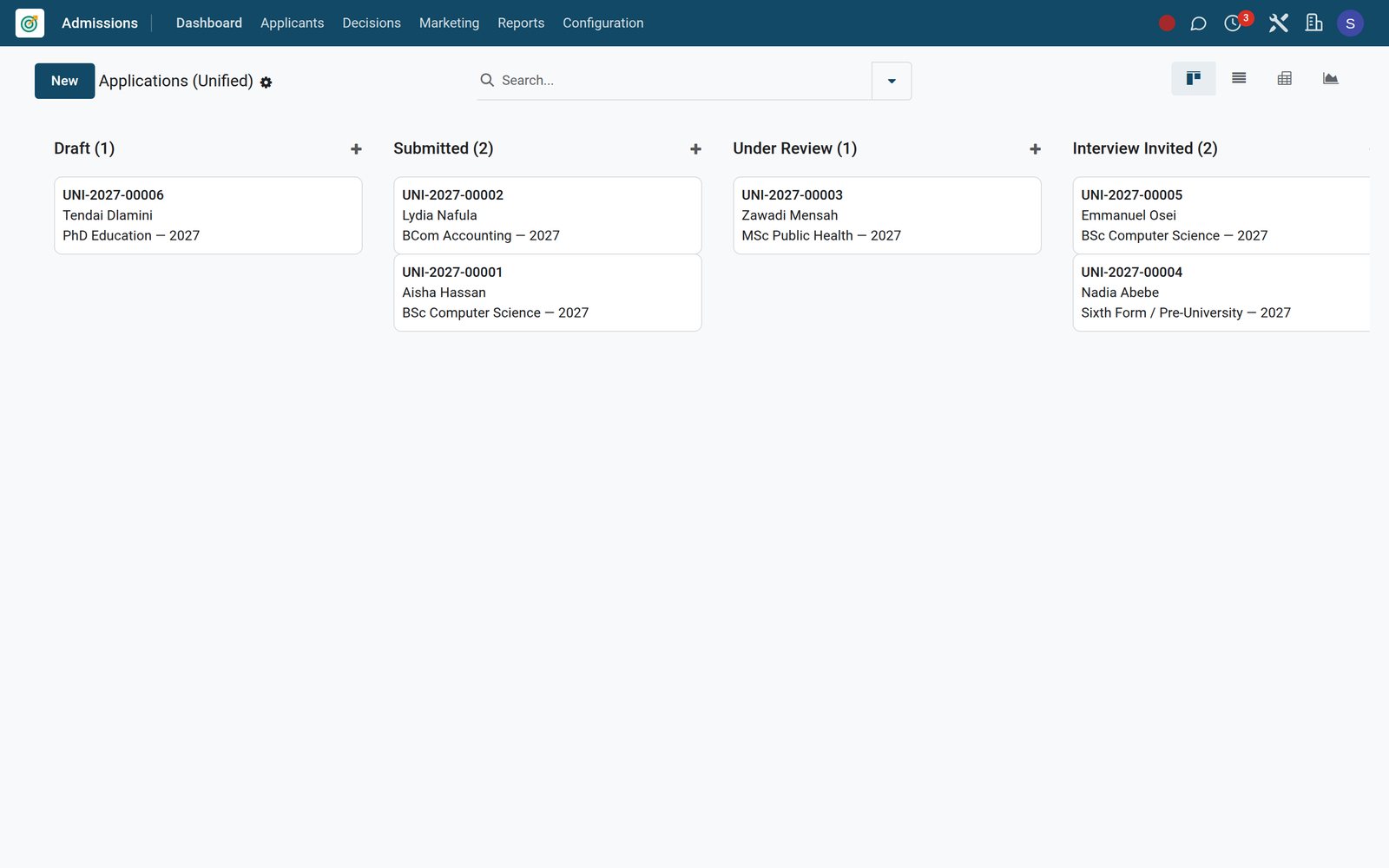
Ready when you are
Open the plan builder with the right apps for this industry already selected, or see it running first.