

Vocational Schools: Run your trade school from enrolment to industrial attachment
Units of competency against national standards, assessor outcomes, trainer licences, workplace attachments and a placement office, with fee invoices payable by mobile money, all in BridgeERP.
Free instant access. No credit card required.
 Academics
 Fees & Billing
 Assessment Engine
 CBET / CBC
 Placements & Careers
 Payments & Mobile Money
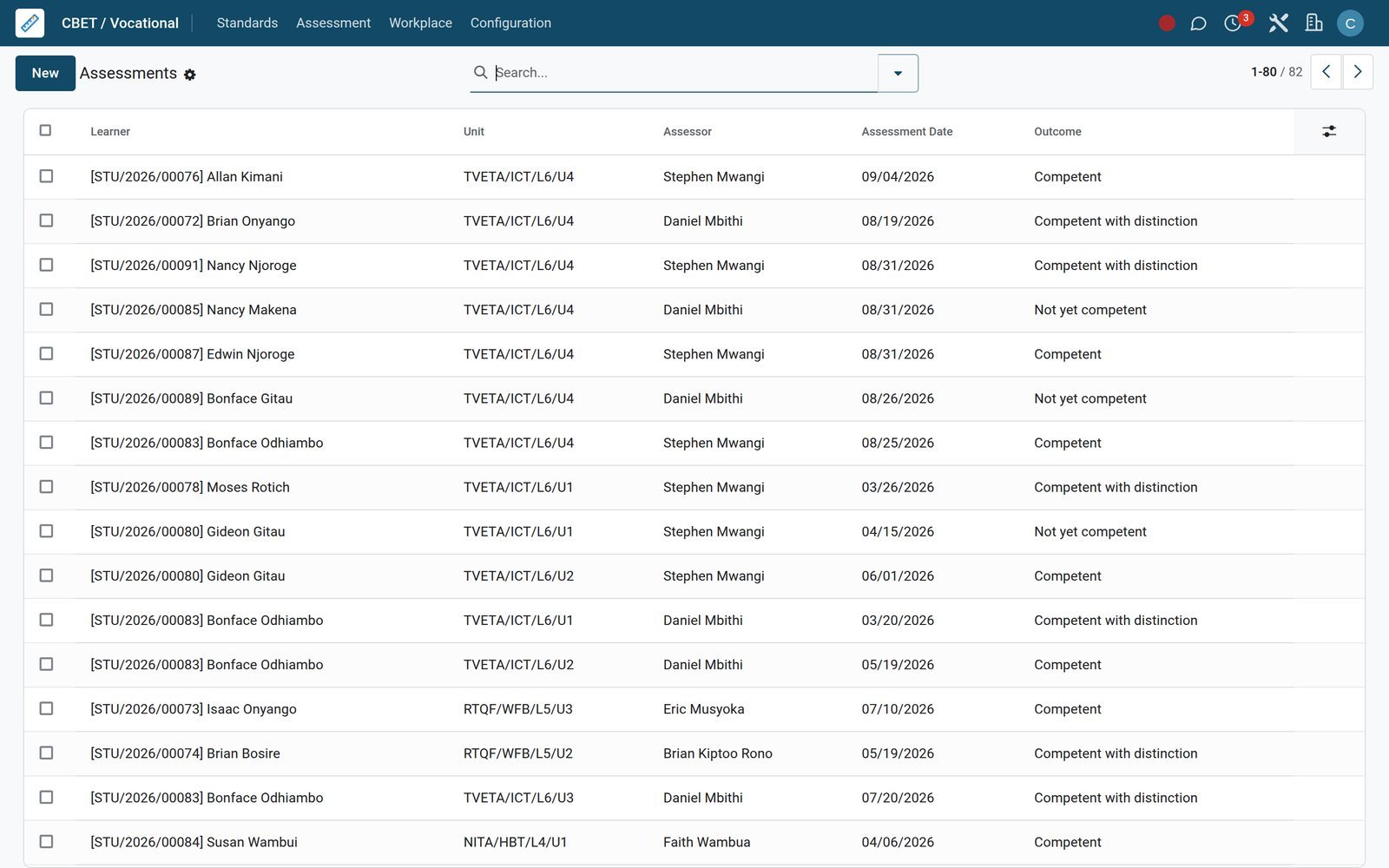
Know which trainees have passed each unit before the board sits
Every assessment records a trainee, a unit of competency, the assessor and the outcome, so the board sees who is competent in what.
 CBET / CBC
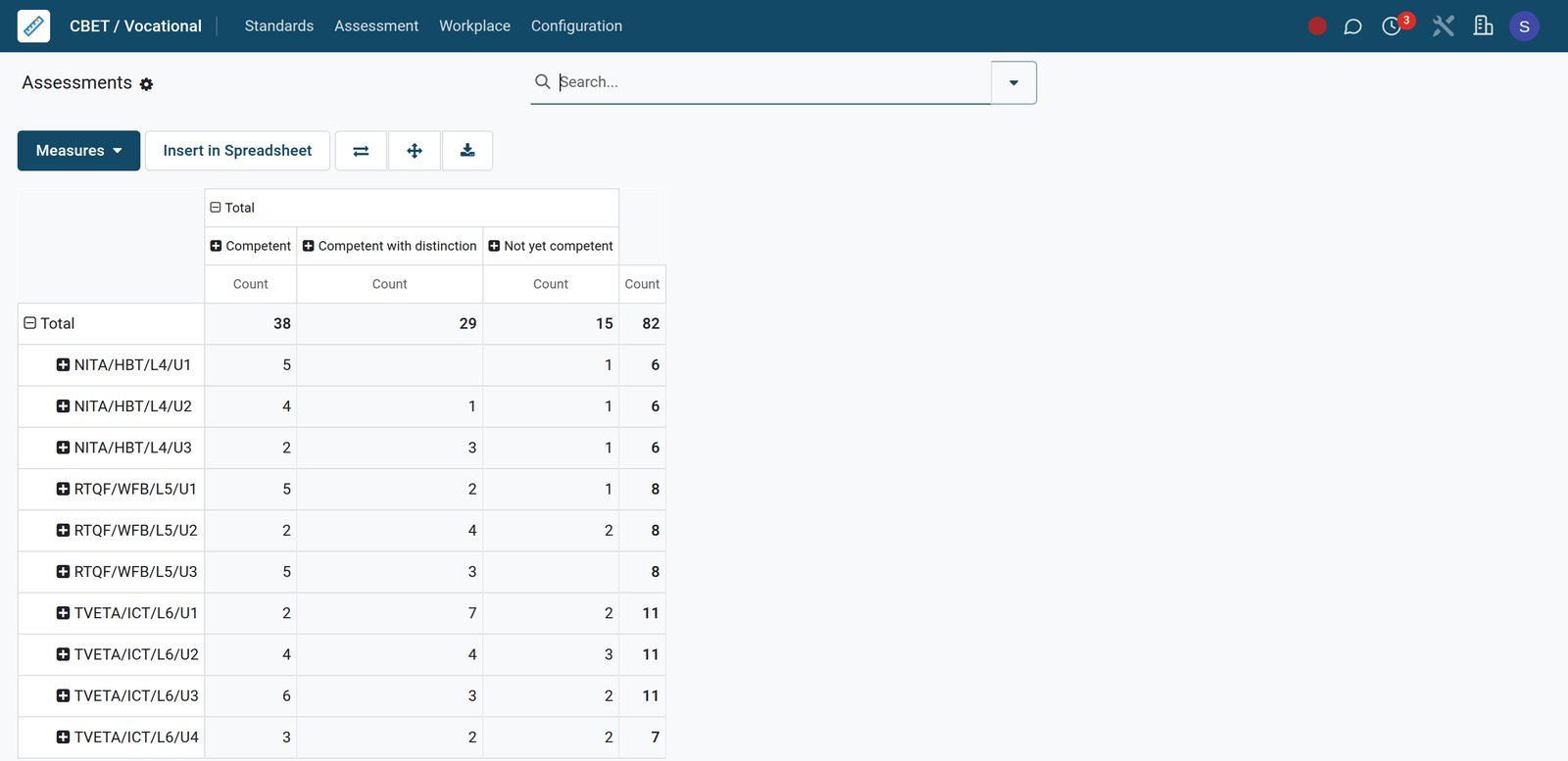
Outcomes per unit of competency
Assessments counted by unit and outcome show how many trainees are competent, competent with distinction or not yet competent in each unit.
Explore CBET / CBC →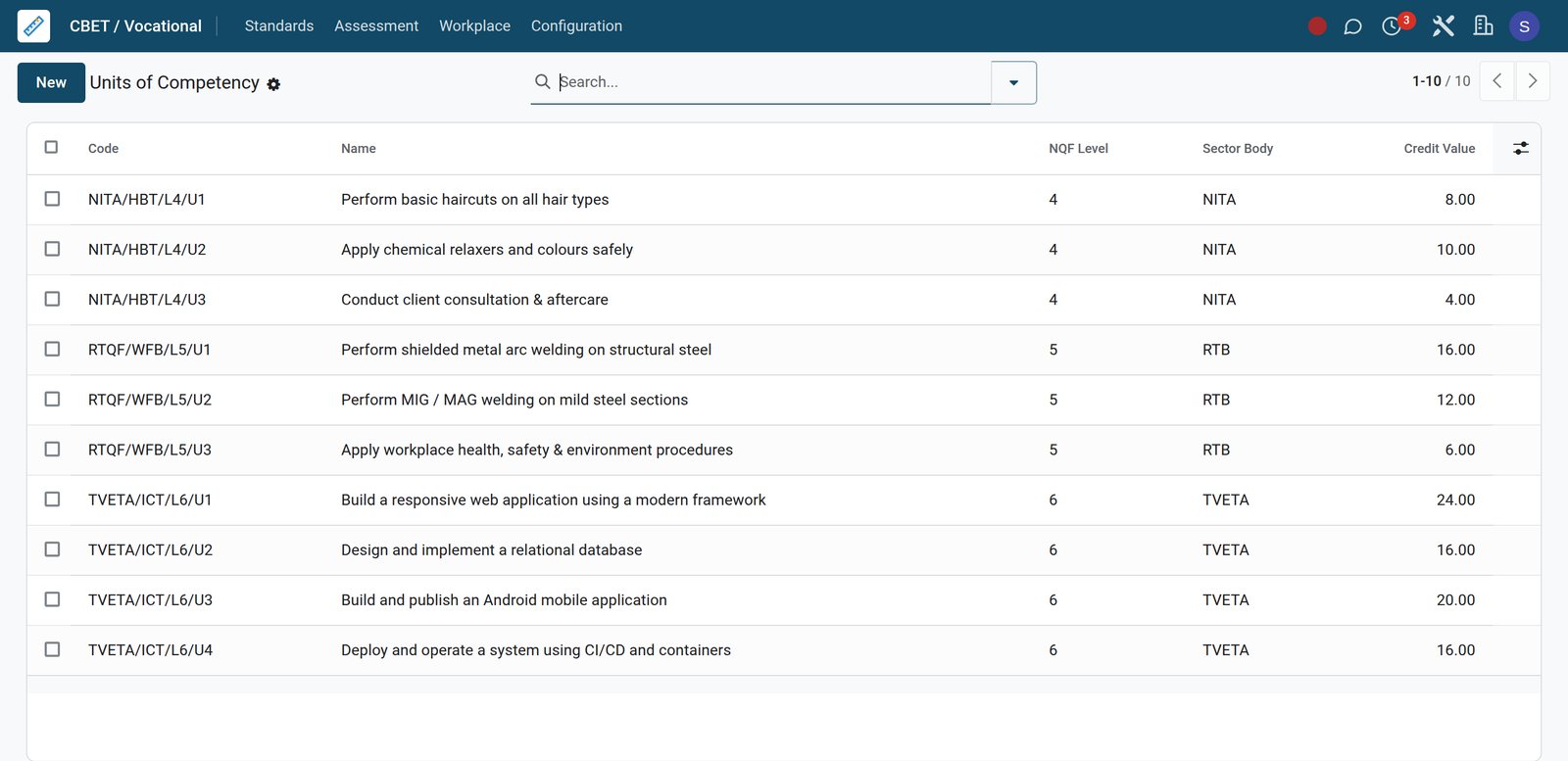 CBET / CBC
Units of competency with NQF level and credits
Each unit of competency carries its code, NQF level, sector body and credit value, and belongs to a national standard.
Explore CBET / CBC →By the numbers
The demo college, counted
Figures taken from the BridgeERP demo database that every screen on this page was captured from.
- 10
- units of competency, each with nominal hours, NQF level, credit value and sector body recorded
- 168
- workshop and lab assets on the equipment register, each one carrying its own serial number
- 12
- industry partners in the Placement Office, each with a signed agreement and a set placement capacity
- 4
- payment modules installed for fees: M-Pesa, Airtel Money, Pesapal and Flutterwave, alongside cash and card
Inside the app
Everything a TVET college runs, in menus you can open
The Academic, Fees & Finance, Placement Office and Accounting apps split the college's work into these areas.
Curriculum and syllabus coverage
Subjects, Syllabi, Strands and Syllabus Coverage break each programme down to chapters, so heads of department see which topics each class has covered.
Units of competency
Each unit records its nominal hours, NQF level, credit value, sector body, assessment method and whether it must be assessed in the workplace.
Timetables and rooms
Timetables, Slots, Rooms and Slot Swap Requests place every theory lesson and practical session with a trainer, a room and a period.
Exams, seating and mark sheets
Exam Schedule, Exam Seating, Mark Entry and Mark Sheets carry each assessment from the timetabled paper to the validated mark.
Attendance by day and by period
Daily Attendance and Per-Period Attendance mark each trainee present, absent or late, with a reason recorded against every absence.
Fees, instalments and financial aid
Fee Structures, Assignments, Installment Plans, Bursaries, Scholarships and Subsidy Schemes decide what each trainee owes and who else pays part of it.
Placement Office
Industry Partners, Vacancies, Applications, logbook Diary Entries and Supervisor Reports follow each trainee through industrial attachment and internship.
Accounting behind the bursary
Fee invoices link to journal entries, so Aged Receivable, bank reconciliation and the Profit and Loss read the same figures as the bursar.
Step by step
From application to transcript, step by step
Each step below is handled in the app named on it, on the same database.
- Step 1
Admit the applicant
Applicants move through the Admissions pipeline, and the Admission Pipeline report shows the registrar how many sit at each stage.
CRM - Step 2
Bill the programme
The bursar picks a Fee Structure, runs Bulk Assign Structure for the class, then Generate Invoices issues every trainee's fee invoice.
Fees & Billing - Step 3
Timetable theory and practicals
Timetable slots give each class a subject, trainer, room and period, and trainers open their day under Today's Timetable.
Academics - Step 4
Assess against the unit
Portfolio evidence is filed against the unit for each trainee; the assessor records the outcome, marks competence and dates the sign-off.
CBET / CBC - Step 5
Send out on attachment
Trainees apply to open vacancies from industry partners, keep a logbook of diary entries, and the workplace supervisor scores their performance.
Placements & Careers - Step 6
Issue results and transcripts
Grade Results feed Report Cards and Transcripts, and Promotion Batches move passing trainees on to the next level of the programme.
Academics
Keep every standard, trainer licence and attachment in order
National standards, trainer qualifications and workplace attachments sit in one CBET app, tied to the same trainees and trainers.
- CBET / CBC
National standards with their units
A standard records its NQF authority and level, sector body, nominal hours and credit value, whether an industry attachment is required and for how many weeks, and lists its units with the assessment method.
Explore CBET / CBC →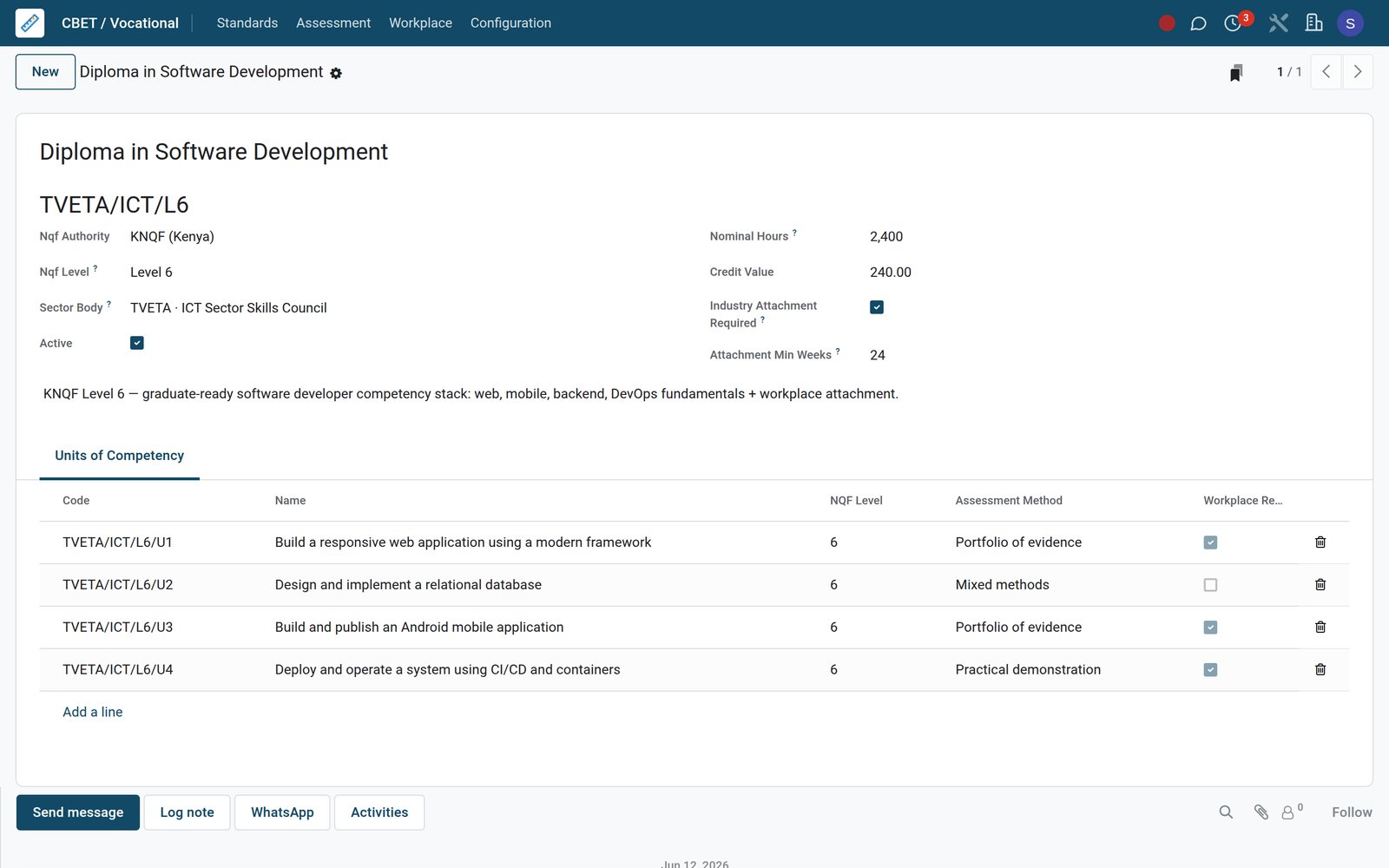
- CBET / CBC
Trainer qualifications with expiry dates
Trainer Qualifications record each trainer's licence or certificate, the issuing authority, registration number, issue and expiry dates, and whether it is still current.
Explore CBET / CBC →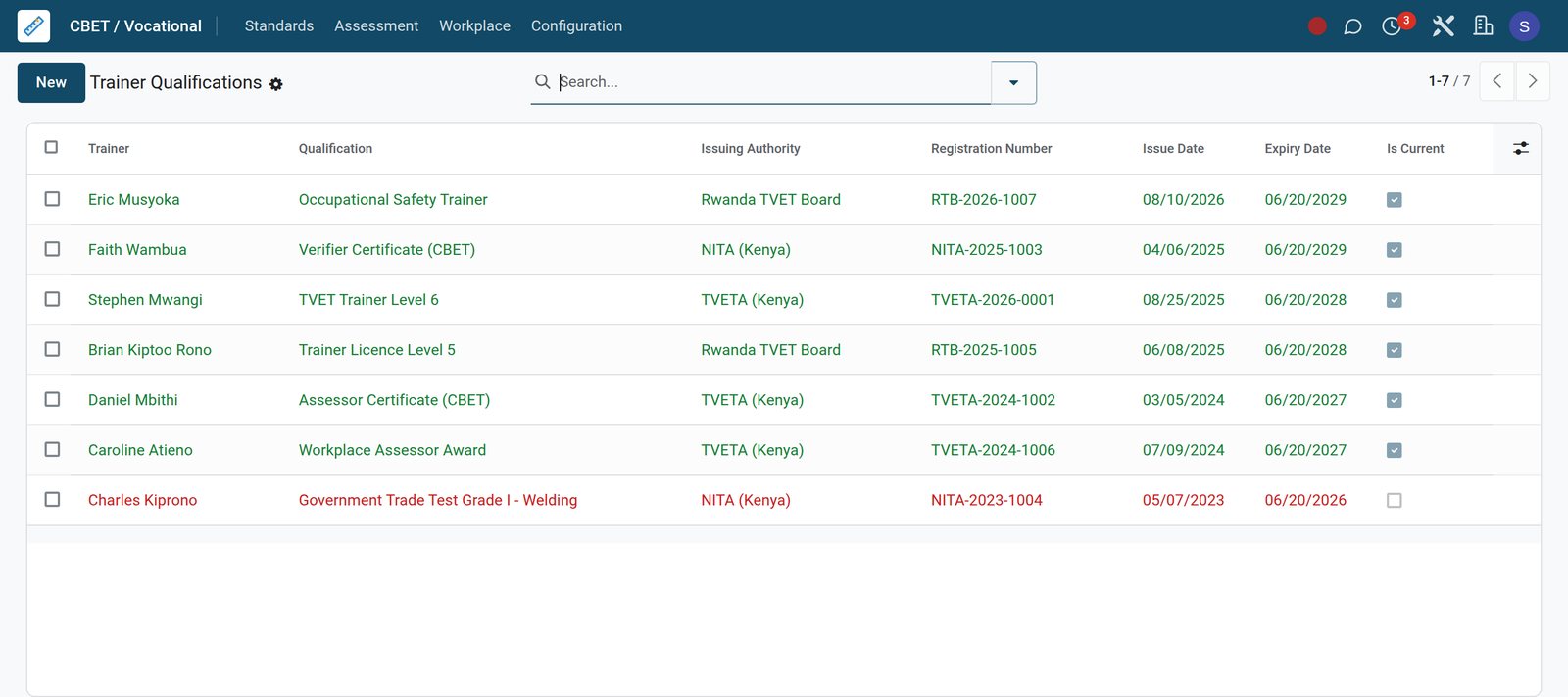
- CBET / CBC
Workplace attachments from approval to pass
Each attachment names the trainee, the standard and the host employer, with start and end dates, the number of weeks and the result.
Explore CBET / CBC →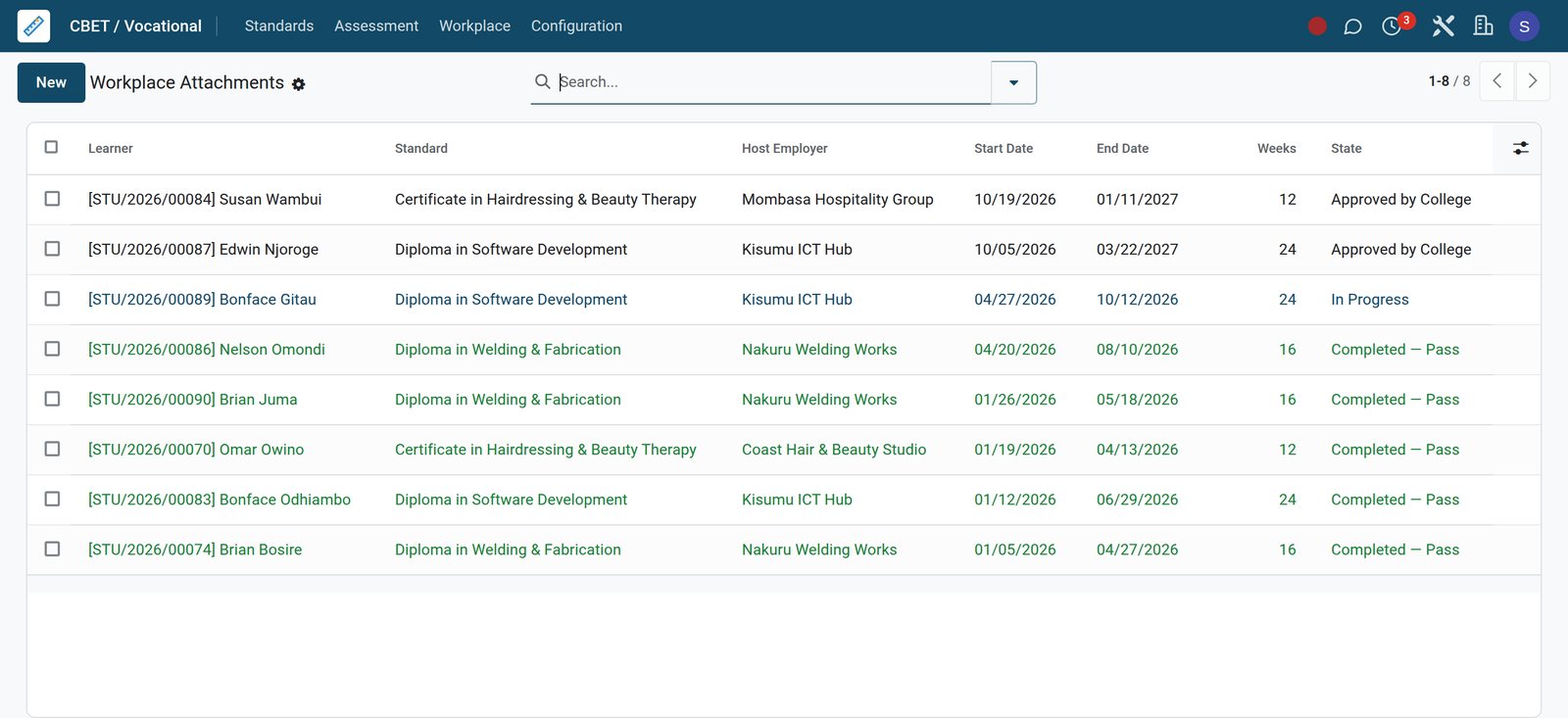
Built for workshops as well as classrooms
Competency, equipment and safety records sit beside the timetable, so a practical assessment has its unit, its evidence and its workshop on file.
Units with hours, level and credits
Each unit carries its code, nominal hours, NQF level, credit value, sector body and assessment method, and flags units that need workplace assessment.
A portfolio of evidence per trainee
Evidence records attach a file to a trainee and a unit, name the type of evidence, and hold the assessor's note and review state.
A signed-off competency decision
Competency assessments link the unit, trainee, assessor and the evidence reviewed, then record the outcome, the competent flag and the sign-off date.
An equipment register with service dates
Workshop and lab equipment carries an asset code, serial number, service interval and next service date, flags overdue items and links to Maintenance equipment.
Workshop bookings with a risk check
Lab and workshop bookings record the class, trainer, room, time and expected headcount, and whether a risk assessment is required and completed.
Safety incidents logged, not forgotten
Safety incidents record the severity, room, trainees involved, immediate and long-term action, and whether a hospital visit or insurance claim followed.
Know which trainees owe fees before exam week
Fee invoices post to the ledger and carry a payment link, while the Overdue Pipeline lists every fee assignment that still has a balance.
Fee invoices with a payment link
Fee Invoices show the trainee, term, invoice date, due date, total and amount outstanding, and each invoice holds an online payment link and its journal entry.
The Overdue Pipeline, trainee by trainee
Overdue Pipeline lists invoiced and part-paid fee assignments with a balance, ready for a Bulk Reminder and the stages of the dunning policy.
Mobile money and cards on the payment link
The invoice payment link opens a page without a login that shows the balance and a button for each active payment provider, including M-Pesa STK Push, Airtel Money and Pesapal.
Place every trainee on attachment, then hear back from the workplace
The Placement Office app keeps industry partners, open vacancies, applications, attachment logbooks and supervisor reports together, so the liaison office works from one list.
 Placements & Careers
Vacancies from industry partners
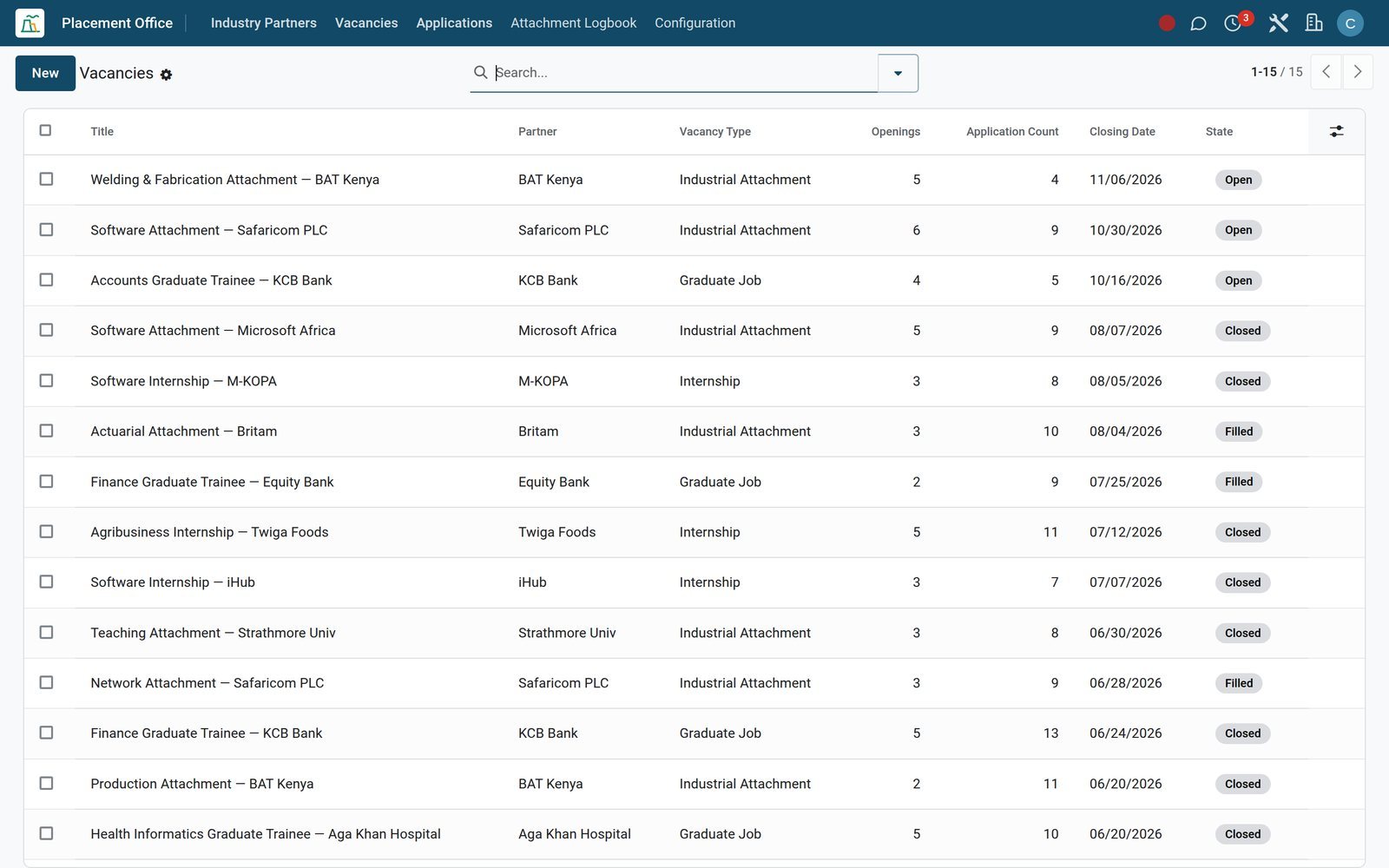
Each vacancy names the partner, its type such as attachment or internship, the location, number of openings, monthly stipend and closing date.
Explore Placements & Careers →Who uses it
What each person at the college opens first
One database, with each role landing on the menus it works from every day.
Principal
Opens Academic Performance and Class Rankings for results, then the Collection Rate chart on the Fees & Finance dashboard for cash.
Trainers and heads of department
Work from Today's Timetable, Lesson Plans Due and the Attendance Register, then enter marks and review homework Submissions.
Exams officer
Builds the Exam Schedule and Exam Seating, checks Mark Sheets, then releases Report Cards and Transcripts at the end of term.
Industrial liaison officer
Keeps Industry Partners and their agreement expiry dates current, posts Vacancies, and reads Supervisor Reports as each attachment ends.
Bursar
Assigns fee structures, generates invoices, works the Overdue Pipeline, and approves fee waivers and refunds waiting in Pending Approval.
Accountant
Reconciles bank lines, reads Aged Receivable and the Profit and Loss, and sets lock dates once a term's fees are posted.
Works with
Apps the college runs alongside
Install only what the college needs; each app below is installed on the demo database.
- AcademicCurriculum, timetable, attendance, marks and transcripts
- Fees & FinanceFee structures, invoices, financial aid and collections
- Competency (CBET)Units of competency, evidence and sign-off
- AssessmentsQuestion bank, online assessments and proctor flags
- Placement OfficeIndustry partners, vacancies and supervisor reports
- Mobile paymentsMobile money and card gateways such as M-Pesa, Airtel Money and Pesapal
 AccountingLedger, bank reconciliation and financial statements
 AdmissionsApplicant pipeline from enquiry to admission
 School ShopOveralls and kits charged to student fees
 eLearningOnline courses linked to academic subjects
 HR & PayrollTrainer records, leave and payroll
 MaintenanceMaintenance requests for workshop equipment
In your country
Fees in your currency, paid from a phone
Payment, currency and language settings that match how trainees, parents and sponsors pay and read.
Mobile money for fee payments
On the demo, the M-Pesa STK Push payment provider is installed, and every fee invoice carries an online payment link that trainees and parents can open.
More wallets and card gateways
Airtel Money, Pesapal and Flutterwave sit in the same Payment Providers list, so sponsors and families can pay by mobile wallet or card.
Two currencies on one ledger
On the demo, Kenyan shillings and US dollars are both active, and Accounting reports unrealised currency gains and losses on balances held in either.
Staff screens in each user's language
On the demo, Kiswahili for Kenya and Tanzania, French, Portuguese and Arabic are installed, so each member of staff can work in the language they read best.
Bursaries, sponsors and subsidies
Bursary applications, scholarship funds and subsidy schemes with their agency, maximum amount and eligibility rules reduce what families pay and show who funds each place.
Overalls and tool kits charged to fees
The School Shop till has a Charge to Student Fees payment method, so overalls, tools and kits bought at the counter go onto the trainee's fee account.
Reports and control
Reports the board and the auditor both ask for
Each report below is a menu on the demo database, built from the same records the trainers and the bursar enter.
Academic Performance
Graph and pivot views of scores and percentages by class, subject and term, including the competency level each trainee reached.
Attendance Analytics
Present and absent lines by class, term, date and trainee in graph and pivot form, to spot trainees missing practical sessions.
Class Rankings and Report Cards
Class Rankings order trainees within each class, and Report Cards gather each term's results into one document per trainee.
Transcripts with cumulative GPA
Transcripts carry a transcript number, cumulative GPA, cumulative average, overall grade and issue date for each trainee who completes the programme.
Collection Rate and forecast
The Fees & Finance dashboard charts what has been billed against what has been paid, with a forward view of fees falling due.
Outstanding Aging
Outstanding balances sorted into ageing buckets with days overdue, broken down by programme, class, fee category and trainee.
Payment Audit
Each payment event keeps its provider, provider reference, amount, state before and after, and a time stamp for the auditor to check.
Approval Matrix and logs
The Approval Matrix sets which group approves each kind of academic record and which step is final, and Approval Logs keep the history.
Getting started
Moving in without retyping the registry
A typical order for setting up a vocational college, using menus and tools already in the product.
Import trainee lists from Excel
Trainee lists, contacts and other records import from Excel or CSV files, and a test run checks every row before anything is saved.
Set grading and competency rules once
Grading Scales, Competency Levels, Assessment Types and Promotion Rules are configured in Academic settings and reused by every class and term.
Bill a whole class in one run
Create Fee Categories and Fee Structures, then use Bulk Assign Structure on a class and Generate Invoices for every trainee in it.
Switch on mobile money
Configure your payment provider, such as M-Pesa, Airtel Money, Pesapal or Flutterwave, under Payment Providers, moving it from test mode to enabled when the college is ready.
Draw up the first timetable
Add Rooms, create a Timetable for each class, then fill its Slots with subjects, trainers and periods; swap requests handle later changes.
Sign up industry partners
Record each partner's sector, contact person, placement capacity and agreement expiry date, then post their vacancies for trainees to apply to.
Questions
Questions about Vocational Schools
Not covered here? Contact us.
Does it handle competency-based training, or only exam marks?
Both. Units of competency record nominal hours, NQF level, credit value and assessment method, with portfolio evidence and a competency sign-off per trainee. Exam-based courses use Grade Results, which weight CAT scores against the final exam.
Can we manage industrial attachment and internships?
Yes. The Placement Office app keeps industry partners with their agreement dates and placement capacity, vacancies with stipends, trainee applications, logbook diary entries, and supervisor reports that score technical skill, attitude, punctuality and teamwork.
Can trainees and sponsors pay fees by mobile money?
On the demo, the M-Pesa STK Push, Airtel Money, Pesapal and Flutterwave payment providers are installed, and each fee invoice carries an online payment link. The Payment Audit log keeps each provider event with its reference and state change.
Can we track workshop tools, machines and safety?
Yes. The equipment register holds serial numbers, service intervals and next service dates, and flags overdue items. Workshop bookings record whether a risk assessment is needed and done, and safety incidents are logged with severity and follow-up action.
Do transcripts and report cards come out of the system?
Yes. Grade Results feed Report Cards, and Transcripts carry a transcript number, cumulative GPA, cumulative average, overall grade and issue date for each trainee.
How do we bring our current trainee and fee records across?
Lists import from Excel or CSV with a test run that validates every row before saving, and re-importing with external IDs updates records instead of duplicating them. Fee structures are then assigned to whole classes with Bulk Assign Structure.
Can bursaries and sponsored places be recorded?
Yes. Bursary applications move through review and approval, scholarship funds hold awards, and subsidy schemes record the agency, maximum amount and eligibility rules, linked to each funded trainee.
Is the system available in other languages, such as Kiswahili or French?
Kiswahili for Kenya and Tanzania, French, Portuguese and Arabic are installed on the demo alongside English, and each user chooses their own language in their preferences.
Tax compliance
Invoices your tax authority accepts
In Kenya, Uganda, Rwanda, Burundi and Zambia, each invoice, receipt and stock movement goes to the tax authority's own system when you post it. Ghana and Pakistan come next, and we connect 73 more countries on request.
- KenyaReady
eTIMS KRA
Invoices, credit notes, POS receipts and stock movements
- UgandaReady
EFRIS URA
Invoices, POS receipts and stock
- RwandaReady
EBM RRA
Invoices, POS receipts, stock and imports
- BurundiReady
EBMS OBR
Invoices, POS receipts, stock and manufacturing
- ZambiaReady
Smart Invoice ZRA
Invoices, POS receipts, stock and imports
Vocational Schools, app by app
One connected flow instead of separate systems — the work moves from one team to the next without re-typing anything.
Every stop is a real app in your plan, and the hand-offs between them are the product.
- Operations
- Finance
Academics
Courses, batches, subjects, enrolment, attendance and gradebook.
Academics →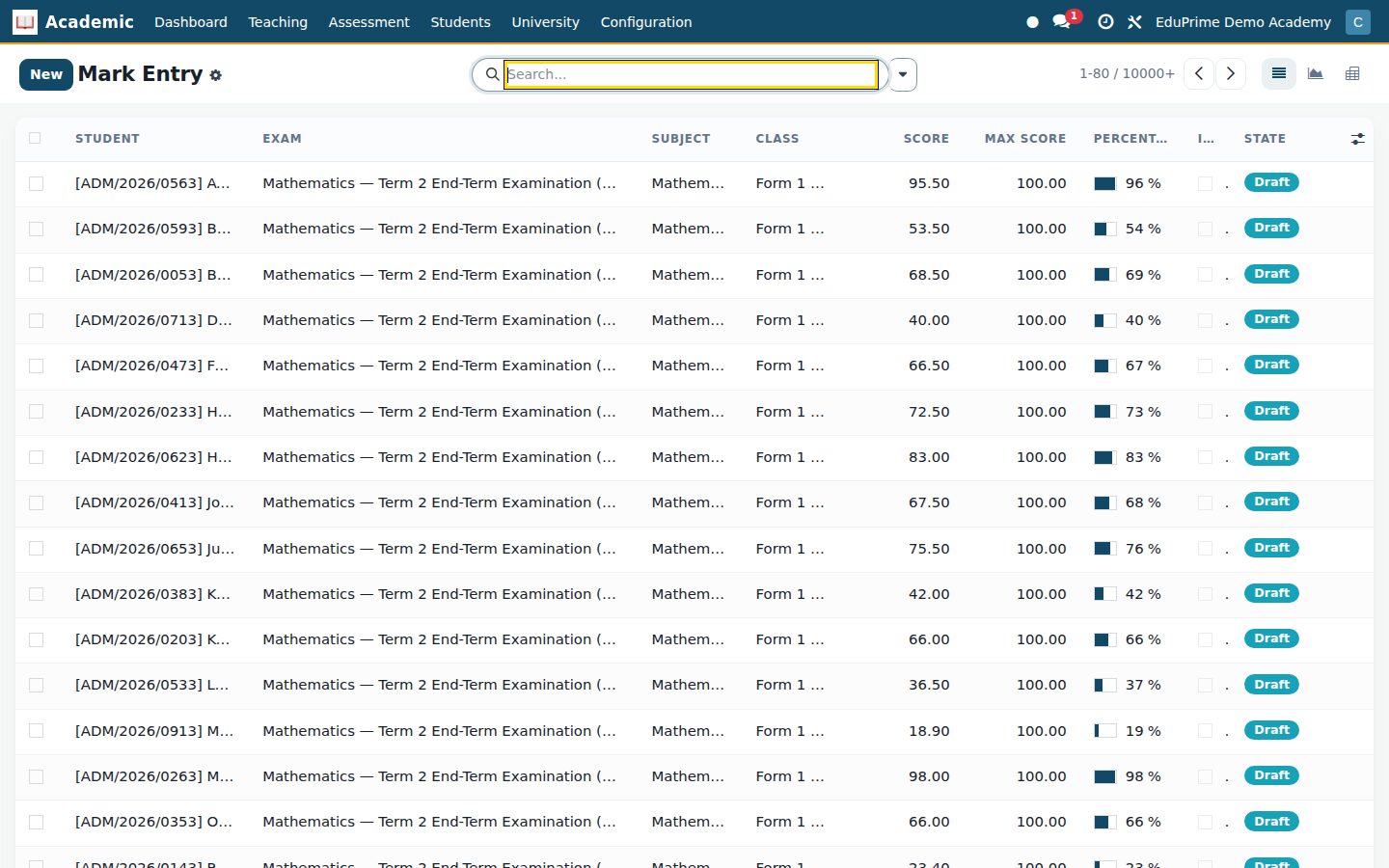
Ready when you are
Open the plan builder with the right apps for this industry already selected, or see it running first.