

Solar Energy: From solar lead to installed system and service plan
BridgeERP gives solar installers the pipeline, system quotes, stock, installation jobs and maintenance plans in one place.
Free instant access. No credit card required.
 Invoicing
 CRM
CRM Sales
Sales Inventory
 Projects
 Field Service
System quotes from your own kit list
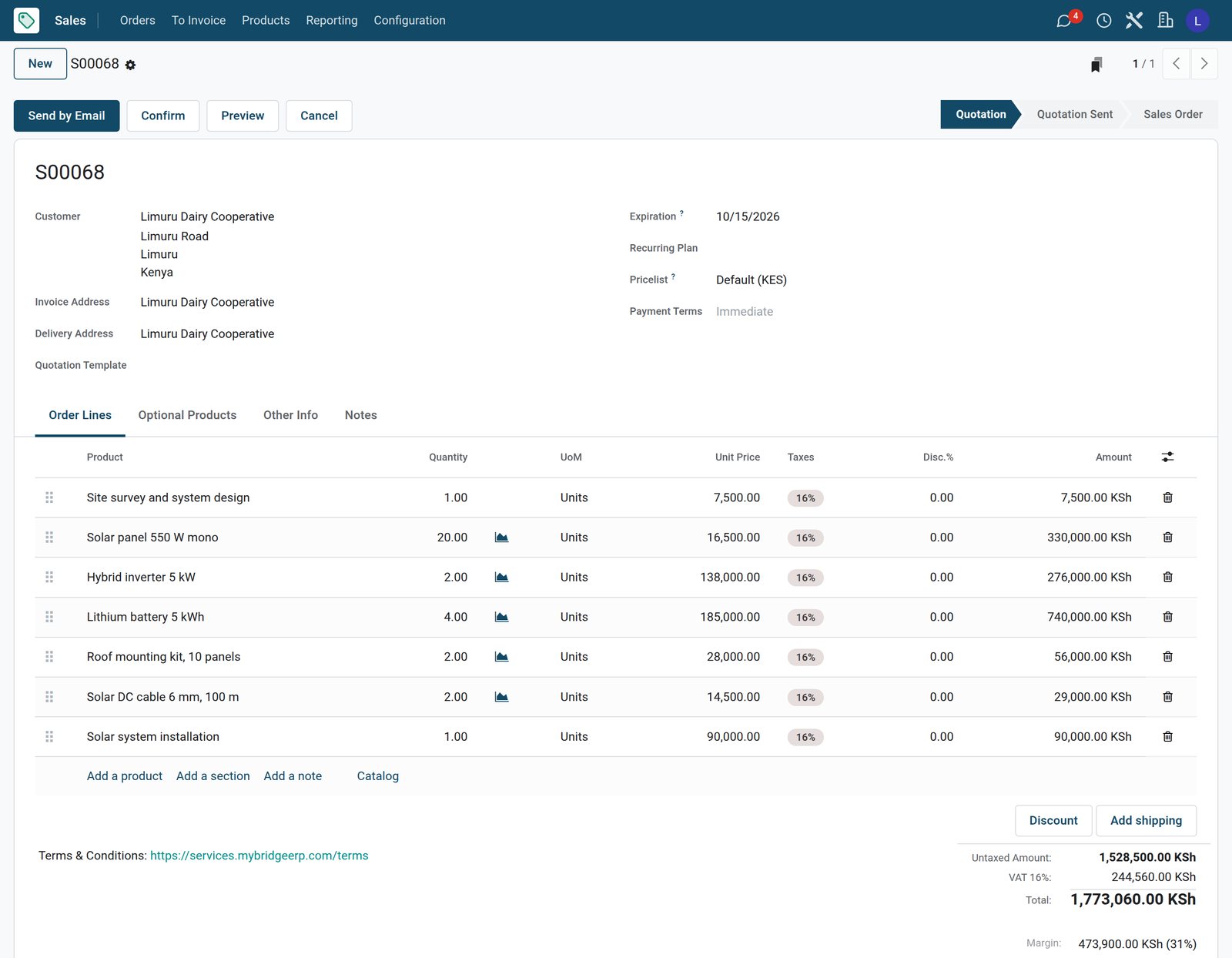
A quote lists the survey, panels, inverters, batteries, mounting, cabling and installation.
 Sales
SalesA 10 kW system quote for a dairy
The milk cooler system for a dairy cooperative is quoted with the site survey, twenty panels, two inverters, four batteries, mounting, cabling and installation.
Explore Sales →By the numbers
What ships inside
Counted in the product.
- 4
- things a sold service can create: nothing, a task, a project, or a project with its tasks
- 5
- ways to count what was delivered, from timesheets and milestones to manual quantities
- 9
- billing types on a timesheet line, from billed on timesheets to non-billable
Inside the app
What is inside
The apps a solar installer runs on, and what each does for a system.
Pipeline
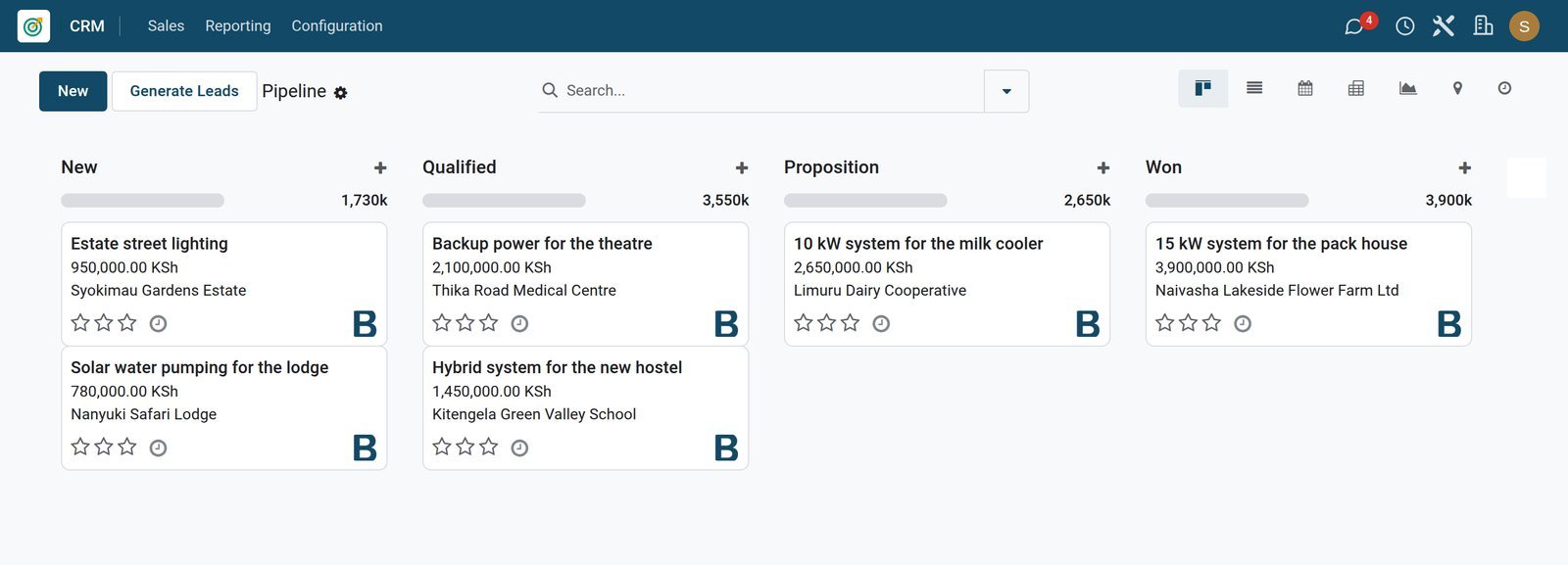
Enquiries for home, farm, school and clinic systems move from new to won with the expected value.
System quotes
Quotes combine panels, inverters, batteries, mounting, cabling, the survey and installation.
Kit in stock
Panels, inverters and batteries are stocked products with on hand and forecast quantities.
Buying from suppliers
Purchase orders to distributors restock panels and batteries and are received into the warehouse.
Installation jobs
Confirming a system order creates its installation job with the site address and dates.
Crew planning
Installer, electrician and surveyor shifts are planned against each job for the week.
Maintenance plans
Monthly service plans are subscriptions that invoice the customer on every period.
Invoices
Delivered kits, installations and call-outs are invoiced to the customer in KES with VAT.
Step by step
From enquiry to powered site
How a solar system runs in BridgeERP, and which app does each step.
- Step 1
Enquiry
A school, farm or home asks for a system and becomes an opportunity with the expected value.
CRM - Step 2
Quote
The quote lists the kit and installation; confirming it reserves the stock for delivery.
Sales - Step 3
Install
The installation job is planned, the crew is scheduled and hours are logged on site.
Field Service - Step 4
Deliver and invoice
The kit is delivered from stock and the system is invoiced with the installation.
Inventory - Step 5
Service plan
A monthly maintenance plan keeps the system checked and invoices every period.
Subscriptions
Installations and service visits on one board
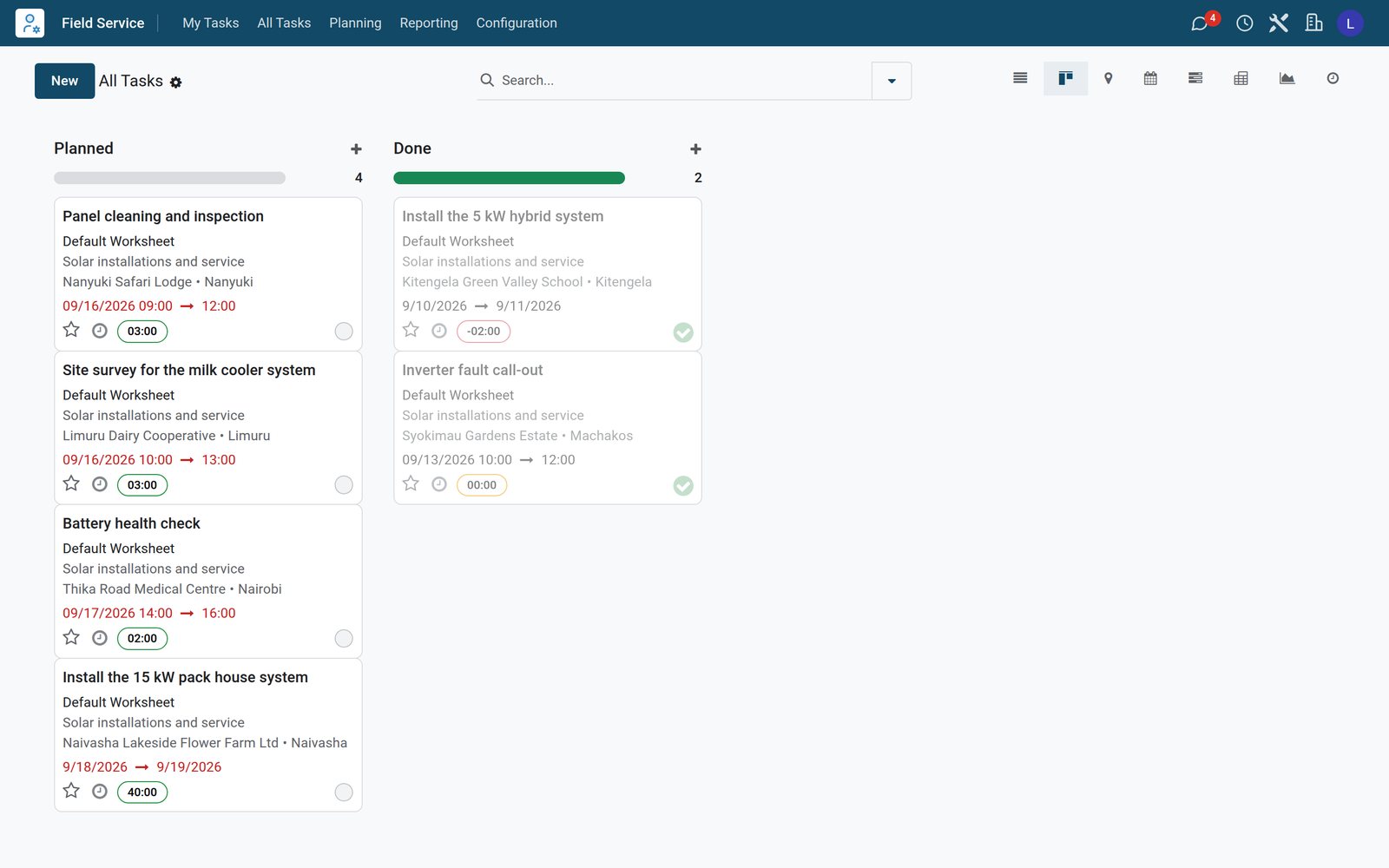
Every installation and service visit is a job with its site and planned dates.
 Field Service
Installation and service jobs
Planned surveys, cleaning, a battery check and a 15 kW installation next to a finished school installation and call-out.
Explore Field Service →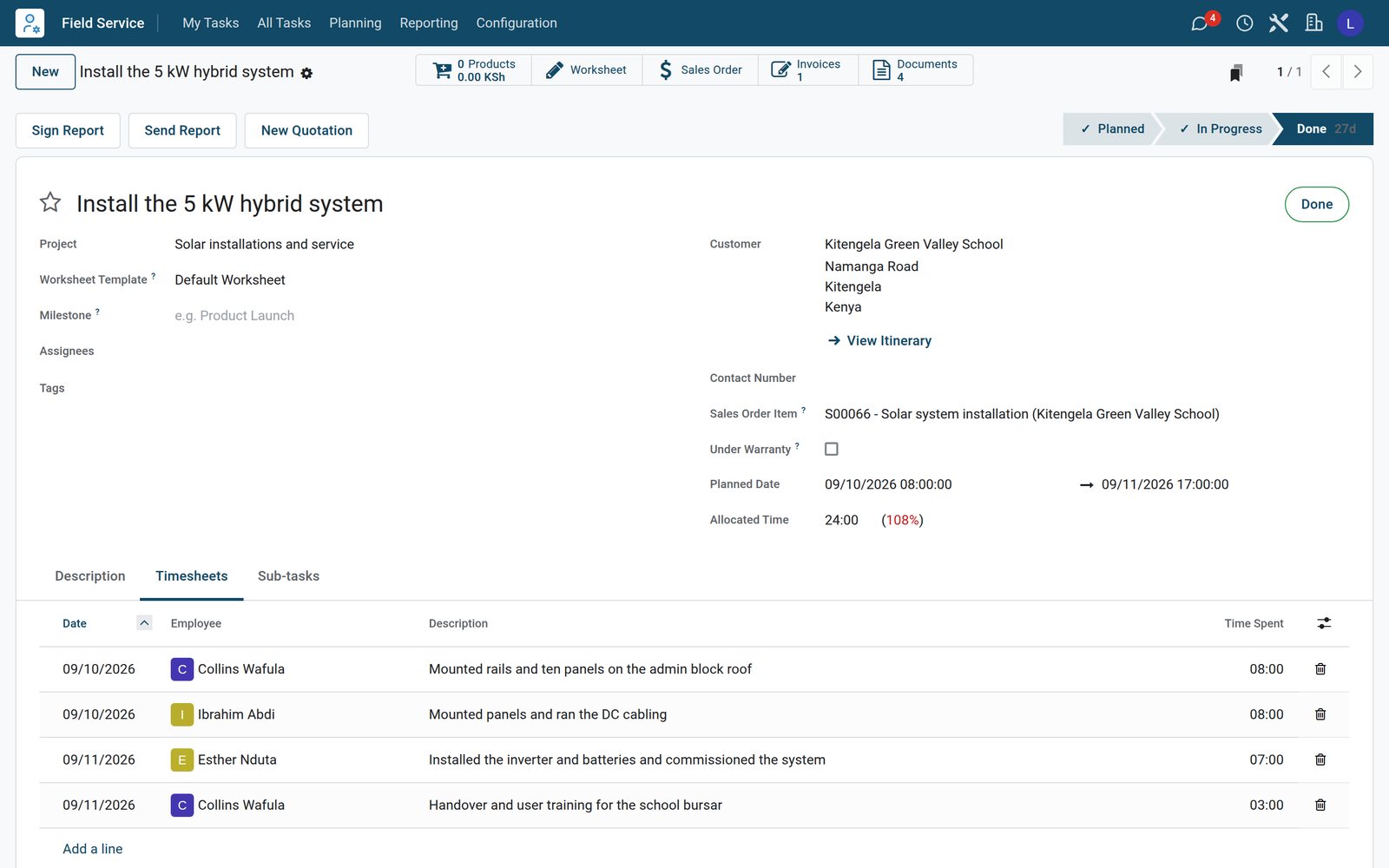 Field Service
A finished school installation
The 5 kW school installation came from the order and shows two days of installer and electrician hours, including commissioning and handover.
Explore Field Service →Panels, inverters and batteries in stock
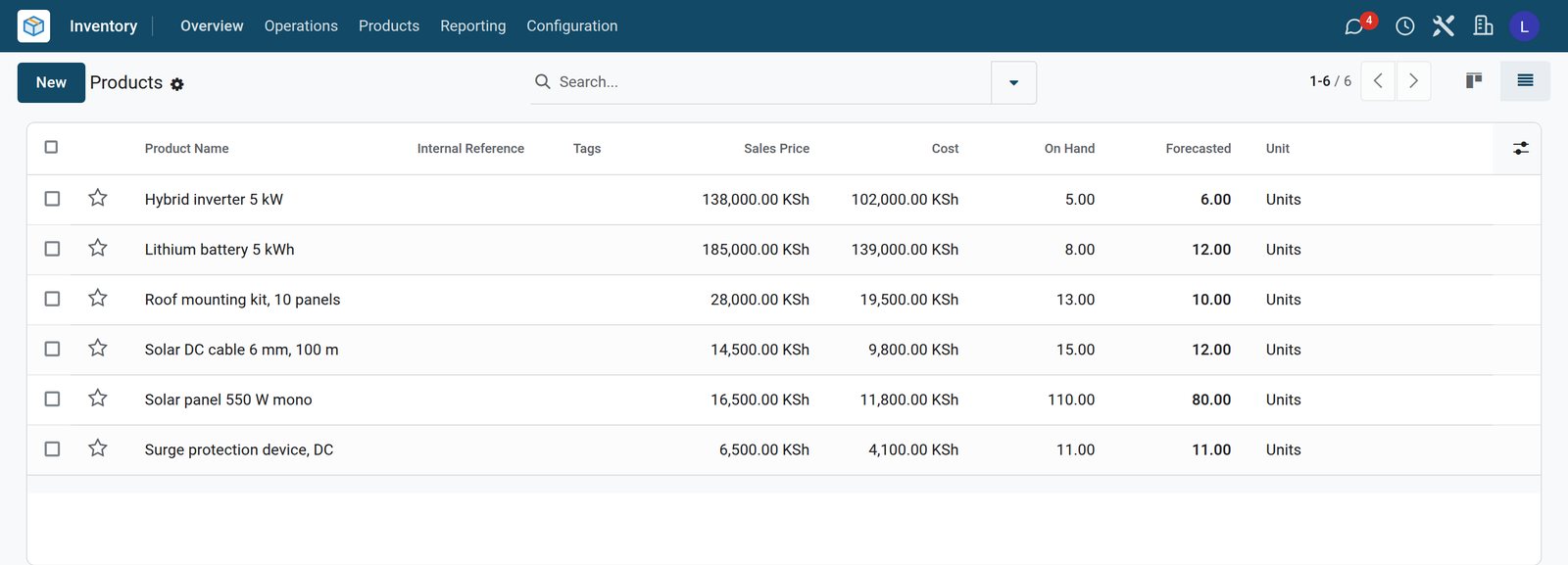
The product list shows what is on hand and what is coming from suppliers.
 Inventory
The kit list with stock levels
Panels, inverters, batteries, mounting kits, cable and surge protectors with prices and the quantities on hand and forecast.
Explore Inventory →Maintenance plans that invoice themselves
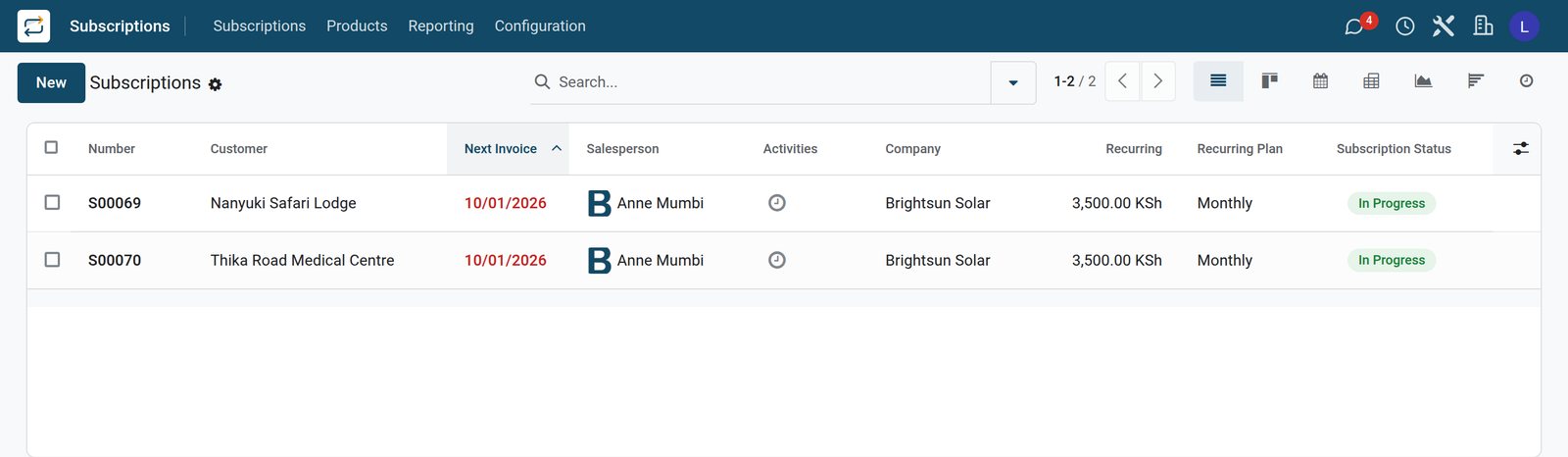
Service plans are subscriptions with their period and next invoice.
 Subscriptions
Monthly maintenance plans
Two monthly solar maintenance plans, for a safari lodge and a medical centre, with their recurring amount and next invoice date.
Explore Subscriptions →Who uses it
Who uses it, and what they see
One system for sales, the warehouse, the crews and the office.
Sales engineer
Qualifies enquiries, books the site survey and sends the system quote for approval.
Operations manager
Plans installation jobs and crew shifts and checks that the kit is in stock.
Installer
Opens the job on site, logs the hours of each day and closes the job at handover.
Finance
Invoices systems and call-outs, follows maintenance plan invoices and pays suppliers.
Works with
Runs with the rest of BridgeERP
Apps a solar installer draws on.


In your country
Built for solar businesses in any country
What changes from country to country, shown on the demo's Kenyan solar installer.
Prices in your currency
Kits, installations, maintenance plans and invoices are in the company currency, KES on the demo.
E-invoicing connectors
Country e-invoicing modules send invoices to the tax authority; the demo has Kenya's eTIMS connector installed, ready for the company to register.
Off-grid and backup sites
Schools, flower farms, dairies, clinics and lodges from Kitengela to Nanyuki are the demo customers.
Getting started
Getting started
How a solar installer moves onto BridgeERP.
Load your kit
Create panels, inverters, batteries and mounting as stocked products with costs and prices.
Count your stock
Enter the quantities on hand in the warehouse so quotes and deliveries use real stock.
Add the crews
Enter installers, electricians and surveyors as employees with their planning roles.
Set up service plans
Create the maintenance plan product and sell it on a monthly or yearly plan.
Questions
Questions about Solar Energy
Not covered here? Contact us.
Does confirming a system order create the installation job?
Yes. The installation service creates its field service job when the order is confirmed.
Is the kit taken from stock?
Yes. Panels, inverters and batteries are stocked products delivered from the warehouse on the order.
Can I sell maintenance plans?
Yes. A maintenance plan is a subscription that invoices the customer every month or year.
Can crews log hours on an installation?
Yes. Installers and electricians log their hours on the job, day by day.
Can I reorder from suppliers?
Yes. Purchase orders to distributors are received into stock when the goods arrive.
Is there an e-invoicing connector for our tax authority?
E-invoicing modules exist for countries such as Kenya, India, Mexico and Saudi Arabia. On the demo, Kenya's eTIMS connector is installed and needs the company registration to send invoices.
Tax compliance
Invoices your tax authority accepts
In Kenya, Uganda, Rwanda, Burundi and Zambia, each invoice, receipt and stock movement goes to the tax authority's own system when you post it. Ghana and Pakistan come next, and we connect 73 more countries on request.
- KenyaReady
eTIMS KRA
Invoices, credit notes, POS receipts and stock movements
- UgandaReady
EFRIS URA
Invoices, POS receipts and stock
- RwandaReady
EBM RRA
Invoices, POS receipts, stock and imports
- BurundiReady
EBMS OBR
Invoices, POS receipts, stock and manufacturing
- ZambiaReady
Smart Invoice ZRA
Invoices, POS receipts, stock and imports
Solar Energy, app by app
One connected flow instead of separate systems — the work moves from one team to the next without re-typing anything.
Every stop is a real app in your plan, and the hand-offs between them are the product.
- Customers & sales
- Operations
- Finance
CRM
Leads, opportunity pipeline, activities and sales forecasting.
CRM →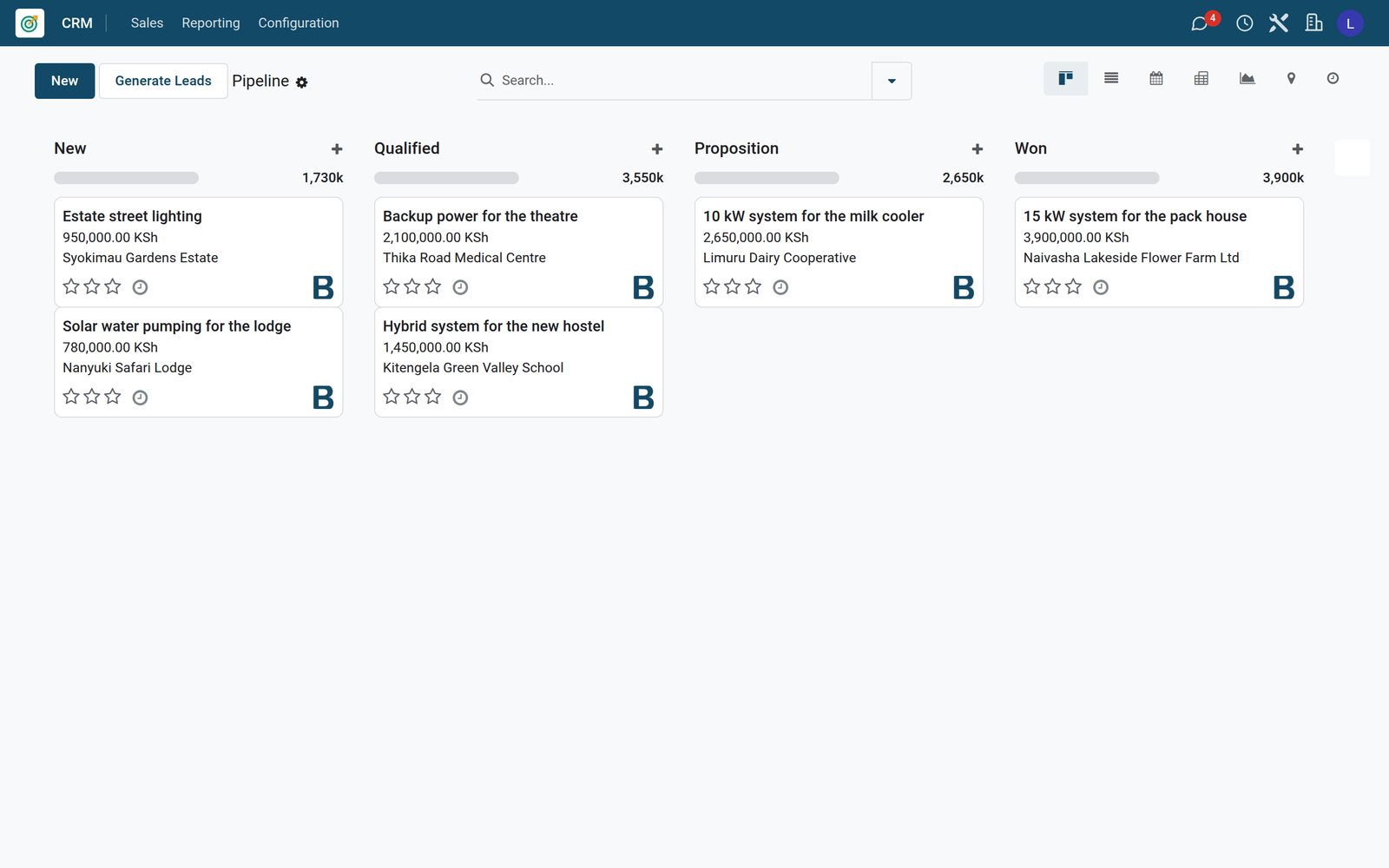
Ready when you are
Open the plan builder with the right apps for this industry already selected, or see it running first.