

Architecture Firms: Design projects, fees and hours in one place
BridgeERP gives architecture practices the pipeline, fee proposals, design-stage tasks, timesheets and invoices for every commission.
Free instant access. No credit card required.
 Invoicing
 CRM
CRM Sales
Sales Projects
 Timesheets
 Documents
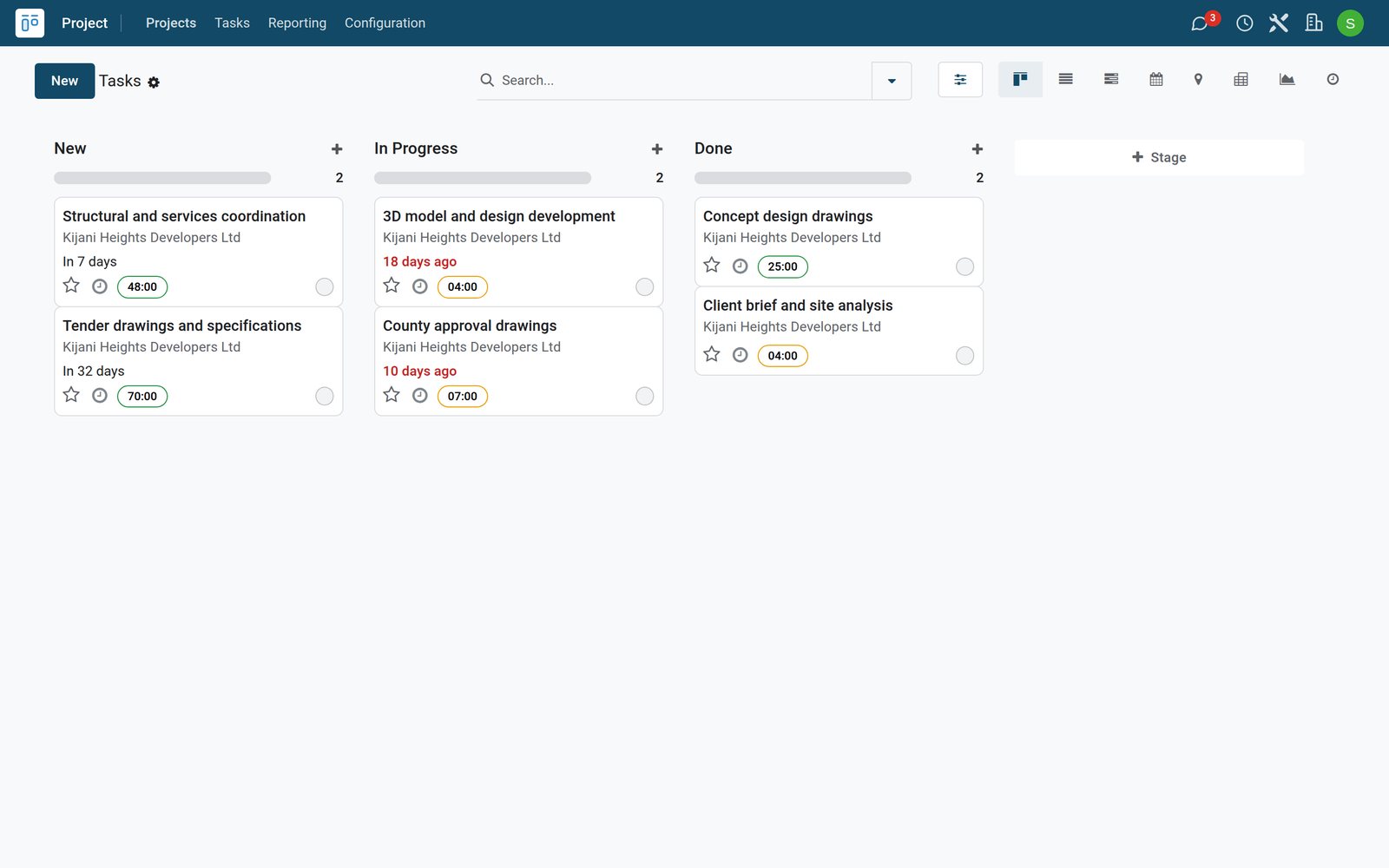
Fee proposals by stage and by hour
A fee proposal mixes fixed design stages, planning approval drawings, site visits and hourly rates.
 Sales
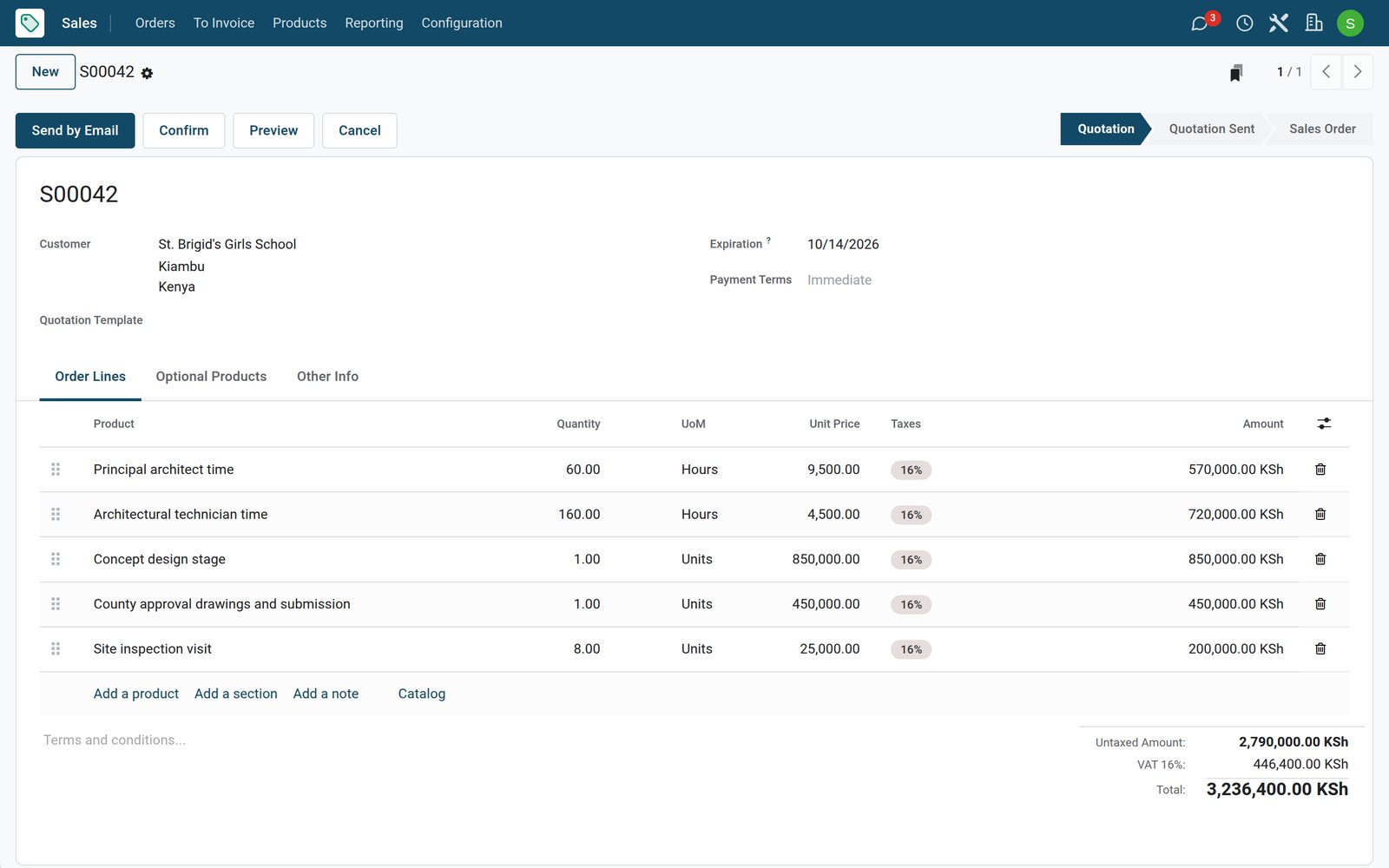
SalesA fee proposal for a school
The dormitory and classroom block for St. Brigid's is quoted with architect and technician hours, the concept stage, county approval drawings and site visits.
Explore Sales →By the numbers
What ships inside
Counted in the product.
- 4
- things a sold service can create: nothing, a task, a project, or a project with its tasks
- 5
- ways to count what was delivered, from timesheets and milestones to manual quantities
- 9
- billing types on a timesheet line, from billed on timesheets to non-billable
Inside the app
What is inside
The apps an architecture practice runs on, and what each does for a commission.
Pipeline
Enquiries for new buildings move from new to won with the client, the fee and the closing date.
Fee proposals
Quotations combine fixed design stages, approval drawings, site visits and hourly rates.
Commission projects
Confirming a proposal creates the project and tasks for the work billed on hours.
Design-stage tasks
Brief, concept, design development, approvals and tender each get a task with a deadline and hours.
Timesheets
Architects and technicians log hours on tasks with a note on the drawings worked on.
Stage and hour billing
Delivered stages, site visits and logged hours are counted on the order for the next invoice.
Drawings and documents
Keep drawings, approvals and client files with the project in Documents.
Site expenses
Staff record travel and printing for site visits as expenses for approval.
Step by step
From enquiry to invoiced stage
How a commission runs in BridgeERP, and which app does each step.
- Step 1
Enquiry
A developer or school asks for a design and becomes an opportunity with the expected fee.
CRM - Step 2
Fee proposal
The quotation sets the design stages, visits and hours for approval by the client.
Sales - Step 3
Commission
Confirming it creates the project and the design tasks for the studio.
Projects - Step 4
Design work
Architects and technicians log their hours on each design-stage task every day.
Timesheets - Step 5
Invoice
Completed stages, visits and hours are invoiced to the client in KES with VAT.
Invoicing
New commissions at a glance
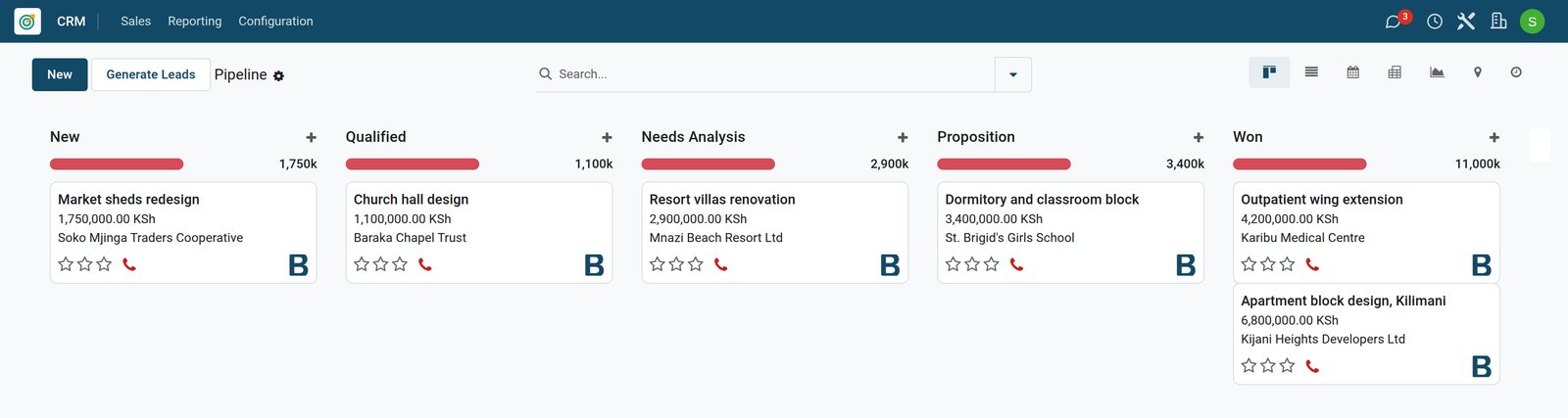
The pipeline shows every building in discussion, its client and the expected fee.
 CRM
CRMCommissions in the pipeline
A market redesign, a church hall, resort villas, a school block and two won commissions, each with its client and fee in KES.
Explore CRM →Hours logged against each design stage
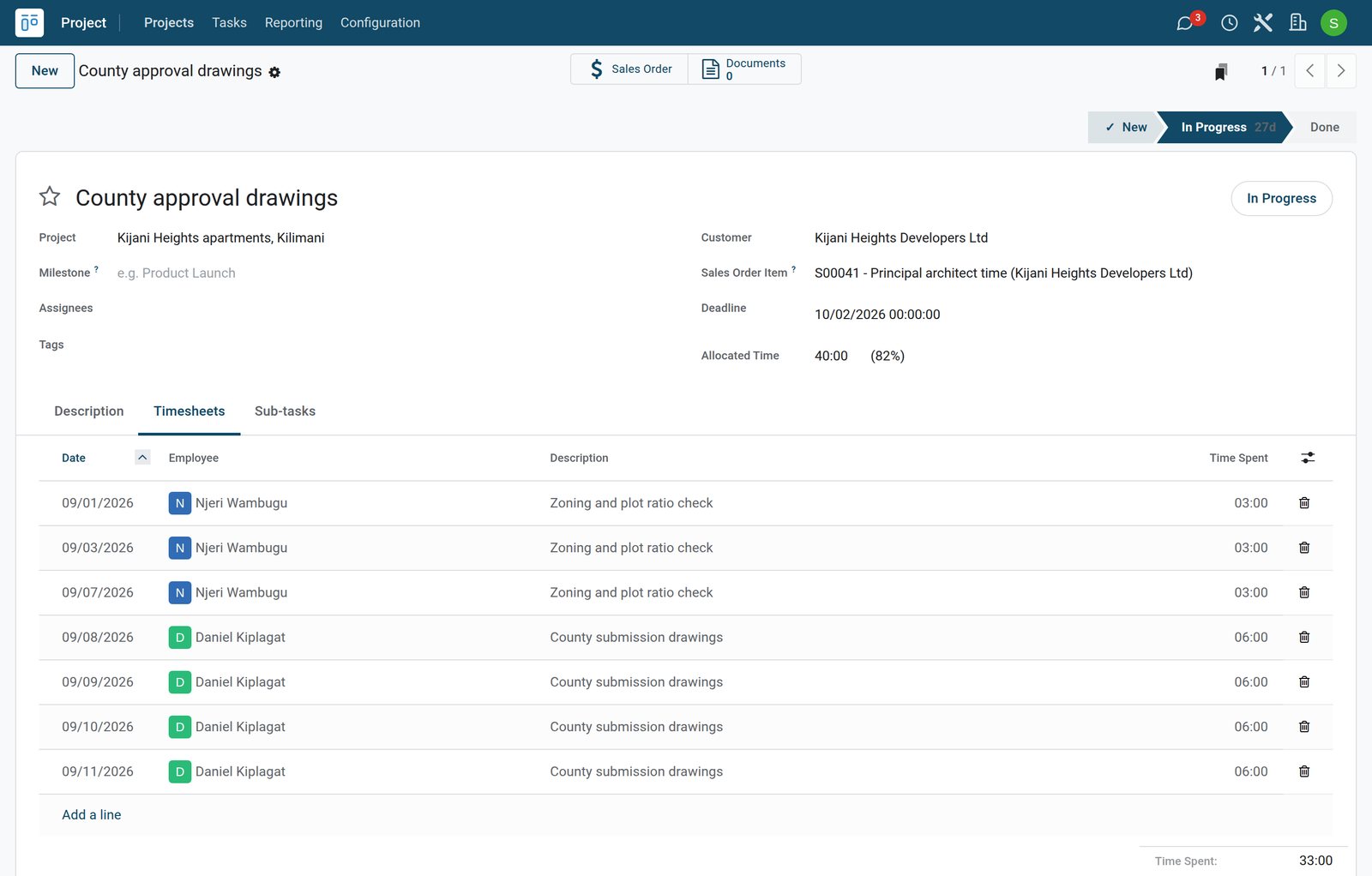
Each task shows its allocated hours and the timesheets of the people who worked on it.
 Timesheets
County approval drawings with their timesheets
The county approval task has 40 hours allocated and shows the principal checking zoning and plot ratio and the project architect preparing the submission drawings.
Explore Timesheets →Stages and hours ready to invoice
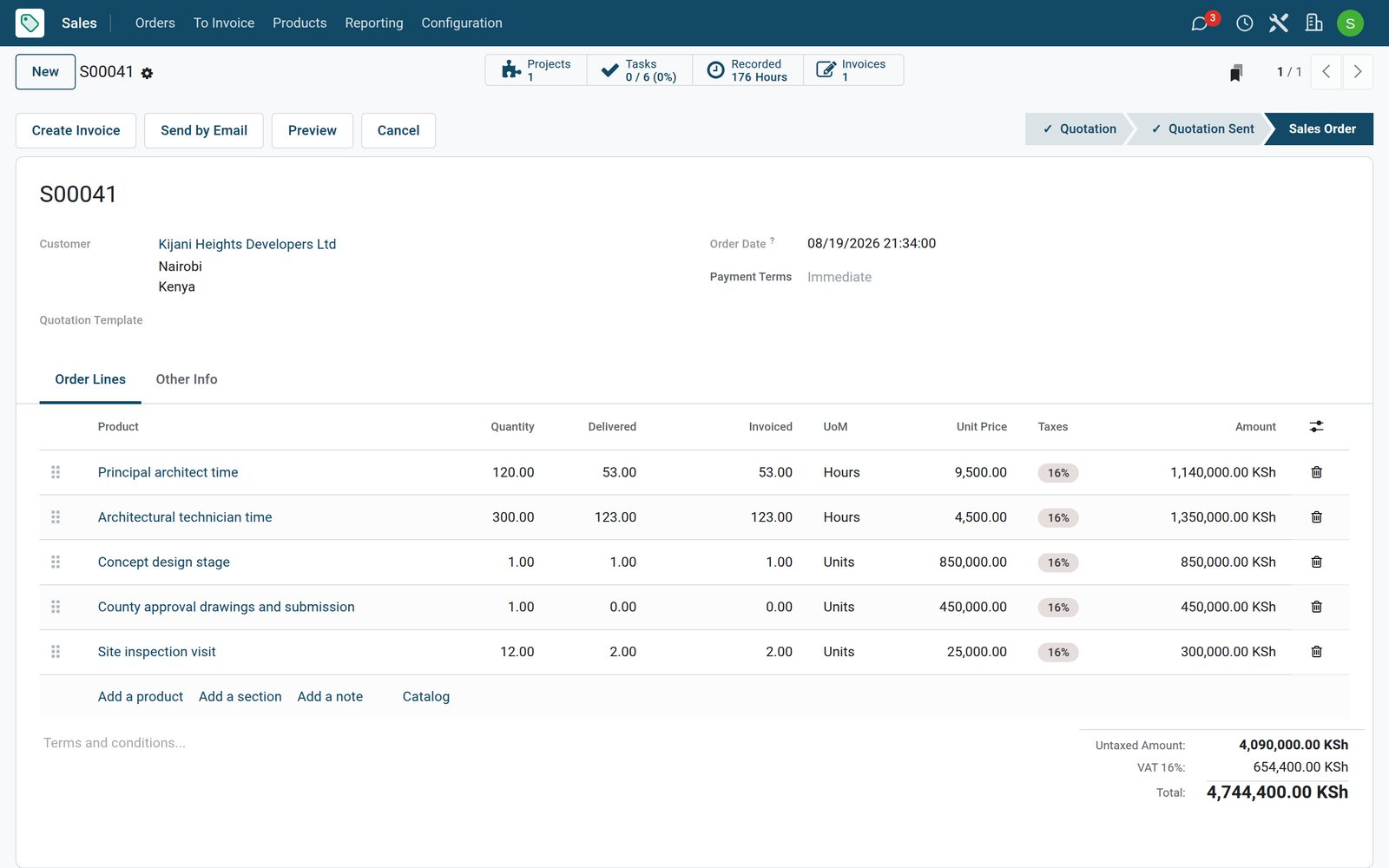
The order counts delivered stages, visits and hours on each line, so nothing billable is missed.
 Sales
SalesA commission order with delivered work
The Kijani Heights order shows the concept stage, two site visits and the architect and technician hours delivered and invoiced so far.
Explore Sales →Who uses it
Who uses it, and what they see
One system for the principal, the studio and the office manager.
Principal architect
Follows new commissions, approves fee proposals and sees which stages run over their hours.
Project architect
Plans the design-stage tasks and deadlines of each commission with the team.
Technician
Works on drawings and models and logs hours with a note every day.
Office manager
Invoices completed stages and visits, follows payments and approves expenses.
Works with
Runs with the rest of BridgeERP
Apps an architecture practice draws on.


In your country
Built for practices in any country
What changes from country to country, shown on the demo's Kenyan architecture practice.
Fees in your currency
Stage fees, hourly rates and invoices are in the company currency, KES on the demo.
Planning approvals as a stage
Approval drawings and submission to the planning authority, the county on the demo, are priced and tracked as their own stage.
Clients across the country
On the demo, developers, schools and hospitals from Nairobi, Kiambu, Kilifi and Machakos share one contact list.
Getting started
Getting started
How a practice moves onto BridgeERP.
Set your fees
Create hourly rates per grade and fixed services for each design stage and site visit.
Add the studio
Enter architects and technicians as employees so their hours can be logged and costed.
Load live commissions
Enter running projects with their design-stage tasks, deadlines and allocated hours.
Invoice stages and hours
Mark completed stages and visits delivered, log the week's hours, then invoice the order.
Questions
Questions about Architecture Firms
Not covered here? Contact us.
Can I invoice by design stage?
Yes. Stages such as concept design or approval drawings are fixed services invoiced when delivered.
Can I also bill hourly work?
Yes. Services billed on timesheets take the hours logged on their tasks onto the next invoice.
Does confirming a fee proposal create the project?
Yes. Hour-based services create the project and its tasks when the order is confirmed.
Can I see when a stage runs over its hours?
Yes. Each task shows its allocated hours and the hours already spent.
Where do drawings go?
Drawings and approvals can be kept with the project in the Documents app.
Are site visit costs tracked?
Yes. Staff record travel and other site costs in Expenses for approval.
Tax compliance
Invoices your tax authority accepts
In Kenya, Uganda, Rwanda, Burundi and Zambia, each invoice, receipt and stock movement goes to the tax authority's own system when you post it. Ghana and Pakistan come next, and we connect 73 more countries on request.
- KenyaReady
eTIMS KRA
Invoices, credit notes, POS receipts and stock movements
- UgandaReady
EFRIS URA
Invoices, POS receipts and stock
- RwandaReady
EBM RRA
Invoices, POS receipts, stock and imports
- BurundiReady
EBMS OBR
Invoices, POS receipts, stock and manufacturing
- ZambiaReady
Smart Invoice ZRA
Invoices, POS receipts, stock and imports
Architecture Firms, app by app
One connected flow instead of separate systems — the work moves from one team to the next without re-typing anything.
Every stop is a real app in your plan, and the hand-offs between them are the product.
- Customers & sales
- Operations
- Finance
- Platform & insight
CRM
Leads, opportunity pipeline, activities and sales forecasting.
CRM →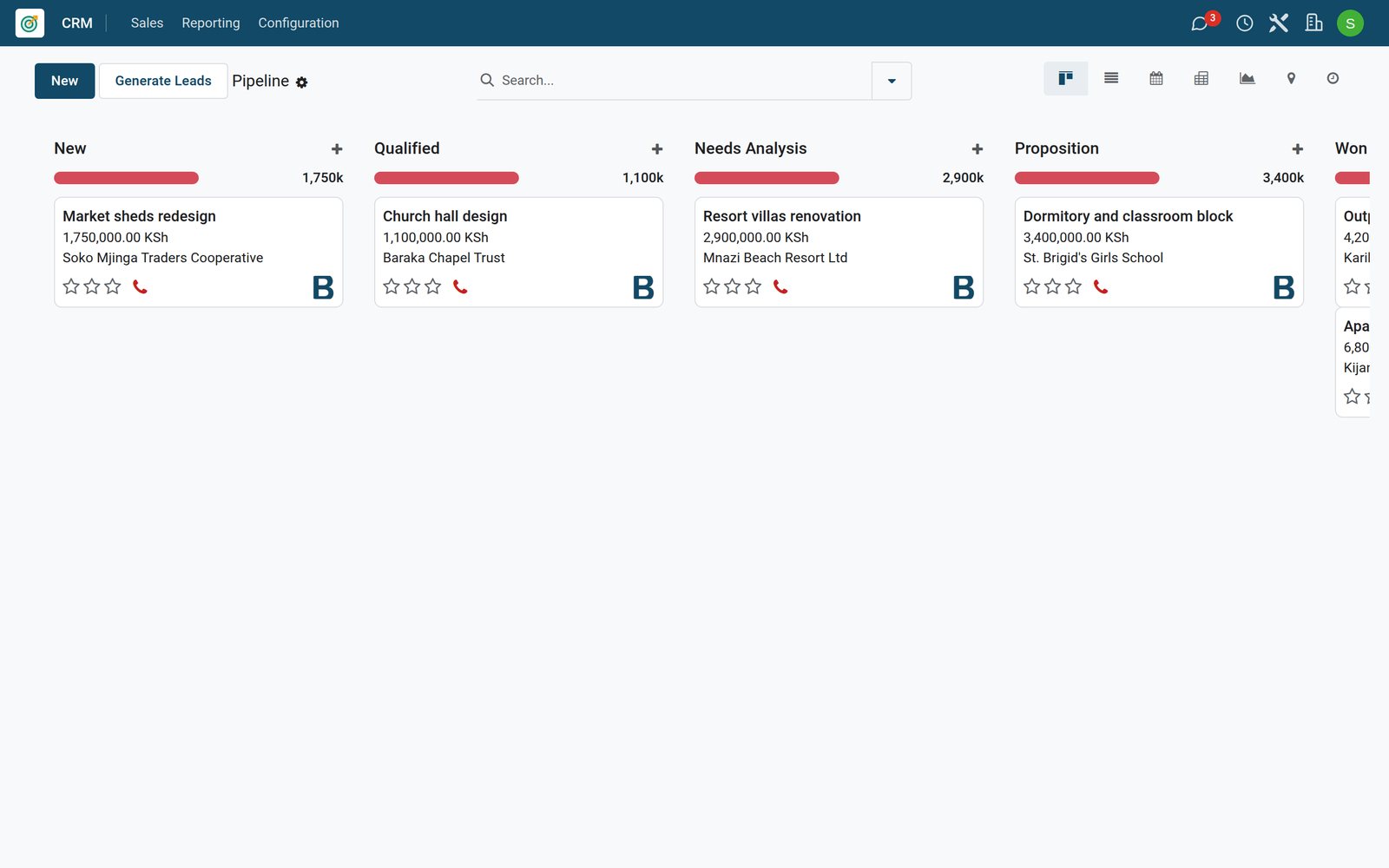
Ready when you are
Open the plan builder with the right apps for this industry already selected, or see it running first.