

Repair Shop: Check in, quote, fix and bill every device from one repair board
BridgeERP Repairs ties each job card to parts stock, customer quotations, online bookings and invoicing with country e-invoicing, so nothing leaves the bench unbilled.
Free instant access. No credit card required.
 Invoicing
 Appointments
 CRM
CRM Point of Sale
 Purchase
 Repairs
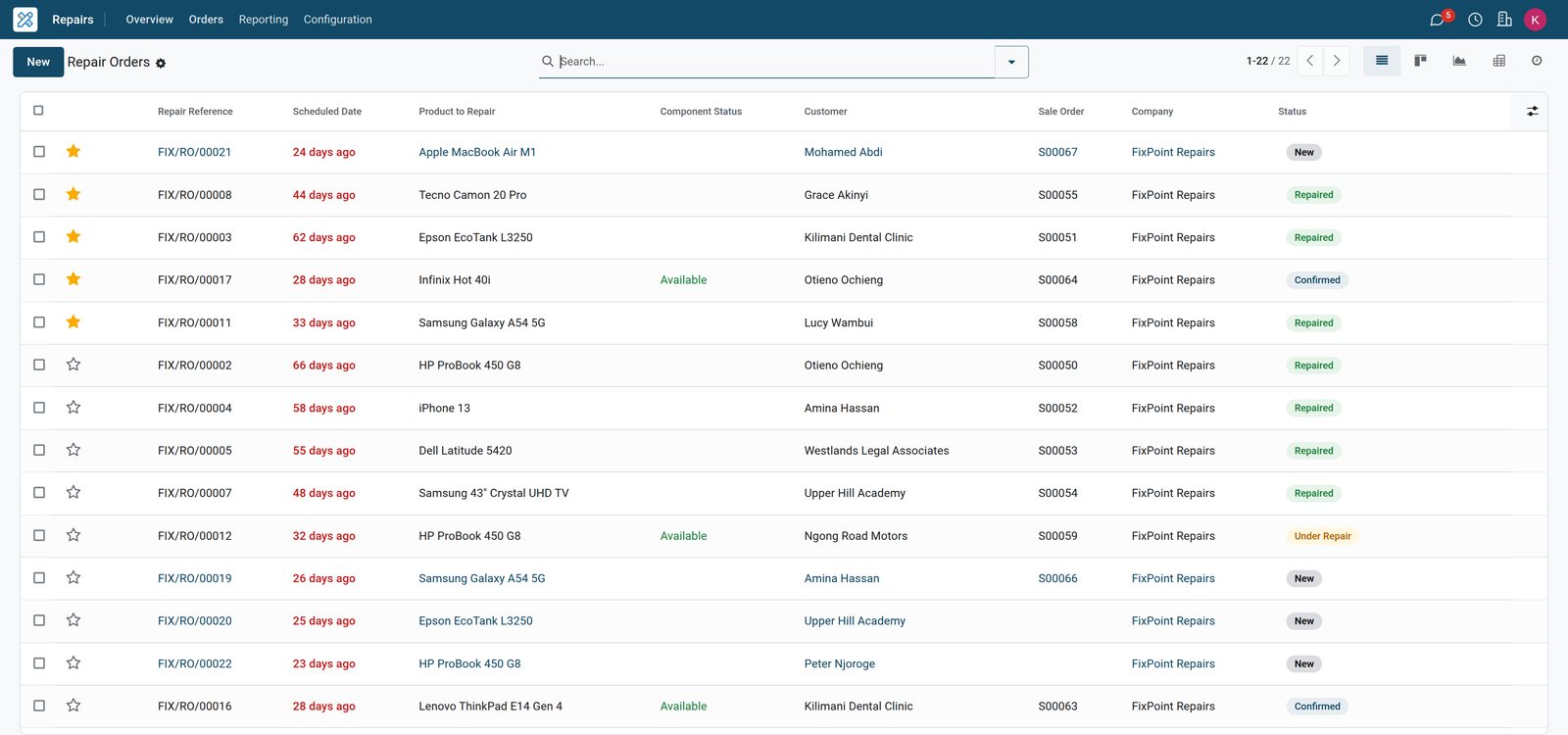
See every device in the shop and exactly where it stands
Repair orders move from New to Confirmed, Under Repair and Repaired. The counter, the bench and the owner all read the same board.
 Repairs
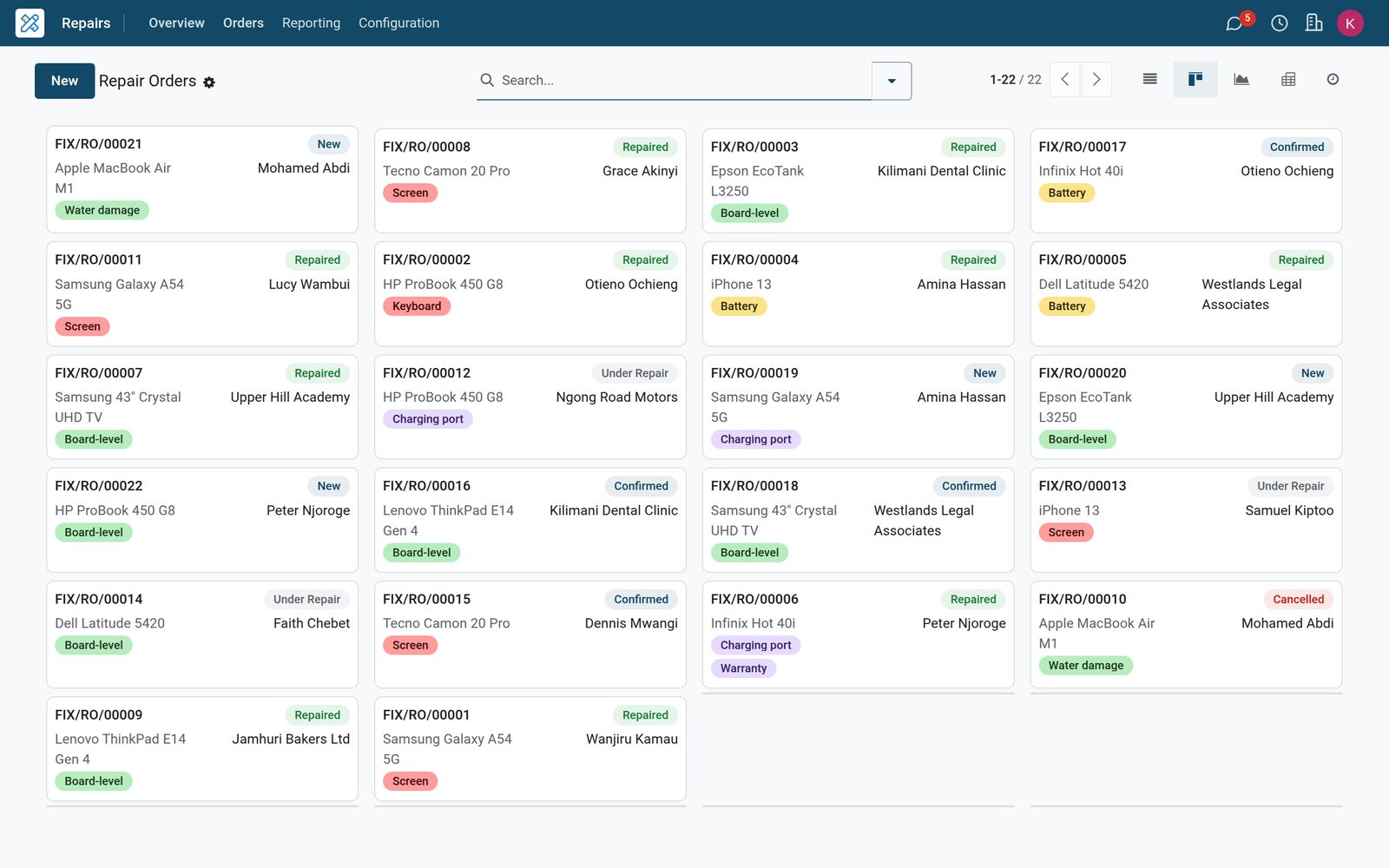
Every job as a card, from New to Repaired
The Repairs board shows each repair order with its customer, product to repair, fault tags and status, so the counter can answer ‘is it ready?’ straight away.
 Repairs
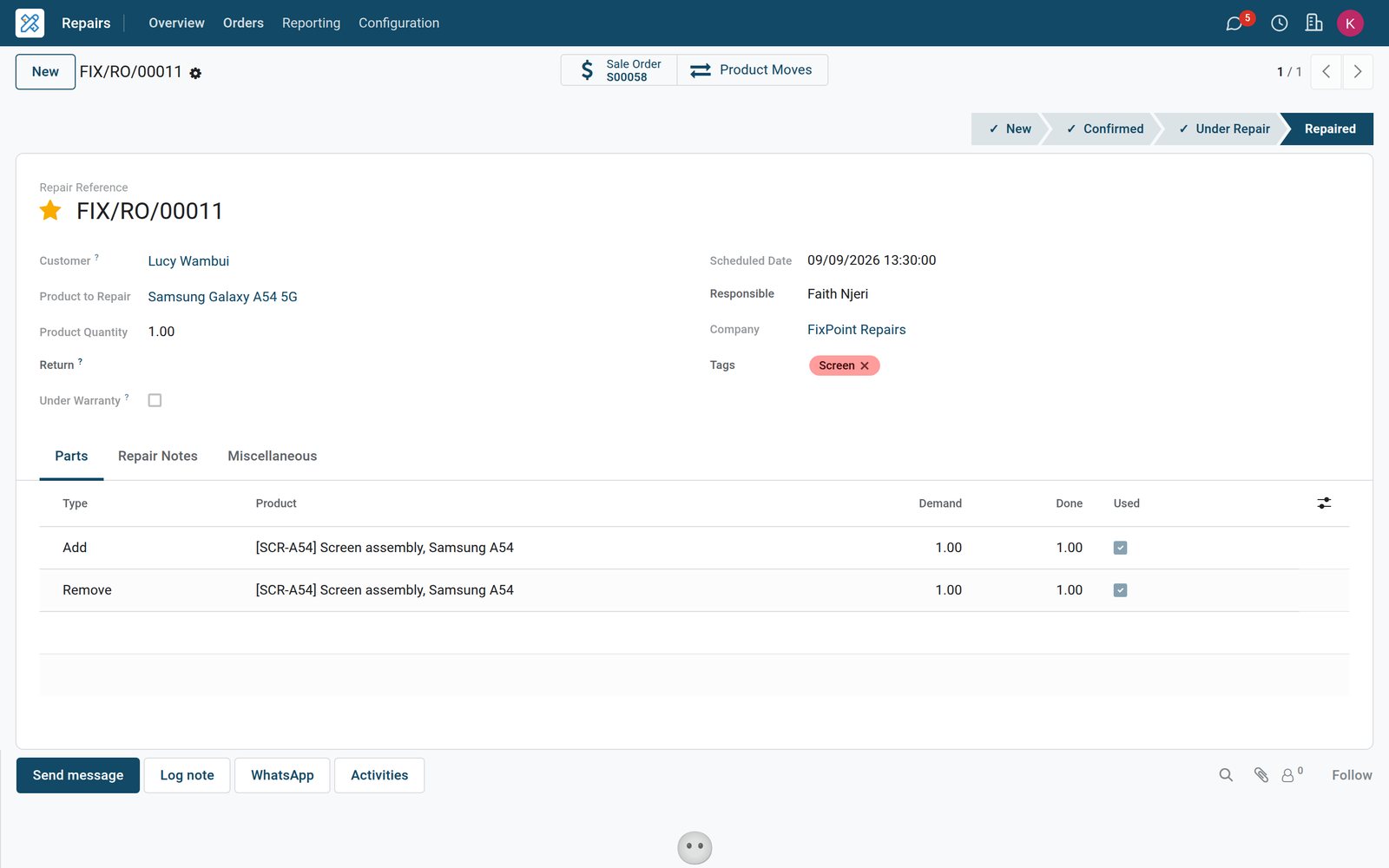
One repair order carries the whole job
Customer, product to repair, scheduled date, responsible technician and a Parts tab with add, remove and recycle lines, plus the linked quotation, sit on one form.
 Repairs
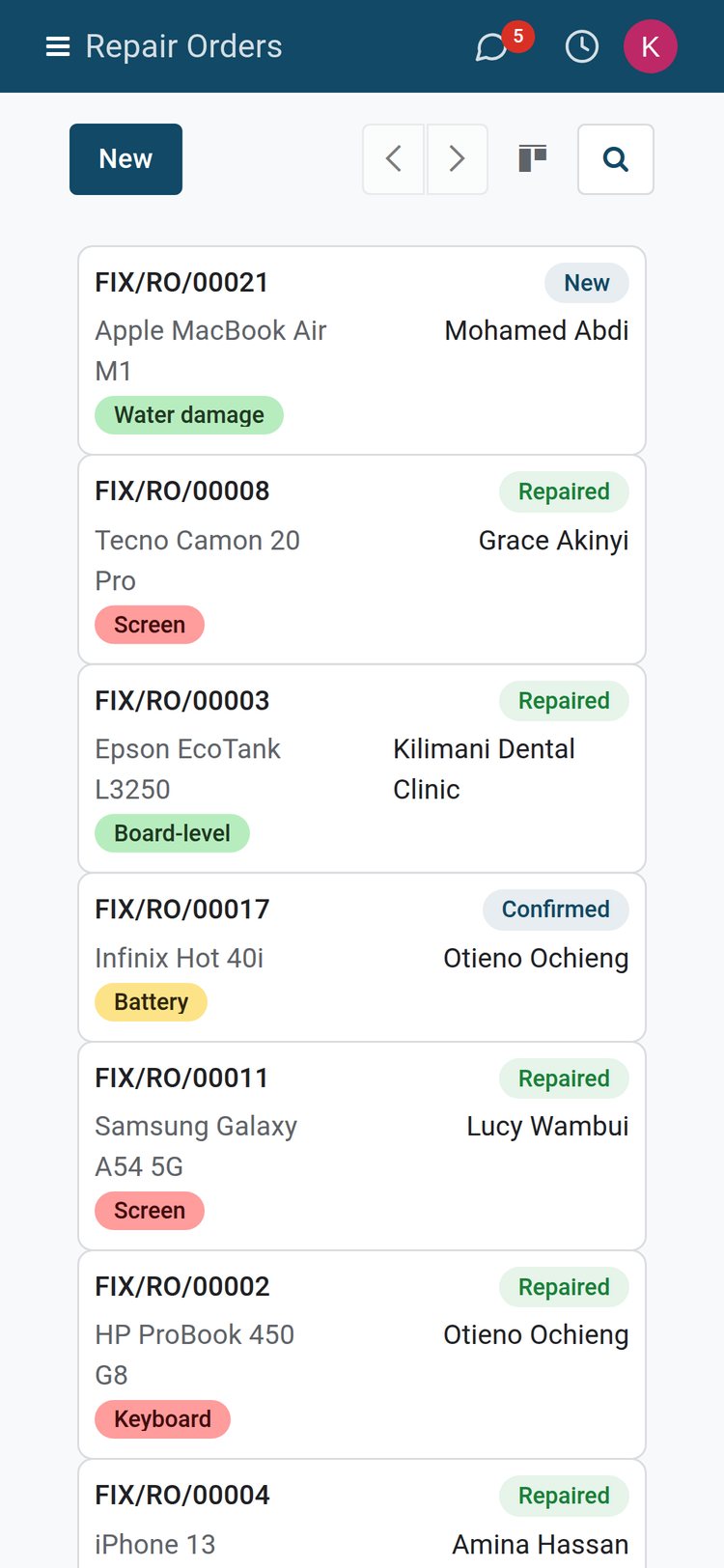
Technicians update jobs from their phone
The same Repairs board opens in a phone browser, so a technician can open a job, check its parts and log a note without leaving the bench.
By the numbers
Ready on the first day
Counts of what ships with the repair shop setup, taken from the product itself.
- 15
- ready-made dashboards in the Dashboards app for sales, stock, helpdesk and accounting
- 17
- online payment providers ready to switch on for quotation and invoice payment links
- 292
- KRA eTIMS reference codes already loaded for signing Kenyan invoices through OSCU
- 8
- reminder presets for booked repair slots, sent by email, text message or in-app alert
Inside the app
What is inside the repair shop setup
Every card below is a real menu, field or report in BridgeERP Repairs and the apps around it.
Repair orders
Customer, product to repair, quantity, scheduled date, responsible user and a priority star on every job, moving through New, Confirmed, Under Repair and Repaired.
Workshop overview
Repairs Overview gives each repair operation a card that counts confirmed jobs, jobs under repair, jobs ready and jobs running late.
Parts in, parts out
Each part line is typed Add, Remove or Recycle, so fitted parts leave stock and salvaged ones go back to a recycle location.
Warranty jobs
Tick Under Warranty and the repair is flagged as one the customer does not pay for, while parts still move through stock.
Quotations from the job
Create Quotation turns the repair's parts into a sales quotation; add a labour service line and send it for the customer's approval.
Repairs from a sale
Tick Create Repair on a repair service product and confirming a sales order for it opens the linked repair order automatically.
Serial-number history
Record the device's serial number on the job; the serial record then shows how often it came in for repair and was repaired.
Returns into repair
Link a repair to the customer's return transfer, so a device sent back after a sale is fixed and delivered out again.
Step by step
From the booking to the paid invoice
One device, followed through the apps that handle it.
- Step 1
Book
The customer picks a slot on your website booking page and gets reminders by email or text before drop-off.
Appointments - Step 2
Check in
The front desk opens a repair order with customer, product to repair, serial number, scheduled date and responsible technician.
Repairs - Step 3
Quote
Create Quotation copies the parts into a quotation; labour is added as a service line and sent for approval.
Sales - Step 4
Repair
Confirm Repair reserves the parts; Start Repair and End Repair move the job on and consume what was used.
Repairs - Step 5
Invoice
The confirmed order is invoiced, signed through the country's e-invoicing where installed, KRA eTIMS on the demo, and the payment is recorded in cash or bank.
Accounting - Step 6
Restock
Replenishment suggests what to reorder and Purchase sends requests for quotation to the parts suppliers on your vendor pricelists.
Purchase
Get the customer's yes before you open the device
Repair quotations live in Sales next to the rest of your quotes, with online signature and payment when you want them.
 Sales
SalesQuotations the customer can sign and pay
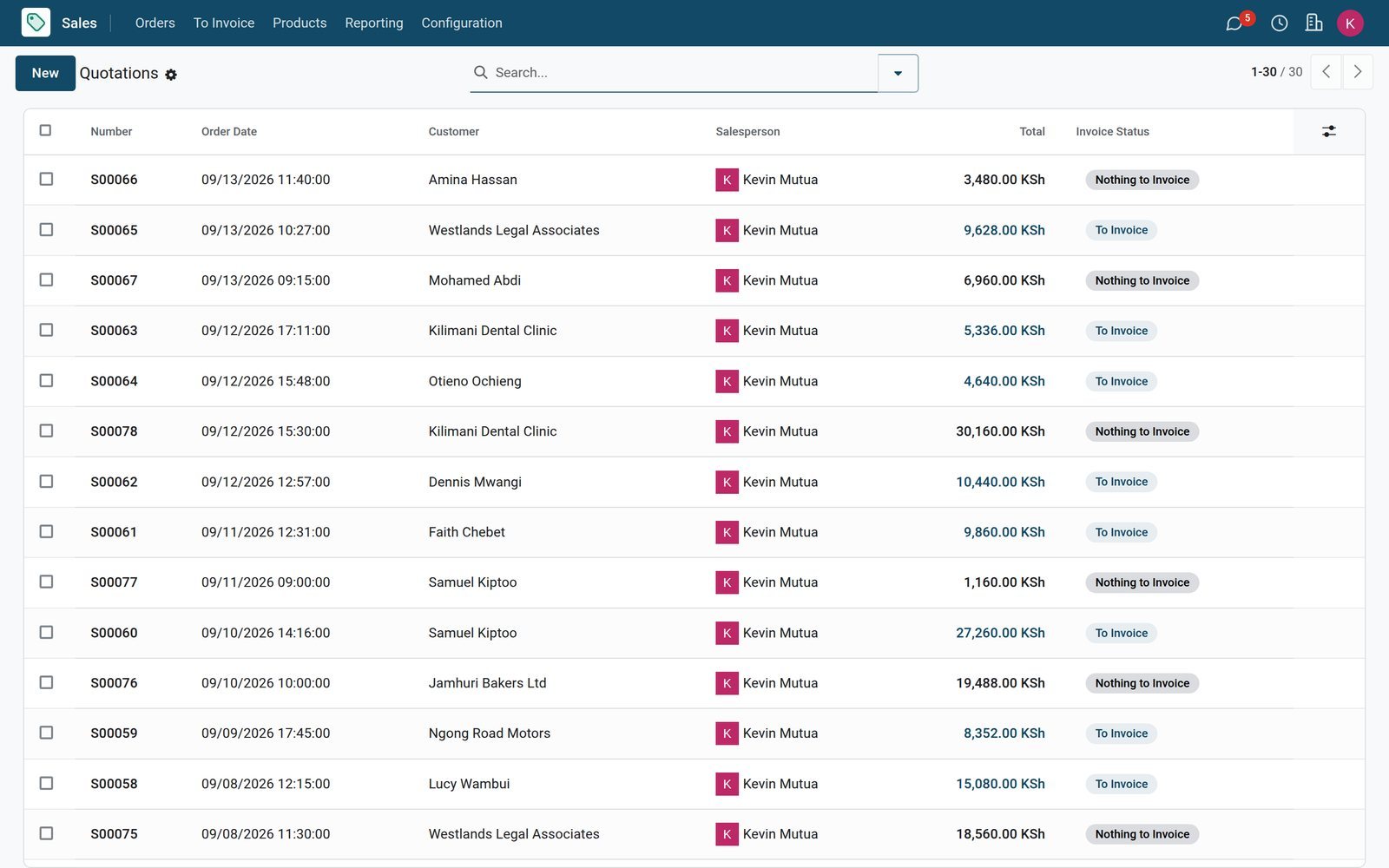
Every repair quotation sits in the Sales Quotations list with customer, total and status; turn on online signature and payment and approvals arrive by link.
Explore Sales →Know the part is on the shelf before you promise a collection date
Parts stock, reordering and supplier prices sit in the same system as the repair orders that use them.
 Inventory
Stock of every part, live
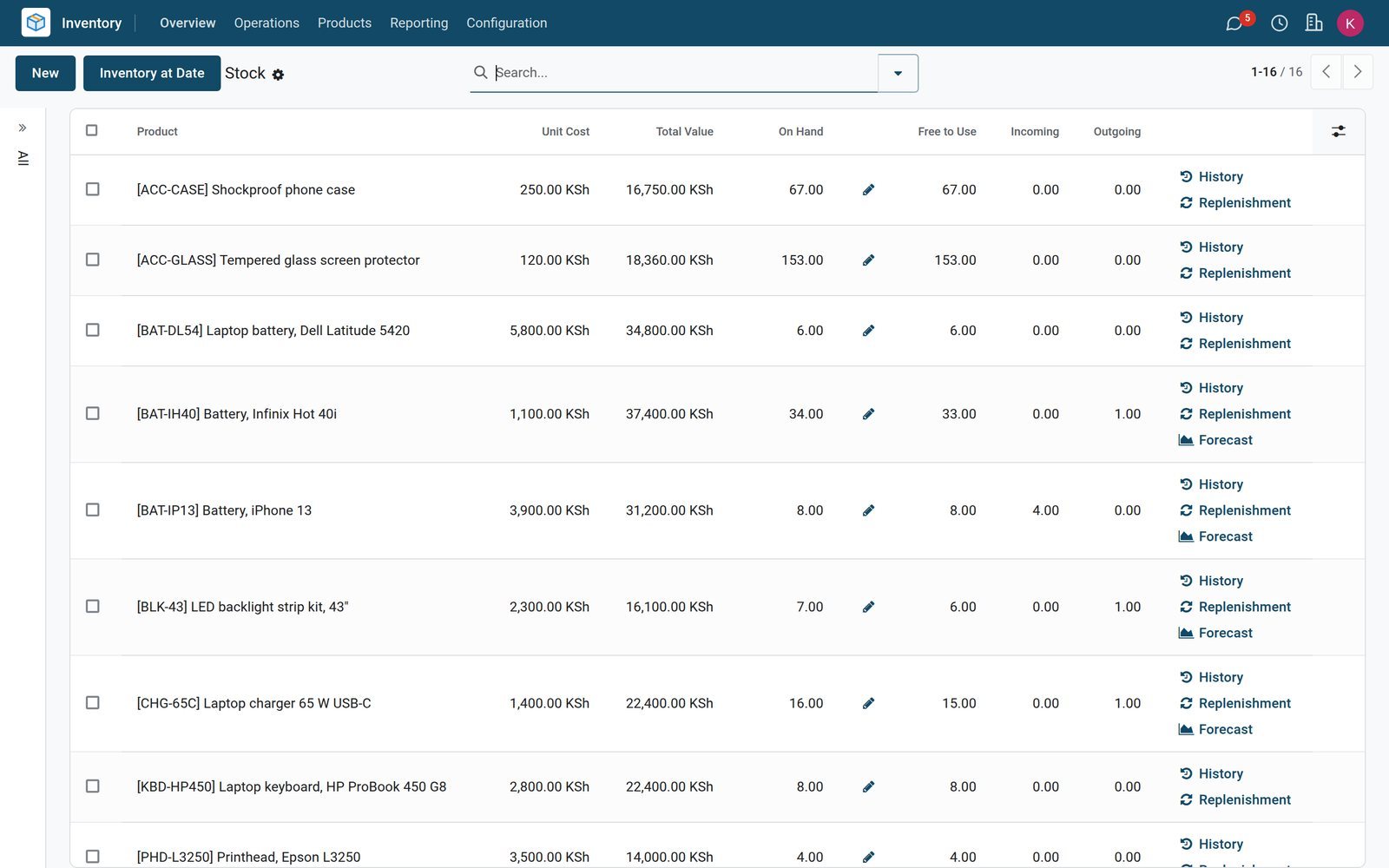
Inventory's Stock report lists each part with on-hand and forecast quantities, while each repair order shows whether its parts are available or late.
Explore Inventory →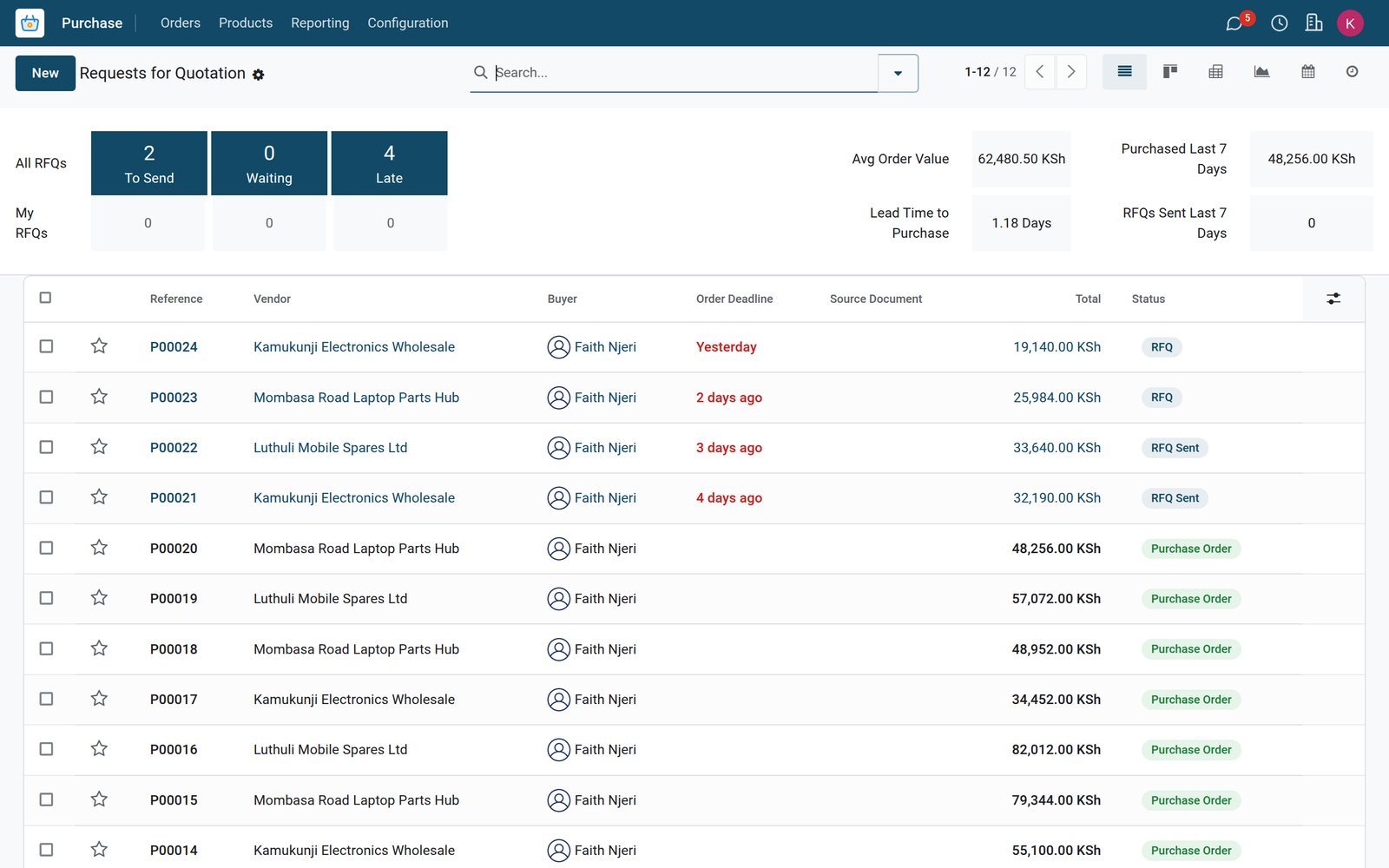 Purchase
Reorder from the right supplier
Requests for quotation go to the supplier on each part's vendor pricelist, and parts bought for a specific job link back to its repair order.
Explore Purchase →Fill the bench with booked slots, not walk-in queues
Appointments publishes repair slots on your website and handles confirmations and reminders.
Online booking page
Publish repair appointment types on your website; customers choose a free slot and the booking lands in the calendar of whoever is assigned.
Technicians or benches
Schedule each appointment type on staff calendars or on resources such as a repair bench, so no slot is double-booked.
Reminders before drop-off
Attach email, text message or in-app reminders to each appointment type from the Reminders list, set hours or days before the slot.
Questions and booking fees
Ask for the device model and fault when the slot is booked, and optionally take a booking fee online before it is confirmed.
See which repairs earn their bench time
Repair and sales analysis read the same records the counter and bench create, so nobody re-keys a figure.
 Repairs
Repairs by status, product and technician
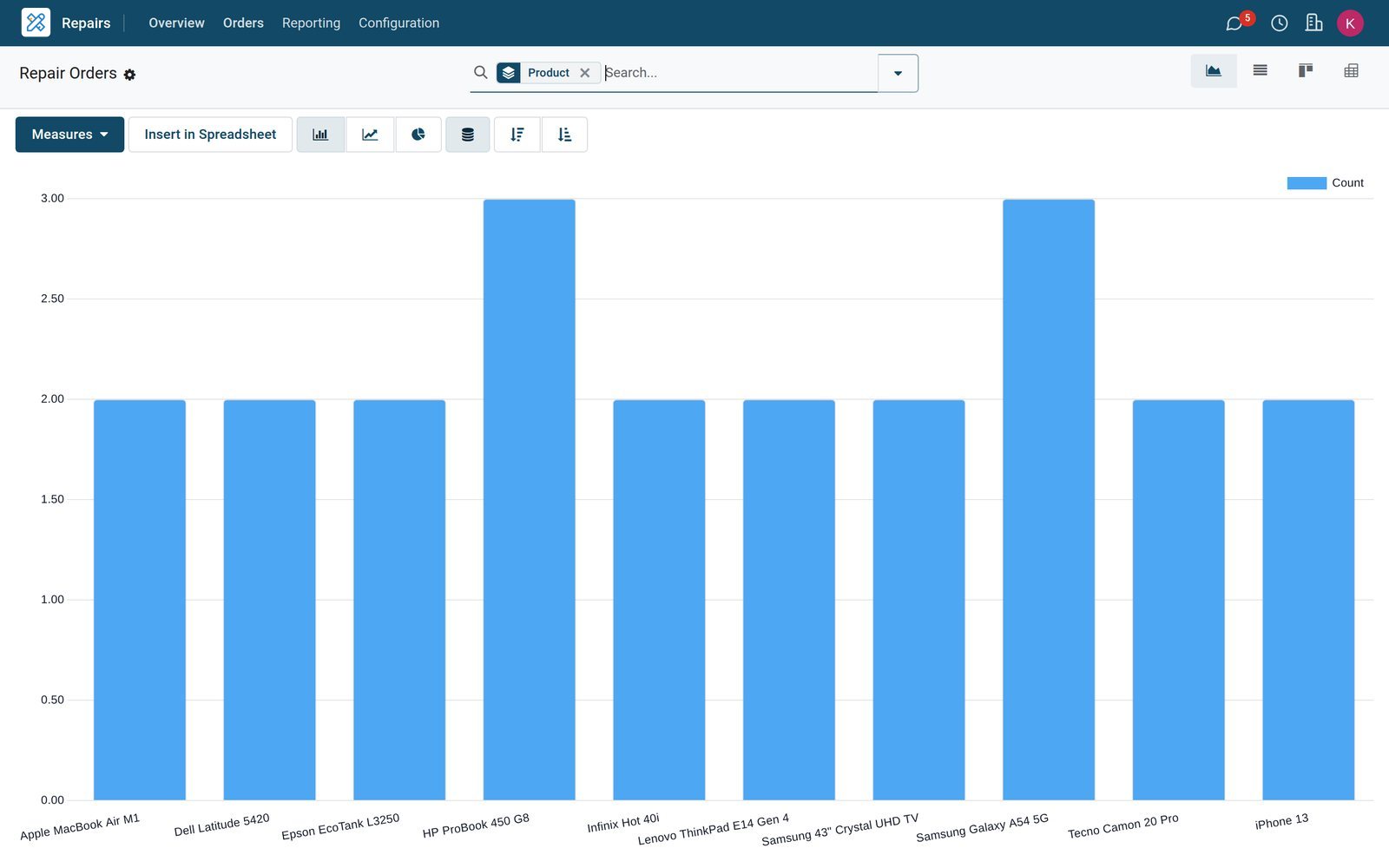
The Repairs report charts repair orders as a graph or pivot, grouped by status, product to repair, customer or responsible technician.
 Sales
SalesRevenue by service and part
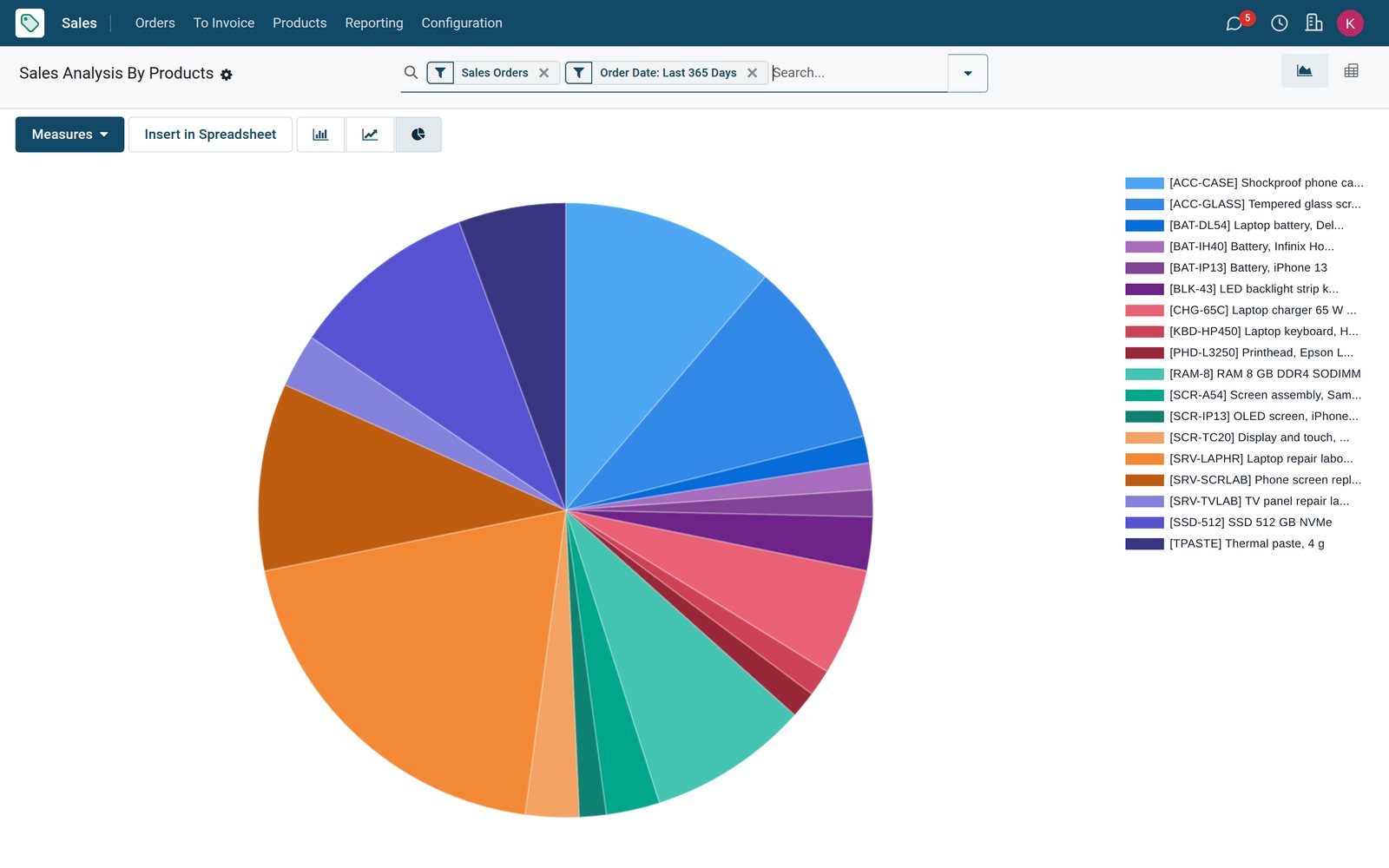
Sales analysis by product shows which repair services, parts and accessories bring in revenue, filterable by customer, salesperson and period.
Explore Sales →Who uses it
What each person in the shop sees
One database, with each role working in the screens that matter to them.
Owner
Dashboards, the Repairs report and Profit and Loss show turnover, open jobs and margins without asking anyone for a spreadsheet.
Front desk and cashier
Books slots in Appointments, opens repair orders at drop-off and sells cases or screen protectors at the Point of Sale counter.
Technician
Works from the Repairs board: starts and ends repairs, records the parts actually used and leaves notes for the next shift.
Storekeeper
Watches the Stock report, runs Replenishment for low parts and scans receipts with the Barcode app as supplier deliveries arrive.
Accountant
Posts invoices and vendor bills, chases overdue customers from Aged Receivable and prepares the Tax Return report from the same ledger.
Customer
Books online, receives the repair quotation by email, and can sign and pay it from the link before collecting the device.
Works with
Apps that run with Repairs
Switch on what the shop needs; they share customers, products and the ledger.
- RepairsRepair orders, parts lines and workshop overview
- InventoryParts stock, serial numbers, replenishment and valuation
- SalesRepair quotations, orders and sales analysis
- PurchaseSupplier RFQs, purchase orders and vendor pricelists
- AppointmentsOnline repair bookings with reminders
 AccountingInvoices, payments, e-invoicing and financial reports
- Point of SaleCounter sales of accessories and quick fixes
 HelpdeskFault reports and follow-ups as tickets
 WebsiteYour shop site with booking pages
 Live ChatAnswer website visitors in real time
 Email MarketingService reminders and offers to past customers
 EmployeesTechnicians, departments and attendance
In your country
Set up for how repair shops get paid and taxed, country by country
Tax, currency, payments and messaging as they work for the demo's Kenyan repair shop, with room to grow into more branches and countries.
E-invoicing on every invoice
On the demo, customer invoices are signed through Kenya's eTIMS OSCU connector, with the signature and receipt number stored on the invoice.
Imported parts through customs
On the demo, customs import records fetched from KRA are listed under Vendors, ready to match to the spare parts you brought into the country.
Buy in one currency, bill in another
Buy parts in US dollars and bill repairs in Kenyan shillings; exchange differences post to their own journal and revaluation report.
Cash, bank and payment links
Record cash and bank payments against invoices, or switch on an online payment provider so customers pay quotations and invoices by link.
WhatsApp and SMS
Send quotations and invoices with WhatsApp templates, and text customers from sales orders, deliveries and appointment reminders.
Branches as companies or warehouses
Run each branch as its own company or warehouse, each with its own repair operation, and see the figures together in one database.
Reports and control
Reports that keep the shop in control
The reports below are menus in the demo, filled from repair orders, sales, stock moves and the ledger.
Repairs analysis
Chart or pivot every repair order by status, product to repair, customer or technician, straight from the Repairs Reporting menu.
Late and ready jobs
The Repairs Overview counts confirmed, ready, under-repair and late jobs for each repair operation, so nothing waits unnoticed.
Sales by product and customer
Sales reporting by product, customer and salesperson shows which repairs and accessories sell, and who brings in the revenue.
Parts movement history
Moves History lists every part moved into or out of a repair, with date, quantity, locations and the reference it came from.
Stock valuation
The Valuation report puts a value on the parts shelf product by product, with an Inventory Valuation journal in the ledger.
Aged Receivable and follow-ups
Aged Receivable shows who still owes for collected repairs, and follow-up levels send reminders as their invoices go overdue.
Profit and Loss
Profit and Loss, Balance Sheet and Cash Flow Statement are built from the same postings as each repair invoice and parts bill.
Dashboards
Ready-made dashboards for sales, stock, helpdesk and accounting open from the Dashboards app, each built on your live records.
Getting started
Up and running without retyping your records
Setup follows the menus you will use every day.
Import customers and parts
Load customers and your parts list from Excel or CSV, test the file before importing, and re-import later without creating duplicates.
Parts, labour and repair services
Create storable parts, service products for labour, and repair services with Create Repair ticked, all from the Repairs Products menu.
Open your booking page
Create an appointment type per service, choose staff or bench resources, attach reminders and publish it to your website.
Set up each workshop
Add a warehouse per branch, check its repair operation type, and create repair tags such as screen, battery or water damage.
Questions
Questions about Repair Shop
Not covered here? Contact us.
Can I record a phone's IMEI or serial number on the repair?
Yes. When the product is tracked by serial number, the repair order has a Lot/Serial field, and the serial number record counts how often that device has come in for repair.
How do I charge for labour as well as parts?
Parts go on the repair order's Parts tab. Create Quotation copies them into a sales quotation, where you add a service product for labour before sending it for approval and invoicing.
Can customers book a repair slot online?
Yes. Appointments publishes booking pages on your website. You choose staff or bench resources, ask questions about the device, attach email or text reminders and can take a booking fee online.
How are warranty repairs handled?
Tick Under Warranty on the repair order. The job is treated as one the customer does not pay for, while the parts it uses still move out of stock, so the cost stays visible.
Will I know a part is missing before I promise a date?
Each repair order shows parts availability and flags late parts. Replenishment suggests what to reorder, and parts bought for a specific job are linked back to that repair order.
Are invoices signed through the tax authority's e-invoicing?
Yes, through the country's e-invoicing module where one exists. For Kenyan companies, for example, customer invoices are signed through the eTIMS OSCU connector, and the KRA signature and receipt number are stored on the invoice.
Can I also sell accessories at the counter?
Yes. Point of Sale handles walk-in sales of cases, chargers and screen protectors, and can load a sales order so a customer settles a repair quotation at the till.
Can technicians use it on a phone?
Yes. BridgeERP runs in the phone's browser, so technicians open the Repairs board, move jobs along, record parts and leave notes from the bench.
Tax compliance
Invoices your tax authority accepts
In Kenya, Uganda, Rwanda, Burundi and Zambia, each invoice, receipt and stock movement goes to the tax authority's own system when you post it. Ghana and Pakistan come next, and we connect 73 more countries on request.
- KenyaReady
eTIMS KRA
Invoices, credit notes, POS receipts and stock movements
- UgandaReady
EFRIS URA
Invoices, POS receipts and stock
- RwandaReady
EBM RRA
Invoices, POS receipts, stock and imports
- BurundiReady
EBMS OBR
Invoices, POS receipts, stock and manufacturing
- ZambiaReady
Smart Invoice ZRA
Invoices, POS receipts, stock and imports
Repair Shop, app by app
One connected flow instead of separate systems — the work moves from one team to the next without re-typing anything.
Every stop is a real app in your plan, and the hand-offs between them are the product.
- Customers & sales
- Operations
- Finance
CRM
Leads, opportunity pipeline, activities and sales forecasting.
CRM →CRMLeads, opportunity pipeline, activities and sales forecasting.Ready when you are
Open the plan builder with the right apps for this industry already selected, or see it running first.