

 Referrals: Let every employee refer a friend, and show them what each referral earns
Employees share open jobs by email, SMS or a tracked link, follow each person they referred through the hiring stages, and spend the points they earn on rewards you choose.
Free instant access. No credit card required.
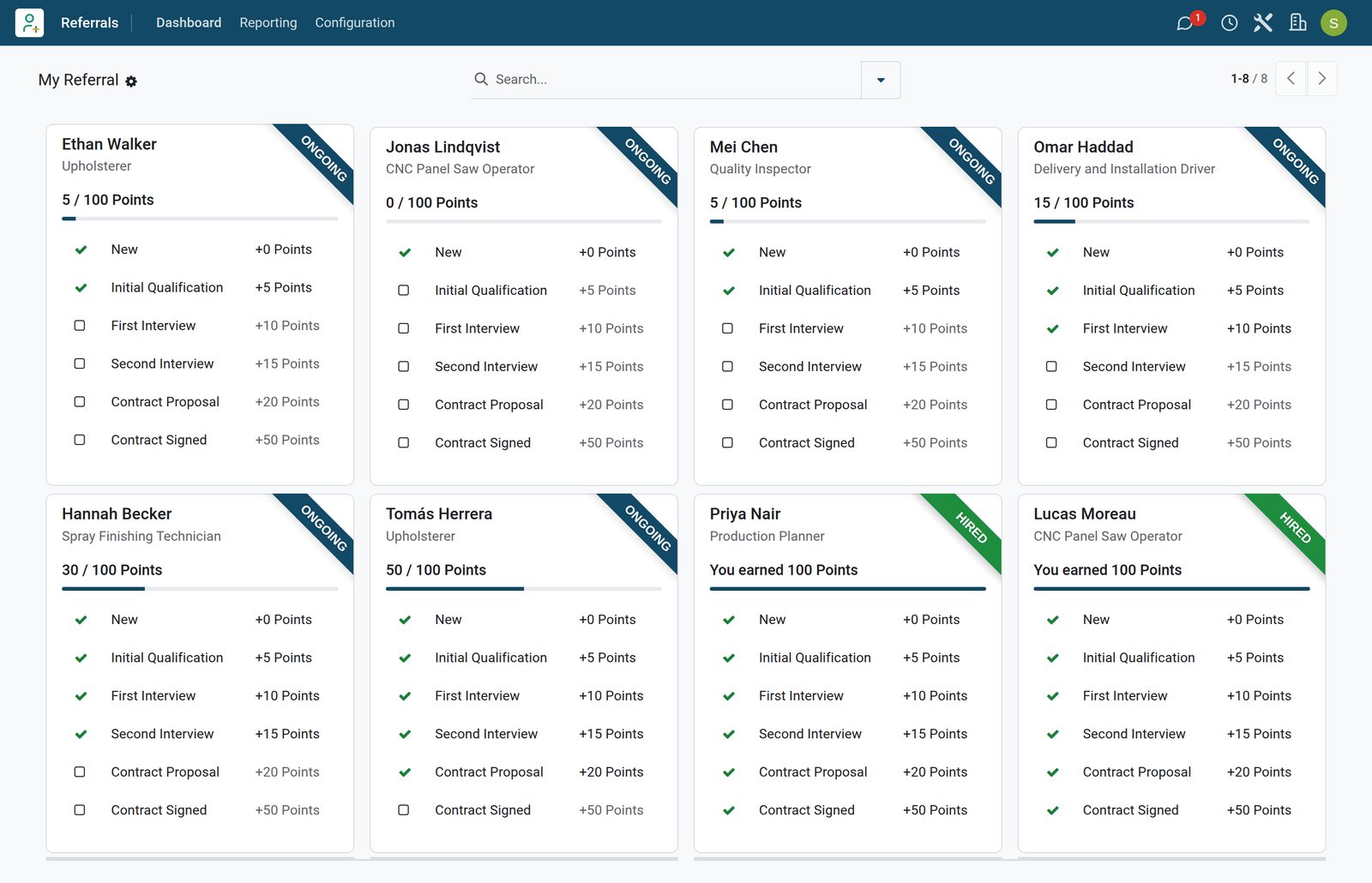
Every open job, one click away from being shared
Published job positions show employees how many people are needed and what a hire is worth, with the sharing buttons on the card.
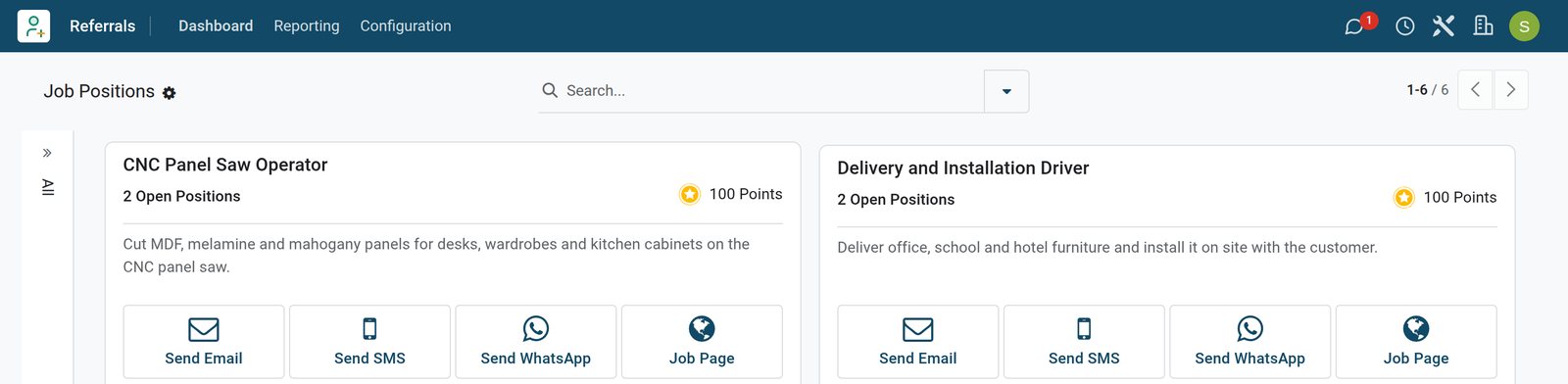 referrals
Jobs to refer
Each card shows its open positions, the 100 points a hire earns and buttons to send the job by email, SMS or WhatsApp, or open its job page.
Explore referrals →By the numbers
The referral programme, counted on the demo
Figures read from the Referrals app on the BridgeERP demo database.
- 100
- points a referral earns once the person is hired, from +5 at Initial Qualification to +50 at Contract Signed
- 5
- referral levels, from level 1 at 0 points to level 5 at 800 points
- 6
- rewards in the demo's shop, from a 50-point coffee gift card to an 800-point weekend away
- 14
- referrals recorded across six open jobs, three of them already hired
Inside the app
Everything a referral programme needs, in one app
Referrals works on the job positions, stages and applications your recruiters already use.
A dashboard for each employee
Referrals / Dashboard shows each employee's total points, points to spend, level and how many referrals are ongoing or successful.
Jobs ready to share
Published job positions list their open positions and the points a hire earns, with Send Email, Send SMS, Send WhatsApp and Job Page buttons.
Links that credit the referrer
Each employee gets their own source and each job its campaign, so the link they share credits them when the friend applies.
Points for each hiring stage
Stages used for referrals carry points, +5 at Initial Qualification up to +50 at Contract Signed, added as the application moves forward.
A rewards shop
Each reward has a points cost, a description, a picture and a Gift Responsible, who gets an activity when an employee buys it.
Levels and alerts
Five levels mark progress by points, and alerts put a dated message on every employee's dashboard, such as a call for upholsterers.
Step by step
From a shared job to a spent reward in six steps
One referral, followed from the job card to the rewards shop.
- Step 1
Publish the job
Create the job position in Recruitment with its number of open positions and publish it, so it appears among the jobs to refer.
Recruitment - Step 2
Share it
The employee sends the job by email, SMS or WhatsApp from its card, or shares the tracked link on Facebook, X or LinkedIn.
referrals - Step 3
The friend applies
The friend applies on the careers page through that link, and the application arrives with the employee as the referrer.
Website Builder - Step 4
Stages earn points
As recruiters move the application from Initial Qualification to Contract Signed, the referrer gains 5, 10, 15, 20 and 50 points.
Recruitment - Step 5
The referrer hears back
The referrer is notified at each step; a hire marks the card Hired, and a refusal keeps the points already earned.
referrals - Step 6
Points become rewards
The employee buys a reward with the points, and its Gift Responsible gets an activity to hand the gift over.
referrals


Send a job to a friend without writing the message
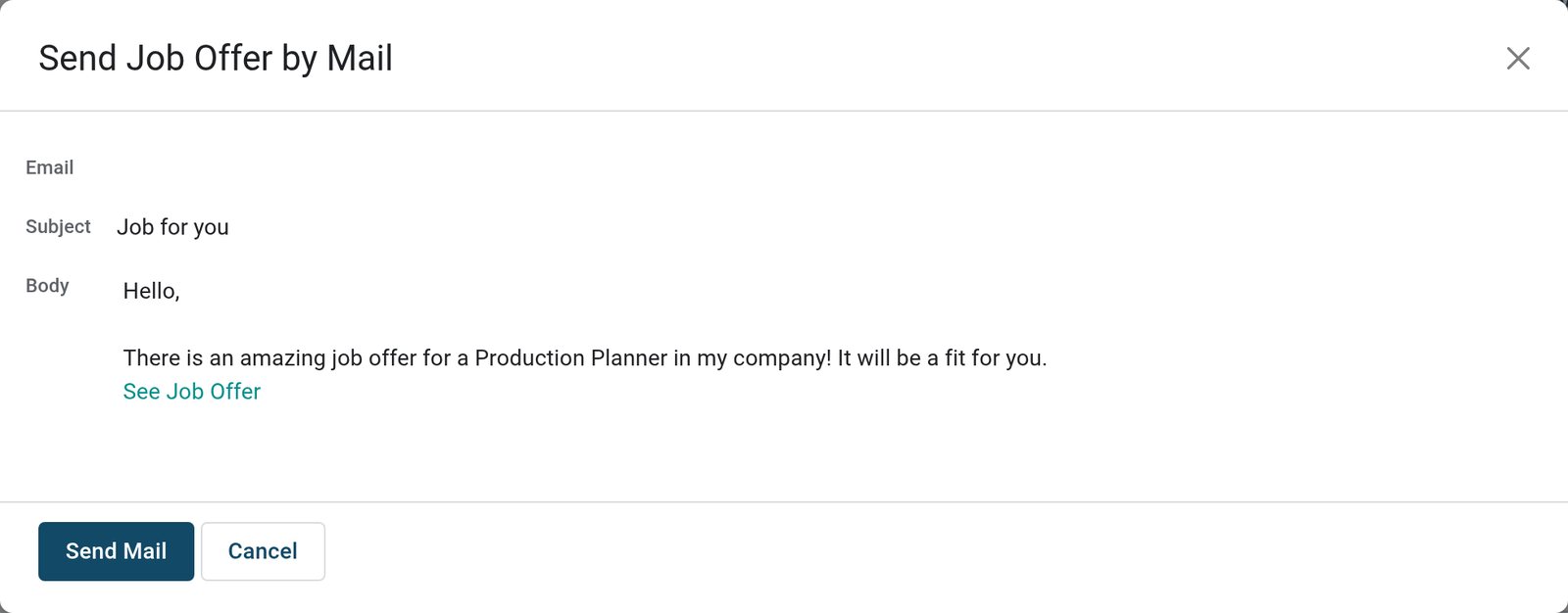
Send Email opens a ready-made message with the job and the employee's own referral link; only the friend's address is missing.
 referrals
Email a friend
For the Production Planner job the message is ready: subject Job for you, a short invitation and a See Job Offer link that credits the sender.
Explore referrals →Points employees can actually spend
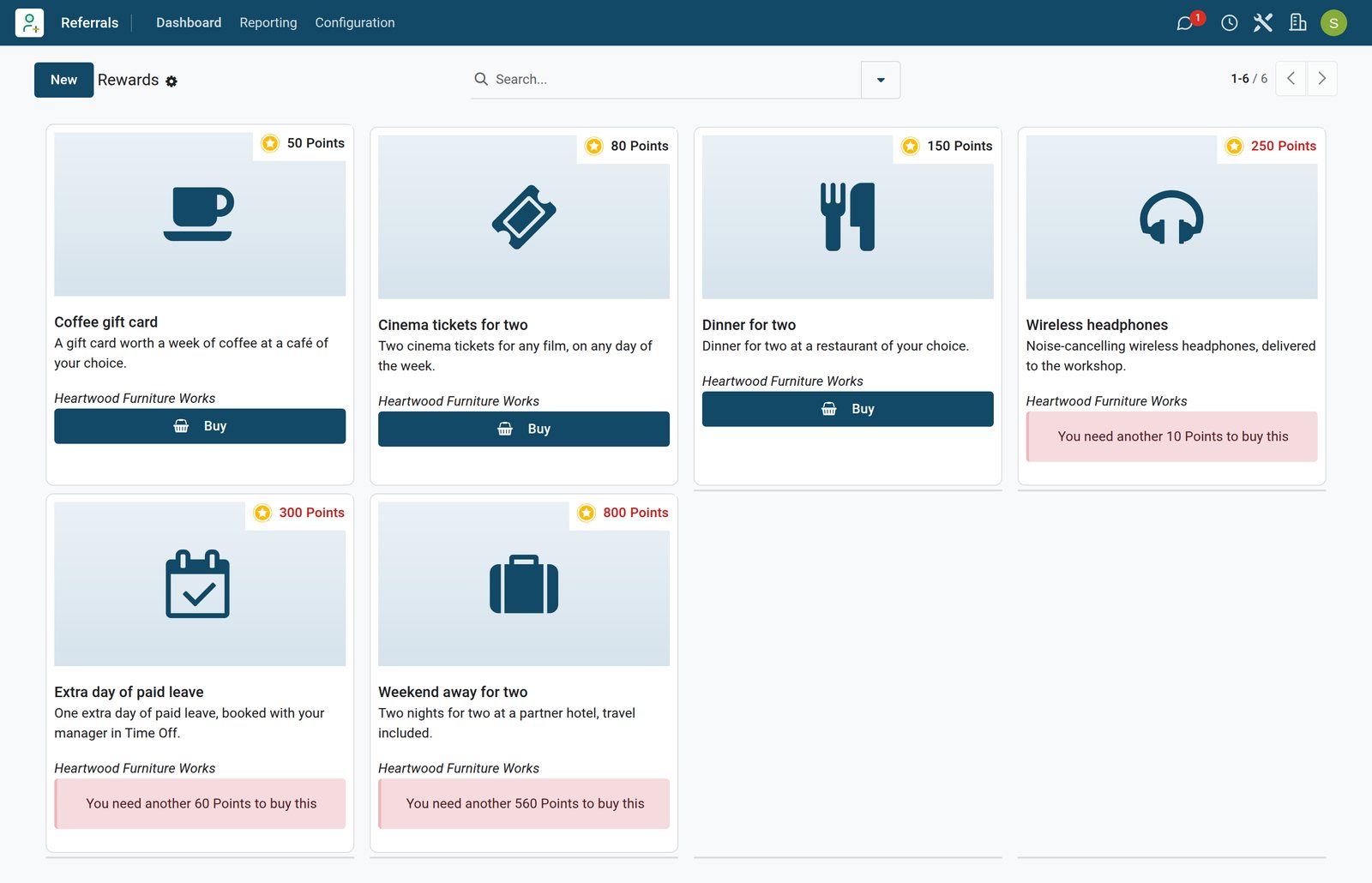
The shop shows every reward with its cost; the Buy button appears once the employee has enough points to spend.
 referrals
The rewards shop
With 240 points to spend, this employee can buy the coffee gift card, the cinema tickets or dinner for two, and needs 10 more for the headphones.
Explore referrals →See which jobs your referrals fill
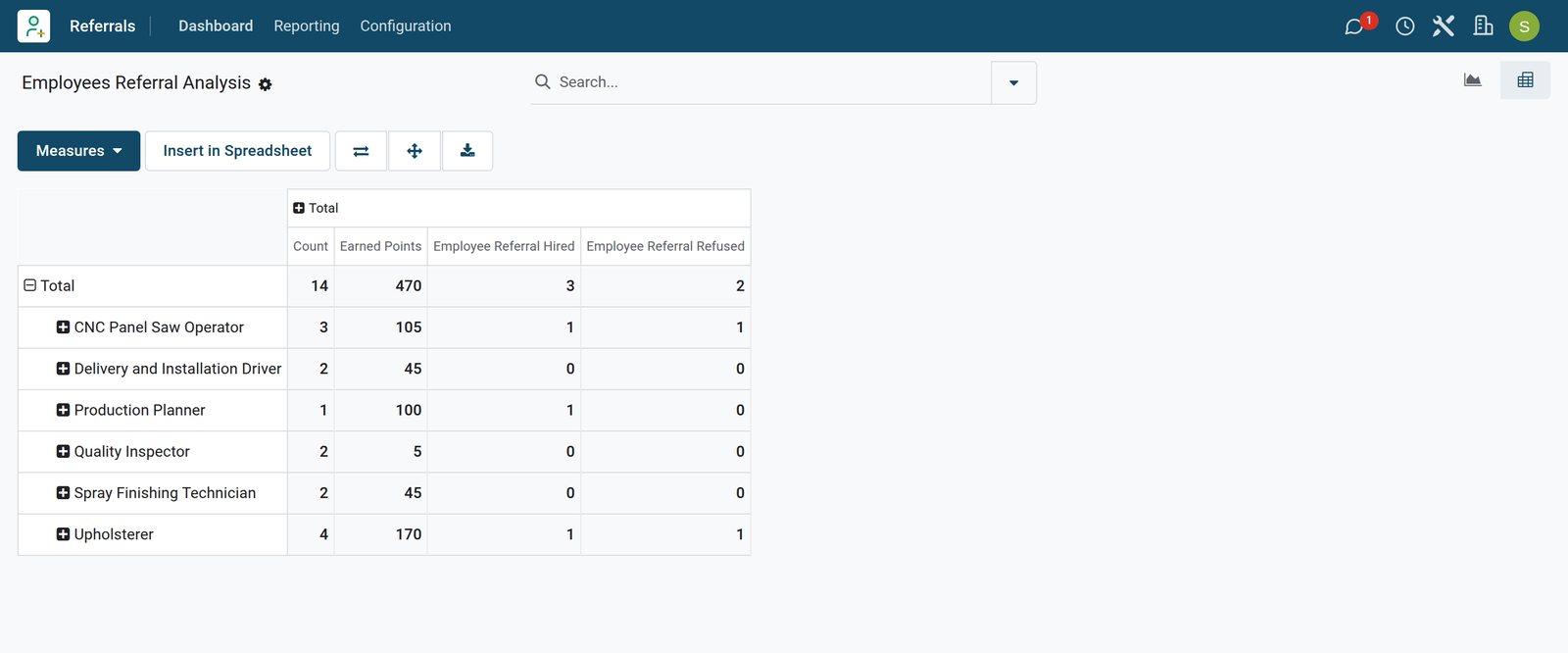
Referral Analysis counts referrals, points, hires and refusals, here per job, and per employee or channel when you need it.
 referrals
Referral Analysis by job
Fourteen referrals across six jobs earned 470 points; three were hired, one of them the Production Planner, and two were refused.
Explore referrals →Who uses it
Who uses it, and what each person sees
The same referral, seen from four desks.
Employee
Opens the dashboard, shares jobs, follows each referral stage by stage and buys rewards with the points earned.
Recruiter
Moves applications through the stages in Recruitment as usual; every step forward awards the referrer's points without extra work.
HR manager
Sets the points per stage, the levels, the alerts and the rewards, and reads Referral Analysis per job or per employee.
Gift responsible
Receives an activity when someone buys the reward they look after, so the gift is handed over and nothing is forgotten.
Works with
Runs with the apps around hiring
Referrals shares its records with the apps recruiters and employees already use.


Built for the way referrals travel today
Friends hear about jobs in chats, texts and social feeds, and one HR team often runs several companies.
Links for any channel
A referral link is an ordinary short link, so it works in chat groups, text messages, email and social posts on any phone.
SMS and WhatsApp from the card
Send SMS uses your SMS credits and Send WhatsApp an approved WhatsApp template, for friends who answer a message before an email.
Several companies, separate programmes
Jobs, rewards, alerts and points belong to a company, so each company in the database keeps its own programme and point balances.
Each employee's language
Screens follow each user's language setting; the demo has English, French and Arabic active, so staff use the same programme in their own.
Reports and control
Reports that show whether referrals work
Every figure comes from the same applications, points and links employees and recruiters use.
Referral Analysis
Referrals per job or employee with earned points, hires and refusals, as a pivot or as a chart by channel and state.
Points ledger
Reporting / Points lists every points line per employee, with the applicant and the stage that earned it, or the reward it paid for.
Clicks on shared links
Each shared link counts its clicks with the employee's source, the channel and the job's campaign, so you see which channel works.
Referrals in Recruitment reports
Recruitment's own analysis counts applications with a referrer, so referrals compare with job boards and direct applications.
Getting started
Launching referrals in your first week
No separate referral system to connect: you configure the app on top of Recruitment.
Set the points
On each Recruitment stage, tick whether it counts for referrals and give it points; the demo uses 5 to 50.
Stock the shop
Add rewards with a cost, a picture and a Gift Responsible under Referrals, Configuration, Rewards.
Publish and announce
Publish the job positions to refer and add an alert with start and end dates, so every dashboard carries the call.
Show employees around
Onboarding slides open the first time each employee visits Referrals, so the rules are explained before anyone shares a job.
What sets it apart
What makes referrals simpler in BridgeERP
Features, not promises: each one is a record or field you can open in the product.
Points follow the real pipeline
There is no separate tracker to update: points come from the application's stage in Recruitment, so they are never out of date.
Rewards employees pick themselves
Employees browse the shop and buy with their own points; HR only hands over the gift the activity points to.
One link per person and channel
Links carry the employee's source and the job's campaign, so credit for a hire never has to be argued about.
Questions
Questions about Referrals
Not covered here? Contact us.
Who can refer, and what do they see?
Employees with Referrals access see the dashboard, the published jobs to refer, their own referrals and the rewards shop. Recruiters keep working in Recruitment, and HR managers also see the configuration and the reports.
How are points earned?
Stages used for referrals carry points. When an application someone referred reaches such a stage, they receive its points: on the demo +5 at Initial Qualification up to +50 at Contract Signed, 100 for a hire.
What happens if the candidate is not hired?
The referral is marked Not Hired and the referrer keeps the points already earned. Referral Analysis shows the refused referrals per job and per employee.
How is a referral credited to the right employee?
The links on a job card carry the employee's own source and the job's campaign. An application that arrives through one of them records that employee as the referrer, and recruiters can also set it on the application.
Can employees share on WhatsApp and social networks?
Yes. Each job card has Send Email, Send SMS and Send WhatsApp buttons, a link to copy and share buttons for Facebook, X and LinkedIn. SMS uses SMS credits and WhatsApp needs an approved WhatsApp template.
Who hands over the rewards?
Each reward can name a Gift Responsible. When an employee buys it, the points are deducted and that person receives an activity to deliver the gift.
Can each company run its own programme?
Yes. Jobs, rewards, alerts and points belong to a company, so companies in the same database keep separate referral programmes and point balances.
Does it replace the Recruitment app?
No, it works on top of it: job positions, stages and applications stay in Recruitment, and Referrals adds the links, points, rewards and dashboard for employees.
Put Referrals to work
Add it to your plan and pay only for what you use, or see it running on your own demo first.