

Personal Trainers: Session packs, schedules and programmes for personal trainers
BridgeERP sells each session pack, puts every session in the trainer's schedule and keeps a programme with notes for each client.
Free instant access. No credit card required.
 Invoicing
 Appointments
 CRM
CRM Sales
Sales
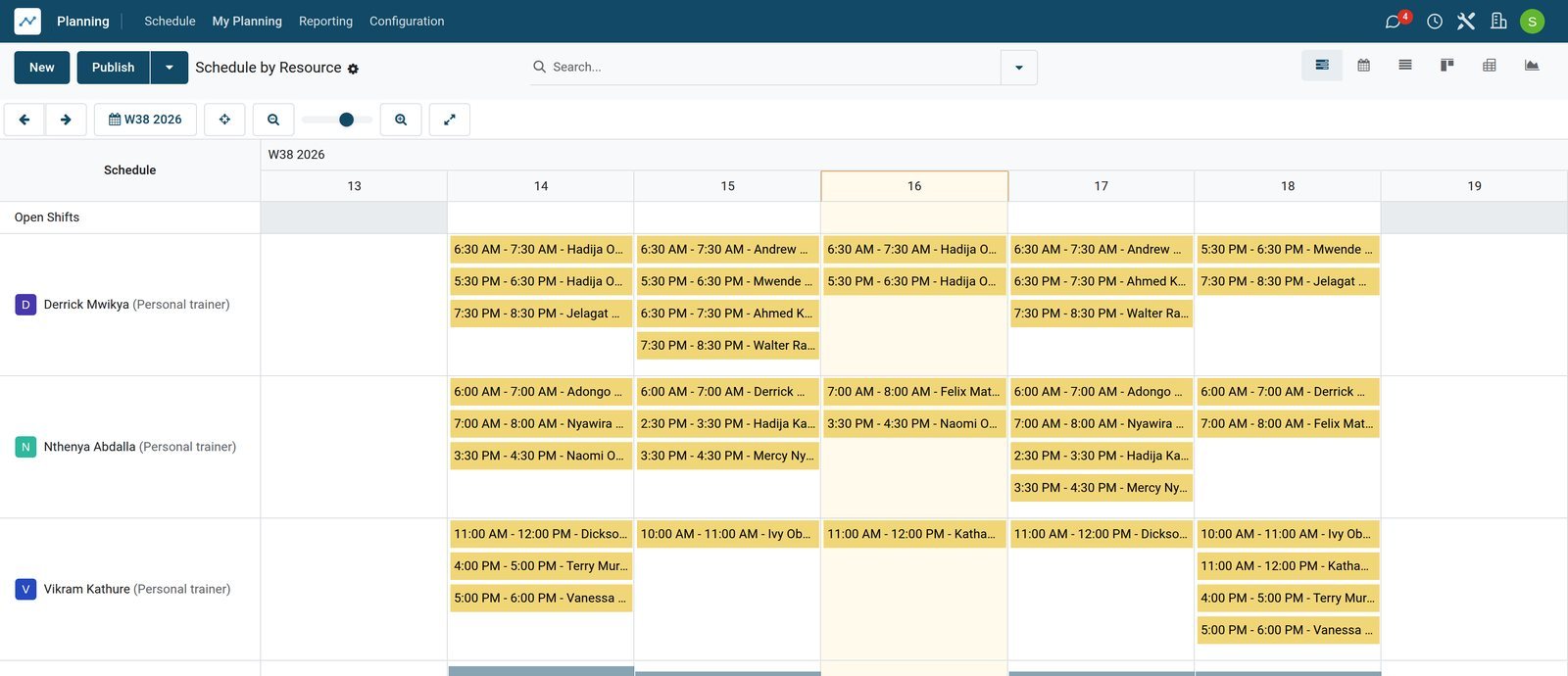
Packs sold, sessions counted
Each pack is sold and invoiced up front, and the order counts the sessions already scheduled and the ones still to plan.
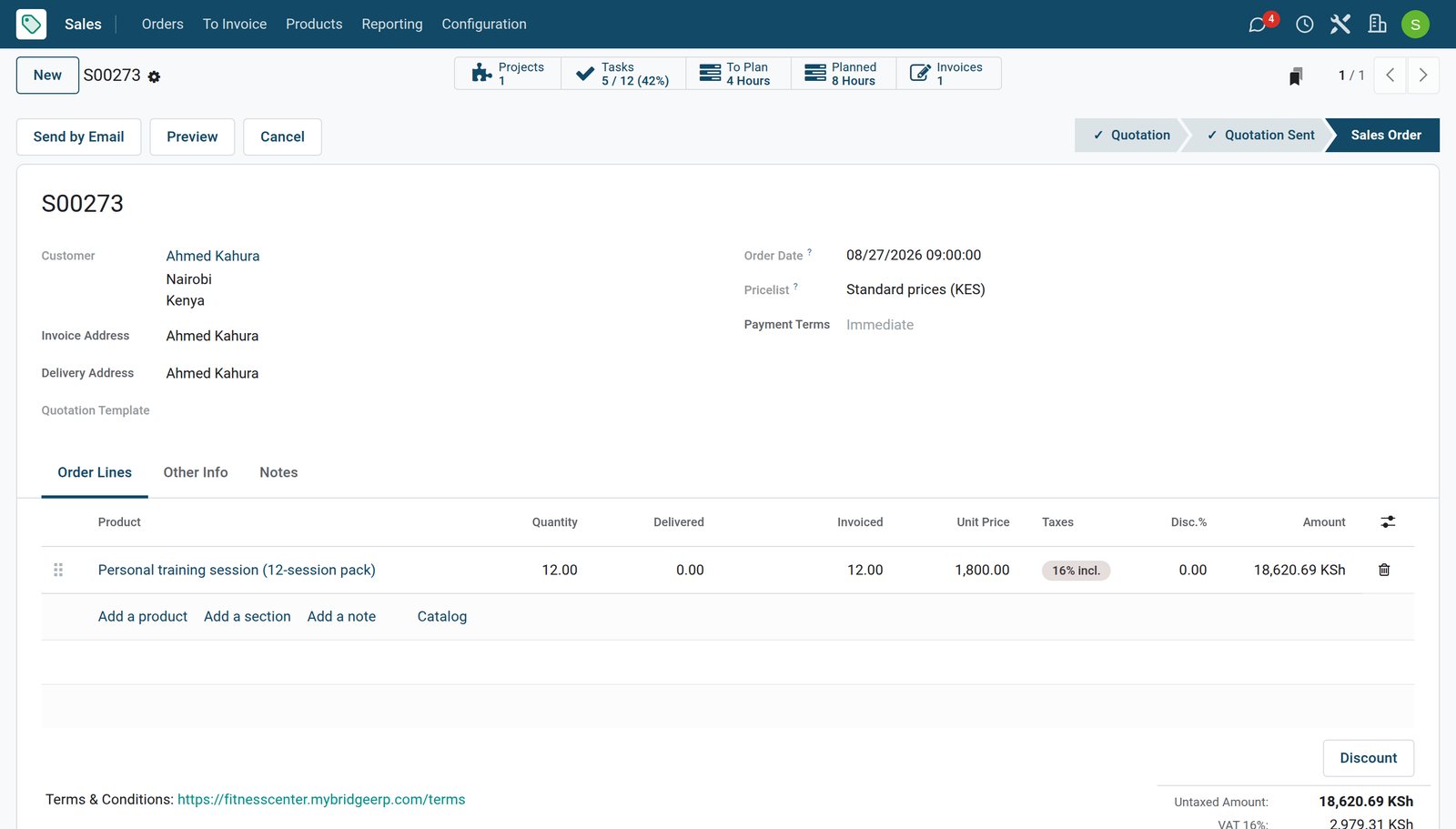 Sales
SalesA 12-session pack
Twelve sessions at 1,800 each, bought on 27 August. Eight hours are already in a trainer's schedule and four are still to plan.
Explore Sales →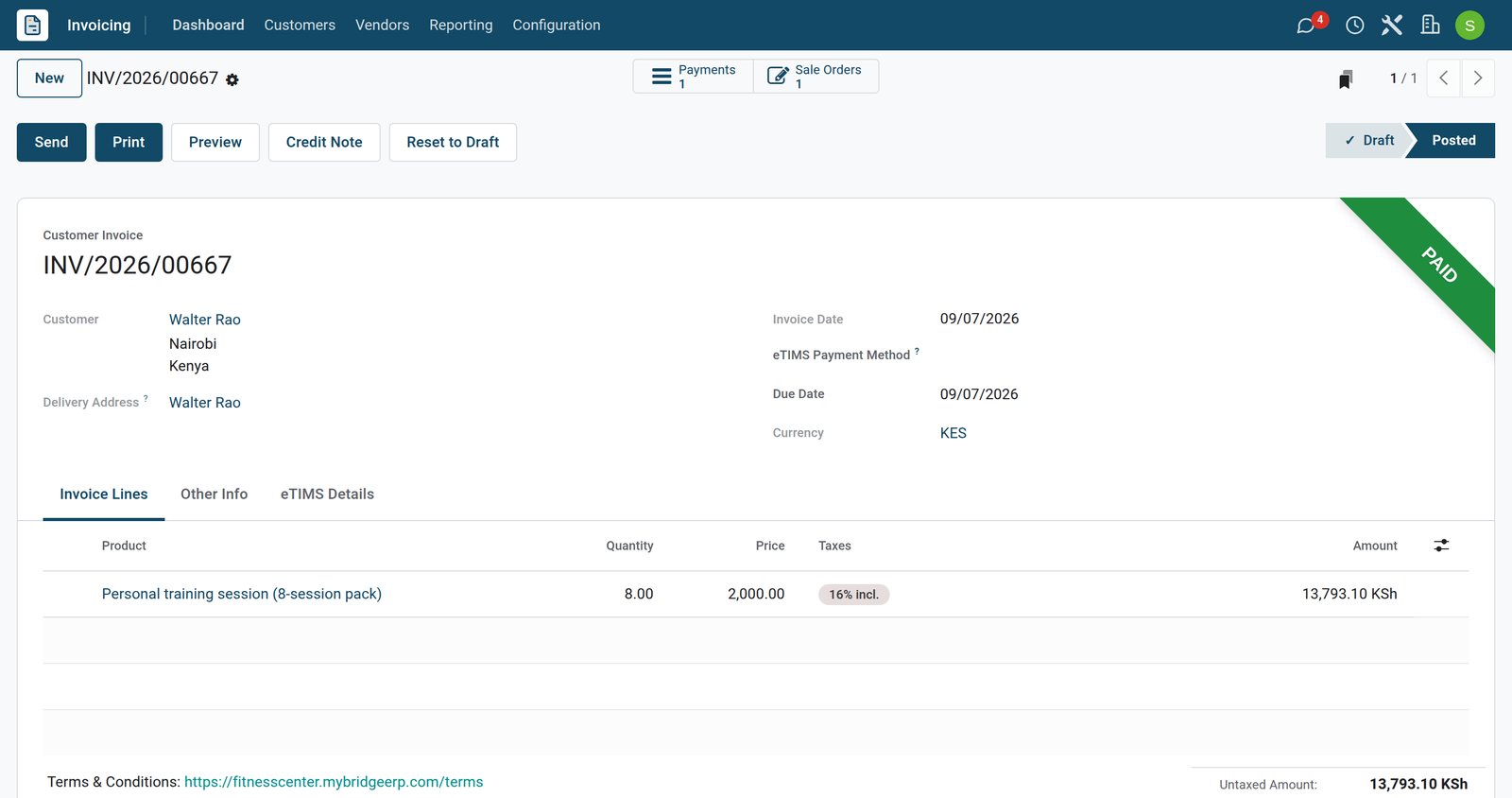 Invoicing
Paid when the pack is sold
The pack's invoice, 21,600 for the twelve sessions, posted and paid on the day the client bought it.
Explore Invoicing →Every session in the trainer's week
Each session sits in the trainer's schedule against its pack, and the hours still to plan stay on the order.
 Shift Planning
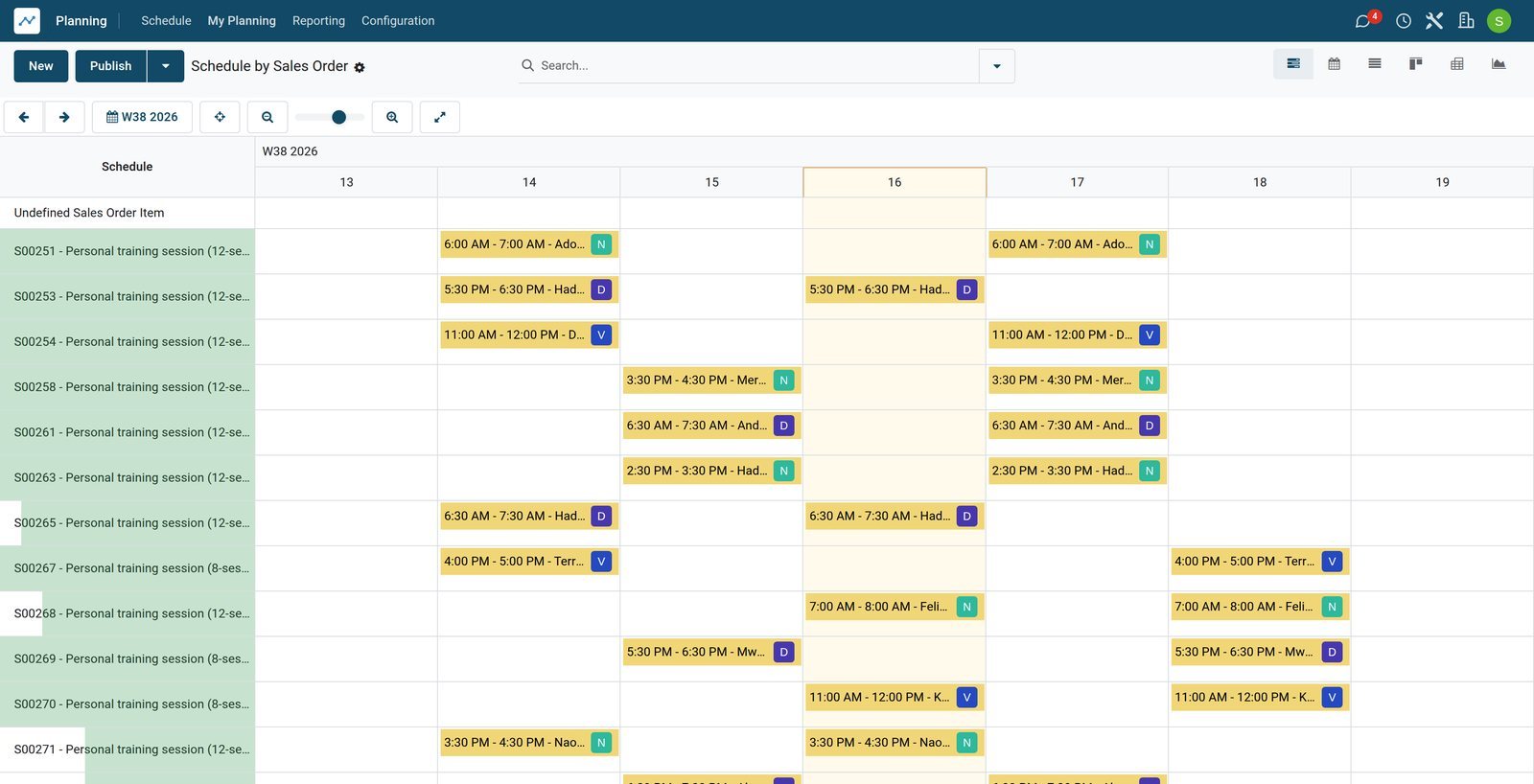
Sessions by pack
The same week grouped by pack, so the sessions delivered against each order and the ones still to plan are counted in one place.
Explore Shift Planning →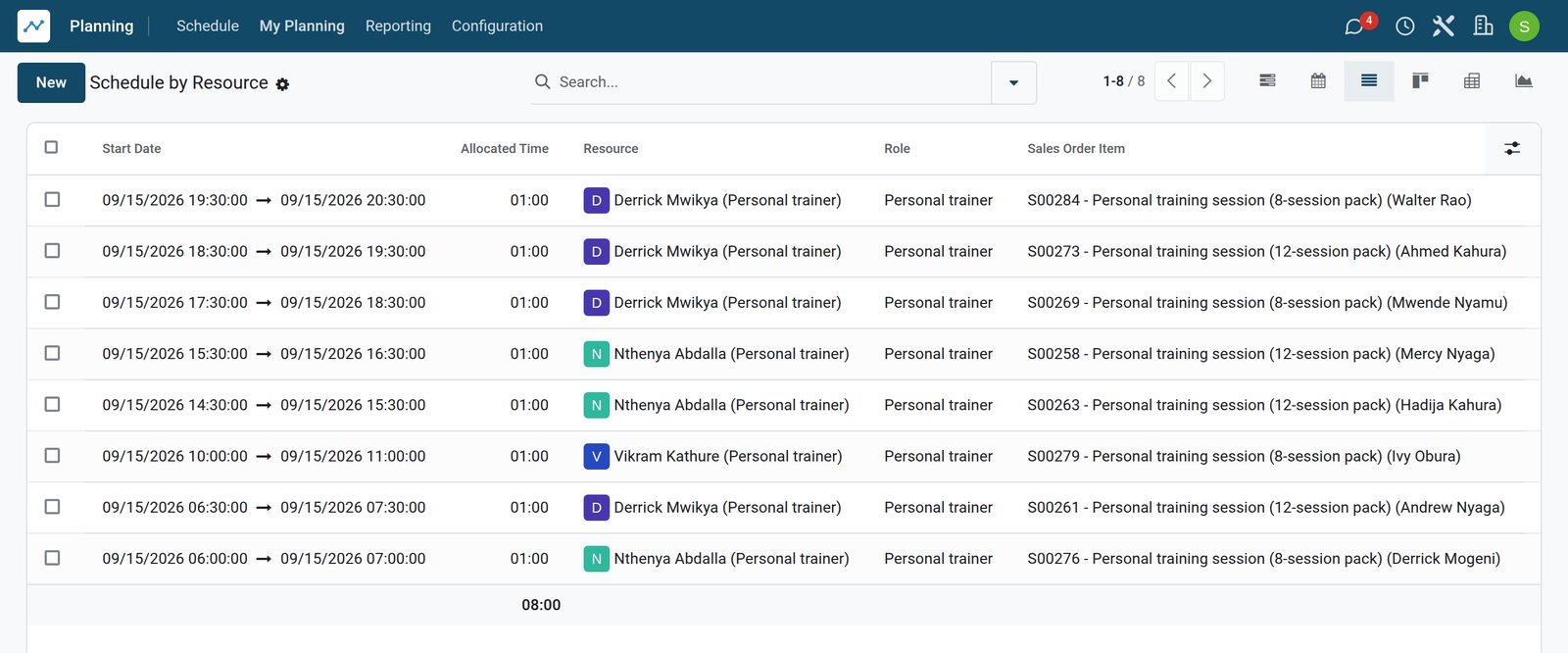 Shift Planning
A day, session by session
Tuesday's client sessions: the trainer, the hour and the pack each one belongs to.
Explore Shift Planning →By the numbers
What ships inside
Counted in the product.
- 4
- ways a service creates work when it is sold: nothing, a task, a project, or a project with its tasks
- 6
- states a task can be in, from in progress to done or cancelled
- 2
- states of a shift: draft while it is planned, published once the trainer can see it
- 2
- ways to invoice a service: on what was ordered, or on what was delivered
Inside the app
What is inside
The apps a personal trainer runs on, and what each does for the week.
Session packs
Packs of 8 or 12 sessions are products with a price per session, sold on a quotation and order.
Paid up front
The pack is invoiced when it is sold and the payment is recorded against the invoice.
Sessions in the schedule
Each session is a shift of the trainer linked to the pack, so the week shows who trains whom and when.
Sessions still to plan
The order line counts the hours scheduled and the hours left, so no paid session is forgotten.
A programme per client
Selling a pack copies a programme template into a project for the client, with a task for every session.
Notes on every session
The trainer writes the loads, measurements and next steps on each session's task.
Done or missed
Each session moves to done or missed, so the programme shows how many sessions were used.
Reports by trainer
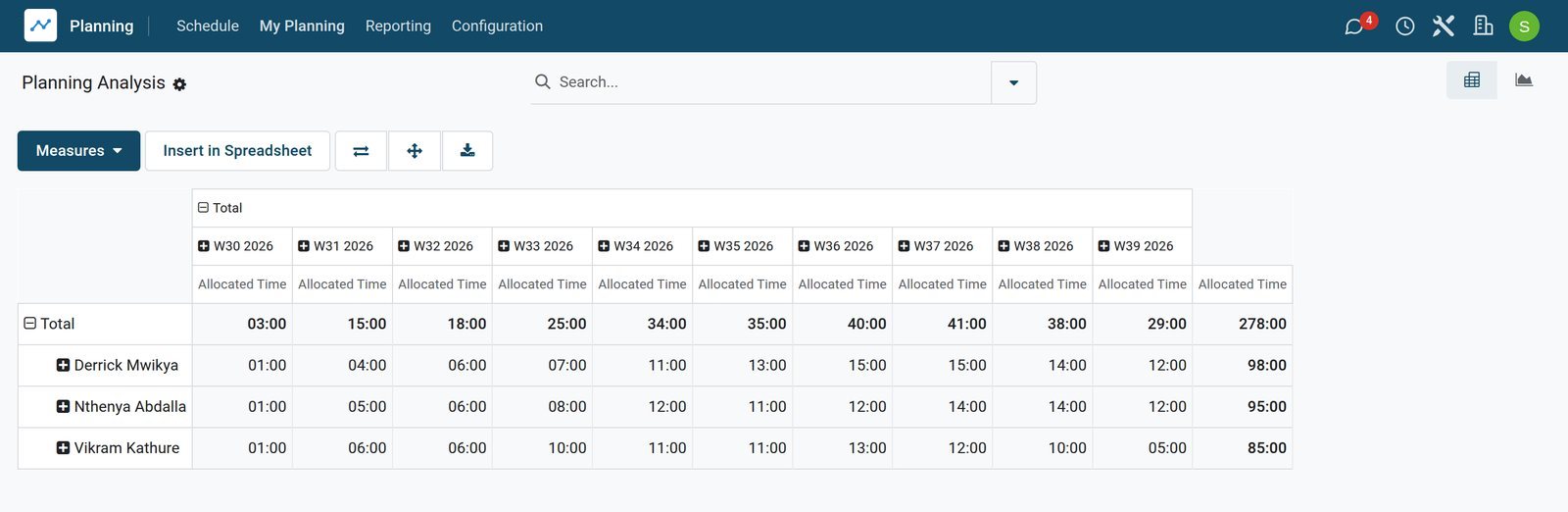
Planning analysis adds up the hours of sessions by trainer, client and week.
Step by step
From the first session to the next pack
How a client moves through personal training in BridgeERP, and which app does each step.
- Step 1
Sell a pack
The client buys a pack of 8 or 12 sessions on a quotation confirmed as an order.
Sales - Step 2
Invoice and pay
The pack is invoiced at once and paid by mobile money, card or cash.
Invoicing - Step 3
Schedule the sessions
Each session goes into the trainer's schedule, linked to the pack.
Shift Planning - Step 4
Train and take notes
After each session the trainer writes the loads, results and next steps on its task.
Projects - Step 5
Mark done or missed
The session moves to done, or to missed when the client did not come.
Projects - Step 6
Sell the next pack
When the sessions run out, a new pack starts the next programme.
Sales
A programme with notes on every session
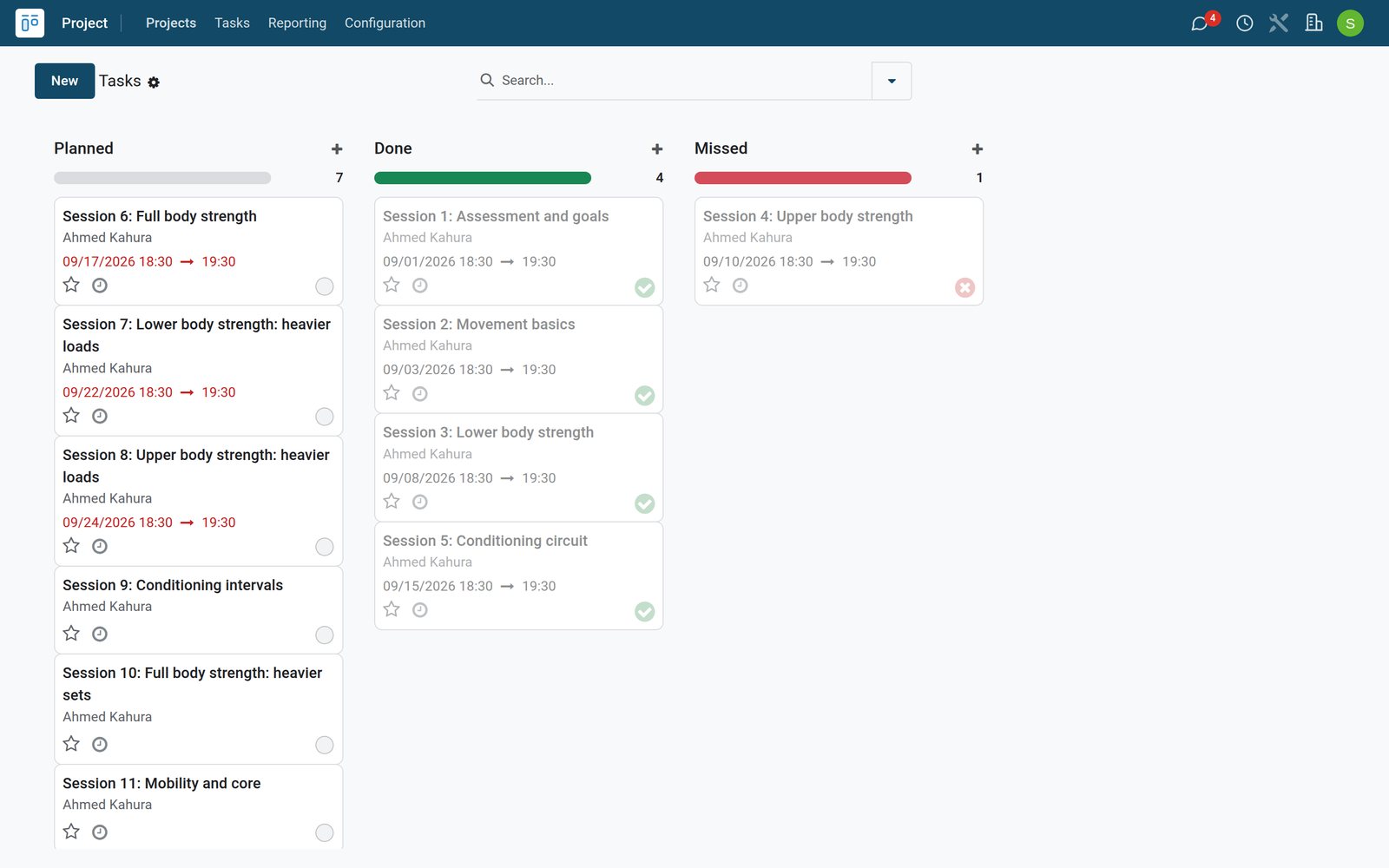
Each pack gets a project for the client, with a task per session that the trainer marks done or missed and fills with notes.
 Projects
The client's sessions by stage
Ahmed Kahura's twelve-session programme: four sessions done, one missed and the rest still planned, each one a task the trainer fills in after the session.
Explore Projects →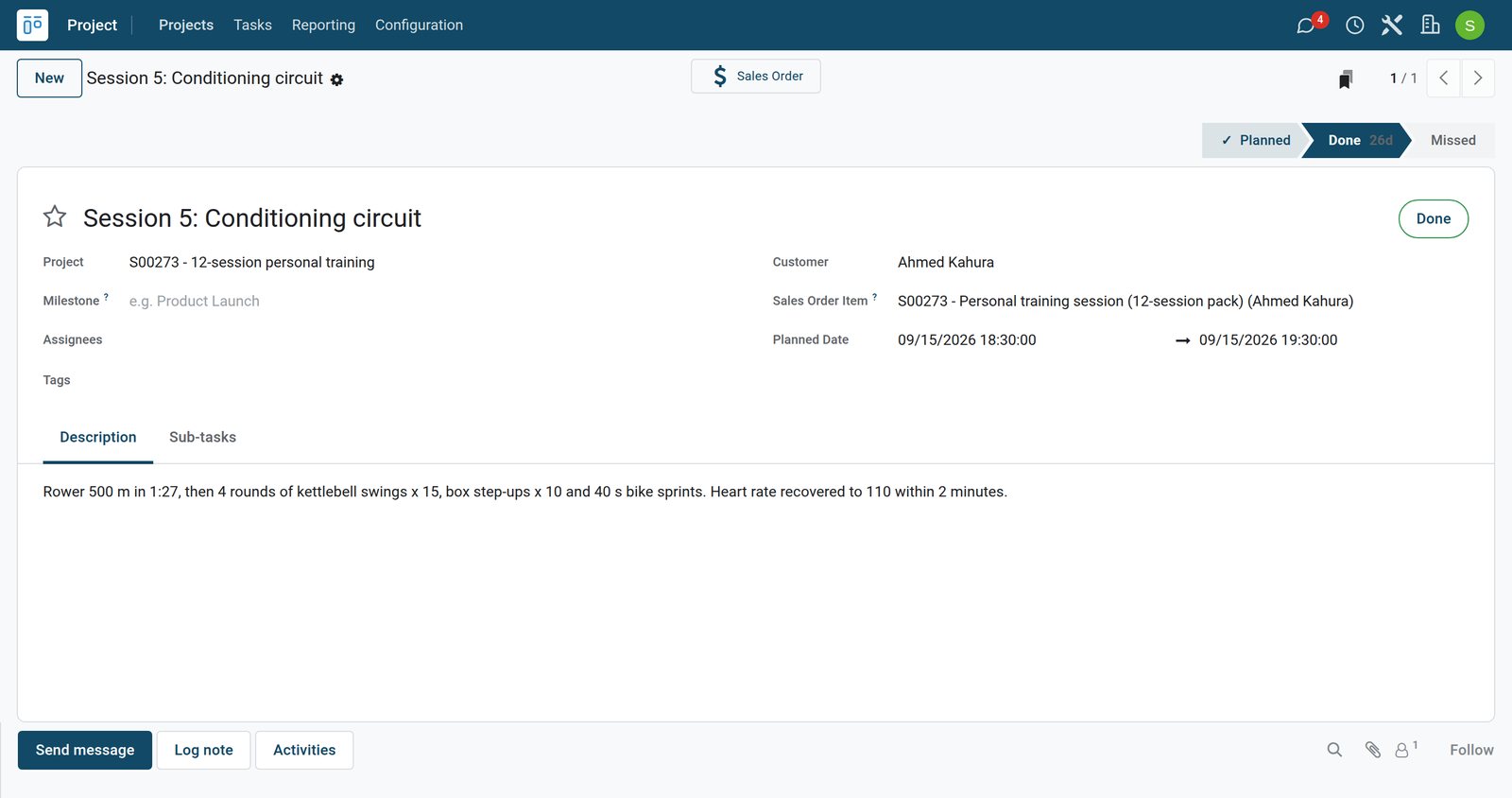 Projects
What the trainer wrote
Session 5 of the programme, done on 15 September: the rower time, the circuit that followed and how quickly the heart rate came down.
Explore Projects →One programme per client, pack after pack
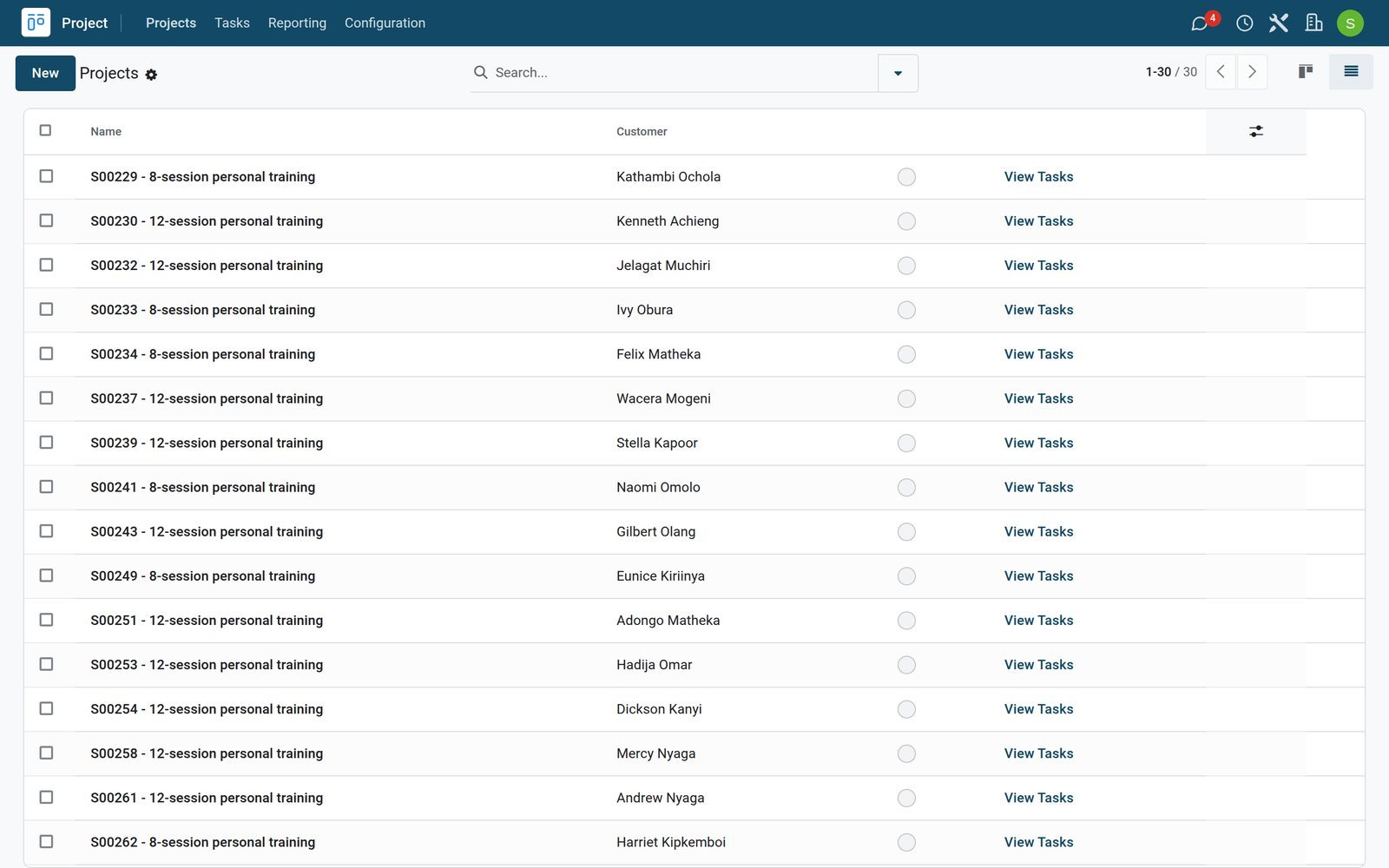
Every pack sold opens its own programme, so a client who comes back has the last one to look at.
 Projects
Every client's programme
One programme per pack sold, each with its client and its order, so a client who comes back has the last one to look at.
Explore Projects →Hours by trainer, packs by month
Planning analysis adds up session hours by trainer and week, and the sales analysis shows the packs sold.
 Shift Planning
Session hours by trainer
Session hours by trainer and by week, so a trainer's load is visible before the next pack is booked in.
Explore Shift Planning →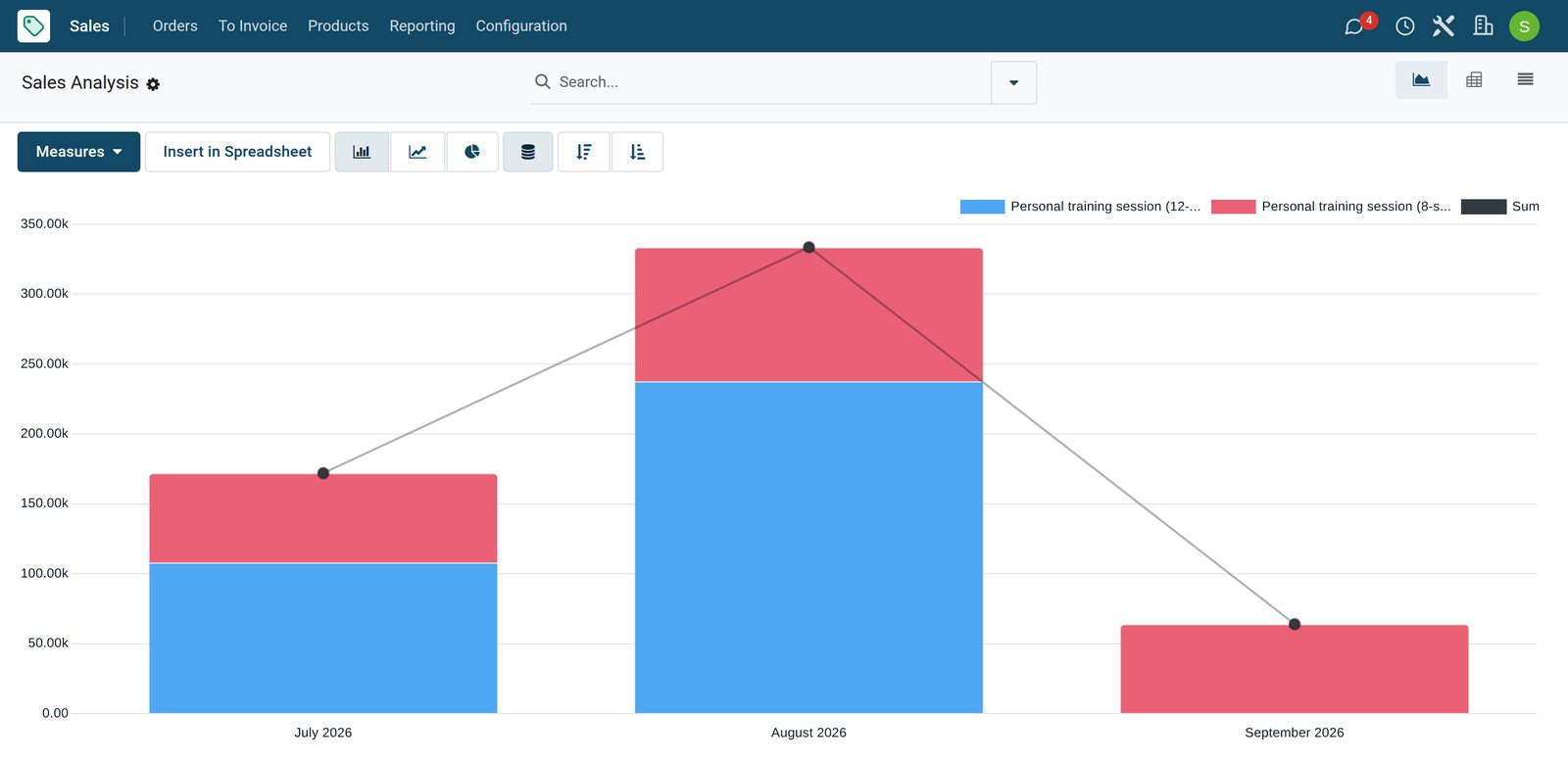
Who uses it
Who uses it, and what they see
One system for the trainers, the front desk and the office.
Trainers
See their sessions for the week, open each client's programme and write notes after every session.
Front desk
Sells packs, takes the payment and books the sessions into the trainer's free hours.
Head coach
Keeps the programme templates and follows which sessions are still to plan or were missed.
Owner
Follows packs sold, payments and the hours each trainer delivers.
Works with
Runs with the rest of BridgeERP
Apps a personal trainer draws on.


In your country
Your currency, payments and taxes
Set to the country the trainer works in.
Company currency
Pack prices, invoices and payments are kept in the currency of the company; the demo trainers charge in KES.
Prices with tax included
A tax can be included in the price, so the pack costs the published price and the VAT is worked out of it; the demo follows a Kenyan example.
Payments on their own journal
Each payment is recorded on the journal it came in on: the bank journal for mobile money and cards, the cash journal for cash taken at the desk.
Accounting by country
Accounting packages for more than 100 countries set up the chart of accounts, the taxes and the tax report.
Getting started
Getting started
How personal trainers move onto BridgeERP.
Create the packs
Create each pack as a service with its price per session, scheduled in Planning on the trainer role.
Build the programme templates
Create a template project with a task for every session, from assessment to re-assessment.
Add the trainers
Add each trainer as an employee with the trainer role and the hours they work.
Sell the first pack
Confirm the pack on an order, invoice it and schedule the first sessions.
Questions
Questions about Personal Trainers
Not covered here? Contact us.
Can we sell sessions in packs of 8 or 12?
Yes. Each pack is a product with a price per session, and the order quantity is the number of sessions in the pack.
How do we know how many sessions a client has left to schedule?
Each pack's order line counts the hours already scheduled and the hours still to plan, and the sessions left to plan appear in the schedule by sales order.
Do the sessions show in the trainer's schedule?
Yes. Each session is a shift of the trainer linked to the pack, so the week by trainer shows every client session next to the trainer's other shifts.
Where do trainers write their session notes?
Selling a pack creates a programme project for the client with a task per session. The trainer writes the loads, results and next steps on each task.
Can a missed session be recorded?
Yes. The session task moves to a missed stage with a note, so the programme shows which sessions were used and which were missed.
Can clients pay by mobile money or card?
The pack is invoiced when it is sold, and the payment is recorded on the journal it came in on, such as mobile money, card or cash.
Tax compliance
Invoices your tax authority accepts
In Kenya, Uganda, Rwanda, Burundi and Zambia, each invoice, receipt and stock movement goes to the tax authority's own system when you post it. Ghana and Pakistan come next, and we connect 73 more countries on request.
- KenyaReady
eTIMS KRA
Invoices, credit notes, POS receipts and stock movements
- UgandaReady
EFRIS URA
Invoices, POS receipts and stock
- RwandaReady
EBM RRA
Invoices, POS receipts, stock and imports
- BurundiReady
EBMS OBR
Invoices, POS receipts, stock and manufacturing
- ZambiaReady
Smart Invoice ZRA
Invoices, POS receipts, stock and imports
Personal Trainers, app by app
One connected flow instead of separate systems — the work moves from one team to the next without re-typing anything.
Every stop is a real app in your plan, and the hand-offs between them are the product.
- Customers & sales
- Operations
- Finance
CRM
Leads, opportunity pipeline, activities and sales forecasting.
CRM →CRMLeads, opportunity pipeline, activities and sales forecasting.Ready when you are
Open the plan builder with the right apps for this industry already selected, or see it running first.