

Law Firm: Run matters, court dates and client money from one law firm system
BridgeERP Law Firm opens each matter after a conflict check, keeps the court diary and deadlines, bills time and disbursements, and keeps the client account to the Advocates (Accounts) Rules.
Free instant access. No credit card required.
 Law Firm
 Invoicing
 Documents
 Sales
Sales Studio
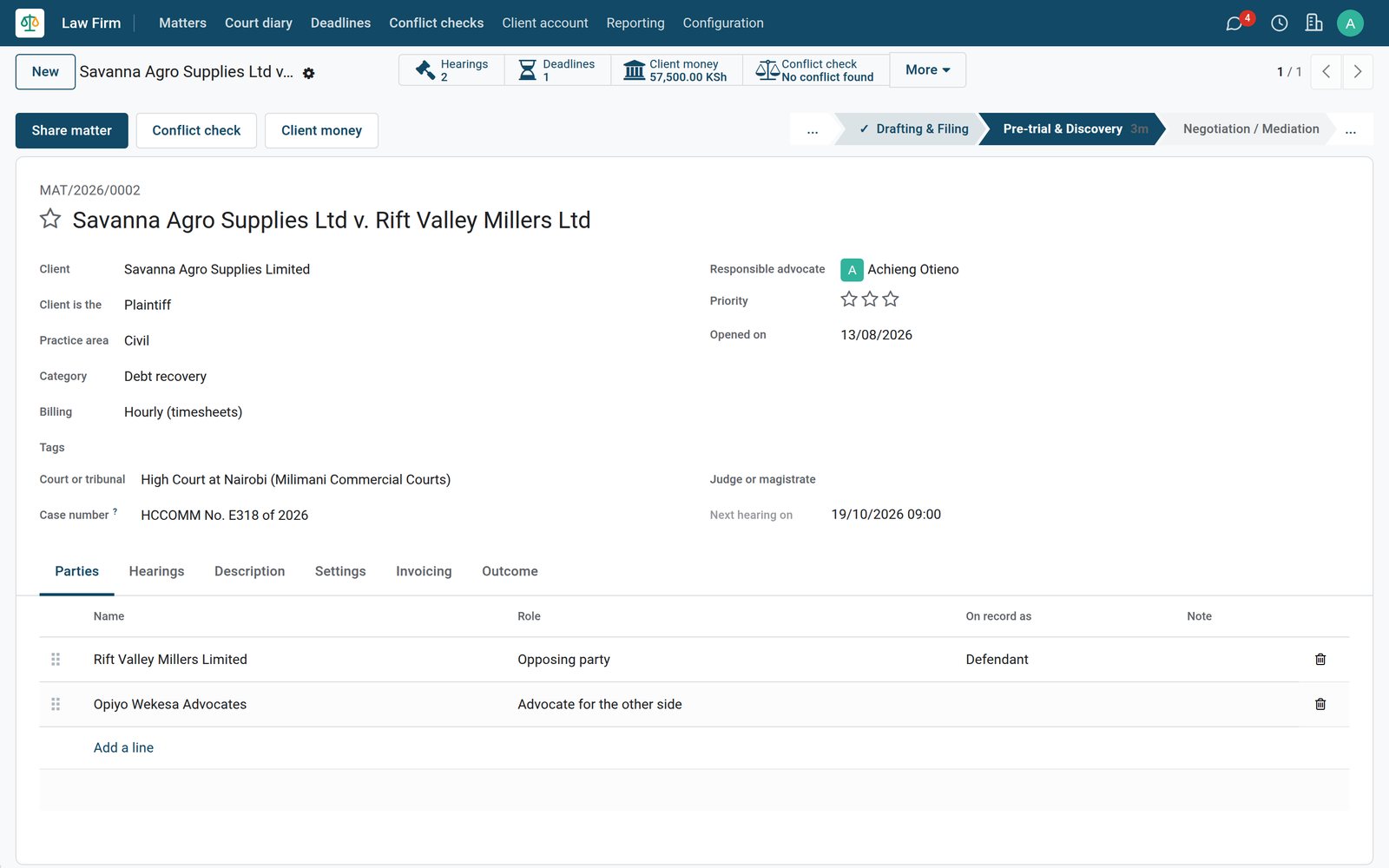
Every matter on one board, from intake to closing
Matters move through stages from Intake to Closed, and each card carries the client, the court, the next hearing and the client money held.
 Law Firm
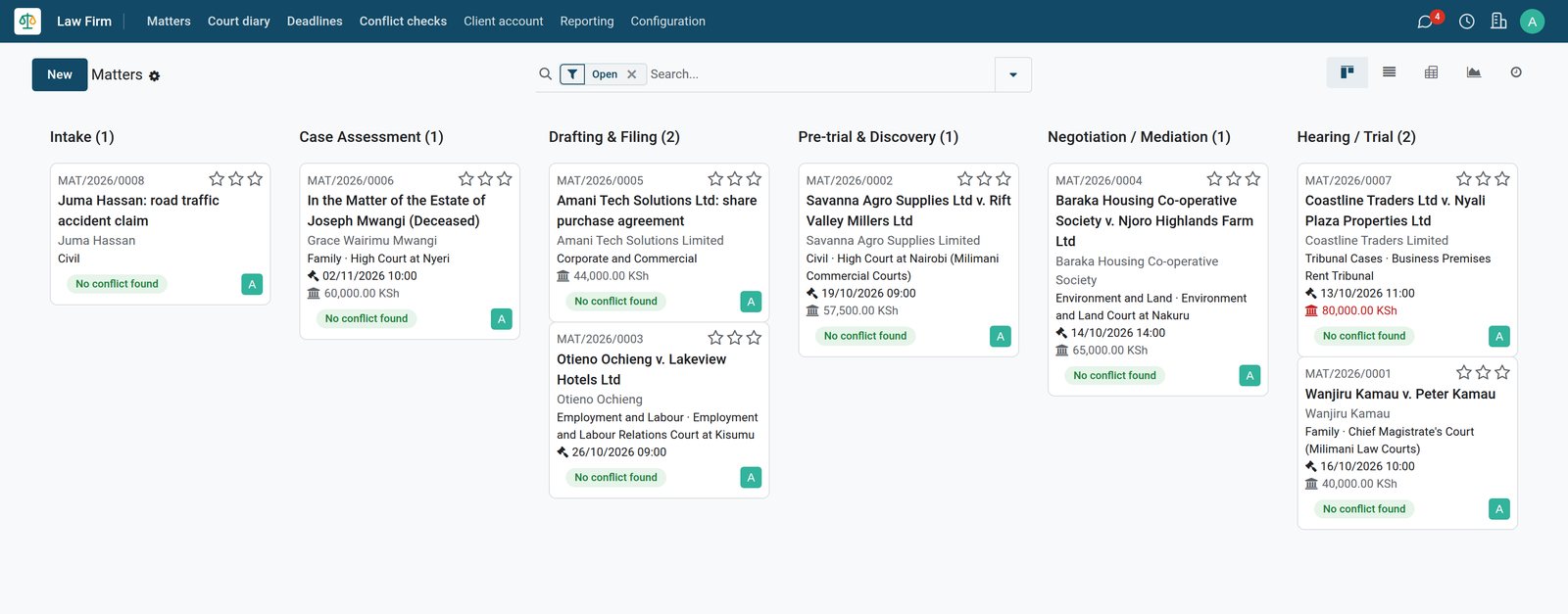
The whole practice at a glance
Each matter card shows its number, client, practice area, court, next hearing, conflict check result and client money held, grouped by stage.
By the numbers
Ready for practice on the first day, with courts and practice areas loaded
Counts of what the Law Firm app loads when it is installed, taken from the product itself.
- 241
- Kenyan courts and tribunals to pick on a matter, from the Supreme Court to magistrates' courts, Kadhis courts and tribunals
- 14
- practice areas, from criminal and family work to conveyancing, corporate, intellectual property and tax
- 50
- case categories inside those practice areas, such as debt recovery, unfair dismissal, and succession and inheritance
- 9
- matter stages from Intake to Closed, with the conflict check gate on every stage after Intake
Inside the app
What is inside the Law Firm app
Every card below is a real menu, field or report in BridgeERP Law Firm and the apps it works with.
Matters
Each matter gets a number, client and role on record, practice area and case category, court, case number, judge or magistrate, billing method and parties.
Conflict checks
Search a prospective client and the other side against the firm's contacts, clients and parties, then record no conflict, a conflict or a waiver with reasons.
Court diary
Hearings sit in the shared calendar with their type, court, judge or magistrate and outcome, and recording an outcome books the next date.
Deadlines
Filing, response, appeal, limitation and statutory notice deadlines are tasks on the matter, with a reminder activity for the people on each one before it falls due.
Fee agreements and time
The Fee agreement button drafts a quotation for hourly, fixed fee or retainer work; once accepted, time recorded on an hourly matter is billed from it.
Client account
Receipts, payments, transfers and bank charges post to a separate client bank account, each entry citing its rule and writing the client's ledger.
Three-way checks
Compare the bank statement, the client bank account in the books and the client ledgers, explain any difference, then confirm the check and keep it.
Documents by matter
Each matter gets its own folder inside a Matters folder in Documents, with tags for pleadings, evidence, correspondence, court orders, agreements, and bills and receipts.
Step by step
From the first call to the bill paid from client money
One piece of work, followed through the apps that handle it.
- Step 1
Check
Run a conflict check on the prospective client and the other side before accepting instructions; hits show the matter and the role the name played.
Law Firm - Step 2
Open
Open the matter with its client, court and parties; with the conflict gate on, it cannot leave Intake before its check is clear, cleared or waived.
Law Firm - Step 3
Agree fees
Send the fee agreement quotation from the matter for the client to accept, with hourly, fixed fee and retainer products already set up.
Sales - Step 4
Record time
Advocates log their hours against the matter in Timesheets, and Time by matter shows the hours recorded on each file.
Timesheets - Step 5
Bill
Invoice the time and disbursements; the bill carries the matter and its e-invoicing details, KRA eTIMS on the demo, with profit costs kept apart from disbursements.
Invoicing - Step 6
Pay from client money
Transfer the client's money to office against the posted bill, never more than is left to pay on it or held for that matter.
Law Firm
Know who you have acted for and against before you accept instructions
A conflict check searches every contact of the firm and every party on its matters, including matters the person running it cannot open.
 Law Firm
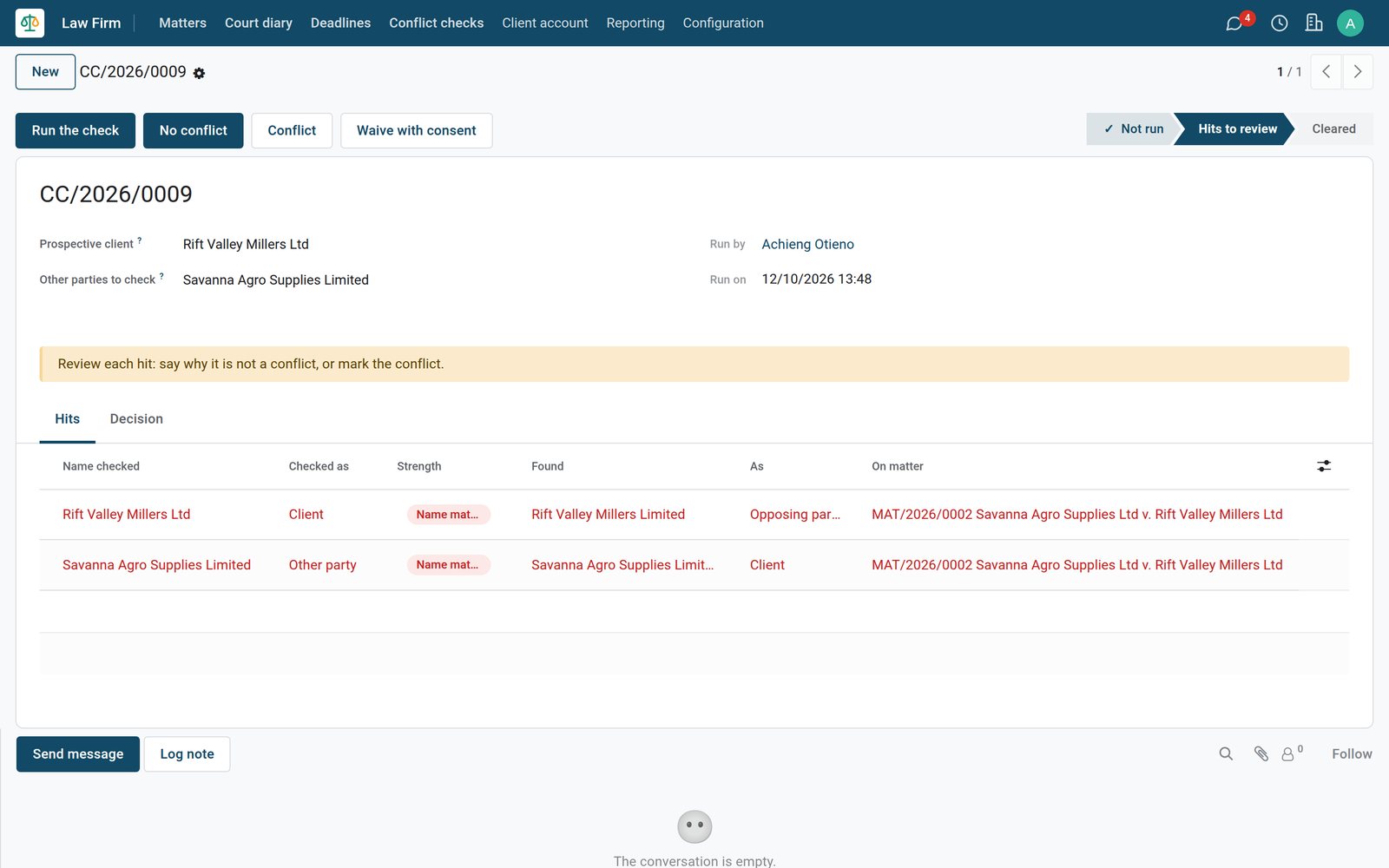
Hits with the matter and the role
Checking Rift Valley Millers as a prospective client finds it as the opposing party on an existing matter, and the other side as that matter's client.
Never lose track of a mention, a hearing or a filing date
Hearings live in the calendar the firm already uses, and deadlines are tasks with reminders, both tied to the matter.
 Law Firm
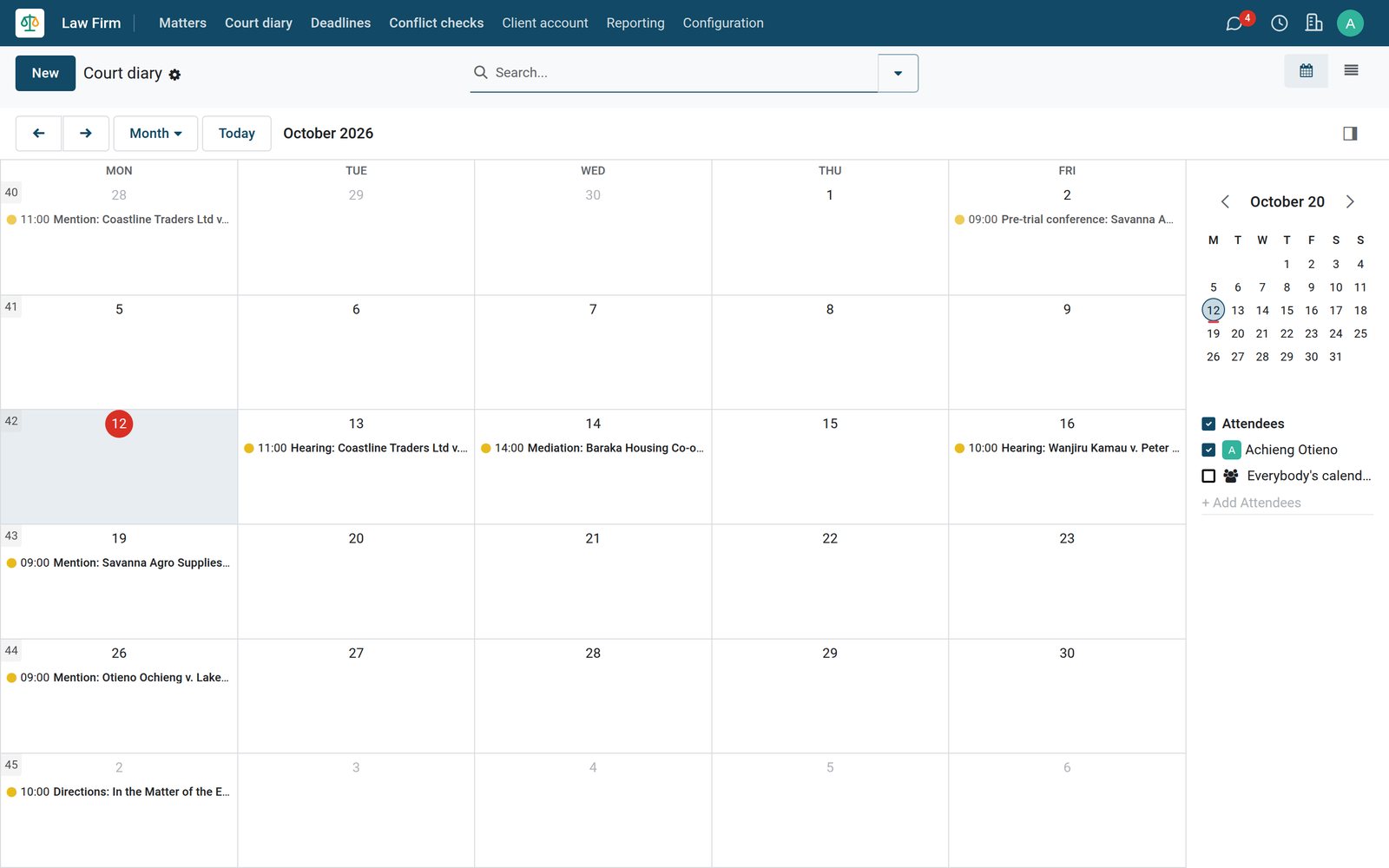
A court diary for the whole firm
Mentions, hearings, pre-trial conferences and mediations sit in the shared calendar by matter, and recording an outcome books the next date in one step.
 Law Firm
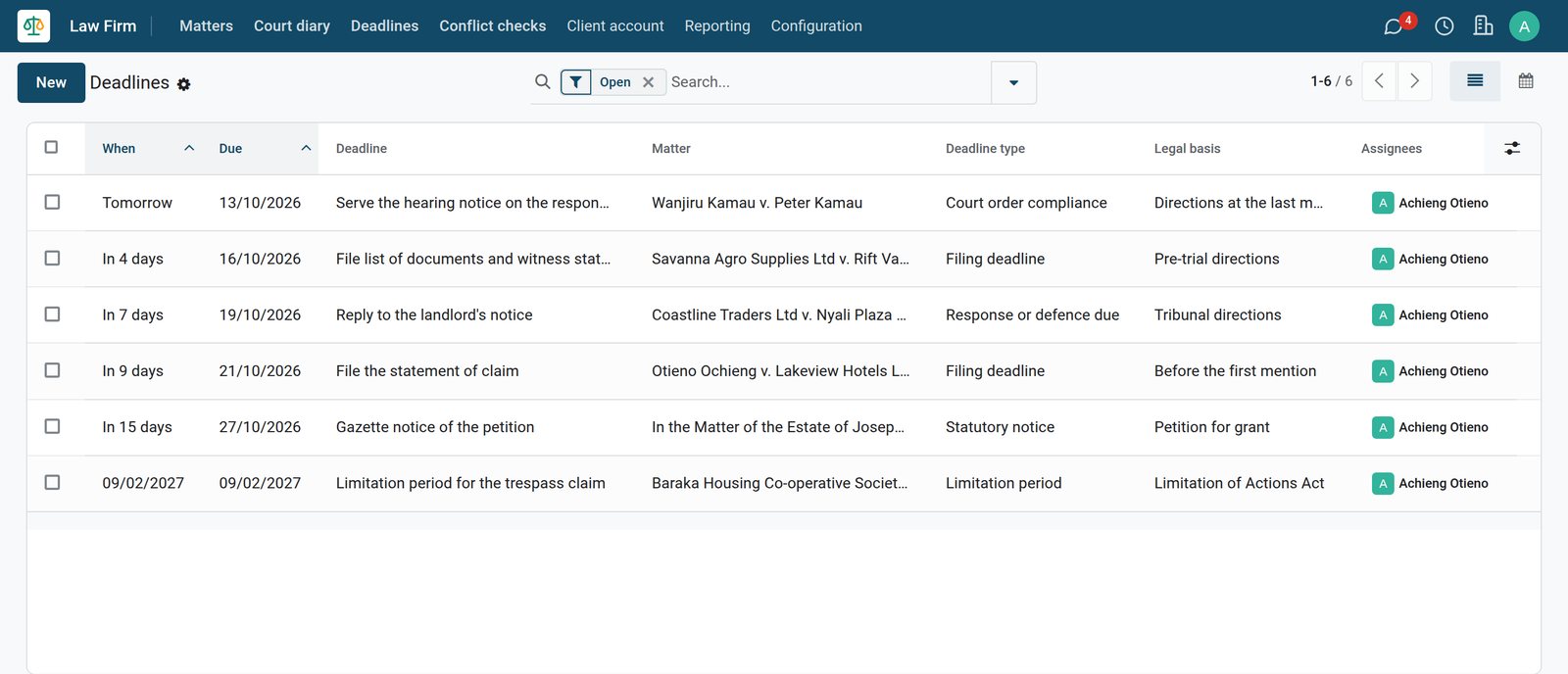
Deadlines with their basis
Every deadline shows its due date, matter, type and the direction or law it comes from, and a reminder activity reaches the advocate before it falls due.
Client money kept apart, entry by entry
The client account has its own bank journal. Every entry cites its rule, writes the client's ledger and is corrected only by a reversal.
- Law Firm
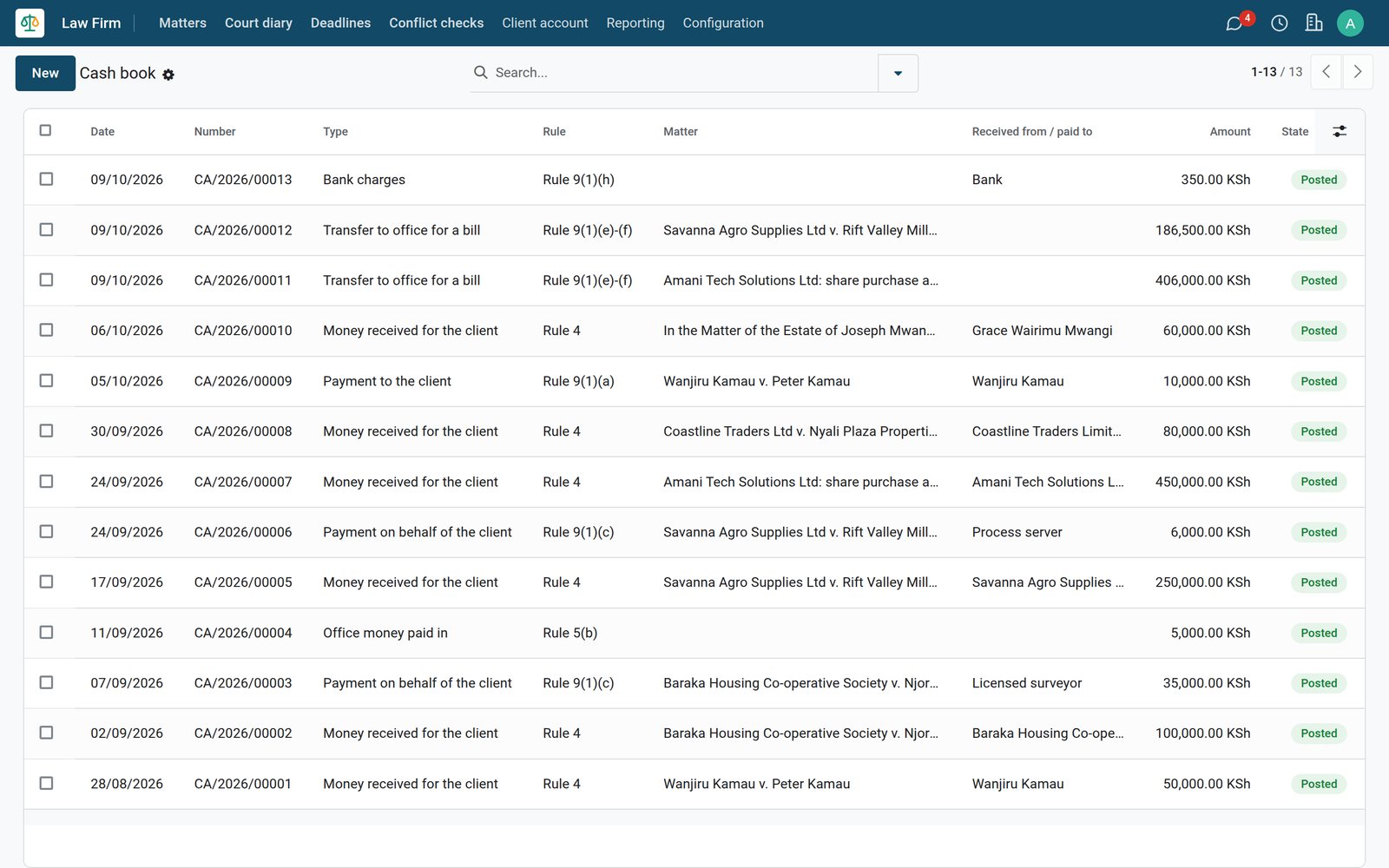
A cash book that cites the rules
Receipts, payments on behalf of clients, transfers to office and bank charges are listed with their rule, matter, counterparty, amount and state.
- Law Firm
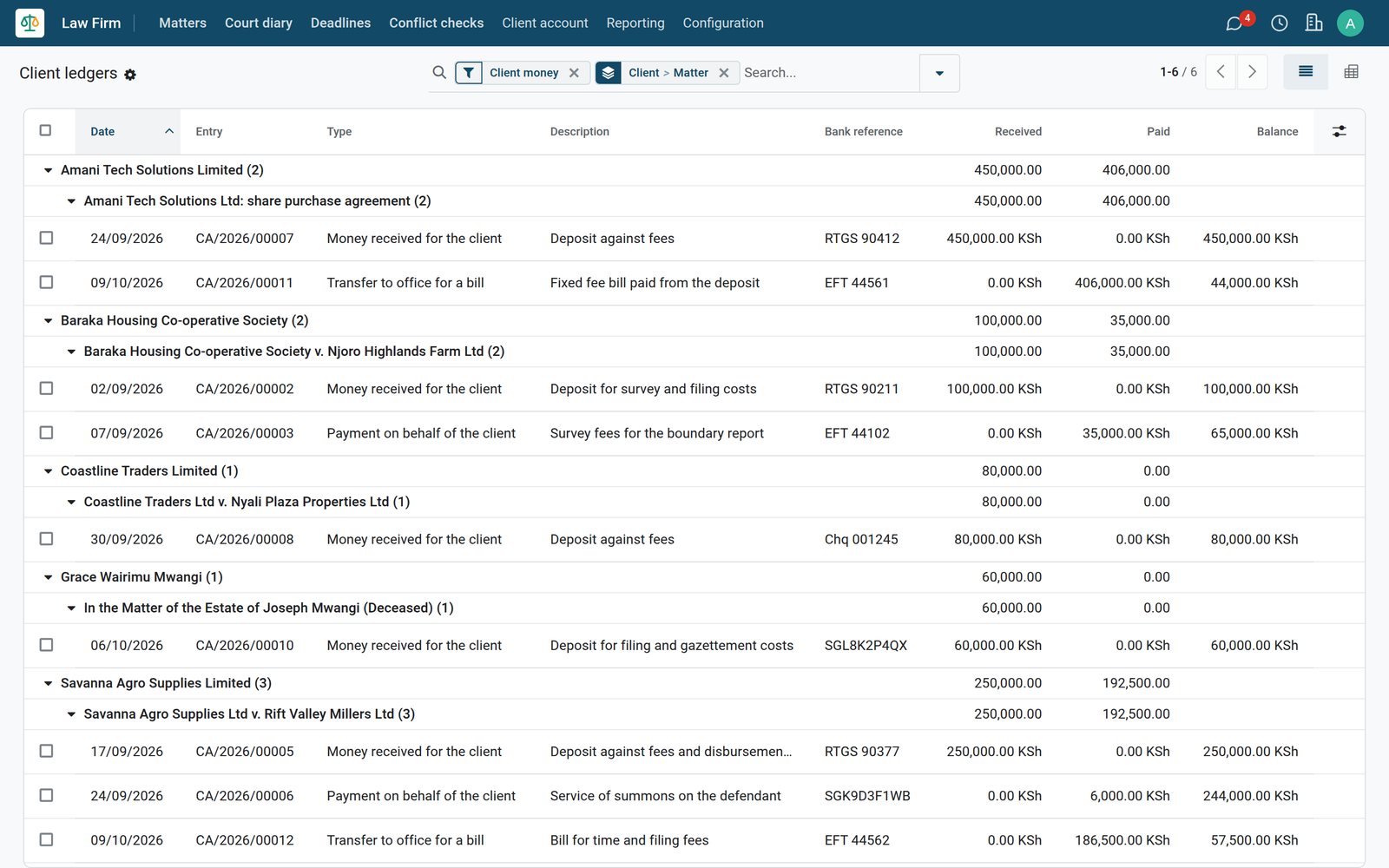
A ledger for every client and matter
Client ledgers group each client's money by matter, with money received, money paid and the running balance after every entry.
- Law Firm
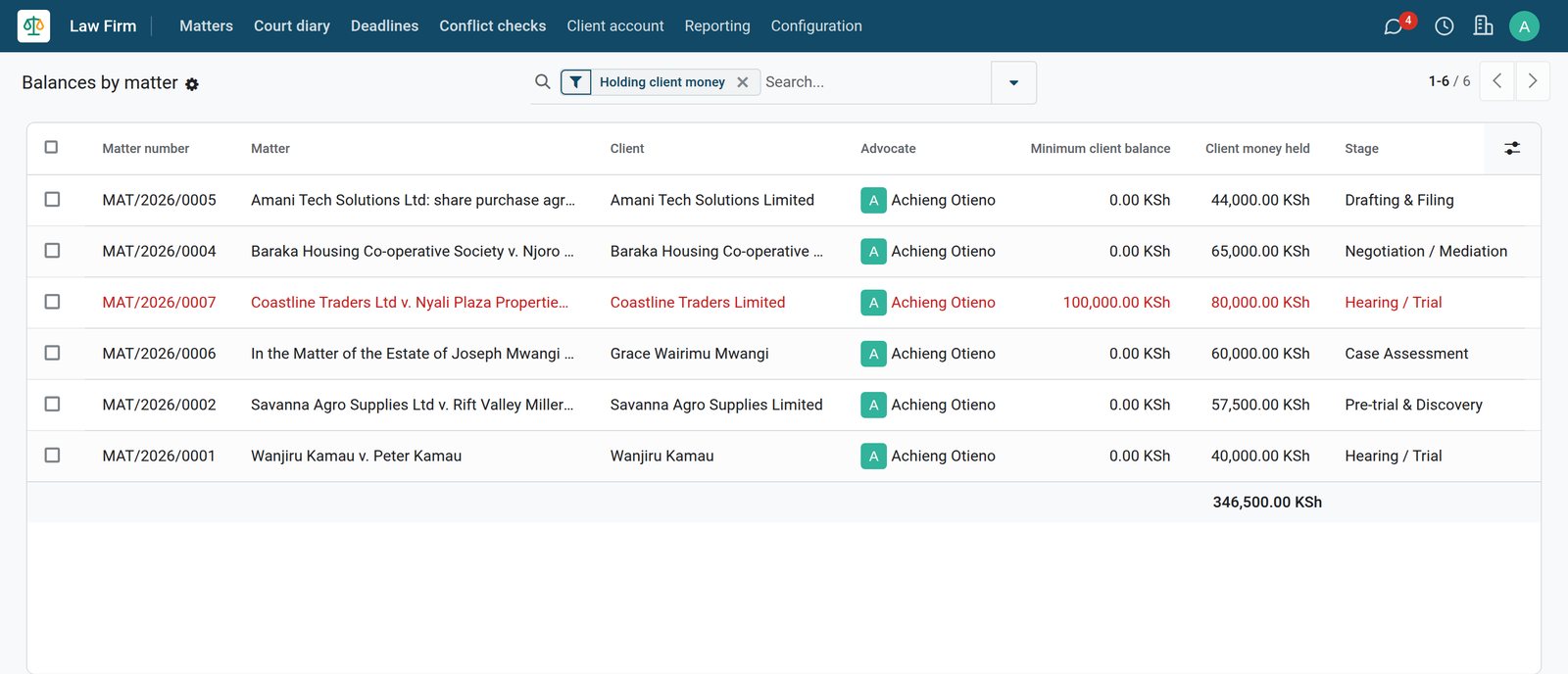
Balances by matter, with a floor
Balances by matter totals the money held for each matter and turns a line red when it falls below the minimum balance set on the matter.
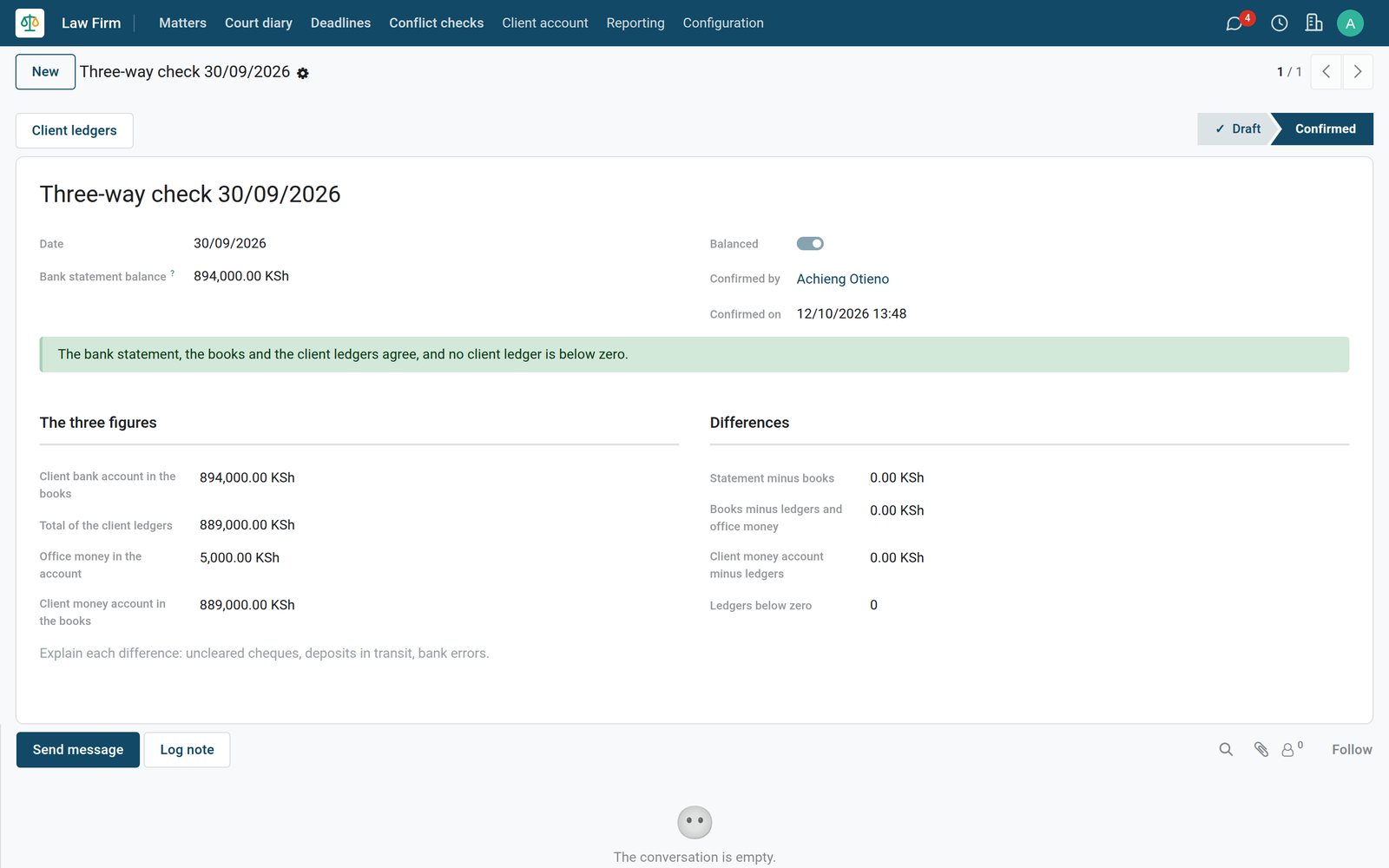
Close every month with a three-way check that is kept
The bank statement, the client bank account in the books and the client ledgers are set side by side, and any difference is explained before confirming.
 Law Firm
Three figures that must agree
Enter the statement balance; the check compares it with the books, the client ledgers plus office money and the client money account, and counts ledgers below zero.
Bills that know the matter, the fees and the disbursements
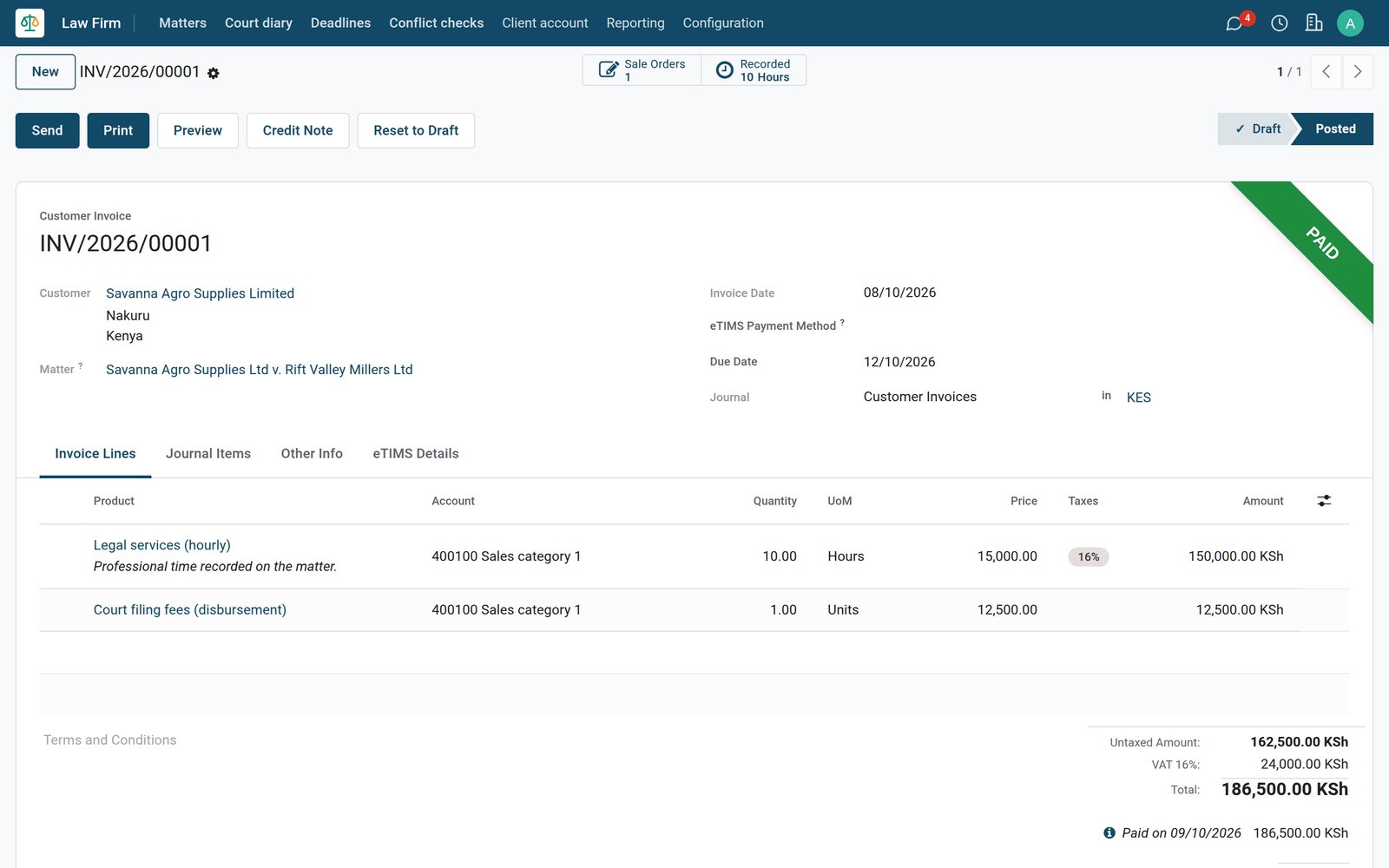
Fee agreements become invoices in Accounting, linked to the matter and paid from client money when the client has money held.
 Invoicing
One bill for fees and disbursements
The bill carries its matter and links back to the fee agreement and the time recorded; VAT applies to the fees but not to the court filing fee.
Explore Invoicing →Who uses it
What each person in the firm sees
One database, with Law Firm access set by role and each person working in the screens that matter to them.
Advocate
Works matters, runs conflict checks, books hearings and deadlines and records time, seeing the client money held on each matter.
Client account officer
Posts and reverses client account entries, which no other Law Firm role can do, and prepares the month-end three-way check.
Managing partner
As Law Firm administrator, waives conflicts on written consent, reopens waived checks, switches on the conflict gate and sets deadline reminders.
Accountant
Works in Accounting on the same bills, payments and client bank journal, with the Bills record and aged receivables for follow-up.
Works with
Apps that run with Law Firm
Switch on what the firm needs; they share clients, matters, time and the ledger.
- Law FirmMatters, conflict checks, court diary, deadlines and client account
 ProjectsMatter stages, tasks and the work behind each file
 TimesheetsHours by advocate and matter, ready to bill
- SalesFee agreements sent for the client to accept
- InvoicingBills, payments and e-invoicing
 AccountingBank journals, reconciliation and financial reports
- DocumentsA folder for each matter with legal tags
 SignEngagement letters and agreements signed online
 AppointmentsConsultations booked online by clients
 CRMEnquiries and referrals before instructions
 WebsiteThe firm website with practice areas and contact forms
 EmployeesAdvocates, clerks and staff records
In your country
Built for how law firms practise, bill and hold client money
Courts, client account rules, tax and payments as the app ships them, starting with Kenya's; courts and practice areas are records a firm adds to for its own jurisdiction.
Courts and tribunals, loaded
Pick the court on a matter from the Supreme Court, Court of Appeal and High Court stations down to magistrates' courts, Kadhis courts and tribunals.
Advocates (Accounts) Rules
Entries cite their rule: rule 4 for receipts, rule 9 for payments and transfers, rule 10 against overdrawing a matter, rule 14 for keeping records.
VAT on fees, not on court fees
Professional fees carry VAT at 16%, while court filing fees and stamp duty are billed without VAT and disbursements are reported apart from profit costs.
E-invoicing on bills
Customer bills go through the country's e-invoicing connector, KRA eTIMS for Kenya, which stores the signature and receipt number on each invoice.
Mobile money, cheques and RTGS
Record how client money moved, by bank transfer (EFT or RTGS), cheque, mobile money or cash, with the transaction or cheque reference.
Practice areas, loaded
Practice areas ship with a Kenyan starting set, from election petitions and the Business Premises Rent Tribunal to succession, conveyancing and tax.
Reports and control
Reports that keep the firm in control
The reports below are menus in the demo, filled from matters, time, bills and client account entries.
Matters analysis
Chart or pivot matters by practice area and stage with the client money held, straight from the Law Firm Reporting menu.
Time by matter
A pivot, list or graph of the hours recorded on each matter, by advocate, task and period, from the timesheets.
Bills record
Every bill on a matter with profit costs, disbursements, tax, total and the amount unpaid, with totals for the period.
Low client balances
Filter matters whose client money has fallen below their minimum, and see ledgers below zero counted on every three-way check.
Corrections by reversal
A posted client account entry cannot be edited or deleted; a reversal is posted instead and points to the entry it reverses.
Deadlines calendar
Deadlines also show as a month calendar coloured by matter, next to the list ordered by due date.
Aged receivables
See which clients owe on their bills and for how long, then follow up from the same Accounting database.
Profit and loss
Fees billed and office costs reach Profit and Loss in real time, while client money stays a liability on the balance sheet.
Getting started
Up and running without retyping your records
Setup follows the Law Firm settings and the menus you will use every day.
Try it with the sample firm
Load a sample firm with matters, hearings, deadlines, bills and client money from Law Firm settings, then remove it in one click.
Set up the client account
One button in settings creates the Client Account bank journal and the Client money held liability account, then you choose the office account.
Courts, areas and stages
Adjust the loaded courts, practice areas, case categories, matter stages and fee products to your firm before opening the first matter.
Import clients, then open matters
Import clients from Excel or CSV, test the file before importing, then open matters and run a conflict check on each.
Questions
Questions about Law Firm
Not covered here? Contact us.
Does the conflict check match "Ltd" against "Limited"?
Yes. Legal-form words such as Ltd and Limited are set aside, so the names match. A contact holding every word of the name in another order, or among other words, shows as a possible match.
Can a matter be opened before its conflict check is done?
It can be created at Intake. With the conflict gate switched on in Law Firm settings, it cannot move to a later stage until its check is clear, cleared or waived.
Who can waive a conflict?
Only a Law Firm administrator, and only after the check has run. The waiver needs its reasons and the written consent it rests on, and only an administrator can reopen it.
Can more be paid out for a matter than the client account holds for it?
No. A payment or transfer that would take a matter below zero is refused with a reference to rule 10 of the Advocates (Accounts) Rules, even when two people post at the same moment.
How do we pay our fees from money held for a client?
Post a transfer to office for a bill. It must name a posted bill addressed to the client of the matter, and it cannot be larger than the amount left to pay on that bill.
What if a client account entry was posted by mistake?
Posted entries cannot be edited or deleted. Reverse the entry: the reversal is posted with a link to the original, and the client ledger shows both.
Can we import bank statements into the client account journal?
No. Client account entries already write that bank journal, so statement lines would count every movement twice. Record the bank's closing balance in a three-way check instead.
How is time billed on an hourly matter?
Send the fee agreement from the matter. Once the client accepts the quotation, the time recorded on the matter is billed on its hourly line when you create the invoice.
Tax compliance
Invoices your tax authority accepts
In Kenya, Uganda, Rwanda, Burundi and Zambia, each invoice, receipt and stock movement goes to the tax authority's own system when you post it. Ghana and Pakistan come next, and we connect 73 more countries on request.
- KenyaReady
eTIMS KRA
Invoices, credit notes, POS receipts and stock movements
- UgandaReady
EFRIS URA
Invoices, POS receipts and stock
- RwandaReady
EBM RRA
Invoices, POS receipts, stock and imports
- BurundiReady
EBMS OBR
Invoices, POS receipts, stock and manufacturing
- ZambiaReady
Smart Invoice ZRA
Invoices, POS receipts, stock and imports
Law Firm, app by app
One connected flow instead of separate systems — the work moves from one team to the next without re-typing anything.
Every stop is a real app in your plan, and the hand-offs between them are the product.
- Customers & sales
- Finance
- Platform & insight
Sales
Quotations, sales orders, price lists and customer portal.
Sales →SalesQuotations, sales orders, price lists and customer portal.Ready when you are
Open the plan builder with the right apps for this industry already selected, or see it running first.