

Professional Services: Client engagements, hours and fees in one place
BridgeERP gives accounting, tax and other professional firms the pipeline, engagement quotes, client projects, timesheets and invoices.
Free instant access. No credit card required.
 Invoicing
 CRM
CRM Point of Sale
 Purchase
 Sales
Sales Inventory
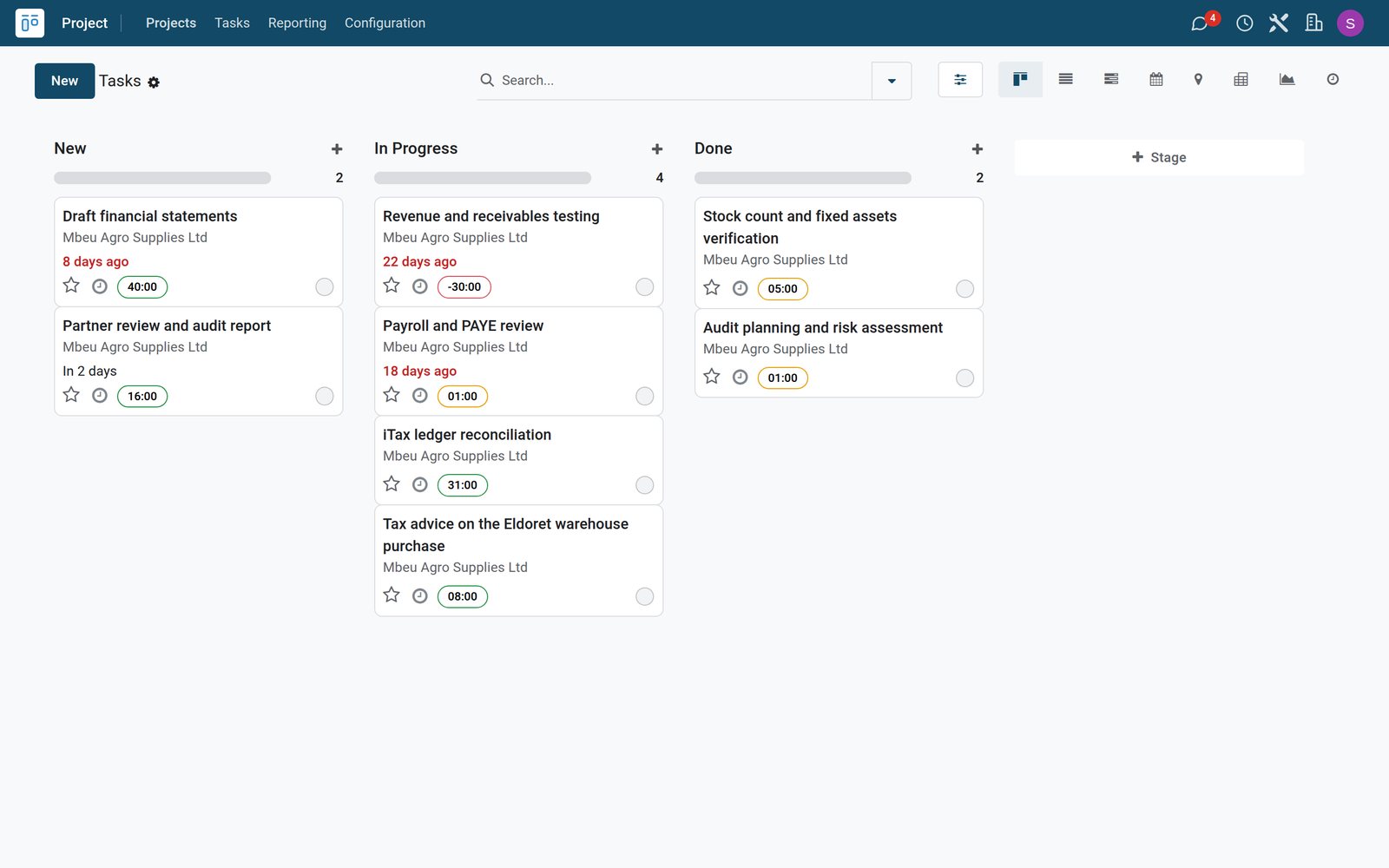
Engagement quotes with fixed fees and retainers
One quote combines a fixed audit fee, tax filing and a monthly bookkeeping retainer.
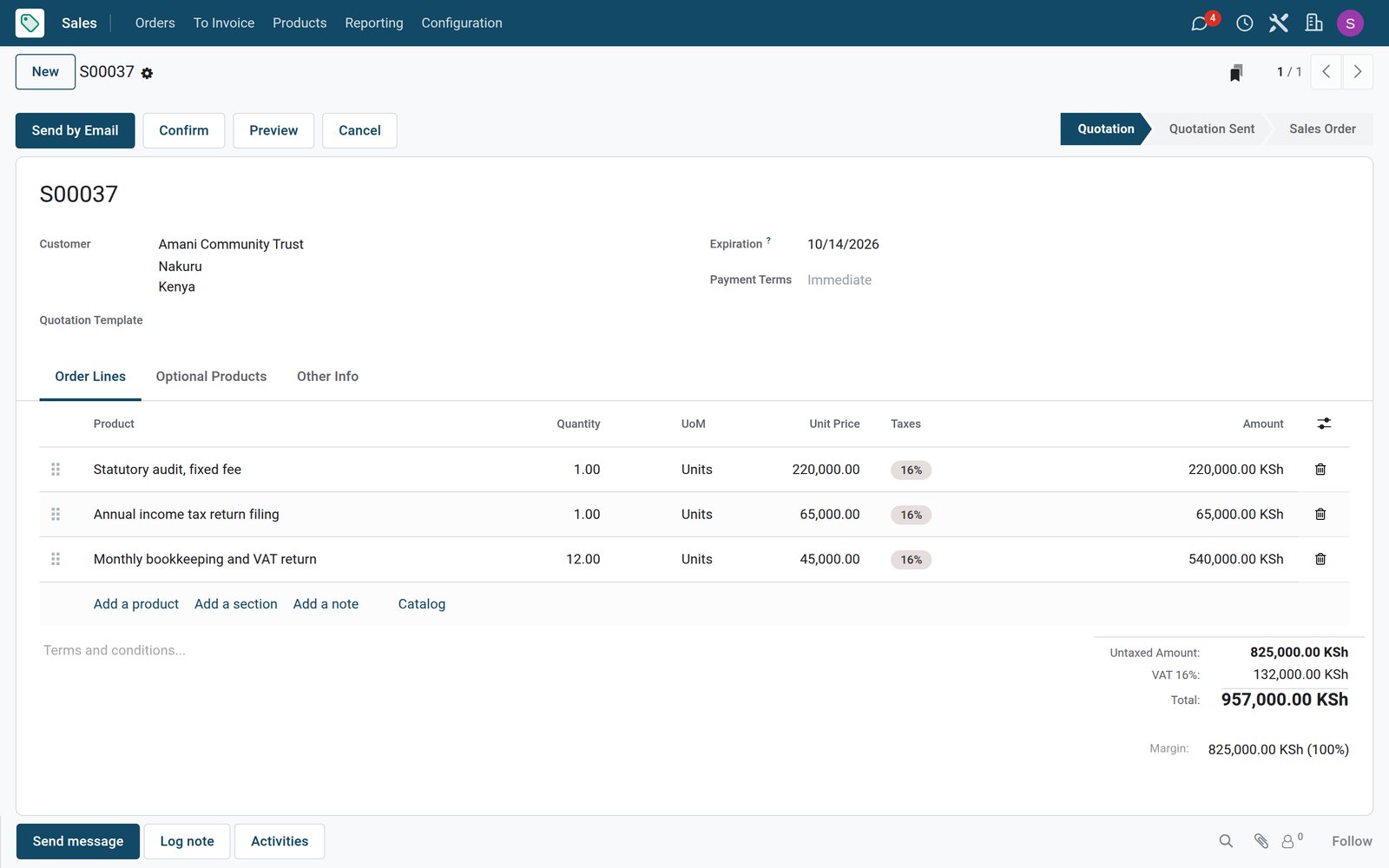 Sales
SalesAn audit and tax quote for a trust
The Amani Community Trust quote has a fixed statutory audit fee, the annual income tax return and twelve months of bookkeeping and VAT returns.
Explore Sales →By the numbers
What ships inside
Counted in the product.
- 4
- things a sold service can create: nothing, a task, a project, or a project with its tasks
- 5
- ways to count what was delivered, from timesheets and milestones to manual quantities
- 9
- billing types on a timesheet line, from billed on timesheets to non-billable
Inside the app
What is inside
The apps a professional firm runs on, and what each does for a client engagement.
Pipeline
New engagements move from enquiry to won with the client, the expected fees and the closing date.
Engagement quotes
Quotations combine fixed fees, hourly advice and monthly retainers for the client to approve.
Client projects
Confirming a quote creates the engagement project and a task for each fee or hourly service.
Engagement tasks
Planning, fieldwork, reviews and reports each get a task with a deadline and allocated hours.
Timesheets
Partners, managers and associates log hours on each task with a note on the work done.
Fees, hours and retainers billed
Retainer months, fixed fees and logged advisory hours are counted on the order for the next invoice.
Staff planning
Schedule who works on which client and when, so busy seasons are covered in advance.
Client meetings
Clients book meetings with the firm online, straight into the calendars of the team.
Step by step
From enquiry to invoiced engagement
How a client engagement runs in BridgeERP, and which app does each step.
- Step 1
Enquiry
A company or trust asks for an audit, tax work or bookkeeping and becomes an opportunity.
CRM - Step 2
Quote
The quotation sets fixed fees, hourly advice and retainer months for the client to approve.
Sales - Step 3
Engagement
Confirming it creates the client project and the tasks for each fee and hourly service.
Projects - Step 4
Client work
The team logs hours on planning, fieldwork, tax and review tasks every day.
Timesheets - Step 5
Invoice
Retainer months, fixed fees and advisory hours are invoiced to the client in KES with VAT.
Invoicing

New engagements at a glance
The pipeline shows every engagement in discussion, its client and the expected fees.
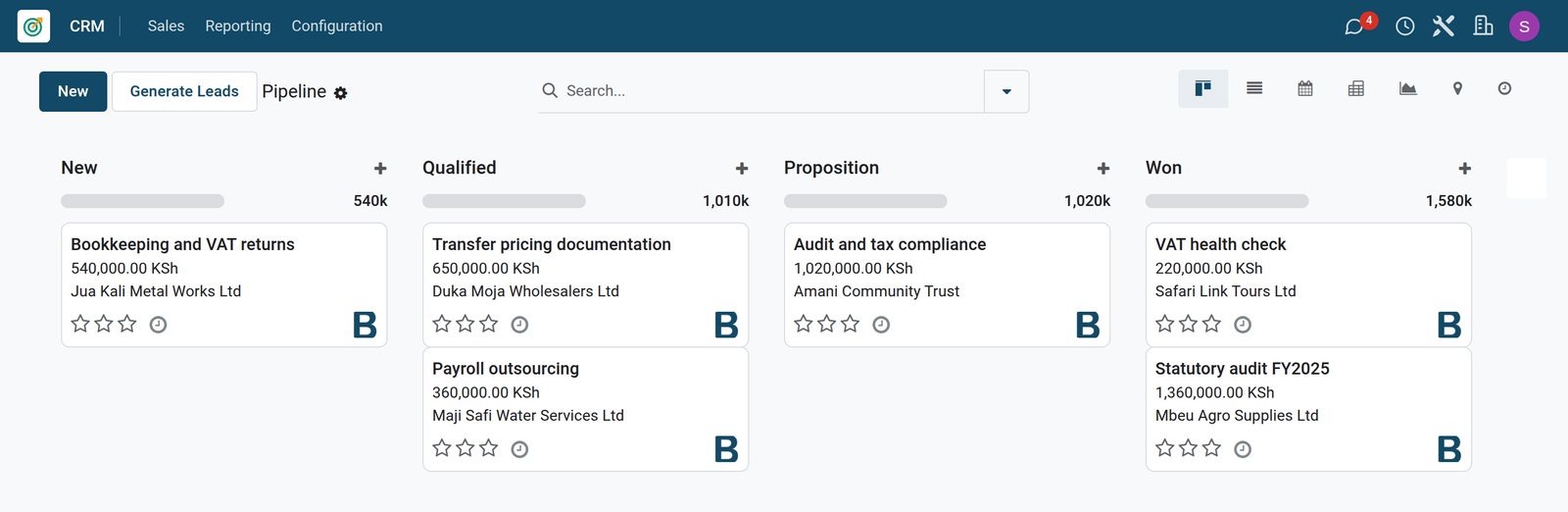 CRM
CRMEngagements in the pipeline
Bookkeeping, transfer pricing, payroll outsourcing, an audit and tax proposal, and two won engagements, each with its client and fees in KES.
Explore CRM →Hours logged against each engagement task
Each task shows its allocated hours and the timesheets of the people who worked on it.
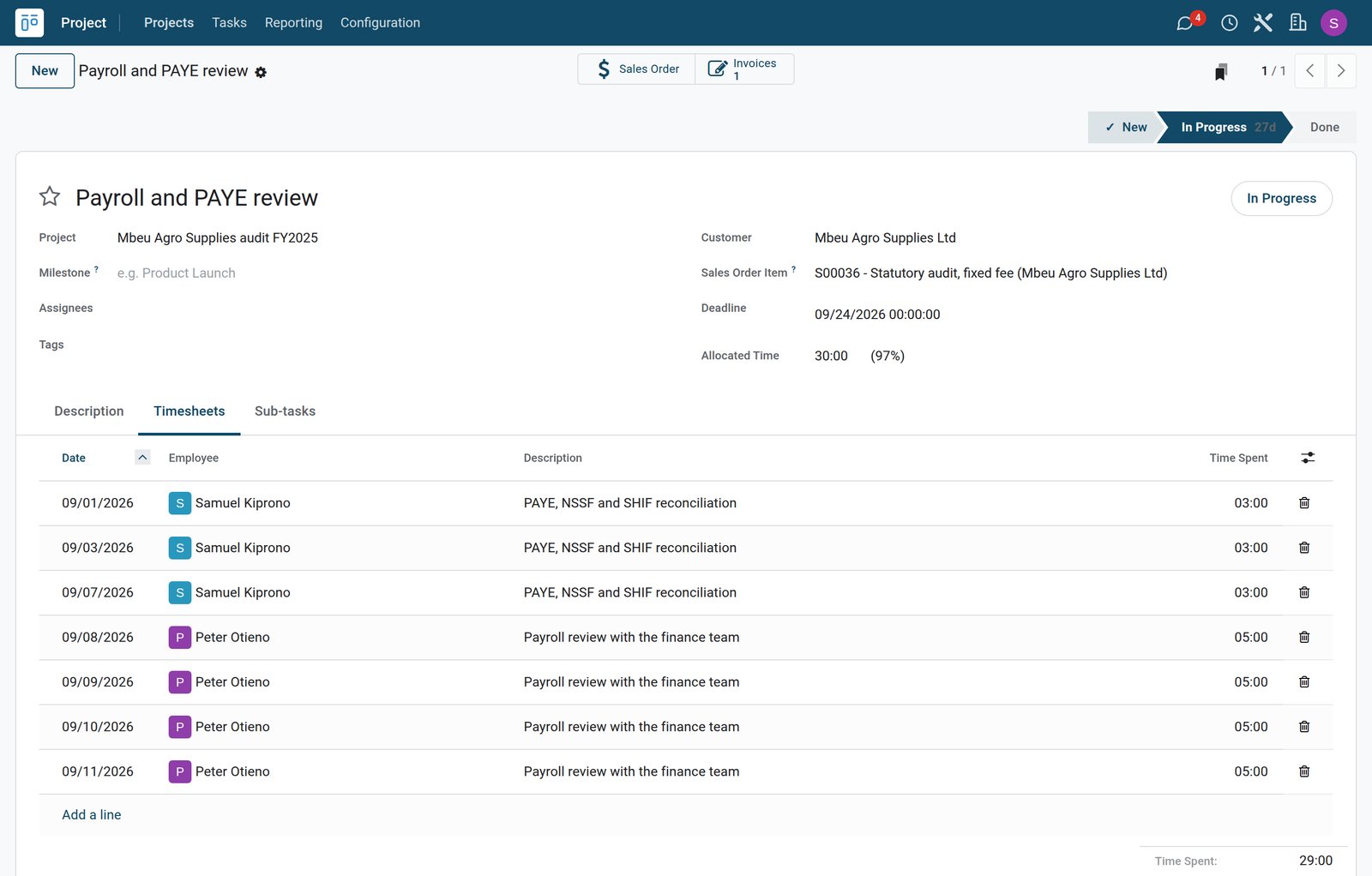
 Timesheets
The payroll review with its timesheets
The payroll and PAYE review of the audit has 30 hours allocated and shows the tax consultant reconciling statutory deductions and the audit manager reviewing payroll.
Explore Timesheets →Fees, retainers and hours ready to invoice
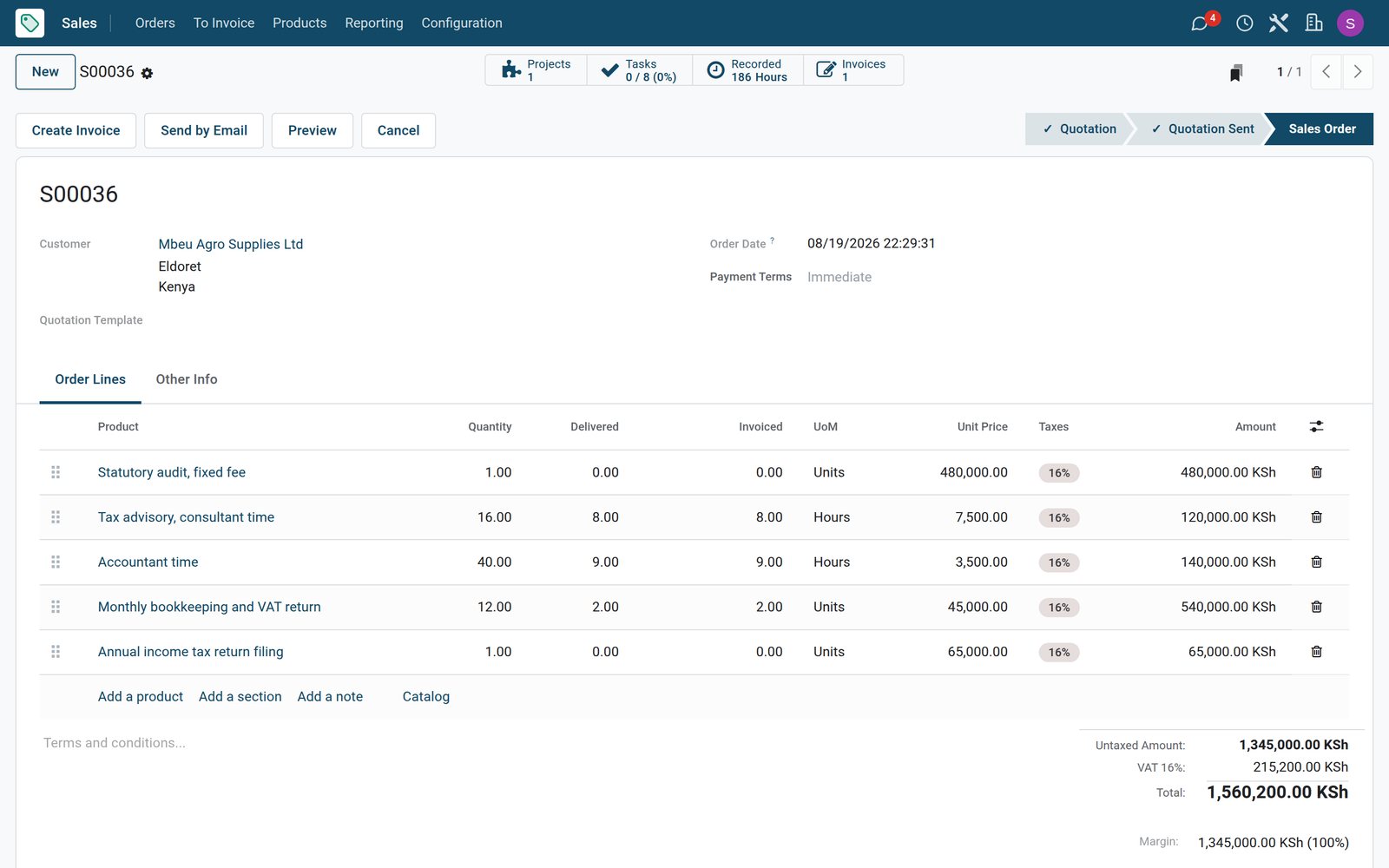
The order counts delivered work on each line, so nothing billable is missed.
 Sales
SalesAn audit engagement order with delivered work
The Mbeu Agro Supplies order shows the fixed audit fee still to bill, advisory and accountant hours and two bookkeeping months delivered and on the draft invoice.
Explore Sales →Who uses it
Who uses it, and what they see
One system for the partners, the engagement team and the office.
Managing partner
Follows new engagements, approves quotes and sees which tasks run over their allocated hours.
Engagement manager
Plans the tasks and deadlines of each client engagement and reviews the work of the team.
Accountant or associate
Works on client files and logs hours with a note on each task every day.
Office and billing
Invoices retainer months, fees and hours, follows payments and keeps client records up to date.
Works with
Runs with the rest of BridgeERP
Apps a professional firm draws on.


In your country
Built for firms in any country
What changes from country to country, shown on the demo's Kenyan accounting and tax practice.
Fees in your currency
Fixed fees, retainers, hourly rates and invoices are in the company currency, KES on the demo.
E-invoicing connectors
Country e-invoicing modules send invoices to the tax authority; the demo has Kenya's eTIMS connector installed, ready for the company to register.
Local statutory work
iTax reconciliations, PAYE, NSSF and SHIF reviews and VAT returns are tasks on the demo client projects.
Getting started
Getting started
How a firm moves onto BridgeERP.
Set your fees
Create hourly rates per grade and fixed services for audits, tax filings and monthly retainers.
Add the team
Enter partners, managers and associates as employees so their hours can be logged and billed.
Load live engagements
Enter running client work with its tasks, deadlines and allocated hours per client.
Invoice every month
Mark retainer months and completed fees delivered, check the logged hours and create the invoices from the orders.
Questions
Questions about Professional Services
Not covered here? Contact us.
Can I charge a fixed fee for an audit?
Yes. A fixed-fee service creates its task on confirmation and is invoiced when you mark it delivered.
Can I also bill hourly advice?
Yes. Services billed on timesheets take the hours logged on their tasks onto the next invoice.
Can I bill a monthly bookkeeping retainer?
Yes. A retainer month is a fixed service invoiced each time a month is marked delivered.
Can I see when a task runs over its hours?
Yes. Each task shows its allocated hours and the hours already spent.
Can clients book meetings online?
Yes. The Appointments app lets clients book time with the firm, which lands in the team calendars.
Is there an e-invoicing connector for our tax authority?
E-invoicing modules exist for countries such as Kenya, India, Mexico and Saudi Arabia. On the demo, Kenya's eTIMS connector is installed and needs the company registration to send invoices.
Tax compliance
Invoices your tax authority accepts
In Kenya, Uganda, Rwanda, Burundi and Zambia, each invoice, receipt and stock movement goes to the tax authority's own system when you post it. Ghana and Pakistan come next, and we connect 73 more countries on request.
- KenyaReady
eTIMS KRA
Invoices, credit notes, POS receipts and stock movements
- UgandaReady
EFRIS URA
Invoices, POS receipts and stock
- RwandaReady
EBM RRA
Invoices, POS receipts, stock and imports
- BurundiReady
EBMS OBR
Invoices, POS receipts, stock and manufacturing
- ZambiaReady
Smart Invoice ZRA
Invoices, POS receipts, stock and imports
Professional Services, app by app
One connected flow instead of separate systems — the work moves from one team to the next without re-typing anything.
Every stop is a real app in your plan, and the hand-offs between them are the product.
- Customers & sales
- Operations
- Finance
- Platform & insight
CRM
Leads, opportunity pipeline, activities and sales forecasting.
CRM →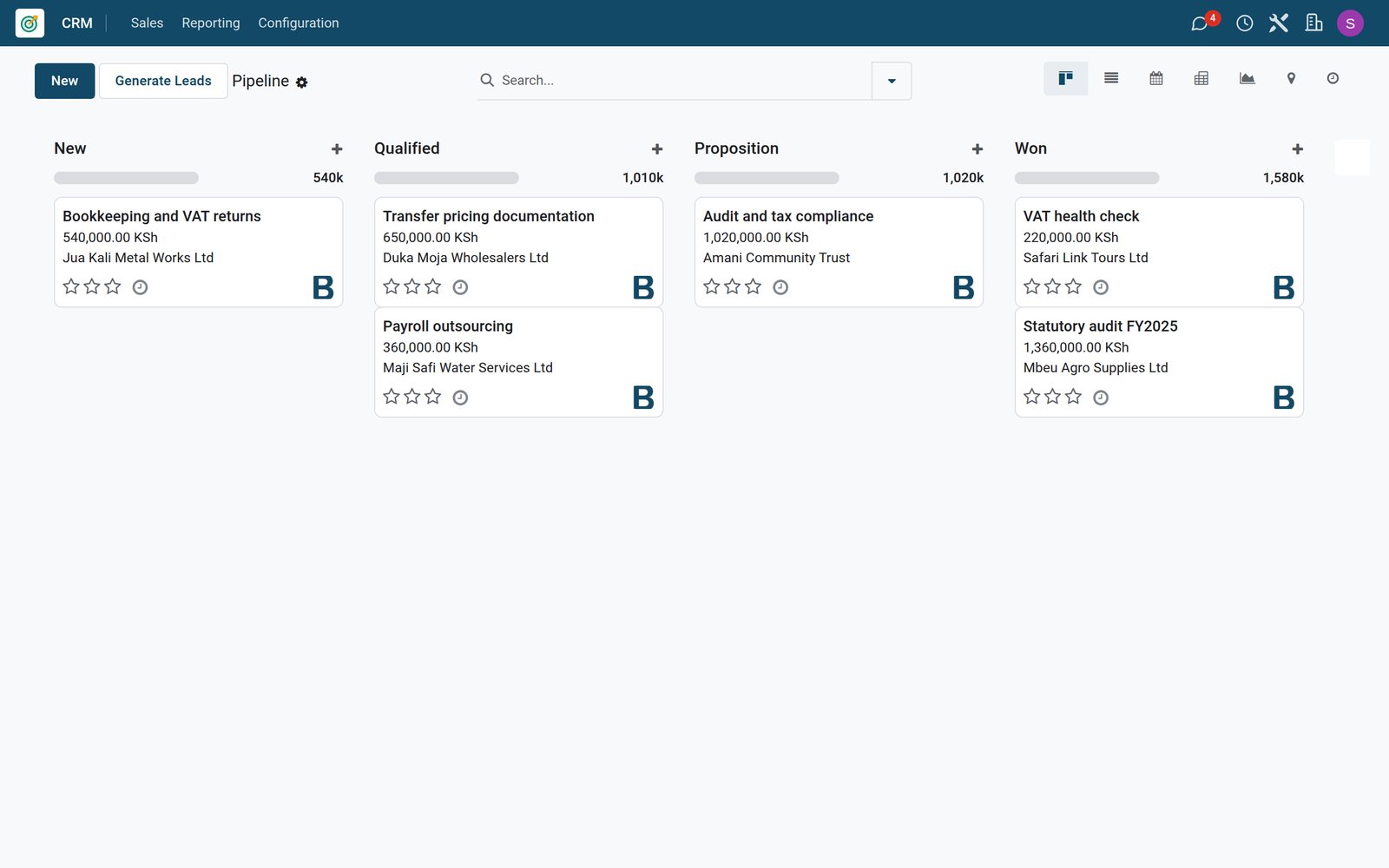
Ready when you are
Open the plan builder with the right apps for this industry already selected, or see it running first.