

Fast Food: Point of sale and kitchen for fast food restaurants
BridgeERP runs the counter and the drive-through, meal deals, mobile money payments, the kitchen screen, stock and the daily cash count in one system.
Free instant access. No credit card required.
 Invoicing
 CRM
CRM Restaurant & Bar
 Purchase
 Inventory
 Studio
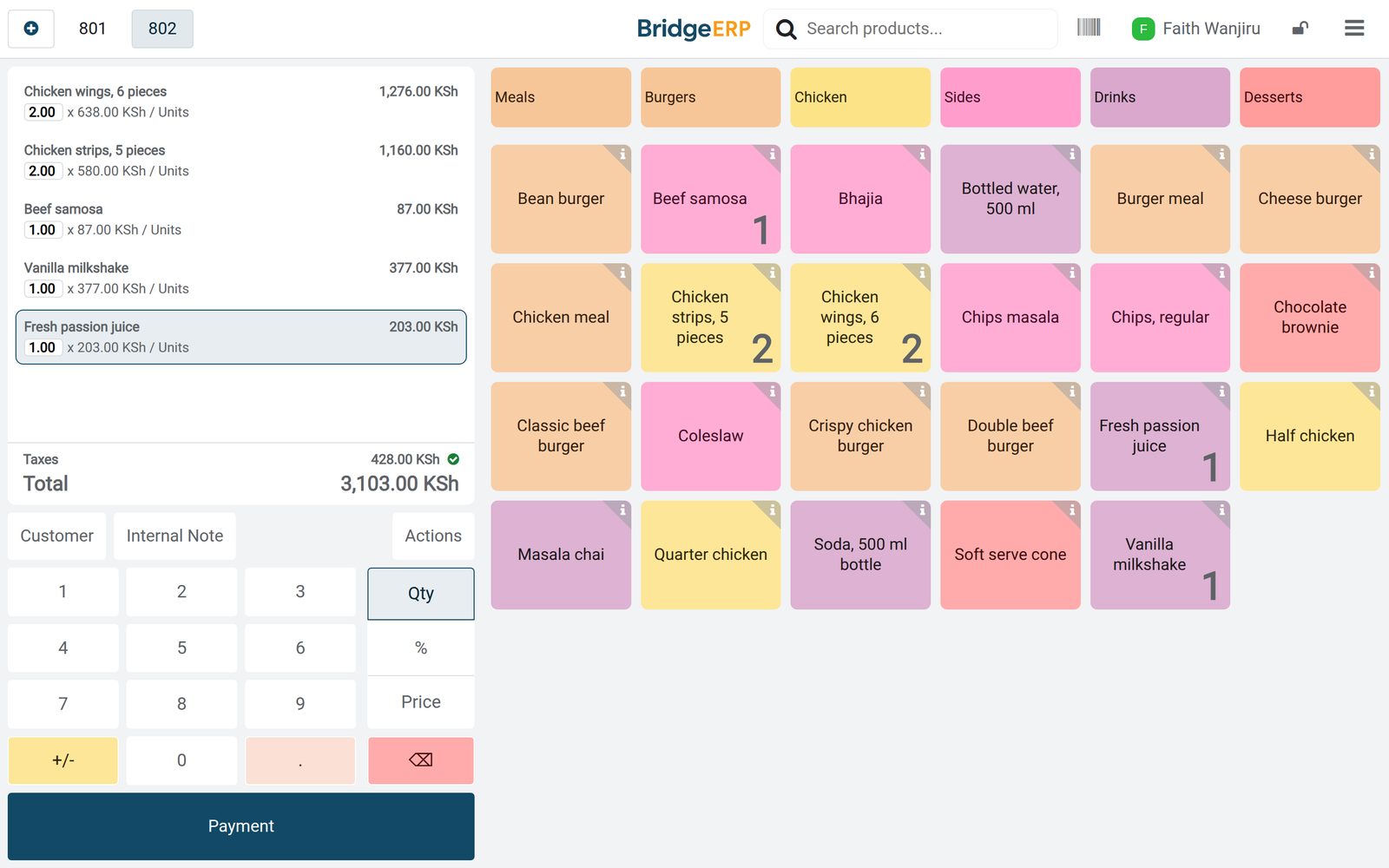
A lunch order, line by line
What was ordered, at what price, with VAT, on one screen.
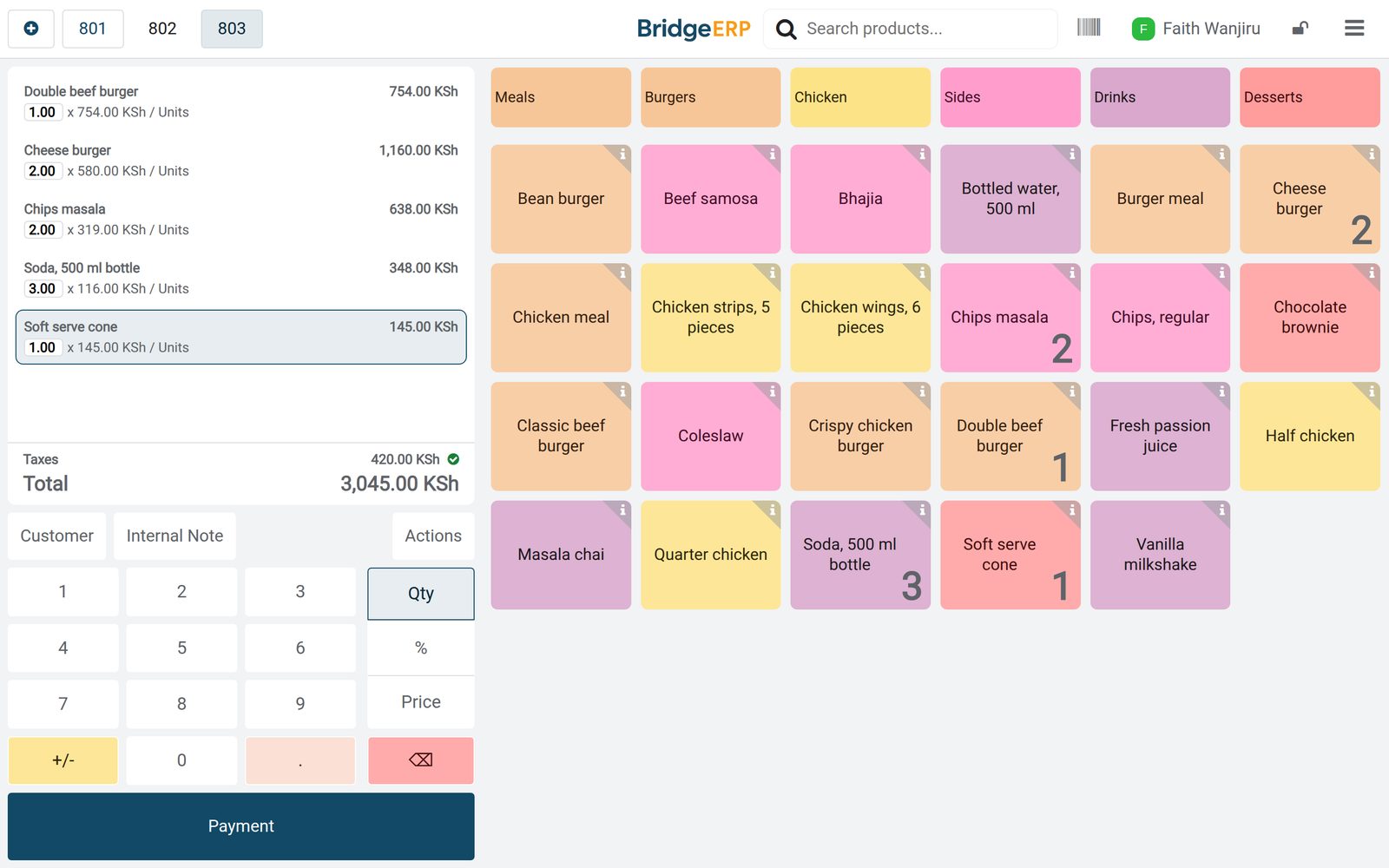
 Point of Sale
A lunch order at the counter
Burgers, chips masala, sodas and a cone on one order, with the cashier, the receipt number and the VAT.
Explore Point of Sale →By the numbers
What ships inside
Counted in the product.
- 8
- kinds of promotion and loyalty programme, from loyalty cards to buy X get Y
- 4
- steps in the life of a till session, from opening cash count to closed
- 3
- product types, including combo products for meal deals
Inside the app
What is inside
The apps a fast food restaurant runs on, and what each does for a shift.
Counter tills
Cashiers take orders by menu category and each order is numbered on its till.
Drive-through
A second till with its own cash drawer serves cars, and its sales appear with the counter.
Meal deals
A combo product lets the customer choose a burger, a side and a drink for one price.
Kitchen screen
Orders go to a preparation display with To prepare, Ready and Completed stages.
Mobile money, cash and card
Each till takes cash, mobile money and card, and one order can be split across methods.
Stock and buying
Bottled drinks, patties, chicken and buns are bought from suppliers and received into stock.
Loyalty rewards
Regulars earn points on every order and swap them for a free cone or money off.
Staff shifts
Cashiers, cooks and supervisors are planned in morning and evening shifts by role.
Step by step
From order to closing the till
How a shift runs in BridgeERP, and which app does each step.
- Step 1
Order
The cashier picks items or a meal deal by category and the order total shows with VAT.
Point of Sale - Step 2
Pay
The customer pays by mobile money, cash or card, or splits the bill between two methods.
Point of Sale - Step 3
Prepare
The order appears on the kitchen display and moves from To prepare to Ready.
Point of Sale - Step 4
Close
At the end of the day the cash is counted and the session posts its sales to accounting.
Accounting - Step 5
Restock
Drinks, patties and buns are ordered from suppliers and received into stock.
Purchase

Meal deals customers build themselves
A combo product holds the choices and the extra price of each.
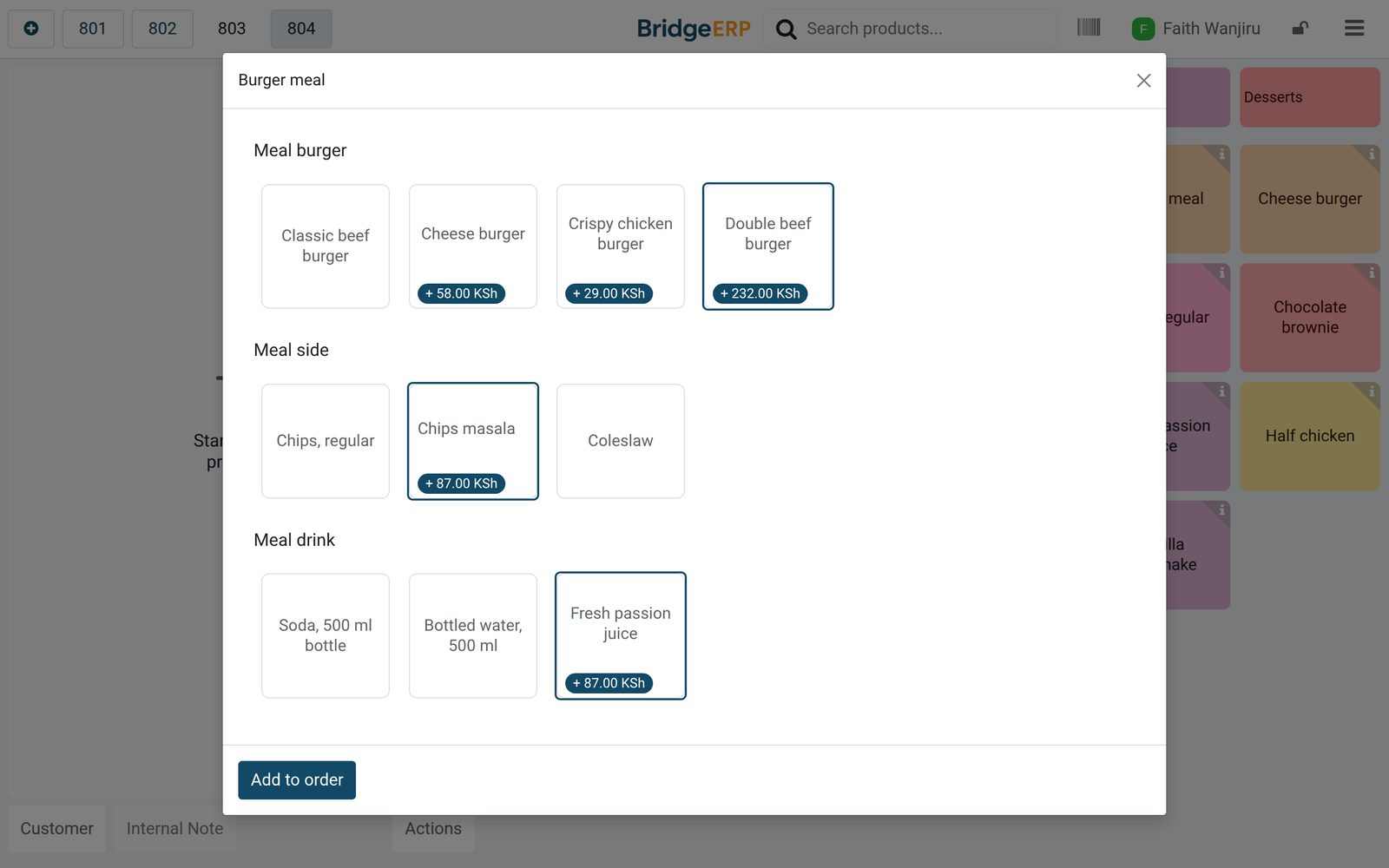 Point of Sale
The burger meal
The burger meal is a combo product sold for KSh 650 before VAT, built from three choices: a burger, a side and a drink.
Explore Point of Sale →The day closed with the cash counted
Each session keeps the opening float, the cash counted and the posted entry.
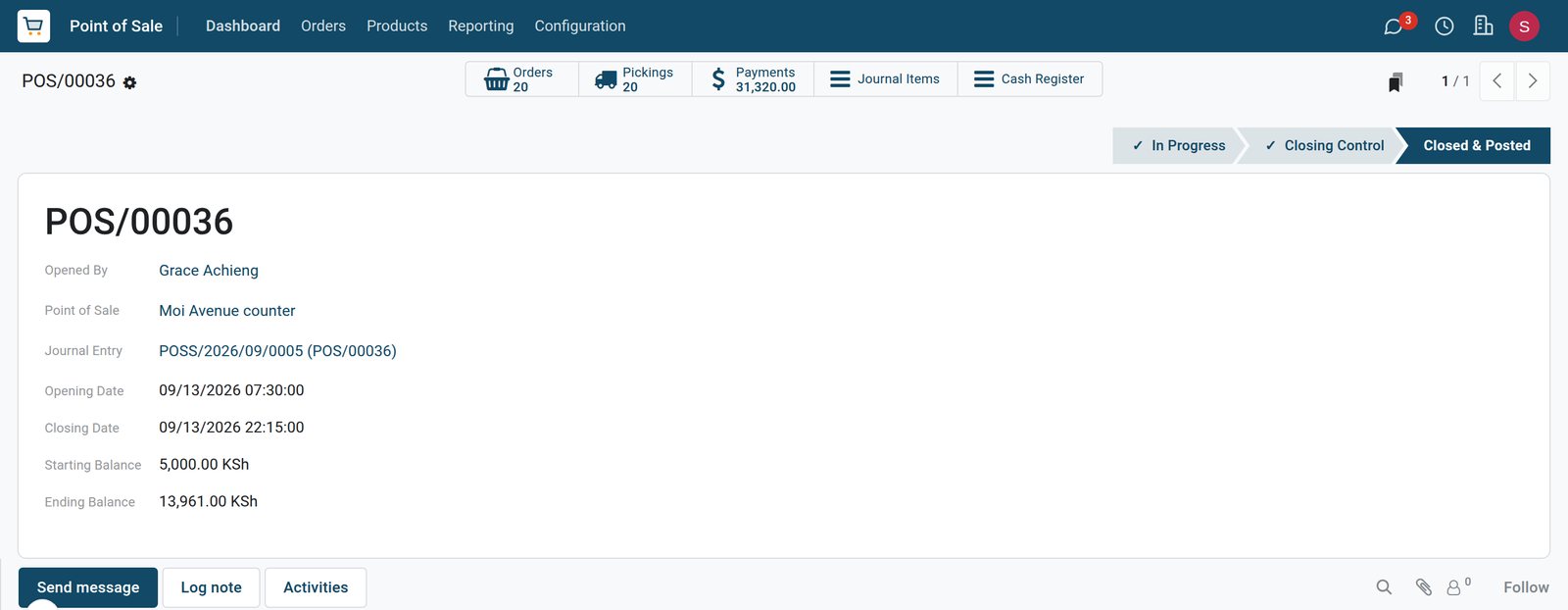 Point of Sale
A closed counter session
The Moi Avenue counter session of 13 September ran from 07:30 to 22:15, took KSh 31,320 in payments and posted its journal entry.
Explore Point of Sale →What sells, by menu category
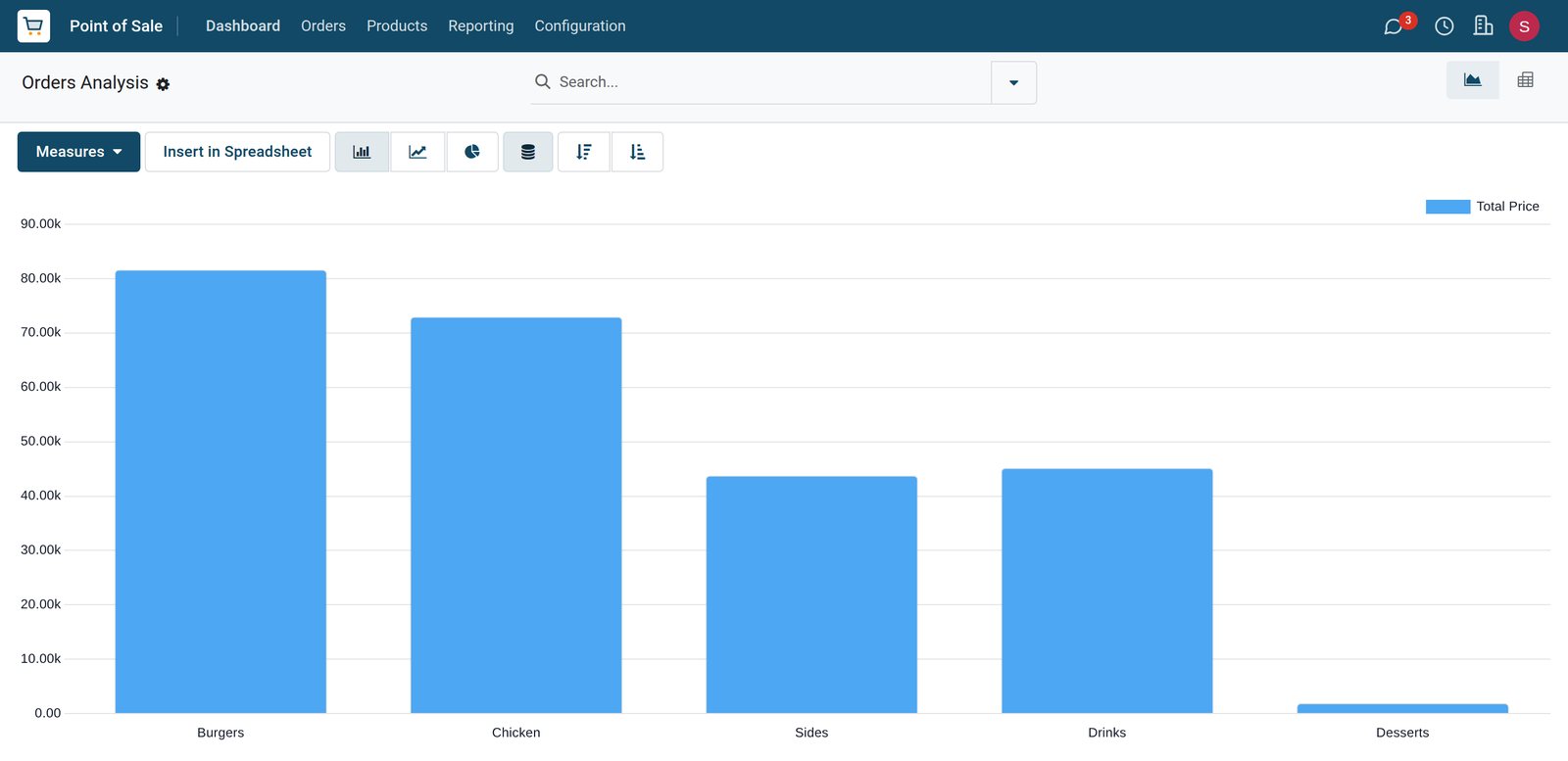
Sales analysis groups every order line by category of the menu.
 Point of Sale
Sales by menu category
Burgers and chicken bring in the most on the two tills, drinks and sides follow close together, and desserts are far behind.
Explore Point of Sale →Stock bought and received
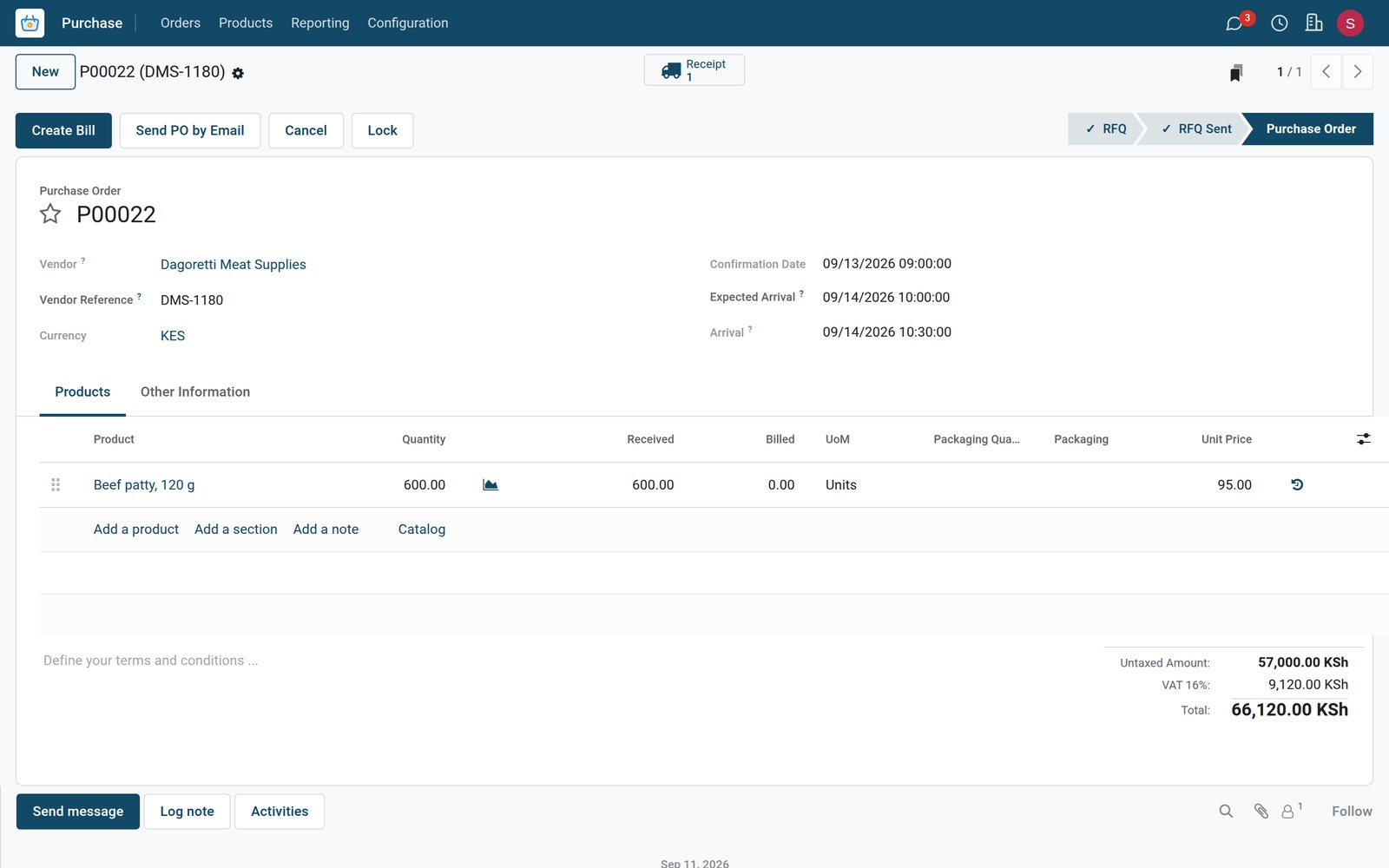
Supplier orders show what was ordered and what arrived.
 Purchase
Beef patties received from the supplier
Six hundred patties ordered on 13 September were received in full the next day, at KSh 95 each plus VAT.
Explore Purchase →Who uses it
Who uses it, and what they see
One system for the owner, the supervisor, the till and the kitchen.
Owner
Compares tills and days, sees which menu categories sell and what stock was bought.
Shift supervisor
Opens and closes the tills, checks the cash count and follows the shift plan.
Cashier
Logs in on the till, takes orders and payments, and adds points for loyalty customers.
Kitchen
Sees each new order on the preparation display and marks it ready when it is done.
Works with
Runs with the rest of BridgeERP
Apps a fast food restaurant draws on.


In your country
Built for fast food in any country
What changes from country to country, shown on the demo's Kenyan fast food business.
Prices in your currency
Menu prices, supplier costs and daily sales are in the company currency, KES on the demo, with VAT at 16%.
Mobile money at the till
Mobile money, M-Pesa on the demo, is set up as a payment method of each till next to cash and card, and is counted separately at closing.
E-invoicing connectors
Country e-invoicing modules report sales to the tax authority; the demo has Kenya's eTIMS connector installed, ready for the company to register.
Getting started
Getting started
How a fast food restaurant moves onto BridgeERP.
Load the menu
Create the menu items by category with prices, and the meal deals as combo products.
Set up the tills
Create a till per counter or drive-through with its cash drawer, mobile money and card.
Add the team
Enter cashiers and cooks as employees so they can log in on the till and be planned.
Enter opening stock
Count drinks and ingredients once, then receive every supplier delivery into stock.
Questions
Questions about Fast Food
Not covered here? Contact us.
Can one order be paid with mobile money and cash?
Yes. Payments on an order can be split between methods, and each method is counted separately at closing.
Do meal deals need a separate price list?
No. A combo product has its own price and lists the choices, and each upgrade adds its extra price.
Can the counter and the drive-through run separately?
Yes. Each till has its own session and cash drawer, and both report into the same sales analysis.
Does the kitchen see orders on a screen?
Yes. A preparation display shows orders by stage, filtered to the menu categories the kitchen prepares.
Can staff log in on the till without a user account?
Yes. Cashiers are employees allowed on the till, and each order records who took it.
Is there an e-invoicing connector for our tax authority?
E-invoicing modules exist for countries such as Kenya, India, Mexico and Saudi Arabia. On the demo, Kenya's eTIMS connector is installed and needs the company registration before sales are reported.
Tax compliance
Invoices your tax authority accepts
In Kenya, Uganda, Rwanda, Burundi and Zambia, each invoice, receipt and stock movement goes to the tax authority's own system when you post it. Ghana and Pakistan come next, and we connect 73 more countries on request.
- KenyaReady
eTIMS KRA
Invoices, credit notes, POS receipts and stock movements
- UgandaReady
EFRIS URA
Invoices, POS receipts and stock
- RwandaReady
EBM RRA
Invoices, POS receipts, stock and imports
- BurundiReady
EBMS OBR
Invoices, POS receipts, stock and manufacturing
- ZambiaReady
Smart Invoice ZRA
Invoices, POS receipts, stock and imports
Fast Food, app by app
One connected flow instead of separate systems — the work moves from one team to the next without re-typing anything.
Every stop is a real app in your plan, and the hand-offs between them are the product.
- Customers & sales
- Operations
- Finance
- Platform & insight
CRM
Leads, opportunity pipeline, activities and sales forecasting.
CRM →CRMLeads, opportunity pipeline, activities and sales forecasting.Ready when you are
Open the plan builder with the right apps for this industry already selected, or see it running first.