

Construction: Contracts, sites, materials and crews in one place
BridgeERP gives building contractors BOQ quotes, contract progress, site projects, materials stock, approvals and crew attendance.
Free instant access. No credit card required.
 Invoicing
 CRM
CRM Projects
 Purchase
 Property Sale & Rental
 Inventory
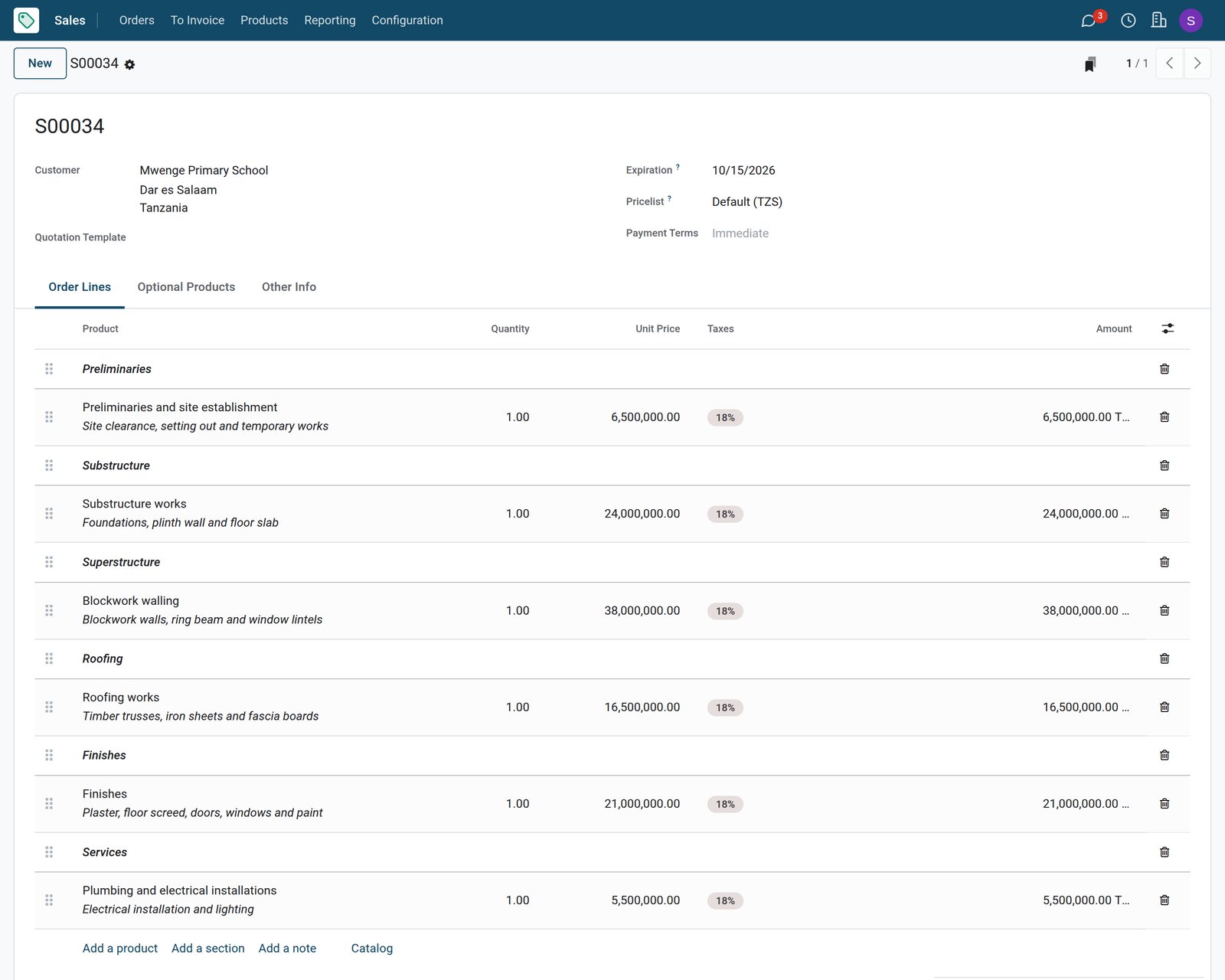
Quotes laid out like a bill of quantities
Sections group the works, from preliminaries to finishes, with a price per item.
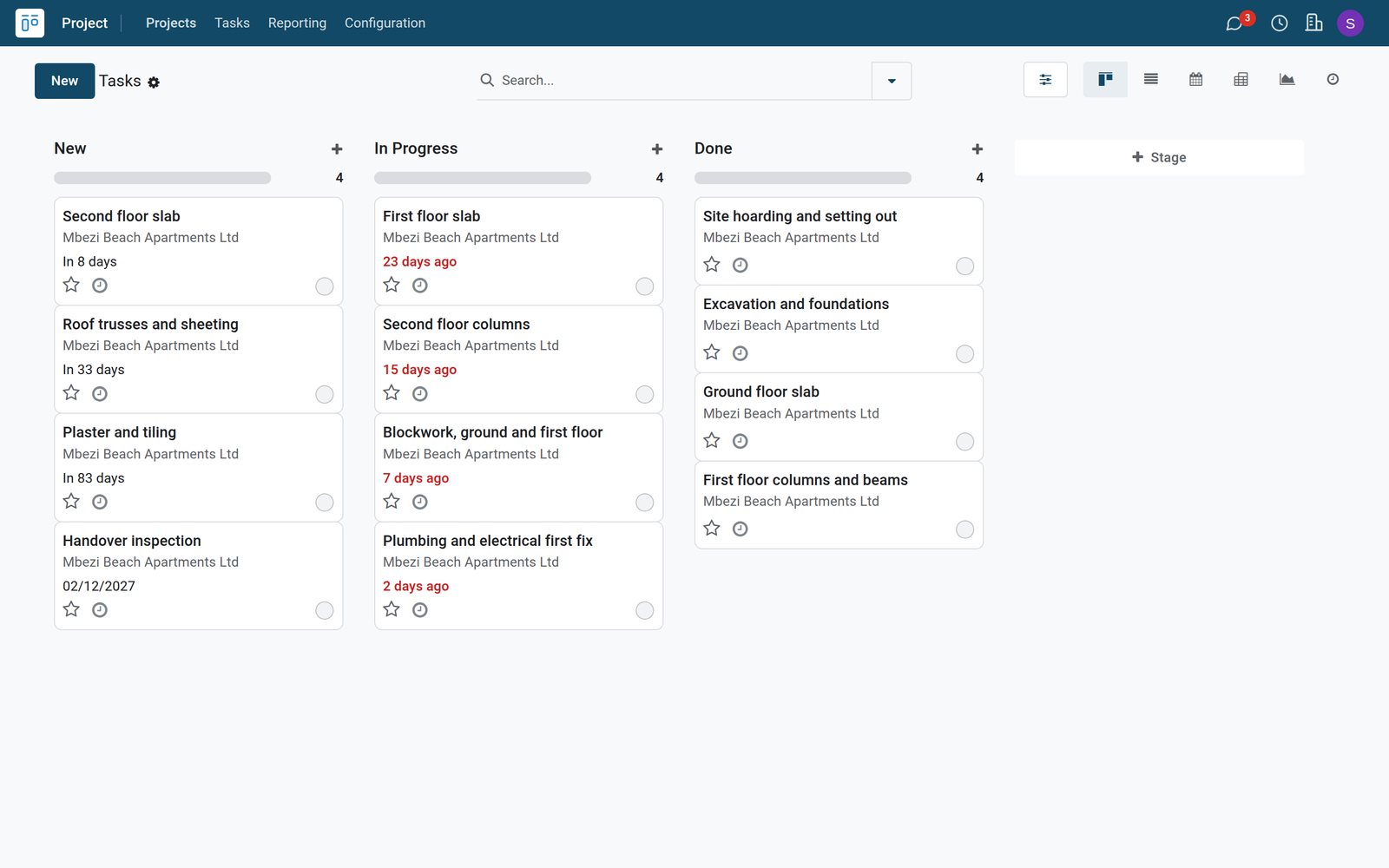
 Sales
SalesA BOQ quote for a classroom block
The two-classroom block for a primary school is priced by section: preliminaries, substructure, superstructure, roofing, finishes and services.
Explore Sales →By the numbers
What ships inside
Counted in the product.
- 3
- kinds of order line: a priced item, a section title or a note
- 5
- statuses of an approval request: to submit, submitted, approved, refused or cancelled
- 6
- states of a stock transfer, from draft and waiting to ready, done or cancelled
Inside the app
What is inside
The apps a contractor runs on, and what each does for a contract.
Tenders and enquiries
New buildings, renovations and paving jobs move through the pipeline with the expected contract value.
BOQ quotes
Quotations are laid out in sections with a priced line for each item of work.
Progress billing
Work done is recorded on the contract as a share of each item and billed as an interim certificate.
Site projects
Each contract is a project with its work packages, stages and deadlines up to handover.
Materials and site stores
Cement, steel, sand and blocks are received from suppliers and moved to the site store.
Approvals
Site requests for materials, hire and fuel are approved or refused before money is committed.
Crew attendance
Foremen, masons, fixers and drivers check in and out, with hours per day on site.
Aftercare tickets
Defects reported after handover are handled as tickets with priority and stage.
Step by step
From tender to handover
How a building contract runs in BridgeERP, and which app does each step.
- Step 1
Tender
A developer or school invites a price and the job becomes an opportunity with its value.
CRM - Step 2
BOQ quote
The quotation prices every section of the works for the client to accept.
Sales - Step 3
Site set-up
The contract gets a project with its work packages and a site store for materials.
Projects - Step 4
Build
Materials move to site, requests are approved and the crew attendance is recorded.
Inventory - Step 5
Certify and bill
Progress on each item is recorded and billed to the client as a certificate.
Accounting

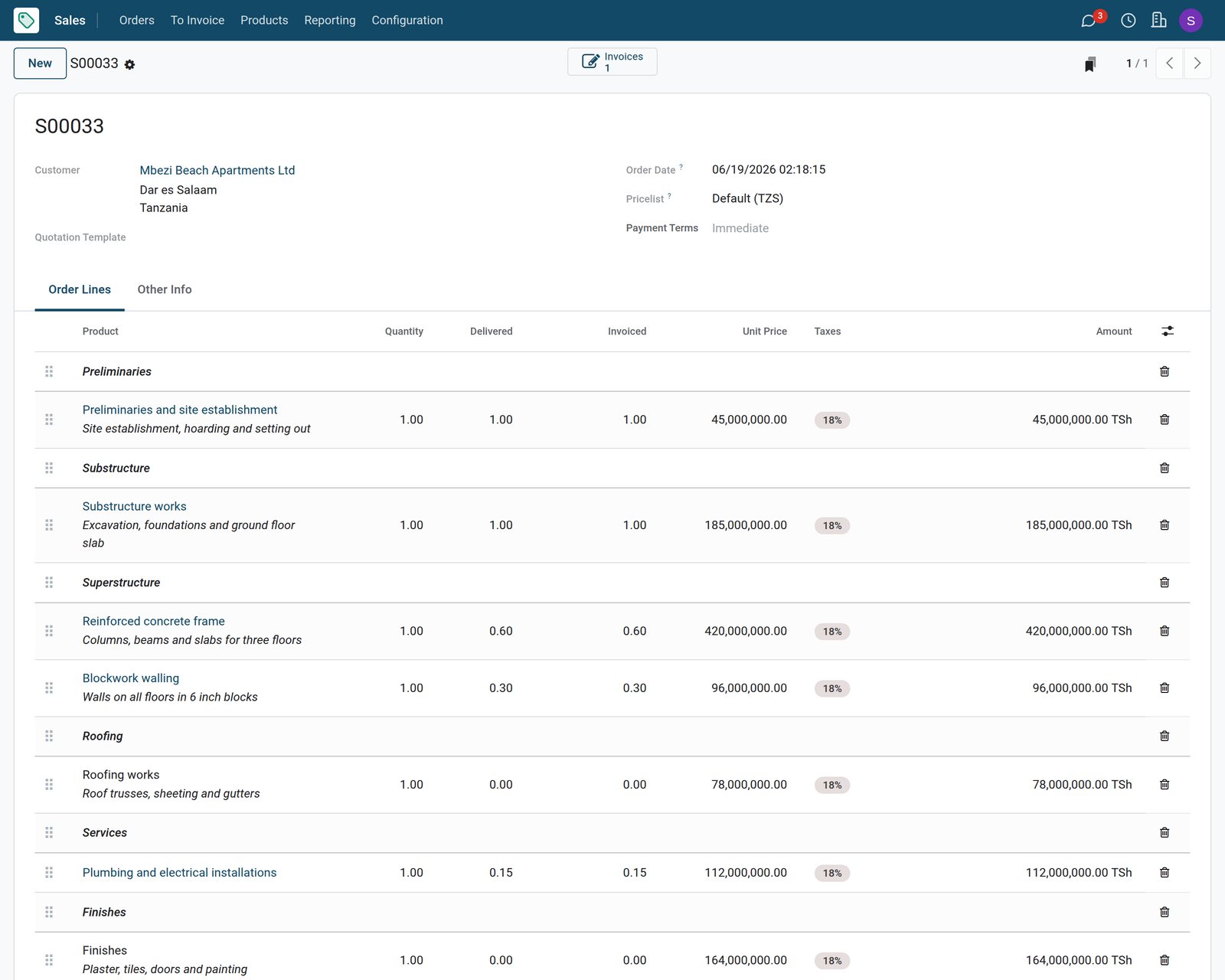
Contract progress billed by item
The contract records the share of each item done, so each certificate follows the site.
 Sales
SalesThe Block A contract with work done
The Block A contract shows preliminaries and substructure complete, 60 percent of the frame, 30 percent of the blockwork and 15 percent of the services, with the certificate as a draft.
Explore Sales →Materials received and moved to site
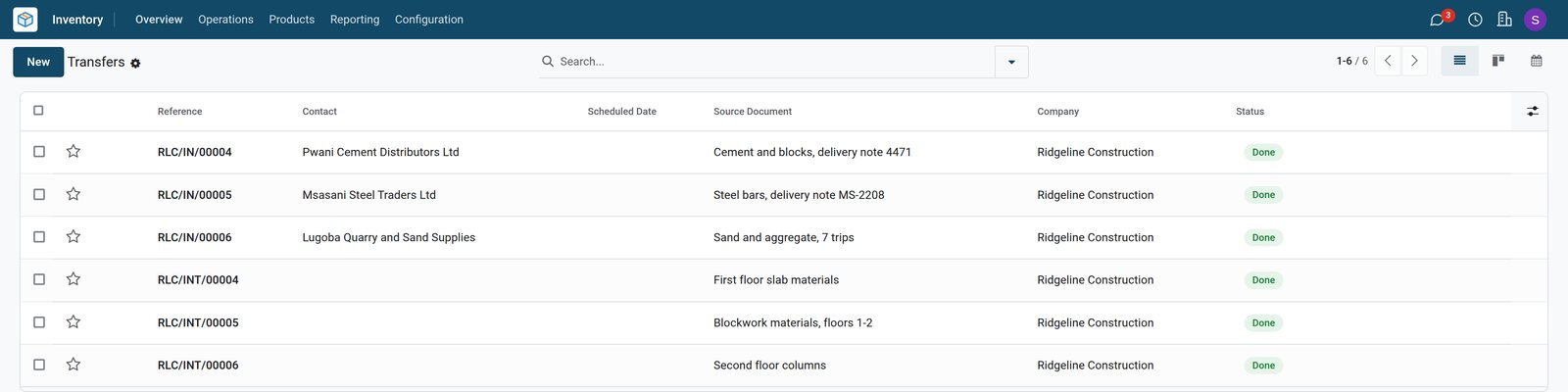
Receipts from suppliers and transfers to the site store, each with its source.
 Inventory
Receipts and site transfers
Cement, steel and quarry deliveries received into the main store, then moved to the Block A site store in three transfers.
Explore Inventory →Approvals and attendance from site
Requests are decided before spending, and the crew hours are on record.
 Approvals
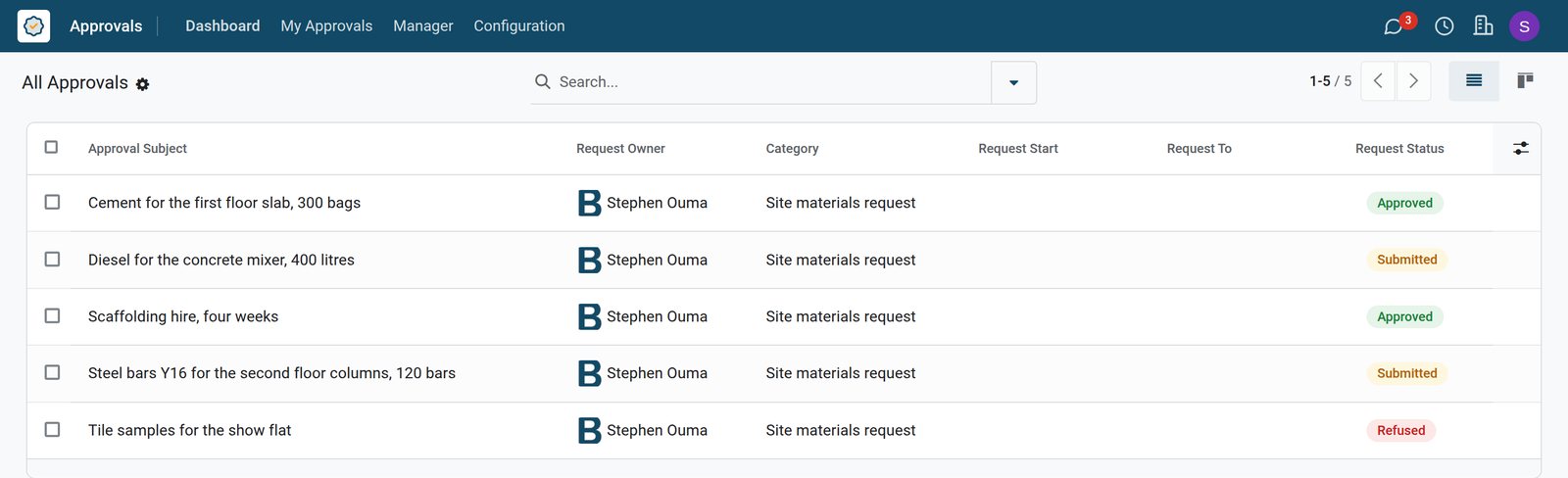
Site requests waiting and decided
Materials, hire and fuel requests for Block A: two approved, one refused and two submitted and waiting for a decision.
Explore Approvals →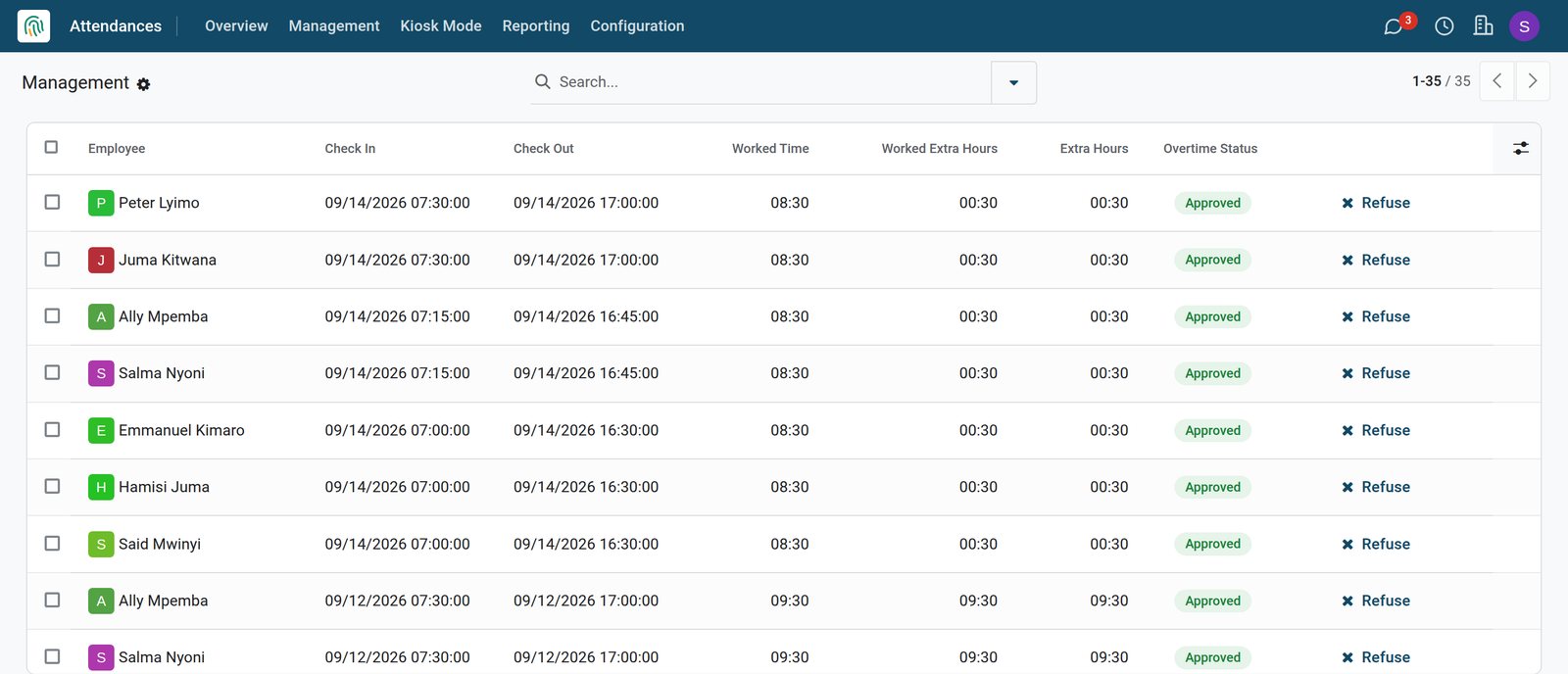
 Employees
Crew attendance for the week
Check-in and check-out of the foreman and site crew for the last working days, with the hours worked.
Explore Employees →Who uses it
Who uses it, and what they see
One system for the office, the site and the stores.
Project manager
Follows tenders, runs the work packages of each site and approves requests from site.
Quantity surveyor
Prices BOQ quotes and records the progress of each item for the next certificate.
Storekeeper
Receives materials from suppliers and moves them to the site stores against each job.
Site foreman
Raises materials requests and keeps the attendance of the crew on site every day.
Works with
Runs with the rest of BridgeERP
Apps a contractor draws on.

In your country
Built for contractors in any country
What changes from country to country, shown on the demo's Tanzanian building contractor.
Your currency and VAT
Quotes, contracts and certificates are in TZS with the 18 percent VAT of the Tanzanian chart of accounts.
Local suppliers and sites
Cement, steel and quarry suppliers and sites in Dar es Salaam and Moshi are the demo partners.
Six-day site weeks
Crew attendance is kept from Monday to Saturday, the usual week on building sites.
Getting started
Getting started
How a contractor moves onto BridgeERP.
Set up BOQ items
Create the work items you price most often and the materials you stock, with their costs.
Add sites and stores
Create a project for each running contract and a stock location for its site store.
Add staff and crew
Enter office staff and site crew as employees so attendance and approvals work.
Load running contracts
Enter each contract with its BOQ sections and the progress already certified.
Questions
Questions about Construction
Not covered here? Contact us.
Can I lay out a quote like a bill of quantities?
Yes. Section titles group the works and each item is a priced line under its section.
How do I bill progress on a contract?
Record the share of each item done on the contract, then create the certificate invoice from it.
Can I track materials at each site?
Yes. Each site store is a stock location, and transfers move materials from the main store to it.
Can site requests be approved before spending?
Yes. Requests for materials, hire or fuel go to an approver, who approves or refuses them.
Can I record crew attendance?
Yes. Crew check in and out in Attendances, and the hours worked are kept per day.
Are defects after handover tracked?
Yes. Aftercare issues are Helpdesk tickets with priority and stage.
Tax compliance
Invoices your tax authority accepts
In Kenya, Uganda, Rwanda, Burundi and Zambia, each invoice, receipt and stock movement goes to the tax authority's own system when you post it. Ghana and Pakistan come next, and we connect 73 more countries on request.
- KenyaReady
eTIMS KRA
Invoices, credit notes, POS receipts and stock movements
- UgandaReady
EFRIS URA
Invoices, POS receipts and stock
- RwandaReady
EBM RRA
Invoices, POS receipts, stock and imports
- BurundiReady
EBMS OBR
Invoices, POS receipts, stock and manufacturing
- ZambiaReady
Smart Invoice ZRA
Invoices, POS receipts, stock and imports
Construction, app by app
One connected flow instead of separate systems — the work moves from one team to the next without re-typing anything.
Every stop is a real app in your plan, and the hand-offs between them are the product.
- Customers & sales
- Operations
- Finance
- Platform & insight
CRM
Leads, opportunity pipeline, activities and sales forecasting.
CRM →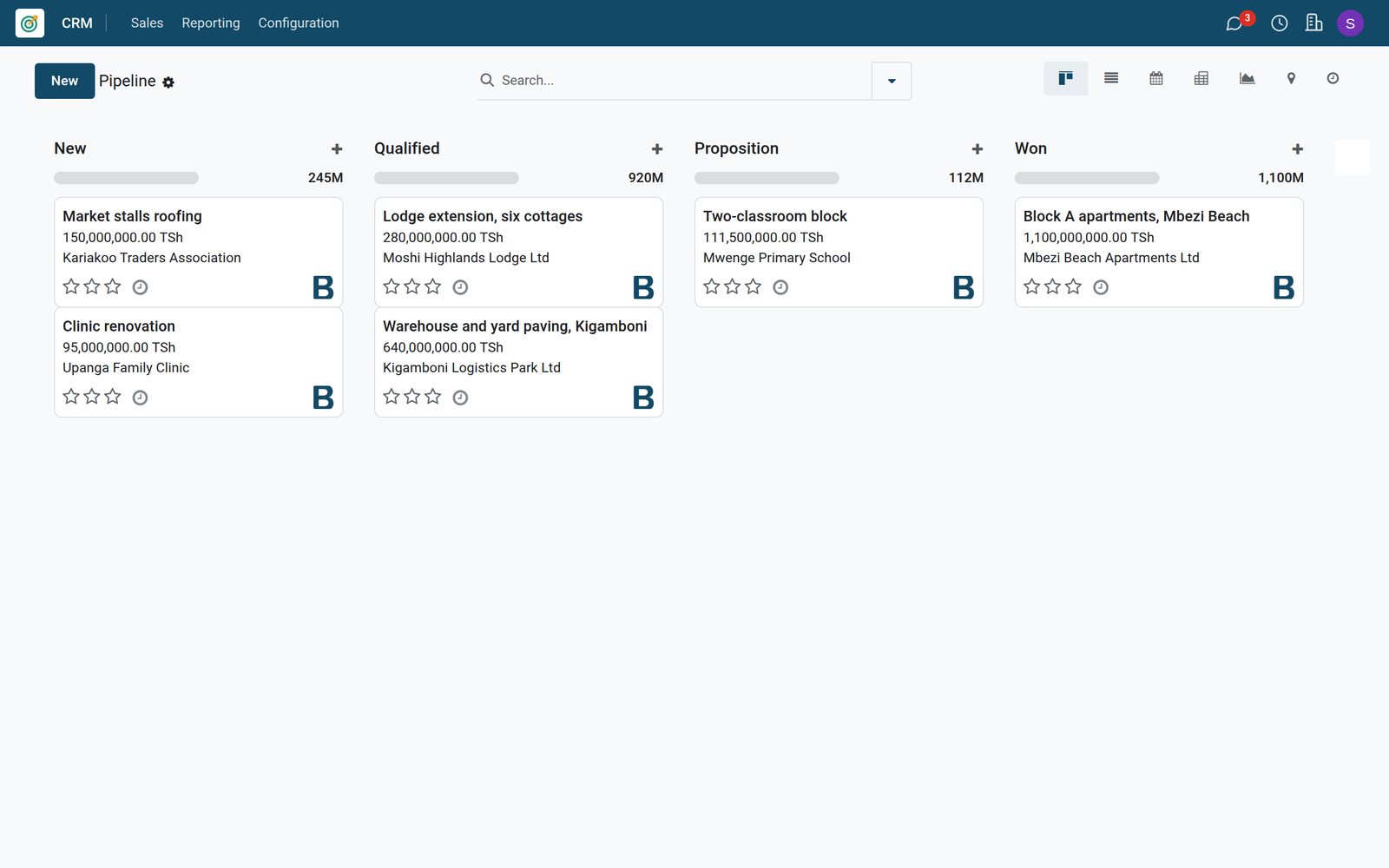
Ready when you are
Open the plan builder with the right apps for this industry already selected, or see it running first.