

Sports Clubs: Memberships, courts and competitions for sports clubs
BridgeERP keeps the club roll and its subscriptions, books the courts, runs the competitions and settles the clubhouse bill.
Free instant access. No credit card required.
 Invoicing
 Point of Sale
 Events
 Appointments
 Email Marketing
 Sales
Sales
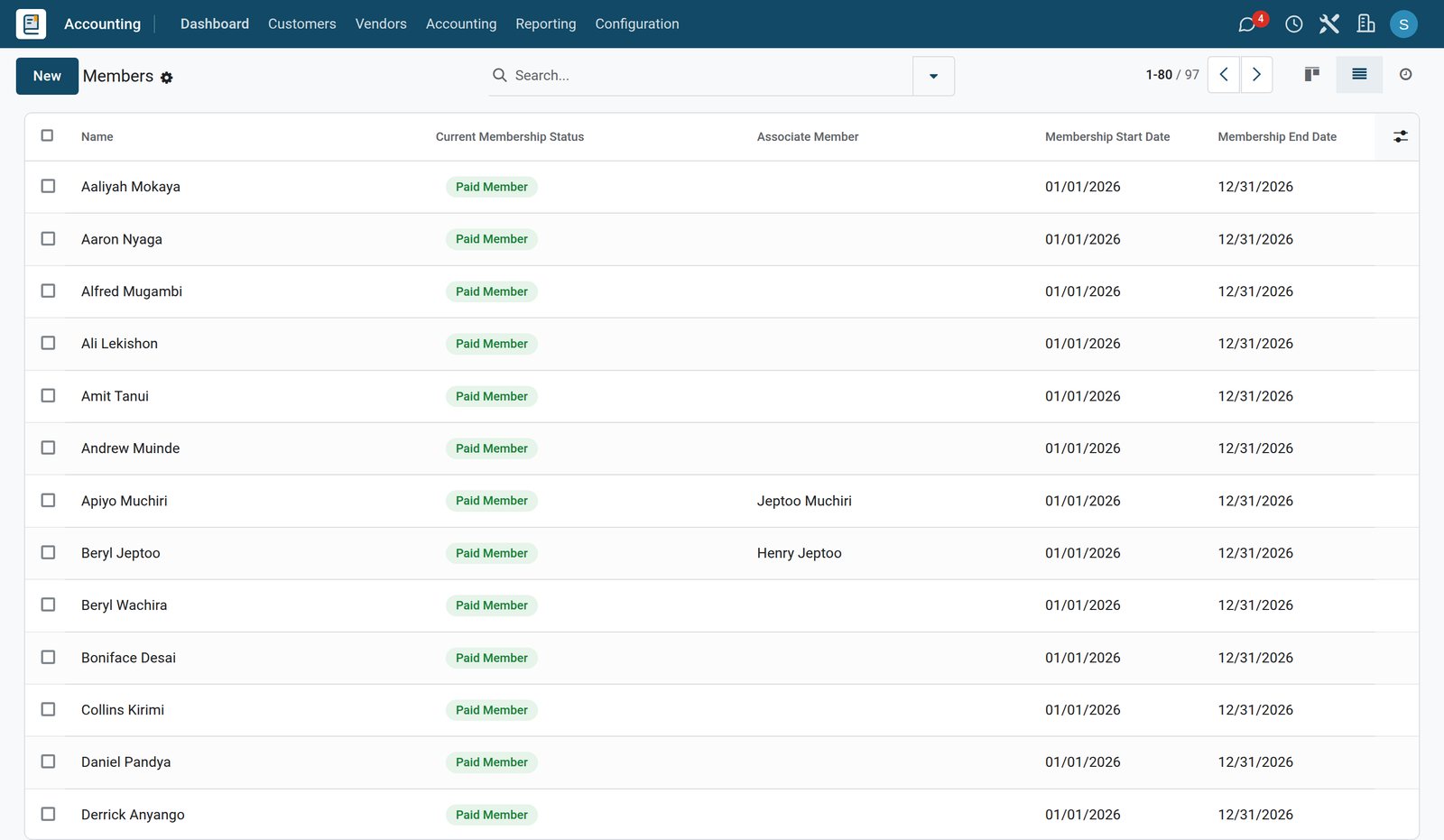
The roll, and what each member owes
Every membership is a yearly subscription invoiced from the member, and the app keeps each member's status from that invoice.
 Accounting
Who has not settled
Four members have an invoice out, two are waiting on a draft and six have not renewed for this year.
Explore Accounting →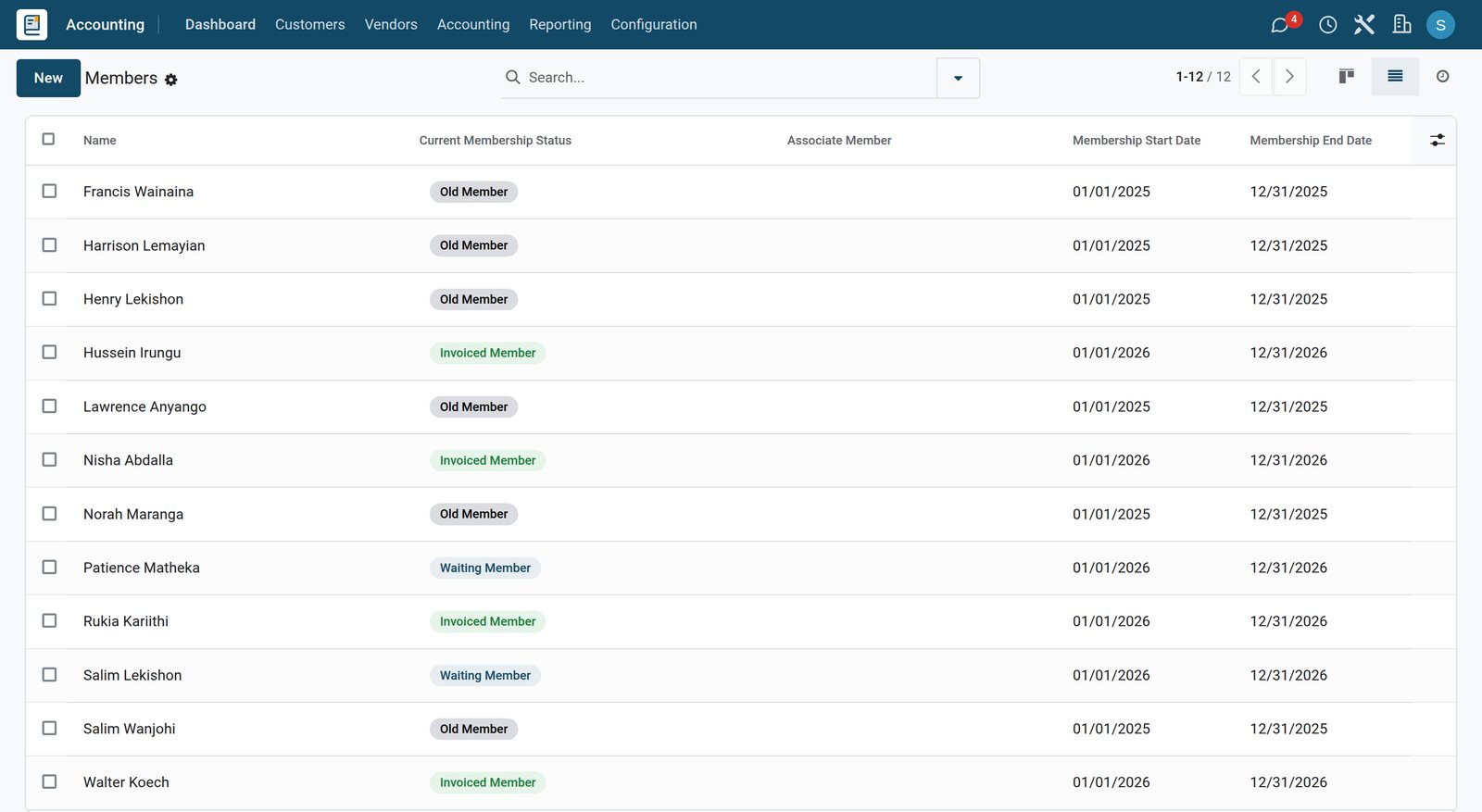
- Accounting
A family membership, and who it covers
The member who pays the family subscription and the three associates whose status follows that membership.
Explore Accounting →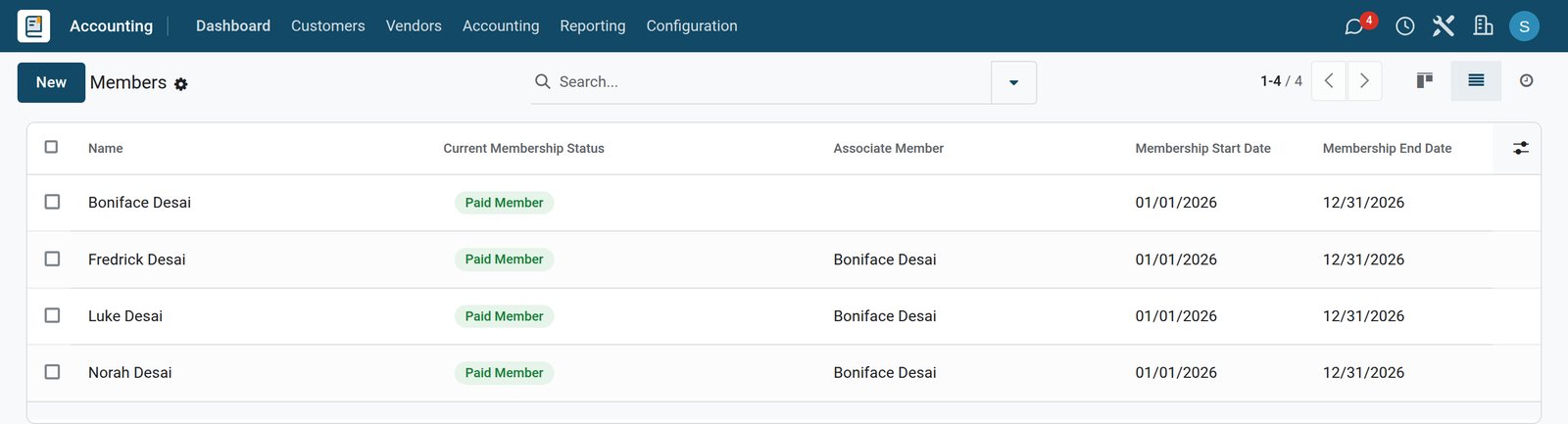
- Accounting
One product per category and year
The full and family memberships for 2026 and last year, each with the dates it covers and its fee.
Explore Accounting →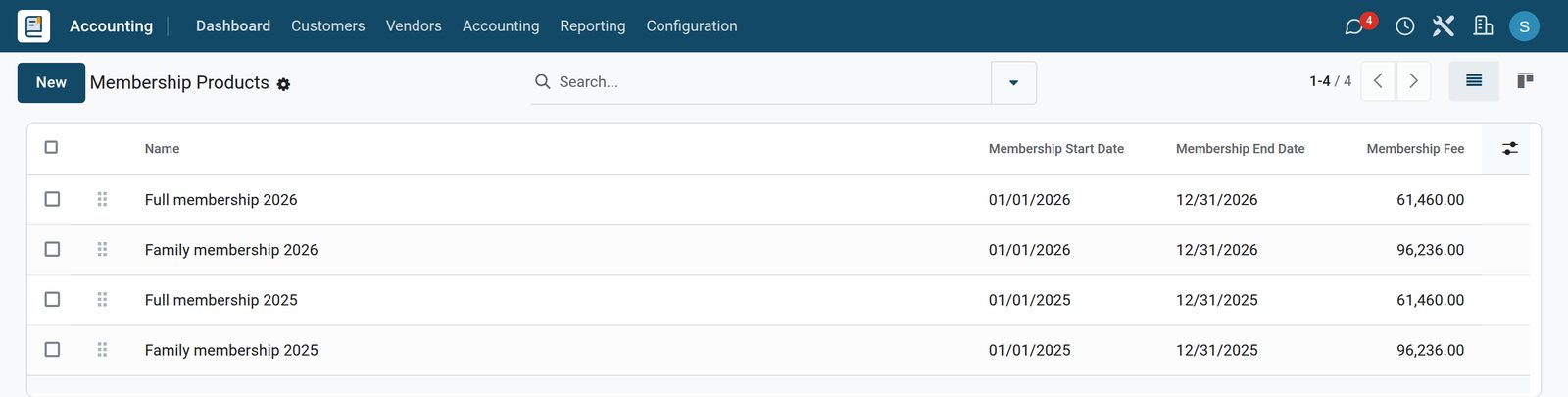
By the numbers
What ships inside
Counted in the product.
- 7
- statuses a member can hold, from waiting and invoiced to paid, free, old and cancelled
- 5
- statuses a court booking can have: request, booked, checked in, no show and cancelled
- 4
- states an entry to a competition moves through: unconfirmed, registered, attended and cancelled
- 3
- kinds of payment a till takes, cash, bank and a member's account, each with its own journal
Inside the app
What is inside
The apps a members' club runs on, and what each does for the year.
The membership roll
Each category and year is a membership product with its own dates and fee, and every member is invoiced from their own record.
Status from the invoice
A member is waiting while the invoice is a draft, invoiced once it is posted and paid once it is settled; last year's members show as old.
Families and associates
The spouse and the children are associate members of the main member, and their status follows the membership that covers them.
Honorary members
A free member keeps their place on the roll without an invoice.
Courts by the hour
Tennis and squash courts are bookable resources on the club's opening hours, one booking at a time, each for the length that sport is played.
Who played, who did not
Each booking is marked checked in or no-show, so the court sheet shows the day as it happened.
Competitions with entries
Every competition is an event with a member entry and a guest entry at their own fee, a limit of places and the entries of the members who play.
The clubhouse till
The dining room and the terrace are table plans at the till, and a member can sign the bill to their account and settle it later.
Step by step
A member's year, from the subscription to the last round
How a club runs on BridgeERP, and which app does each step.
- Step 1
Invoice the subscription
Each member is invoiced for the year from their own record, on the category they belong to.
Invoicing - Step 2
Follow who has paid
The roll shows who is paid, who has an invoice waiting and who has not renewed.
Invoicing - Step 3
Book a court
A member takes a court for an hour, or three quarters of an hour for squash.
Appointments - Step 4
Enter a competition
The member takes a place on the day's event, and brings a guest on a guest entry.
Events - Step 5
Eat at the clubhouse
The bill is rung up on the table and paid, or signed to the member's account.
Restaurant & Bar - Step 6
Read the year
Members analysis, the attendees of every competition and the till's takings show the year as it went.
Invoicing
Courts booked by the hour
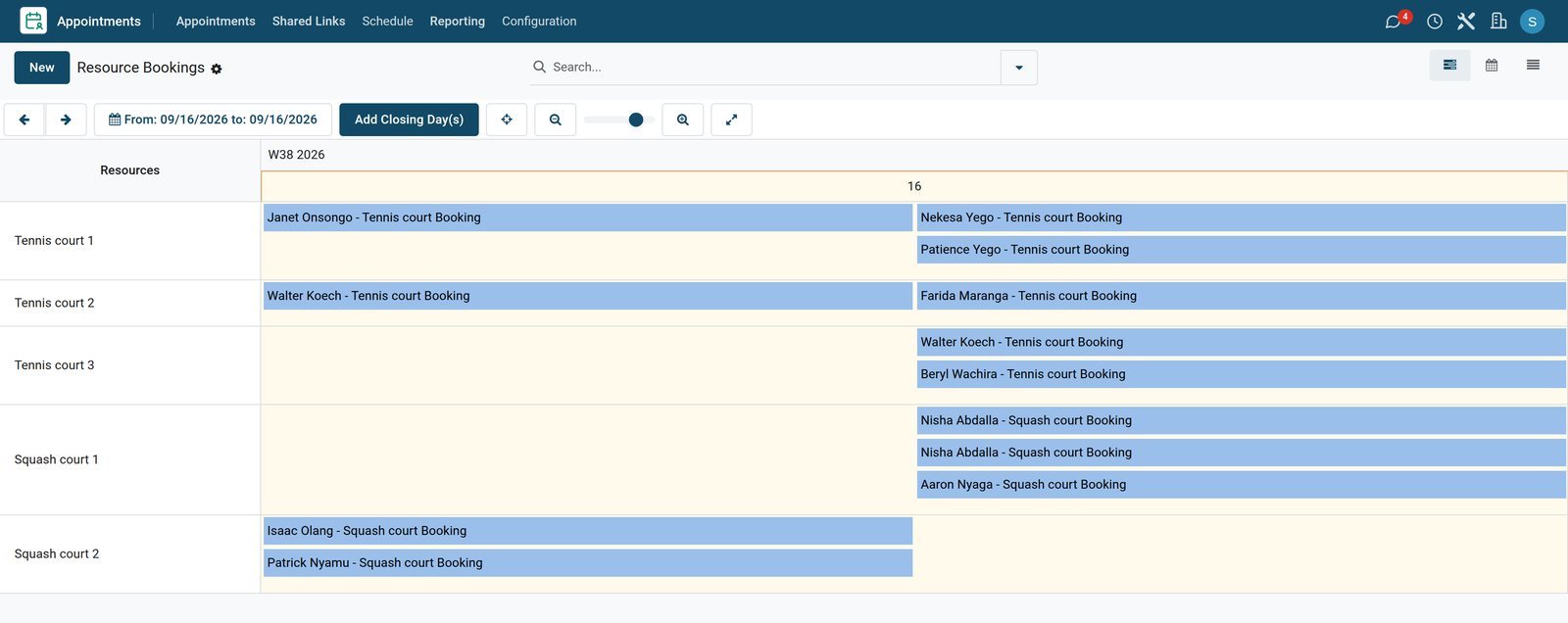
Each court takes one booking at a time on the club's opening hours, and every booking is checked in or marked as a no-show.
 Appointments
Wednesday on the courts
Twelve bookings across the three tennis courts and the two squash courts, each one on the court it was taken on.
Explore Appointments →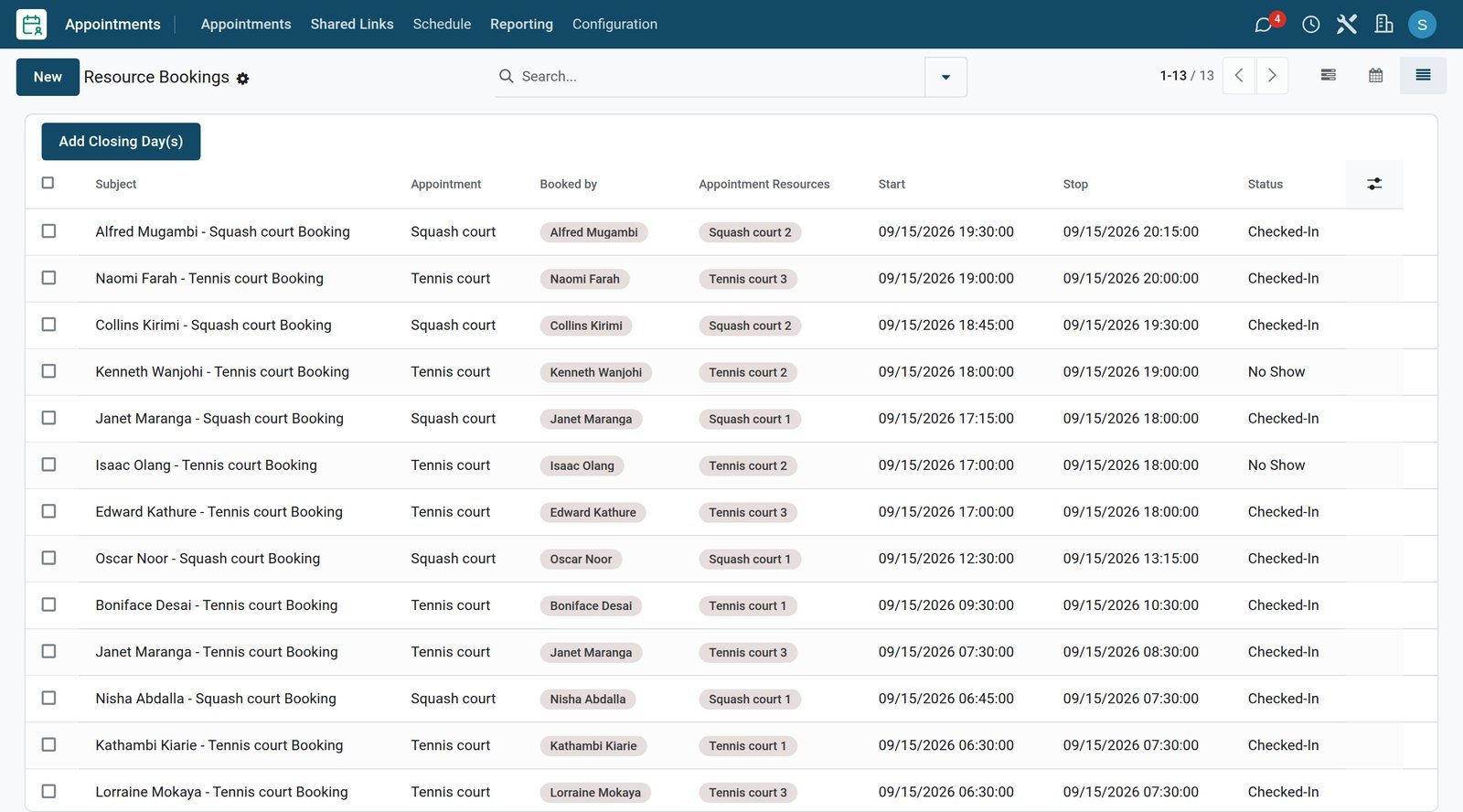 Appointments
Tuesday, court by court
Thirteen bookings on Tuesday: who booked each court and for how long, eleven checked in and two no-shows.
Explore Appointments →Competitions, entries and who played
Every competition is an event with its entry fees, its places and the members who entered.
- Events
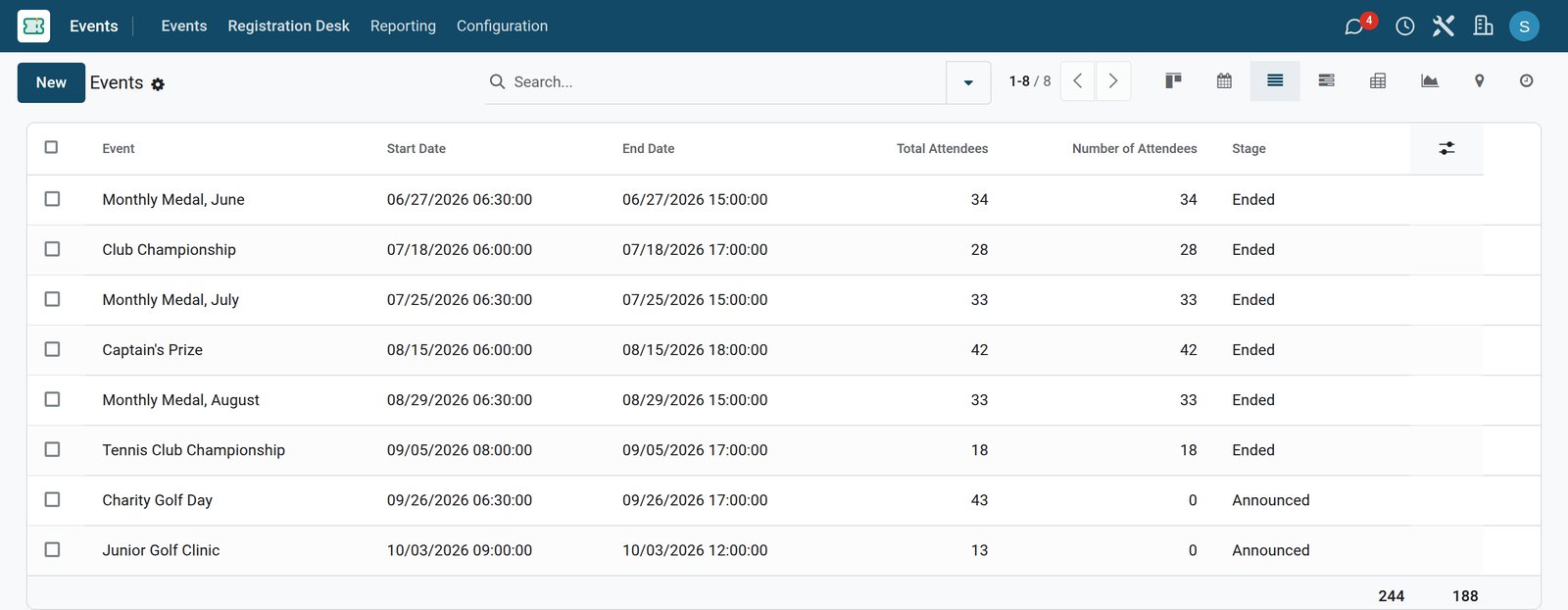
The season on one list
Eight competitions: six already played and two still open, with the entries each took and the members who turned up.
- Events
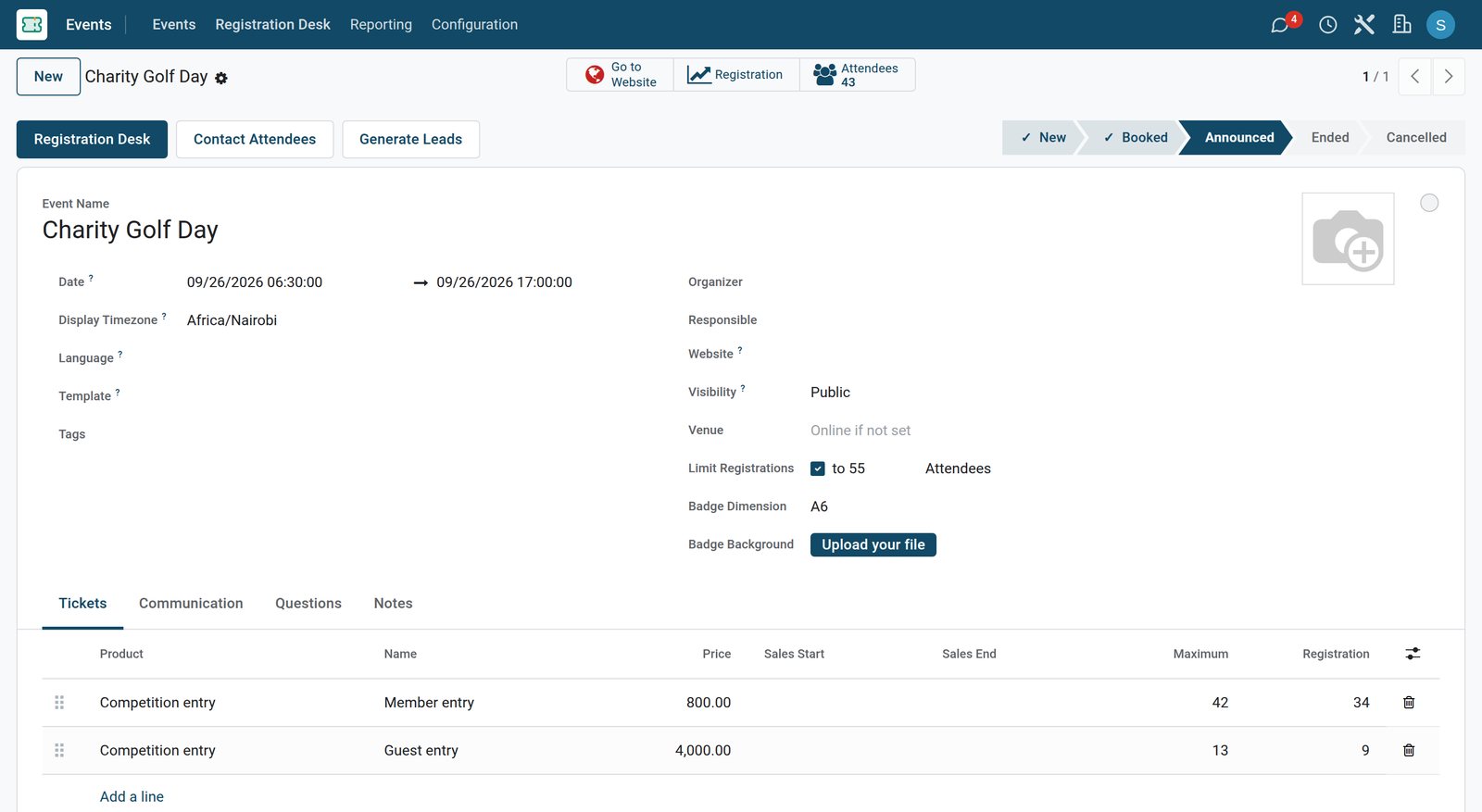
The next competition and its entries
Fifty-five places on the charity day, forty-three taken, at 800 for a member and 4,000 for a guest.
- Events
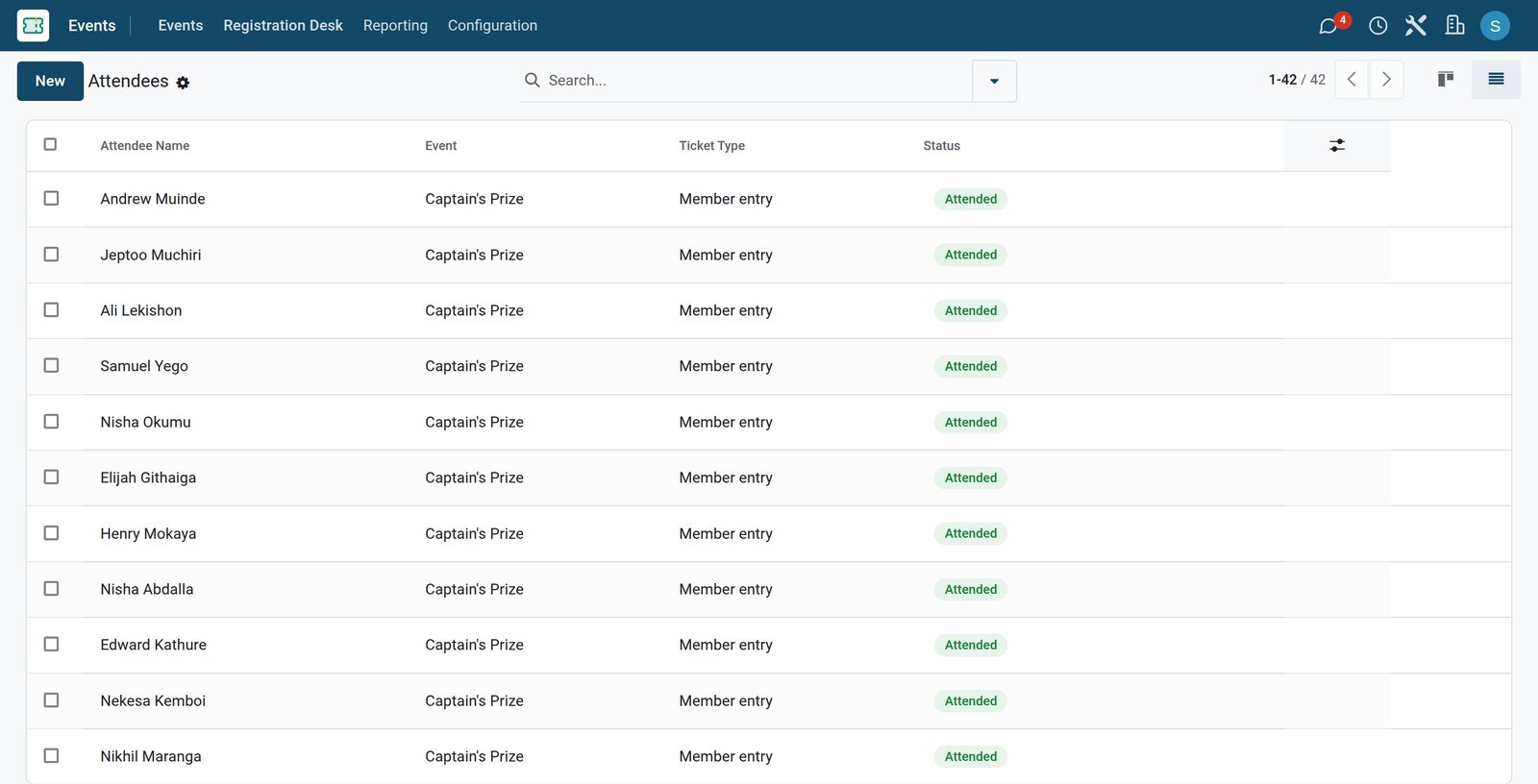
Who played in August
The forty-two members who played the Captain's Prize in August, each with the entry they bought, marked attended.
The clubhouse, table by table
The dining room and the terrace are table plans at the till, and a member can sign the bill to their account.
 Restaurant & Bar
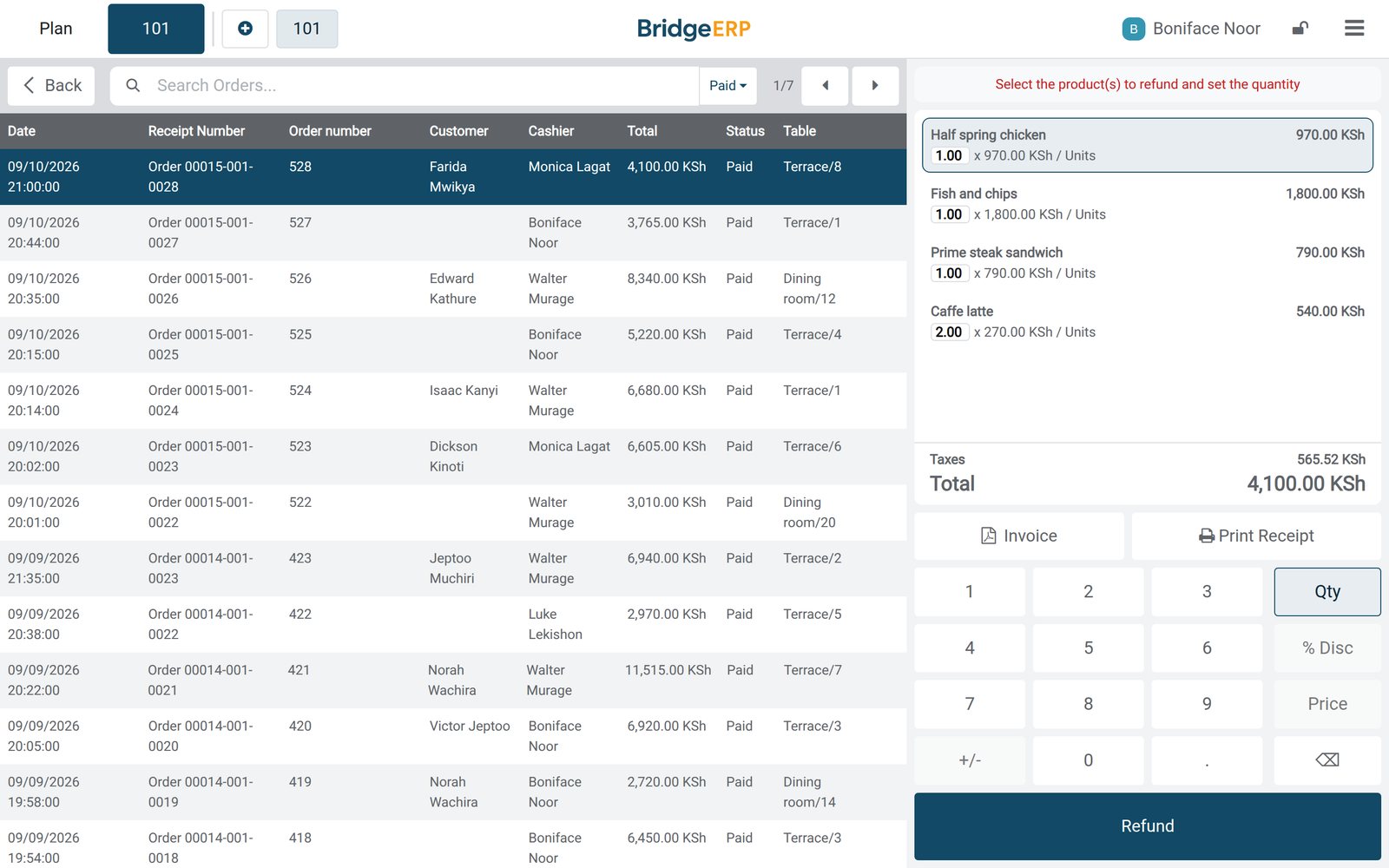
A day of bills
Twenty-six bills from Tuesday's service, each with the waiter who served it, its total, and the member's name where the bill was signed.
Explore Restaurant & Bar →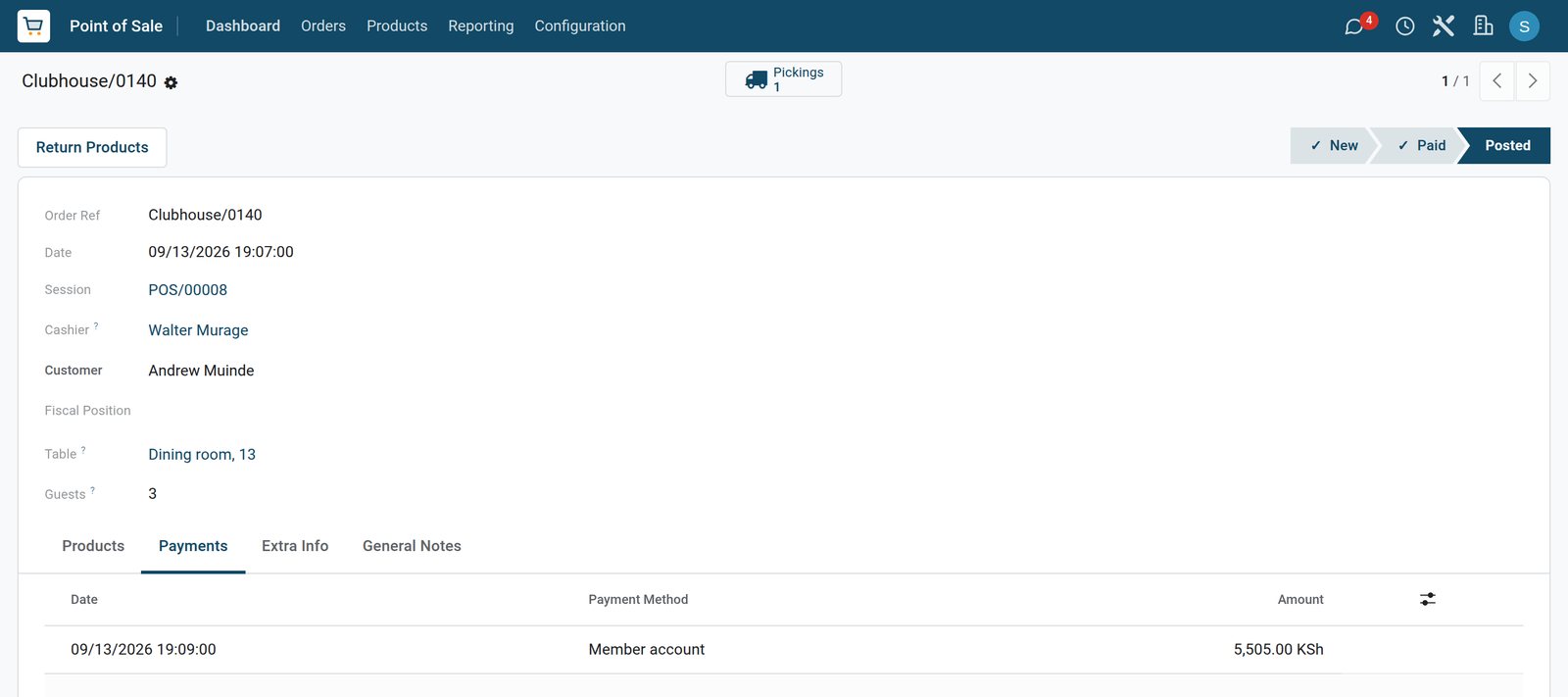 Restaurant & Bar
Signed to a member's account
Sunday evening in the dining room: three guests at table 13, and the 5,505 bill signed to a member's account.
Explore Restaurant & Bar →The year in numbers
Members analysis follows the roll and what it has earned, and the attendees report counts every competition.
 Accounting
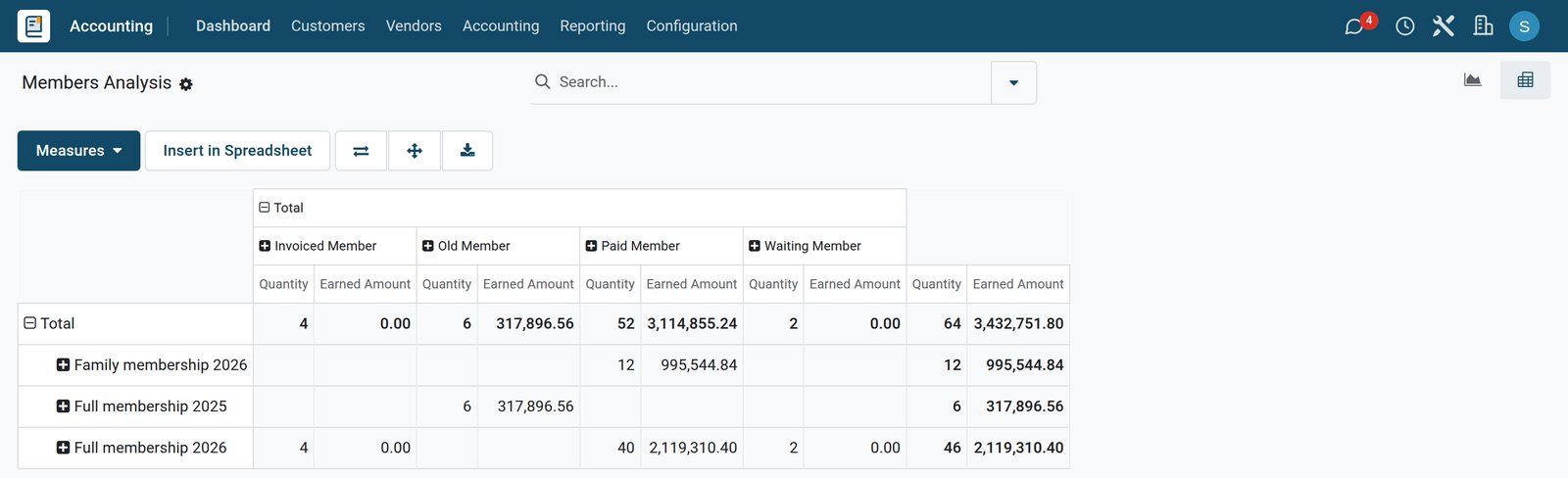
The roll by category and status
Members analysis: how many members each category and year holds, and what each of them has earned.
Explore Accounting →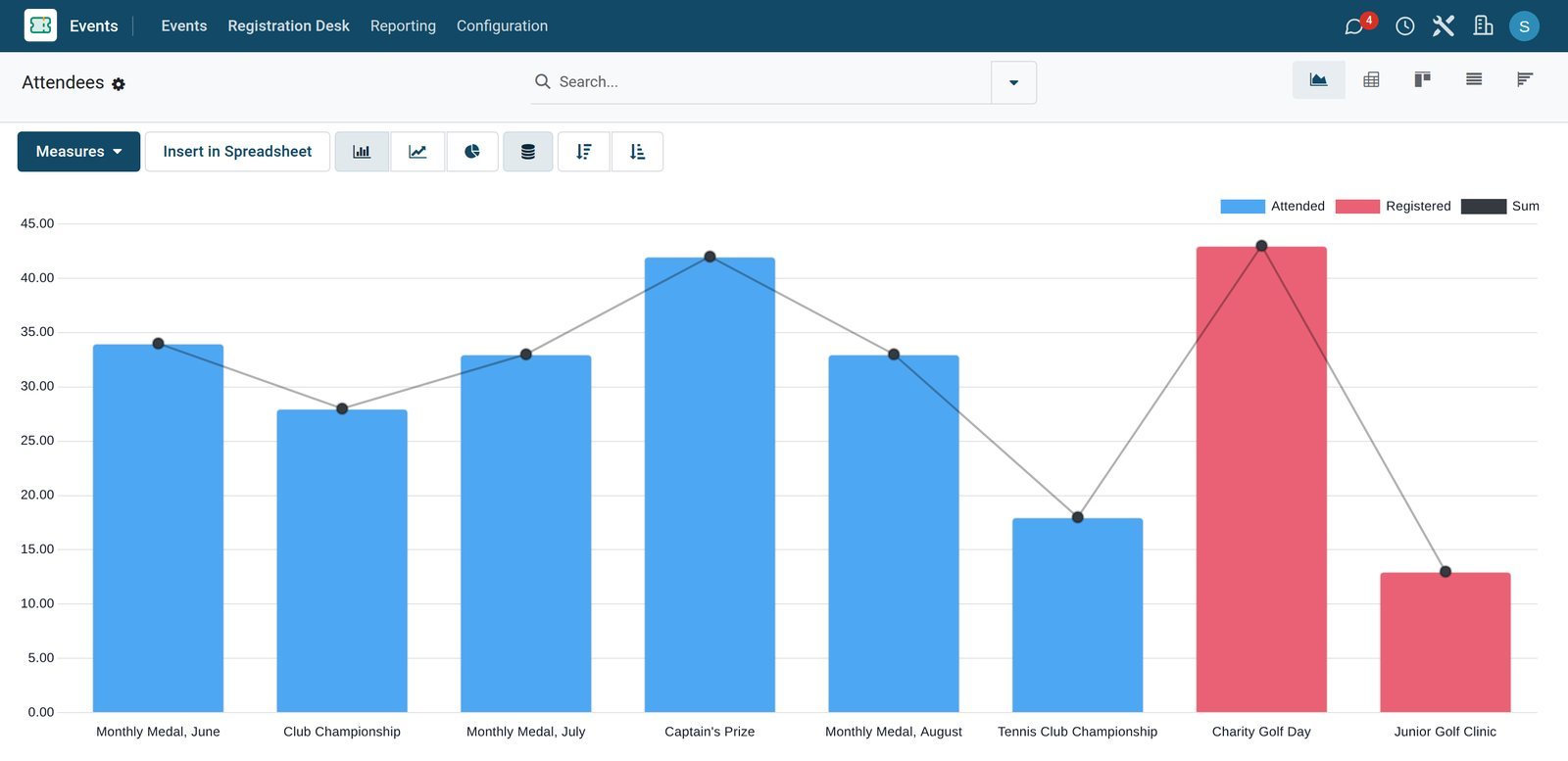 Events
Entries by competition
Every competition of the season with the entries it took, so the committee sees which days fill and which do not.
Who uses it
Who uses it, and what they see
One system for the office, the courts, the committee and the clubhouse.
Club office
Invoices the year's subscriptions, follows who has paid and keeps the roll up to date.
Reception
Books the courts, checks members in and marks the no-shows.
Competitions committee
Opens each competition, sets the entry fees and the places, and closes the entry list.
Clubhouse
Takes orders on the table plan, splits the bill and signs it to a member's account.
Works with
Runs with the rest of BridgeERP
Apps a members' club draws on.

In your country
Your currency, payments and taxes
Set to the country the club is in.
Company currency
Subscriptions, entry fees and clubhouse bills are kept in the currency of the company; the demo club charges in KES.
Prices with tax included
A tax can be included in the price, so the published menu price is what the member pays and the VAT is worked out of it; the demo follows a Kenyan example.
The payment methods members use
Each till has its own payment methods; the demo clubhouse takes mobile money, card and cash, and a member account for bills settled later.
Accounting by country
Accounting packages for more than 100 countries set up the chart of accounts, the taxes and the tax report.
Getting started
Getting started
How a club moves onto BridgeERP.
Create the categories
Create a membership product for each category and year, with the dates it covers and its fee.
Import the roll
Bring in the members, mark the honorary ones as free members and link each family's associates to the main member.
Add the courts
Add each court as a resource on the club's opening hours, and a bookable type per sport.
Open the clubhouse
Set the table plan of each room, the menu and the payment methods, including the member account.
Questions
Questions about Sports Clubs
Not covered here? Contact us.
Can we invoice every member for the year in one run?
Yes. Each category and year is a membership product with its own dates and fee, and the invoice is created from the member on that product, so the roll and the invoices stay in step.
How do we see who has not paid yet?
Each member carries a status worked out from their invoice: waiting while it is a draft, invoiced once it is posted, paid once it is settled, and old when the year they paid for has passed.
Can a family membership cover the spouse and the children?
Yes. They are associate members of the main member, and their status follows the membership that covers them.
Do honorary members need an invoice?
No. An honorary member is a free member: they keep their place on the roll with no invoice.
Can members book the tennis and squash courts?
Yes. Each court is a resource that takes one booking at a time on the club's opening hours, for the length that sport is played, and every booking is checked in or marked as a no-show.
Can a member sign the clubhouse bill and pay later?
Yes. The bill is taken on the member's account at the till and settled later against their balance.
Tax compliance
Invoices your tax authority accepts
In Kenya, Uganda, Rwanda, Burundi and Zambia, each invoice, receipt and stock movement goes to the tax authority's own system when you post it. Ghana and Pakistan come next, and we connect 73 more countries on request.
- KenyaReady
eTIMS KRA
Invoices, credit notes, POS receipts and stock movements
- UgandaReady
EFRIS URA
Invoices, POS receipts and stock
- RwandaReady
EBM RRA
Invoices, POS receipts, stock and imports
- BurundiReady
EBMS OBR
Invoices, POS receipts, stock and manufacturing
- ZambiaReady
Smart Invoice ZRA
Invoices, POS receipts, stock and imports
Sports Clubs, app by app
One connected flow instead of separate systems — the work moves from one team to the next without re-typing anything.
Every stop is a real app in your plan, and the hand-offs between them are the product.
- Customers & sales
- Operations
- Finance
Point of Sale
Touch till, offline mode, sessions, cash control and receipts.
Point of Sale →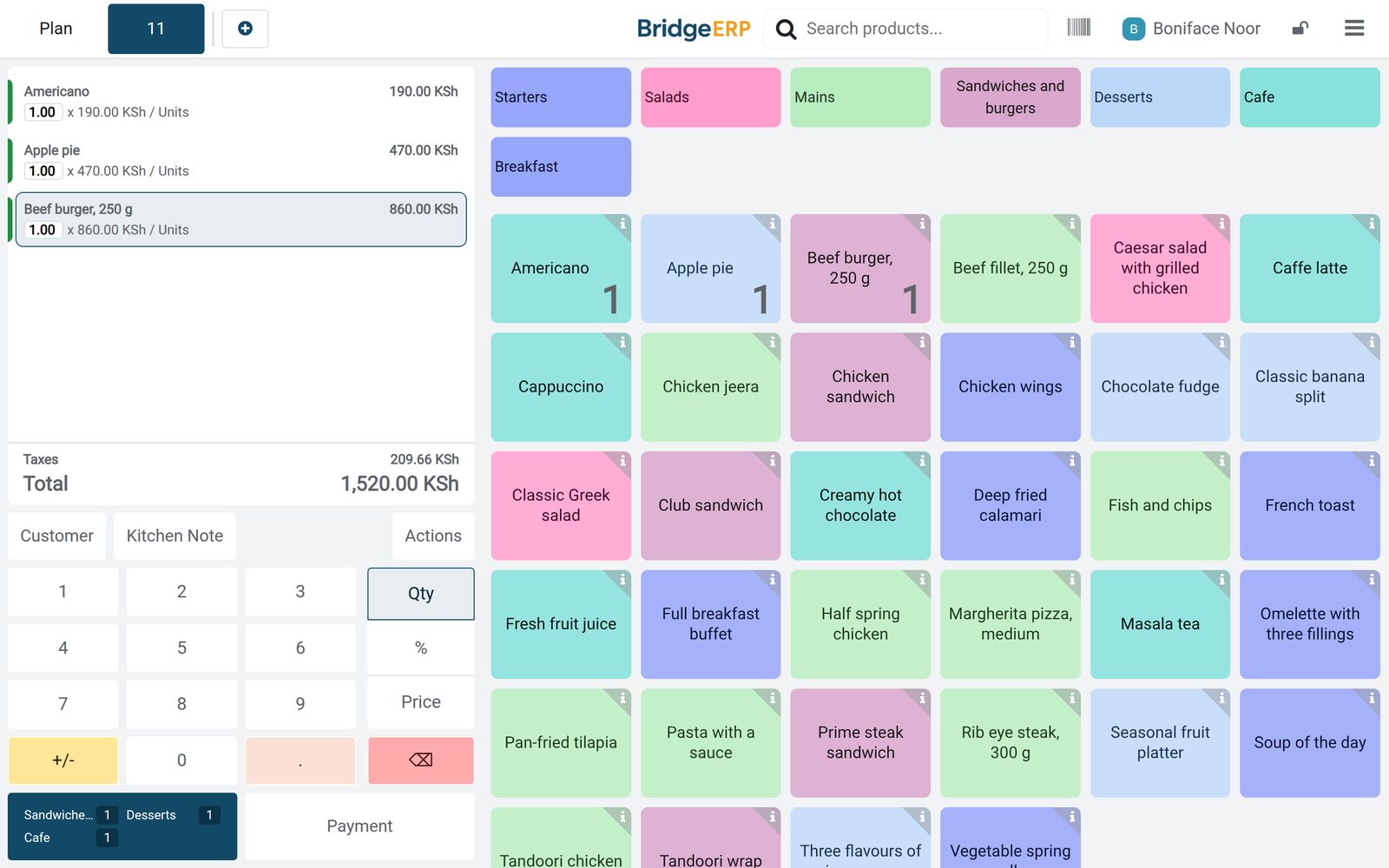
Ready when you are
Open the plan builder with the right apps for this industry already selected, or see it running first.